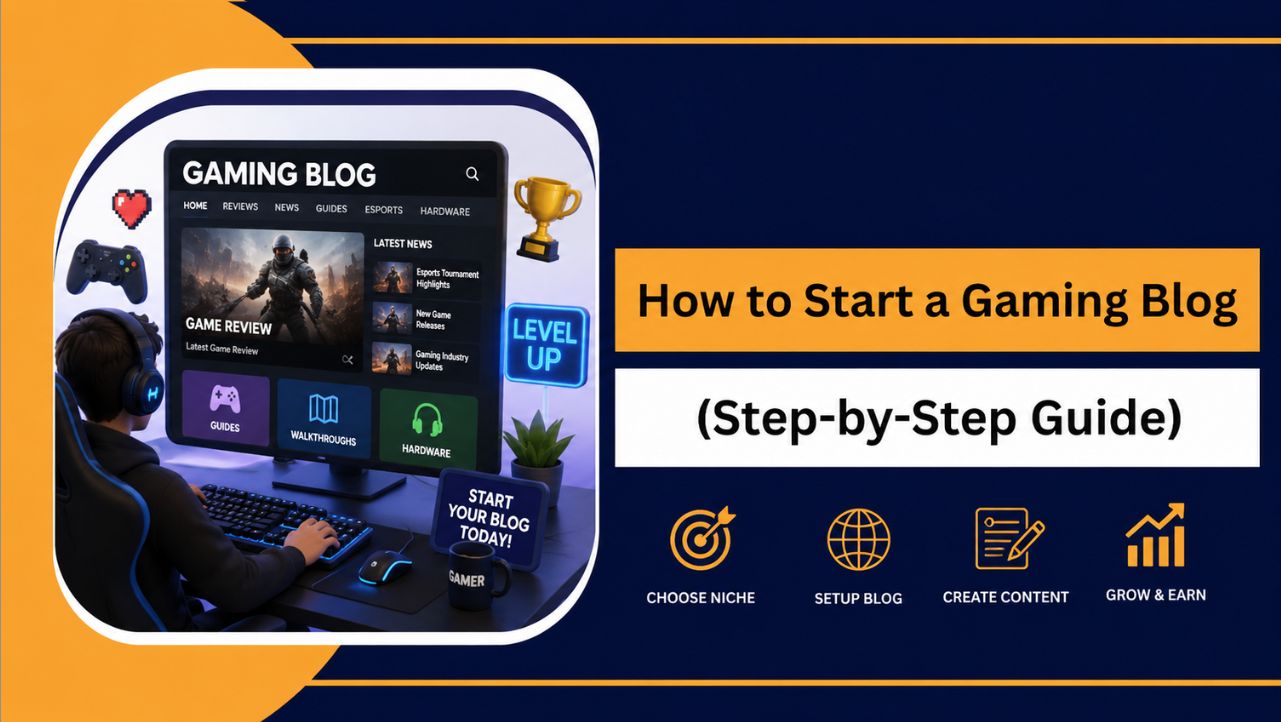
If gaming is more than just a hobby for you, starting a gaming blog can be a great way to share your experiences, recommendations, and insights with players who genuinely value helpful gaming content and authentic opinions.
Many people delay starting a gaming blog because they assume it requires advanced technical skills or a large budget. Today, user friendly platforms and affordable hosting solutions have made launching a professional gaming website much easier than before.
Whether you want to publish game reviews, walkthroughs, esports updates, or gaming tips, having a clear strategy from the beginning can save time and help you avoid common mistakes. The right approach can also create opportunities for long term audience growth and monetization.
What Is a Gaming Blog?
A gaming blog is a website dedicated to publishing content related to video games, gaming hardware, esports, tutorials, industry news, and gaming experiences. It serves as a platform where gamers can share opinions, educate others, and build communities around their favorite games.
Unlike social media posts that often have a short lifespan, gaming blogs create evergreen content that continues attracting readers through search engines long after publication.
This allows you to establish authority and become a trusted source within your chosen gaming niche.
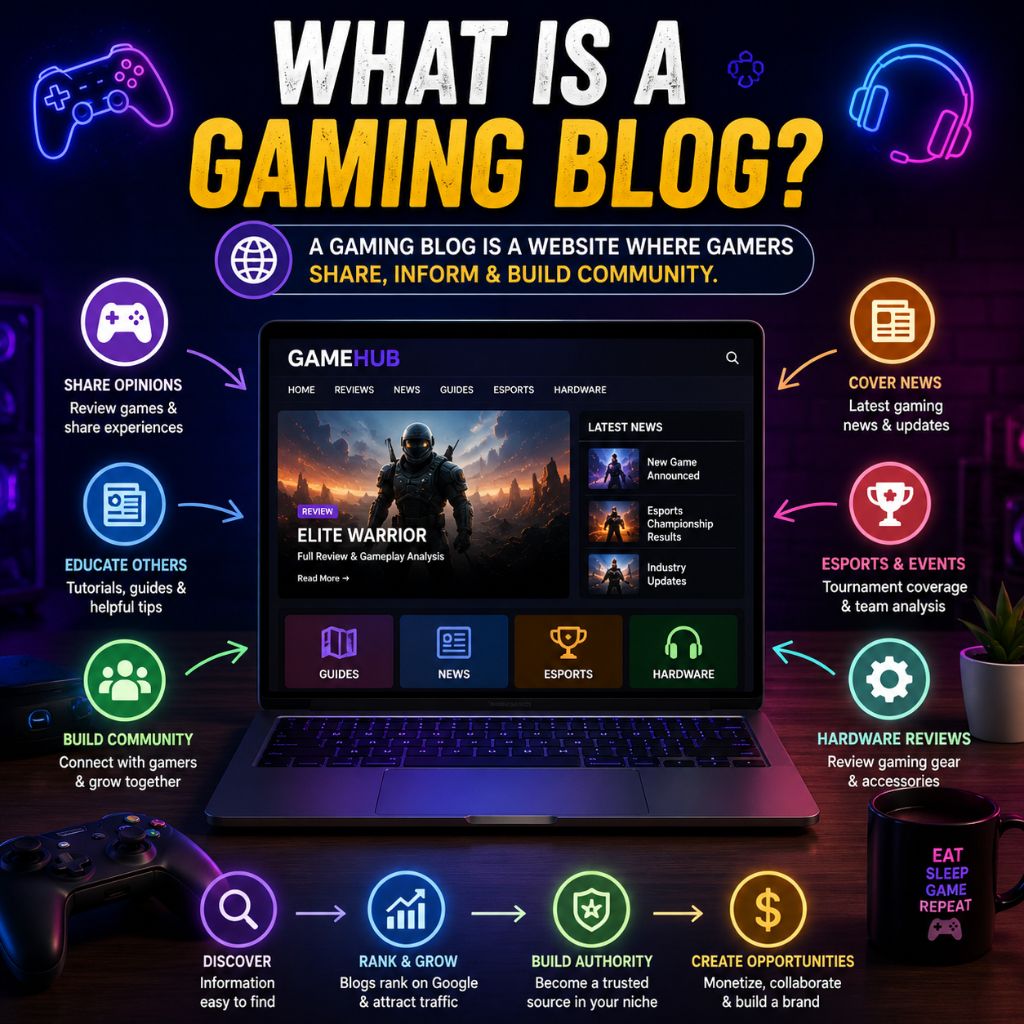
Gaming blogs can focus on many different areas depending on your interests and expertise.
| Type of Gaming Blog | Examples of Content |
| Game Review Blogs | Reviews of newly released games |
| Gaming News Blogs | Industry updates and announcements |
| Esports Blogs | Tournament coverage and team analysis |
| Mobile Gaming Blogs | Android and iOS gaming content |
| PC Gaming Blogs | PC game reviews and setup guides |
| Console Gaming Blogs | PlayStation, Xbox, and Nintendo content |
| Gaming Guide Blogs | Walkthroughs and tutorials |
| Hardware Review Blogs | Gaming accessories and equipment reviews |
| Indie Gaming Blogs | Coverage of independent games |
| Streaming Blogs | Tips for aspiring gaming creators |
Whether you want to help gamers make informed decisions, share strategies, support indie developers, or eventually build an online business, a gaming blog provides an excellent platform to achieve those goals.
Why Start a Gaming Blog in 2026?
The gaming industry continues to grow rapidly, creating more opportunities for content creators than ever before. Millions of gamers actively search for reviews, tutorials, gaming news, and buying advice before making decisions about games and equipment.
A gaming blog allows you to build a long term platform that you control while creating opportunities to establish authority, grow a community, and potentially generate income.
| Benefit | Why It Matters |
| Share Your Passion | Write about games you genuinely enjoy playing. |
| Build a Gaming Community | Connect with players from around the world. |
| Establish Authority | Become a trusted voice within your niche. |
| Support Game Developers | Highlight games deserving attention. |
| Improve Content Skills | Develop writing and analytical abilities. |
| Create Income Opportunities | Monetize through multiple methods. |
| Access Industry Opportunities | Collaborate with brands and developers. |
| Own Your Platform | Maintain control over your audience and content. |
What You Need Before Starting a Gaming Blog
Before creating your gaming website, it’s important to understand the essentials you’ll need. Fortunately, you don’t require advanced technical skills or a large budget to get started.
Choose a Gaming Niche
Many beginners try covering every gaming topic imaginable. However, focusing on a specific niche helps attract a targeted audience and makes content planning easier.
Popular gaming niches include:
- Game Reviews
- Gaming News
- Esports Coverage
- Mobile Gaming
- PC Gaming
- Console Gaming
- Gaming Walkthroughs
- Hardware Reviews
- Indie Game Coverage
- Streaming and Creator Tips
Get a Domain Name
Your domain name is your website’s identity online. Choose something memorable, easy to spell, and relevant to gaming.
Examples include:
- PixelQuestHub.com
- GamingPulseHQ.com
- NextLevelGamers.com
- RespawnZone.com
- TheGameChronicle.com
Choose Reliable Hosting
Hosting stores your website files and makes them accessible to visitors.
Reliable hosting directly impacts:
- Website speed
- Security
- Uptime reliability
- Backup availability
- Visitor experience
For most beginners, WordPress Hosting is the best choice because it simplifies website management while delivering excellent performance.
As your website grows, you may eventually consider:
- VPS Hosting: Suitable for gaming websites requiring more resources and flexibility.
- Dedicated Servers: Ideal for large gaming publications, forums, or high traffic communities.
Starting with WordPress Hosting provides a solid foundation while allowing room for future growth.
Use WordPress
WordPress powers millions of websites worldwide because it’s beginner friendly, highly customizable, and scalable.
Benefits include:
- No coding knowledge required
- Thousands of themes and plugins
- Strong SEO capabilities
- Flexible customization options
- Excellent long term scalability
Plan Your Content
Having content ideas prepared before launch helps maintain consistency.
You could start with:
- Game reviews
- Walkthroughs
- Gaming news articles
- Esports updates
- Hardware recommendations
- Setup guides
- Beginner tutorials
Stay Consistent and Patient
Building a successful gaming blog takes time. Focus on publishing helpful content consistently, learning from your audience, and improving gradually.
With these essentials in place, you’re ready to start building your gaming blog confidently.
How to Start a Gaming Blog (Step-by-Step Guide)
Starting a gaming blog may seem complicated initially, especially if you’ve never built a website before. However, once you understand the process, you’ll realize that creating a professional gaming blog is much easier than most people expect.
Whether you want to review games, cover esports tournaments, publish gaming guides, or build a community around your favorite titles, the following steps will help you create a strong foundation for long term success.
Step 1: Choose Your Gaming Blog Niche
One of the biggest mistakes new gaming bloggers make is trying to cover every game, platform, and gaming topic at the same time. While that approach may seem like a way to attract more readers, it often makes it difficult to build authority and grow a loyal audience.
Choosing a specific niche helps readers understand what your blog is about and gives search engines clearer signals about your expertise.
Popular Gaming Blog Niche Ideas
| Gaming Niche | Best For |
| Game Reviews | Gamers who enjoy sharing opinions |
| Gaming News | Industry followers |
| Esports Coverage | Competitive gaming enthusiasts |
| Mobile Gaming | Android and iOS gamers |
| PC Gaming | PC gaming communities |
| Console Gaming | PlayStation, Xbox, and Nintendo players |
| Indie Games | Supporting smaller game developers |
| Gaming Guides | Tutorial creators |
| Gaming Hardware | Tech focused gamers |
| Streaming Tips | Aspiring content creators |
Why Choosing a Niche Matters
A focused niche helps you:
- Build authority faster.
- Attract a targeted audience.
- Create content more consistently.
- Improve SEO performance.
- Stand out from larger gaming websites.
For example, instead of covering every gaming topic, you might focus on:
- PlayStation game reviews.
- Competitive esports analysis.
- Indie game discoveries.
- Mobile gaming tutorials.
- Gaming PC setup guides.
How to Choose the Right Gaming Niche
Before making a decision, ask yourself:
- Which games do you genuinely enjoy playing?
- What topics can you consistently write about?
- Is there audience demand for this niche?
- Can you see yourself creating content about it long term?
The best niche often sits at the intersection of passion, knowledge, and audience demand.
Remember, you can always expand your content categories later as your gaming blog grows.
Step 2: Research Gaming Topics Readers Are Searching For
After selecting your niche, the next step is understanding what gamers actually want to read. Publishing content around real search demand increases your chances of attracting visitors through search engines.
Many beginners write only about topics they personally find interesting. While passion is important, combining it with audience demand creates much stronger growth opportunities.
Understand Your Target Audience
Think carefully about who you’re creating content for.
Your audience may include:
- Casual gamers.
- Hardcore gamers.
- Competitive esports players.
- Streamers and creators.
- Gaming hardware enthusiasts.
- Mobile gamers.
- Console players.
- PC gaming communities.
Understanding your audience helps you create content that genuinely solves problems or answers questions.
Use Free Research Tools
You don’t need expensive SEO software to discover content ideas.
Several free resources can help identify what gamers are actively searching for.
Google Autocomplete
Start typing gaming related phrases into Google such as:
- Best RPG games…
- How to level up…
- Best gaming headset…
- Call of Duty tips…
Google will automatically display popular searches based on real user behavior.
People Also Ask
Google’s “People Also Ask” section reveals common questions users search for.
Examples include:
- What are the best free PC games?
- Which gaming headset is worth buying?
- How do beginners start esports?
These questions often make excellent blog post topics.
Google Trends
Google Trends helps identify:
- Rising game popularity.
- Seasonal gaming trends.
- New releases gaining attention.
- Growing esports topics.
Reddit Gaming Communities
Reddit is one of the best places to understand what gamers are discussing.
Popular communities include:
- r/gaming
- r/pcgaming
- r/PS5
- r/XboxSeriesX
- r/NintendoSwitch
- r/esports
Look for recurring questions, frustrations, and recommendations.
YouTube and Twitch
Gaming content creators often reveal what audiences currently care about.
Pay attention to:
- Popular gaming videos.
- Trending game releases.
- Frequently asked questions.
- Streaming trends.
Gaming Blog Content Ideas
| Content Type | Example Topics |
| Game Reviews | Reviews of newly released games |
| Walkthroughs | Beginner guides and tutorials |
| Esports Coverage | Tournament analysis |
| Gaming News | Industry updates |
| Hardware Reviews | Best gaming keyboards and headsets |
| Setup Guides | Gaming PC build recommendations |
| Opinion Articles | Gaming industry discussions |
| Indie Game Spotlights | Hidden gems worth playing |
Focus on Helping Gamers First
Before publishing any article, ask yourself: Will this content genuinely help another gamer?
If the answer is yes, you’re moving in the right direction.
The goal isn’t simply publishing more content. The goal is creating content that helps readers solve problems, discover games, improve their skills, or make better purchasing decisions.
Once you’ve built a list of content ideas, you’re ready for the next stage, choosing a domain name and setting up reliable hosting for your gaming blog.
Step 3: Get a Domain Name and WordPress Hosting
Now that you’ve chosen your gaming niche and researched content ideas, it’s time to build the foundation of your website. This starts with selecting a domain name and choosing reliable hosting.
Many beginners focus only on writing content and overlook the importance of hosting. However, your hosting directly affects website speed, security, uptime, SEO performance, and overall visitor experience.
Choose a Domain Name for Your Gaming Blog
Your domain name is your website’s address on the internet. It’s also one of the first things visitors notice, so choosing the right name is important.
A good gaming domain name should be:
- Easy to remember.
- Easy to spell.
- Relevant to gaming.
- Short and brandable.
- Flexible enough for future growth.
Gaming Blog Domain Name Examples

| Domain Idea | Suitable For | Recommendation |
| GamingPulseHQ.com | Gaming news websites, reviews, esports updates | Best Choice |
| PixelQuestHub.com | General gaming blogs, tutorials, indie game coverage | Highly Recommended |
| RespawnZone.com | Gaming news and reviews | Use with caution (may have existing associations) |
| NextLevelGamers.com | Gaming communities and forums | Not Recommended (similar to existing gaming brands) |
| TheGameChronicle.com | Gaming publications and editorial websites | Use with caution (possible existing usage) |
Try to avoid:
- Numbers
- Hyphens
- Difficult spellings
- Names that are too specific to a single game
Choosing a broader brand name gives you more flexibility as your website grows.
What Is WordPress Hosting?
Hosting is the service that stores all your website files and makes them accessible to visitors online.
A simple way to understand it:
- Domain Name = Address
- Hosting = House
Without hosting, your website cannot be viewed online.
Reliable hosting impacts:
- Website speed
- Security
- Search engine rankings
- Visitor experience
- Website stability
This is why choosing quality hosting from the beginning is one of the most important decisions you’ll make.
Why We Recommend YouStable WordPress Hosting
For most gaming bloggers, YouStable WordPress Hosting provides the ideal balance of performance, affordability, and ease of use.
It’s particularly beginner friendly because it simplifies website management while providing features that help your gaming blog load quickly and remain secure.
Benefits of YouStable WordPress Hosting
| Feature | Benefit for Gaming Blogs |
| Free Domain for 1 Year* | Reduces startup costs. |
| LiteSpeed Web Server | Faster page loading speeds. |
| NVMe SSD Storage | Improved website performance. |
| Free SSL Certificate | Better security and trust. |
| One Click WordPress Installation | Easy setup for beginners. |
| Free Off Site Backups | Protects valuable content. |
| AI Optimized Caching | Improves Core Web Vitals. |
| Imunify360 Protection | Advanced security protection. |
| Unmetered Bandwidth | Handles growing traffic. |
| 24/7 Expert Support | Assistance whenever needed. |
For gaming blogs that publish screenshots, gameplay images, guides, and reviews regularly, these features can make a noticeable difference.
Which YouStable Hosting Plan Should You Choose?
DaStart Plan
Best for:
- New gaming bloggers.
- Single gaming websites.
- Beginners with smaller budgets.
DaProfessional Plan (Recommended)
Best for:
- Serious gaming bloggers.
- Multiple websites.
- Long term growth.
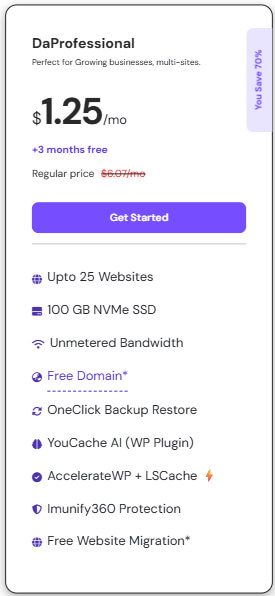
Benefits include:
- Free domain for one year.
- Additional resources.
- Better scalability.
- Multiple website support.
For most readers starting a gaming blog, DaProfessional is usually the best value.
DaElite Plan
Best for:
- High traffic gaming websites.
- Growing gaming publications.
- Content heavy gaming projects.
Hosting Plan Comparison
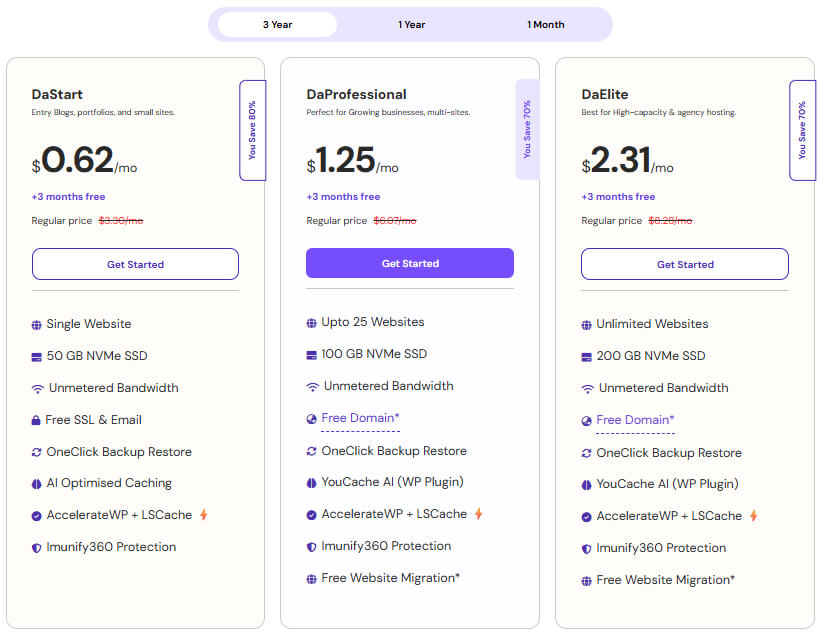
| Plan | Best For | Starting Price |
| DaStart | New bloggers | ₹0.62/month |
| DaProfessional | Growing websites | ₹1.25/month |
| DaElite | Large websites | ₹2.31/month |
How to Buy YouStable WordPress Hosting (Step-by-Step)
If you’ve never purchased hosting before, don’t worry. The process is straightforward.
Step 1: Visit the WordPress Hosting Page
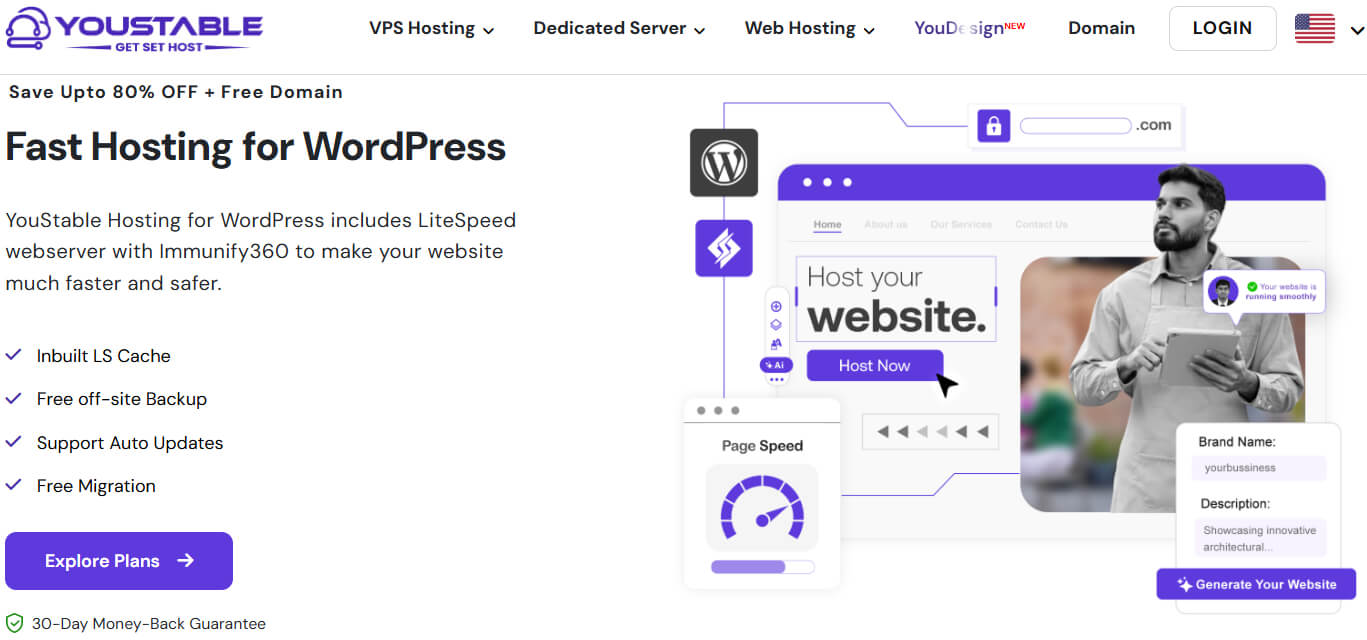
Open the YouStable WordPress Hosting page and click Explore Plans.
Step 2: Compare Available Plans
Review the features included with each hosting package and choose the option that best matches your goals.
Step 3: Select Your Hosting Plan
For most gaming blogs, the DaProfessional Plan offers the best balance of value and resources.
Step 4: Register Your Domain Name
Enter your preferred domain name and check availability.
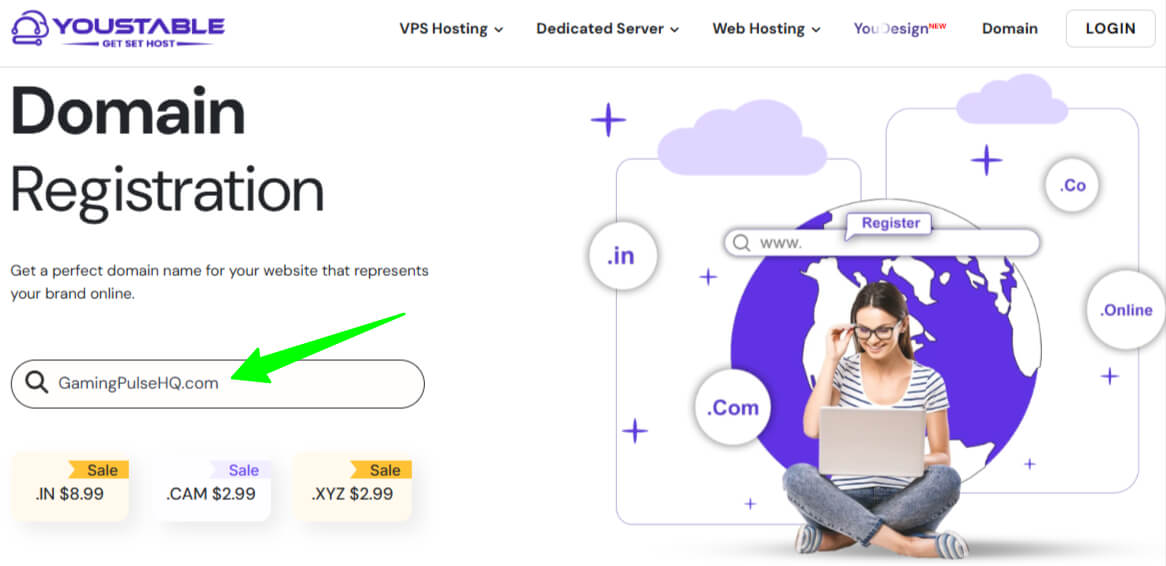
Eligible plans include a free domain for one year, which helps reduce startup costs.
Step 5: Create Your Account
Provide:
- Name
- Email address
- Contact details
Step 6: Choose a Billing Cycle
Select the billing period that works best for you.
Longer billing terms often provide better overall value.
Step 7: Complete Payment
Review your order details and complete the payment process securely.
Step 8: Access Your Dashboard
Once payment is confirmed, you’ll gain access to your hosting dashboard where you can install WordPress and begin building your gaming blog.
Want to Launch Your Website Even Faster?
Some users prefer creating a website as quickly as possible without manually configuring themes, layouts, and page designs.
For those users, YouStable offers YouDesign AI Website Builder.
What Is YouDesign AI Website Builder?
YouDesign is an AI powered WordPress website builder that can generate a professional website without requiring coding skills.
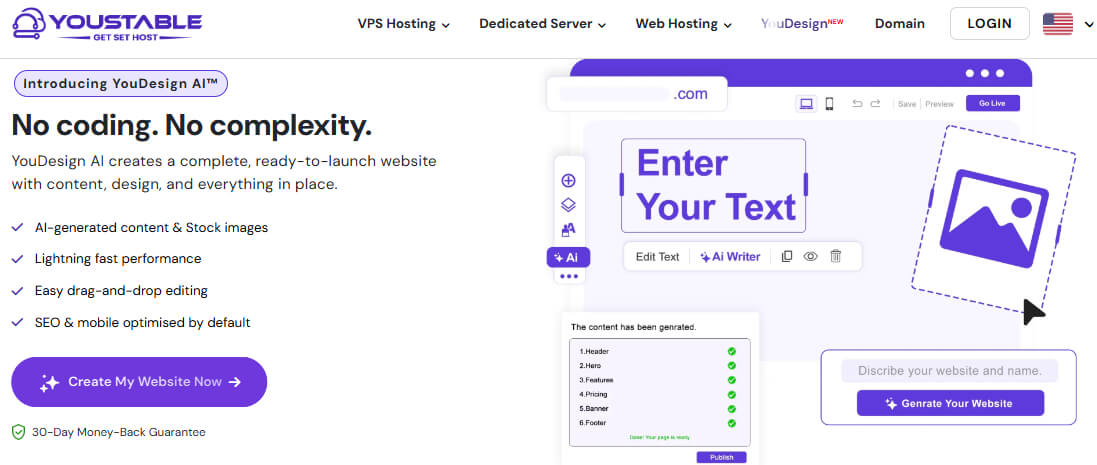
Instead of building everything manually, AI helps create:
- Website layouts
- Content sections
- Design elements
- Starter pages
This significantly reduces setup time.
Benefits of YouDesign AI Website Builder
| Feature | Benefit |
| AI Website Generation | Creates websites automatically. |
| No Coding Required | Beginner friendly setup. |
| 200+ Templates | Professional design options. |
| AI Content Assistance | Faster content creation. |
| Mobile Responsive Layouts | Works across devices. |
| SEO Friendly Structure | Better search visibility. |
| One Click Publishing | Launch quickly. |
Who Should Use YouDesign?
YouDesign is ideal if:
- You want the fastest setup possible.
- You don’t have technical experience.
- You prefer AI assisted website creation.
- You want to focus on content rather than design.
When Should You Upgrade to VPS Hosting?
Most gaming bloggers can comfortably start with WordPress Hosting.
However, as traffic increases, additional resources may become necessary.
VPS Hosting May Be Suitable If:
- Your gaming blog receives significant traffic.
- You run multiple gaming websites.
- You need greater control over server settings.
- Your website uses resource intensive features.
Benefits of VPS Hosting
- Dedicated resources.
- Better scalability.
- Improved performance.
- Greater customization.
VPS Hosting is often the next logical upgrade for growing gaming websites.
When Does a Gaming Blog Need a Dedicated Server?
Large gaming websites sometimes outgrow shared hosting and VPS environments.
A Dedicated Server becomes useful when maximum performance and complete control are required.
Dedicated Servers Are Ideal For:
- Large gaming publications.
- Gaming forums and communities.
- Esports websites.
- High traffic content platforms.
Benefits of Dedicated Servers
- Exclusive server resources.
- Superior performance.
- Enhanced security.
- Complete server control.
Most beginners won’t need a Dedicated Server immediately, but it’s useful to know that upgrade paths exist as your website grows.
With your domain and hosting ready, the next step is installing WordPress and preparing your gaming blog for launch.
Step 4: Install WordPress on Your Hosting Account
Once you’ve purchased your hosting plan and domain name, the next step is installing WordPress. This is the platform you’ll use to create content, manage your website, customize its design, and grow your gaming blog.
The good news is that YouStable includes one-click WordPress installation, so you don’t need any coding or technical experience.
How to Install WordPress on YouStable
Follow these simple steps:
- Log in to your YouStable account.
- Open your hosting dashboard.
- Locate the WordPress Installer or Softaculous Apps Installer.
- Click Install WordPress.
- Select your domain name.
- Enter your website details:
- Site Name
- Admin Username
- Strong Password
- Email Address
- Review the settings.
- Click Install.
- Wait for the installation to complete.
Within a few minutes, your WordPress website will be ready.
Access Your WordPress Dashboard
After installation, you’ll receive your login URL.
It usually looks like: yourdomain.com/wp-admin
Enter your administrator credentials and log in.
This dashboard is where you’ll:
- Publish articles
- Install themes
- Add plugins
- Manage comments
- Customize your website
Why WordPress Is the Best Platform for Gaming Blogs
WordPress powers more than 40% of websites worldwide and remains the most popular content management system.
Key advantages include:
| Benefit | Why It Matters |
| Beginner Friendly | Easy to learn and manage |
| SEO Friendly | Supports search engine growth |
| Highly Customizable | Thousands of themes and plugins |
| Scalable | Grows with your website |
| No Coding Required | Suitable for beginners |
| Large Community | Extensive support and resources |
For gaming bloggers, WordPress provides everything needed to create reviews, walkthroughs, news articles, and gaming guides.
Step 5: Configure Essential WordPress Settings
Before customizing your website, spend a few minutes configuring important settings. These adjustments improve SEO, usability, and website security from day one.
Configure Your Site Title and Tagline
Go to: Settings → General
Add:
- Website Name
- Tagline
Example:
Site Title: Gaming Pulse HQ
Tagline: Gaming Reviews, Guides & Industry News
Choose a title that clearly represents your brand.
Set Your Time Zone
Still under Settings → General, choose the correct time zone.
This ensures:
- Accurate publishing schedules
- Correct timestamps
- Better website management
Change Your Permalink Structure
Permalinks control your URL structure.
Go to: Settings → Permalinks
Select: Post Name
This creates clean URLs such as: yourdomain.com/best-gaming-keyboards
instead of: yourdomain.com/?p=123
SEO friendly URLs are easier for readers and search engines to understand.
Verify Search Engine Visibility
Navigate to: Settings → Reading
Make sure: Discourage search engines from indexing this site
is unchecked.
This allows Google and other search engines to discover your content.
Enable SSL Security
Most YouStable plans include a free SSL certificate.
Your website should load using: https://yourdomain.com
instead of: http://yourdomain.com
SSL helps:
- Improve security
- Build trust
- Support SEO
Remove Default Content
WordPress installs sample content by default.
Delete:
- Sample Post
- Sample Page
- Default Comment
This keeps your website clean and professional.
Keep Everything Updated
Regularly update:
- WordPress Core
- Themes
- Plugins
Updates improve:
- Security
- Compatibility
- Performance
Taking care of these settings now helps avoid problems later.
Step 6: Choose a Gaming Blog Theme
Your theme controls how your gaming blog looks and feels.
A well designed theme improves:
- User experience
- Mobile usability
- SEO performance
- Brand credibility
What Should You Look For in a Gaming Theme?
Mobile Responsiveness
Most visitors browse gaming content using mobile devices.
Your theme should automatically adapt to:
- Smartphones
- Tablets
- Desktop computers
Fast Loading Speed
Website speed impacts:
- User experience
- Bounce rate
- Search rankings
Choose lightweight themes optimized for performance.
Easy Customization
Look for themes that allow you to customize:
- Colors
- Fonts
- Menus
- Layouts
- Headers
without needing coding knowledge.
SEO Friendly Structure
A well coded theme helps search engines understand your website more effectively.
Recommended Themes for Gaming Blogs
| Theme | Best For |
| Astra | Beginners |
| Kadence | Performance focused websites |
| GeneratePress | SEO focused blogs |
| Blocksy | Creative gaming websites |
| Neve | Modern gaming blogs |
Best Choice for Beginners
For most new gaming bloggers, Astra is often the easiest choice because it offers:
- Fast loading performance
- Excellent customization options
- Mobile responsiveness
- SEO friendly design
- Compatibility with popular plugins
How to Install a Theme
- Go to Appearance → Themes
- Click Add New Theme
- Search for your preferred theme
- Click Install
- Click Activate
Your new design will immediately become active.
Customize Your Theme
Navigate to: Appearance → Customize
Here you can:
- Upload your logo
- Change colors
- Create menus
- Adjust layouts
- Configure homepage sections
Keep your design clean and easy to navigate.
Remember, gaming readers care more about useful content than flashy animations.
Step 7: Install Essential Plugins
Plugins add additional functionality to your gaming blog without requiring coding knowledge.
However, avoid installing dozens of plugins because too many can slow down your website.
Essential Plugins for Gaming Blogs
| Plugin | Purpose |
| Rank Math SEO | Search engine optimization |
| LiteSpeed Cache | Website speed optimization |
| WPForms | Contact forms |
| UpdraftPlus | Website backups |
| Wordfence Security | Security protection |
| MonsterInsights | Google Analytics integration |
| Pretty Links | Affiliate link management |
| Smash Balloon | Social media feeds |
Rank Math SEO
Rank Math helps optimize:
- Titles
- Meta descriptions
- XML sitemaps
- Schema markup
This makes it easier for search engines to understand your content.
LiteSpeed Cache
LiteSpeed Cache improves:
- Website speed
- Core Web Vitals
- User experience
It works particularly well with YouStable’s LiteSpeed powered hosting infrastructure.
WPForms
WPForms allows visitors to:
- Contact you
- Submit inquiries
- Request collaborations
- Send sponsorship proposals
UpdraftPlus
Backups are extremely important.
UpdraftPlus helps:
- Create automatic backups
- Restore your website quickly
- Protect valuable content
Wordfence Security
Wordfence provides:
- Firewall protection
- Malware scanning
- Login security
- Threat monitoring
MonsterInsights
MonsterInsights connects your website with Google Analytics and helps track:
- Visitor numbers
- Popular pages
- Traffic sources
- User behavior
Keep Plugins Organized
Before installing a plugin, ask:
- Do I actually need this feature?
- Is the plugin actively maintained?
- Will it improve my website?
A smaller plugin collection usually results in better performance.
At this stage, your gaming blog has a strong technical foundation. Next, you’ll create important pages and publish your first gaming content.
Step 8: Create Important Pages for Your Gaming Blog
Before publishing game reviews and tutorials, it’s important to create a few essential pages that help visitors understand who you are, what your website offers, and how they can contact you. These pages improve trust, professionalism, and overall user experience.
Essential Pages Every Gaming Blog Should Have
| Page | Why It Matters |
| About Page | Introduces you and your gaming background. |
| Contact Page | Allows readers, brands, and developers to reach you. |
| Privacy Policy | Explains how visitor data is handled. |
| Disclaimer | Clarifies the purpose of your content. |
| Affiliate Disclosure | Maintains transparency about affiliate partnerships. |
| Advertise With Us | Provides sponsorship opportunities. |
| Start Here Page | Guides new visitors to your best content. |
About Page
Your About page helps readers connect with the person behind the blog.
Include:
- Your gaming interests and experience.
- Why you started the gaming blog.
- Types of games you cover.
- What readers can expect from your content.
You don’t need to be a professional gamer. Authenticity and honesty often matter more to readers.
Contact Page
A Contact page makes it easy for others to reach you.
You can include:
- Contact form
- Professional email address
- Social media profiles
- Partnership inquiries
Using WPForms, you can create a professional contact form within minutes.
Privacy Policy and Disclaimer
These pages are important for transparency and legal compliance.
A Privacy Policy explains:
- Information you collect.
- How cookies are used.
- Third party services integrated into your website.
A Disclaimer clarifies that reviews, opinions, and recommendations are based on your experiences and research.
Affiliate Disclosure
If you recommend gaming products using affiliate links, disclose those relationships clearly.
Examples include:
- Gaming headsets
- Keyboards
- Controllers
- Monitors
- Games and accessories
Transparency builds trust with your audience.
Advertise With Us Page
As your gaming blog grows, brands and developers may approach you for collaborations.
This page can include:
- Sponsorship opportunities
- Advertising options
- Media kit details
- Contact information
Start Here Page
A Start Here page helps first time visitors discover your most valuable content.
You can feature:
- Popular game reviews
- Beginner gaming guides
- Hardware recommendations
- Esports coverage
- Latest tutorials
Having these pages in place gives your gaming blog a professional appearance from the beginning.
Step 9: Publish Your First Gaming Blog Post
Publishing your first article is one of the most exciting milestones in your blogging journey. Many beginners delay this step because they believe everything must be perfect before launching.
The reality is that every successful gaming blogger started with a single post.
Gaming Blog Post Ideas for Beginners
If you’re unsure what to write first, consider these topics:
- Reviews of newly released games.
- Beginner guides and walkthroughs.
- Best gaming settings for specific titles.
- Gaming hardware recommendations.
- Esports tournament coverage.
- Indie game discoveries.
- Gaming tips and strategies.
- Personal gaming experiences.
Choose topics you genuinely enjoy discussing because enthusiasm often translates into better content.
Tips for Writing Great Gaming Content
Share Honest Experiences
Readers appreciate authenticity.
Whether reviewing a game or recommending equipment, provide balanced opinions based on actual experiences.
Use Reliable Information
When discussing gaming news or updates:
- Verify information carefully.
- Use official announcements.
- Reference trusted sources when necessary.
Accuracy strengthens credibility.
Add Personal Insights
Your experiences make your content unique.
You can share:
- What you enjoyed about a game.
- Challenges you encountered.
- Strategies that worked well.
- Lessons learned from gameplay.
These insights improve EEAT signals and build stronger reader connections.
Structure Content Clearly
Improve readability by using:
- Headings and subheadings
- Short paragraphs
- Bullet points
- Tables when appropriate
Well structured articles are easier to read and understand.
Publish Consistently
You don’t need to publish daily.
Choose a schedule you can realistically maintain, such as:
- One article per week.
- Two articles per month.
- Weekly gaming news roundups.
Consistency often matters more than frequency.
Don’t Wait for Perfection
Your writing, design choices, and SEO knowledge will improve naturally over time.
The most important step is simply getting started.
With your first post published, the next step is optimizing your gaming blog so readers can find your content through search engines.
Step 10: Optimize Your Gaming Blog for SEO
Creating helpful content is important, but SEO ensures your target audience can actually discover your articles through search engines.
Implementing SEO best practices from the beginning can help generate sustainable traffic over time.
Essential SEO Tips for Gaming Blogs
| SEO Practice | Why It Matters |
| Keyword Research | Targets topics gamers actively search for. |
| Optimized Titles and Meta Descriptions | Improves click through rates. |
| Proper Heading Structure | Makes content easier to understand. |
| Internal Linking | Helps visitors discover related articles. |
| Image Optimization | Improves speed and accessibility. |
| Mobile Optimization | Enhances user experience. |
| Website Speed Optimization | Supports SEO performance. |
| EEAT Signals | Strengthens trust and authority. |
Use Keywords Naturally
Include relevant keywords within:
- Titles
- Headings
- Introduction paragraphs
- Meta descriptions
- Image alt text
Avoid keyword stuffing. Focus on writing naturally for readers first.
Build Strong Internal Links
Link related articles together throughout your website.
For example, connect posts about:
- Game reviews
- Gaming tutorials
- Hardware recommendations
- Esports news
As your gaming blog expands, you can also naturally link readers to resources about WordPress Hosting, VPS Hosting, or Dedicated Servers depending on their website requirements.
Optimize Images
Gaming articles often include screenshots and visuals.
Before uploading images:
- Compress large files.
- Use descriptive filenames.
- Add alt text.
- Choose modern image formats when possible.
Optimized images improve both speed and accessibility.
Improve Website Speed
Website speed directly affects:
- User experience
- Bounce rates
- Search rankings
Improve speed by:
- Using LiteSpeed Cache.
- Choosing reliable hosting.
- Limiting unnecessary plugins.
- Optimizing media files.
Fast loading websites generally perform better in search results.
Build Trust and Authority
Search engines prioritize websites demonstrating expertise and credibility.
You can strengthen EEAT by:
- Sharing firsthand gaming experiences.
- Including author information.
- Publishing original insights.
- Updating older content regularly.
- Using accurate information.
SEO is a long term strategy. Consistently creating valuable content and following these best practices can help your gaming blog attract more readers over time.
Step 11: Promote Your Gaming Blog
Publishing high quality content is only one part of building a successful gaming blog. Promotion helps you reach new readers, grow your audience, and establish your presence within the gaming community.
The good news is that you don’t need to be active on every platform. Focus on the channels where your target audience spends the most time.
Effective Ways to Promote Your Gaming Blog
| Promotion Method | Why It Works |
| SEO | Generates long term organic traffic. |
| YouTube | Reaches gamers searching for gameplay content. |
| Twitch | Connects with gaming communities. |
| Discord | Builds loyal audiences around shared interests. |
| Allows participation in gaming discussions. | |
| X (Twitter) | Helps share gaming news and updates. |
| Email Marketing | Encourages repeat visitors. |
| Collaborations | Expands your reach through partnerships. |
Share Content on Social Media
Gaming communities are highly active across multiple platforms.
You can share:
- New game reviews
- Walkthrough highlights
- Gaming setup tips
- Esports updates
- Gaming news summaries
Focus on providing value instead of simply promoting links.
Build an Email List Early
Email marketing allows you to communicate directly with your audience without depending on social media algorithms.
You can use newsletters to share:
- Latest gaming articles
- Weekly gaming recommendations
- New game releases
- Exclusive content
Even a small email list can become a valuable long term asset.
Join Gaming Communities
Engaging with gaming communities helps build credibility and relationships.
Participate in:
- Discord servers
- Reddit communities
- Gaming forums
- Facebook gaming groups
Focus on contributing genuinely rather than self promotion.
Collaborate With Other Creators
Networking creates opportunities for growth.
Consider:
- Guest posting
- Interviews with streamers
- Expert roundups
- Collaborative gaming projects
These partnerships can expose your content to new audiences.
Stay Consistent
Most successful gaming blogs grow gradually.
Focus on:
- Publishing regularly
- Improving content quality
- Learning SEO fundamentals
- Engaging with readers
Consistency often produces better long term results than short bursts of activity.
Step 12: Monetize Your Gaming Blog
One of the most common questions new gaming bloggers ask is whether it’s possible to make money from a gaming blog.
The answer is yes.
However, successful monetization usually happens after you’ve built trust with your audience and consistently published valuable content. Readers return because they appreciate your recommendations and insights. Revenue opportunities become stronger as that relationship grows.
Popular Ways to Monetize a Gaming Blog
| Monetization Method | How It Works |
| Affiliate Marketing | Recommend gaming products and earn commissions. |
| Display Advertising | Generate income from website ads. |
| Sponsored Content | Partner with gaming brands and developers. |
| Digital Products | Sell guides and gaming resources. |
| Membership Content | Offer exclusive content to subscribers. |
| Consulting Services | Share expertise with gamers and creators. |
| Merchandise | Sell branded products. |
Affiliate Marketing
Affiliate marketing is one of the most popular monetization methods for gaming blogs.
You can recommend:
- Gaming headsets
- Mechanical keyboards
- Gaming mice
- Monitors
- Consoles
- Gaming chairs
- Video games
When readers purchase through your affiliate links, you may earn a commission at no additional cost to them.
Always recommend products you genuinely believe provide value.
Display Advertising
Display ads can become a source of passive income as your traffic grows.
Popular advertising options include:
- Google AdSense
- Mediavine
- Raptive
Premium ad networks often require minimum traffic thresholds.
Sponsored Content
As your authority increases, gaming brands and developers may approach you for collaborations.
Sponsored opportunities can include:
- Sponsored reviews
- Product showcases
- Brand partnerships
- Promotional campaigns
Always disclose sponsored relationships to maintain transparency.
Sell Digital Products
Digital products can create additional revenue streams.
Examples include:
- Gaming strategy guides
- Tournament preparation resources
- Stream setup checklists
- Gaming templates
- eBooks
Digital products often require upfront effort but can generate ongoing income.
Membership Communities
Once you’ve built a loyal audience, you may consider offering premium content through memberships.
Examples include:
- Exclusive gaming discussions
- Early access to content
- Private Discord communities
- Premium guides
While not necessary for beginners, this option may become valuable as your community grows.
Set Realistic Expectations
Gaming blogging isn’t a quick way to generate income.
Success depends on:
- Consistent publishing
- Content quality
- Audience engagement
- SEO efforts
- Long term commitment
Many successful gaming bloggers focus first on helping readers and building trust before prioritizing monetization.
Focus on Value First
The strongest monetization strategies are built on credibility.
Readers trust creators who:
- Provide honest opinions
- Recommend products thoughtfully
- Prioritize audience needs
- Maintain transparency
When readers trust your recommendations, monetization becomes significantly more effective.
Common Mistakes to Avoid When Starting a Gaming Blog
Starting a gaming blog is exciting, but avoiding common mistakes can save you time and frustration while helping your website grow more effectively.
| Mistake | How to Avoid It |
| Choosing a Broad Niche | Focus on a specific gaming category initially. |
| Publishing Inconsistently | Follow a realistic schedule. |
| Ignoring SEO | Learn and apply basic SEO principles. |
| Choosing Poor Hosting | Invest in reliable hosting from the start. |
| Copying Other Websites | Develop your own voice and perspective. |
| Monetizing Too Early | Build trust before prioritizing revenue. |
| Using Too Many Plugins | Install only essential tools. |
| Giving Up Too Soon | Stay patient and consistent. |
Remember, every successful gaming blog started with zero visitors and a single article.
Progress matters more than perfection.
FAQs
Can I Start a Gaming Blog Without Technical Experience?
Yes, you can start a gaming blog without technical experience. Platforms like WordPress offer beginner-friendly tools, one-click installations, and customizable themes, making it easier to build and manage a gaming website without coding knowledge.
How Much Does It Cost to Start a Gaming Blog?
The cost of starting a gaming blog depends on the tools and services you choose. Most beginners only need a domain name and reliable WordPress hosting to launch their website successfully.
Typical expenses include:
• Domain Name: A .com domain usually costs around $10–$15 per year, although prices may vary depending on the registrar and chosen domain extension.
• WordPress Hosting: Entry level hosting plans can start from $0.62 per month, offering essential features needed to run a beginner friendly gaming blog.
• Premium Themes or Plugins (Optional): These tools provide additional customization and functionality, but they are not mandatory when launching a new gaming blog.
• Marketing Tools (Optional): SEO platforms, email marketing software, and analytics tools can support growth as your audience and content strategy expand.
Many successful gaming blogs begin with a modest investment and gradually upgrade their resources as website traffic and monetization opportunities increase over time.
Can You Make Money From a Gaming Blog?
Yes, gaming blogs can generate income through methods such as affiliate marketing, display advertising, sponsored content, and digital products. Building trust, publishing valuable content, and maintaining consistency are essential for long term monetization success.
What Are the Best Gaming Blog Niches for Beginners?
The best gaming niche balances your interests, expertise, and audience demand. Choosing a focused niche helps establish authority and makes creating valuable content more manageable.
Popular gaming blog niches include:
• Game Reviews: Share detailed opinions, gameplay experiences, and recommendations about newly released and popular games.
• Gaming Guides and Walkthroughs: Help players complete missions, overcome challenges, and improve their overall gaming performance.
• Esports Coverage: Cover tournaments, professional teams, player updates, and developments within the competitive gaming industry.
• Gaming Hardware Reviews: Review gaming accessories, consoles, laptops, and peripherals to help readers make informed purchasing decisions.
• Mobile Gaming: Focus on Android and iOS games, including reviews, guides, tips, and industry updates.
• Indie Game Coverage: Highlight independent developers and introduce readers to innovative games they may otherwise overlook.
Selecting a niche that aligns with your passion and audience interests can help you build trust and attract loyal readers consistently.
How Long Does It Take for a Gaming Blog to Grow?
Growing a gaming blog requires patience and consistency. Most blogs take several months to gain noticeable traffic through SEO and content marketing. Regular publishing, quality content, and audience engagement significantly influence long term growth.
Related Blogging Guides
Looking for inspiration beyond gaming? Explore these beginner friendly blogging guides to learn how to start a successful blog in different niches and build a website around your interests:
Conclusion
Starting a gaming blog is an excellent way to share your passion for gaming, help other players, and build a platform that reflects your knowledge and interests. Whether you want to review games, publish walkthroughs, cover esports events, or create a thriving gaming community, consistent effort and valuable content can help you achieve your goals.
You don’t need advanced technical skills or years of experience to begin. Focus on choosing the right niche, creating helpful content, and improving as you gain experience. Every successful gaming blogger started with a single post and a willingness to learn.
If you’re ready to launch your gaming blog, YouStable WordPress Hosting offers beginner friendly features, one click WordPress installation, strong performance, and a free domain for one year with eligible plans.
If you prefer a faster, no code approach, YouDesign AI Website Builder can help you create a professional gaming website quickly. As your audience grows, VPS Hosting and Dedicated Servers provide scalable solutions to support your website’s future success.