If you love reading and enjoy sharing your thoughts on books, starting a book blog can be a rewarding way to connect with fellow readers. It gives you a dedicated platform to recommend books, discuss favorite genres, and build your online presence.
Book blogging continues to grow as readers actively search for honest reviews, reading guides, and book recommendations before choosing their next read. With WordPress and beginner friendly hosting solutions, creating a professional book blog has become more accessible than ever.
You’ll learn exactly how to start a book blog from scratch, from choosing a niche and setting up WordPress to publishing content, attracting readers, and building a strong foundation for long term growth.
What Is a Book Blog?
A book blog is a website where you share content related to books and reading. It can include book reviews, reading recommendations, author interviews, reading guides, and discussions about your favorite genres.
Unlike social media platforms, a book blog gives you complete control over your content and allows you to build a community of readers who share similar interests.
Whether you want to recommend great books, document your reading journey, or connect with fellow book lovers, a book blog provides a dedicated space to express your passion for reading and help others discover their next favorite book.
Why Start a Book Blog in 2026?
Starting a book blog in 2026 offers more than just a place to share your thoughts on books. It allows you to build a community of readers, improve your writing skills, establish an online presence, and create long term opportunities through collaborations and monetization as your audience grows.
| Benefit | Why It Matters |
| Share Your Passion for Reading | Help others discover books and share your honest opinions and recommendations. |
| Build a Community | Connect with readers, bloggers, authors, and book enthusiasts worldwide. |
| Improve Writing Skills | Regular blogging helps you become a more confident and effective writer. |
| Create an Online Presence | Establish yourself as a trusted voice within your favorite book niche. |
| Receive Free Books | Publishers and authors may offer advance review copies as your blog grows. |
| Collaborate With Authors | Explore interviews, sponsored partnerships, and other opportunities. |
| Learn Valuable Digital Skills | Gain experience in SEO, content creation, and website management. |
| Generate Income Opportunities | Monetize through affiliate marketing, display ads, sponsorships, and digital products. |
| Build a Long Term Asset | Unlike social media, you own and control your blog and its content. |
| Turn a Hobby Into Something Bigger | Your passion for books can evolve into a rewarding side project or business. |
What You Need Before Starting a Book Blog
Before creating your book blog, there are a few essentials you’ll need. The good news is that you don’t need technical expertise to get started.
- Choose a Clear Niche: Focus on a specific category, such as fantasy, romance, mystery, YA fiction, or non fiction, to attract the right audience.
- Get a Domain Name: Pick a short, memorable name that reflects your book blog and is easy to spell.
- Choose WordPress Hosting: Reliable WordPress hosting ensures good speed, security, backups, and an overall better experience for your readers.
- Use WordPress: As one of the most popular website platforms, WordPress is beginner friendly, customizable, and SEO friendly.
- Plan Your Content: Prepare a few article ideas in advance, such as book reviews, reading guides, recommendation lists, or monthly wrap ups.
- Stay Consistent: Growing a book blog takes time. Focus on publishing valuable content regularly and improving as you gain experience.
With these essentials in place, you’ll be ready to start building your book blog with confidence.
How to Start a Book Blog (Step-by-Step)
Starting a book blog is easier than you might think. By following the right steps, you can create a professional website, share your passion for reading, connect with fellow book lovers, and build a strong foundation for long term growth.
Step 1: Choose Your Book Blog Niche
Before purchasing hosting or designing your website, take some time to decide what type of book blog you want to create.
Your niche is the specific topic or category you’ll primarily focus on. Choosing a niche helps you attract a targeted audience, establish credibility, and make content planning much easier.
While broad book blogs can be successful, narrowing your focus initially often allows you to grow faster because readers know exactly what type of content they can expect from you.
Why Choosing a Niche Matters
Selecting a niche can help you:
- Build authority within a specific area of interest.
- Attract readers who share similar tastes.
- Develop a clear content strategy.
- Improve your chances of ranking for relevant search terms.
- Identify monetization opportunities more easily.
Without a defined niche, it can become difficult to stand out in a competitive space.
Popular Book Blog Niche Ideas
If you’re unsure where to start, consider one of these popular niches:
| Niche | Ideal For |
| Fiction Book Reviews | Readers who enjoy multiple fiction genres |
| Fantasy and Science Fiction | Fans of immersive worlds and series |
| Romance Books | Readers looking for relationship focused stories |
| Mystery and Thriller | Audiences interested in suspense and crime fiction |
| Young Adult (YA) Books | Teen and young adult readers |
| Self-Help and Personal Development | Readers seeking practical advice and motivation |
| Children’s Books | Parents, teachers, and caregivers |
| Non-Fiction Reviews | Educational and informational readers |
| Historical Fiction | Readers interested in history based storytelling |
| Book Club Recommendations | Communities looking for discussion worthy books |
How to Choose the Right Niche for You
The best niche is one that balances your interests with audience demand.
Ask yourself these questions:
- Which genres do you genuinely enjoy reading?
- Can you consistently create content about this topic?
- Are people actively searching for recommendations in this category?
- Would you still be excited to write about this niche a year from now?
Remember, you don’t have to make a perfect decision from the beginning. Many successful book bloggers refine their focus as they gain experience and understand their audience better.
The goal is simply to choose a direction that excites you enough to keep creating content consistently.
Once you’ve identified your niche, the next step is finding out what topics your potential readers are already searching for online.
Step 2: Research Topics Readers Are Searching For
After choosing your niche, the next step is understanding what your potential readers actually want to read.
Many new bloggers make the mistake of writing only about topics they personally find interesting without checking whether people are actively searching for those subjects. While passion is important, combining it with audience demand gives your book blog a much better chance of growing through search engines.
You don’t need expensive SEO tools to get started. Several free resources can help you discover content ideas that readers are already interested in.
Understand Your Target Audience
Before researching keywords, think about who you’re writing for.
Ask yourself:
- What types of books do they enjoy?
- What questions might they have before choosing a book?
- Are they looking for recommendations, reviews, or reading guides?
- Are they beginners exploring a genre or experienced readers seeking specific suggestions?
Understanding your audience helps you create content that genuinely addresses their needs.
For example:
- Fantasy readers may search for “best fantasy books for beginners.”
- Romance readers may want “enemies to lovers romance books.”
- Parents might search for “best children’s books for 8 year olds.”
The better you understand your readers, the easier it becomes to create valuable content.
Use Google Search Suggestions
One of the simplest ways to find content ideas is through Google Autocomplete.
Start typing a book related phrase into Google, such as:
- Best mystery books…
- Fantasy books for…
- Romance novels with…
Google will automatically suggest popular searches based on real user behavior.
These suggestions often provide excellent blog post ideas because they reflect what people are actively searching for.
Explore Google’s “People Also Ask” Section
When you search for book related topics, you’ll often notice a “People Also Ask” box in the search results.
This section contains common questions that users frequently ask.
Examples include:
- What are the best fantasy books for beginners?
- Which thriller books are worth reading?
- What books should everyone read at least once?
Answering these questions in your articles can improve the usefulness of your content and may help you appear in featured snippets.
Use Google Trends to Identify Popular Topics
Google Trends allows you to see whether interest in a topic is increasing, decreasing, or remaining steady over time.
You can use it to:
- Compare different book genres.
- Identify seasonal reading trends.
- Discover emerging topics in the book community.
For example, if interest in a particular genre is growing, creating content around that topic may help attract more readers.
Explore Goodreads Discussions and Lists
Goodreads is one of the largest online communities for book lovers, making it an excellent source of content inspiration.
You can browse:
- Popular book lists
- Reader discussions
- Book club selections
- Highly rated recommendations
Pay attention to recurring themes and frequently discussed books, as these often indicate strong reader interest.
Visit Reddit Book Communities
Subreddits such as r/books, r/suggestmeabook, and genre specific communities can provide valuable insights into what readers are currently discussing.
Look for:
- Frequently asked questions
- Recommendation requests
- Common reading challenges
- Popular book debates
These discussions can inspire article ideas that directly address reader interests.
Book Blog Content Ideas to Get You Started
If you’re unsure what to publish first, here are some content formats that perform well for book blogs:
| Content Type | Example Topics |
| Book Reviews | Review of recently released books |
| Recommendation Lists | Best fantasy books for beginners |
| Reading Guides | Where to start with classic literature |
| Author Spotlights | Interviews and author features |
| Reading Challenges | Monthly reading challenge updates |
| Genre Guides | Best mystery novels for new readers |
| Seasonal Lists | Summer reading recommendations |
| Comparison Articles | Book vs movie adaptations |
Focus on Helping Readers First
When planning your content, ask yourself one simple question:
“Will this article genuinely help someone find their next great book?”
If the answer is yes, you’re moving in the right direction.
The goal isn’t to publish as many articles as possible. Instead, focus on creating useful, thoughtful content that solves problems, answers questions, and provides value to your audience.
Once you have a list of content ideas, you’re ready to move on to one of the most important steps, setting up your book blog with a domain name and reliable WordPress hosting.
Step 3: Get a Domain Name and WordPress Hosting
Now that you know what topics you’ll write about, it’s time to set up the foundation of your book blog. This is the step where your idea turns into a real website that people can visit online.
To launch your book blog, you’ll need two things:
- A domain name (your blog’s address on the internet)
- WordPress hosting (the service that stores your website files and makes them accessible to visitors)
If these terms sound technical, don’t worry. Setting everything up is much easier than most beginners expect.
What Is a Domain Name?
A domain name is the web address people use to access your blog.
For example:

- www.BookishJourney.com
- TheBookNookBlog.com
- PagesAndChapters.com
- ReadersBookShelf.com
- TheNovelCorner.com
- BookLoversSpot.com
- MyReadingHaven.com
- ChapterByChapterReads.com
- TheBookishCorner.com
- BeyondThePagesBlog.com
- NextPageReads.com
Think of your domain name as your blog’s identity online. It’s how readers will remember and find your website.
When choosing a domain name, try to:
- Keep it short and memorable.
- Make it easy to spell and pronounce.
- Avoid numbers and hyphens.
- Choose a name related to books or reading.
- Select something that can grow with your brand.
Since changing a domain later can be challenging, it’s worth spending some time finding the right one.
What Is WordPress Hosting?
WordPress hosting is the service that stores all of your website’s files, images, and content.
Whenever someone visits your book blog, your hosting provider delivers your website to their browser.
The quality of your hosting directly affects important factors such as:
- Website speed
- Security
- Uptime and reliability
- Backup availability
- Overall visitor experience
Choosing reliable hosting from the beginning helps you avoid many common technical issues as your blog grows.
Why We Recommend YouStable WordPress Hosting for Beginners
If this is your first time creating a website, choosing beginner friendly hosting can make the entire process significantly easier.
We recommend YouStable WordPress Hosting because it offers features that help simplify website setup while providing excellent performance and security.
One of the biggest advantages for beginners is that eligible WordPress Hosting plans include a free domain for one year, which helps reduce your initial setup costs.
Instead of purchasing your domain and hosting separately, you can manage everything from a single platform.
Benefits of Choosing YouStable WordPress Hosting
Here are some features that make YouStable a practical option for new book bloggers:
| Feature | Why It Matters for Book Bloggers |
| Free Domain for 1 Year | Helps reduce startup expenses |
| LiteSpeed Web Server | Delivers faster website performance |
| NVMe SSD Storage | Improves loading speeds and responsiveness |
| Free SSL Certificate | Secures your website and visitor data |
| Imunify360 Security | Provides advanced malware protection |
| One Click WordPress Installation | Makes setup simple for beginners |
| Free Off Site Backups | Protects your content from accidental loss |
| AI Optimized Caching | Enhances overall website speed |
| Free Website Migration | Useful if moving from another hosting provider |
| Unmetered Bandwidth | Supports increasing visitor traffic |
| 30 Day Money Back Guarantee | Allows you to try the service with confidence |
Which YouStable WordPress Hosting Plan Should You Choose?
YouStable offers several WordPress Hosting plans designed for different types of users.
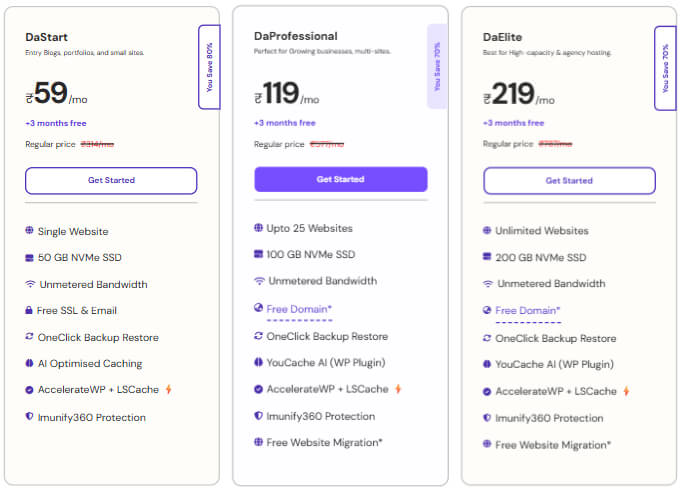
DaStart Plan
This plan is suitable if you’re launching your first website and want to keep things simple.
Best for:
- First time bloggers
- Single website owners
- Readers starting with a limited budget
DaProfessional Plan (Recommended)
For most new book bloggers, this is the plan we recommend.
It provides additional flexibility and room for growth as your website expands.
Best for:
- Bloggers planning long term growth
- Users who may build additional websites in the future
- Those looking for the best balance between features and pricing
Some notable benefits include:
- Support for multiple websites
- 100 GB NVMe SSD storage
- Free domain for one year
- Free website migration
- Backup restore options
- Enhanced scalability
If you’re serious about growing your book blog over time, this plan offers excellent value.
DaElite Plan
This plan is designed for users managing larger websites with higher traffic requirements.
Best for:
- Established websites
- Agencies
- Advanced users with multiple projects
Once you’ve selected the plan that fits your goals, the next step is purchasing your hosting and claiming your free domain name.
How to Buy YouStable WordPress Hosting (Step-by-Step)
Setting up your hosting account only takes a few minutes. Follow these steps to launch your book blog.
Step 1: Visit the YouStable WordPress Hosting Page
Start by visiting the YouStable WordPress Hosting page.
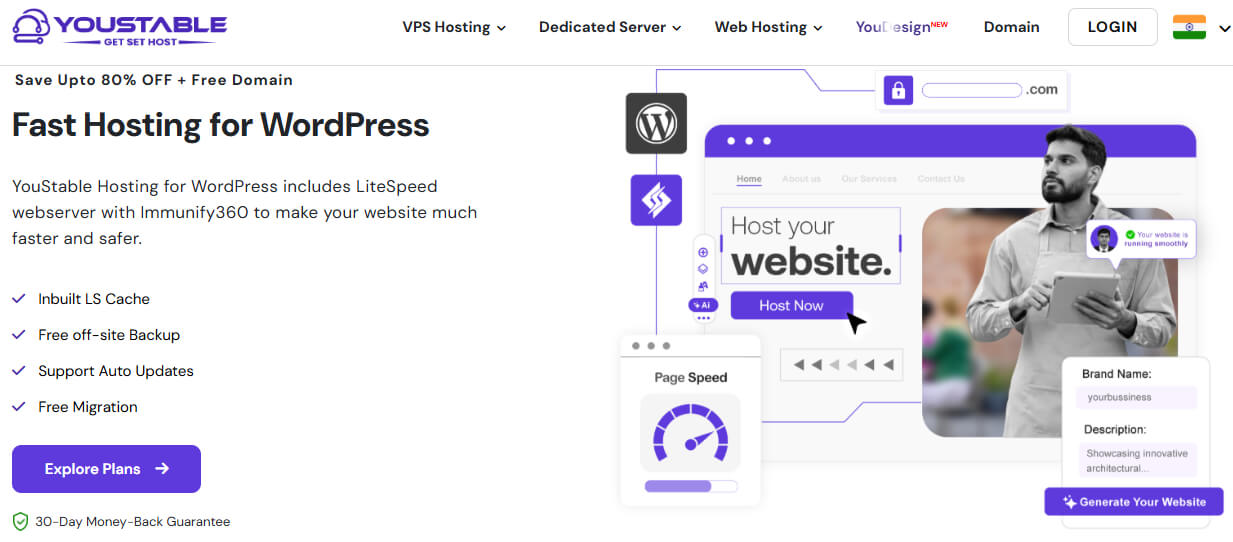
Browse through the available plans and compare their features based on your requirements and budget.
Step 2: Choose the Right Hosting Plan
Select the plan that best matches your blogging goals.
- Choose DaStart if you’re launching a single blog on a tight budget.
- Choose DaProfessional if you want additional flexibility, a free domain, and room for future growth.
- Choose DaElite if you expect high traffic or manage multiple websites.
After deciding, click the Get Started button below your preferred plan.
Step 3: Claim Your Free Domain Name
Eligible WordPress Hosting plans include a free domain for one year, making it easier for beginners to start their websites without additional domain registration costs.
Search for your preferred domain name to check its availability.
If your first choice isn’t available, try:
- Using related book terms.
- Adding words like “reads,” “library,” or “bookish.”
- Exploring alternative domain extensions if appropriate.
Choose a domain name that reflects your brand and is easy for readers to remember.
Step 4: Create Your YouStable Account
You’ll now be asked to create your account.
Provide the required information, including:
- Full name
- Email address
- Password
- Billing details
Use an email address you regularly access since important account information will be sent there.
Step 5: Choose Your Billing Cycle
YouStable typically offers multiple billing options.
Longer billing periods often provide better overall savings compared to monthly plans.
Review the available options carefully and select the one that aligns with your budget and long term plans.
Step 6: Review Your Order Details
Before completing your purchase, verify that:
- You’ve selected the correct hosting plan.
- Your preferred domain name appears correctly.
- Any available discounts have been applied.
- The total amount matches your expectations.
Taking a moment to review everything helps prevent mistakes.
Step 7: Complete the Payment Process
Proceed to checkout and select your preferred payment method.
After successfully completing your payment:
- Your hosting account will be activated.
- Your domain registration process will begin.
- You’ll receive account details via email.
Step 8: Access Your Hosting Dashboard
Once your account is active, log in to your hosting dashboard.
From here, you’ll be able to:
- Manage your hosting account.
- Install WordPress.
- Access backups.
- Configure website settings.
- Monitor your website resources.
Congratulations! At this point, you’ve secured both your domain name and hosting account.
The next step is installing WordPress and preparing your book blog for launch.
Step 4: Install WordPress on Your Hosting Account
If you prefer a quicker setup process, you can also learn how to build a WordPress website using an AI website builder. It can help beginners launch their websites more efficiently without dealing with complex configurations.
Now that you’ve purchased your domain name and WordPress hosting, it’s time to install WordPress and bring your book blog to life.
If you’ve never built a website before, this step might sound technical. However, modern WordPress hosting providers have simplified the process significantly. With YouStable’s one click WordPress installer, you can have your website ready in just a few minutes without writing a single line of code.
Why Use WordPress for Your Book Blog?
Before installing WordPress, it’s helpful to understand why millions of bloggers choose it.
WordPress powers more than 40% of websites worldwide because it’s:
- Beginner friendly and easy to use
- Highly customizable through themes and plugins
- SEO friendly for better search visibility
- Flexible enough to grow with your blog
- Supported by a large community and extensive documentation
Whether you’re publishing book reviews, reading lists, or author interviews, WordPress provides all the tools you need to manage your content efficiently.
How to Install WordPress Using YouStable
Follow these simple steps to install WordPress on your hosting account.
Step 1: Log in to Your YouStable Hosting Dashboard
After purchasing your hosting plan, you’ll receive a welcome email containing your account details.
Use these credentials to log in to your YouStable client area and access your hosting dashboard.
From there, navigate to your hosting services section.
Step 2: Open the WordPress Installer
Within your hosting control panel, locate the WordPress Installer or Softaculous Apps Installer.
This tool allows you to install WordPress automatically without manually uploading files or creating databases.
Click on Install WordPress to begin the setup process.
Step 3: Select Your Domain Name
If you have multiple domains connected to your account, choose the domain where you want to install WordPress.
For most beginners, this will be the domain name you registered during the hosting purchase process.
Double check your selection before moving forward.
Step 4: Configure Your Website Details
You’ll now need to enter some basic information about your website.
Site Name
Enter the name of your book blog.
Examples:
- The Reading Corner
- Bookish Adventures
- Next Chapter Reads
Don’t worry too much about perfection. You can always update this later from your WordPress dashboard.
Site Description
Add a short tagline describing your blog.
Examples:
- Honest Book Reviews and Reading Recommendations
- Helping You Find Your Next Great Read
- Book Reviews, Reading Tips, and Literary Discussions
This can also be edited later.
Step 5: Create Your WordPress Administrator Account
Next, you’ll create your login credentials for WordPress.
You’ll need to set:
- An administrator username
- A strong password
- An email address
Choose a username that isn’t simply “admin,” as using unique credentials improves security.
For your password:
- Use a combination of uppercase and lowercase letters.
- Include numbers and symbols.
- Avoid using easily guessed information.
Store these login details somewhere safe because you’ll use them to access your WordPress dashboard.
Step 6: Choose Your Language Settings
Select your preferred website language from the available options.
Most bloggers choose English, but WordPress supports many languages if your audience prefers a different language.
Step 7: Click the Install Button
After reviewing your settings, click Install.
The installation process usually takes only a few minutes.
During this time, WordPress automatically:
- Creates the necessary website files
- Configures your database
- Sets up your administrator account
- Prepares your website for use
Once the installation is complete, you’ll receive confirmation along with your WordPress login URL.
It typically looks something like this: yourdomain.com/wp-admin
Step 8: Log In to Your WordPress Dashboard
Visit your WordPress login page and enter the administrator credentials you created earlier.
After logging in, you’ll see the WordPress dashboard.
This is where you’ll manage every aspect of your book blog, including:
- Publishing blog posts
- Installing themes
- Adding plugins
- Managing comments
- Updating website settings
- Monitoring your site’s performance
At this stage, your book blog is officially live.
While it may still look basic, you’ve completed one of the most important parts of the entire process. The next step is configuring essential WordPress settings to ensure your website is optimized from the very beginning.
Step 5: Configure Essential WordPress Settings
Your WordPress installation is complete, but before you start publishing content, it’s important to configure a few essential settings. These adjustments only take a few minutes, yet they can improve your website’s user experience, security, and SEO performance from the very beginning.
Many beginners skip this step and end up revisiting these settings later. Taking care of them now will help you build a stronger foundation for your book blog.
1. Update Your Site Title and Tagline
Your site title and tagline help visitors and search engines understand what your blog is about.
To update them:
- Log in to your WordPress Dashboard.
- Navigate to Settings → General.
- Locate the Site Title field.
- Enter your blog name.
- Add a short and descriptive tagline.
For example:
Site Title: The Reading Corner
Tagline: Honest Book Reviews and Reading Recommendations
Choose a tagline that clearly communicates the purpose of your blog without overcomplicating it.
2. Set Your Time Zone Correctly
Configuring your time zone ensures that scheduled posts are published at the right time.
To update it:
- Go to Settings → General.
- Scroll down to the Time Zone section.
- Select your local time zone.
- Save your changes.
This small setting becomes especially important once you begin scheduling content in advance.
3. Configure SEO Friendly Permalinks
Permalinks determine the structure of your website URLs.
By default, WordPress may generate URLs that look like this: yourdomain.com/?p=123
These URLs aren’t very user friendly or helpful for SEO.
Instead, switch to a cleaner structure such as: yourdomain.com/book-review-example/
To change your permalink settings:
- Navigate to Settings → Permalinks.
- Select Post Name.
- Click Save Changes.
This option creates simple, readable URLs that both readers and search engines prefer.
4. Check Search Engine Visibility Settings
WordPress includes an option that discourages search engines from indexing your website.
This feature is useful during development but should remain disabled when you’re ready to publish.
To verify this setting:
- Go to Settings → Reading.
- Locate Search Engine Visibility.
- Ensure that “Discourage search engines from indexing this site” is unchecked.
- Save your settings.
Leaving this option enabled can prevent your blog from appearing in search results.
5. Configure Discussion Settings
Comments can help build a community around your book blog, but they can also attract spam.
To manage comment settings:
- Navigate to Settings → Discussion.
- Decide whether you want readers to comment on your posts.
- Enable comment moderation if desired.
- Review notification preferences.
Many bloggers choose to manually approve first time commenters to reduce spam and maintain quality discussions.
6. Delete Default Content
A fresh WordPress installation usually includes sample content that serves no purpose for your actual blog.
Take a few minutes to remove:
- The default “Hello World” post
- The sample page
- Unused themes you don’t plan to use
- Unnecessary plugins that come pre-installed
Removing unused items keeps your website organized and reduces clutter.
7. Update Your User Profile
Your author profile helps readers learn more about you.
To update it:
- Go to Users → Profile.
- Add your display name.
- Write a short author bio.
- Upload a professional profile picture if desired.
As your book blog grows, readers may appreciate learning more about the person behind the recommendations and reviews.
8. Enable HTTPS Using SSL
Security is important for every website, including book blogs.
Most quality hosting providers, including YouStable, provide a free SSL certificate.
SSL enables HTTPS and helps:
- Protect visitor data
- Improve website security
- Build trust with readers
- Support SEO efforts
Check that your website loads using: https://yourdomain.com
rather than: http://yourdomain.com
9. Keep WordPress Updated
WordPress regularly releases updates that improve functionality and security.
Make it a habit to update:
- WordPress core files
- Themes
- Plugins
Keeping everything updated reduces vulnerabilities and helps your website perform reliably.
Don’t Aim for Perfection
Many new bloggers spend weeks adjusting settings and trying to make everything perfect before publishing their first post.
The truth is that your website will continue evolving over time.
The goal at this stage is simply to create a solid foundation so you can start sharing your content confidently.
With these essential settings configured, your book blog is now ready for the next exciting step, choosing a professional theme that reflects your style and provides a great reading experience for your audience.
Step 6: Choose a Professional Theme for Your Book Blog
Your WordPress theme controls how your book blog looks and how visitors interact with it. It determines your website’s layout, typography, colors, navigation, and overall user experience.
While it can be tempting to choose a theme based purely on appearance, functionality and performance matter just as much. A beautiful theme that loads slowly or is difficult to customize can negatively impact both user experience and SEO.
The good news is that you don’t need an expensive theme to create a professional looking book blog. Many excellent free options provide everything beginners need.
What Should You Look for in a Book Blog Theme?
Before installing a theme, consider the following factors:
Mobile Friendly Design
A large percentage of readers browse websites on smartphones and tablets.
Your theme should automatically adapt to different screen sizes to provide a seamless reading experience across all devices.
A mobile responsive design also supports better search engine rankings.
Fast Loading Speed
Website speed directly affects user experience.
If your pages take too long to load, visitors may leave before reading your content.
Choose lightweight themes optimized for performance rather than themes overloaded with unnecessary features.
Easy Customization Options
As a beginner, you should be able to personalize your website without touching code.
Look for themes that allow you to customize:
- Colors
- Fonts
- Headers
- Homepage layouts
- Navigation menus
This flexibility helps you create a unique brand identity for your book blog.
SEO Friendly Structure
A well coded theme provides a strong technical foundation for SEO.
Although plugins like Rank Math can help optimize your content, using an SEO-friendly theme supports better website performance and crawlability.
Compatibility With Popular Plugins
Your chosen theme should work smoothly with essential WordPress plugins.
This becomes important when adding features such as:
- SEO optimization
- Contact forms
- Caching tools
- Security plugins
- Backup solutions
Best WordPress Themes for Book Blogs
Here are some beginner friendly themes worth considering:
| Theme | Best For | Why It’s Recommended |
| Astra | Beginners | Lightweight, highly customizable, and easy to use |
| Kadence | Performance focused websites | Fast loading with flexible design options |
| GeneratePress | SEO conscious bloggers | Clean code and excellent speed optimization |
| Blocksy | Creative customization | Modern layouts with user friendly controls |
All of these themes offer free versions that are suitable for launching your first book blog.
Our Recommendation for Beginners
If you’re starting your very first book blog, Astra is an excellent choice.
It offers:
- Fast performance
- Beginner friendly customization
- Mobile responsive layouts
- Compatibility with popular page builders
- Excellent integration with WordPress plugins
Most importantly, it allows you to create a professional website without feeling overwhelmed.
How to Install a WordPress Theme
Installing a theme only takes a few minutes.
Follow these steps:
Step 1: Open the Themes Section
From your WordPress Dashboard:
- Navigate to Appearance → Themes.
- Click Add New Theme.
You’ll now see thousands of free themes available through the official WordPress repository.
Step 2: Search for Your Preferred Theme
Use the search bar to find the theme you want to install.
For example, search for:
- Astra
- Kadence
- GeneratePress
- Blocksy
Once you locate your chosen theme, continue to the next step.
Step 3: Install the Theme
Click the Install button.
WordPress will automatically download and prepare the theme for activation.
This process usually takes only a few seconds.
Step 4: Activate the Theme
After installation completes:
- Click Activate.
- Visit your website to preview its appearance.
Your new design is now live.
Don’t worry if everything doesn’t look perfect immediately. Most themes require some customization before they match your vision.
Customize Your Theme
To personalize your website:
- Navigate to Appearance → Customize.
- Explore the available customization options.
Common settings include:
- Uploading your logo
- Choosing brand colors
- Adjusting typography
- Configuring header layouts
- Managing homepage sections
- Setting navigation menus
Take your time experimenting with different settings until your website feels aligned with your style.
Keep Reader Experience in Mind
As a book blogger, readability should always be a priority.
When customizing your theme:
- Use easy to read fonts.
- Avoid cluttered layouts.
- Ensure there is enough white space between elements.
- Make navigation simple and intuitive.
- Prioritize content over unnecessary visual effects.
Remember, readers visit your website to discover books and enjoy your insights. A clean, distraction free design often performs better than an overly complex one.
Common Mistakes to Avoid When Choosing a Theme
Many beginners make these mistakes:
- Choosing a theme based only on appearance.
- Installing themes with excessive features they don’t need.
- Frequently switching themes after launching.
- Ignoring mobile responsiveness.
- Sacrificing website speed for visual effects.
A simple, fast, and user friendly theme will serve your blog much better in the long run.
At this point, your book blog is starting to take shape. You have hosting, WordPress, essential settings configured, and a professional design in place.
The next step is installing the essential plugins that will help improve your website’s SEO, security, speed, and overall functionality.
Step 7: Install Essential WordPress Plugins
One of the biggest advantages of using WordPress is the ability to extend your website’s functionality through plugins. Plugins allow you to add features to your book blog without needing coding knowledge.
However, installing too many plugins can slow down your website and create unnecessary complications. Instead of adding dozens of plugins, focus on tools that genuinely improve your blog’s performance, security, SEO, and user experience.
The following plugins provide an excellent starting point for most new book bloggers.
What Are WordPress Plugins?
WordPress plugins are software extensions that add specific features to your website.
For example, plugins can help you:
- Improve SEO
- Speed up your website
- Create contact forms
- Enhance security
- Back up your content
- Optimize images
Think of plugins as apps for your WordPress website.
How to Install a WordPress Plugin
Before exploring which plugins to use, here’s how to install them:
- Log in to your WordPress Dashboard.
- Navigate to Plugins → Add New Plugin.
- Use the search bar to find the plugin you want.
- Click Install Now.
- After installation completes, click Activate.
The plugin is now ready to use.
Essential Plugins for Your Book Blog
Below are some plugins that can help you build a secure, fast, and SEO friendly book blog.
| Plugin | Purpose |
| Rank Math SEO | Helps optimize content for search engines |
| LiteSpeed Cache | Improves website speed and performance |
| WPForms | Creates contact forms easily |
| UpdraftPlus | Backs up your website data |
| Wordfence Security | Protects your site from security threats |
| ShortPixel | Compresses images for faster loading times |
Rank Math SEO
Search engine optimization plays an important role in helping readers discover your content.
Rank Math SEO simplifies many SEO tasks and provides recommendations while you’re writing blog posts.
It can help you:
- Optimize title tags and meta descriptions
- Generate XML sitemaps
- Improve on page SEO
- Manage schema markup
- Monitor SEO settings more efficiently
For beginners, it offers a user friendly setup wizard that guides you through the initial configuration process.
LiteSpeed Cache
Website speed affects both user experience and SEO.
If your pages load slowly, visitors may leave before reading your content.
LiteSpeed Cache helps improve website performance through advanced caching and optimization features.
Some benefits include:
- Faster page loading times
- Improved Core Web Vitals
- Browser caching support
- CSS and JavaScript optimization
- Image optimization options
If you’re using YouStable WordPress Hosting, LiteSpeed Cache works especially well because of LiteSpeed server compatibility.
WPForms
Every professional website should provide visitors with a simple way to get in touch.
WPForms allows you to create contact forms using a drag and drop builder.
You can use it to create:
- Contact pages
- Reader feedback forms
- Collaboration inquiries
- Author submission forms
The free version is sufficient for most beginner book blogs.
UpdraftPlus
Imagine spending months creating content only to lose it because of a technical issue.
Backups protect your website against unexpected problems.
UpdraftPlus helps you:
- Create automatic backups
- Restore your website quickly
- Store backups in cloud services
- Protect your content from accidental loss
Although many hosting providers offer backups, maintaining your own backup strategy provides additional peace of mind.
Wordfence Security
Website security should never be overlooked.
Even small blogs can become targets for malicious activity.
Wordfence Security helps protect your website through features such as:
- Firewall protection
- Malware scanning
- Login security enhancements
- Suspicious activity monitoring
- Brute force attack prevention
Using a security plugin alongside your hosting provider’s built in protections creates an additional layer of defense.
ShortPixel Image Optimizer
Book blogs often include book covers, graphics, and featured images.
Large image files can slow down your website significantly.
ShortPixel automatically compresses images while maintaining good visual quality.
Benefits include:
- Faster page loading speeds
- Reduced bandwidth usage
- Improved visitor experience
- Better SEO performance
Optimizing images from the beginning helps keep your website efficient as your content library grows.
Avoid Installing Too Many Plugins
A common beginner mistake is installing plugins for every small feature.
Before adding a new plugin, ask yourself:
- Does my website truly need this functionality?
- Can an existing plugin already handle this task?
- Is the plugin regularly updated and well reviewed?
Keeping your plugin collection lean helps maintain better website performance and security.
Keep Your Plugins Updated
Plugin developers frequently release updates that improve functionality and address security vulnerabilities.
Make it a habit to:
- Review available updates regularly.
- Update plugins promptly.
- Remove plugins you no longer use.
Maintaining updated plugins contributes to a safer and more reliable website.
At this stage, your book blog has a strong technical foundation. You’ve chosen reliable hosting, installed WordPress, configured essential settings, selected a theme, and added important plugins.
The next step is creating the essential pages that every professional book blog should have before publishing content.
Step 8: Create Important Pages for Your Book Blog
Before you start publishing book reviews and recommendations, it’s important to create a few essential pages for your website. These pages help readers understand who you are, how they can contact you, and how your website handles important matters such as privacy and affiliate relationships.
Many new bloggers overlook these pages, but they play a significant role in building trust and maintaining professionalism. Some of them are also important for legal compliance and monetization opportunities.
The good news is that creating these pages in WordPress is simple and only takes a few minutes.
How to Create a New Page in WordPress
Before diving into the individual pages, here’s how to create one:
- Log in to your WordPress Dashboard.
- Navigate to Pages → Add New Page.
- Enter your page title.
- Add your content.
- Click Publish.
Repeat this process for each important page listed below.
1. Create an About Page
Your About page is often one of the most visited sections of your website. Readers want to know who is behind the book recommendations they trust.
Use this page to introduce yourself and explain why you started your book blog.
You can include:
- A short introduction about yourself
- Your reading interests and favorite genres
- Why you decided to start a book blog
- What readers can expect from your content
- A personal photo if you’re comfortable sharing one
You don’t need to sound overly formal. Write as if you’re introducing yourself to a fellow book lover.
For example:
“Hi, I’m [Your Name], an avid reader who enjoys exploring fantasy and mystery novels. I started this blog to share honest reviews, book recommendations, and help other readers discover books they’ll love.”
Authenticity helps readers connect with you.
2. Create a Contact Page
A Contact page makes it easy for readers, authors, publishers, and potential collaborators to reach you.
Without one, visitors may struggle to get in touch.
Your Contact page can include:
- A contact form created using WPForms
- A professional email address
- Links to your social media profiles (if applicable)
Keep the messaging simple and welcoming.
For example:
“Have a question, recommendation, or collaboration inquiry? I’d love to hear from you. Feel free to reach out using the contact form below.”
3. Create a Privacy Policy Page
A Privacy Policy explains how your website collects, stores, and uses visitor information.
This page becomes especially important if you:
- Use analytics tools like Google Analytics
- Display advertisements
- Collect email addresses
- Use contact forms
- Implement cookies on your website
Fortunately, WordPress can help generate a basic Privacy Policy template.
To access it:
- Go to Settings → Privacy.
- Create a new Privacy Policy page.
- Customize the provided template to reflect your website practices.
If your audience is international, having a Privacy Policy can also support compliance with regulations such as GDPR.
4. Create a Disclaimer Page
A Disclaimer helps clarify the purpose of your content and limits misunderstandings.
For book blogs, a disclaimer can explain that:
- Reviews reflect your personal opinions.
- Content is intended for informational purposes.
- Recommendations are based on your experiences and preferences.
This transparency helps readers understand your perspective.
5. Create an Affiliate Disclosure Page
If you plan to monetize your book blog through affiliate programs such as Amazon Associates, an Affiliate Disclosure is essential.
Affiliate links allow you to earn a commission when readers make purchases through your recommendations at no additional cost to them.
Being transparent about affiliate relationships helps build trust with your audience.
Your disclosure should clearly state that:
- Some links on your website may be affiliate links.
- You may earn a commission from qualifying purchases.
- Recommendations are based on honest opinions and experiences.
Even if you don’t plan to use affiliate links immediately, creating this page early can save time later.
6. Create a “Start Here” Page
As your blog grows, new visitors may feel overwhelmed by the amount of content available.
A “Start Here” page acts as a guide, helping readers quickly find your most valuable resources.
You can include:
- An introduction to your blog
- Popular book recommendations
- Featured reviews
- Reading guides
- Links to important categories
Think of this page as a welcome center for new visitors.
Why These Pages Matter
These pages do much more than fill space on your website.
They help you:
- Build credibility with readers
- Improve transparency and trust
- Support legal compliance
- Prepare for future monetization opportunities
- Provide a better overall user experience
Visitors are more likely to trust a blog that clearly communicates who runs it and how it operates.
Add Important Pages to Your Navigation Menu
After creating these pages, make them easy to find.
To add them to your menu:
- Navigate to Appearance → Menus.
- Create a new menu if necessary.
- Add your important pages.
- Assign the menu to your website’s primary navigation area.
- Save your changes.
A clear navigation structure helps readers explore your website more efficiently.
At this point, your book blog is starting to look professional. You’ve built the technical foundation and created the essential pages readers expect to find.
Now comes one of the most exciting parts of the process, publishing your first book blog post and sharing your voice with the world.
Step 9: Publish Your First Book Blog Post
This is the moment you’ve been working toward, publishing your first blog post.
Many new bloggers spend weeks perfecting their website design and settings but hesitate when it’s time to actually start writing. They worry about whether their content is good enough or if readers will find it valuable.
The truth is that every successful book blogger started with a first post. It doesn’t have to be perfect. What matters most is getting started, sharing your genuine thoughts, and improving with each article you publish.
How to Create a New Blog Post in WordPress
Publishing a post in WordPress is straightforward.
Follow these steps:
- Log in to your WordPress Dashboard.
- Navigate to Posts → Add New Post.
- Enter your article title.
- Write your content using the WordPress editor.
- Add images if needed.
- Select a category for the post.
- Add relevant tags.
- Preview your article.
- Click Publish when you’re ready.
Congratulations! Your content is now live for readers to discover.
What Should Your First Book Blog Post Be About?
Many beginners overthink this decision.
Instead of trying to create the perfect article, choose a topic you’re genuinely excited to write about.
Some excellent first post ideas include:
- A review of a book you recently finished
- Your favorite books of all time
- Books you recommend for beginners in a specific genre
- Your current reading goals
- A monthly reading wrap up
- An introduction explaining what readers can expect from your blog
Starting with familiar topics often makes writing easier and more enjoyable.
How to Write an Engaging Book Review
Book reviews are among the most popular types of content for book blogs.
A helpful review should do more than summarize the plot. Readers want to understand whether a book might be a good fit for them.
Consider including the following elements:
Book Information
Start with basic details such as:
- Book title
- Author name
- Genre
- Publication date
- Rating (if you use one)
This provides important context for readers.
Brief Synopsis
Offer a short overview of the story without revealing major spoilers.
Focus on giving readers enough information to understand the premise while maintaining curiosity.
What You Enjoyed About the Book
Share the aspects that stood out to you.
For example:
- Character development
- Writing style
- World building
- Pacing
- Emotional impact
- Unique themes
Specific examples make your review more useful and authentic.
Areas That Could Have Been Better
Constructive criticism adds credibility to your reviews.
You might mention:
- Slow pacing in certain sections
- Underdeveloped characters
- Predictable plot twists
- Confusing storytelling elements
Being honest helps readers trust your recommendations.
Who Would Enjoy This Book?
Help readers determine whether the book matches their interests.
For example:
“If you enjoy fast paced fantasy novels with strong character development and intricate world building, this book may be worth adding to your reading list.”
This practical advice increases the value of your review.
Your Final Thoughts
End with a concise conclusion summarizing your overall opinion.
Mention whether you would recommend the book and why.
Tips for Writing Book Blog Posts Readers Enjoy
You don’t need to be a professional writer to create engaging content.
These simple practices can significantly improve your articles:
Write Like You’re Talking to a Fellow Reader
Avoid sounding overly formal or academic.
Imagine you’re recommending a book to a friend over coffee.
A conversational tone helps readers connect with your content.
Share Honest Opinions
Authenticity is one of the biggest strengths of independent book bloggers.
Readers appreciate genuine experiences more than overly polished reviews.
Don’t be afraid to express your real thoughts respectfully.
Use Clear Headings and Short Paragraphs
Breaking your content into sections improves readability.
It also helps readers quickly find the information they’re looking for.
Avoid Major Spoilers
Many readers visit book blogs before deciding whether to read a book.
Providing spoiler free reviews ensures your content remains helpful and accessible.
If spoilers are necessary, clearly warn readers beforehand.
Add Your Unique Perspective
Thousands of people may review the same book.
What makes your content different is your personal experience and viewpoint.
Your insights and interpretations are what encourage readers to return to your blog.
Optimize Your Blog Posts Before Publishing
Before hitting publish, review your article carefully.
Check that you have:
- An engaging title
- Clear headings and subheadings
- Proper spelling and grammar
- Relevant images with alt text
- Internal links to related content (when available)
- A compelling conclusion
Taking a few extra minutes to polish your content can improve both reader experience and search performance.
Consistency Matters More Than Perfection
It’s easy to compare yourself to established book bloggers who have been creating content for years.
Remember that they all started exactly where you are now.
Instead of aiming for perfection, focus on consistency.
Publishing valuable content regularly will help you:
- Improve your writing skills
- Build confidence
- Understand your audience better
- Grow your website over time
Your first blog post won’t be your best one, and that’s completely normal.
The important thing is taking that first step and sharing your passion for books with others.
Now that you’ve published your first piece of content, the next step is making sure readers can actually find your blog through search engines by implementing basic SEO practices.
Step 10: Optimize Your Book Blog for SEO
Publishing great content is only part of building a successful book blog. If you want readers to discover your reviews, recommendations, and reading guides through search engines like Google, you’ll need to pay attention to SEO.
SEO, or Search Engine Optimization, is the process of improving your website and content so that search engines can better understand and rank your pages. The higher your content appears in search results, the more opportunities you have to attract readers who are actively looking for book related information.
The good news is that you don’t need to be an SEO expert to get started. By following a few fundamental practices consistently, you can build a strong foundation for long term organic growth.
What Is SEO and Why Does It Matter?
SEO helps search engines understand:
- What your content is about
- Which searches your content should appear for
- Whether your website provides a good user experience
For book bloggers, SEO can help bring readers who are searching for topics such as:
- Best fantasy books for beginners
- Book reviews for newly released novels
- Must read mystery books
- Reading order guides
- Recommendations for specific genres
Unlike social media posts that may lose visibility within days, well optimized blog posts can continue attracting visitors for months or even years.
Start With Keyword Research
Keywords are the words and phrases people type into search engines.
Before writing a blog post, think about what your target readers might search for.
For example, instead of targeting a broad term like:
Books
You could focus on more specific phrases such as:
- Best romance books for beginners
- Fantasy books with strong female protagonists
- Book review of [Book Title]
- Best mystery novels to read this year
Specific keywords often help you reach readers with clearer intent.
Use Keywords Naturally
Once you’ve identified your target keyword, include it naturally throughout your content.
Important places to use your keyword include:
- The article title
- The introduction
- At least one subheading
- The URL slug
- The meta description
- Image alt text when relevant
However, avoid forcing keywords into every paragraph.
Write for readers first. If your content sounds natural and genuinely addresses the topic, search engines will generally understand its relevance.
Write Helpful, Reader Focused Content
Modern SEO is no longer about repeating keywords as many times as possible.
Google increasingly prioritizes content that demonstrates:
- Experience
- Expertise
- Authoritativeness
- Trustworthiness
As a book blogger, this means sharing genuine opinions, thoughtful analysis, and practical recommendations based on your own reading experiences.
Ask yourself:
“Does this article genuinely help someone choose their next book?”
If the answer is yes, you’re already moving in the right direction.
Create Clear Content Structure
Well structured content improves both readability and SEO.
Use:
- One H1 heading for the page title
- H2 headings for major sections
- H3 headings for supporting topics
- Short paragraphs that are easy to scan
- Bullet points and tables when appropriate
Organized content helps readers quickly find the information they need while making it easier for search engines to understand your article.
Optimize Your Title and Meta Description
Your title and meta description are often the first things people see in search results.
A strong title should:
- Clearly describe the content
- Include the primary keyword naturally
- Encourage readers to click
Your meta description should summarize what readers can expect from the article.
For example:
“Looking for your next favorite fantasy novel? Explore our list of the best fantasy books for beginners, complete with recommendations and reading tips.”
Compelling titles and descriptions can improve click through rates from search results.
Use Internal Links
Internal links connect one page of your website to another.
For example, if you’re reviewing a fantasy novel, you might link to:
- Related fantasy book recommendations
- Author spotlight articles
- Reading guides within the same genre
Internal linking helps:
- Readers discover more of your content
- Search engines understand your website structure
- Distribute authority throughout your site
As your blog grows, internal linking becomes increasingly valuable.
Optimize Images for Better Performance
Book blogs often include book covers and featured images.
Large image files can slow down your website, affecting both user experience and SEO.
Before uploading images:
- Compress them using tools such as ShortPixel
- Use descriptive file names
- Add relevant alt text
For example:
Instead of: IMG12345.jpg
Use: best-fantasy-books-for-beginners.jpg
Alt text should accurately describe the image for accessibility purposes.
Improve Website Speed
Website speed is an important ranking factor and directly impacts visitor satisfaction.
To maintain good performance:
- Use reliable WordPress hosting
- Enable caching with LiteSpeed Cache
- Optimize images
- Limit unnecessary plugins
- Keep WordPress updated
Fast loading websites create better experiences for readers and encourage them to stay longer.
Make Your Website Mobile Friendly
Many readers discover book blogs using smartphones and tablets.
Ensure your website:
- Displays correctly on mobile devices
- Uses readable font sizes
- Has easy to use navigation
- Loads quickly across different screen sizes
Most modern WordPress themes are mobile responsive, but it’s still a good idea to test your site regularly.
Focus on Building Trust
Trust plays a major role in both reader loyalty and long term SEO success.
You can strengthen trust by:
- Writing honest reviews
- Disclosing affiliate relationships clearly
- Including author information
- Maintaining accurate and updated content
- Providing balanced opinions rather than exaggerated claims
Readers appreciate authenticity, especially when choosing books based on recommendations.
Monitor Your SEO Performance
As your blog grows, monitoring performance can help you identify opportunities for improvement.
Tools such as:
- Google Search Console
- Google Analytics
- Rank Math SEO
can help you understand:
- Which articles attract traffic
- What keywords readers use to find your content
- How visitors interact with your website
These insights can guide your future content strategy.
SEO Is a Long Term Strategy
One of the most important things to remember is that SEO takes time.
It’s completely normal if your articles don’t rank immediately after publication.
Instead of focusing on quick results, concentrate on:
- Publishing helpful content consistently
- Improving existing articles over time
- Understanding your audience’s needs
- Building trust with your readers
Small improvements made consistently often lead to significant growth over the long term.
Now that you’ve optimized your content for search engines, it’s time to focus on promoting your book blog and attracting readers from multiple channels beyond organic search.
Step 11: Promote Your Book Blog
Publishing high quality content is essential, but even the best articles need visibility. If no one knows your book blog exists, it becomes much harder to build an audience and grow your website.
The good news is that you don’t need thousands of followers or a large marketing budget to promote your blog effectively. By consistently sharing your content in the right places, you can gradually attract readers who genuinely enjoy your recommendations and insights.
Instead of trying every promotional strategy at once, focus on a few channels that align with your audience and strengths.
1. Use Pinterest to Drive Long Term Traffic
Pinterest works more like a visual search engine than a traditional social media platform, making it particularly effective for bloggers.
Many readers use Pinterest to discover:
- Book recommendations
- Reading lists
- Genre guides
- Book review roundups
- Reading challenge ideas
To get started:
- Create a Pinterest Business account.
- Design eye catching pins for your blog posts.
- Use descriptive titles and keywords.
- Organize content into relevant boards.
Examples include:
- Best Fantasy Books
- Romance Book Recommendations
- Monthly Reading Lists
- Book Club Picks
Unlike social posts that disappear quickly, Pinterest pins can continue generating traffic for months.
2. Join the Goodreads Community
Goodreads is one of the largest online communities dedicated to readers and books.
It can be an excellent place to connect with people who share your interests.
You can:
- Review books you’ve read.
- Participate in discussion groups.
- Join reading challenges.
- Engage with other readers authentically.
However, avoid treating Goodreads purely as a promotional platform.
Focus on building genuine relationships and contributing valuable insights. Readers who appreciate your recommendations may naturally become interested in your blog.
3. Build an Instagram Presence
Book related content performs exceptionally well on Instagram through the popular Bookstagram community.
You don’t need professional photography equipment to get started.
Consider sharing:
- Current reads
- Book recommendations
- Reading updates
- Favorite quotes
- Behind the scenes glimpses of your reading life
To increase engagement:
- Use relevant hashtags.
- Respond to comments.
- Interact with other book creators.
- Maintain a consistent posting schedule.
Remember that social media works best when it’s social. Focus on conversations rather than constant self promotion.
4. Participate in Facebook Groups
Many active Facebook communities revolve around books and reading.
Joining these groups can help you:
- Understand reader interests.
- Discover trending topics.
- Participate in discussions.
- Build relationships within niche communities.
Before sharing blog posts, always review each group’s guidelines regarding self promotion.
The goal should be to contribute meaningfully rather than simply dropping links.
5. Start Building an Email List Early
Many bloggers postpone email marketing until they have significant traffic.
Starting earlier often works better.
An email list allows you to communicate directly with readers without depending on social media algorithms.
You can use it to:
- Share new blog posts.
- Recommend books.
- Send monthly reading updates.
- Announce special content or resources.
Even if you only have a handful of subscribers initially, growing your list consistently can become one of your most valuable assets.
6. Focus on Search Engine Traffic
SEO remains one of the most sustainable ways to grow a book blog.
Readers actively searching for:
- Book reviews
- Reading recommendations
- Genre guides
- Author information
already have strong intent.
By consistently publishing optimized, high quality content, you can attract visitors long after your articles are published.
Organic traffic often grows gradually but can provide long term benefits.
7. Network With Other Book Bloggers
Building relationships within the book blogging community can create valuable opportunities.
Consider:
- Commenting thoughtfully on other blogs.
- Sharing fellow bloggers’ content.
- Participating in collaborative projects.
- Joining online blogging communities.
Supporting others often leads to meaningful connections and mutual growth.
8. Repurpose Your Content Across Multiple Platforms
You don’t have to create entirely new content for every platform.
Instead, repurpose existing blog posts.
For example:
A blog post titled: 10 Fantasy Books Every Beginner Should Read
could become:
- A Pinterest graphic
- An Instagram carousel
- A Facebook discussion post
- An email newsletter feature
This approach helps maximize the value of the content you’ve already created.
Prioritize Consistency Over Complexity
One of the biggest mistakes new bloggers make is trying to master every promotional platform simultaneously.
This often leads to burnout.
Instead:
- Choose two or three channels.
- Focus on consistency.
- Track what works best for your audience.
- Expand gradually as your confidence grows.
You don’t need to be everywhere to build a successful book blog.
Building an Audience Takes Time
It’s important to set realistic expectations.
Most successful book blogs didn’t gain thousands of readers overnight.
Audience growth often happens gradually through:
- Consistent publishing
- Helpful content
- Genuine engagement
- Strategic promotion
Celebrate small milestones along the way.
Your first subscriber, first comment, and first returning visitor are all signs that your efforts are making an impact.
The key is to keep showing up and providing value to your readers.
Now that you know how to attract visitors to your website, let’s explore how you can turn your passion for books into income through various monetization strategies.
Step 12: Monetize Your Book Blog
One of the most common questions new book bloggers ask is whether it’s possible to make money from a book blog. The short answer is yes.
However, it’s important to understand that successful monetization usually comes after you’ve built trust with your audience and consistently published valuable content. Readers visit your blog because they appreciate your recommendations and insights. Income opportunities naturally become stronger as that relationship grows.
Instead of focusing solely on earning money from day one, aim to create a helpful resource that genuinely serves your readers. Over time, your book blog can evolve into both a creative outlet and an additional income stream.
Can You Really Make Money From a Book Blog?
Yes, many book bloggers generate income through various methods, including affiliate marketing, advertising, sponsored partnerships, and digital products.
That said, results vary depending on factors such as:
- The quality of your content
- Your traffic levels
- Audience engagement
- Consistency in publishing
- Your chosen monetization methods
For most beginners, monetization should be viewed as a long-term goal rather than an immediate outcome.
1. Affiliate Marketing
Affiliate marketing is one of the most popular monetization methods for book bloggers.
When you recommend books or products using affiliate links, you earn a commission if someone makes a purchase through those links. The visitor pays the same price, while you receive a small percentage of the sale.
For example, you might recommend:
- Books you genuinely enjoyed
- E-readers
- Reading accessories
- Book subscription services
- Writing tools for aspiring authors
Programs such as Amazon Associates are commonly used by book bloggers.
Why Affiliate Marketing Works Well for Book Blogs
Readers often visit book blogs specifically to find recommendations.
If someone trusts your opinion and decides to purchase a book you’ve recommended, affiliate marketing provides a natural way to monetize that relationship.
The key is transparency.
Always disclose affiliate relationships clearly and only recommend products you genuinely believe provide value.
2. Display Advertising
Display ads allow you to earn income when visitors view or interact with advertisements placed on your website.
As your traffic grows, ad networks can become a source of passive income.
Popular advertising options include:
- Google AdSense
- Mediavine
- Raptive
Keep in mind that premium ad networks often require minimum traffic thresholds before acceptance.
For newer blogs, advertising income may initially be modest, but it can increase over time as your audience expands.
3. Sponsored Content
As your blog establishes credibility, publishers, authors, and relevant brands may approach you for collaborations.
Sponsored opportunities can include:
- Sponsored book reviews
- Promotional campaigns
- Featured content partnerships
- Product reviews related to reading
Whenever you publish sponsored content, maintain honesty and disclose the partnership to your readers.
Authenticity remains one of your greatest assets as a book blogger.
4. Sell Digital Products
Creating digital products can provide an additional revenue stream while helping your audience.
Some ideas include:
- Reading journals
- Book trackers
- Reading challenge templates
- Printable bookmarks
- Literary discussion guides
- Book club resources
Digital products often require upfront effort to create but can generate ongoing sales with minimal maintenance.
5. Offer Freelance Services
Book blogging helps you develop valuable skills that extend beyond your website.
As your experience grows, you may choose to offer services such as:
- Freelance writing
- Editing and proofreading
- Content strategy consulting
- Social media management
- Book reviewing services
Many bloggers discover that their websites become effective portfolios for attracting freelance opportunities.
6. Create Membership or Premium Content
Once you’ve built a loyal audience, you may consider offering exclusive content through memberships.
Examples include:
- Private reading communities
- Exclusive book recommendations
- Early access to content
- Monthly discussion sessions
- Premium reading resources
While this strategy isn’t necessary for beginners, it can become an option as your audience grows.
Focus on Trust Before Revenue
One of the biggest mistakes new bloggers make is prioritizing monetization before establishing credibility.
Readers return to blogs they trust.
You can build trust by:
- Providing honest reviews
- Recommending books thoughtfully
- Being transparent about affiliate relationships
- Prioritizing reader needs over commissions
When readers believe that your recommendations are genuine, monetization opportunities become much more effective.
Set Realistic Expectations
Book blogging is rarely a “get-rich-quick” opportunity.
Building meaningful traffic and generating consistent income often requires:
- Publishing quality content regularly
- Learning SEO fundamentals
- Engaging with your audience
- Continuously improving your website
Some bloggers begin earning within a few months, while others take longer.
Progress depends on consistency and long term commitment.
Your Passion Should Come First
The most successful book bloggers usually start because they genuinely love books and enjoy sharing their experiences.
Monetization works best as a byproduct of creating helpful content rather than the sole motivation behind your blog.
If you focus on serving your readers, building trust, and consistently providing value, income opportunities can naturally follow.
At this stage, you’ve learned how to choose a niche, set up your website, publish content, promote your blog, and monetize your efforts.
Before wrapping up, let’s explore some common mistakes that new book bloggers should avoid to make their journey smoother and more enjoyable.
Common Mistakes to Avoid When Starting a Book Blog
Many new book bloggers make avoidable mistakes that can slow their growth. Some common ones include choosing a broad niche, waiting for everything to be perfect, publishing inconsistently, ignoring basic SEO, selecting unreliable hosting, and focusing on monetization too early.
It’s also important not to compare yourself with established bloggers or give up if results don’t come immediately.
| Mistake | How to Avoid It |
| Choosing a Broad Niche | Focus on a specific book category initially. |
| Waiting for Perfection | Start publishing and improve over time. |
| Inconsistent Posting | Follow a realistic content schedule. |
| Ignoring SEO | Learn basic SEO practices from the beginning. |
| Choosing Poor Hosting | Use reliable WordPress hosting for better performance. |
| Comparing Yourself to Others | Focus on your own progress and growth. |
| Skipping Backups | Regularly back up your website data. |
| Writing Only for SEO | Prioritize reader value and authentic content. |
| Monetizing Too Early | Build trust before focusing on income. |
| Giving Up Too Soon | Stay patient and remain consistent. |
Remember, successful book blogs aren’t built overnight. Focus on continuous improvement, provide value to your readers, and stay consistent with your efforts.
Also Read:
FAQs
Is starting a book blog still worth it in 2026?
Yes. Readers continue searching for book reviews, recommendations, reading guides, and authentic opinions from fellow book enthusiasts. A book blog also gives you complete ownership over your content, unlike many social media platforms.
How much does it cost to start a book blog?
Starting a book blog is affordable, especially for beginners. With YouStable WordPress Hosting, you can launch your blog for a relatively low investment while getting all the essential features needed to get started.
• DaStart Plan: ₹59/month → ₹708/year
• DaProfessional Plan (Recommended): ₹119/month → ₹1,428/year (includes a free domain for 1 year)
• DaElite Plan: ₹219/month → ₹2,628/year
• Domain Name: Free for 1 year with eligible plans.
• WordPress: Free to use.
• Premium Themes/Plugins: Optional, not required initially.
Do I need technical skills to start a book blog?
No. Modern WordPress hosting providers offer beginner friendly tools such as one click WordPress installation, making it possible to launch a blog without coding knowledge.
Which hosting is best for beginner book bloggers?
Many beginners prefer WordPress hosting solutions that simplify setup and provide essential features such as backups, security, and easy WordPress installation.
YouStable WordPress Hosting is one option worth considering because it includes beginner friendly tools and a free domain with eligible plans.
What should I write about if I’m just getting started?
Some beginner friendly content ideas include:
• Book reviews
• Reading wrap ups
• Genre recommendations
• Reading challenge updates
• Lists of favorite books
• Author spotlights
Start with topics you’re genuinely excited to discuss.
Conclusion
Starting a book blog is easier than many beginners expect when you follow the right steps. From choosing a niche and setting up WordPress to publishing content and growing an audience, each step helps build a strong foundation for long term success.
The most important thing is to start. You don’t need to be an expert writer or web developer to create a successful book blog. Focus on sharing honest insights, helping readers discover great books, and consistently publishing valuable content.
If you’re ready to launch your book blog, choosing reliable WordPress hosting can simplify the process. With beginner friendly features, one click WordPress installation, and a free domain for one year on eligible plans, YouStable WordPress Hosting can help you get started with confidence.