Which US dedicated server should you choose? Should you choose managed or unmanaged?
This guide explains what managed US dedicated server and unmanaged US dedicated server offers, who should choose it and which support level fits your needs.
This choice also affects your monthly cost, how much server work you handle and who helps when something goes wrong.
The main difference is responsibility.
With a managed server, the hosting provider handles more of the server work. There is an entire server management staff who helps you when you require help of any kind.
And with an unmanaged server, you handle most of the server administration related work yourself.
| Disclaimer: I run hosting services, so I have a full knowledge about this topic. The information below focuses on helping you choose the right support level. |
Managed vs Unmanaged Dedicated Server: The Quick Answer
You should choose a managed dedicated server if you want the hosting provider to handle most server administration for you and you should choose an unmanaged dedicated server if you or your tech team can handle server setup, security, updates and troubleshooting.
The difference is really simple:
- More support, more cost and gives you no server responsibility
- Less support, less cost and gives you full server responsibility and control.
This is the main difference between managed and unmanaged dedicated servers.
The sections below explain the details.
What Is a Managed USA Dedicated Server?
A managed USA dedicated server is a physical server (located in the US) given only to you and all the server resources, like the CPU, RAM, storage, bandwidth of the entire server is allotted only for your online projects.
The hosting provider offers you a proper technical staff who handles all the server administration work on your behalf in a scheduled manner from time to time (you do not have to remind them).
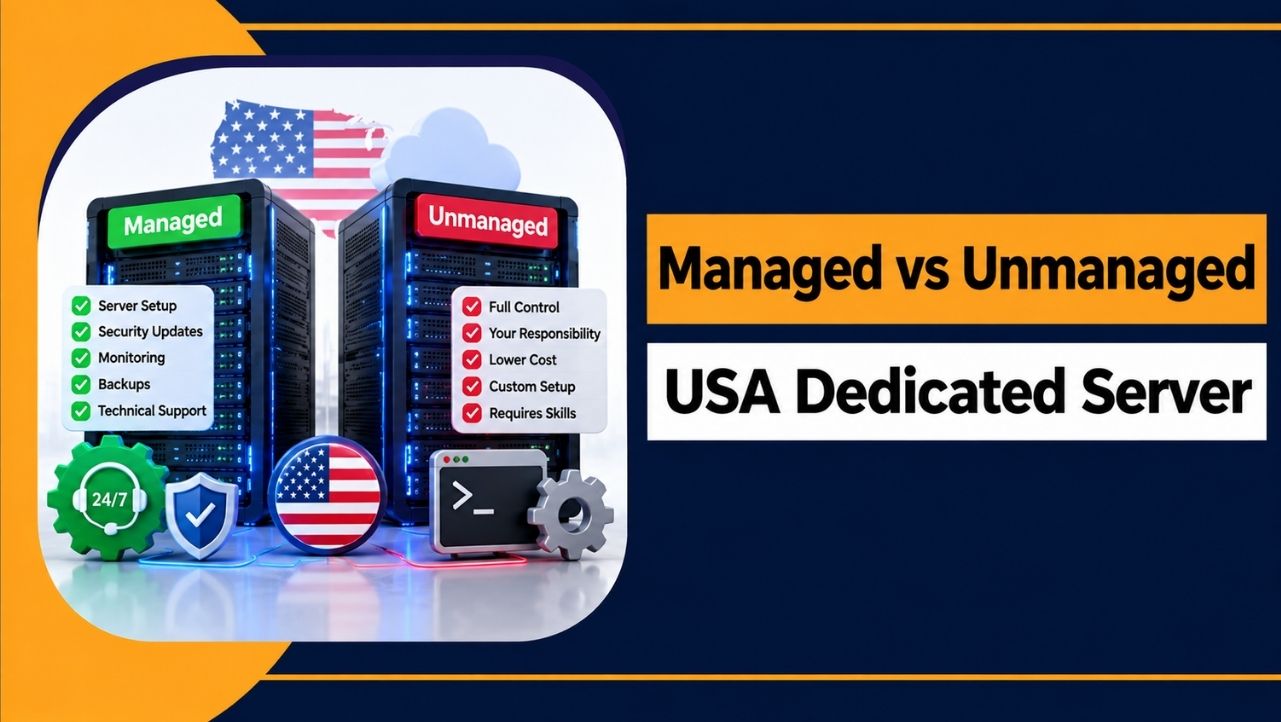
Your provider handles these following works:
- Server setup and operating system updates
- Security patches and server security
- Server monitoring and alerts
- Backups and recovery
- Troubleshooting and technical support
You still manage your websites and applications. You also keep the root access with yourself. Only the management part is done by the tech team of the hosting provider.
The main thing here is that your provider handles all the regular server administration so that you do not have to take the headache of handling server (the hosting provider’s tech team does that)
The only thing is that you have to pay extra cost for the managed services provided by the hosting team.
| Note: “Managed” can mean different things with different providers. Always check the exact services included before you buy. |
What Is an Unmanaged USA Dedicated Server?
An unmanaged US dedicated server (located in the US) gives you full 100% responsibility of the dedicated server. This means that you have to do server setup, security, updates, monitoring and troubleshooting, all by yourself.
It gives you all the dedicated server resources and allots it for only your online projects. And with all the hardware and server access, you handle the server administration.
There is no technical staff of the hosting provider who helps you in managing the server. You only do it yourself.
You are completely responsible for:
- Operating system installation and server configuration
- Software installation and updates
- Server security, firewall rules, and permissions
- Server monitoring and backups
- Troubleshooting server problems
You get full server control and full responsibility. This gives you 100% freedom to configure the server the way you want, but you also handle the technical work yourself.
The main benefit is a lower server cost, which we explain next.
Managed vs Unmanaged Dedicated Server: What Is the Difference?
The table below shows the main differences between managed and unmanaged dedicated servers. The exact services can vary by provider, so check what is included with your plan.
| Area | Managed | Unmanaged |
| Server setup | Provider handles it | You handle it |
| Operating system updates | Provider assisted | You handle them |
| Server security | Provider may help | You handle it |
| Server monitoring | Often included | Usually yours |
| Backups | Often included | Usually yours |
| Troubleshooting | Provider support | You troubleshoot |
| Software installation | May be supported | Usually yours |
| Root access | Usually available | Usually available |
| Server control | High | Very high |
| Technical expertise | Lower need | Higher need |
| Dedicated server cost | Higher | Lower |
The biggest difference is usually who handles the server work.
Both options may provide root access, but managed hosting gives you more support while unmanaged hosting puts more responsibility on you.
Who Should Choose Which Support Level?
The right support level depends on your technical skills and your budget.
| Your situation | Better choice |
| Beginner or first server | Managed |
| Small business with no IT staff | Managed |
| Downtime costs you money | Managed |
| Developer who runs servers daily | Unmanaged |
| Experienced system administrator | Unmanaged |
| You want the lowest hosting cost | Unmanaged |
| Agency running client servers | Depends on the team |
You should choose managed hosting if you:
- Want the provider to handle most server administration
- Have limited server management experience
- Want help with updates, security, monitoring, and troubleshooting
- Prefer to spend your time managing websites and applications
You should choose unmanaged hosting if you:
- Have server management skills or an experienced IT team
- Want full control over the server
- Can handle security, updates, monitoring, and troubleshooting
- Want to reduce hosting costs
In simple terms, managed hosting saves time and reduces server work. Unmanaged hosting gives you more control and lower costs, but requires more technical work.
How Much Technical Knowledge Do You Need?
An unmanaged dedicated server requires you to handle most server administration yourself.
You should be comfortable with:
- Managing a Linux or Windows server through SSH or RDP
- Setting up firewalls and user permissions
- Installing and updating software
- Managing server maintenance and backups
- Understanding basic DNS, networking, and server security
- Reading logs and troubleshooting server problems
You do not need to know everything before starting. However, you should understand most of these tasks and know where to get help when needed.
If you are not comfortable with these tasks, managed dedicated hosting is usually the better choice.
Managed vs Unmanaged Dedicated Server Cost Difference
Managed dedicated hosting usually costs more because the provider handles server management, support and routine administration.
Unmanaged dedicated hosting usually costs less because you handle these tasks yourself.
However, the monthly price is not the only cost to consider. An unmanaged server can cost more overall if you need to spend many hours managing it or hire a system administrator.
| Tip: Compare the total cost, including management, backups, and support fees, instead of comparing only the monthly server price. |
The better option depends on both money and time, not just the advertised price.
What Happens When Something Goes Wrong?
The difference between managed and unmanaged hosting becomes clearer when a server has a problem.
Case 1: The server stops responding
Managed: You contact the provider, and their team investigates the issue based on the support included in your plan.
Unmanaged: You investigate the problem yourself or hire someone to fix it.
Case 2: A security update is required
Managed: The provider may apply or help with the required update, depending on the plan.
Unmanaged: You are responsible for applying and checking the update.
The main difference is who handles the problem. Managed hosting gives you more provider support, while unmanaged hosting puts the responsibility on you or your IT team.
What to Check Before Buying?
The word managed can mean different things from one provider to another. Check the included services before buying.
Ask the provider:
- Which server management tasks are included?
- Is server setup and migration included?
- Are security updates and backups included?
- Is server monitoring available 24/7?
- Does support cover applications, or only the server?
- What are the support hours?
- Is 24/7 support available for technical issues?
- Which services cost extra?
Getting clear answers helps you understand what the managed plan actually covers.
FAQs
What is a managed dedicated server?
A managed dedicated server is a physical server where the provider handles tasks such as updates, security, monitoring, backups, and server troubleshooting. You still have server access and control.
Is managed dedicated hosting worth it?
It can be worth the extra cost if you do not have the time or skills to manage the server yourself. It can also reduce the amount of server administration your team needs to handle.
Is unmanaged dedicated hosting cheaper?
Yes! The monthly price is lower because server management is mainly your responsibility. However, you should also consider the value of your time or the cost of hiring an administrator.
Who should use an unmanaged dedicated server?
Unmanaged hosting is suitable for developers, DevOps teams, system administrators, and businesses with the skills to manage dedicated servers.
Do I need technical skills for an unmanaged server?
Yes! You should be comfortable with server administration, security, updates, backups, networking, and troubleshooting.
Does managed hosting include server security?
Yes! Managed plans include some security tasks such as updates, hardening, or monitoring. The exact coverage depends on the provider, so check the plan details before buying.
Which is better for a small business?
Managed hosting is often easier for a small business that does not have an in-house server administrator. It reduces the amount of technical work the business needs to handle.
Conclusion
The main difference between managed and unmanaged USA dedicated servers is who handles the server administration.
With managed hosting, the provider handles more of the technical work. With unmanaged hosting, you or your IT team handle it yourself, usually at a lower monthly cost.
Choose based on your technical skills, available time, team, and budget.
Most beginners and businesses without server administrators will find managed hosting easier. Experienced server administrators may prefer unmanaged hosting for its lower cost and greater control.
Before you buy, check exactly what the provider includes in its management and support.