Running OpenClaw on the wrong hosting can quickly cause slow tasks, failed workflows, and unstable performance. Many users choose cheaper hosting at first, but problems start appearing as soon as real workloads begin to run.
The real decision comes down to VPS or shared hosting, and the difference becomes clear under actual usage. This comparison explains how each option handles performance, resources, and stability, so you can choose a setup that keeps OpenClaw running smoothly without interruptions.
What is OpenClaw?
OpenClaw is an automation tool designed to handle repetitive tasks, run workflows, and process data without constant manual input. It is mainly used in setups where tasks need to run continuously and complete without interruptions.
It can manage multiple processes at the same time, which makes it dependent on stable system resources like CPU and RAM. For smooth performance and reliable execution, it works best in an environment where resources are consistent and not affected by other users.
OpenClaw VPS vs Shared Hosting: Full Comparison
The difference between VPS and shared hosting becomes clear when you compare how each handles performance, control, and long running tasks. For OpenClaw, these differences directly impact how smoothly your automation runs.
| Feature | VPS Hosting | Shared Hosting |
| Performance | High and consistent | Limited and variable |
| Resources | Dedicated | Shared |
| Control | Full access | Restricted |
| Scalability | Easy upgrades | Limited |
| Stability | Strong and reliable | Affected by other users |
| Security | Better isolation | Lower isolation |
| Best For | Automation, heavy workloads | Basic websites |
With VPS hosting, you get stable and dedicated resources, which means OpenClaw can run continuously without interruptions. In shared hosting, performance depends on other users on the same server, which can lead to slowdowns or failed tasks.
This comparison clearly shows that VPS is built for performance and reliability, while shared hosting is designed mainly for simple and low resource websites.
Also Read: Setup OpenClaw On VPS
Performance Comparison for OpenClaw
Performance directly affects how efficiently OpenClaw executes tasks and handles multiple workflows at the same time. Since it relies on continuous processing, consistent CPU and RAM availability are essential to avoid delays, failures, or unstable execution.
VPS hosting provides a stable environment with dedicated resources, allowing smooth and reliable task execution even under load. In contrast, shared hosting depends on shared resources, which can lead to unpredictable performance, slower execution, and interruptions when other users consume more server capacity.
| Factor | VPS Hosting | Shared Hosting |
| Performance | Consistent and stable | Variable and unpredictable |
| Resource Use | Dedicated CPU and RAM | Shared among multiple users |
| Speed | Faster task execution | Slower under load |
| Reliability | Fewer errors and interruptions | Higher risk of failures |
| Workload Handling | Handles multiple workflows smoothly | Struggles with multiple tasks |
Resource Allocation and Control
Resource allocation and control directly affect how efficiently OpenClaw runs, especially when handling multiple workflows at the same time.
VPS Hosting
- Dedicated resources: CPU and RAM only for your use
- Full control: Root access to configure server settings
- Custom setup: Install and optimize tools as needed
- Stable performance: No impact from other users
Shared Hosting
- Shared resources: CPU and RAM are divided among users
- Limited control: No access to core server settings
- Restricted environment: Cannot fully customize setup
- Performance impact: Other users can affect your speed
Quick Comparison
| Feature | VPS Hosting | Shared Hosting |
| Resource Access | Dedicated | Shared |
| Server Control | Full | Limited |
| Customization | High | Restricted |
| Performance | Stable | Variable |
For OpenClaw, having dedicated resources and full control makes a clear difference, which is why VPS is the more suitable option.
Also Read: OpenClaw vs Claude Code: AI Assistant Comparison
Scalability and Flexibility
Scalability becomes important as your OpenClaw usage grows. What works for basic automation today may not be enough once you start handling multiple workflows or heavier tasks.
VPS Hosting
- Easy upgrades: Increase CPU, RAM, or storage anytime
- Handles growth: Supports more workflows without performance drop
- Flexible setup: Adjust configurations based on workload
- No migration needed: Upgrade without shifting to another server
Shared Hosting
- Limited scaling: Fixed resources with strict limits
- Upgrade restrictions: Often requires moving to a different plan
- Not workload friendly: Struggles with increasing automation tasks
- Less flexibility: Cannot adjust server environment
Quick Comparison
| Feature | VPS Hosting | Shared Hosting |
| Scalability | Easy and flexible | Limited |
| Resource Upgrade | Instant | Restricted |
| Flexibility | High | Low |
| Growth Support | Strong | Weak |
For OpenClaw, scalability ensures your system keeps running smoothly as your workload increases. VPS makes this process simple, while shared hosting quickly becomes a limitation.
Security and Stability
Security and stability are important when running OpenClaw, especially because it works continuously in the background. Any interruption or instability can affect workflows and results.
VPS Hosting
- Isolated environment: Your server is separated from other users
- Better security: Lower risk of external interference
- Stable performance: No unexpected slowdowns from others
- Consistent uptime: Suitable for long running automation
Shared Hosting
- Shared environment: Multiple users on the same server
- Higher risk: Issues from other users can affect your setup
- Unstable performance: Sudden slowdowns are common
- Limited protection: Less control over security settings
For OpenClaw, a stable and secure environment is essential, and VPS provides a much more reliable setup compared to shared hosting.
Real Life Example
You might start using OpenClaw on shared hosting thinking it will handle your tasks easily, and at first, it works fine. But as your workflows increase, you begin to notice slow execution, delays, and sometimes tasks not completing properly. This happens because shared hosting cannot provide consistent resources for continuous automation.
- Initial setup works fine with light usage
- Performance drops as more workflows are added
- Tasks may slow down or fail due to shared resources
- Switching to VPS improves speed and consistency
- Dedicated CPU and RAM ensure smooth execution
- Workflows run reliably even under higher load
This is where the difference becomes clear, VPS provides a stable and reliable environment that OpenClaw actually needs.
Pros and Cons of VPS Hosting
VPS hosting is designed for performance and flexibility, which makes it suitable for tools like OpenClaw. However, it also comes with a few considerations.
Pros
- High performance: Dedicated CPU and RAM ensure smooth execution
- Full control: Access to server settings and configurations
- Better stability: No impact from other users
- Scalable: Easily upgrade resources as workload grows
Cons
- Higher cost: More expensive than shared hosting
- Basic technical knowledge: Setup and management may require some understanding
VPS hosting provides a strong and reliable environment for automation, especially when consistent performance is required.
Pros and Cons of Shared Hosting
Shared hosting is mainly designed for simplicity and affordability, which makes it suitable for basic websites but not for resource heavy tools like OpenClaw.
Pros
- Affordable pricing: Lower cost compared to VPS hosting
- Easy to use: No technical setup required
- Pre-configured environment: Ready to use without server management
Cons
- Limited performance: Shared resources can slow down execution
- No control: Cannot customize server settings
- Unstable environment: Performance depends on other users
- Not suitable for automation: Struggles with continuous and heavy workloads
Shared hosting works well for simple use cases, but for OpenClaw, it quickly becomes a limitation.
Which One Should You Choose?
The right choice depends on how you plan to use OpenClaw and the level of performance you expect.
Choose VPS Hosting if:
- You are running OpenClaw for automation
- You need stable and consistent performance
- You want full control over your server
- Your workload is growing or expected to grow
Choose Shared Hosting if:
- You are only running a basic website
- You do not need automation tools
- Your resource usage is very low
- You want the lowest cost option
For OpenClaw, VPS hosting is the practical choice. It provides the performance, stability, and flexibility needed to run automation smoothly without interruptions.
Also Read: OpenClaw VPS Requirements
Best VPS Hosting for OpenClaw
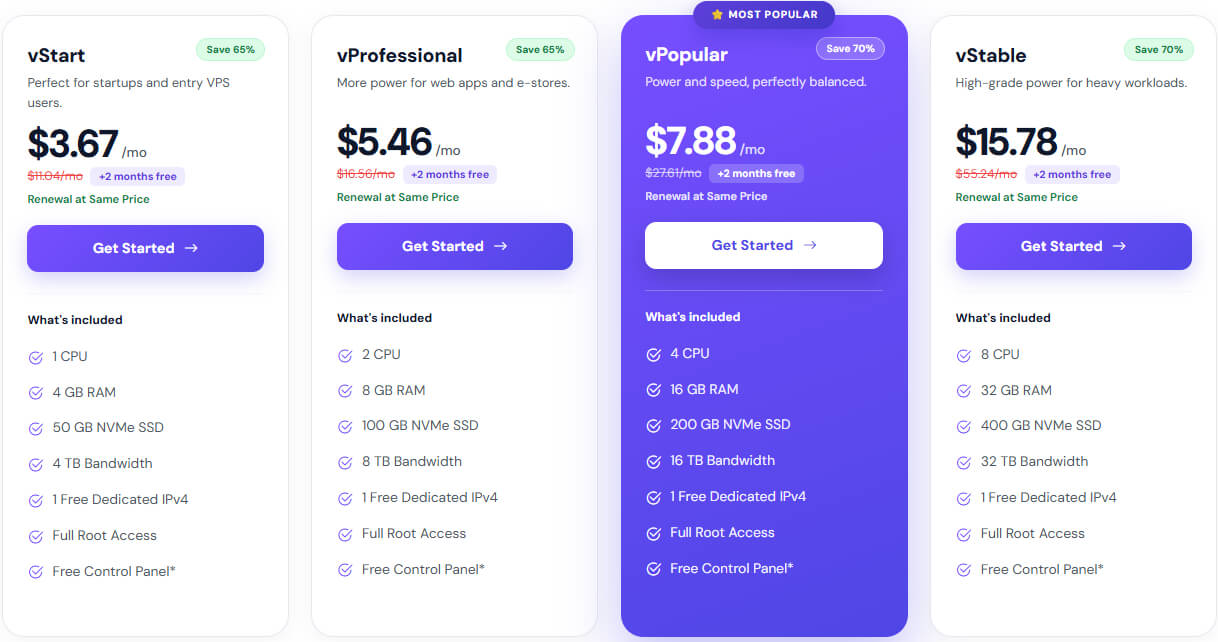
Choosing a VPS that is already optimized for OpenClaw makes a big difference in performance and setup time. Instead of spending hours configuring the server, installing dependencies, and fixing errors, an environment built specifically for automation allows everything to run smoothly from the start.
A strong and practical choice is OpenClaw VPS Hosting by YouStable, designed to handle continuous automation workloads with stability and speed.
Plans & Pricing
Why this works well for OpenClaw
- OpenClaw ready environment: Pre-configured setup so you can start instantly without manual configuration
- Consistent high performance: NVMe storage and dedicated resources ensure fast and stable execution
- Auto restart system: Keeps your workflows running even if a process fails
- Full control access: Complete server control to customize and scale as needed
- 24/7 uptime support: Reliable infrastructure with continuous monitoring
- Docker support included: Easy deployment and management of automation workflows
This setup is especially useful when your workflows need to run continuously without interruption. Instead of dealing with server side issues, you can focus completely on your automation, scaling it as your workload grows without performance drops.
Also Read: Run OpenClaw Bot 24/7 on a Linux VPS
FAQs
Can OpenClaw run on shared hosting?
u003cstrongu003eNou003c/strongu003e, OpenClaw is not suitable for shared hosting. It requires dedicated resources and proper server control to run automation tasks smoothly. Shared hosting environments limit both performance and flexibility, which can lead to slow execution and interruptions.
Is VPS required for OpenClaw?
Yes, VPS is the recommended option for running OpenClaw. It provides dedicated CPU, RAM, and full control over the server, which are essential for stable and continuous automation.
What VPS specs are required for OpenClaw?
OpenClaw can run on different configurations depending on usage:u003cbru003eu003cstrongu003e• Minimum setup:u003c/strongu003e 2 CPU cores, 4GB RAM, SSD storageu003cbru003eu003cstrongu003e• Recommended setup:u003c/strongu003e 4+ CPU cores, 8–16GB RAM, NVMe SSDu003cbru003eHigher specs help handle multiple workflows and improve overall performance.
Is shared hosting ever suitable for OpenClaw?
Shared hosting may work only for very basic testing, but it is not reliable for real usage. For consistent performance and long running tasks, VPS is always the better choice.
Conclusion
The difference between VPS and shared hosting becomes clear when OpenClaw starts handling real workloads. Shared hosting may seem convenient at first, but its limitations quickly appear as tasks grow and performance becomes inconsistent.
VPS hosting provides the stability, control, and dedicated resources required for smooth automation. Choosing the right setup from the beginning helps ensure reliable performance, fewer interruptions, and a system that can handle growth without issues.