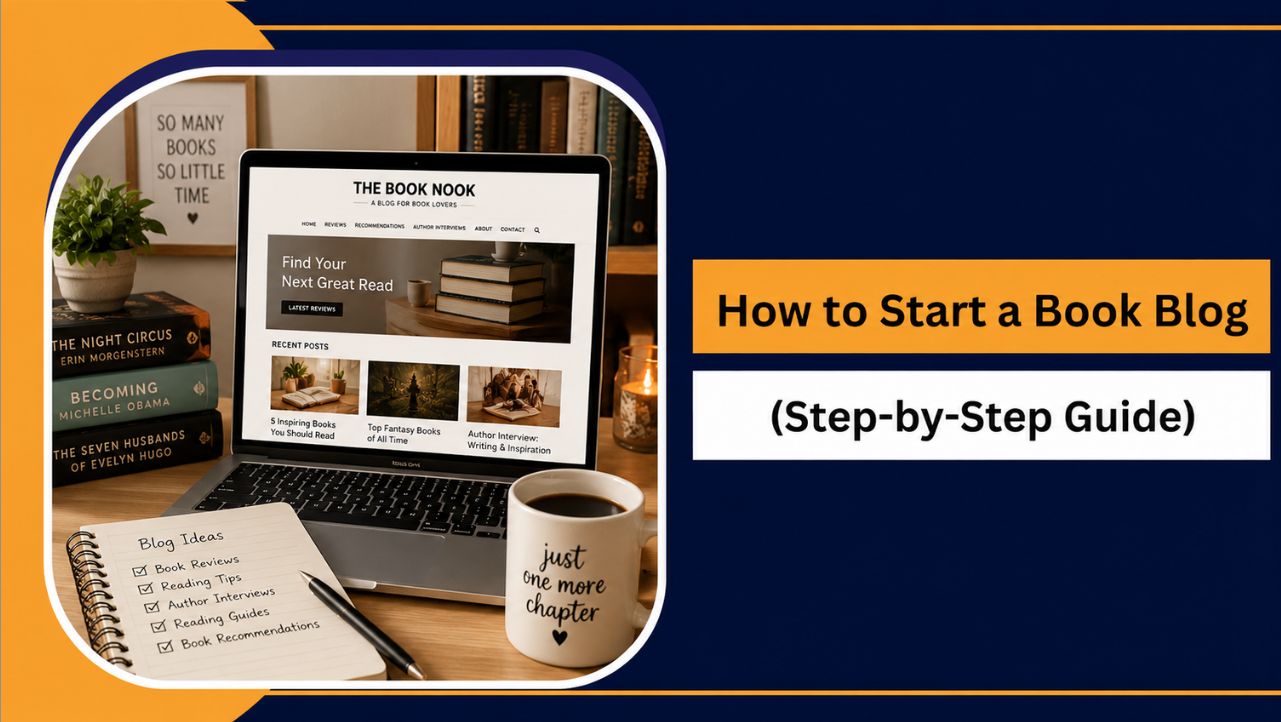
If you love reading and enjoy sharing your thoughts on books, starting a book blog can be a rewarding way to connect with fellow readers. It gives you a dedicated platform to recommend books, discuss favorite genres, and build your online presence.
Book blogging continues to grow as readers actively search for honest reviews, reading guides, and book recommendations before choosing their next read. With WordPress and beginner friendly hosting solutions, creating a professional book blog has become more accessible than ever.
You'll learn exactly how to start a book blog from scratch, from choosing a niche and setting up WordPress to publishing content, attracting readers, and building a strong foundation for long term growth.
What Is a Book Blog?
A book blog is a website where you share content related to books and reading. It can include book reviews, reading recommendations, author interviews, reading guides, and discussions about your favorite genres.
Unlike social media platforms, a book blog gives you complete control over your content and allows you to build a community of readers who share similar interests.
Whether you want to recommend great books, document your reading journey, or connect with fellow book lovers, a book blog provides a dedicated space to express your passion for reading and help others discover their next favorite book.
Why Start a Book Blog in 2026?
Readers still search for honest reviews before they buy a book, and a blog you own keeps working for you long after a social post disappears.
- Share your love of books with readers who like the same genres.
- Get free review copies from authors and publishers as you grow.
- Earn money from affiliate links, ads and sponsored reviews.
- Own your audience on your own domain, not on a platform that can change its rules.
What You Need Before Starting a Book Blog
Before creating your book blog, there are a few essentials you'll need. The good news is that you don't need technical expertise to get started.
- Choose a Clear Niche: Focus on a specific category, such as fantasy, romance, mystery, YA fiction, or non fiction, to attract the right audience.
- Get a Domain Name: Pick a short, memorable name that reflects your book blog and is easy to spell.
- Choose WordPress Hosting: Reliable WordPress hosting ensures good speed, security, backups, and an overall better experience for your readers.
- Use WordPress: As one of the most popular website platforms, WordPress is beginner friendly, customizable, and SEO friendly.
- Plan Your Content: Prepare a few article ideas in advance, such as book reviews, reading guides, recommendation lists, or monthly wrap ups.
- Stay Consistent: Growing a book blog takes time. Focus on publishing valuable content regularly and improving as you gain experience.
With these essentials in place, you'll be ready to start building your book blog with confidence.
How to Start a Book Blog in 2026: Step-by-Step
Follow these 12 steps in order and your book blog can be live in a single afternoon.
Step 1: Choose Your Book Blog Niche
A clear niche helps readers know what to expect and makes it easier to rank on Google. Pick the genres you read most, so you never run out of ideas.
- Fiction reviews across several genres
- Fantasy and science fiction for series and world-building fans
- Romance, mystery and thriller or young adult books
- Self-help, non-fiction or children's books for parents and teachers
Step 2: Research Topics Readers Are Searching For
Write what readers already search for. These free sources show you what people want:
- Google suggestions and People Also Ask for real reader questions
- Google Trends for books and genres that are rising
- Goodreads lists and Reddit book communities for popular discussions
Good first topics include book reviews, recommendation lists like best fantasy books for beginners, reading guides, author spotlights and book vs movie comparisons.
Step 3: Get a Domain Name and WordPress Hosting
Your domain is your book blog address, like bookishjourney.com, and hosting is where your blog lives. You can buy both together on YouStable in a few minutes, and a WordPress hosting plan gives you the domain free for the first year. Here is the exact flow, step by step.
3.1 Search for your book blog domain name
Open the YouStable domain registration page, type the name you want into the search box and click Search. Keep it short, easy to spell and related to books, for example bookishjourney, thereadingnook or pagesandplot.
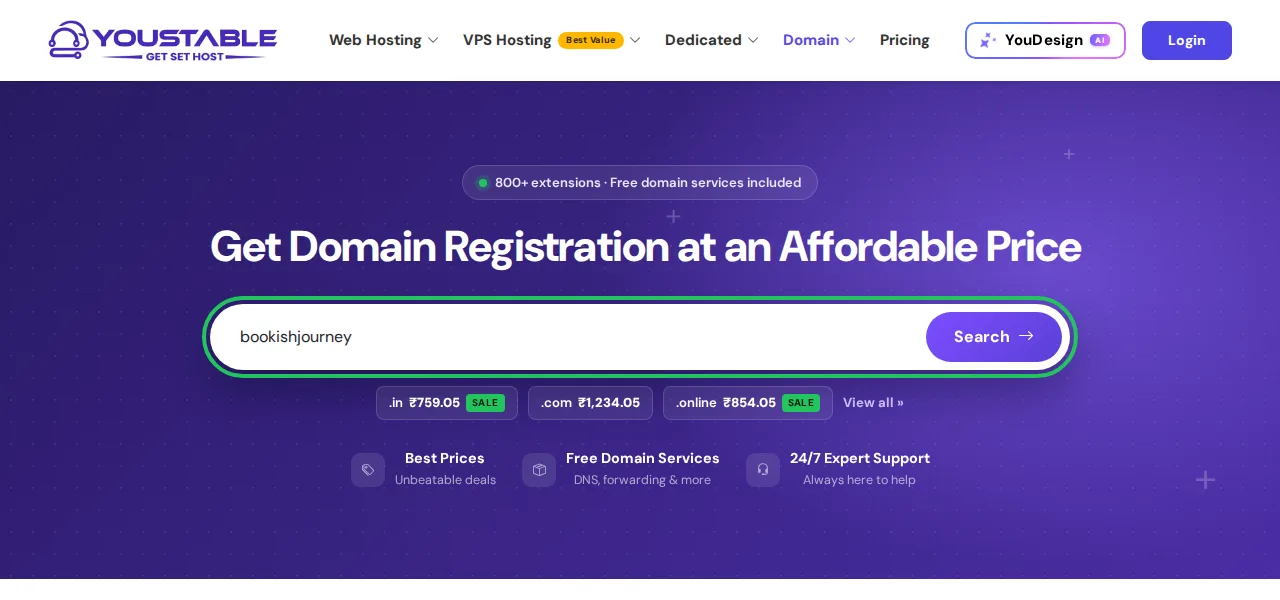
If the name is free, you will see a green is available message with the first-year price. If it is taken, try a different word or a different extension such as .in or .online.

3.2 Pick a WordPress hosting plan
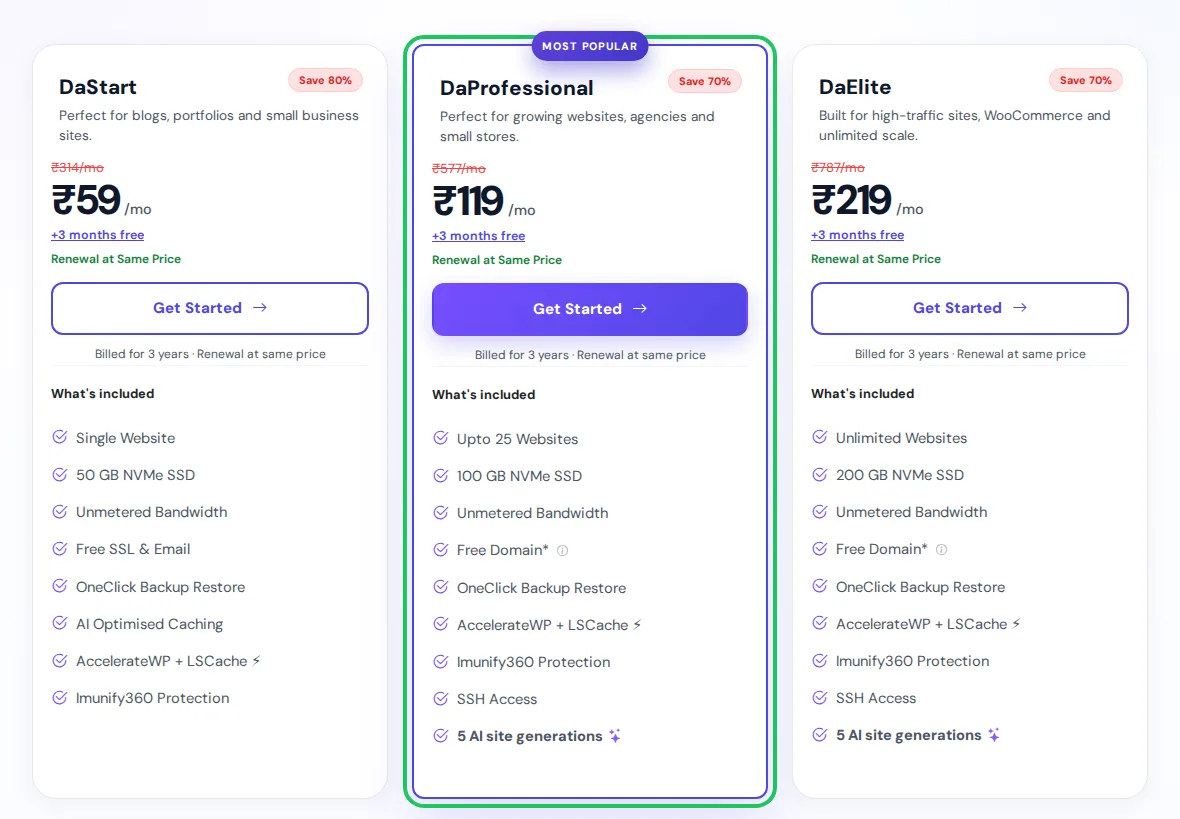
Next, go to the WordPress hosting page and choose a plan. For a new book blog, DaStart is enough for one site, while DaProfessional is the best value if you want a free domain, room for up to 25 sites and AI site generations to build pages faster. Pick the 3 Year tab for the lowest monthly price and 3 extra months free, then click Get Started.
3.3 Register your free domain with the plan
On the Choose a Domain step, stay on Register a New Domain, type your book blog name, keep .com selected and click Check. Free first-year registration works on .com, .org, .in, .xyz, .cfd and .co.in. If you already own a domain, choose Use Own Domain instead.
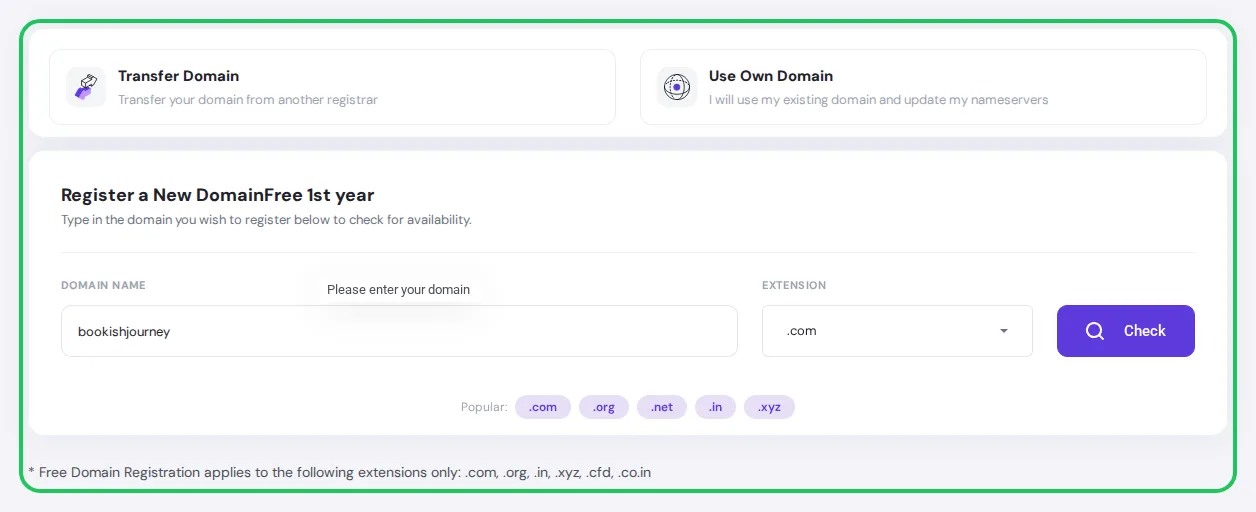
When the domain shows as available, add it and click Continue.
3.4 Review your domain and complete checkout
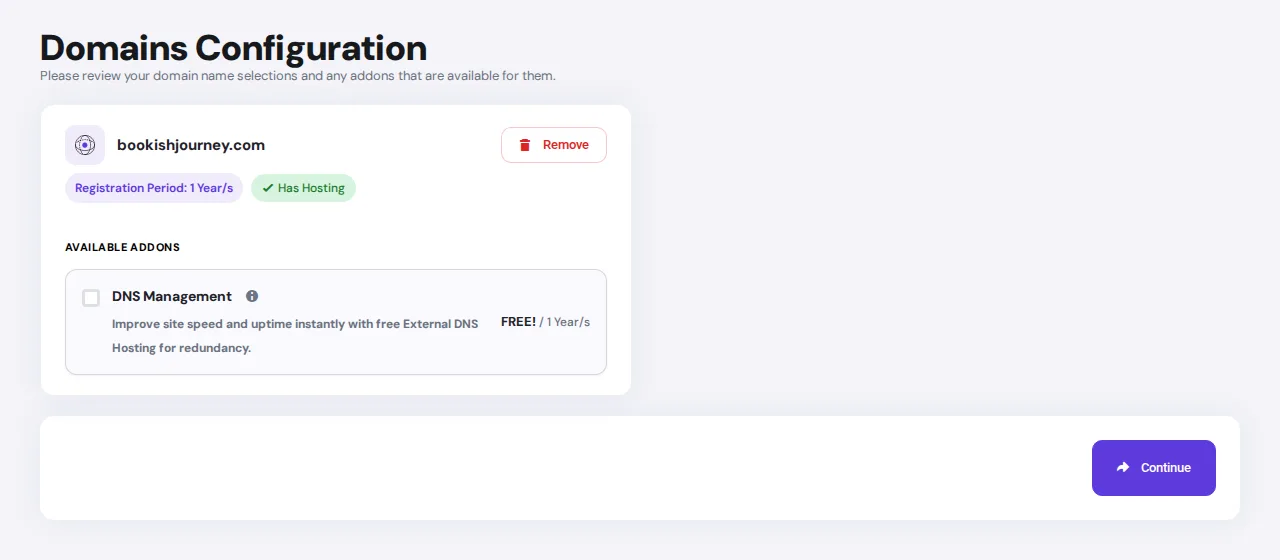
On the Domains Configuration page, check the domain name and the Has Hosting tag, then click Continue. Choose your billing cycle (the longer the term, the lower the monthly price), review the order summary and complete checkout with UPI, card or net banking.
- Use a coupon: check the YouStable coupons page before you pay for an extra discount on yearly plans.
- Keep your login safe: your hosting account details and DirectAdmin login arrive by email right after payment.
- Domain goes live fast: a new domain usually starts working within a few hours.
Step 4: Install WordPress on Your Hosting Account
WordPress is free, beginner friendly and gives you full control of your blog. YouStable hosting installs it in a few clicks:
- Log in to your YouStable client area with the details from your welcome email and open your hosting control panel.
- Open Softaculous Apps Installer and click WordPress → Install.
- Select your book blog domain, then add your site name and a short tagline.
- Create an admin username, a strong password and your email address.
- Click Install, then log in at yourdomain.com/wp-admin.
Step 5: Configure Essential WordPress Settings
Spend ten minutes on these settings before you write anything:
- Settings → General: site title, tagline and the correct time zone.
- Settings → Permalinks: choose Post name for clean, SEO friendly URLs.
- Settings → Reading: make sure search engines are not blocked.
- Clean up: delete the sample post and page, and update your profile name.
- Security: make sure your site loads on HTTPS and keep WordPress updated.
Step 6: Choose a Professional Theme for Your Book Blog
Pick a fast, mobile friendly theme that is easy to customise. These free themes all work well for book blogs:
- Astra: lightweight and the easiest choice for beginners (our pick).
- Kadence: fast with flexible design options.
- GeneratePress: clean code and great speed for SEO.
- Blocksy: modern layouts with simple controls.
To install one, go to Appearance → Themes → Add New Theme, search for it, click Install and then Activate.
Step 7: Install Essential WordPress Plugins
Plugins add features to your blog. Go to Plugins → Add New Plugin, search, then click Install Now and Activate. Start with these:
- Rank Math SEO for titles, meta descriptions and sitemaps.
- LiteSpeed Cache to make pages load faster.
- WPForms for your contact form.
- UpdraftPlus for automatic backups.
- Wordfence for security and ShortPixel for image compression.
Keep the list short and update plugins regularly, since too many plugins slow your site down.
Step 8: Create Important Pages for Your Book Blog
A few basic pages build trust with readers, authors and publishers. To create one, go to Pages → Add New Page in your WordPress dashboard, add a title and your content, then click Publish. These are the pages every book blog needs:
- About: who you are, your favourite genres and what readers can expect from your reviews.
- Contact: a simple form or email address so authors and publishers can send review requests.
- Privacy Policy: start from the template under Settings → Privacy and edit it for your site.
- Disclaimer: a short note that your reviews are your personal opinion.
- Affiliate Disclosure: required once you add Amazon or other affiliate links.
- Start Here (optional): your best reviews and reading lists for new visitors.
Once they are live, add them to your menu from Appearance → Menus so readers can always find them.
Step 9: Publish Your First Book Blog Post
Go to Posts → Add New Post and start with a review of a book you loved. A simple review structure that readers enjoy:
- Book details: title, author, genre and page count.
- A short synopsis without major spoilers.
- What you enjoyed and what could have been better.
- Who will enjoy this book.
- Your final thoughts and rating.
Write like you are talking to a fellow reader, keep paragraphs short and stay honest. Publishing regularly matters more than making every post perfect.
Step 10: Optimize Your Book Blog for SEO
SEO brings free, long term traffic from Google. Focus on these basics:
- Target one keyword per post, such as a book title plus review, and use it in the title and first paragraph.
- Write a clear title and meta description with Rank Math.
- Link related posts together so readers stay longer.
- Compress images and add alt text to every cover.
- Keep the site fast and mobile friendly with caching and good hosting.
- Track results in Google Search Console. Most new blogs see traffic grow after 3 to 6 months.
Step 11: Promote Your Book Blog
Share every post where readers already spend time:
- Pinterest: create pins for reviews and reading lists for long term traffic.
- Goodreads and Instagram: join the bookstagram and reviewer communities.
- Facebook groups: take part in book club and genre groups.
- Email list: start collecting subscribers from day one.
- Other book bloggers: network, collaborate and repurpose posts into short videos.
Step 12: Monetize Your Book Blog
Yes, a book blog can make money. Most book bloggers start earning once they have steady traffic and a loyal audience. Start with one or two of these methods, then add more as you grow.
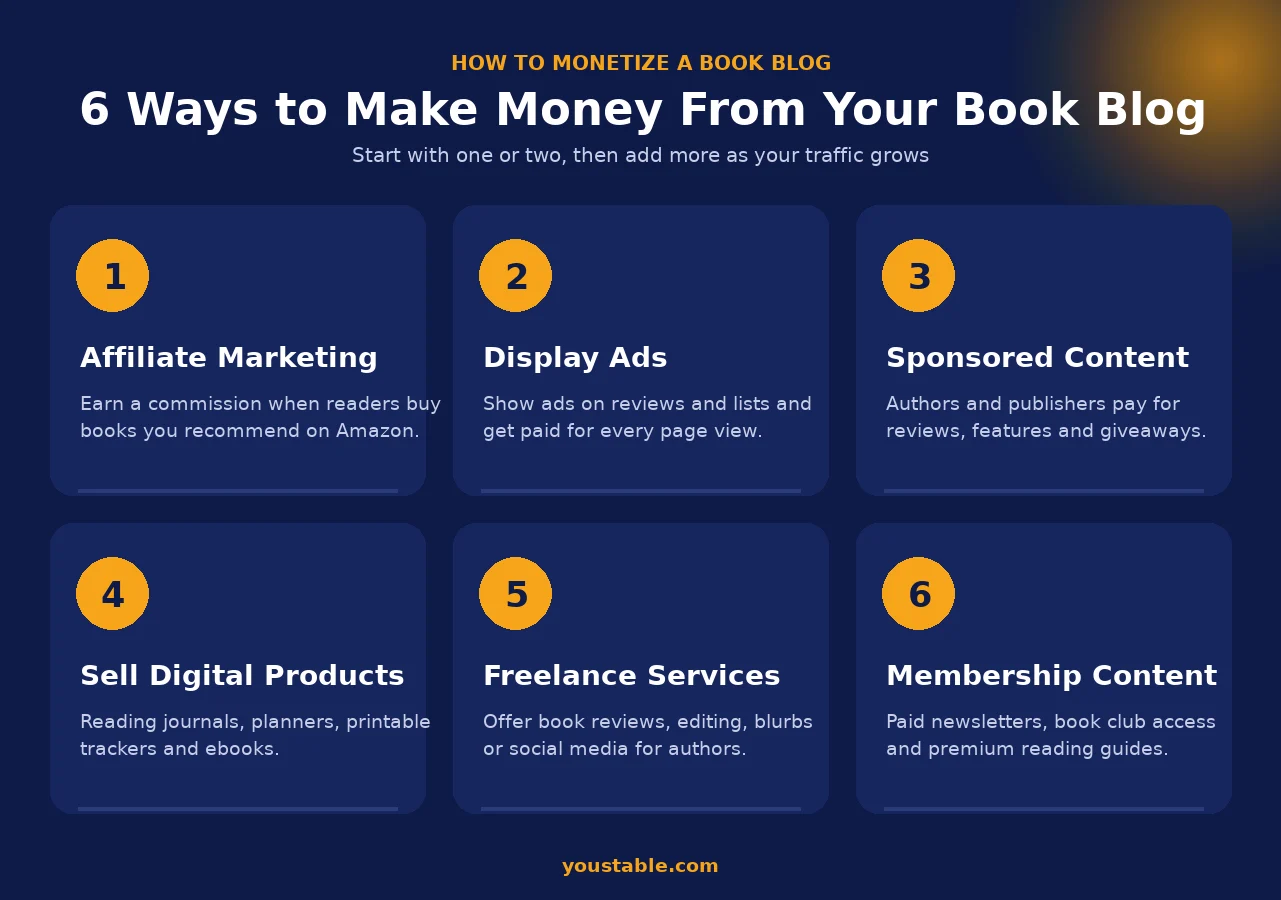
- Affiliate marketing: earn a commission when readers buy books you recommend through Amazon Associates or other programs.
- Display ads: place ads on reviews and reading lists and get paid for page views once your traffic grows.
- Sponsored content: authors and publishers pay for reviews, features, interviews and giveaways.
- Digital products: sell reading journals, planners, printable trackers or your own ebooks.
- Freelance services: offer review writing, editing, blurbs or social media help for authors.
- Membership content: run a paid newsletter, book club or premium reading guides.
Tip: honest reviews build the trust that every income stream depends on. Always disclose affiliate links and sponsored posts, and keep your reading passion first.
Common Mistakes to Avoid When Starting a Book Blog
Many new book bloggers make avoidable mistakes that can slow their growth. Some common ones include choosing a broad niche, waiting for everything to be perfect, publishing inconsistently, ignoring basic SEO, selecting unreliable hosting, and focusing on monetization too early.
It's also important not to compare yourself with established bloggers or give up if results don't come immediately.
| Mistake | How to Avoid It |
| Choosing a Broad Niche | Focus on a specific book category initially. |
| Waiting for Perfection | Start publishing and improve over time. |
| Inconsistent Posting | Follow a realistic content schedule. |
| Ignoring SEO | Learn basic SEO practices from the beginning. |
| Choosing Poor Hosting | Use reliable WordPress hosting for better performance. |
| Comparing Yourself to Others | Focus on your own progress and growth. |
| Skipping Backups | Regularly back up your website data. |
| Writing Only for SEO | Prioritize reader value and authentic content. |
| Monetizing Too Early | Build trust before focusing on income. |
| Giving Up Too Soon | Stay patient and remain consistent. |
Remember, successful book blogs aren't built overnight. Focus on continuous improvement, provide value to your readers, and stay consistent with your efforts.
Also Read:
FAQs
Is starting a book blog still worth it in 2026?
Yes. Readers continue searching for book reviews, recommendations, reading guides, and authentic opinions from fellow book enthusiasts. A book blog also gives you complete ownership over your content, unlike many social media platforms.
How much does it cost to start a book blog?
Starting a book blog is affordable, especially for beginners. With YouStable WordPress Hosting, you can launch your blog for a relatively low investment while getting all the essential features needed to get started.
• DaStart Plan: ₹59/month → ₹708/year
• DaProfessional Plan (Recommended): ₹119/month → ₹1,428/year (includes a free domain for 1 year)
• DaElite Plan: ₹219/month → ₹2,628/year
• Domain Name: Free for 1 year with eligible plans.
• WordPress: Free to use.
• Premium Themes/Plugins: Optional, not required initially.
Do I need technical skills to start a book blog?
No. Modern WordPress hosting providers offer beginner friendly tools such as one click WordPress installation, making it possible to launch a blog without coding knowledge.
Which hosting is best for beginner book bloggers?
Many beginners prefer WordPress hosting solutions that simplify setup and provide essential features such as backups, security, and easy WordPress installation.
YouStable WordPress Hosting is one option worth considering because it includes beginner friendly tools and a free domain with eligible plans.
What should I write about if I'm just getting started?
Some beginner friendly content ideas include:
• Book reviews
• Reading wrap ups
• Genre recommendations
• Reading challenge updates
• Lists of favorite books
• Author spotlights
Start with topics you're genuinely excited to discuss.
Conclusion
Starting a book blog is easier than many beginners expect when you follow the right steps. From choosing a niche and setting up WordPress to publishing content and growing an audience, each step helps build a strong foundation for long term success.
The most important thing is to start. You don't need to be an expert writer or web developer to create a successful book blog. Focus on sharing honest insights, helping readers discover great books, and consistently publishing valuable content.
If you're ready to launch your book blog, choosing reliable WordPress hosting can simplify the process. With beginner friendly features, one click WordPress installation, and a free domain for one year on eligible plans, YouStable WordPress Hosting can help you get started with confidence.