Choosing a Windows VPS plan in India may look simple at first, but once you start comparing different plans, the confusion begins. One plan offers more RAM, another promises faster storage, and another focuses on lower pricing. The real question you should ask yourself is simple: which Windows VPS plan actually suits your needs?
Think about what you want to run on the server. Are you hosting an ASP.NET website, running business software, managing databases, or using Remote Desktop to access applications? The resources you choose, CPU, RAM, storage, and network speed, directly affect how smoothly everything works.
Windows VPS hosting is popular because it provides dedicated resources and full control through Remote Desktop. Once you understand how these resources impact performance, selecting the right VPS plan becomes much easier and helps you avoid common mistakes when buying a server.
What Is a Windows VPS?
A Windows VPS (Virtual Private Server) is a virtual server that runs on a physical machine using virtualization technology. The physical server is divided into multiple virtual servers, and each VPS receives dedicated resources such as CPU cores, RAM, storage, and bandwidth.
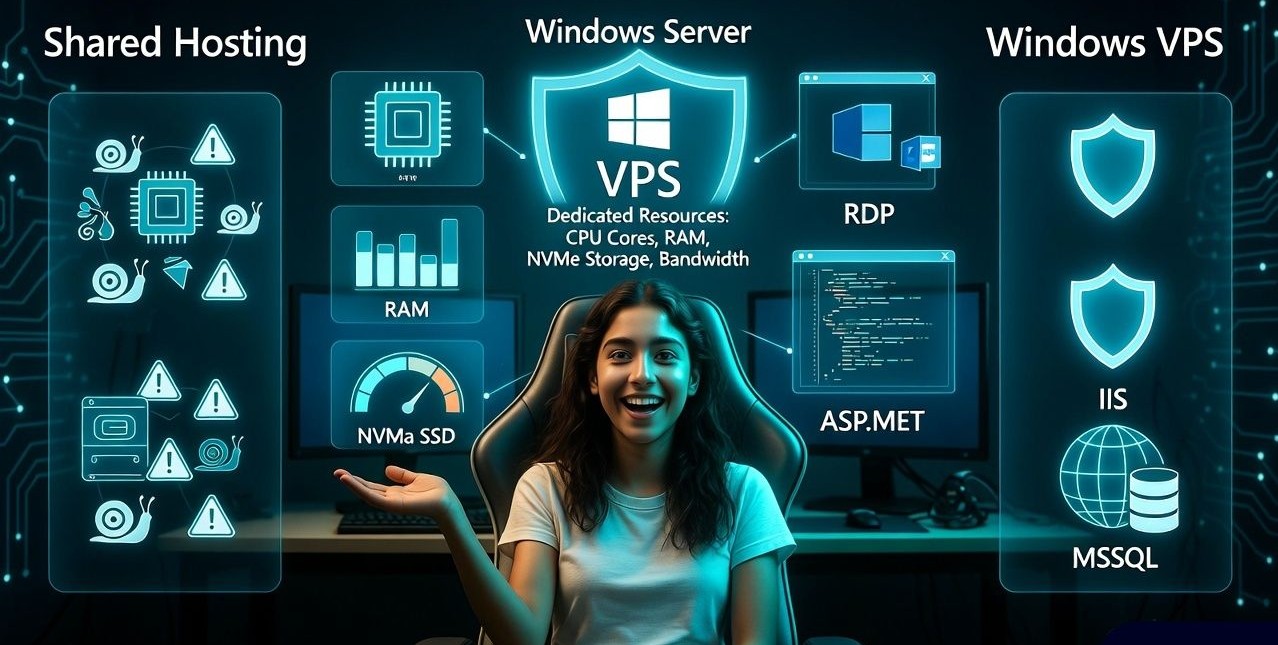
Unlike shared hosting, where multiple websites share the same environment, a VPS provides isolated resources. This ensures better performance, improved security, and more control over the server configuration.
A Windows VPS specifically runs the Microsoft Windows Server operating system. This allows users to run Windows based applications, manage the server through Remote Desktop Protocol (RDP), and use services such as IIS web server and Microsoft SQL Server.
Windows VPS hosting is commonly used for hosting ASP.NET applications, running business software, managing remote work environments, and hosting databases.
Why Choose Windows VPS Hosting in India?
Selecting a Windows VPS located in India can significantly improve website performance for Indian users. Server location directly affects latency and response times.
When the server is physically closer to visitors, data travels a shorter distance, resulting in faster loading speeds.
Key advantages of choosing a Windows VPS in India include:
- Lower latency for Indian users: Websites load faster when hosted in Indian data centers such as Mumbai, Bangalore, or Delhi.
- Local payment options: Many Indian hosting providers support UPI, debit cards, and INR billing.
- Better customer support availability: Local hosting companies often provide support aligned with Indian time zones.
- Improved SEO performance for local audiences: Search engines consider server location as a minor factor in local search performance.
For businesses targeting Indian customers, hosting the server within the country usually provides a much better overall user experience. Many users prefer providers that offer reliable Indian data centers, stable network connectivity, and responsive support.
Platforms like YouStable Windows VPS hosting are often chosen because they provide Indian server locations, fast NVMe storage, and easy Remote Desktop access for Windows based applications.
Key Factors to Consider Before Buying a Windows VPS Plan
Choosing the correct VPS plan depends on understanding how each resource impacts performance.
CPU Performance
CPU power determines how quickly your applications process requests.
Windows VPS plans usually allocate virtual CPU cores (vCPUs). Each vCPU represents a share of the physical processor.
Typical recommendations include:
| Use Case | Recommended CPU |
| Small websites or development servers | 1-2 vCPU |
| Business websites or applications | 2-4 vCPU |
| High traffic websites or multiple apps | 4-8 vCPU |
Applications such as databases, ERP systems, or trading platforms often require higher CPU performance.
RAM Requirements
RAM directly affects how many applications and users the server can handle simultaneously.
Insufficient RAM can cause slow performance, application crashes, or excessive disk usage.
Typical RAM requirements include:
| Use Case | Recommended RAM |
| Small website or testing environment | 2GB |
| Business website or application | 4GB |
| Multiple applications or databases | 8GB or more |
If you plan to host databases or multiple services, selecting additional RAM can significantly improve stability.
Storage Type (SSD vs NVMe)
Storage speed is another major factor affecting VPS performance.
Older servers used HDD storage, which is much slower than modern solutions.
Modern VPS hosting typically offers:
- SSD storage: Solid State Drives provide much faster read and write speeds compared to HDD.
- NVMe SSD storage: NVMe drives connect directly to the PCIe interface, offering significantly faster data access.
NVMe storage is particularly useful for databases, high traffic websites, and applications that frequently access disk data.
Windows Server Version
Windows VPS plans typically provide multiple operating system options, such as:
- Windows Server 2016
- Windows Server 2019
- Windows Server 2022
Newer versions of Windows Server include improved security features, better performance optimization, and longer support lifecycles.
Windows Server 2022 is currently one of the most widely recommended options for modern deployments.
Data Center Location
The data center location affects network latency and reliability.
Common Indian server locations include:
- Mumbai
- Bangalore
- Delhi NCR
If your audience is primarily within India, choosing a local data center improves website speed and response times.
For global audiences, some businesses use data centers in Singapore or Europe to balance global traffic distribution.
Network Speed and Bandwidth
A good Windows VPS should provide high network speed and sufficient bandwidth.
Many providers offer 1 Gbps network connectivity, which supports large amounts of data transfer.
Bandwidth refers to the total amount of data transferred each month.
Plans may offer:
- Limited monthly bandwidth (for example 2–5 TB)
- Unmetered bandwidth
High traffic websites or download services should select plans with higher bandwidth limits.
Remote Desktop Access (RDP)
One major advantage of Windows VPS hosting is Remote Desktop Protocol (RDP).
RDP allows users to access their server exactly like a Windows computer.
This enables users to:
- Install and run Windows applications
- Manage websites and databases
- Control the server remotely from anywhere
Many businesses use Windows VPS as remote work environments where employees connect through RDP.
Security Features
Security is essential for any server hosting environment.
A reliable Windows VPS plan should include security features such as:
- DDoS protection
- Firewall configuration
- Malware protection
- Backup systems
- Secure data center infrastructure
Regular server updates and monitoring also help prevent vulnerabilities.
Managed vs Unmanaged Windows VPS
Before purchasing a Windows VPS, you should decide whether you prefer a managed or unmanaged server.
Managed VPS
With managed VPS hosting, the provider handles tasks such as:
- Server setup
- Security updates
- Monitoring
- Technical support
This option is ideal for beginners or businesses without system administrators.
Unmanaged VPS
With unmanaged VPS hosting, the user is responsible for:
- Server configuration
- Security management
- Software updates
Unmanaged VPS plans are typically cheaper but require technical expertise.
Read Also: Top 7 Benefits of Windows VPS Hosting for Indian Businesses
How Much Does a Windows VPS Cost in India?
Windows VPS hosting generally costs more than Linux VPS hosting because the server includes a licensed Microsoft Windows operating system.
The exact price depends on resources such as CPU cores, RAM, NVMe storage, bandwidth, and management features.
For example, YouStable Windows VPS hosting in India currently offers several plans depending on server resources. Based on their current configuration, the pricing typically starts from around ₹1,809 per month and increases depending on the hardware configuration.
Typical Windows VPS pricing from YouStable includes:
| VPS Plan | Monthly Price | Resources |
| RDP-Startup | ₹1,809/mo | 2Core CPU, 4GB RAM, 60GB NVMe |
| RDP-Pro | ₹2,624/mo | 4Core CPU, 8GB RAM, 125GB NVMe |
| RDP-Popular | ₹4,615/mo | 6Core CPU, 16GB RAM, 250GB NVMe |
| RDP-Extreme | ₹7,692/mo | 8Core CPU, 32GB RAM, 500GB NVMe |
All these plans typically include Windows Server 2019/2022 support, NVMe SSD storage, 1TB bandwidth, 99.9% uptime, and full admin access, making them suitable for hosting ASP.NET applications, databases, and Windows based workloads.
Because the pricing scales with server resources, users can start with an entry level plan and upgrade as their applications or traffic grow.
Common Use Cases for Windows VPS
Windows VPS servers support a wide variety of workloads.
Common use cases include:
- Hosting ASP.NET websites
- Running Microsoft SQL Server databases
- Remote desktop environments
- Forex trading platforms
- Game servers
- Business applications
- Software development environments
Because Windows VPS provides dedicated resources and full administrative access, it can support both development and production environments.
Signs You Need to Upgrade Your VPS
Over time, server workloads can grow. Recognizing the signs of resource limitations helps maintain performance.
Common indicators include:
- High CPU usage
- Frequent memory shortages
- Slow application response times
- Increased website traffic
- Storage capacity reaching limits
Upgrading to a higher VPS plan can resolve these issues and provide additional scalability.
Tips for Choosing a Reliable Windows VPS Provider
Selecting a reliable hosting provider is just as important as choosing the right plan.
Key factors to evaluate include:
- Uptime guarantee: Look for providers offering at least 99.9% uptime.
- Modern hardware: Servers using NVMe storage and modern processors offer better performance.
- Technical support availability: Reliable support ensures quick issue resolution.
- Transparent pricing: Avoid providers that advertise very low prices but charge hidden fees later.
- Scalability options: The ability to upgrade CPU, RAM, and storage easily is important for future growth.
When comparing providers, it is also helpful to choose companies that specialize in performance focused VPS infrastructure. For example, YouStable Windows VPS hosting is often recommended by developers and businesses because it offers NVMe based servers, scalable plans, and support for Windows applications such as ASP.NET and MSSQL.
Beginner Tips Before Buying a Windows VPS
If you are purchasing a VPS for the first time, consider these practical tips:
- Start with a plan that allows easy upgrades.
- Choose NVMe storage for better performance.
- Ensure backups are included or available.
- Verify that the Windows license is included in the price.
- Check the provider’s support response time.
Following these tips helps prevent common mistakes when selecting VPS hosting.
FAQs
Is Windows VPS better than Linux VPS?
u003cstrongu003eWindows VPS is better suited foru003c/strongu003e Microsoft technologies such as ASP.NET, IIS, and MSSQL. Linux VPS is more commonly used for open source applications.
Do I need technical knowledge to use Windows VPS?
u003cstrongu003eBasic server knowledge isu003c/strongu003e helpful, but managed VPS services simplify server management for beginners.
Can I host websites on a Windows VPS?
u003cstrongu003eYesu003c/strongu003e. Windows VPS supports web hosting through IIS web server and can run applications built with ASP.NET.
Is Windows VPS suitable for small businesses?
u003cstrongu003eYesu003c/strongu003e. Windows VPS provides dedicated resources, remote access, and scalability, making it a practical solution for growing businesses.
Conclusion
By carefully evaluating these aspects and selecting a reliable hosting provider, businesses and developers can deploy Windows based applications with stability and long term scalability. Choosing a trusted provider such as YouStable can also simplify the process by offering optimized Windows VPS infrastructure designed for modern workloads.