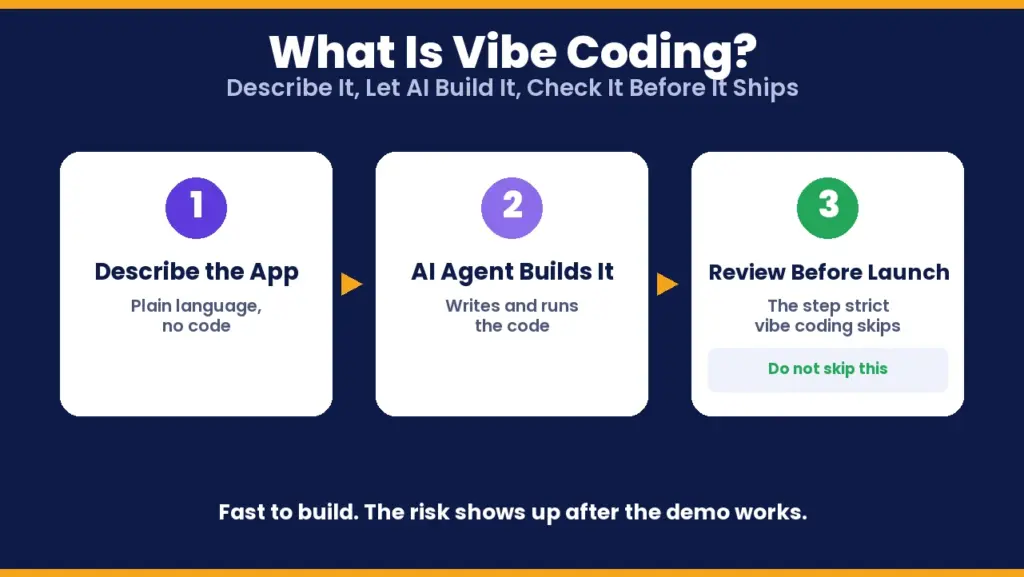
Vibe coding is not the same thing as using AI to help you code. The strict version of the term, coined by AI researcher Andrej Karpathy in February 2025, means something more specific: you describe what you want in plain language, an AI agent writes and runs the code, and you never actually read it. You just keep describing what is wrong until it works. Collins Dictionary named it word of the year for 2025, which says something about how fast this moved from a niche habit to a default way to build software.
The part everyone skips past is what happens after the demo works. This guide covers both halves of that problem: what vibe coding actually is versus what people assume it is, and once you have an app you half-understand, what kind of VPS it actually needs to survive real traffic instead of just a local preview.
Vibe Coding at a Glance
| Question | Short answer |
|---|---|
| Who coined the term | Andrej Karpathy, February 2025 |
| What it actually means | Describing what you want to an AI agent and accepting the code without reading it |
| What people often mean instead | AI-assisted coding where a developer still reviews the diff |
| Typical stack it lands on | Next.js or React frontend, Node or Python backend, a hosted database like Supabase or a local SQLite file |
| Biggest real risk | Security flaws that were never reviewed, not just bugs |
| Best place to host a serious one | A VPS sized for the actual backend, not the free tier it was prototyped on |
Keep this table in mind as you read. Most of the confusion around vibe coding comes from the gap between the strict definition and how the term actually gets used day to day.
What Is Vibe Coding, Really?
In its strict sense, vibe coding means you give an AI agent a goal in natural language, let it write, run, and fix its own code, and you judge the result only by whether it works, not by reading what it wrote. You stop treating the code as something you own and start treating it the way you treat a finished product you bought: you test the outcome, not the internals.
That strict definition is genuinely contested. A large share of people who say they are vibe coding are actually doing something looser: AI-assisted development where a person still reads the diff, writes or checks tests, and takes responsibility for what ships. That workflow is faster than typing every line by hand, but it is not vibe coding in Karpathy's original sense, it is AI-assisted engineering with a human still in the loop. The distinction matters because the risks below apply mainly to the strict version, where nobody is checking the AI's work at all.
Tools built around this workflow, like Cursor, Replit Agent, Lovable, and Bolt, let someone with no coding background describe a working app and watch it get built in minutes. That is genuinely useful for a prototype, an internal tool, or a weekend project. It becomes a problem only when that prototype quietly turns into the thing real customers rely on, without anyone going back to check what got built.
What a Vibe-Coded App Actually Produces
In practice, "describe it and get an app" tends to produce one of a few shapes, almost regardless of what you asked for:
- A frontend plus a thin backend. A React or Next.js interface talking to a small Node or Python API, because that is the pattern most AI coding tools were trained on most heavily.
- A hosted database bolted on fast. Supabase or Firebase get picked by default because they skip the step of setting up a database server, not because they were evaluated against alternatives.
- Authentication that looks done but is not configured correctly. A login screen that works for you, on your laptop, is not the same as a login system that correctly checks permissions for every user on every request.
- A SQLite file pretending to be a production database. It works perfectly in a demo with one user. It does not behave the same way under concurrent writes from real traffic.
None of this is necessarily bad. It is exactly what a fast prototype should look like. The problem shows up when that prototype gets deployed as-is and starts handling real user data, real payments, or real traffic, with nobody having gone back to check any of the four points above.
The Real Risk: Nobody Reviewed the Code
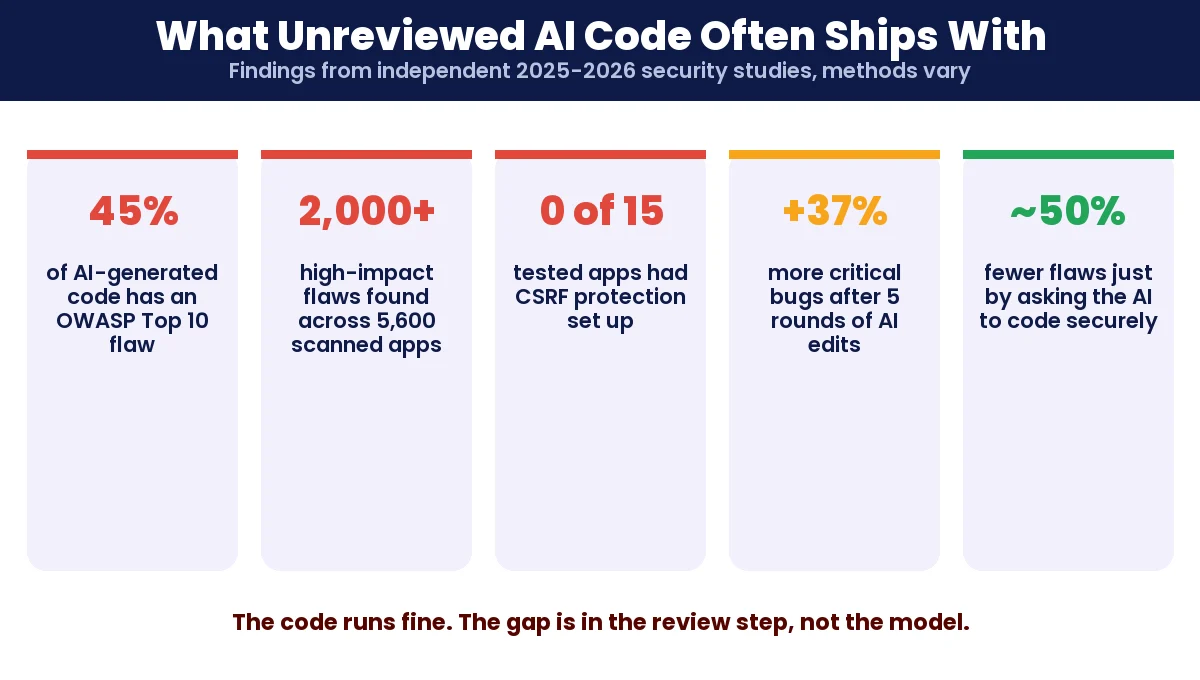
This is the part most "what is vibe coding" guides either skip or soften. Several independent studies through 2025 and early 2026 looked at AI-generated code specifically for security flaws, and the numbers are not close to reassuring, though the exact figures vary a lot depending on how each study was run.
- A Veracode benchmark covering more than 100 AI models across 80 security-sensitive coding tasks found that roughly 45 percent of the generated code contained a flaw from the OWASP Top 10 list, a rate that has barely moved in about two years of model improvements.
- A security firm called Escape scanned 5,600 publicly deployed vibe-coded apps and found more than 2,000 high-impact vulnerabilities, over 400 exposed secrets such as API keys, and 175 cases of exposed personal data sitting in plain view.
- A separate test of 15 apps built across five different AI coding tools found 69 vulnerabilities combined, and not one of the 15 apps had CSRF protection or basic security headers set up.
- One study found that repeatedly asking an AI agent to revise and improve an app made security worse, not better: after five rounds of edits, the code had roughly 37 percent more critical vulnerabilities than the very first version.
- In early 2026, one widely reported incident involved a vibe-coded app leaking roughly 1.5 million API keys and 35,000 user email addresses through a misconfigured database that nobody had checked before launch.
These numbers come from different organizations using different methods, so treat them as directional rather than a single agreed-upon statistic. The consistent theme across all of them is the same: the code often runs fine and looks finished, while the gap is entirely in the review step that strict vibe coding skips by design. One encouraging finding from the same research: simply instructing the AI agent to follow secure coding practices, even with a generic prompt, cut vulnerability rates roughly in half. Detailed guidance pulled from OWASP or MITRE's own secure-coding references worked even better than a generic reminder.
What Stack Vibe-Coded Apps Usually Land On
Before picking a VPS, it helps to know what you are actually hosting. AI coding agents default heavily toward a small set of frameworks, since that is what they saw the most of during training:
| Layer | What usually gets picked | Why it matters for hosting |
|---|---|---|
| Frontend | Next.js, React, or plain Vite | Can often be served as static files if there is no server-side rendering |
| Backend | Node (Express) or Python (FastAPI, Flask) | Needs a process that stays running, not just static file serving |
| Database | SQLite file, or a hosted service like Supabase | SQLite does not survive real concurrent traffic well and has no built-in backup story |
| Auth | A hosted auth provider or a copied login template | Frequently missing proper session expiry or role checks |
The practical takeaway: if your app has any backend process at all, a serverless static host cannot run it properly. You need somewhere a Node or Python process can run continuously, which is exactly what a VPS is for. If the backend is a Node app specifically, our guide on how to deploy a Node JS app on Ubuntu VPS covers the actual server setup step by step.
VPS Sizing: What It Actually Needs
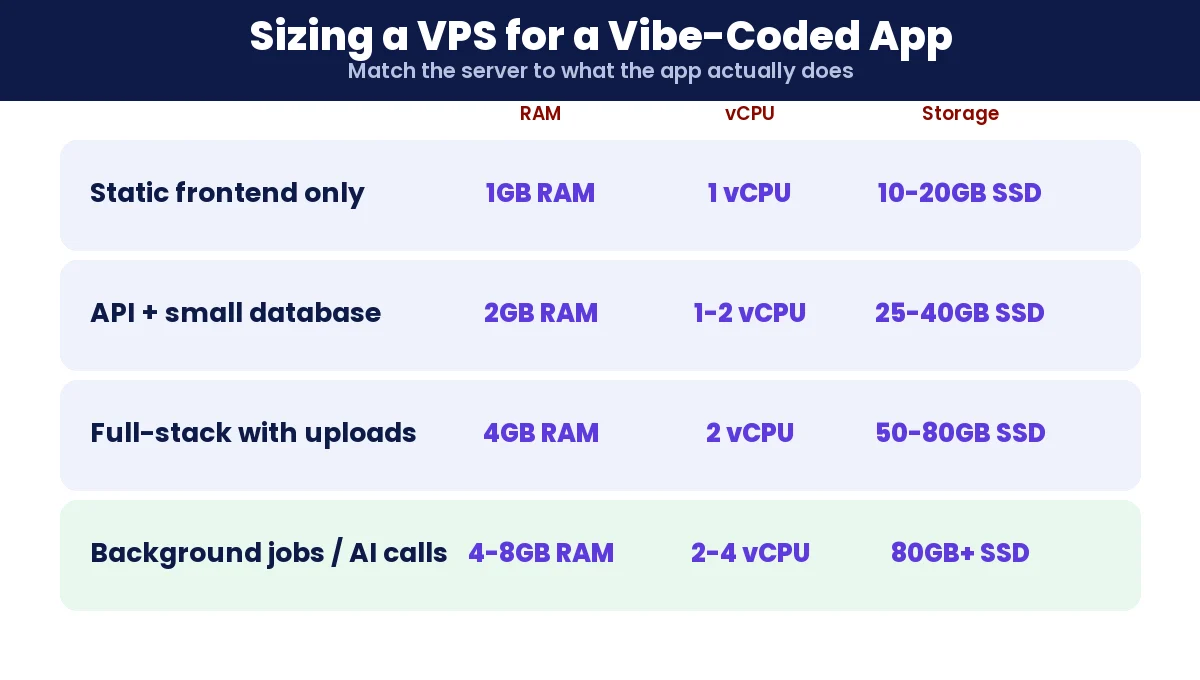
A vibe-coded app is usually small and light on its own, so it rarely needs a large server. What it needs is the right shape of server, not necessarily a big one.
| App type | RAM | vCPU | Storage | Notes |
|---|---|---|---|---|
| Static frontend only, no backend | 1 GB | 1 | 10 to 20 GB SSD | Barely needs a VPS at all, a basic plan is enough |
| Node or Python API with a small database | 2 GB | 1 to 2 | 25 to 40 GB SSD | Covers most early-stage prototypes moved into light production |
| Full-stack app with real user accounts and uploads | 4 GB | 2 | 50 to 80 GB SSD | Room for a proper database, backups, and file storage together |
| Anything with background jobs or an AI API call per request | 4 to 8 GB | 2 to 4 | 80 GB+ SSD | Queued jobs and external API calls both hold memory longer than a simple request |
Two sizing mistakes show up constantly with apps built this way. First, picking a plan based on the free tier the app was prototyped on, which was never meant for real users. Second, ignoring storage growth, since uploaded files and database size both creep up quietly until a disk-full error takes the whole app down at the worst possible time.
Managed VPS or Unmanaged: What Fits a Non-Developer
This is the one decision worth being honest about if you built your app by describing it rather than writing it. An unmanaged VPS gives you full root access and the lowest price, but it assumes you can configure a firewall, set up SSL, apply security patches, and diagnose a crashed process at 2 a.m. If you vibe-coded the app itself, there is a good chance you have not done any of that before, and that is exactly the kind of gap that shows up in the security numbers above.
A managed VPS costs more but includes someone handling the server layer: OS patching, firewall rules, backups, and support when something breaks at the infrastructure level. That does not fix security problems inside your own application code, but it closes off an entire category of risk that has nothing to do with your app and everything to do with the server underneath it.
- Pick unmanaged if you are comfortable with a terminal, or you already have someone who is, and you want the lowest ongoing cost.
- Pick managed if the app was built without anyone on the team having prior server experience, or if it is going to handle real user data or payments.
Common Deployment Mistakes
These show up repeatedly when a vibe-coded app moves from a local preview to a real server, mostly because the AI agent never had to think about a second environment:
- Hardcoded localhost URLs. The frontend was told to call
http://localhost:3000directly, which works perfectly until it is deployed anywhere else. - Missing environment variables. API keys and database credentials that worked locally because they sat in a file that never got copied to the server.
- CORS misconfiguration. Either locked so tight the frontend cannot reach its own backend, or opened so wide that any website can call your API.
- Exposed secrets in the repository. An API key typed straight into a file instead of an environment variable, then pushed to a public or shared repository without anyone noticing.
- No process manager. The app runs fine until the terminal session that started it closes, then it silently goes offline with no automatic restart.
Moving From Prototype to Something You Can Trust
Before a vibe-coded app takes real traffic, a short checklist closes most of the gap described above, without requiring you to rewrite everything from scratch:
- Move off a SQLite file to a real database server like PostgreSQL or MySQL if more than one person will ever use the app at the same time.
- Move every API key and credential out of the code and into environment variables on the server, never committed to a repository.
- Ask the AI agent directly to review its own code for OWASP Top 10 issues, and separately ask it to add CSRF protection and security headers if those are missing, since both are commonly skipped by default.
- Set up a process manager, such as PM2 for Node apps or systemd for Python ones, so the app restarts automatically if it crashes.
- Put a basic firewall and SSL certificate in place before the app is reachable from outside your own network.
- Set up automated backups for the database and uploaded files, since a prototype rarely has any backup plan at all.
Where Should You Actually Deploy It?
The honest split, based on what the app actually is rather than how it was built:
- Pure static frontend, no backend at all: a static host works fine, a VPS is overkill.
- Full-stack app with its own backend and database: this needs a VPS, or a platform that is really just a VPS with a simpler dashboard on top.
- You want to never touch a terminal: a managed VPS or a platform-as-a-service option trades some cost and control for someone else handling the server layer.
- You want full control and the lowest long-term cost: an unmanaged VPS, once the checklist above is actually done, not skipped.
Whichever direction you take, the deciding factor is not how impressive the demo looked. It is whether anyone has actually gone back and checked what the AI agent built before real people start depending on it.
FAQs
What is vibe coding in simple words?
Vibe coding means describing what you want to an AI coding agent in plain language and letting it write and run the code, without reading or reviewing what it produces yourself. You judge it by whether it works, not by what the code actually says.
Who coined the term vibe coding?
AI researcher Andrej Karpathy coined the term in February 2025. It spread quickly enough that Collins Dictionary named it word of the year for 2025.
Is vibe coding the same as using AI to help you code?
Not exactly. Using AI to help you code usually still involves a developer reading the generated code, writing tests, and taking responsibility for it. Strict vibe coding skips that review step entirely and accepts the AI output as-is.
Is vibe coding safe for real production apps?
Not without review. Independent studies have found AI-generated code frequently contains OWASP Top 10 flaws, exposed API keys, and missing basic protections like CSRF tokens, specifically because nobody checked the code before it shipped.
What VPS specs does a vibe-coded app need?
It depends on whether it has a backend at all. A simple Node or Python API with a small database usually runs fine on 2GB RAM and 1 to 2 vCPUs, while a full-stack app with file uploads and user accounts is more comfortable with 4GB RAM and 2 vCPUs.
Can I host a vibe-coded app without knowing how to use a server?
Yes, with a managed VPS or a platform-as-a-service option, where someone else handles OS patching, firewalls, and server-level support. It will not fix security issues inside your own application code, but it removes an entire category of server-level risk.
Why does my vibe-coded app work locally but break when deployed?
The most common causes are hardcoded localhost URLs, missing environment variables that only existed on your own machine, and CORS settings that were never configured for a real domain.
Should I move off SQLite before launching a vibe-coded app?
Yes, if more than one person will use the app at the same time. SQLite works well for a single-user prototype but does not handle concurrent writes or backups the way a real database server like PostgreSQL or MySQL does.
Conclusion
Vibe coding is a genuinely useful way to get from an idea to a working prototype fast, and there is nothing wrong with building that way. The risk was never the speed. It is skipping the review step and the hosting plan at the exact moment a weekend project starts handling real people's data. Size the server for what the app actually does, not the free tier it started on, close the gaps in the checklist above, and the thing you described into existence has a real shot at staying online.