The Top 10 Best Shared Hosting in India for 2026 are selected based on India region latency, uptime consistency, security stack, customer support quality, and real world WordPress performance. This list focuses on hosting providers that deliver fast local speeds, reliable infrastructure, and beginner friendly features such as free SSL, professional email, one click WordPress installs, and scalable resources. These plans are ideal for blogs, small businesses, portfolios, and new websites that need performance without high costs.
Choosing the right shared hosting in India isn’t just about the lowest price. What truly matters is how fast your site loads for Indian visitors, how stable the uptime remains during traffic spikes, how responsive support is when issues arise, and whether the hosting can scale as your website grows. This 2026 ready, field tested guide breaks down the best shared hosting options based on real usage factors, so you can launch confidently, avoid common pitfalls, and get long term value without overspending.
How We Ranked the Best Shared Hosting in India 2026
So, how did we actually decide which shared hosting is worth your money?
Instead of trusting marketing claims, we tested each hosting provider based on real factors that directly affect your website performance, security, and overall experience.
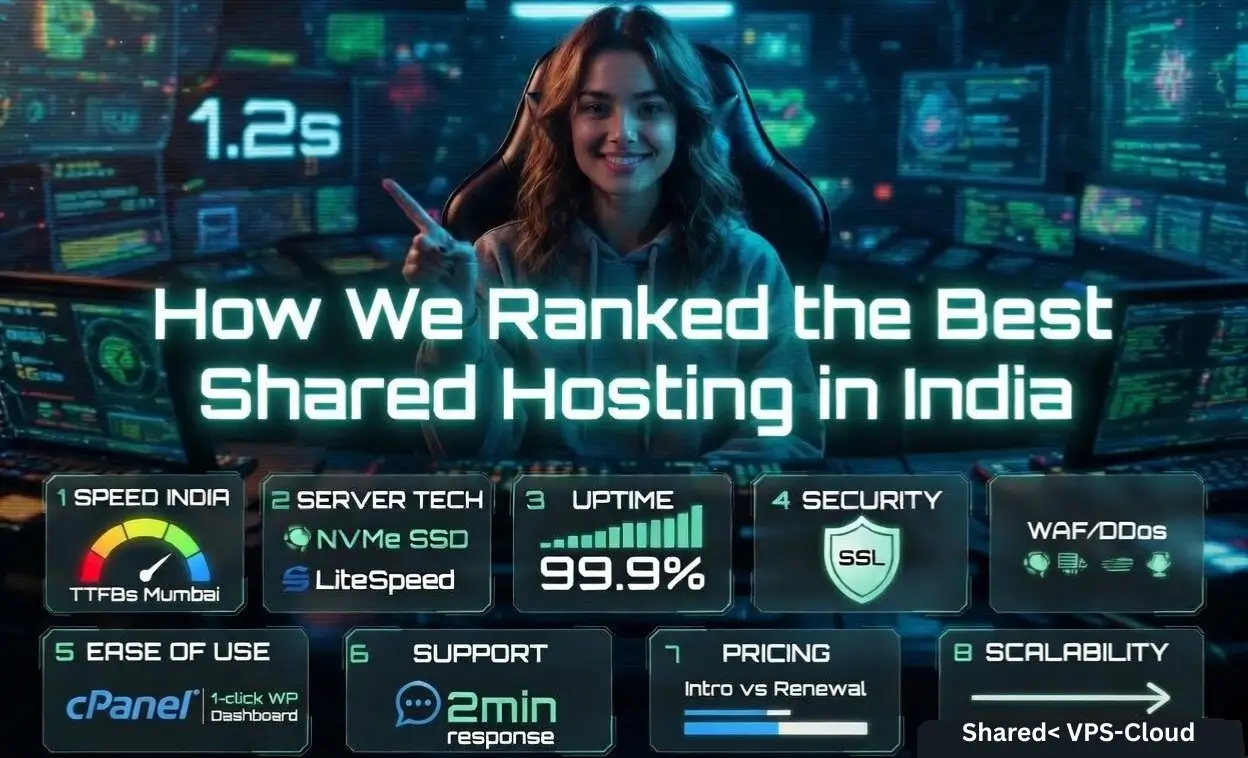
Here’s exactly what we checked and why it matters to you:
| What We Checked | What We Did | What It Means for You |
| Speed in India | Tested TTFB and loading speed from locations like Mumbai | Your website loads faster for Indian visitors, improving user experience and SEO |
| Server Technology | Checked NVMe SSD, LiteSpeed/NGINX, HTTP/3, and caching | Better technology means faster performance and smoother website operation |
| Uptime & Stability | Monitored uptime consistency and performance during traffic spikes | Your website stays online without unexpected downtime |
| Security Protection | Verified SSL, WAF, malware scanning, and DDoS protection | Keeps your website safe from hackers and common threats |
| Ease of Use | Reviewed cPanel or dashboard and one click WordPress setup | You can easily manage your website even if you’re a beginner |
| Customer Support | Tested response time and quality of support | You get quick help whenever you face any issue |
| Pricing Transparency | Compared intro price vs renewal cost and hidden charges | No surprises later, you know the real cost upfront |
| Scalability | Checked upgrade options to VPS or cloud hosting | Your hosting can grow with your website without problems |
10 Best Shared Hosting in India 2026, May
Shortlist first, details next so you can match needs, budget, and growth potential.
Each host includes “Best for,” India oriented insights, and real pros/cons you can trust.
1. YouStable – Accepts UPI Payments + Hindi Support
Best for: Fast WordPress sites on a budget with India first routing.
Price: From ₹59–₹219/month (intro offers vary; GST may apply).

YouStable focuses on speed first shared hosting for Indian audiences, pairing NVMe SSD storage with LiteSpeed Web Server and HTTP/3. This stack consistently lowers TTFB for Mumbai and Delhi users, helping WordPress themes and WooCommerce product pages load under the vital 2.5s LCP threshold. Beginner friendly cPanel, Softaculous, and guided WordPress installation make launch painless.
Security is tight for the price: free SSL, web application firewall rules, proactive malware scanning, and DDoS mitigation. Daily backups and 24×7 chat/ticket support reduce risk for SMEs scaling from a brochure site to an active blog. Expect straightforward upgrade paths to VPS when traffic spikes or when you need dedicated resources.
Key Features of YouStable
YouStable shared hosting is designed to deliver fast performance, strong security, and easy management for Indian users, making it a reliable choice for beginners and growing websites.
- NVMe SSD Storage: High speed NVMe drives ensure faster data access, improving website loading time and overall performance.
- LiteSpeed Web Server: Advanced LiteSpeed technology with LSCache boosts WordPress speed and helps achieve better Core Web Vitals.
- Unmetered Bandwidth: Handle growing traffic without worrying about bandwidth limits, suitable for blogs and business websites.
- Free SSL Certificate: Secure your website with HTTPS encryption at no extra cost.
- Free Domain (on higher plans): Get a free domain with selected plans, reducing initial setup cost.
- One Click WordPress Install: Easily launch your website using Softaculous without any technical setup.
- Daily Backup & Restore: Automatic backups with one click restore keep your data safe and recoverable.
- Imunify360 Security: Advanced protection against malware, brute force attacks, and vulnerabilities.
- Free Website Migration: Move your existing site without downtime or technical hassle.
- 24×7 Customer Support: Reliable support via chat/ticket for quick issue resolution and guidance.
Pros & Cons
- Pros: Strong Indian latency, NVMe by default, helpful WordPress support.
- Friendly pricing with clean upgrade routes to VPS as traffic grows.
- Cons: Entry plans have fair use CPU/inode limits; monitor if hosting multiple sites.
Plans & Pricing
Not sure which plan fits your website right now? These YouStable shared hosting plans are built for real Indian traffic, giving you NVMe speed, LiteSpeed performance, & unmetered bandwidth so your site stays fast & stable without paying for features you don’t actually need.
| Plans Name | Monthly Price | Storage | Bandwidth | Free |
| DaStart | ₹59/mo | 50GB NVMe SSD | Unmetered | Free SSL & Email |
| DaProfessional | ₹119/mo | 100GB NVMe SSD | Unmetered | Free Domain & Free Website Migration |
| DaElite | ₹219/mo | 200GB NVMe SSD | Unmetered | Free Domain & Free Website Migration |
Why Choose YouStable Shared Hosting?
YouStable shared hosting is built specifically for Indian users who want fast, affordable, and reliable performance without technical complexity. From local payment options to optimized server infrastructure, it delivers a smooth experience for both beginners and growing websites.
- India Optimized Performance: Servers tuned for Indian traffic ensure low latency and faster loading speeds in cities like Mumbai and Delhi.
- NVMe SSD + LiteSpeed Stack: Advanced hardware and server technology improve website speed, helping you achieve better Core Web Vitals and SEO performance.
- UPI & Local Payment Support: Easy billing with UPI, cards, and Indian friendly pricing makes it convenient for beginners and small businesses.
- Beginner Friendly Control Panel: Simple cPanel interface with one click WordPress installation lets you launch your website without technical knowledge.
- Strong Security Protection: Free SSL, Imunify360 protection, malware scanning, and firewall rules keep your website safe from common threats.
- Free Domain & Migration: Selected plans include a free domain and hassle free website migration with minimal downtime.
- Reliable 24×7 Support: Quick and helpful support team available anytime to assist with setup, optimization, or troubleshooting.
- Affordable Pricing with Scalability: Start at a low cost and upgrade easily to higher plans or VPS as your traffic grows.
2. BlueHost – Beginner Friendly WordPress Shared Hosting
Best for: Beginners who want a WordPress recommended brand and easy setup.
Price: Often ₹199–₹649/month (intro), renewals higher; check India promos.

BlueHost is a well known WordPress.org recommended host, ideal for first time site owners. The onboarding flow, free domain for the first year, and integrated CDN make it easy to get online quickly. While primary data centers are outside India, caching plus a CDN can keep perceived speed acceptable for mixed India/global audiences.
cPanel hosting, automated WordPress installs, and staging on selected plans simplify content changes and plugin updates. Support is broadly accessible, and documentation is extensive. Just budget for higher renewal rates and avoid optional upsells you do not need on day one.
Key Features of BlueHost
- WordPress recommended host with simple setup and guided onboarding flow.
- Free domain, SSL, and CDN on most plans to cover essentials from day one.
- cPanel access, email hosting, and Softaculous for 1 click installs.
- Staging and backups on higher tiers for safer site updates and testing.
- Global network with decent India performance when paired with caching.
- Large knowledge base with tutorials suited to non technical beginners.
Pros & Cons
- Pros: Beginner friendly, broad ecosystem, stable uptime.
- Pros: Bundled free domain reduces upfront costs for new sites.
- Cons: No native India DC; renewals and add-ons can raise total cost.
3. HostGator – Reliable cPanel Hosting For Startups
Best for: New bloggers and small businesses wanting cPanel and phone support.
Price: Typically $4.50–$13.95249/month (intro); watch renewal pricing.

HostGator’s shared plans are straightforward: cPanel, email, one click WordPress, and unmetered bandwidth under fair use. For India audiences, performance is serviceable with caching and a CDN. The brand’s long history and accessible phone/chat support make it a safe starter option for non technical users.
Backups and malware scanning exist, though robust security tooling is often on higher tiers or add-ons. If you plan heavy traffic or many plugins, consider their cloud shared or a VPS upgrade earlier to avoid resource throttling at peak hours.
Key Features of HostGator
- Classic cPanel with Softaculous for fast WordPress and app installs.
- Unmetered bandwidth with fair use CPU/RAM limits for stability.
- 24×7 phone and chat support suitable for first time site owners.
- Integrated caching and CDN options to improve India load times.
- Email hosting, autoresponders, and SPF/DKIM support for deliverability.
- Easy upgrades to cloud or VPS when your site starts scaling traffic.
Pros & Cons
- Pros: Familiar tools, helpful support, stable starter plans.
- Pros: Good feature coverage for blogs and brochure sites.
- Cons: Performance can vary at peak; watch for upsells at checkout.
4. Namecheap – Affordable Shared Hosting For Small Sites
Best for: Lowest cost shared hosting with solid uptime for small sites.
Price: From $9.88-$20.88/month (≈₹165) intro; INR varies by conversion and GST.

Namecheap pairs affordable pricing with dependable 99.9%+ uptime and a clean UI. For India only audiences, latency is higher than India hosted providers, but thoughtful caching, image optimization, and a CDN can deliver acceptable performance for blogs, portfolios, and landing pages.
You get free SSL, email, and cPanel, plus frequent promos that keep total cost of ownership low. If you host multiple sites or heavier WordPress themes, audit inode usage and plugin overhead to stay under fair use limits on entry plans.
Key Features of NameCheap
- Very competitive pricing with frequent promos ideal for students and startups.
- Free SSL, email, and cPanel for a complete starter stack at low cost.
- Backups and easy app installs via Softaculous for quick deployment.
- Staging and advanced tools on higher tiers when projects grow.
- Good documentation and active community for DIY problem solving.
- Optional CDN integration to help offset higher India latency.
Pros & Cons
- Pros: Budget friendly, transparent plans, reliable uptime.
- Pros: Good for simple WordPress or HTML landing pages.
- Cons: No local India DC; resource caps on entry plans require care.
Also Read: Learn How to Add Domain in cPanel?
5. DreamHost – Transparent WordPress Hosting With Unmetered Traffic
Best for: Clean WordPress experience with unmetered traffic policies.
Price: $2.89-$9.99/month (≈₹215) intro; INR depends on USD rate and taxes.

DreamHost is known for transparent policies and solid performance for WordPress. Its custom panel (not cPanel) is intuitive, and the unmetered bandwidth policy helps sites that spike occasionally without incurring surprise overages. Pair with a CDN for India traffic to reduce TTFB from overseas data centers.
Backups, SSL, and domain privacy are well handled, and the 97 day money back window is among the industry’s best. If you rely on cPanel specific workflows or want native India hosting, consider that before committing.
Key Features of DreamHost
- Custom control panel with clear WordPress tooling and updates.
- Unmetered bandwidth policy suited for unpredictable traffic spikes.
- Free SSL, domain privacy, and backups to cover core security needs.
- Solid knowledge base and clean UI for non technical users.
- Good PHP performance with persistent object caching options.
- Works well with global CDNs to improve India user experience.
Pros & Cons
- Pros: Transparent policies, long refund window, stable WordPress hosting.
- Pros: Great documentation and simple panel for beginners.
- Cons: No cPanel; India latency needs CDN and caching to shine.
6. Verpex – Free Migration Hosting with Daily Backups
Best for: Free migrations and cPanel shared plans with frequent backups.
Price: Around $2.99–$8.99/month (intro, plan dependent); verify local promos.

Verpex stands out for fast, free website migrations and daily (often twice daily) backups across shared plans. You get cPanel with a modern stack, and quick support responses make it appealing when moving from an underperforming host. With edge CDN routing, India visitors see better consistency during peak hours.
The company prioritizes helpful support and practical features over gimmicks. For heavy WooCommerce or high concurrent users, watch CPU/time limits and upgrade timely to avoid throttling during sales or campaigns.
Key Features of Verpex
- Free expert migrations with minimal downtime for moving sites safely.
- cPanel access, email hosting, and Softaculous for standard workflows.
- Daily or twice daily backups depending on plan for resilience.
- HTTP/3 ready stack with CDN options to stabilize global traffic.
- Responsive, human support that understands WordPress challenges.
- Clear upgrade paths to managed or reseller hosting as needs grow.
Pros & Cons
- Pros: Fast migrations, frequent backups, attentive support.
- Pros: Good fit for agencies moving multiple small client sites.
- Cons: Check India routing; peak time performance varies by region.
7. Elementor Hosting – Managed WordPress Hosting for Elementor users
Best for: Elementor powered WordPress sites needing managed convenience.
Price: From $14.99-$34.99/month (≈₹830) intro; managed WP, not classic shared hosting.

Elementor Hosting is a managed WordPress platform optimized for the Elementor site builder. It’s not traditional cPanel shared hosting, but its Google Cloud infrastructure, integrated CDN, and built in caching deliver strong performance for design heavy pages typical of Elementor sites. The editor to hosting workflow shortens build times.
You’ll gain automatic updates, SSL, and hardened security policies out of the box. Note that email hosting may be limited or external, and pricing is higher than entry shared plans. If you design in Elementor and want fewer moving parts, it’s a compelling alternative for India focused brands using a CDN.
Key Features of Elementor Hosting
- Tight integration with Elementor builder for faster design to publish cycles.
- Google Cloud infrastructure with CDN for stable global performance.
- SSL, automatic updates, and managed security baked in by default.
- Staging support to test templates, popups, and plugin updates safely.
- Server level caching tailored for Elementor assets and queries.
- Great fit for agencies designing multiple Elementor based sites.
Pros & Cons
- Pros: Simplified stack for Elementor, solid performance, easy staging.
- Pros: Less tinkering; focus on design and conversions, not servers.
- Cons: Not classic shared hosting; email and cPanel are not included.
8. GreenGeeks – Eco Friendly LiteSpeed WordPress Hosting
Best for: Eco-friendly hosting with LiteSpeed performance for WordPress.
Price: $1.95–$5.95/month intro; renewals higher.

GreenGeeks combines environmentally conscious operations (300% renewable energy match) with a fast LiteSpeed + LSCache stack ideal for WordPress. While primary data centers are in North America and Europe, pairing with Cloudflare CDN and LSCache brings India load times into a comfortable range for content sites and small stores.
You get free SSL, nightly backups, email, and helpful security hardening. Their platform balances simplicity with performance, especially if you enable object caching and image compression to keep Core Web Vitals in the green on Indian 4G networks.
Key Features of GreenGeeks
- LiteSpeed + LSCache for fast WordPress, especially on dynamic pages.
- 300% renewable energy match for environmentally conscious brands.
- Free SSL, nightly backups, and malware scanning for safety.
- Email hosting with SPF/DKIM guidance for better deliverability.
- Cloudflare CDN integration to serve India users faster.
- Good knowledge base; straightforward for first time site owners.
Pros & Cons
- Pros: Strong WordPress speed stack, eco focus, nightly backups.
- Pros: Easy setup with LSCache and CDN guides for speed.
- Cons: No India DC; ensure caching/CDN is tuned for best results.
9. Kinsta – Premium Google Cloud Managed WordPress Hosting
Best for: Premium managed WordPress with high concurrency and security.
Price: From $30-$280/month; managed WP, not traditional shared hosting.

Kinsta runs on Google Cloud’s premium tier, using containerized resources and a global CDN with edge caching. Although this isn’t shared hosting, it’s a realistic upgrade path when your India focused WordPress site outgrows shared resources. Expect consistent performance under load, great for campaigns, launches, and content heavy sites.
Security is managed end to end: DDoS protection, malware removal, and automatic backups. Developers benefit from staging, SSH, WP-CLI, and perf analytics. If you’re planning for scale or mission critical uptime, Kinsta is a strong alternative to shared hosting in 2026.
Key Features of Kinsta
- Google Cloud premium tier with isolated resources for stability.
- Edge and CDN caching to minimize India TTFB despite global hosting.
- Daily backups, malware removal guarantee, and uptime monitoring.
- Staging, SSH, and WP-CLI for safe development workflows.
- Analytics on performance and content to catch bottlenecks early.
- Expert support with WordPress first troubleshooting depth.
Pros & Cons
- Pros: Superb performance at scale, strong security, pro tools.
- Pros: Great for high traffic Indian brands and campaigns.
- Cons: Higher price; exceeds needs of basic shared hosting users.
10. WP Engine – Enterprise Grade Managed WordPress Platform
Best for: Managed WordPress at enterprise grade reliability and tooling.
Price: From $40–$312/month; not traditional shared hosting.

WP Engine is a premium managed WordPress provider with rock solid performance, advanced caching, and developer features like Git based workflows and multi environment staging. Although it’s not shared hosting, businesses that outgrow shared plans choose WP Engine for uptime, proactive security, and expert support.
For India audiences, use their CDN and caching layers to keep page loads snappy. If you’re an agency or SaaS content team, the workflow tooling and reliability justify the spend versus shared hosting limitations.
Key Features of WP Engine
- Advanced caching and CDN for repeatable, fast page delivery globally.
- Multiple staging environments to test features and updates safely.
- Security suite with DDoS protection and managed updates.
- Developer tooling including Git integration and SSH access.
- Expert WordPress support with SLA backed uptime.
- Great for agencies managing multiple WP properties and clients.
Pros & Cons
- Pros: Enterprise grade reliability, developer friendly, strong support.
- Pros: Excellent for growth beyond shared hosting constraints.
- Cons: Higher cost; not cPanel shared, limited email hosting options.
Who Should Choose Shared Hosting in India (And Who Shouldn’t)
Shared hosting is perfect for small sites, portfolios, and early stage blogs.
High traffic stores or apps should consider VPS or managed WordPress early.
Pick shared hosting if you’re launching a brochure site, a local business page, or a niche blog expecting under 50,000 monthly visits. You’ll get low upfront costs, a friendly control panel, and essentials like SSL and email. Use caching, image compression, and a CDN to improve India performance without spending heavily.
Skip shared hosting if you plan heavy WooCommerce traffic, real time dashboards, or custom apps. The moment you see CPU throttling, slow admin dashboards, or 503 errors under load, move to VPS or a managed WordPress platform like Kinsta/WP Engine for isolated resources and predictable performance.
Key Buying Factors for Indian Shared Hosting in 2026
Don’t chase the lowest price, optimize for speed, security, and honest limits.
Check India latency, backup cadence, email deliverability, and upgrade paths.
Use this checklist before you buy:
- Performance: NVMe SSD, LiteSpeed/NGINX, HTTP/3/Brotli, and low TTFB from Mumbai/Singapore.
- Uptime: 99.9%+ with clear credits or SLAs; verify historical status pages.
- Security: Free SSL, WAF rules, malware scanning, and DDoS protection included.
- Backups: Daily minimum; on demand restores and offsite retention preferred.
- Control panel: cPanel for simplicity; or a clean custom panel with staging.
- Email: SPF/DKIM, webmail, SMTP limits disclosure, and blocklist free IPs.
- Support: 24×7 chat/ticket; response time under 5 minutes on average.
- Scalability: Easy upgrades to VPS/managed WP; transparent resource allocations.
- Billing: INR billing, UPI/cards, clear renewals, and no forced add-ons.
Performance Tuning Tips for India Visitors
Want your website to load fast for users in India?
Here’s the truth, even the best hosting won’t give you top speed unless your website is properly optimized. If your visitors are coming from India, especially on mobile networks, these small improvements can make a big difference in speed, user experience, and SEO.
Here’s exactly what you should do:
| What You Should Do | What It Means | Why It Matters for You |
| Enable Page Caching | Use LiteSpeed Cache or WP Super Cache | Reduces server load and makes your pages load much faster |
| Use a CDN (India PoPs) | Connect Cloudflare or a CDN with Mumbai/Delhi servers | Delivers content from nearby locations for faster loading |
| Optimize Images | Convert images to WebP and compress size | Reduces page weight and improves loading speed on mobile |
| Enable HTTP/3 & Brotli | Turn on modern compression and protocols | Faster data transfer and better performance on slow networks |
| Limit Plugins | Remove unused or heavy WordPress plugins | Prevents slow loading and reduces server strain |
| Use Lightweight Themes | Choose fast themes like Astra or GeneratePress | Improves overall speed and Core Web Vitals |
| Enable Lazy Loading | Load images only when users scroll | Speeds up initial page load time |
| Update PHP Version | Use latest PHP (8.2 or higher) | Better performance and improved security |
| Set Up Object Caching | Use Redis or Memcached if available | Speeds up database queries for dynamic sites |
| Configure Email Authentication | Add SPF, DKIM, and DMARC records | Improves email delivery and avoids spam issues |
FAQs
Which shared hosting is best for WordPress in India?
For speed and value, YouStable and GreenGeeks (LiteSpeed) are top picks. For pure simplicity, BlueHost and HostGator are beginner friendly. If you outgrow shared, Kinsta/WP Engine offer managed WordPress alternatives.
Is shared hosting enough for WooCommerce?
It’s fine for small catalogs and low traffic. Once admin slows or checkouts lag during sales, move to VPS or managed WordPress for dedicated CPU/RAM and consistent concurrency.
Do I need an India data center for a local audience?
It helps, but it’s not mandatory. With LiteSpeed cache, a good CDN, and optimized media, overseas hosting can still load fast in India. Low TTFB and proper caching matter most.
What’s a good uptime guarantee for shared hosting?
Look for at least 99.9% with clear credits. Check a host’s status page and third party monitoring history. Real world stability matters more than a marketing SLA.
Which is the cheapest reliable shared host in India?
Namecheap and YouStable routinely run low cost promos. Ensure renewals, backups, and email are included to avoid add-ons that inflate the total cost of ownership.
Can I migrate my existing site without downtime?
Yes. Choose a host offering free expert migration (e.g., Verpex, YouStable). Lower TTL, migrate files and database, verify on a staging link, then switch DNS during low traffic hours.
Does shared hosting include business email?
Most shared plans include email. Managed WordPress options (Elementor, Kinsta, WP Engine) may not; pair with Google Workspace or a reliable third party email service.
Conclusion
Match your use case to a plan, and avoid paying for features you won’t use.
Prioritize India speed, backups, security, and clean upgrade paths to VPS/Cloud.
For most beginners, YouStable delivers the best India first blend of speed, support, and price. BlueHost and HostGator keep onboarding simple, while Namecheap offers the lowest cost entry.
If you’re building with Elementor or expect fast growth, Elementor Hosting, Kinsta, or WP Engine provide managed alternatives that outperform shared hosting at scale. Launch lean, monitor Core Web Vitals, and upgrade when your metrics say it’s time.