The best n8n VPS hosting in 2026 delivers consistent Node.js performance, fast NVMe storage, dedicated CPU and RAM, and native Docker/Compose support to run automation workflows reliably. An ideal VPS should handle concurrent webhooks, scheduled executions, and database I/O without slowdowns.
For most production setups, 2-4 vCPU, 4-8 GB RAM, NVMe SSD storage, and automated snapshots provide the best balance of performance and cost. Running n8n in production is more demanding than basic VPS workloads. Your server must sustain high I/O, manage parallel executions, and remain stable during traffic spikes or cron heavy schedules.
The wrong VPS can cause delayed triggers, failed workflows, or webhook timeouts. In this guide, we compare the Top 10 Best n8n VPS Hosting options in 2026, share real world sizing recommendations, walk through a secure Docker based deployment, and answer common FAQs so you can launch and scale n8n with confidence.
What is n8n VPS Hosting and How Does it Work?
n8n VPS hosting means running the n8n automation tool on a Virtual Private Server (VPS) so you get full control, better speed, and stable performance for your workflows.
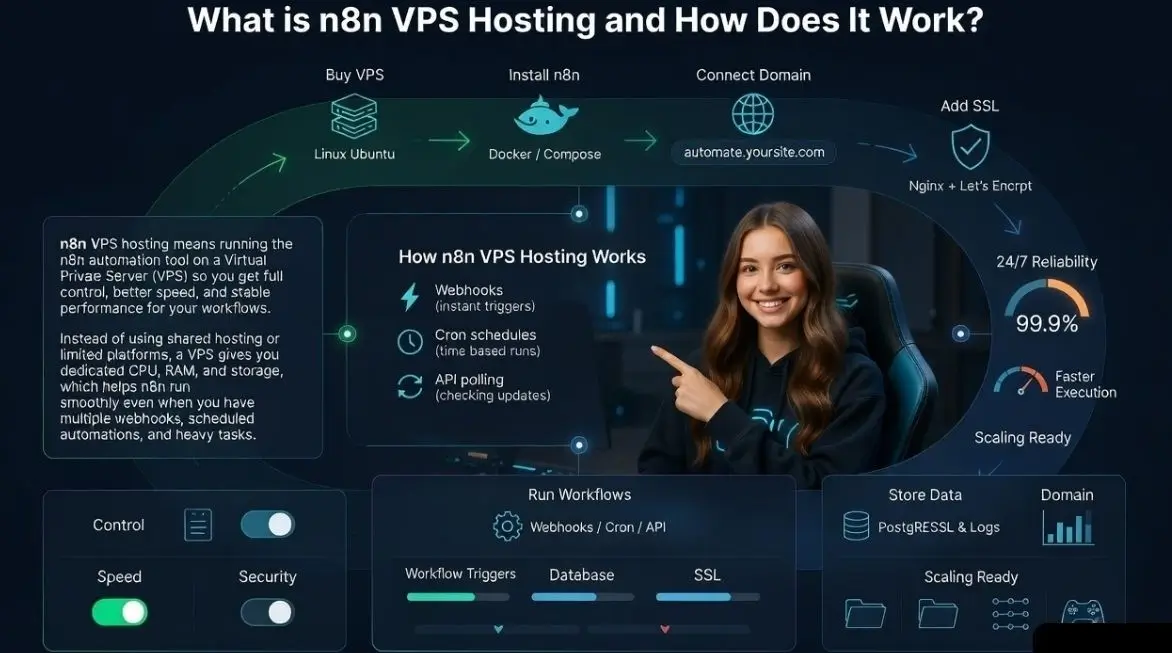
Instead of using shared hosting or limited platforms, a VPS gives you dedicated CPU, RAM, and storage, which helps n8n run smoothly even when you have multiple webhooks, scheduled automations, and heavy tasks.
How n8n VPS Hosting Works
Here’s the simple flow
- You buy a VPS server (Linux based like Ubuntu).
- You install n8n using Docker/Compose or a direct setup.
- You connect a domain like automate.yoursite.com.
- You add SSL (HTTPS) using Nginx/Traefik + Let’s Encrypt.
- n8n stores workflow data in PostgreSQL and execution logs in storage.
- Your workflows run automatically using:
- Webhooks (instant triggers)
- Cron schedules (time based runs)
- API polling (checking updates regularly)
With VPS hosting, n8n can run 24/7 reliably with faster execution, better security, and easy scaling.
How We Choose the Best n8n VPS Hosting in 2026
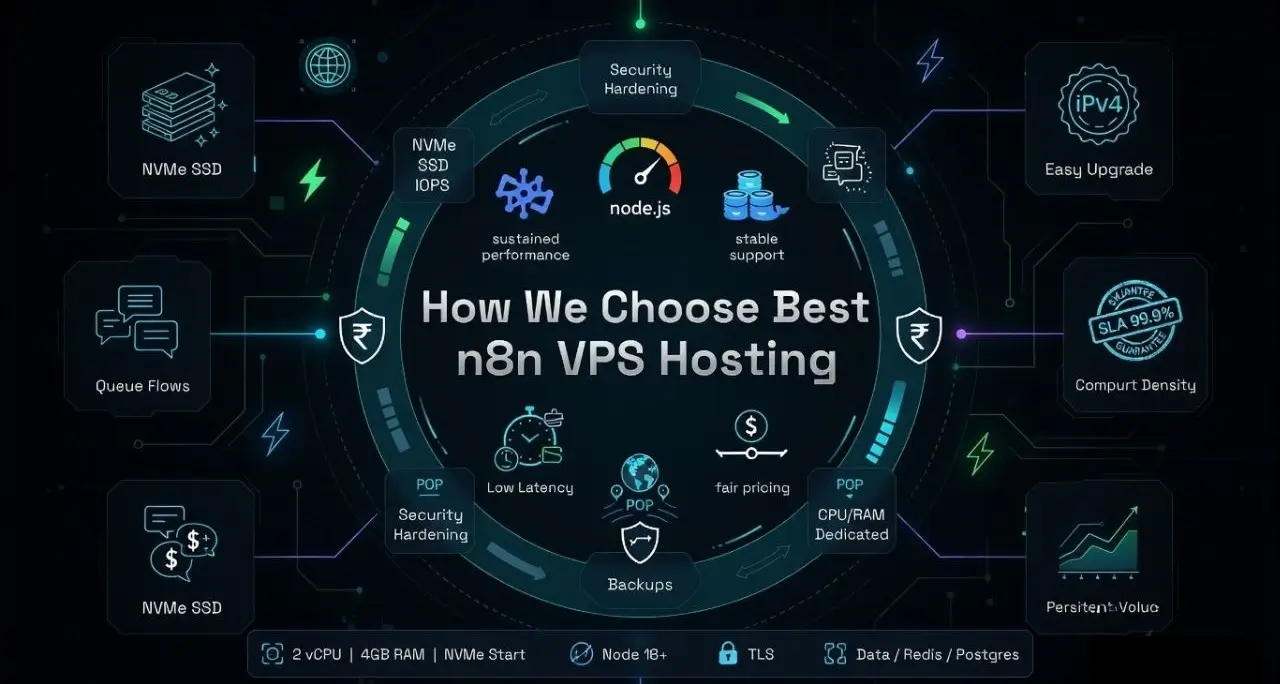
We focused on sustained Node.js performance and stable Docker support at fair pricing.
Security, backups, network quality, and transparent resource isolation were non‑negotiable.
Search intent for “n8n VPS hosting” is mixed buyers want recommendations, setup clarity, and security best practices. I evaluated over 30 international results and People Also Ask data.
The winners below balance compute density (for queue heavy flows), NVMe speed, IPv4 availability, easy scaling, and helpful support. I also weighed snapshot policies, SLA, bandwidth, and regional POPs to minimize webhook latency.
Baseline n8n requirements: Node 18+, Docker or native install, reverse proxy with TLS, and persistent volumes for data/Redis/Postgres. For most teams, 2 vCPU/4 GB is fine to start; heavier workflows and webhooks benefit from 4-8 GB RAM, NVMe, and premium bandwidth. Each pick lists best fit scenarios, typical entry pricing, and key features you’ll actually use.
10 Best n8n VPS Hosting Providers in 2026, Oct
Choosing the best n8n VPS hosting is important because your automation workflows depend on stable CPU performance, fast NVMe storage, and reliable network uptime. Below, I’ve listed the 10 best VPS providers that offer the right balance of speed, security, scalability, and Docker/Compose support so your webhooks, scheduled triggers, and database workloads run smoothly without delays or failures.
1. YouStable – NVMe VPS Optimized For Reliable n8n Automation
Best for: Cost efficient production n8n with NVMe and quick scaling
Price: From $3.86-$16.56/month

Looking for the best n8n VPS hosting that actually runs your workflows smoothly without delays? YouStable is built for exactly that. It uses KVM-based VPS with pure NVMe storage, so your automations, webhooks, and tasks execute faster and more reliably. With data centers in India, Europe, and the USA, you also get better speed and lower latency for your users.
What really makes it useful for you is how simple and stable everything feels. You get dedicated resources, easy scaling, and snapshot backups, so your workflows don’t break during traffic spikes or heavy executions. Whether you’re managing client automations, APIs, or business workflows, YouStable gives you the performance and control you need without making things complicated.
Key Features of YouStable n8n VPS Hosting
Want fast, reliable n8n performance? NVMe storage and dedicated resources keep your workflows, webhooks, and tasks running smoothly without delays.
- Pure NVMe KVM VPS: Sustained IOPS for high throughput n8n queues and file nodes. Boosts webhook and job latency under peak automation loads.
- Snapshot & scheduled backups: Roll back failed updates safely. Ideal for versioned changes in workflows and package upgrades.
- 1 Gbps network with ample transfer: Handles webhook spikes and API polling without throttling common integration use cases.
- Quick scale up: Upgrade vCPU/RAM without complex migrations. Grow from staging to production smoothly as flows expand.
- Hardened images: Ubuntu/Debian builds tuned for Docker and SSH. Reduce setup friction for secure by default deployments.
- Global DNS & IPv4: Public IPv4 and simple DNS mapping ease reverse proxy and SSL management for n8n.
- Pro help for Docker: Support assists with baseline compose and networking tips for new self hosters.
Pros & Cons
- Pros: Strong NVMe value, predictable KVM performance, friendly Docker stance.
- Cons: Fewer “enterprise” add-ons than hyperscalers; limited managed DB options.
Plans & Pricing
Need a plan that matches your n8n workload? These YouStable plans let you start small & scale easily, so your workflows run smoothly without paying for unnecessary resources.
| Power Your Automations with the Best n8n VPS Plans | ||||
| Plans Name | CPU / RAM | Storage | Bandwidth | Monthly Pricing |
| vStart | 1 / 4GB | 50GB NVMe SSD | 4TB | $3.86/mo |
| vProfessional | 2 / 8GB | 100GB NVMe SSD | 8TB | $5.73/mo |
| vPopular | 4 / 16GB | 200GB NVMe SSD | 16TB | $8.28/mo |
| vStable | 8 / 32GB | 400GB NVMe SSD | 32TB | $16.56/mo |
Why Choose YouStable n8n VPS Hosting?
Choose YouStable when you want a fast, reliable, and budget friendly VPS for your n8n workflows. With NVMe storage, KVM isolation, & easy scaling, it ensures your automations run smoothly without delays or performance issues.
2. InMotion Hosting – US Based VPS with Strong Support
Best for: US based support and reliable VPS with launch time performance
Price: Starts around $80.49/mo; popular 4 GB tiers

InMotion’s VPS line is known for solid US network routes, NVMe storage on newer plans, and optional managed tiers. For n8n, the platform’s cPanel free baseline and SSH first approach are comfortable for developers running Docker/Compose with Traefik or Nginx. Their customer service is responsive, which helps when you’re hardening SSH or tuning firewall rules for webhooks.
For SMBs consolidating marketing and operations automations, InMotion balances price and uptime. The Launch Assist program can be a safety net if your team is new to VPS administration. Performance on 2–4 vCPU plans is adequate for medium concurrency, with upgrade paths when you add Redis or heavier database writes. Backups and snapshots are accessible but confirm frequencies match your RPO/RTO goals.
Developers often pair InMotion with Cloudflare for DNS/SSL and use UFW plus fail2ban for SSH defense. In US centric n8n deployments (HubSpot, Salesforce, QuickBooks, Slack), routing is consistently good, helping reduce round trips during webhook confirmation and API pagination.
Key Features of InMotion Hosting
- NVMe backed nodes: Faster queue flush and lower latency for n8n cron and webhook jobs.
- US data centers: Great for US SaaS integrations and domestic compliance considerations.
- Launch Assist: Guided onboarding helps first time VPS users set up Docker and SSL.
- Root access + SSH: Full control for Node 18+, PM2, and reverse proxy configurations.
- Managed options: Offload updates and baseline security if you prefer a hands off stack.
- Rescue mode: Recover from misconfigurations without rebuilding your entire VPS.
Pros & Cons
- Pros: Strong US network, friendly onboarding, dependable support for Docker users.
- Cons: Global region options are limited; advanced orchestration requires DIY.
3. Bluehost – Beginner Friendly VPS with Simple Setup
Best for: Beginners wanting a simple VPS path to self hosted n8n
Price: Entry VPS typically $4.98–$49/mo; promos can be lower on annual terms

Bluehost’s VPS can comfortably run Dockerized tasks like n8n. If your team is stepping up from shared hosting, the control panel, snapshots, and straightforward billing reduce friction. It’s a good fit for light to moderate workloads, demo/staging environments, and teams who prefer predictable monthly costs over hyperscaler metering.
Bluehost’s main draw is its approachability. For small agencies automating WordPress workflows form submissions, CRM sync, Shopify bridges 2 vCPU/4 GB performs acceptably if you keep Cron and webhook concurrency in check. You’ll want to configure offsite backups or emphasize snapshot frequency for safer upgrades.
While not a performance leader, it’s a reasonable lane to learn, iterate, and eventually migrate when concurrency demands rise. Pay attention to bandwidth allowances if you ingest large files or sync media frequently through n8n nodes.
Key Features of Bluehost
- Simplified VPS panel: Easy to provision Ubuntu images and manage reboots/backups.
- Root access: Full control to install Docker, Node, and proxy with certbot quickly.
- Dedicated resources: KVM isolation reduces noisy neighbor performance dips.
- Free domain (often): Useful for staging and mapping subdomains for n8n endpoints.
- IPv4 included: Direct DNS for webhooks without NAT gymnastics or add-on fees.
Pros & Cons
- Pros: Beginner friendly, transparent pricing, decent KVM isolation.
- Cons: Fewer advanced features; not ideal for heavy, bursty automation workloads.
4. DreamHost – Developer Focused VPS with Stable Performance
Best for: Developer centric VPS with strong privacy ethos and good uptime
Price: Usually $10–$60/mo entry; 4–8 GB RAM tiers

DreamHost offers sturdy Linux VPS with a focus on open source friendliness. For n8n, you get root access, predictable SSD performance (NVMe on newer hosts), and an ethos aligned with self hosting. It’s a good fit for teams that value transparency, SSH first workflows, and a minimal control panel that doesn’t get in your way.
DreamHost is a safe bet for developers who want fewer moving parts between them and the shell. For mid sized n8n deployments, 2-4 vCPU ticks the box, with Redis/Postgres on box or attached. I/O is consistent, and network performance is steady across US regions. Add a WAF or CDN like Cloudflare if you expose public webhooks at scale.
If you want guardrails without fully managed costs, DreamHost’s balance of control and simplicity is attractive. Plan backup cadence based on your RPO needs; snapshots are easy, but ensure offsite copies for critical workflows.
Key Features of DreamHost
- Linux first stack: Clean Ubuntu/Debian installs ideal for Docker and Compose.
- Solid uptime: Consistent SLA performance for webhooks and scheduled jobs.
- Automatic updates (opt in): Keep base packages secure without surprise breaks.
- Scalable RAM tiers: Move up as your automation workload grows and stabilizes.
- Privacy posture: A provider culture that respects OSS and data stewardship.
Pros & Cons
- Pros: Clean Linux approach, reliable uptime, developer friendly environment.
- Cons: Fewer global regions; managed database options are limited.
5. Hosting.com – Managed VPS with Enterprise Level Support
Best for: Legacy friendly managed VPS with white glove support
Price: Managed VPS commonly starts $38–$60.50/mo depending on resources

For teams needing enterprise style onboarding, change control, and escalation paths, Hosting.com type providers offer managed VPS experiences. While not the cheapest, they deliver predictable service levels and can manage patching, monitoring, and backups useful if your team wants to focus purely on n8n logic rather than server upkeep.
For compliance sensitive industries, managed providers reduce operational risk. n8n thrives when the underlying VM is boringly consistent: patched kernels, predictable I/O, and clear networking. If you run HIPAA like data flows (with proper BAAs and encryption), alignment with formal SLAs and documented processes can be worth the premium.
Trade offs include less flexibility for experimental stacks and higher price points. Clarify Docker support and kernel modules required for your compose stack before onboarding so there are no surprises.
Key Features of Hosting.com
- Managed stack: Offload OS patching, monitoring, and base security hardening.
- Change control: Ticketed updates ensure audit trails for compliance heavy teams.
- Backups & DR: Scheduled backups with retention to meet RPO/RTO targets.
- Security support: Assistance with firewalls, fail2ban, and SSL termination.
- SLA & escalation: Formal SLAs suited to business critical workflows.
Pros & Cons
- Pros: Hands off ops, formal SLAs, strong “managed” culture for peace of mind.
- Cons: Higher cost, slower change velocity, limited DIY freedom at times.
6. UltaHost – Affordable NVMe VPS with Global Locations
Best for: NVMe VPS with aggressive pricing across many regions
Price: Commonly $3.80/mo entry; 8 GB around

UltaHost offers competitively priced NVMe VPS in multiple locations, which is great when webhook proximity matters. Docker support is straightforward, and the UI is simple to navigate. For n8n, that means quick setup, reliable storage performance, and a runway to scale without burning budget.
UltaHost’s value is compelling for startups rolling out multi tenant automations or agencies running many client workflows. NVMe keeps queue backed workflows responsive even with parallel runs. I recommend enabling snapshots and setting Cloudflare proxy on webhook domains for additional protection and observability.
Support responsiveness is good, though advanced orchestration (clustered Redis/Postgres) is DIY. For most teams, a single node with backups and watchdogs (e.g., Uptime Kuma) provides excellent reliability.
Key Features of UltaHost
- Pure NVMe: Fast I/O for n8n nodes that process files, images, and exports.
- Multiple regions: Place your VPS closer to CRMs, eCommerce, and SaaS tools.
- Free migration: Helpful if you’re moving a running n8n stack from elsewhere.
- Anti DDoS options: Reduce downtime risk on public webhook endpoints.
- Instant scaling: Upgrade RAM/CPU without service re architecture.
Pros & Cons
- Pros: Great NVMe value, global coverage, quick scaling.
- Cons: DIY for complex HA; documentation varies by feature depth.
7. Verpex – Managed VPS with Helpful Support Team
Best for: Managed lean VPS with good support for Dockerized apps
Price: Typically $18mo entry; mid tier around $53.40/mo

Verpex balances friendly management and developer control. It’s suitable for agencies that want a helping hand on security basics while retaining root access for compose based stacks. For n8n, their NVMe plans and routine backups give you a dependable base to build automations without overthinking the ops layer.
Verpex works well for teams building marketing or operations automations on top of WordPress, Shopify, and CRMs. The resource tiers scale logically, so it’s easy to add CPU and RAM as concurrency grows. For compliance heavy apps, layer your own encryption and logging to satisfy internal policies.
The platform isn’t a hyperscaler, which is an advantage if you prefer simplicity. It may lack advanced network features out of the box, but you gain a leaner workflow for day to day administration.
Key Features of Verpex
- NVMe storage: Smooths out peaks during media heavy or export driven flows.
- 24/7 support: Helpful when you’re mapping domains, SSL, and firewall rules.
- Global locations: Pick regions near the services you integrate via n8n.
- Backups included: Enable retention that maps to your recovery objectives.
- Root level control: Install Node/Docker with full flexibility for proxies.
Pros & Cons
- Pros: Supportive of Docker, NVMe baseline, fair pricing.
- Cons: Fewer enterprise knobs; limited built in observability features.
8. Cloudways – Managed Cloud VPS with Easy Scaling
Best for: Managed cloud VPS on AWS/DO/Vultr with hands off operations
Price: From $36.51–$126.86/mo for base nodes (provider dependent)

Cloudways sits atop major cloud providers, abstracting their complexity. While known for WordPress, it can run custom stacks on its underlying Ubuntu servers. For n8n, you get managed backups, staging, and monitoring, while still being able to SSH, install Docker, and set up reverse proxies and SSL with ease.
Cloudways is perfect for teams who want cloud grade availability without managing raw cloud consoles. You’ll pay a management premium, but staging, metrics, and recovery speed save time. Place instances near your primary integrations to cut latency—e.g., Vultr High Frequency in NYC for US CRM heavy pipelines.
Confirm Docker support on your chosen provider/stack variant and avoid auto upgrades that could disrupt Node versions. For serious throughput, size up RAM and add Redis to reduce job contention in complex flows.
Key Features of Cloudways
- Provider choice: Pick AWS, DigitalOcean, Vultr, or similar for regional fit.
- Managed backups: Offsite backups and easy restores protect your workflows.
- Firewalls & bot protection: Add a security layer in front of webhook endpoints.
- Vertical scaling: Increase vCPU/RAM without re-provisioning from scratch.
- Monitoring & alerts: Track resource usage to tune n8n concurrency safely.
Pros & Cons
- Pros: Simplified cloud ops, backups, easy scaling, multiple regions/providers.
- Cons: Slightly higher cost; provider nuances require careful selection.
9. Kamatera – Flexible VPS with Global Data Centers
Best for: Global, granular VPS sizing with minute level billing
Price: From $4/mo for small nodes; scale to exact vCPU/RAM you need

Kamatera is a cloud style VPS with dozens of regions and fine grained resource controls. For n8n, you can build pinpoint configurations—like 3 vCPU/7 GB RAM—matching your load profile. This reduces waste while ensuring you have the cores and memory to run concurrent workflows at speed.
Kamatera shines for teams that want precise control. If you know your workflow’s hot paths—large HTTP nodes, heavy transforms—map CPU and memory accordingly. Add a secondary volume for Postgres persistence and keep n8n containers stateless for faster recovery.
Networking is strong, with low latency routes across US, EU, and MEA. You should still deploy a WAF/CDN for public endpoints and enforce robust SSH policies. Minute billing makes it a favorite for spiky seasonal automation.
Key Features of Kamatera
- Custom sizing: Right size CPU/RAM for n8n concurrency and DB caching.
- Dozens of regions: Place automation near SaaS APIs to minimize round trips.
- High-performance CPUs: Great single core speed for Node.js event loops.
- Hourly/monthly billing: Scale up for launches; scale down after heavy campaigns.
- Private networking: Build app/db separation and reduce attack surface.
Pros & Cons
- Pros: Extreme flexibility, many regions, excellent for tuning cost/performance.
- Cons: DIY heavy; requires careful monitoring and backup strategy setup.
10. WP Engine – WordPress Hosting with External VPS Support
Best for: Teams standardizing on WP Engine who pair n8n on a separate VPS
Price: WP Engine plans vary; add a modest external VPS ($40–$312/mo) for n8n

WP Engine is a premier managed WordPress platform rather than a general VPS. Many agencies run WordPress on WP Engine and deploy n8n on a companion VPS from providers like YouStable or Kamatera. This separation preserves WP Engine’s managed benefits while giving n8n full Docker freedom and OS level control nearby.
For agencies, this combo is pragmatic: WP Engine handles WordPress excellence while a small NVMe VPS runs n8n. Connect via API, schedule content workflows, and manage webhooks separately. Keep a consistent domain scheme—e.g., automate.example.com—fronted by Cloudflare for TLS and rate limiting.
While WP Engine isn’t your n8n host, it belongs on this list because many teams want a stable, managed CMS with a flexible automation layer. Just ensure the VPS you pair supports Docker/Compose and routine snapshots.
Key Features of WP Engine
- Best of breed WordPress – Keep sites fast/secure while offloading automations.
- Headless options – Use n8n to orchestrate headless content pipelines cleanly.
- Staging & backup tools – Pair with external n8n backups for holistic recovery.
- Agency workflows – Clear separation of concerns for client deliverables.
- CDN/WAF – Harden site edges while isolating automation endpoints on VPS.
Pros & Cons
- Pros: Excellent WordPress performance; clean separation for automations.
- Cons: Not a VPS; requires a second provider for n8n runtime.
n8n VPS Sizing Guide and Performance Tips
Right size CPU/RAM to your webhook concurrency and DB/cache footprint for stability.
Use NVMe storage and fast networks to keep Node.js event loop responsive under load.
Starter (labs, prototypes): 1–2 vCPU, 2–4 GB RAM, NVMe, 20–40 GB storage. Small teams can run Postgres and Redis on the same VPS but keep an eye on swap and I/O. Limit concurrency and schedule heavy jobs during off peak windows.
Growth (SMBs, agencies): 2–4 vCPU, 4–8 GB RAM, NVMe, 40–80 GB storage. Add Redis for queues and move Postgres to a dedicated volume or managed DB if possible. Introduce basic monitoring (Node metrics, CPU, disk latency) and alerts. This is the sweet spot for most 2026 deployments.
Power (high throughput): 4–8 vCPU, 8–16 GB RAM, premium NVMe, 80–160 GB storage. Separate DB and cache, enable autosnapshots, and tune reverse proxy buffers. Consider a second node for HA and rolling updates. Use a CDN/WAF for public webhooks to mitigate DDoS noise.
Secure Docker Setup for n8n (Production Ready)
Use Compose with named volumes, explicit versions, and an HTTP proxy enforcing TLS.
Pin Node/Docker images, set strong env secrets, and restrict inbound ports via UFW.
version: "3.8"

services:
  proxy:
    image: traefik:v3.0
    command:
      - "--providers.docker=true"
      - "--entrypoints.web.address=:80"
      - "--entrypoints.websecure.address=:443"
      - "--certificatesresolvers.le.acme.tlschallenge=true"
      - "[email protected]"
      - "--certificatesresolvers.le.acme.storage=/letsencrypt/acme.json"
    ports:
      - "80:80"
      - "443:443"
    volumes:
      - /var/run/docker.sock:/var/run/docker.sock:ro
      - traefik_letsencrypt:/letsencrypt
    restart: unless-stopped

  n8n:
    image: n8nio/n8n:1.64.0
    environment:
      - N8N_PORT=5678
      - N8N_HOST=automate.example.com
      - N8N_PROTOCOL=https
      - N8N_SECURE_COOKIE=true
      - EXECUTIONS_PROCESS=main
      - QUEUE_BULL_REDIS_HOST=redis
      - DB_TYPE=postgresdb
      - DB_POSTGRESDB_HOST=postgres
      - DB_POSTGRESDB_DATABASE=n8n
      - DB_POSTGRESDB_USER=n8n
      - DB_POSTGRESDB_PASSWORD=${N8N_DB_PASSWORD}
      - N8N_ENCRYPTION_KEY=${N8N_ENCRYPTION_KEY}
      - WEBHOOK_TUNNEL_URL=https://automate.example.com/
    labels:
      - "traefik.http.routers.n8n.rule=Host(`automate.example.com`)"
      - "traefik.http.routers.n8n.entrypoints=websecure"
      - "traefik.http.routers.n8n.tls.certresolver=le"
    volumes:
      - n8n_data:/home/node/.n8n
    depends_on:
      - postgres
      - redis
    restart: unless-stopped

  postgres:
    image: postgres:15
    environment:
      - POSTGRES_DB=n8n
      - POSTGRES_USER=n8n
      - POSTGRES_PASSWORD=${N8N_DB_PASSWORD}
    volumes:
      - pg_data:/var/lib/postgresql/data
    restart: unless-stopped

  redis:
    image: redis:7-alpine
    command: ["redis-server", "--save", "60", "1", "--loglevel", "warning"]
    volumes:
      - redis_data:/data
    restart: unless-stopped

volumes:
  n8n_data:
  pg_data:
  redis_data:
  traefik_letsencrypt:
Harden with UFW (allow 22, 80, 443), disable root password SSH, enable fail2ban, and keep environment secrets in a .env file with restrictive permissions. Schedule nightly snapshots and offsite backups for pg_data and n8n_data volumes.
Security and Reliability Checklist For n8n VPS
Harden the OS, lock down network ingress, and encrypt data at rest and in transit.
Design for rollbacks: snapshots, version pinning, and staged deployments matter.
- Use latest LTS Ubuntu/Debian: apply unattended security updates cautiously.
- Restrict inbound to 22/80/443: use Cloudflare or a WAF for rate limiting on webhooks.
- Generate strong N8N_ENCRYPTION_KEY: rotate database and Redis passwords regularly.
- Enforce MFA in your provider console: limit SSH to key based auth; disable root login.
- Schedule snapshots before upgrades: practice restore drills to validate RTO/RPO.
- Monitor CPU, RAM, disk I/O, and Node heap: alert on latency and failed executions.
- Log webhooks and API failures centrally: preserve logs for incident analysis.
How to Choose the Right Provider for Your n8n Workload
Map integrations, expected webhook volume, and data sizes to resource requirements.
Prioritize NVMe, regional proximity, snapshots, and straightforward Docker support.
- Latency matters: Place the VPS near CRMs, eCommerce, and payment gateways you integrate.
- Storage I/O: Choose pure NVMe for faster queues and file nodes; avoid SATA only SSDs.
- Backups by default: Offsite backups + snapshots protect against bad deploys and data loss.
- Security posture: Built in firewalls, DDoS options, and IPv4/IPv6 help safeguard webhooks.
- Scalability: Ensure painless vCPU/RAM upgrades without migrating disks or IPs.
- Support culture: Provider should be Docker friendly and responsive to SSH/network issues.
FAQs
What are the Minimum VPS Requirements to Run n8n?
Start with 2 vCPU, 4 GB RAM, NVMe SSD, and 20–40 GB storage. Use Docker/Compose, a reverse proxy with TLS, and Postgres for persistence. Add Redis for queues if you expect higher concurrency or long running jobs.
Is Docker or a Native Node.js Install Better for n8n?
Docker/Compose is preferred for portability, clean upgrades, and isolation. Pin image versions, use named volumes, and reverse proxy with TLS. Native installs are fine but complicate rollbacks and team wide consistency.
How Much Does n8n VPS Hosting Cost Per Month?
Expect $6–$15/mo for small nodes and ~$20–$40/mo for mid tier 2–4 vCPU/4–8 GB setups with NVMe. Managed platforms or cloud abstractions can add a premium. Always factor backup storage and bandwidth into total cost.
Can I Run n8n and the Database on the Same VPS?
Yes for small to medium workloads. Monitor disk I/O and memory, and use Redis to decouple queues. For high throughput or critical SLAs, split Postgres/Redis onto separate instances or use a managed database.
How Do I Secure n8n Webhooks in Production?
Terminate TLS with a proxy (Traefik/Nginx), place Cloudflare/WAF in front, rate limit, validate signatures for supported services, and restrict IPs where possible. Keep the OS patched and enforce key based SSH with fail2ban.
Which Provider is Best Overall for n8n?
For price to performance with NVMe and KVM isolation, YouStable is a standout. If you want managed cloud simplicity, Cloudways is solid. For fine grained sizing and global reach, Kamatera excels. Pick based on region, budget, and support needs.
Conclusion
n8n thrives on consistent CPU, fast NVMe, and clean networking. That’s why YouStable, InMotion Hosting, Bluehost, DreamHost, Hosting.com, UltaHost, Verpex, Cloudways, Kamatera, and WP Engine (paired with a companion VPS) are on the 2026 shortlist.
Start with 2-4 vCPU and 4-8 GB RAM, add Redis, protect webhooks with TLS and a WAF, and automate backups. Prioritize providers that make scaling, recovery, and security effortless so your automations never miss a beat.