The 3-2-1 backup rule is a proven data protection strategy: keep three total copies of your data, store them on two different types of media, and maintain one copy offsite. This layered approach reduces single points of failure, safeguards against ransomware and disasters, and improves recovery reliability. It’s simple, vendor agnostic, and adaptable to home users, businesses, and cloud workloads, making it the most widely recommended backup baseline in IT and cybersecurity.
Data loss is never planned, but it is predictable. Drives fail, people make mistakes, ransomware spreads, and cloud accounts can be compromised. The 3-2-1 backup rule gives you a systematic way to anticipate failure and still recover, fast. In this guide, you’ll learn what the 3-2-1 rule means, why it works, how to implement it on premises and in the cloud, and the modern variants that harden your data against today’s threats.
What Is the 3-2-1 Backup Rule?
Three copies protect against device failure and user mistakes without complicating restores. Two different media types avoid correlated risk, and one offsite copy mitigates disasters.
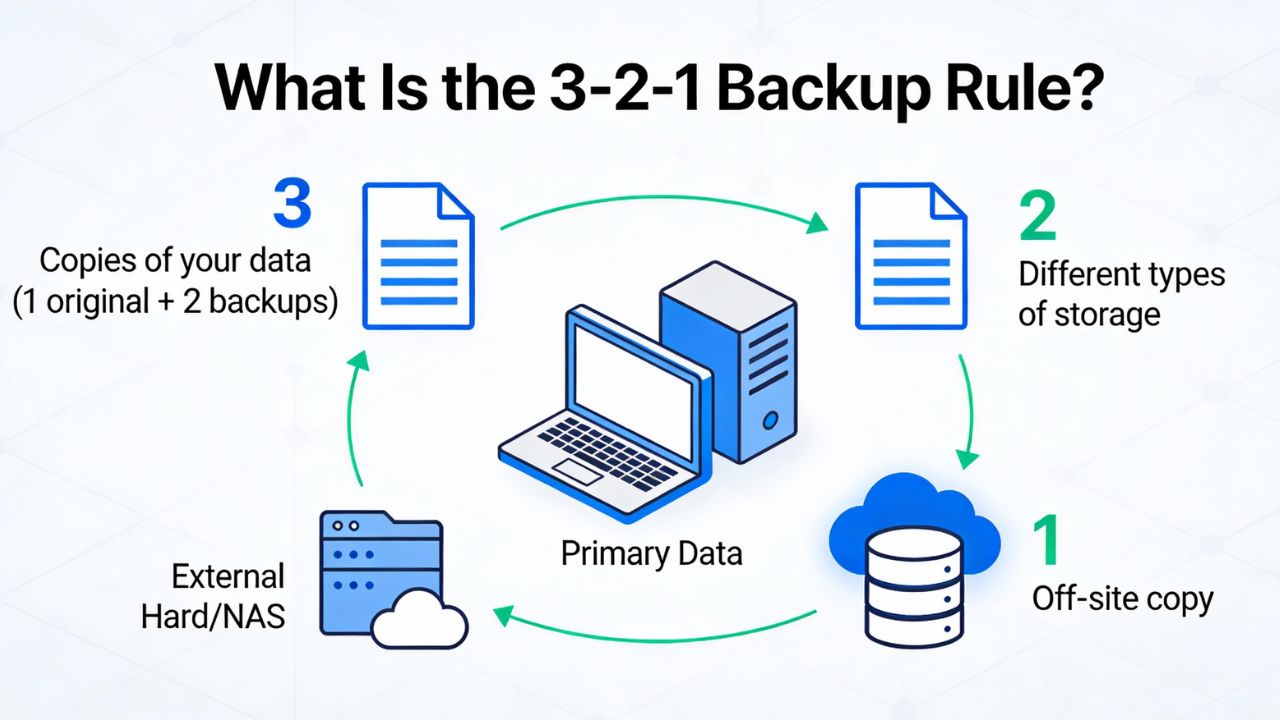
At its core, the 3-2-1 backup rule prescribes redundancy and diversity. “Three copies” means your production data and at least two additional backups. “Two media” means those backups should live on different storage technologies (e.g., local NAS and cloud object storage) to avoid a single shared failure mode. “One offsite” ensures a copy remains safe if your primary location is compromised by fire, flood, theft, or localized ransomware.
Breaking down each element
Three copies is the minimum redundancy that tolerates one bad backup without losing protection. If your latest backup is corrupt or incomplete, the second backup remains usable. Maintaining multiple restore points also supports recovery from logical corruption (like accidental mass deletion) by rolling back to an earlier state.
Two media types limit systemic risk. Examples include internal SSDs plus external HDDs, or a local NAS paired with LTO tape, or on premises block storage plus S3-compatible object storage. The idea is to avoid a single vendor, filesystem, or protocol dependency that could fail across all copies in the same way.
One offsite copy protects against sitewide incidents. This can be geographically separate data centers, cloud regions, or physically stored tapes off premises. In the cloud era, “offsite” usually means a different provider account and region, ideally with immutability enabled.
Why the 3-2-1 Rule Is Important
Modern threats exploit centralization and convenience; backups restore balance and control.
3-2-1 reduces downtime, limits financial loss, and strengthens cybersecurity resilience.
From an operational standpoint, the 3-2-1 rule directly lowers your risk across multiple failure domains. Hardware fails. Users delete things. Software bugs introduce corruption. Attackers encrypt data. Natural disasters destroy equipment. By diversifying copies and locations, you contain these risks and ensure there is always a viable recovery path. This is fundamental to business continuity and disaster recovery planning.
Key benefits you can measure
Reduced Recovery Time Objective (RTO): With a local backup on fast media, you can restore quickly for common incidents, while a slower offsite copy protects against site level disasters. This balance controls cost and performance.
Improved Recovery Point Objective (RPO): Multiple copies and retention points help you restore to the closest point before an incident, minimizing data rework and loss. Incremental backup schedules can keep RPO to minutes.
Ransomware resilience: If malware reaches production and local storage, an offsite—and ideally immutable—backup breaks the attack chain. This is your last line of defense when endpoint and network controls fail.
Compliance alignment: Frameworks like ISO 27001, SOC 2, HIPAA, and GDPR expect adequate backups, offsite copies, encryption, and tested restores. 3-2-1 is a practical, auditable way to meet those expectations.
How 3-2-1 Works in Practice
Start with critical data, define RPO/RTO, and map sources to storage and schedules.
Use one fast local backup for speed, one offsite copy for resilience, and verify restores.
Implementation begins with a simple inventory. Identify data sets (databases, VMs, file shares, SaaS exports, WordPress sites), classify their criticality, and define acceptable RPO/RTO per workload. Then select tools and storage that fit those targets. In most small to mid sized environments, this results in a hybrid approach: a local backup on NAS for fast restores and a cloud copy for offsite protection.
Example: WordPress and small business websites
For a WordPress site, keep three copies: production files and database; a nightly local backup on the hosting server or a connected NAS; and an offsite backup in S3-compatible storage with object lock. Use a plugin like UpdraftPlus or JetBackup (if your host provides it) to schedule daily incrementals and weekly fulls. Store at least 14–30 days of retention to recover from slow burn corruption.
If you host with a provider like YouStable, you can combine platform backups with your own offsite copy. Enable cPanel backups to a remote destination (S3, Backblaze B2, or another region) and periodically perform a test restore to a staging subdomain. This verifies both integrity and procedures without risking production uptime.
Example: Virtual machines and databases
For VMs, use hypervisor integrated backups (e.g., Veeam, Nakivo, or Proxmox Backup Server) to capture application consistent snapshots. Keep a primary backup repository on local deduplicated storage for fast restores and replicate backups offsite to object storage with immutability. For databases, combine logical dumps (mysqldump, pg_dump) with volume level snapshots and regular point in time recovery wherever possible.
Schedules often look like this: daily incrementals with weekly fulls, 30–90 days retention locally, and 90–365 days offsite. Align longer offsite retention with compliance or business needs. Consider staggering weekly and monthly fulls to offer more restore points for rare but severe events.
3-2-1 vs. 3-2-1-1-0: The Modern Variant
As threats evolved, the rule gained an extra layer: immutability and verification.
3-2-1-1-0 adds one offline/immutable copy and aims for zero backup verification errors.
The 3-2-1-1-0 model augments the original by requiring one copy to be truly offline or immutable. Offline could be tape stored offsite. Immutable could be cloud object storage with write once, read many (WORM) retention, like S3 Object Lock, Azure Immutable Blob Storage, or Wasabi Object Lock. The “0” emphasizes validation—verifying backups complete without errors and test restores succeed.
When to adopt 3-2-1-1-0
If you face ransomware risk, compliance demands, or high value data exposure, add immutability now. For many SMBs, enabling object lock is simpler than managing tape. Combine MFA and separate cloud accounts to reduce the chance a single compromised credential deletes all copies.
Schedule regular restore tests. Quarterly full recovery tests and monthly spot check restores are realistic baselines. Log results and fix any restore slowness or errors. The point of backups is restores, validation makes that real.
Choosing Backup Media and Storage
Each storage medium has different cost, speed, durability, and operational tradeoffs.
Mix fast local recovery with durable offsite storage to satisfy both RTO and resilience.
Common media options
Local NAS or DAS HDDs: Affordable capacity, good for fast restores and short RTO. Pair with RAID for availability, but remember RAID is not a backup. Use snapshots plus backups for safer rollbacks. Good for onsite copy in 3-2-1.
Cloud object storage (S3/B2): Highly durable (eleven 9s typical), scalable, and suitable for offsite copies. Enable versioning and object lock for immutability. Watch egress and API costs; use lifecycle policies to control retention and archive older backups to colder tiers.
LTO tape: Excellent for air gapped, long term, and cost effective archival at scale. Slower access and operational overhead. Best for organizations with large data sets and strict retention policies who can manage handling and vaulting.
Selecting destinations and accounts
Use account separation. Store offsite backups in a separate cloud account or tenant, not just a different bucket. Enforce MFA and limited IAM roles. For on prem to cloud, route traffic over TLS and consider client side encryption for extra assurance.
Prefer object lock capable storage for ransomware resilience. Many S3-compatible providers support WORM retention. Set legal holds for critical datasets and time based retention for routine backups, balancing compliance and cost.
Backups vs. Snapshots, RAID, and Sync
Not every copy is a backup. Understand differences to avoid false confidence. RAID, snapshots, and sync all help, but they don’t replace a 3-2-1 backup strategy.
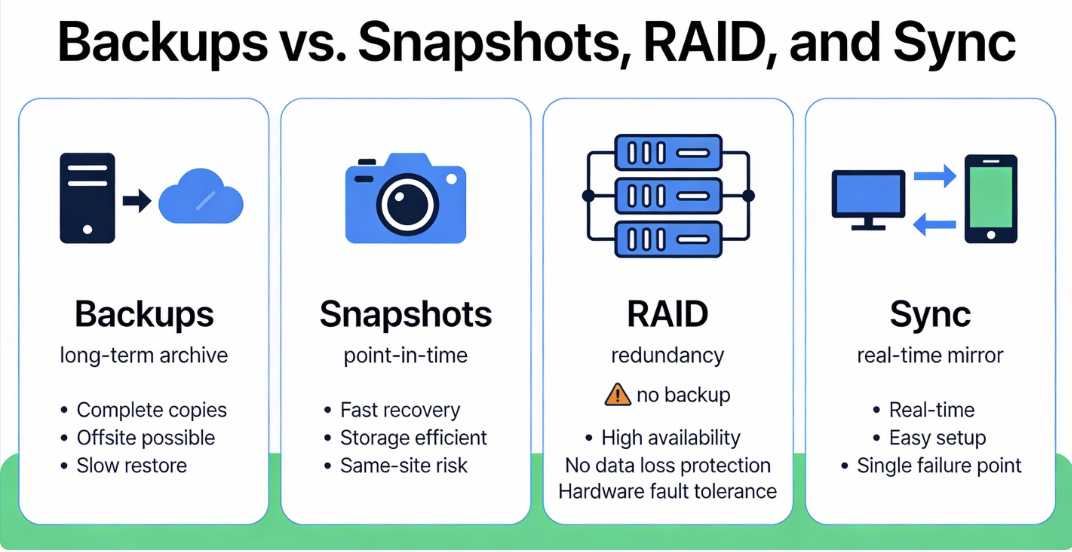
RAID improves availability by tolerating disk failures, but it mirrors corruption and deletes. Snapshots are point in time on the same system; they’re fast for rollbacks but vulnerable to the same threats as production. File sync (e.g., cloud drive) replicates changes including mistakes and malware, across devices. Backups create independent, versioned, and ideally immutable copies with retention policies and verification.
Designing Your 3-2-1 Backup Plan
A practical plan starts with discovery and ends with tested, documented restores.
Keep it simple to maintain. The best backup is the one you can reliably restore.
Step-by-step checklist
- Inventory data sources: servers, databases, VMs, endpoints, SaaS exports, and websites.
- Classify data: critical, important, archival. Map to RPO/RTO targets for each class.
- Choose media: local NAS or repository for speed, cloud/tape for offsite durability.
- Select tools: hypervisor aware backups for VMs, app-aware for databases, plugins for CMS.
- Define schedules: daily incrementals, weekly fulls; adjust based on change rate and risk.
- Set retention: 30–90 days onsite; 90–365+ days offsite for compliance and rollback safety.
- Enable security: encryption in transit/at rest, object lock, MFA, separate accounts.
- Automate verification: backup reports, checksum validation, and restore tests.
- Document procedures: where data lives, how to restore, who to contact, credentials escrow.
- Review quarterly: capacity growth, costs, restore times, and new data sources.
Scheduling and retention tips
Backups should run outside peak hours to avoid performance impact. Stagger jobs across systems to smooth bandwidth and I/O. For high change datasets (like databases), consider more frequent incrementals or transaction log backups to improve RPO without massive storage growth.
Retention is a risk decision. Longer retention increases recovery options after stealthy attacks but raises costs. Use tiered retention: frequent backups for the last week, daily for a month, weekly for three months, monthly for a year, and yearly for seven years if required by regulation.
Sizing, Performance, and Cost Planning
Estimate capacity and bandwidth up front to avoid failed jobs and surprise bills.
Use deduplication, compression, and lifecycle policies to optimize storage spend.
Capacity planning basics
Calculate source data size, daily change rates, and desired retention. For example, with 2 TB of data and a 3% daily change rate, 30 days of incrementals plus weekly fulls may require roughly 2 TB (full) + (0.03 × 2 TB × 30) + weekly overhead, then apply compression/dedupe ratios (often 1.5–3× reduction depending on content).
Provision extra headroom 20–30%, so growth doesn’t break jobs. For offsite, consider seeding options (initial backup to a shipped disk or a temporary higher bandwidth window) to avoid long first run times.
Network and restore performance
Backup windows are bounded by your slowest link. Use LAN speed backups to a local repository for fast RTO. Offsite replication can run continuously at a throttled rate to avoid saturating WAN links. For restores, prioritize restoring critical services first and consider “instant recovery” features that boot VMs directly from backup storage while full restores complete.
Cost levers to adjust
Balance retention vs. cost with lifecycle policies: keep recent backups in standard storage for speed and move older ones to colder, cheaper tiers. Watch egress fees; design restores to pull only what’s needed. Compress before upload and exclude non essential data (caches, temp files) from backups.
Security and Compliance Considerations
Backups are high value targets. Secure them like production—if not more.
Encrypt, minimize access, separate duties, and log everything end to end.
Implement encryption in transit (TLS) and at rest. For cloud backups, choose server side encryption with customer managed keys or client side encryption for stricter control. Limit IAM roles to least privilege, use MFA, and isolate backup administration from production admins to reduce insider risk.
Maintain audit logs for backup jobs, deletions, retention changes, and restore actions. For regulated data, document chain of custody and retention schedules. Verify your practices meet obligations under GDPR (right to erasure vs. compliance retention), HIPAA (integrity and availability), and sector specific standards.
Common Mistakes to Avoid
Small oversights compound into failed restores. Avoid these frequent pitfalls. Design for human error and complexity by testing procedures, not just technology.
- Relying on RAID or snapshots alone: They don’t protect against deletion or malware.
- Single vendor, single account: A compromised credential can delete every copy.
- No restore testing: Unverified backups frequently fail when you need them most.
- Poor retention planning: Too short loses recovery options; too long wastes budget.
- Backing up everything: Include only what you need; exclude cache/temp/log bloat.
- Unencrypted backups: Sensitive data in transit or at rest is a compliance and breach risk.
- Leaving backups online: Without immutability, ransomware can encrypt your backups too.
Tools and Workflows That Fit 3-2-1
Pick tools that understand your workloads and support offsite replication.
Favor solutions with immutability, verification, and easy, documented restores.
For websites and WordPress
Use hosting native backups (cPanel/WHM or Plesk) plus a plugin for granular control. Schedule daily database dumps and file backups, replicate to S3-compatible storage with object lock, and test restore to a staging site. If your host offers JetBackup or similar, enable remote destinations and email reporting for visibility.
As a hosting provider, YouStable customers often pair cPanel backups with an external S3 bucket and MFA protected credentials. This adheres to 3-2-1 with minimal overhead and keeps restores straightforward via the control panel or plugin interface.
For servers, VMs, and databases
VM aware tools (Veeam, Nakivo, Proxmox Backup Server) provide application consistent backups and instant recovery. Database aware tooling (native dumps, WAL/redo log backups) improves point in time recovery. Pair a local repository with object storage replication. Enable periodic fulls, frequent incrementals, and automatic integrity checks.
Open source and CLI workflows
Tools like BorgBackup, Restic, and Duplicati support deduplication, encryption, and S3 backends. Rclone can replicate encrypted archives to cloud storage and verify checksums. These are excellent for technical teams who value portability and transparency.
Sample Offsite Backup Script Linux
Automate encrypted, versioned backups to S3-compatible storage with verification. Use cron to schedule daily incrementals and weekly fulls, with email reporting.
# Requires: borg, rclone, gpg (optional), mailx
# Local repo for fast restores
export BORG_REPO=/backup/borg-repo
export BORG_PASSPHRASE='change-me'

# 1) Create incremental backup locally
borg create --stats --compression lz4 \
  $BORG_REPO::'{hostname}-{now:%Y-%m-%d_%H-%M}' \
  /var/www /etc /var/lib/mysql --exclude-caches

# 2) Prune retention (keep dailies, weeklies, monthlies)
borg prune -v --list $BORG_REPO --keep-daily=7 --keep-weekly=4 --keep-monthly=6

# 3) Compact repo to reclaim space
borg compact $BORG_REPO

# 4) Sync local repo offsite with rclone to S3 with object lock (bucket policy required)
# Configure 'rclone config' remote named 'offsite' with versioning + lock
rclone sync /backup/borg-repo offsite:my-backups/hostname --checksums --transfers=4 --bwlimit=8M

# 5) Verify a random archive list
borg list $BORG_REPO | shuf -n 1 | while read -r archive _; do borg verify $BORG_REPO::$archive; done

# 6) Send a simple report
echo "Backup completed on $(hostname) at $(date)" | mail -s "Backup Report $(hostname)" admin@example.com
This example keeps a fast local repository for restores and replicates the repository offsite. For immutability, enable object lock on the bucket and configure retention policies so deletions or modifications are blocked for a defined period.
Use Cases and Scenarios
Adapt 3-2-1 to the workload’s risk, change rate, and compliance requirements.
From freelancers to enterprises, the pattern holds with different tools and scales.
Freelancers and creators
Keep working files on your laptop, back up to an external HDD/SSD with Time Machine or similar, and push an encrypted backup to a cloud drive or object storage weekly. This provides rapid local recovery and offsite protection if a device is lost or stolen.
Small and midsize businesses
Centralize routine backups on a NAS, back up servers and SaaS exports (Microsoft 365/Google Workspace) daily, and replicate to S3 with object lock. Test a quarterly full restore to a lab or staging environment. Document roles and escalation contacts for incidents.
Enterprises and regulated industries
Employ policy driven backups, immutable offsite copies, and geo redundancy across regions. Use key management systems (KMS/HSM), strict IAM separation, backup network segmentation, SIEM integrated logging, and automated DR runbooks. Align retention with legal holds and discovery requirements.
FAQs
What is the 3-2-1 backup rule in simple terms?
Keep three total copies of your data, store them on two different types of media, and keep one copy offsite. This ensures redundancy, diversity, and disaster protection in a simple, vendor agnostic framework.
Is 3-2-1 still relevant, or should I use 3-2-1-1-0?
3-2-1 remains a strong baseline. If ransomware or compliance is a concern, adopt 3-2-1-1-0 by adding an immutable or offline copy and verifying backups regularly to achieve zero errors during validation and restores.
Does cloud storage count as offsite?
Yes. A cloud region separate from your on premises location qualifies as offsite. For stronger protection, use a separate cloud account, enable versioning and object lock, and require MFA for all backup operations.
How often should I back up my data?
Match frequency to business impact. Daily backups are a minimum for most workloads; high change systems may need hourly incrementals or continuous log backups. Always align schedules with your RPO and RTO targets.
Are RAID and snapshots enough for backups?
No. RAID improves availability, and snapshots help with quick rollbacks, but neither protects against deletion, ransomware, or site loss. You still need independent, versioned, and ideally immutable backups stored offsite.
How long should I keep backups?
It depends on risk and regulations. A common baseline is 30–90 days onsite and 90–365+ days offsite. Use tiered retention to balance cost and recovery options, and follow any legal or industry specific requirements.
How do I test that my backups really work?
Run scheduled restore tests: monthly file level restores, quarterly full system or VM recoveries, and documented validation of application integrity. Track RTO/RPO achieved and correct any gaps you discover during testing.
Conclusion
Simplicity scales better than heroics; 3-2-1 is simple, proven, and versatile. Adopt it, automate it, test it and you’ll turn incidents into routine recoveries.
The 3-2-1 backup rule gives you redundancy, media diversity, and offsite protection in a framework that fits any environment from a single WordPress site to a multi region enterprise.
Modernize with immutability and regular verification, secure your destinations with strong identity controls, and practice restores until they’re predictable. With that foundation, you’ll meet today’s resilience expectations and be ready for tomorrow’s threats.