Tiered storage for data backups is a strategy that places recent, frequently restored data on fast “hot” storage, less active backups on “warm” storage, and long term archives on low cost “cold” storage.
A cost benefit analysis balances recovery speed (RTO), data loss tolerance (RPO), retention needs, and total cost of ownership to optimize spend and resilience. Backups are your last line of defense against outages, human error, and ransomware, but not all data needs the same speed or price point.
This guide explains how to run a practical cost benefit analysis of hot, warm, and cold tiers, so you cut storage bills without risking recovery objectives or compliance.
What is Tiered Storage for Data Backups?
Tiered backup storage aligns how quickly you can restore data with how often you need it. Instead of keeping every backup on expensive, high-performance media, you distribute copies across tiers to meet Recovery Time Objective (RTO), Recovery Point Objective (RPO), and retention policies at the lowest sustainable cost.
Hot vs. Warm vs. Cold: Quick Definitions
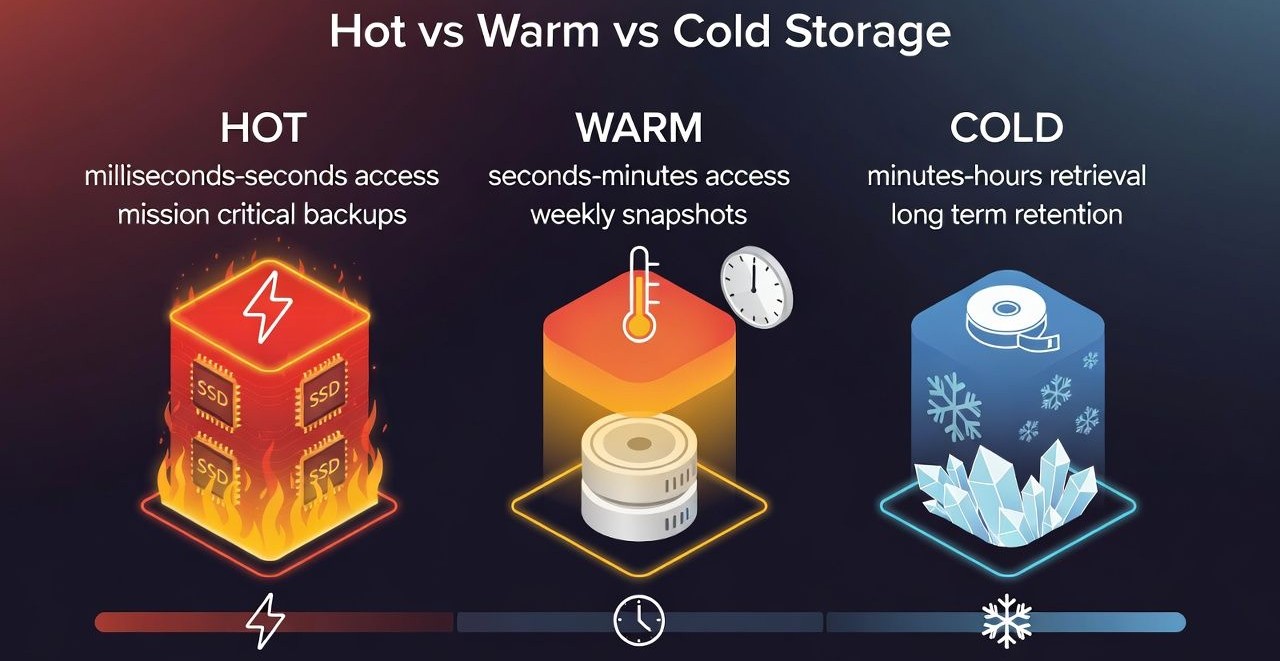
- Hot storage (performance first): SSD/NVMe or high availability object storage. Milliseconds to seconds access, highest cost. Ideal for latest recovery points, mission critical databases, and frequently tested restores.
- Warm storage (balanced): Slower disks or infrequent access object classes. Seconds to minutes access, moderate cost. Ideal for recent but less frequently accessed backups (e.g., weeks old snapshots).
- Cold storage (cost first): Archival object/tape with delayed retrieval (minutes to hours). Lowest cost per GB month, but retrieval and early deletion fees can apply. Ideal for long term retention, legal holds, and quarterly/annual archives.
Why a Cost Benefit Analysis Matters?
Storage bills grow quietly. Without tiering, organizations pay premium rates for data they rarely touch. A cost benefit analysis quantifies trade offs across price, performance, and risk, so finance, security, and engineering can agree on a data protection plan that meets SLAs and budgets.
Key Variables to Model
- Capacity: Total protected data, daily change rate, and expected growth.
- Retention: How long to keep daily/weekly/monthly/yearly restore points (e.g., 30/12/7/7).
- RPO/RTO: How much data loss is acceptable and how quickly must you restore specific workloads.
- Storage cost: $/GB month by tier, minimum storage durations, replication premiums.
- Retrieval/egress: Fees for restoring or transferring data, rehydration costs, API/operation charges.
- Durability/availability: 9s of durability, availability SLAs, cross region or immutable options.
- Data reduction: Compression/deduplication ratios and incremental backups/snapshots.
- Operational overhead: Lifecycle orchestration, monitoring, and testing effort.
Hot, Warm, Cold: The Economics Explained
Hot tiers command the highest $/GB month because they deliver speed and availability. Warm tiers lower cost with modest access penalties. Cold tiers minimize storage cost, but retrieval can be delayed and metered. Your ideal mix typically places the most recent restore points hot, the middle aged backups warm, and long retention sets cold.
A Simple Cost Model You Can Reuse
Use this framework to compare scenarios. Plug in your provider’s published pricing and your backup software’s dedup/compression ratios. Always validate with current price sheets and account for minimum storage duration rules in archival classes.
# Input variables (example)
Hot_GB   = recent_data_kept_hot
Warm_GB  = mid_age_data_kept_warm
Cold_GB  = long_retention_data_kept_cold

Hot_rate  = hot_storage_cost_per_GB_month
Warm_rate = warm_storage_cost_per_GB_month
Cold_rate = cold_storage_cost_per_GB_month

Hot_ops   = API_ops_hot_per_month * op_cost
Warm_ops  = API_ops_warm_per_month * op_cost
Cold_ops  = API_ops_cold_per_month * op_cost

Retrieval_cold_GB = GB_restored_from_cold
Retrieval_fee     = cold_retrieval_cost_per_GB
Egress_fee        = network_egress_cost_per_GB

# Monthly storage cost
Storage_cost = (Hot_GB*Hot_rate) + (Warm_GB*Warm_rate) + (Cold_GB*Cold_rate)

# Operations + retrieval + egress
Variable_cost = Hot_ops + Warm_ops + Cold_ops \
              + (Retrieval_cold_GB * (Retrieval_fee + Egress_fee))

# Total monthly cost
Total_monthly = Storage_cost + Variable_cost
Illustrative Scenario (for Methodology)
Assume 100 TB logical data, 2% daily change rate, 2:1 effective data reduction (compression+dedupe), and a 30/60/365 retention: last 7 days hot, next 23 days warm, older warm to cold after 60 days. These are illustrative numbers, substitute your real workload and provider pricing.
- Effective backup size: ~50 TB initial full (after reduction).
- Daily incrementals: ~1 TB/day after reduction (2% of 50 TB).
- Keep hot: 7 daily copies ≈ ~7 TB.
- Keep warm: Previous 23 days ≈ ~23 TB.
- Keep cold: Monthly/quarterly/yearly sets ≈ ~20–25 TB (depends on GFS policy).
If warm storage is roughly half the cost of hot, and cold is a fraction of warm, the blended $/GB month drops sharply versus all hot. Even after budgeting retrieval events from cold (e.g., quarterly audit restore or a targeted file recovery), total spend typically falls 40–70% while meeting RTO/RPO for most workloads.
Benefits Beyond Lower Storage Bills
Stronger Resilience and Compliance
- Immutable backups: Write once policies on warm/cold tiers resist ransomware tampering.
- Air gapped copies: Cold tiers can serve as logically isolated copies for the 3-2-1 rule.
- Retention assurance: Lifecycle rules enforce legal/industry retention without manual intervention.
Operational Efficiency
- Faster critical restores: Hot tier ensures rapid RTO for production incidents.
- Reduced noise: Warm/cold tiers prevent hot storage from ballooning with old data.
- Predictable planning: Tiering clarifies costs by data age, aiding FinOps and capacity forecasting.
Risks, Trade offs, and Hidden Costs
- Retrieval delays: Cold tiers may take minutes to hours to rehydrate; verify this against RTO.
- Minimum storage duration: Deleting cold objects early can trigger pro rated charges.
- API/operation fees: Frequent listings, small object writes, or lifecycle transitions add up.
- Egress charges: Restoring large volumes out of cloud regions can be pricey.
- Policy drift: Without monitoring, hot data may inadvertently accumulate, eroding savings.
Designing a Tiered Backup Policy
1) Map Business Objectives to Data Classes
- Critical (P0): Databases, authentication, payments. RTO minutes, RPO minutes hours. Keep multiple hot points.
- Important (P1): App servers, analytics. RTO hours, RPO hours. Hot for a few days, then warm.
- Retain only (P2): Logs, exports, media archives. RTO days acceptable. Warm to cold quickly.
2) Define Lifecycle Transitions
- Hot → Warm after 7–14 days for most workloads.
- Warm → Cold after 45–90 days or after a monthly snapshot is sealed.
- Cold → Delete upon retention expiry, with legal holds honored.
3) Automate with Lifecycle Rules
Automate transitions and retention with object storage lifecycle policies. Below is an example policy sketch to move objects from hot to warm to cold and then expire them. Adapt the days, prefixes, and class names to match your provider and bucket layout.
{
  "Rules": [
    {
      "ID": "hot-to-warm-14d",
      "Filter": { "Prefix": "backups/daily/" },
      "Status": "Enabled",
      "Transitions": [
        { "Days": 14, "StorageClass": "WARM" }
      ]
    },
    {
      "ID": "warm-to-cold-60d",
      "Filter": { "Prefix": "backups/daily/" },
      "Status": "Enabled",
      "Transitions": [
        { "Days": 60, "StorageClass": "COLD" }
      ]
    },
    {
      "ID": "expire-after-365d",
      "Filter": { "Prefix": "backups/daily/" },
      "Status": "Enabled",
      "Expiration": { "Days": 365 }
    }
  ]
}
4) Monitor, Test, and Optimize
- Cost monitoring: Tag backup buckets by app/team; alert on anomalies.
- Restore tests: Quarterly drills to verify RTO with hot and warm data; annual cold restore rehearsal.
- Right size objects: Use larger parts and batching to reduce API costs.
- Immutability: Enable time bound locks on warm/cold for ransomware defense.
Common Patterns and Real World Use Cases
WordPress and SMB Websites
- Hot: Last 3–7 daily backups for fast rollbacks after plugin/theme issues.
- Warm: Prior 3 weeks for point in time recovery.
- Cold: Monthly images for 12 months for legal/accounting audit trails.
SaaS with Strict Retention
- Hot: Database log shipping and hourly snapshots.
- Warm: Daily app snapshots for 60–90 days.
- Cold: Yearly archives (7+ years), immutable, cross region replicated.
Virtual Machines and Databases
- Hot: Latest VM images and recent PITR logs.
- Warm: Weekly synthetic fulls.
- Cold: Quarterly “golden” images for DR compliance.
How YouStable Helps Optimize Backup Storage Tiers
At YouStable, we help customers lower backup TCO without compromising recoverability. Our hosting and cloud solutions support hot, warm, and cold object storage classes, lifecycle automation, immutable retention, and multi region options, so you can enforce 3-2-1 backups, meet RPO/RTO, and reduce egress surprises with transparent pricing and 24/7 expert support.
Whether you’re protecting a single WordPress site or a multi terabyte SaaS platform, our engineers can size tiers, tune dedup/compression, and script lifecycle policies that align with your budget and compliance needs.
Practical Tips to Maximize Savings Safely
- Prioritize RPO/RTO: Never move data to a tier that breaks recovery SLAs.
- Use incremental forever: Combine periodic synthetic fulls with dedup to shrink capacity.
- Consolidate small files: Bundle to reduce per request overhead.
- Stagger transitions: Transition in batches to avoid peak retrieval costs during audits.
- Tag everything: Cost allocation by app/team encourages responsible data retention.
FAQs
What’s the difference between hot, warm, and cold backup storage?
Hot storage offers fastest restores at the highest price, warm balances cost and access speed, and cold minimizes $/GB month but adds retrieval delays and potential fees. Use hot for recent, critical recovery points; warm for mid aged sets; and cold for long term retention or compliance archives.
How do RPO and RTO influence tier selection?
Short RPO/RTO require hot storage for the most recent backups to guarantee quick recovery and minimal data loss. As acceptable RTO increases (hours or days), older backups can shift to warm or cold. Always tier according to the worst case recovery requirement per workload.
How much can tiered storage save versus all hot backups?
It varies by dataset size, change rate, and retrieval frequency, but 40–70% monthly savings are common when moving older backups to warm and cold tiers, even after accounting for occasional retrieval and API costs. Accurate modeling with real prices and your access patterns is essential.
Is cold storage suitable for ransomware recovery?
Yes, especially with immutable policies and air gapped design. Cold tiers provide cost effective, tamper resistant retention. However, test restore times; you may want the most recent clean copies on hot or warm tiers for faster incident response, then rely on cold for deep recovery windows.
What’s the best tiering strategy for WordPress backups?
Keep the last 3–7 daily backups hot for instant rollbacks, 2–3 weeks warm for point in time recovery, and monthly images cold for a year or longer. Automate transitions via lifecycle policies and periodically test restores. YouStable can preconfigure this for managed WordPress hosting.