To back up massive unstructured data at scale, use object storage as the capacity tier, incremental/forever backups with parallel throughput, and immutable retention (Object Lock/WORM). Define RPO/RTO and data classes, automate lifecycle tiering, index metadata for rapid restores, and test regularly. Follow the 3-2-1-1-0 rule with cross region replication for resilience.
Backing up massive unstructured data in highly scalable environments demands a strategy that is fast, resilient, and cost efficient. In this guide, I’ll show you how to back up massive unstructured data using cloud native object storage, parallel data movers, immutability, and modern backup patterns all explained in simple terms with practical steps and examples.
What “Massive Unstructured Data” Really Means
Unstructured data includes files, logs, images, videos, datasets, and object store blobs that don’t fit neatly into tables.
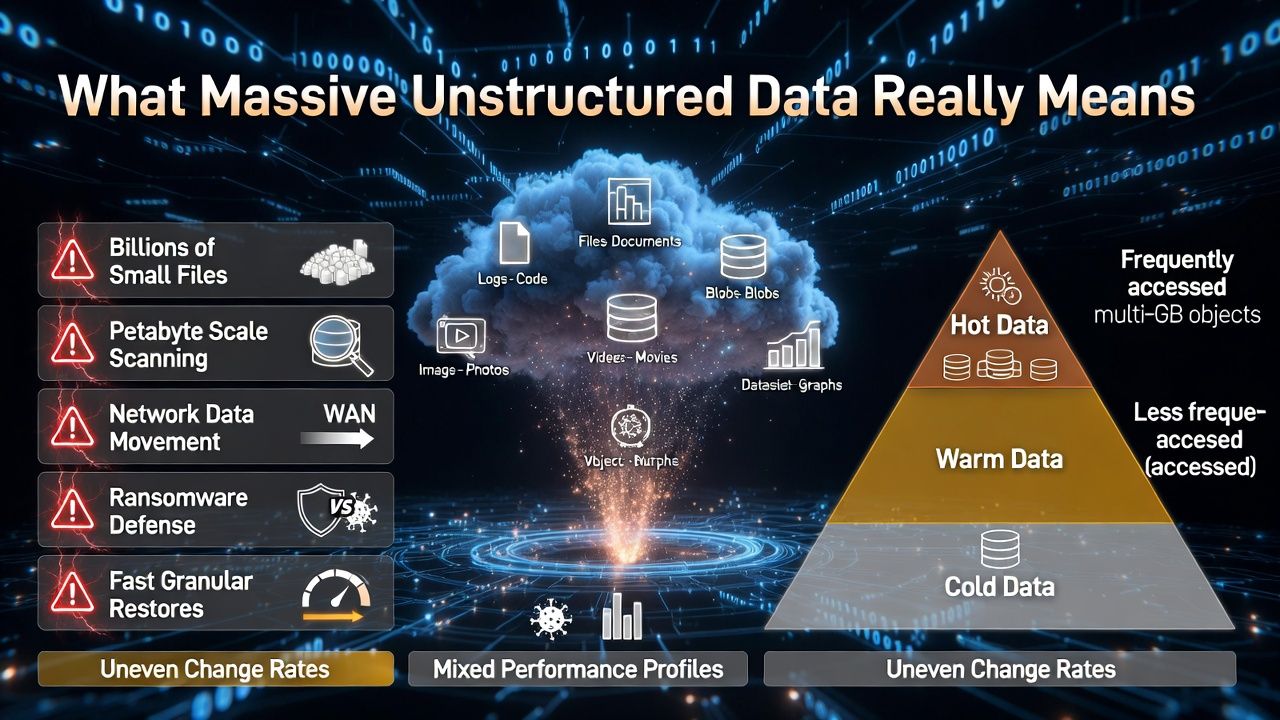
At petabyte scale, you’ll face billions of small files, multi gigabyte objects, uneven change rates, and mixed performance profiles across hot, warm, and cold data.
The challenges: scanning and change detection at scale, moving data quickly over networks, keeping costs down, defending against ransomware, and restoring only what you need, fast. Solving these requires architecture, not just a backup tool.
Core Principles for Scalable Unstructured Backups
Define RPO/RTO and Data Classes First
RPO (how much data you can lose) and RTO (how fast you must recover) drive the design. Classify data: critical, important, and archive. Critical data may need hourly incremental and low latency storage; archive data can use cheaper, slower tiers. Decisions here prevent overspending later.
Follow the 3-2-1-1-0 Rule + Immutability
Keep 3 copies on 2 media types, 1 offsite, 1 air gapped/immutable, and 0 unresolved restore errors. In practice, that’s primary storage + backup copy on object storage + offsite copy in another region/account with Object Lock/WORM to prevent tampering.
Use Scale Out Architecture and Object Storage
Object storage (Amazon S3, Azure Blob, Google Cloud Storage, or S3 compatible like MinIO) is the ideal capacity tier. It scales horizontally, supports multipart parallel uploads, erasure coding, versioning, lifecycle tiering, and immutability. Pair it with change aware movers and a global index.
Prefer Incremental Forever with Synthetic Fulls
Full backups at petabyte scale are impractical weekly. Take one full, then incremental forever. Let the backup platform build synthetic fulls on the backend using block level metadata. This shrinks backup windows and network use while keeping restore performance.
Reference Architectures That Work
Cloud Native: Direct to Object Storage
Ideal when most data already lives in cloud services or containers. Use cloud object storage with versioning and Object Lock. Data movers like rclone, restic, Kopia, or enterprise suites push incremental data directly to buckets with parallel transfers and client side encryption.
- Storage: S3/GCS/Blob with versioning, lifecycle policies, and optional cross region replication.
- Mover: rclone or backup suite configured for multipart parallelism and checksums.
- Index: Catalog metadata in a scalable database; shard catalogs by path or tenant.
- Restore: Granular restores via index; bulk restores through parallel downloads or native APIs.
Hybrid/On Prem: NAS, HDFS, or Object to S3 Compatible
Back up network attached storage (SMB/NFS), HDFS, Ceph, or Lustre to an on prem S3 compatible target (e.g., MinIO) and replicate to cloud. Use NDMP or change lists where available, or scan with a distributed crawler. Push increments to object storage via multiple concurrent streams.
- Local target for seeding and fast restores.
- WAN optimized replication to cloud object storage with immutability enabled.
- Policy based lifecycle to cooler tiers after 30–90 days.
Edge and ROBO: Seeding, Forward Incremental, Short Chains
For remote sites with limited bandwidth, do an initial seed to a portable device or local object gateway. Use forward incremental with periodic synthetic fulls to keep chain lengths manageable. Throttle bandwidth and schedule transfers during off peak hours.
Technology Options: Managed, Enterprise, or Open Source
Managed Cloud Backup Services
AWS Backup, Azure Backup, and Google Cloud Backup and DR provide policy driven protection for cloud services and can back up to object storage with immutability. They’re great for simplicity, compliance features, and integration with cloud IAM and KMS.
Enterprise Backup Suites
Veeam, Commvault, Rubrik, and Cohesity excel at scale out architectures, global deduplication, synthetic fulls, ransomware detection, and object storage tiering. They offer robust catalogs and role based access with audit trails for regulated environments.
Open Source Stack
Tools like restic or Kopia for deduped repositories, rclone for high speed sync, and Velero for Kubernetes backups can meet demanding needs when engineered carefully. Combine them with S3 compatible storage, Object Lock, and Infrastructure as Code for repeatability.
Performance at Petabyte Scale
Parallelism and Multipart Uploads
Use dozens to hundreds of parallel streams. On S3, tune multipart chunk size and concurrency. Spread workload across multiple clients near the data to avoid a single bottleneck. Ensure end to end checksums (MD5, SHA 256) for integrity.
The Small Files Problem
Billions of tiny files kill throughput. Bundle small files into larger archives or chunks before upload, or use tools that virtualize chunking under the hood. Maintain a searchable index so you can restore single files without pulling entire tarballs.
Catalog and Metadata Scaling
Catalogs can grow faster than data. Shard catalog databases, store object level metadata in scalable datastores, and use hierarchical retention (short retention for granular indexes, longer for coarse indexes) to keep query times low.
Cost Optimization Without Sacrificing Recovery
Tiers and Lifecycle Policies
Leverage storage classes: S3 Standard/IA/Glacier tiers, Azure Hot/Cool/Archive, GCS Standard/Nearline/Coldline/Archive. Keep recent restore points on faster tiers; auto move older points to archival tiers. Model retrieval costs before committing to archival for frequently restored datasets.
Deduplication and Compression
Global block level deduplication plus compression can shrink capacity by 3–10x depending on data. For media and already compressed logs, dedupe gains are modest; prioritize lifecycle tiering and delete policies.
Retention Modeling
Estimate storage with a simple model: average daily change rate × retention days × overhead for indexes and metadata. Run sensitivity analysis for 7/30/90/365 day scenarios to align with budgets and compliance.
Security, Compliance, and Ransomware Defense
Immutability, WORM, and Least Privilege
Enable bucket Object Lock (compliance or governance mode) with retention policies. Use separate accounts and KMS keys for backup targets. Restrict write roles from deleting or shortening retention, and audit with logs. Encrypt in transit and at rest by default.
Air Gapping and Isolation
For virtual air gap, replicate backups to a secondary account with no interactive users, dedicated KMS, and VPC endpoints. Physical air gap adds removable media or offline copies for critical datasets that must withstand worst case compromise.
Recovery Testing and Proof
Run automated restore drills and malware scans on isolated restore environments. Track RTO/RPO adherence and ensure you have 0 unresolved errors as the 3-2-1-1-0 rule mandates.
Step-by-Step Implementation Checklist
- Define RPO/RTO and classify data.
- Choose object storage and enable versioning and Object Lock.
- Select a backup platform (managed, enterprise, or open source).
- Design for incremental forever and synthetic fulls.
- Tune parallelism, multipart size, and concurrency.
- Implement lifecycle tiers and cross region replication.
- Harden IAM, KMS, and network paths; separate accounts.
- Build an index/catalog strategy and capacity model.
- Automate monitoring, alerts, and reporting.
- Schedule restore drills and document runbooks.
Example Configurations and Commands
The following snippets illustrate common building blocks. Adapt to your environment and policies.
# AWS S3: Create a versioned, immutable bucket with lifecycle
aws s3api create-bucket --bucket my-backup-bucket --region us-east-1
aws s3api put-bucket-versioning --bucket my-backup-bucket --versioning-configuration Status=Enabled
aws s3api put-object-lock-configuration --bucket my-backup-bucket --object-lock-configuration \
  "ObjectLockEnabled=Enabled,Rule={DefaultRetention={Mode=GOVERNANCE,Days=30}}"

# Lifecycle to transition older backups to Glacier Instant Retrieval then Deep Archive
cat <<'JSON' > lifecycle.json
{
  "Rules": [{
    "ID": "tiering",
    "Status": "Enabled",
    "Filter": { "Prefix": "" },
    "Transitions": [
      { "Days": 30, "StorageClass": "GLACIER_IR" },
      { "Days": 180, "StorageClass": "DEEP_ARCHIVE" }
    ],
    "NoncurrentVersionTransitions": [
      { "NoncurrentDays": 30, "StorageClass": "GLACIER_IR" }
    ],
    "Expiration": { "ExpiredObjectDeleteMarker": true }
  }]
}
JSON
aws s3api put-bucket-lifecycle-configuration --bucket my-backup-bucket --lifecycle-configuration file://lifecycle.json
# rclone: high-throughput copy to S3 with multipart tuning
rclone copy /data s3:my-backup-bucket/data \
--transfers 64 --checkers 64 --s3-chunk-size 64M --s3-upload-concurrency 8 \
--s3-disable-checksum=false --progress
# Restic: deduplicated, encrypted backups to S3 with immutability
export RESTIC_REPOSITORY="s3:https://s3.amazonaws.com/my-backup-bucket/repo"
export RESTIC_PASSWORD="<strong-passphrase>"
export AWS_ACCESS_KEY_ID="<key>"
export AWS_SECRET_ACCESS_KEY="<secret>"
restic init
restic backup /data --iexclude "/data/tmp" --verbose --one-file-system
restic forget --keep-hourly 24 --keep-daily 14 --keep-weekly 8 --prune
restic restore latest --target /restore# Velero: Kubernetes cluster + PV backup to S3-compatible storage
velero install \
--provider aws \
--bucket my-k8s-backups \
--plugins velero/velero-plugin-for-aws:v1.8.0 \
--backup-location-config region=minio,s3ForcePathStyle=true,s3Url=http://minio.local:9000 \
--secret-file ./credentials-velero
# Create a scheduled backup
velero create schedule daily --schedule "0 2 * * *" --ttl 240hMonitoring, Testing, and SLOs
Metrics That Matter
Track backup success rate, failed objects, average throughput, restore time by dataset, catalog latency, storage utilization by tier, and anomaly signals (sudden change rates that may indicate ransomware).
Continuous Validation
Automate checksum verification, perform monthly file level restores, and quarterly bulk restores. Record RTO and RPO outcomes and adjust policies or capacity where targets are missed.
Common Pitfalls and How to Avoid Them
- Endless full backups: switch to incremental forever with synthetic fulls.
- No immutability: enable Object Lock/WORM and separate backup accounts.
- Ignoring small files: bundle or chunk to avoid metadata overhead.
- Underestimating catalogs: shard and size metadata stores properly.
- One size fits all retention: align by data class to control costs.
- No restore drills: schedule recurring tests and fix runbooks.
FAQs
What’s the best way to back up unstructured data at petabyte scale?
Use object storage as the capacity tier, incremental forever backups, global deduplication, and immutability. Drive high throughput with parallel multipart uploads and place recent restore points on faster tiers, while tiering older points to archival storage.
How do I back up a large NAS with billions of files?
Leverage vendor change journals or NDMP where supported, run distributed crawlers, and bundle small files. Back up to local S3 compatible storage for seeding, then replicate to cloud with Object Lock and lifecycle tiering for cost control.
Is object storage reliable enough for backups?
Yes. Major object stores offer 11+ nines of durability via erasure coding and replication. Enable versioning and Object Lock for immutability, and use cross region replication to meet disaster recovery objectives.
How often should I run incrementals?
Align with your RPO and change rate. Many teams run hourly or every 4 hours for critical data, daily for less critical. Use job staggering and change aware scans to keep windows short and predictable.
How do I protect backups from ransomware?
Implement the 3-2-1-1-0 rule with immutable object storage, separate accounts and KMS keys, least privilege IAM, anomaly detection on change rates, and regular isolated restore tests to verify integrity before rehydrating data.