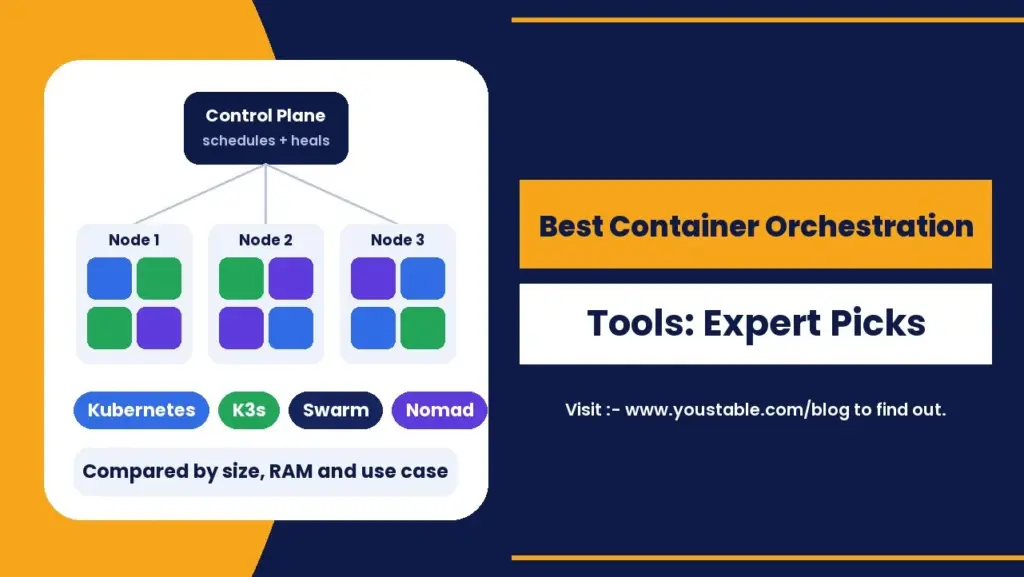
The best container orchestration tools in 2026 are Kubernetes for large and complex platforms, K3s and MicroK8s for lightweight Kubernetes on small servers, Docker Swarm for the simplest setup, and HashiCorp Nomad for mixed container and non-container workloads. Management layers such as Rancher and Portainer sit on top of these to make clusters easier to run, while Red Hat OpenShift packages Kubernetes for large enterprises.
Most comparisons stop at a list of names. This guide goes further: it compares the best container orchestration tools side by side, shows the real CPU and RAM each one needs, gives you the commands to start each tool, explains Kubernetes orchestration in plain language, and helps you choose based on your team size and workload.
What Is Container Orchestration?
Container orchestration is the automatic management of containers across one or more servers. Once you run more than a handful of containers, doing everything by hand stops working. An orchestration tool takes over the repetitive and error-prone jobs:
- Scheduling: deciding which server each container runs on.
- Self-healing: restarting or replacing containers that crash.
- Scaling: adding or removing copies of an app as traffic changes.
- Networking and service discovery: letting containers find and talk to each other.
- Rolling updates: deploying new versions without taking the app offline.
- Configuration and secrets: storing settings and passwords outside your images.
Container orchestration is a specific kind of automation. If you are interested in automating business processes rather than containers, see our separate guide on workflow orchestration.
Do You Need an Orchestrator at All?
Not always. If you run one or two apps on a single server, Docker Compose with restart policies may be all you need. Container orchestration tools start to pay off when you have several services, more than one server, frequent deployments or uptime targets that require automatic recovery. A good signal is when you find yourself writing scripts to restart containers, move them between servers or roll out updates by hand. That is exactly the work an orchestrator automates, and it is the point where choosing among the best container orchestration tools becomes worth the effort.
Best Container Orchestration Tools at a Glance
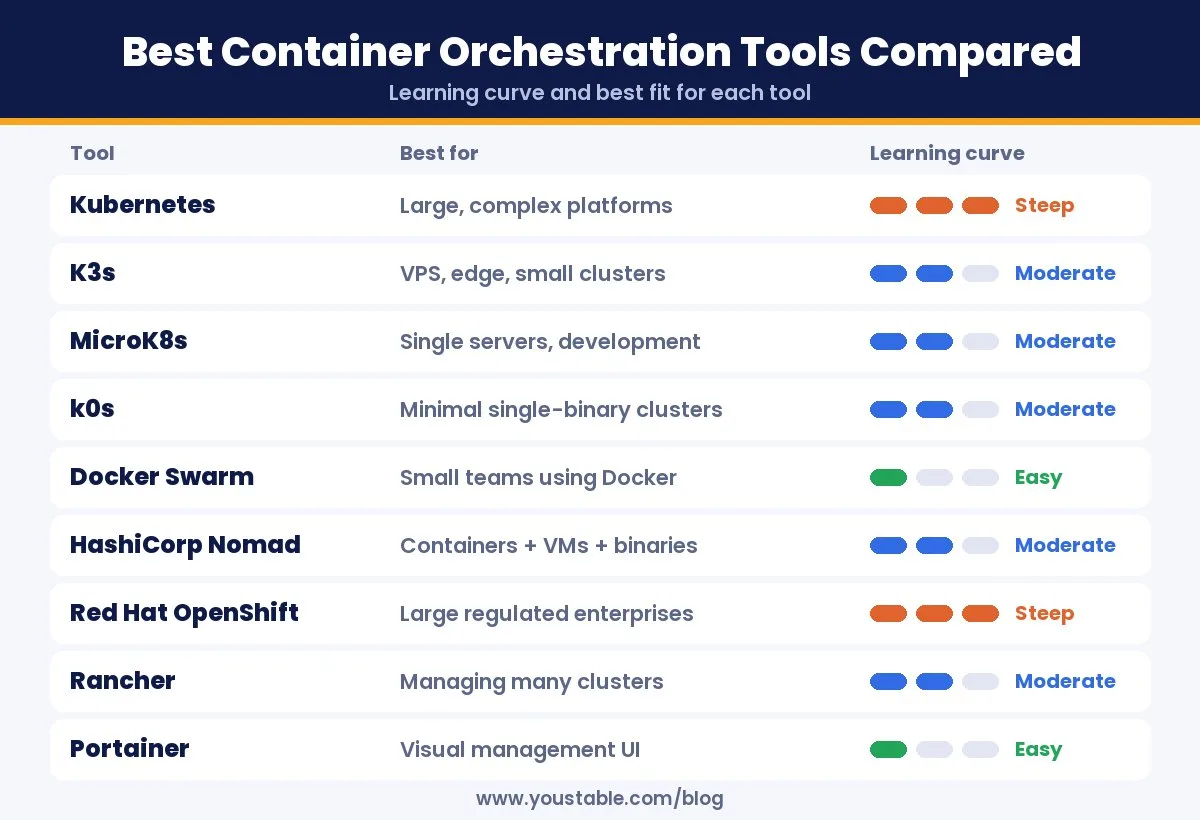
| Tool | Type | Best For | Learning Curve |
|---|---|---|---|
| Kubernetes | Open source orchestrator | Large, complex platforms | Steep |
| K3s | Lightweight Kubernetes | VPS, edge and small clusters | Moderate |
| MicroK8s | Lightweight Kubernetes | Single servers, labs, development | Moderate |
| k0s | Lightweight Kubernetes | Minimal, single-binary clusters | Moderate |
| Docker Swarm | Built into Docker | Small teams already using Docker | Easy |
| HashiCorp Nomad | General workload scheduler | Containers plus VMs and binaries | Moderate |
| Red Hat OpenShift | Enterprise Kubernetes platform | Large, regulated organisations | Steep |
| Rancher | Kubernetes management | Running many clusters | Moderate |
| Portainer | Management UI | Visual control of Docker, Swarm and Kubernetes | Easy |
| Managed Kubernetes | Cloud service | Teams that want no control plane to run | Moderate |
1. Kubernetes: The Standard for Kubernetes Orchestration
Kubernetes is the most widely used container orchestration tool. Originally built at Google and open sourced in 2014, it is now a graduated project of the Cloud Native Computing Foundation (CNCF) with a huge ecosystem of tools, operators and integrations.
How Kubernetes Orchestration Works
Kubernetes orchestration is built on a simple idea: you describe the state you want, and Kubernetes keeps working to make it true. You write a manifest that says, for example, run three copies of this web app. The control plane schedules those containers onto worker nodes, watches them and replaces any that fail, so your app keeps matching what you declared.
- Pods: the smallest unit, one or more containers that run together.
- Deployments: manage how many pods run and how updates roll out.
- Services: give pods a stable network address and load balance traffic.
- Ingress: routes outside web traffic to the right service.
- ConfigMaps and Secrets: keep configuration and passwords out of your images.
Pros: the largest ecosystem, runs anywhere, strong auto-scaling and self-healing, and skills that are in high demand. Cons: a steep learning curve and real operational effort to run a full cluster yourself.
Requirements: the official kubeadm setup asks for at least 2 GB RAM per machine and 2 CPUs for control plane nodes. New to the platform? Start with our explainer on what Kubernetes is on a Linux server.
2. K3s: Best Lightweight Kubernetes for VPS
K3s is a certified, lightweight Kubernetes distribution packaged as a single binary. Created by Rancher and now a CNCF project, it strips out rarely used parts of Kubernetes so it can run on small servers, edge devices and labs while staying compatible with standard Kubernetes manifests.
Requirements: a K3s server node needs at least 2 CPU cores and 2 GB RAM, while an agent node needs 1 core and 512 MB, before counting your own workloads. That makes it one of the best container orchestration tools for a single VPS or a small cluster.
curl -sfL https://get.k3s.io | sh -
sudo k3s kubectl get nodes
3. MicroK8s: Best for Single Servers and Development
MicroK8s from Canonical is a compact Kubernetes that installs with one command and adds features such as DNS, ingress and dashboards as simple add-ons. It can run in as little as 540 MB of memory, though Canonical recommends at least 4 GB RAM and 20 GB of disk for comfortable use.
sudo snap install microk8s --classic
microk8s status --wait-ready
4. k0s: Best Minimal Kubernetes Distribution
k0s is another single-binary Kubernetes distribution with very few host dependencies. It suits teams that want a clean, minimal Kubernetes install they can reproduce easily across servers.
5. Docker Swarm: Simplest Container Orchestration
Docker Swarm is the orchestration mode built into Docker Engine. If you already use Docker and Docker Compose, you can turn a group of servers into a cluster in minutes and deploy services with familiar commands. Swarm is now maintained by Mirantis and receives fewer new features than Kubernetes, but it remains stable and very easy to operate.
docker swarm init
docker service create --name web --replicas 3 -p 80:80 nginx
docker service ls
Best for: small teams and simple apps where Kubernetes would be overkill.
6. HashiCorp Nomad: Best for Mixed Workloads
HashiCorp Nomad is a flexible scheduler that runs containers alongside virtual machines, Java applications and plain binaries. It ships as a single binary and is simpler to operate than Kubernetes, but it has a smaller ecosystem and relies on separate tools for networking and service discovery.
Two facts are worth knowing before you choose it: HashiCorp moved Nomad from an open source licence to the Business Source License in 2023, and HashiCorp is now part of IBM. Check the licence terms if you plan to build a commercial product on top of it.
7. Red Hat OpenShift: Best Enterprise Kubernetes Platform
Red Hat OpenShift builds on Kubernetes and adds a developer platform, built-in CI/CD, stricter security defaults and commercial support. It is popular with large, regulated organisations, but it costs more and needs more resources than plain Kubernetes.
8. Rancher: Best for Managing Many Clusters
Rancher is an open source platform for managing multiple Kubernetes clusters from one dashboard, with central access control, monitoring and app catalogues. It works with K3s, RKE2 and other Kubernetes distributions, which makes it a natural fit once you run more than one cluster.
9. Portainer: Best Visual Management Tool
Portainer gives you a web interface for Docker, Docker Swarm and Kubernetes. It is not an orchestrator on its own, but it makes the best container orchestration tools far easier to use, especially for teams who prefer clicking to writing YAML.
10. Managed Kubernetes Services
The large cloud platforms all offer managed Kubernetes, where the provider runs the control plane and handles upgrades for you. You still manage your workloads, nodes and costs. Managed services save time for big teams, but they often cost more and tie you to one provider. Many small and mid-sized teams instead run K3s or Kubernetes on their own servers for predictable monthly pricing and full control.
Best Kubernetes Alternatives for Smaller Teams
Kubernetes orchestration is powerful, but many teams do not need all of it. If you are looking for Kubernetes alternatives that are easier to run, these are the strongest options:
- Docker Swarm: the easiest step up from Docker Compose, with a cluster running in minutes.
- HashiCorp Nomad: a simpler scheduler that also handles VMs and plain binaries.
- K3s, MicroK8s or k0s: not alternatives to Kubernetes itself, but lighter ways to run it with far less setup and fewer resources.
- Docker Compose on one server: not an orchestrator, but often all a small app needs, with restart policies and simple scaling on a single machine.
The trade-off is ecosystem. Kubernetes has the most tools, tutorials and hiring demand, so if you expect to grow, a lightweight Kubernetes distribution often gives you the best of both: simple to start, and the same skills and manifests as full container orchestration tools at scale.
How Much CPU and RAM Does Each Tool Need?
Almost no comparison covers this, yet it decides how much your infrastructure will cost. These are the minimums from each project’s official documentation, before your own apps:
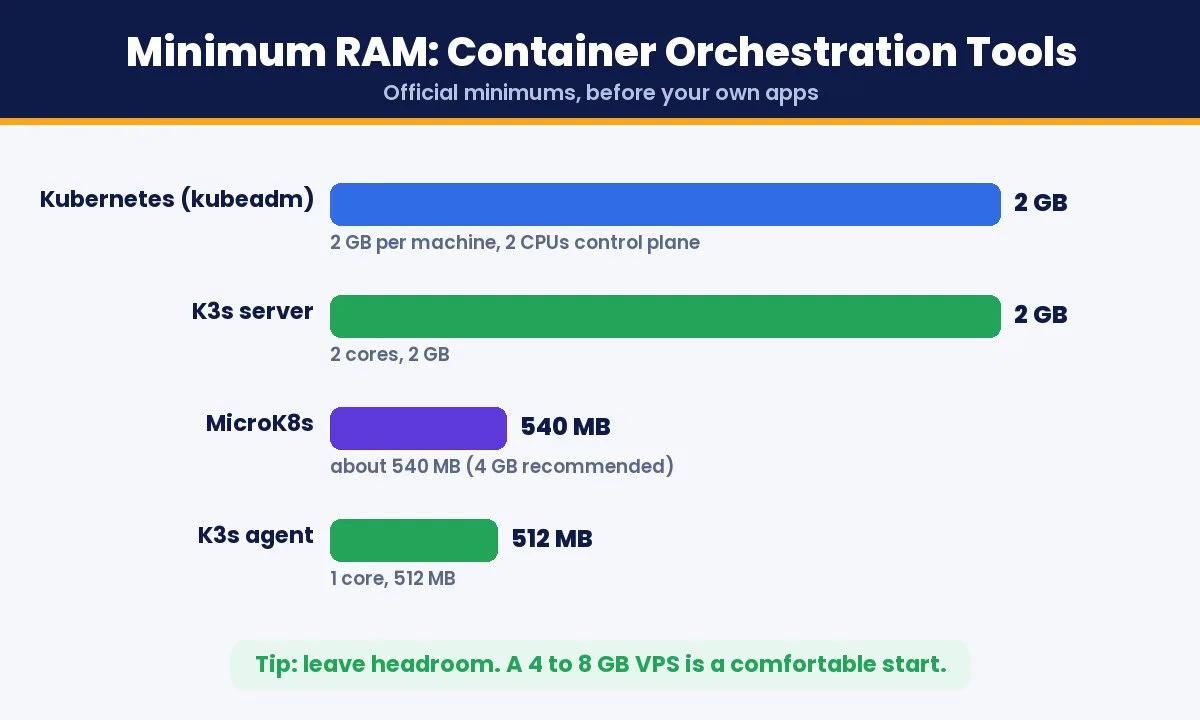
| Tool | Official Minimum | Comfortable Starting Server |
|---|---|---|
| Kubernetes (kubeadm) | 2 GB RAM per machine, 2 CPUs for control plane | 2 CPU, 8 GB RAM |
| K3s server | 2 cores, 2 GB RAM | 2 CPU, 4 to 8 GB RAM |
| K3s agent | 1 core, 512 MB RAM | 1 CPU, 4 GB RAM |
| MicroK8s | About 540 MB RAM | 4 GB RAM, 20 GB disk (recommended) |
| Docker Swarm | Runs wherever Docker runs | 1 CPU, 4 GB RAM |
The comfortable starting sizes leave room for the system, the orchestrator and a few real applications. Start small and scale up once you see real usage, since it is easy to add CPU and RAM to a virtual server later.
Kubernetes vs Docker Swarm vs Nomad
| Factor | Kubernetes | Docker Swarm | Nomad |
|---|---|---|---|
| Setup effort | High | Very low | Low to moderate |
| Ecosystem | Largest | Small | Medium |
| Auto-scaling | Built in | Manual scaling | With extra tooling |
| Non-container workloads | Limited | No | Yes |
| Licence | Open source | Open source | Business Source License |
| Best for | Growing and complex platforms | Small, simple deployments | Mixed workloads |
For a deeper look at how Kubernetes orchestration compares with running plain Docker on one server, read our guide to Kubernetes vs Docker on a VPS.
How to Choose the Right Container Orchestration Tool
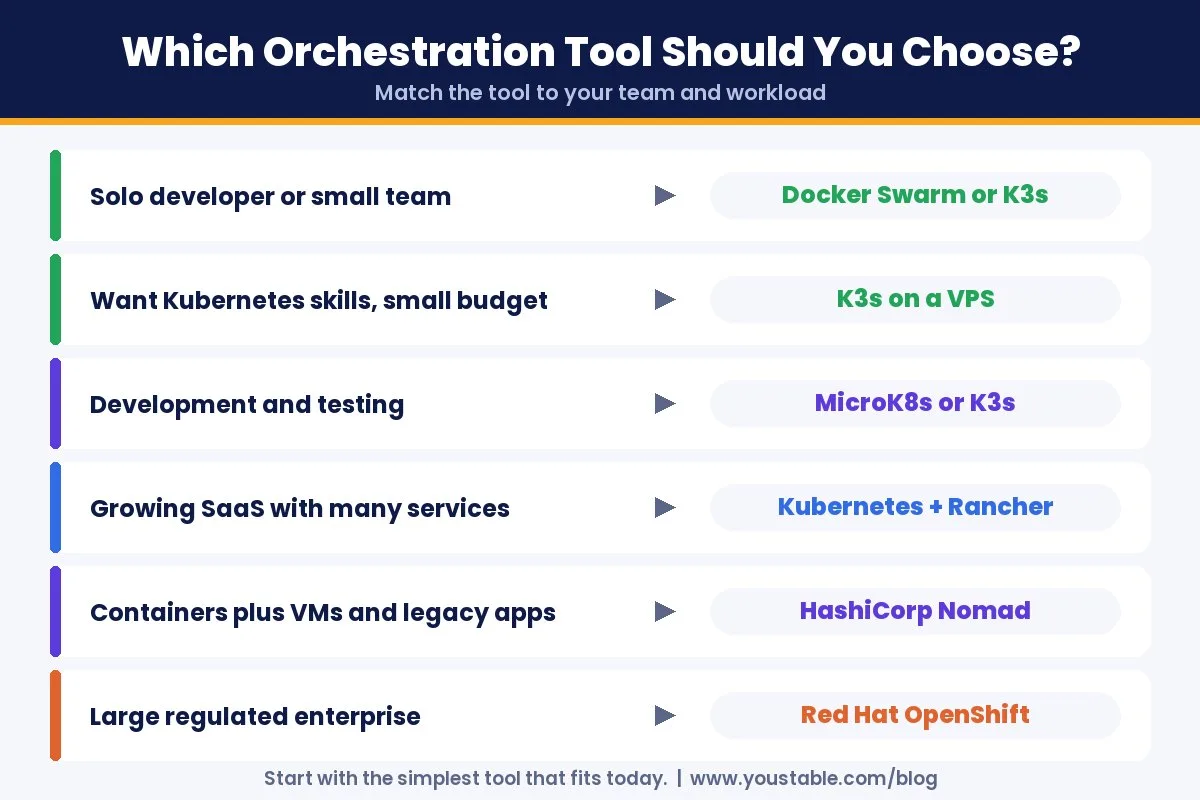
| Your Situation | Best Choice |
|---|---|
| Solo developer or small team on one server | Docker Compose, then Docker Swarm or K3s |
| Small team that wants Kubernetes skills | K3s on a VPS |
| Development and testing environments | MicroK8s or K3s |
| Growing SaaS with many services | Kubernetes, managed with Rancher |
| Containers plus legacy apps and VMs | HashiCorp Nomad |
| Large regulated enterprise | Red Hat OpenShift |
| Team that prefers a visual dashboard | Any of the above with Portainer |
A simple rule works for most teams: start with the simplest tool that solves today’s problem. Many projects never outgrow Docker Swarm or a single K3s node, and moving to full Kubernetes orchestration later is straightforward because K3s already uses standard Kubernetes manifests.
Running Container Orchestration on a VPS
You do not need a large cloud account to use the best container orchestration tools. A virtual private server with full root access is enough to run Docker Swarm, K3s or a small Kubernetes cluster, and it keeps your monthly bill fixed and predictable.
Shared hosting cannot run orchestration tools at all, because they need root access, kernel features for containers and open ports between nodes. A VPS gives you all three. For containers, a Docker VPS with NVMe storage is a solid base: the entry plan with 1 CPU and 4 GB RAM is enough to learn Swarm or run a single K3s agent, while 2 CPU and 8 GB RAM gives a K3s server or Kubernetes control plane comfortable headroom.
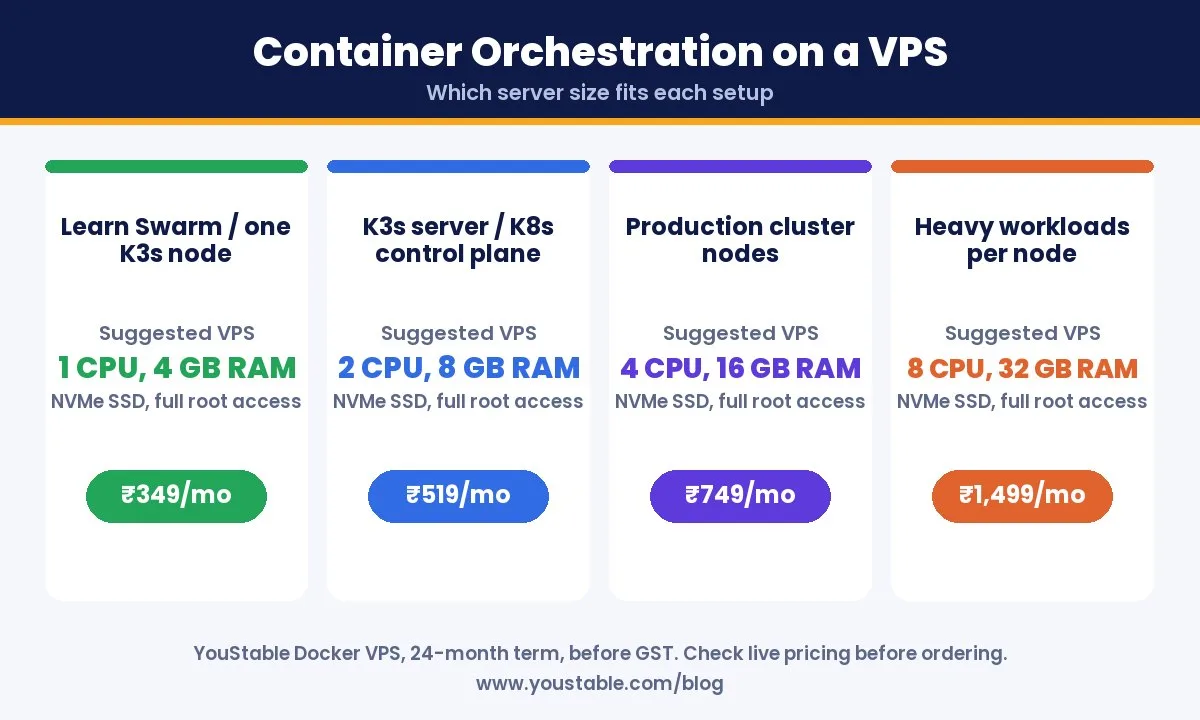
| Setup | Suggested VPS | Starting Price |
|---|---|---|
| Learning Docker Swarm or a single K3s node | 1 CPU, 4 GB RAM, 50 GB NVMe | ₹349/mo |
| K3s server or Kubernetes control plane | 2 CPU, 8 GB RAM, 100 GB NVMe | ₹519/mo |
| Production cluster nodes | 4 CPU, 16 GB RAM, 200 GB NVMe | ₹749/mo |
| Heavy workloads per node | 8 CPU, 32 GB RAM, 400 GB NVMe | ₹1,499/mo |
Prices are monthly on a 24-month term, before GST. For step-by-step setups, follow our guides to set up a Kubernetes cluster on a VPS and run containers on a VPS. When a single cluster grows large enough to need whole physical machines, AMD EPYC dedicated servers offer up to 32 cores per node.
Common Mistakes When Choosing Container Orchestration Tools
- Starting with full Kubernetes too early: for a few containers on one server, Docker Compose or Swarm is faster and easier to maintain.
- Running a single control plane in production: if that one node fails, you lose control of the cluster. Use three control plane nodes for high availability.
- Ignoring persistent storage: databases need volumes that survive container restarts. Plan storage before you deploy stateful apps.
- Skipping monitoring: without metrics and logs, failures go unnoticed until users complain.
- Not checking licences: make sure the licence of tools like Nomad fits your business use.
- Under-sizing nodes: leave headroom for the orchestrator itself, not just your apps.
Container Orchestration Security Best Practices
- Use role-based access control so each person and service only gets the permissions it needs.
- Keep secrets out of images: store passwords and API keys in the orchestrator’s secrets feature.
- Scan container images for known vulnerabilities before deploying them.
- Apply network policies so only the services that must talk to each other can.
- Patch nodes and the orchestrator regularly, and lock down SSH with keys and a firewall.
Want to go deeper on Kubernetes specifically? Our guide to running Kubernetes on a VPS covers setup and day-to-day management, and our comparison of Docker vs Podman helps you pick the right container engine underneath.
FAQs
What are the best container orchestration tools?
Kubernetes is the most widely used, followed by lightweight Kubernetes distributions such as K3s and MicroK8s, Docker Swarm for simple setups, HashiCorp Nomad for mixed workloads and Red Hat OpenShift for enterprises. Rancher and Portainer help manage them.
What is Kubernetes orchestration?
Kubernetes orchestration means using Kubernetes to automatically schedule, scale, heal and update containers across servers. You declare the state you want, such as three copies of an app, and Kubernetes keeps the cluster matching it.
Is Docker Swarm still used?
Yes. Docker Swarm is built into Docker Engine and maintained by Mirantis. It gets fewer new features than Kubernetes, but it remains a stable and simple choice for small teams and simple deployments.
What is the best lightweight Kubernetes for a VPS?
K3s is a popular choice. Its server node needs at least 2 CPU cores and 2 GB RAM, and agents need only 1 core and 512 MB, while staying compatible with standard Kubernetes manifests.
Can I run Kubernetes on a single VPS?
Yes. Lightweight distributions such as K3s or MicroK8s run well on a single VPS, which is ideal for learning, development and small production apps. For high availability in production, use three control plane nodes.
Is Kubernetes free?
Kubernetes itself is free and open source. You pay only for the servers it runs on, or for a managed service if you choose one.
Kubernetes or Docker Swarm for a small team?
For a small team running a few services, Docker Swarm is faster to learn and easier to maintain. Choose Kubernetes, or K3s, if you expect to grow, need auto-scaling or want skills that are widely used in the industry.
Final Verdict
Kubernetes remains the standard for Kubernetes orchestration at scale, but it is not the only answer. The best container orchestration tools for you depend on your team and workload: Docker Swarm for simplicity, K3s or MicroK8s for lightweight Kubernetes on small servers, Nomad for mixed workloads and OpenShift for large enterprises, with Rancher or Portainer making any of them easier to manage.
Start with the simplest tool that fits today, and run it on infrastructure you control. A Docker VPS with full root access and NVMe storage is an easy, predictable place to run Swarm, K3s or your first Kubernetes cluster.