If you want to share your political insights, explain complex issues, or help others understand elections and public policies, starting a political blog can be a great way to do it. It gives you a platform to educate readers, encourage informed discussions, and contribute your perspective on important topics.
Creating a political blog is much easier than many people expect. With WordPress, reliable hosting, and the right strategy, you can build a professional website without advanced technical knowledge. Consistently publishing accurate and well researched content can also help you establish credibility over time.
You’ll learn how to choose the right niche, set up your political blog using WordPress, create trustworthy content, fact check information before publishing, and grow an audience that values your insights and expertise.
Why Starting a Political Blog in 2026 Can Be a Great Opportunity
Starting a political blog can be a rewarding way to share insights, educate readers, and contribute to important discussions. With increasing interest in political developments and public policies, there is significant potential to build a trusted and influential platform.
Here Are Some Reasons Why Starting a Political Blog Can Be Worthwhile:
- Growing Demand for Reliable Information: People actively seek accurate explanations about elections, policies, and political events.
- Opportunity to Build Authority: Consistently publishing well researched content can help establish you as a trusted voice in your niche.
- Promotes Civic Awareness: Political blogs can educate readers and encourage informed participation in democratic processes.
- Steady Content Opportunities: Both evergreen topics and current political developments provide endless content ideas.
- Potential for Long Term Growth: As your audience expands, your blog can create networking, career, and monetization opportunities.
What You Need Before Starting a Political Blog
Before launching your political blog, it’s important to have a few essentials in place. Proper preparation makes the setup process smoother and helps you build a credible and professional website from the beginning.
Here Are the Key Things You’ll Need:
- A Clear Political Niche: Decide whether you’ll focus on political news, policy analysis, local politics, elections, or political commentary.
- A Domain Name: Choose a professional and memorable domain name that reflects your blog’s purpose and brand.
- Reliable Hosting: Select a dependable hosting provider to ensure your website remains fast, secure, and accessible.
- Content Strategy and Topic Ideas: Plan the types of political content you want to publish and identify topics your audience is interested in.
- Commitment to Accuracy: Be prepared to research thoroughly, fact check information, and use credible sources in your content.
- Basic Understanding of WordPress: Familiarity with WordPress will help you manage your website, publish posts, and customize your blog more efficiently.
How to Start a Political Blog (Step by Step Guide)
If you’re planning to start a political blog, understanding the right process can save you time and help you avoid common mistakes. The following steps explain exactly how you can choose your niche, set up your website, create trustworthy content, and build a political blog that readers value and trust.
Step 1: Choose the Right Political Blog Niche
Choosing a specific political niche helps you create focused content and attract the right audience. Instead of covering every political topic, concentrate on an area that genuinely interests you.
A clear niche also makes content planning easier and improves your chances of building authority over time. Readers are more likely to return when they know what type of content to expect.
Popular Political Blog Niche Ideas
- Political News and Analysis: Cover political developments and explain their impact through informed analysis.
- Local and Regional Politics: Focus on elections, policies, and government activities within a specific location.
- Public Policy and Government Affairs: Explain how policies related to healthcare, education, or the economy affect citizens.
- Election Coverage: Share election updates, candidate information, and voting-related content.
- Political Opinion and Commentary: Provide thoughtful perspectives while clearly separating opinions from factual reporting.
- International Politics: Discuss global political events, foreign relations, and international policy issues.
- Political Education and Civic Awareness: Create educational content about political systems, voting processes, and civic responsibilities.
Questions to Help You Choose the Right Niche
- Are you genuinely interested in this political topic?
- Can you consistently create content about it over the long term?
- Is there an audience actively searching for this type of information?
- Can you offer unique insights or valuable perspectives?
Selecting the right niche from the beginning gives your political blog a stronger foundation and helps you build credibility with readers interested in your expertise.
Step 2: Find Political Topics and Keywords Your Audience Is Searching For
After choosing your political blog niche, identify the topics and keywords your audience is actively searching for. This helps you create relevant content that addresses reader interests and improves your visibility in search results.
1. Use Keyword Research Tools
Use tools such as Google Trends, Google Keyword Planner, Ahrefs, SEMrush, Ubersuggest, and AnswerThePublic to discover political topics with search demand. Focus on specific, intent driven keywords rather than broad terms.
2. Monitor Political Trends
Stay updated on elections, policy changes, and major political developments through Google Trends, official government websites, election commissions, and reputable news sources to identify timely content opportunities.
3. Analyze Audience Questions
Review questions from Google’s People Also Ask section, forums, social media discussions, and political communities to understand what information people are looking for.
4. Study Other Political Blogs
Analyze established political blogs to identify content gaps and opportunities where you can provide more detailed, accurate, or unique insights.
5. Balance Evergreen and Trending Content
Combine evergreen topics, such as voting processes and public policy explanations, with timely content covering elections, policy announcements, and current political events to maintain consistent traffic.
Researching topics and keywords before writing helps you create valuable content, improve search visibility, and build your political blog as a trusted information source.
Step 3: Get Your Domain Name and WordPress Hosting With YouStable
Now that you’ve chosen your political blog niche and identified the topics you want to cover, it’s time to set up your website. To launch your political blog, you’ll need a domain name and reliable WordPress hosting.
Choose a domain name that is professional, easy to remember, and relevant to your niche.
Examples:
- PoliticalInsightBlog.com
- CivicVoiceToday.com
- ElectionUpdatesHub.com
Avoid using long names, difficult spellings, numbers, or unnecessary symbols. A simple and memorable domain name helps build trust with readers and strengthens your brand identity.
Why Choose YouStable for Your Political Blog?
Political blogs often experience increased traffic during elections, policy updates, and major political events. Choosing reliable hosting helps ensure your website remains fast, secure, and accessible when readers need information the most.
YouStable offers WordPress hosting with features designed to simplify website management while providing strong performance and security.
Benefits of Choosing YouStable WordPress Hosting
- Free Domain for 1 Year on eligible annual plans, helping reduce your initial setup costs.
- LiteSpeed Web Servers with LSCache support for improved website speed.
- NVMe SSD Storage for faster website performance.
- Imunify360 Protection to strengthen website security.
- Free SSL Certificate to secure your website and visitor data.
- One Click WordPress Installation for quick setup.
- Automatic Theme and Plugin Updates to simplify maintenance.
- Free Off Site Backups to protect your website data.
- Free Website Migration if you’re moving an existing website.
- 30 Day Money Back Guarantee for added peace of mind.
For many first time bloggers, the free domain for one year is one of the biggest advantages because it allows you to launch your website without purchasing a separate domain initially.
Choose the Right YouStable Hosting Plan
| Plan | Starting Price | Best For |
| DaStart | ₹59/month | New political blogs and beginners |
| DaProfessional | ₹119/month | Growing political websites requiring additional resources |
| DaElite | ₹219/month | Established blogs expecting higher traffic |
If you’re starting your first political blog, the DaStart plan is usually sufficient. As your audience grows, you can upgrade your hosting plan based on your requirements.
How to Buy Domain and Hosting From YouStable
Step 1: Choose a WordPress Hosting Plan
Visit YouStable’s WordPress Hosting page and compare the available plans. Select the hosting plan that best matches your website goals and expected traffic.
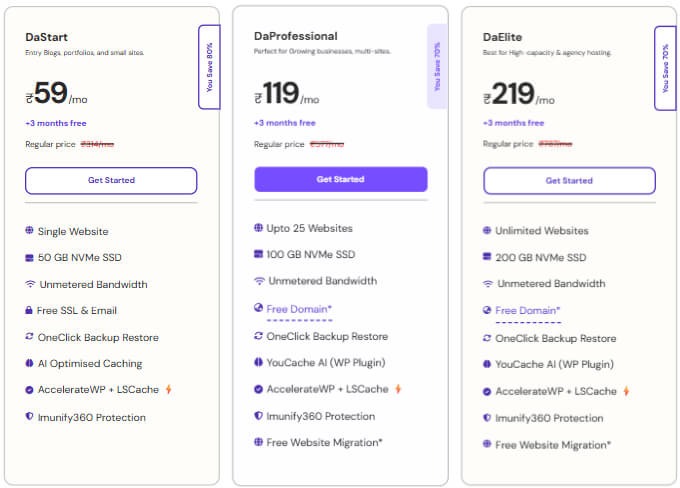
- DaStart: Suitable for beginners launching their first political blog.
- DaProfessional: Ideal for growing websites that need additional resources.
- DaElite: Best for larger political blogs expecting higher visitor volumes.
Step 2: Click on “Get Started”
Once you’ve selected your preferred hosting plan, click the Get Started button to proceed with the purchase process.
Step 3: Search for Your Domain Name
Enter your preferred domain name to check whether it’s available.
Examples:

- PoliticalInsightBlog.com
- ElectionUpdatesHub.com
- CivicVoiceToday.com
If your first choice isn’t available, consider trying different variations or domain extensions.
Step 4: Claim Your Free Domain
Eligible annual hosting plans include a free domain for one year. If your selected plan qualifies, the domain discount will automatically apply during checkout.
Step 5: Review Your Order Details
Before continuing, verify the following information:
- Selected hosting plan
- Billing cycle
- Domain registration details
- Additional services, if any
Reviewing everything carefully helps prevent mistakes during the purchase process.
Step 6: Create Your YouStable Account
Provide your basic details to create your account:
- Full Name
- Email Address
- Mobile Number
- Billing Information
Use an active email address, as you’ll receive important account information and hosting details there.
Step 7: Complete the Payment Process
Choose your preferred payment method and complete the checkout process. Once the payment is successful, your hosting account will be activated automatically.
Step 8: Access Your Hosting Dashboard
After activation, log in to your YouStable account dashboard. From there, you’ll be able to manage your domain, access hosting settings, and install WordPress using the one-click installer.
Once your domain and hosting are ready, you can move on to installing WordPress and continue building your political blog.
While WordPress hosting is sufficient for most political blogs, you can upgrade to YouStable’s VPS Hosting or Dedicated Servers if you need greater performance, enhanced control, and better scalability as your website traffic grows.
Step 4: Install and Set Up WordPress for Your Political Blog
After purchasing your domain name and WordPress hosting, the next step is installing WordPress and configuring the basic settings for your political blog. Fortunately, most hosting providers, including YouStable, offer one click WordPress installation, making the setup process quick and beginner friendly.
WordPress powers millions of websites worldwide because of its flexibility, ease of use, and extensive customization options. It allows you to publish articles, manage content, optimize your website for search engines, and grow your political blog without requiring technical expertise.
Install WordPress Using One Click Installation
YouStable provides a simple way to install WordPress through its hosting control panel. Follow these steps to get started:
- Log in to your YouStable hosting account.
- Open your hosting control panel (cPanel).
- Locate the Softaculous Apps Installer section.
- Click on WordPress from the list of available applications.
- Select Install Now to begin the installation process.
- Choose the domain name where you want to install WordPress.
- Leave the directory field empty if you want WordPress installed on your main domain (for example, yourblog.com instead of yourblog.com/blog).
Enter your website details, including:
- Site Name
- Site Description
- Admin Username
- Strong Password
- Administrator Email Address
- Review the installation settings carefully.
- Click Install and wait for the process to complete.
Within a few minutes, WordPress will be installed successfully, and you’ll receive your website login details.
Access Your WordPress Dashboard
Once the installation is complete, you can log in to your WordPress dashboard using: yourdomain.com/wp-admin
Enter the administrator username and password you created during installation.
The WordPress dashboard serves as the control center for your political blog.
From here, you can:
- Publish and manage blog posts
- Install themes and plugins
- Moderate comments
- Configure website settings
- Monitor website performance and updates
Spend a few minutes exploring the dashboard to become familiar with the available options.
Configure Basic WordPress Settings
Before publishing content, it’s important to adjust a few essential settings.
Update Your Site Title and Tagline
Navigate to:
Settings → General
Add your political blog’s name and a short tagline that clearly explains your website’s purpose.
For example:
- Site Title: Political Insight Daily
- Tagline: Trusted Analysis and Updates on Politics and Public Policy
Set Your Preferred Permalink Structure
Search engine friendly URLs improve readability and SEO performance.
Go to: Settings → Permalinks
Select the Post Name option.
This changes your URLs from: yourdomain.com/?p=123
to:
yourdomain.com/election-analysis-guide
Clean URLs are easier for readers to understand and can contribute to a better user experience.
Verify Time Zone and Date Settings
Accurate time settings ensure your posts are published according to your local schedule.
Navigate to: Settings → General
Update:
- Time Zone
- Date Format
- Time Format
This is especially useful if you plan to publish political news and event based content regularly.
Remove Default Content
WordPress automatically creates sample content during installation. Cleaning these up gives you a fresh start.
Delete:
- The default “Hello World” post
- The sample page
- Unused themes and plugins that you don’t plan to use
Removing unnecessary items helps keep your website organized.
Strengthen Your Website Security
Since political blogs often discuss sensitive topics and may attract increased attention, implementing basic security measures from the beginning is a good practice.
Consider these steps:
- Use a strong administrator password
- Enable two factor authentication if available
- Keep WordPress, themes, and plugins updated
- Install a security plugin in the next setup stage
These simple precautions can help protect your website from common security threats.
By properly installing and configuring WordPress, you create a strong technical foundation for your political blog. Once your website is ready, the next step is choosing a professional WordPress theme that reflects your brand and provides an excellent reading experience for your audience.
If you want a faster setup process, you can also learn how to build a WordPress website using an AI website builder and launch your political blog more efficiently.
Step 5: Choose a Professional WordPress Theme for Your Political Blog
Now that WordPress is installed and configured, it’s time to choose a professional theme for your political blog. Your theme controls your website’s appearance, layout, and overall user experience. Since political blogs rely heavily on trust, readability, and credibility, selecting the right theme is an important decision.
A well designed theme not only makes your blog visually appealing but also improves navigation, mobile responsiveness, and website performance. Readers should be able to easily find information and enjoy a distraction free reading experience.
What to Look for in a Political Blog Theme
Before installing a theme, make sure it offers the following features:
- Fast Loading Performance: Lightweight themes improve page speed and enhance the user experience.
- Mobile Friendly Design: A responsive layout ensures your blog looks great on smartphones, tablets, and desktops.
- Clean and Professional Appearance: Political blogs should prioritize readability and credibility over flashy designs.
- Customization Options: The ability to adjust colors, typography, layouts, and branding elements helps create a unique identity.
- SEO Friendly Structure: Well coded themes support better search engine visibility.
- Compatibility With Popular Plugins: Your theme should work smoothly with SEO, caching, and security plugins.
Recommended WordPress Themes for Political Blogs
Here are some excellent themes suitable for political websites:
1. GeneratePress
GeneratePress is one of the most popular lightweight WordPress themes. It focuses on speed, stability, and flexibility, making it an excellent choice for political blogs.
Why choose GeneratePress:
- Extremely fast and lightweight
- Highly customizable with the premium version
- Excellent compatibility with page builders
- SEO friendly code structure
- Strong focus on accessibility and usability
2. Astra
Astra is another popular theme known for its speed and extensive customization options.
Key features include:
- Pre built starter templates
- Mobile responsive layouts
- Lightweight design optimized for performance
- Compatibility with major WordPress plugins
3. Kadence
Kadence provides a modern design experience with powerful customization features.
Benefits include:
- Drag and drop header and footer builder
- Fast loading performance
- Flexible typography and layout settings
- User friendly customization options
4. Blocksy
Blocksy is a feature rich theme built with performance and customization in mind.
Highlights include:
- Modern and clean design
- Advanced customization controls
- Optimized for speed and SEO
- Excellent WooCommerce compatibility if you expand your website later
How to Install a WordPress Theme
Installing a theme is straightforward.
Follow these steps:
- Log in to your WordPress dashboard.
- Navigate to Appearance → Themes.
- Click Add New.
- Search for your preferred theme, such as GeneratePress or Astra.
- Click Install.
- Select Activate after the installation completes.
If you purchased a premium version of a theme:
- Download the theme ZIP file from the provider’s website.
- Go to Appearance → Themes → Add New → Upload Theme.
- Upload the ZIP file.
- Click Install Now.
- Activate the theme.
Customize Your Political Blog Theme
After activating your theme, personalize it to reflect your political blog’s identity.
Navigate to: Appearance → Customize
You can modify:
- Site logo
- Brand colors
- Typography settings
- Homepage layout
- Navigation menus
- Sidebar widgets
- Footer information
Keep the design simple and professional. Avoid excessive animations, cluttered layouts, or too many advertisements that could distract readers from your content.
Why Theme Selection Matters
The theme you choose influences how visitors perceive your political blog. A clean and trustworthy design can encourage readers to spend more time on your website, explore additional articles, and return for future updates.
For most political bloggers, GeneratePress is an excellent option because of its outstanding speed, reliability, and flexibility. However, the best theme ultimately depends on your design preferences and specific website requirements.
Once your theme is installed and customized, your political blog will begin to take shape visually. The next step is creating essential pages that help build trust and credibility with your audience.
Step 6: Create Essential Pages to Build Trust and Credibility
Building a successful political blog involves more than publishing informative articles. Since political content often covers sensitive topics and influences public understanding, establishing trust with your audience is essential.
One of the best ways to demonstrate professionalism and transparency is by creating important website pages that explain who you are, how your website operates, and how you handle information.
These pages not only improve the user experience but also strengthen your website’s credibility and support important trust signals that search engines value, especially for political and other high impact content.
1. About Us Page
The About Us page introduces readers to your political blog and the people behind it. This page helps visitors understand your mission, expertise, and editorial approach.
Your About Us page should include:
- The purpose of your political blog
- The topics you cover
- Your experience, background, or interest in political reporting and analysis
- Your commitment to providing accurate and responsible information
- Your editorial values and principles
Readers are more likely to trust content when they know who is creating it and why.
2. Contact Us Page
A Contact Us page provides visitors with a way to communicate with you. It demonstrates transparency and shows that you are accessible to your audience.
Consider including:
- Contact form
- Professional email address
- Social media profiles related to your blog
- Business inquiry information, if applicable
Providing clear contact information helps establish legitimacy and encourages reader engagement.
3. Privacy Policy Page
A Privacy Policy explains how your website collects, uses, and protects visitor data. This page is especially important if your blog uses:
- Contact forms
- Analytics tools
- Email newsletter subscriptions
- Advertising networks
- Affiliate links
- Cookies and tracking technologies
Many third party services and advertising platforms require websites to have a privacy policy in place.
4. Disclaimer Page
A Disclaimer clarifies the purpose and limitations of your content. Since political blogs often include analysis and opinions, it’s important to distinguish these from factual reporting.
Your disclaimer may explain that:
- Content is intended for informational and educational purposes
- Opinions expressed represent the author’s viewpoints when applicable
- Readers should consult official sources for legal, financial, or governmental decisions
- While every effort is made to ensure accuracy, information may change over time
This page helps set appropriate expectations for readers.
5. Editorial Policy Page
An Editorial Policy outlines the standards you follow when creating content. Publishing this page demonstrates your commitment to responsible journalism and ethical content practices.
Your editorial policy can cover:
- How topics are selected
- Research and source verification procedures
- Fact checking processes
- Corrections and update policies
- Guidelines for maintaining objectivity and fairness
Transparency about your editorial process can significantly strengthen reader confidence.
6. Fact Checking Policy Page
Accuracy is critical in political blogging. A Fact Checking Policy explains the steps you take to verify information before publishing.
You can include details about:
- Using official government sources and reputable organizations
- Cross checking information through multiple reliable references
- Updating articles when new information becomes available
- Correcting factual errors promptly and transparently
This demonstrates your commitment to publishing trustworthy and well researched content.
7. Terms and Conditions Page
A Terms and Conditions page establishes the rules governing the use of your website.
This page may include:
- User responsibilities
- Intellectual property notices
- Limitations of liability
- Commenting guidelines
- Website usage terms
While not mandatory for every blog, it provides additional legal clarity and professionalism.
How to Create These Pages in WordPress
Creating these pages is simple:
- Log in to your WordPress dashboard.
- Navigate to Pages → Add New.
- Enter the page title, such as About Us or Privacy Policy.
- Add the relevant information for each page.
- Click Publish when the page is complete.
- Add these pages to your website’s navigation menu or footer for easy access.
Why These Pages Matter
Essential pages help readers understand who you are, how your website operates, and the standards you follow when publishing political content. They also demonstrate accountability, professionalism, and transparency, all of which are particularly important for political blogs.
Taking the time to create these pages early in your blogging journey helps build credibility with both your audience and search engines, creating a stronger foundation for long term growth and trust.
Step 7: Install Essential WordPress Plugins for SEO, Security, and Performance
After setting up your website and creating essential pages, the next step is installing WordPress plugins that improve your political blog’s functionality, security, and overall performance. Plugins allow you to add powerful features to your website without writing any code.
However, it’s important to use only necessary and reputable plugins. Installing too many plugins can slow down your website and create potential compatibility issues. Focus on tools that enhance search engine optimization, strengthen security, improve speed, and simplify website management.
1. Install an SEO Plugin
Search engine optimization (SEO) helps your political blog appear in search results when readers look for political news, analysis, and educational content.
One of the best options is Rank Math SEO, which provides powerful optimization features while remaining beginner friendly.
Key benefits of Rank Math SEO include:
- Optimize titles and meta descriptions
- Generate XML sitemaps automatically
- Add schema markup to improve search visibility
- Analyze on page SEO recommendations
- Monitor keyword optimization
- Integrate with Google Search Console
A good SEO plugin helps search engines understand your content and can improve your chances of attracting organic traffic.
2. Use a Caching Plugin to Improve Website Speed
Website speed plays an important role in both user experience and search engine rankings. Political blogs covering breaking news and trending topics should load quickly, especially during traffic spikes.
If your hosting uses LiteSpeed servers, LiteSpeed Cache is an excellent choice.
Features include:
- Page caching for faster loading times
- Image optimization
- Browser caching
- CSS and JavaScript optimization
- Database optimization
- Content Delivery Network (CDN) support
A faster website encourages visitors to stay longer and explore more of your content.
3. Strengthen Security With a Security Plugin
Political websites may receive increased attention, making website security especially important. A security plugin helps protect your website from common threats such as malware, brute force attacks, and unauthorized login attempts.
Wordfence Security is a widely trusted option.
It offers features such as:
- Website firewall protection
- Malware scanning
- Login security enhancements
- Two factor authentication support
- Real time threat monitoring
- Protection against suspicious activity
Taking proactive security measures helps safeguard both your website and your audience.
4. Set Up Regular Website Backups
Backups ensure you can restore your website if unexpected problems occur, such as hacking incidents, plugin conflicts, or accidental content deletion.
UpdraftPlus is one of the most popular backup plugins for WordPress.
Its features include:
- Automated scheduled backups
- One click website restoration
- Backup storage integration with cloud services
- Selective backup and restore options
Regular backups provide peace of mind and help protect your hard work.
5. Add a Contact Form Plugin
Allowing readers to contact you easily improves transparency and engagement.
WPForms is a beginner friendly plugin for creating contact forms.
You can use it to create:
- Contact forms
- Feedback forms
- Newsletter signup forms
- General inquiry forms
Simple communication channels help build trust with your audience.
6. Optimize Images for Better Performance
Large image files can slow down your website. Image optimization plugins reduce file sizes while maintaining visual quality.
ShortPixel Image Optimizer is an excellent option.
Benefits include:
- Automatic image compression
- WebP image conversion
- Bulk image optimization
- Improved page loading speed
Optimized images contribute to a better user experience and improved website performance.
7. How to Install WordPress Plugins
Installing plugins is straightforward.
Follow these steps:
- Log in to your WordPress dashboard.
- Navigate to Plugins → Add New Plugin.
- Search for the plugin you want to install.
- Click Install Now.
- Select Activate after installation.
- Complete the plugin’s initial setup process.
For premium plugins:
- Download the plugin ZIP file from the provider’s website.
- Go to Plugins → Add New Plugin → Upload Plugin.
- Upload the ZIP file.
- Click Install Now and then Activate.
8. Recommended Plugins for Political Blogs
| Purpose | Recommended Plugin |
| SEO | Rank Math SEO |
| Performance | LiteSpeed Cache |
| Security | Wordfence Security |
| Backups | UpdraftPlus |
| Contact Forms | WPForms |
| Image Optimization | ShortPixel Image Optimizer |
9. Use Plugins Wisely
Although plugins add valuable functionality, avoid installing unnecessary ones. Keep your plugin list focused on essential tools, update them regularly, and remove any plugins you no longer use.
Choosing reliable plugins from the beginning helps your political blog remain fast, secure, and easy to manage. With these important tools in place, you’re ready for the next exciting step: publishing your first political blog post and sharing your ideas with the world.
Step 8: Publish Your First Political Blog Post
With your website fully set up, it’s time for the most exciting part of the process: publishing your first political blog post. This is your opportunity to share valuable insights, educate readers, and begin building an audience interested in political topics and current affairs.
Many new bloggers spend so much time perfecting their website that they delay creating content. However, your blog grows through consistent publishing and providing useful information to readers. Your first post doesn’t have to be perfect. The goal is to publish high quality, accurate, and informative content that serves your audience.
Choose a Relevant Topic for Your First Post
Start by selecting a topic related to the political niche you chose earlier. Focus on subjects that your target audience is actively searching for or discussing.
Some examples include:
- How Local Elections Impact Communities
- Understanding the Electoral Process in the United States
- Key Political Issues Shaping Current Policy Debates
- A Beginner’s Guide to Public Policy and Government
- What First Time Voters Should Know Before Election Day
If you’ve already completed keyword research, prioritize topics with clear search demand and user interest.
Research Your Topic Thoroughly
Political blogging requires a strong commitment to accuracy and responsible reporting. Before writing, gather information from credible and authoritative sources.
Consider using:
- Official government websites
- Election commission resources
- Legislative documents and reports
- Academic publications and research studies
- Reputable news organizations
- Nonpartisan fact checking organizations
Cross check important facts and statistics to ensure your content is reliable and trustworthy.
Structure Your Political Blog Post Effectively
A well organized article improves readability and helps readers understand complex political topics more easily.
A simple structure may include:
- Compelling Headline: Clearly describe what readers will learn.
- Introduction: Explain why the topic matters and what the article covers.
- Main Sections: Break information into logical headings and subheadings.
- Supporting Evidence: Include facts, examples, and data from credible sources.
- Conclusion: Summarize key points and encourage readers to stay informed.
Using short paragraphs and descriptive headings also improves the overall reading experience.
Optimize Your Post for Search Engines
Basic SEO optimization can help your political content reach a larger audience through search engines.
Before publishing, review the following:
- Include your target keyword naturally in the title.
- Add the keyword within the introduction and relevant headings.
- Write an engaging meta title and meta description.
- Use descriptive image alt text if you include images.
- Link to other relevant articles on your website.
- Add links to authoritative sources when appropriate.
Remember that political content should prioritize accuracy and usefulness over excessive keyword usage.
Add Categories and Tags
Organizing your content makes it easier for readers to navigate your website.
For example:
Categories:
- Elections
- Public Policy
- Political Analysis
- Government Affairs
- International Politics
Tags:
- Voting
- Election Updates
- Healthcare Policy
- Tax Reform
- Political Commentary
Use categories and tags thoughtfully to maintain a clear website structure.
Preview and Proofread Before Publishing
Take a few moments to review your article carefully before making it live.
Check for:
- Grammar and spelling errors
- Factual accuracy
- Broken links
- Proper heading structure
- Mobile readability
- Consistent formatting
Reading your article aloud can also help identify awkward wording or unclear explanations.
Publish Your First Blog Post
Once you’re satisfied with your content:
- Log in to your WordPress dashboard.
- Navigate to Posts → Add New Post.
- Enter your article title.
- Add your content using the WordPress editor.
- Assign categories and tags.
- Upload a featured image if applicable.
- Click Preview to review the final version.
- Select Publish to make your article live.
Congratulations! Your political blog is now officially active, and you’ve published your first piece of content.
Commit to Consistent Publishing
One article is only the beginning. Building a successful political blog requires consistency and dedication.
Consider creating a content schedule that allows you to publish regularly, whether that’s:
- Once per week
- Twice per week
- Several times each month
Consistent publishing helps establish authority, encourages repeat visitors, and increases opportunities to grow your audience through search engines and social media.
Publishing your first political blog post marks an important milestone in your blogging journey. Focus on delivering accurate, balanced, and valuable information, and continue improving your content with each new article you create.
How to Write Credible and Trustworthy Political Content
Building trust is essential in political blogging. Readers rely on political content to stay informed, so publishing accurate, balanced, and transparent information helps establish your blog as a reliable source.
Follow These Best Practices:
- Use Trusted Sources: Rely on official government websites, reputable news outlets, and recognized research organizations.
- Fact Check Before Publishing: Verify important claims and statistics through multiple credible sources.
- Separate Facts From Opinions: Clearly distinguish news reporting from personal commentary or analysis.
- Cite Your Sources: Reference original reports, studies, or official statements to improve transparency.
- Avoid Clickbait Headlines: Use accurate headlines that reflect the actual content of your article.
- Update Content Regularly: Review and refresh articles when new information becomes available.
- Correct Errors Promptly: If a mistake occurs, update the content quickly to maintain reader trust.
- Stay Fair and Objective: Present information responsibly and avoid misleading or emotionally charged language.
Consistently following these practices can help you build credibility and establish your political blog as a trusted source of information.
How to Fact Check Political Information Before Publishing
Fact checking is essential in political blogging because inaccurate information can mislead readers and damage your credibility. Verifying facts before publishing helps ensure your content remains accurate, trustworthy, and responsible.
Political Content Fact Checking Checklist
| What to Check | How to Verify It |
| Statistics and Data | Use official government reports, election commissions, research institutions, or original studies. |
| Political Claims | Cross check information using multiple reputable news sources and official statements. |
| Quotes and Statements | Confirm quotes from speeches, interviews, press releases, or verified transcripts. |
| Election Information | Verify dates, results, and voting procedures through official election authorities. |
| Laws and Policies | Refer to government websites, legislative documents, and official policy publications. |
| Images and Videos | Check the original source to ensure media hasn’t been edited or taken out of context. |
| Trending Social Media Posts | Avoid relying solely on viral posts unless supported by credible evidence. |
| Publication Date | Make sure the information is current and not based on outdated events or reports. |
Following this fact checking process before publishing can help you avoid misinformation and establish your political blog as a reliable source of information.
Common Political Blogging Mistakes That Can Hurt Your Growth
Building a successful political blog takes time, consistency, and credibility. Avoiding common mistakes can help you establish trust with readers and support long term growth.
Mistakes to Avoid as a Political Blogger
- Publishing Unverified Information: Sharing inaccurate or unconfirmed information can damage your credibility and reader trust.
- Ignoring SEO Best Practices: Failing to optimize your content for search engines can limit your visibility and organic traffic.
- Using Misleading Headlines: Clickbait titles may attract short term clicks but can negatively impact your reputation.
- Mixing Facts With Personal Opinions: Always distinguish factual reporting from commentary to maintain transparency.
- Publishing Inconsistently: Irregular posting schedules can make it difficult to build and retain an audience.
- Neglecting Content Updates: Political information changes frequently, so outdated content should be reviewed and updated regularly.
- Overlooking Reader Engagement: Ignoring comments, feedback, and audience questions can reduce community growth and loyalty.
- Using Unreliable Sources: Depending on questionable sources increases the risk of spreading misinformation.
Avoiding these mistakes can help you build a political blog that readers trust and return to for accurate, valuable, and well researched content.
How to Grow Your Political Blog and Reach More Readers
Growing a political blog takes consistency, credibility, and a strategic approach. Focusing on the right growth strategies can help you attract more readers and establish your blog as a trusted source of political information.
Step 1: Publish Content Consistently
Publishing regularly helps build audience trust and signals to search engines that your website is active.
Tips:
- Follow a realistic publishing schedule.
- Prioritize quality over quantity.
- Create a content calendar to stay organized.
Step 2: Optimize Your Content for SEO
SEO helps your political blog appear in search results when readers look for information related to politics and public affairs.
Focus on:
- Targeting relevant keywords.
- Writing compelling meta titles and descriptions.
- Using proper heading structures.
- Adding internal links to related articles.
Step 3: Cover Evergreen and Trending Topics
Combining long lasting topics with current political developments can help generate steady traffic.
Evergreen content examples:
- How elections work
- Understanding public policy
- Voting guides
Trending content examples:
- Election updates
- Major policy announcements
- Political debates and current events
Step 4: Promote Your Articles on Social Media
Sharing your content on social platforms can increase visibility and drive additional traffic.
Best practices:
- Share new articles consistently.
- Engage respectfully in political discussions.
- Use relevant hashtags where appropriate.
Step 5: Build an Email Newsletter
Email newsletters help you maintain direct communication with your audience.
Benefits include:
- Notifying readers about new content.
- Encouraging repeat visits.
- Building a loyal subscriber base.
Step 6: Update Older Content Regularly
Political information changes frequently, making content updates essential.
Review and update:
- Statistics and data
- Election related information
- Policy developments
- External links and references
Step 7: Encourage Reader Engagement
Building a community around your blog can improve loyalty and trust.
Ways to engage readers:
- Respond to comments thoughtfully.
- Invite questions and discussions.
- Encourage newsletter subscriptions.
Step 8: Strengthen Internal Linking
Internal links help readers discover additional content and improve website navigation.
Internal linking benefits:
- Increases time spent on your website.
- Helps search engines understand content relationships.
- Improves the overall user experience.
Growing a political blog takes patience and ongoing effort. By consistently publishing valuable content, optimizing for search engines, and actively engaging with your audience, you can gradually expand your reach and build a trusted platform over time.
FAQs
Can I Start a Political Blog Without Political Experience?
Yes, you can start a political blog without formal political experience. However, you should be committed to researching thoroughly, using credible sources, fact-checking information, and presenting content responsibly. Focusing on a specific niche and continuously learning can help you build authority over time.
How Often Should I Publish Content on a Political Blog?
Consistency is more important than frequency. Most political bloggers benefit from publishing at least one high quality article per week.
For best results:
• Publish evergreen content regularly.
• Cover major political developments and trending topics promptly.
• Maintain a realistic schedule you can follow consistently.
Is WordPress the Best Platform for Starting a Political Blog?
WordPress is one of the best platforms for political blogging because it offers flexibility, customization options, and excellent SEO capabilities. It also supports thousands of themes and plugins that can help you improve your website’s functionality, security, and performance.
How Can I Make My Political Blog More Trustworthy?
Building trust requires accuracy, transparency, and responsible reporting practices.
To improve credibility:
• Use official and reputable sources.
• Clearly separate facts from opinions.
• Fact check information before publishing.
• Update outdated content regularly.
• Correct mistakes promptly when necessary.
Can You Make Money From a Political Blog?
Yes, political blogs can generate income once they attract a consistent audience. Common monetization methods include display advertising, affiliate marketing, sponsored partnerships, premium newsletters, and reader supported memberships. Building trust and publishing valuable content are essential for long term success.
Conclusion
Starting a political blog gives you an opportunity to explain complex issues, share informed perspectives, and contribute to meaningful public discussions. With proper planning, you can build a professional platform readers trust.
Sustainable success depends on publishing accurate content, verifying facts, citing reliable sources, and maintaining transparency. Consistently following responsible editorial practices helps strengthen credibility and encourages readers to return for updates.
Building a trusted political blog requires patience, consistency, and a commitment to serving your audience. Start creating valuable content, refine your approach over time, and focus on informing readers responsibly.