Full clone vs linked clone, a full clone is a complete, independent copy of a virtual machine with its own virtual disk, while a linked clone shares the parent VM’s base disk via a snapshot and stores only changes.
Full clones use more storage but are durable; linked clones are space and time efficient but depend on the parent. Choosing between a full clone and a linked clone affects performance, storage, backup, and lifecycle management.
In this guide, we compare “full clone vs linked clone” in plain language, explain how each works in platforms like VMware and VirtualBox, and help you pick the right approach for production, testing, CI/CD, and lab environments.
What is a Full Clone?
A full clone is a one to one duplicate of a virtual machine (VM), including an independent copy of all virtual disks. Once created, it no longer relies on the parent.
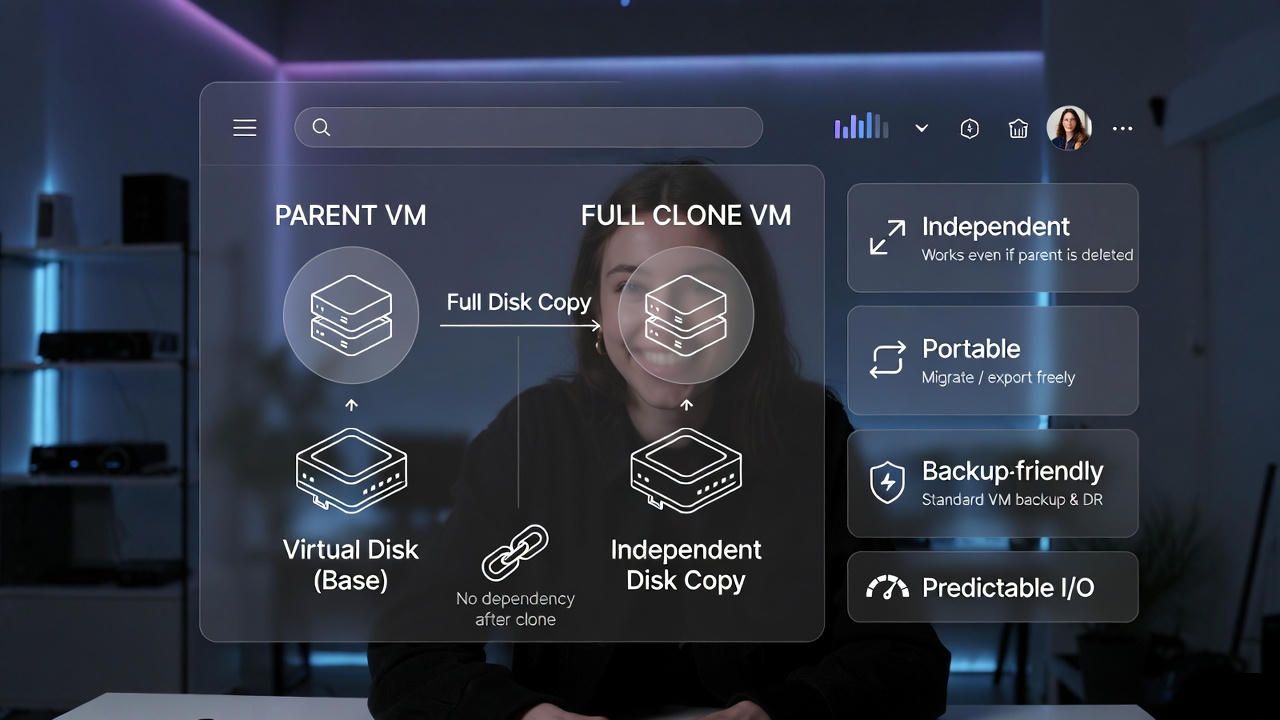
You can power it on, move it to another datastore, back it up, or delete the parent without breaking the clone.
How a Full Clone Works
The hypervisor copies the entire virtual disk file(s) and metadata from the source VM (or template). The process can take longer and consume significant I/O, especially for large disks, but the result is a self contained VM suitable for production or long term use.
Full Clone: Pros
- Independent: Survives even if the parent or its datastore is deleted.
- Predictable performance: No copy on write dependency on a parent disk.
- Easier backup/DR: Treat like any normal VM in backup and replication jobs.
- Portable: Migrate, export, and move between environments freely.
Full Clone: Cons
- Slower to create: Must copy full disk(s).
- Higher storage cost: Consumes the same capacity as the parent VM.
- More I/O during provisioning: Can impact storage if many are created at once.
What is a Linked Clone?
A linked clone is a fast, space efficient VM that references a read only base disk captured at a parent snapshot.
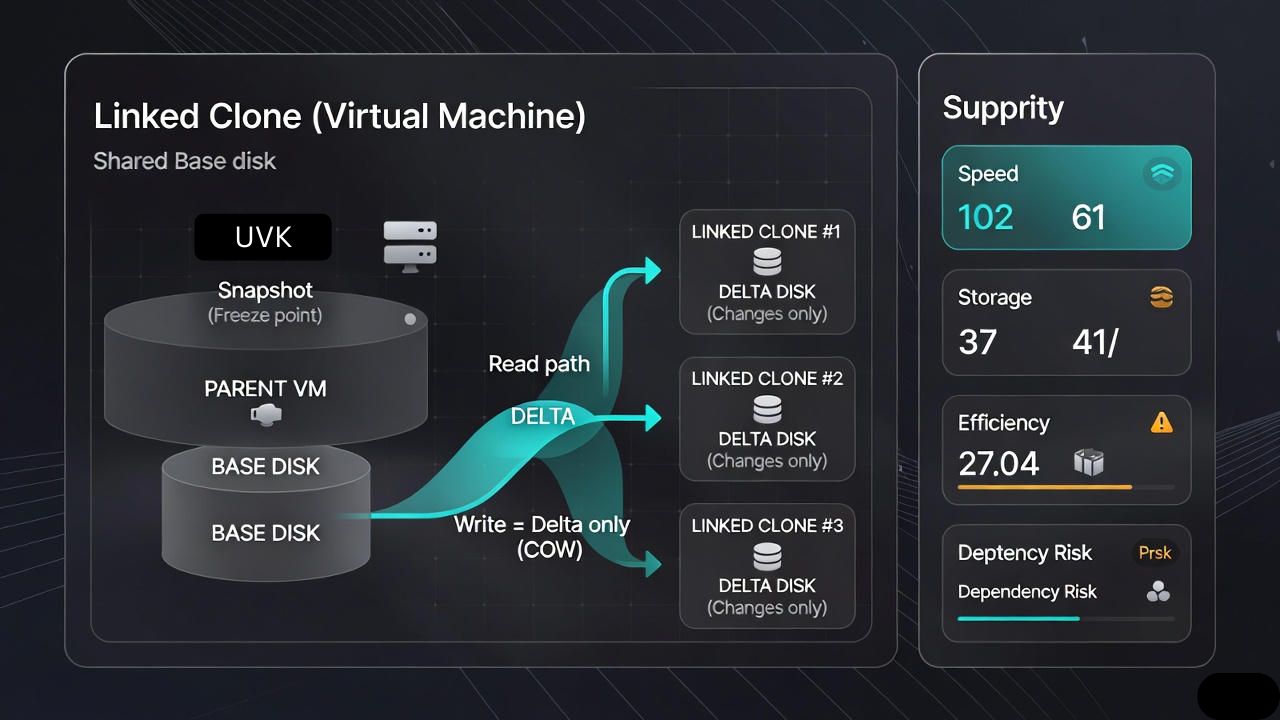
The clone stores only the differences in a small delta disk. This approach is ideal for short lived workloads, labs, and development environments.
How a Linked Clone Works
The hypervisor creates a snapshot of the parent and marks that base disk read only. The linked clone reads blocks from the base and writes new or changed blocks to its delta file via copy on write. If the parent or snapshot chain is removed or corrupted, the linked clone breaks.
Linked Clone: Pros
- Very fast provisioning: Great for spinning up dozens of VMs quickly.
- Minimal storage: Only deltas consume space.
- Ideal for test/dev, training, classrooms, CI pipelines, and sandboxes.
Linked Clone: Cons
- Depends on parent and snapshot integrity; cannot outlive them.
- Performance overhead from copy on write and snapshot chains.
- More complex backup/restore and lifecycle management.
- Not recommended for production or long term workloads.
Full Clone vs Linked Clone: Key Differences at a Glance
- Independence: Full clone is standalone; linked clone relies on a parent snapshot.
- Storage: Full uses full disk capacity; linked stores only changes (delta).
- Speed to Provision: Full is slower; linked is near instant.
- Performance: Full has consistent I/O; linked may see copy on write overhead.
- Durability: Full survives parent deletion; linked fails if parent/snapshot chain is lost.
- Backup & DR: Full is straightforward; linked requires careful snapshot aware handling.
- Use Cases: Full for production/long term; linked for labs, demos, dev/test.
Performance, Storage, and Lifecycle Explained
Storage Behavior
Full clones duplicate the entire virtual disk file (VMDK, VDI, etc.). Thin provisioning can reduce initial physical usage but logical capacity remains equal to the source. Linked clones hold only change blocks, leading to dramatic savings when many clones share the same base image.
Performance and I/O Path
Full clones read and write locally, delivering predictable throughput. Linked clones must read from a shared base and write to a delta, invoking copy on write. As deltas grow and snapshot chains lengthen, read amplification increases and latency can rise, especially under random I/O.
Lifecycle, Portability, and Backups
Full clones are easy to migrate, export, and protect. Linked clones complicate portability because the base disk and snapshot lineage must be present and consistent. For backups, full clones fit standard VM backups; linked clones may require consolidation or conversion to full before protection.
When to Choose a Full Clone vs a Linked Clone
- Choose a full clone when:
- Hosting production workloads or customer facing services.
- You need independent lifecycle management and straightforward backups.
- You plan to migrate across clusters, datastores, or to another provider.
- Choose a linked clone when:
- Running short lived dev/test environments, POCs, classrooms, or demos.
- You must provision many VMs quickly with minimal storage use.
- Base images are frequently refreshed and disposable.
Linked Clone, Snapshot, and Template: Don’t Confuse Them
- Snapshot: A point in time state of a VM’s disk and sometimes memory. Used for rollback, not as a long term backup.
- Template: A gold image of a VM that’s not intended to run. You deploy full clones from templates to standardize builds.
- Linked clone: A new VM that references a snapshot’s base disk and writes deltas.
Best Practices and Common Pitfalls
- Keep snapshot chains short: Long chains hurt performance and increase risk.
- Convert to full when promoting to production: Solidify linked clones you intend to keep.
- Standardize gold images: Patch, harden, and test your base image before cloning.
- Isolate labs from production: Prevent base disk contention and accidental deletions.
- Monitor delta growth: Linked clone disks can balloon with heavy write workloads.
- Plan backups: Snapshot aware tools or conversion to full clones simplify protection.
- Document parent child relationships: Track which clones depend on which base image.
How to Create Full and Linked Clones (General Flow)
Full Clone (VMware/VirtualBox style)
- Shut down or quiesce the source VM if consistency is required.
- Right click VM > Clone > Full Clone (use “Create as Full Clone” or “Clone to a Virtual Machine”).
- Select target datastore, name, MAC/customization, and network mappings.
- Finish and wait for disk copy to complete.
Linked Clone (VMware/VirtualBox style)
- Create a clean snapshot of the parent VM (shut down for best consistency).
- Right click snapshot or VM > Clone > Linked Clone.
- Choose name, datastore, and networks; confirm dependency on the base image.
- Provision instantly; monitor delta disk growth and base image health.
Cost, Licensing, and Security Considerations
- Storage cost: Linked clones minimize capacity costs for ephemeral labs.
- Licensing: Each VM instance may require its own OS and application licenses—cloning doesn’t bypass licensing.
- Compliance: Production workloads typically require independent, traceable images (favor full clones).
- Security: Regenerate machine identifiers and rotate secrets on cloned VMs to avoid collisions and exposure.
Applying This to Cloud and VPS Projects
In cloud or VPS environments, the concept maps to images, snapshots, and fast clones. For throwaway test stacks, linked clone like workflows slash time and storage. For production, promote to full clones (or deploy from hardened templates) to simplify backups, DR, and compliance.
At YouStable, we help teams design image pipelines, gold templates, and cloning strategies that balance speed with reliability. Whether you run CI test farms or customer workloads, our experts can align cloning, snapshots, and backups with your SLAs and budget.
Real World Scenarios
- CI/CD pipelines: Use linked clones to spin up build agents in seconds, tear down after tests, and refresh from a patched base image nightly.
- Training classes: Provision dozens of identical lab VMs with minimal storage, reset by refreshing the base snapshot.
- Production migrations: Deploy full clones from templates, then back up with your standard VM protection policy.
- Blue/green releases: Prepare a full clone from a template for the new version; switch traffic, then retire the old instance.
Full Clone vs Linked Clone: Which One Should You Use?
Use full clones for anything customer facing, long lived, or compliance bound. Use linked clones for disposable, fast turn workloads where space and time are critical. When a linked clone graduates to production, convert or redeploy it as a full clone and bring it under normal backup and monitoring.
FAQs
Can I convert a linked clone to a full clone later?
Yes. Most platforms let you “consolidate” or convert a linked clone into a full clone by copying the base plus deltas into a single, independent disk. This is recommended when promoting a dev/test VM into production or before long term retention.
If the parent VM is deleted, will the linked clone still work?
No. A linked clone depends on the parent’s base disk and snapshot chain. If the parent or its base files are deleted or corrupted, the linked clone will fail. Always preserve the parent and avoid modifying or removing its base snapshot unexpectedly.
Is a snapshot the same as a linked clone?
No. A snapshot is a point in time state of a VM, typically for rollback. A linked clone is a separate VM that references a snapshot’s base disk. Snapshots alone are not backups; use proper backup tools or convert to full clones for protection.
Which is faster to create: full clone or linked clone?
Linked clones are significantly faster because they don’t copy the entire disk; they create delta disks that reference the base. Full clones require copying all data and therefore take longer, especially with large virtual disks.
How much storage can I save with linked clones?
Savings depend on workload churn. For read heavy, short lived labs, savings can be dramatic, as only deltas are stored. For write heavy or long lived VMs, delta disks grow quickly, eroding the advantage. Monitor delta growth and refresh base images regularly.
Conclusion
full clone vs linked clone comes down to independence and durability versus speed and efficiency. Decide by lifecycle, compliance, and performance needs, and lean on proven templates, backups, and monitoring. If you need guidance designing a scalable cloning strategy, YouStable’s team is ready to help.