

Type 1 vs Type 2 hypervisors differ by where they run and the trade offs that follow. Type 1 (bare metal) runs directly on hardware for higher performance, stronger isolation, and enterprise features. Type 2 (hosted) runs on an OS, prioritizing convenience and portability for desktops, labs, and light workloads. Choose based on performance, security, and management needs.
Understanding Type 1 vs Type 2 hypervisors is foundational to virtualization planning, whether you’re building a homelab, consolidating servers, or launching cloud instances. This guide explains each hypervisor type, key differences, use cases, pros and cons, and how to choose, based on hands on experience deploying and managing virtualized environments in hosting and enterprise settings.
What is a Hypervisor?
A hypervisor is the virtualization layer that creates and runs virtual machines (VMs).
It abstracts CPU, memory, storage, and network resources so multiple guest
operating systems can run on the same physical host.
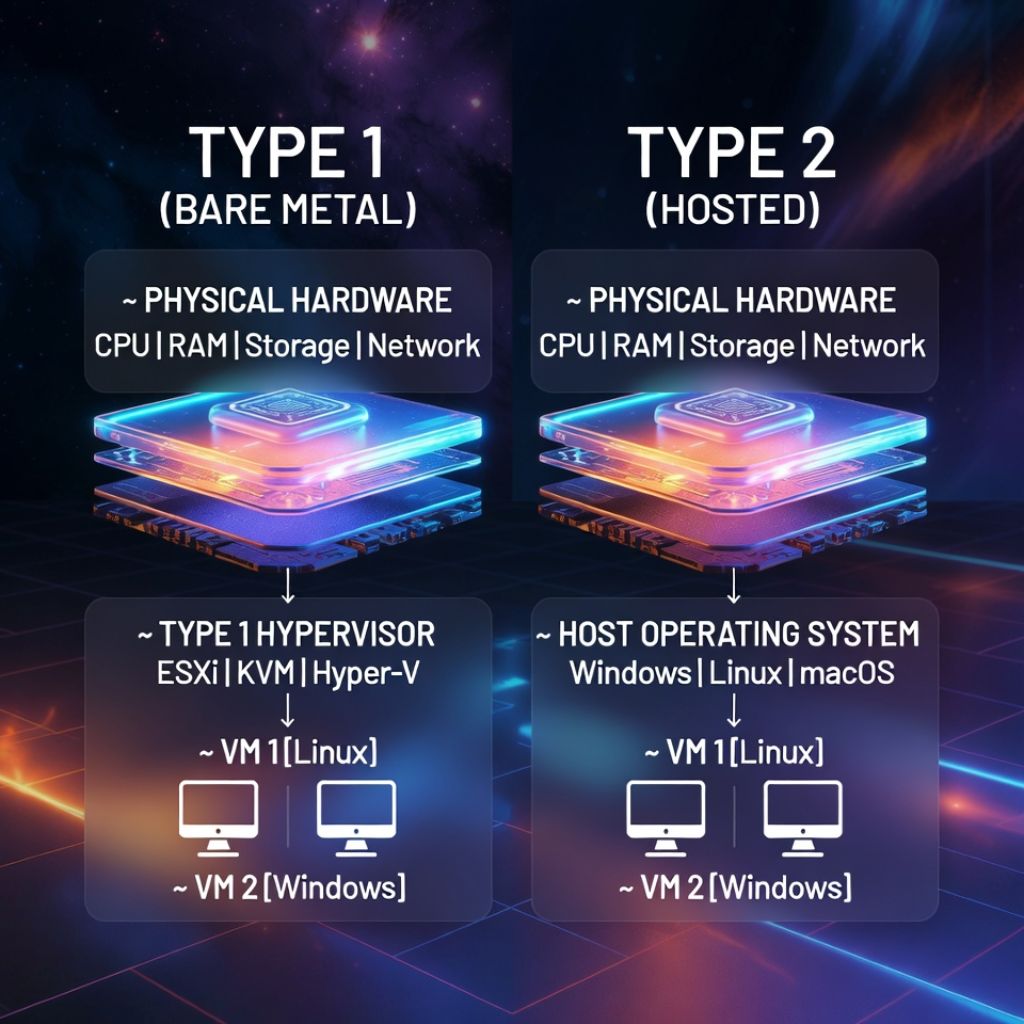
Hypervisors are broadly categorized as Type 1 (bare metal) or Type 2 (hosted), and that architectural choice shapes performance, security, and feature sets.
Type 1 vs Type 2 Hypervisors at a Glance
- Architecture: Type 1 runs directly on hardware (no general purpose host OS). Type 2 runs on top of a host OS (Windows, macOS, Linux).
- Performance & Overhead: Type 1 has lower overhead and more predictable performance. Type 2 adds a host OS layer, increasing overhead.
- Security & Isolation: Type 1 reduces attack surface and is preferred for multi tenant and production workloads. Type 2 inherits the host OS’s risk profile.
- Features: Type 1 platforms typically offer live migration, HA clustering, and granular resource controls. Type 2 focuses on developer convenience and desktop features.
- Use Cases: Type 1 for servers, clouds, and data centers. Type 2 for dev/test, training, and light personal or lab workloads.
What is a Type 1 (Bare Metal) Hypervisor?
Type 1 hypervisors install directly on hardware, acting as the minimal OS that manages compute, memory, and I/O for VMs. This direct control enables better efficiency, stronger isolation, and advanced virtualization features.
Common Examples
- VMware ESXi
- Microsoft Hyper-V (bare metal architecture with a parent partition)
- KVM (Kernel based Virtual Machine, integrated into the Linux kernel)
- Xen / Citrix Hypervisor
Pros
- Lower overhead and near native performance
- Hardened attack surface and strong tenant isolation
- Enterprise features: live migration, HA, DRS, snapshots, SR-IOV/PCIe passthrough
- Predictable resource scheduling for SLAs
Cons
- Requires dedicated hardware and planned deployment
- Steeper learning curve for cluster and storage networking
- Some platforms have licensing costs
Best Use Cases
- Data centers and cloud platforms
- High density, multi tenant hosting
- Mission critical and performance sensitive workloads
- Virtual Desktop Infrastructure (VDI) at scale
What is a Type 2 (Hosted) Hypervisor?
Type 2 hypervisors install as applications on a host operating system. They reuse the host’s device drivers and services, making them easy to set up for desktops and laptops. The trade off is additional overhead and a larger attack surface due to the host OS.
Common Examples
- Oracle VirtualBox
- VMware Workstation and VMware Fusion
- Parallels Desktop (macOS)
- QEMU (hosted mode without kernel acceleration)
Pros
- Fast to install and easy to use on existing OS
- Great for developers, students, and trainers
- Flexible for quick labs and cross OS testing
- Often free or low cost
Cons
- Higher overhead and less predictable performance
- Security depends on the host OS hygiene
- Fewer enterprise grade features and integrations
Best Use Cases
- Dev/test environments on workstations
- Running a second OS on a laptop (e.g., macOS + Linux VM)
- Training, demos, and short lived sandboxes
- Light services without strict SLAs
Deep Dive Comparison: Key Differences That Matter
Performance and Overhead
Type 1 hypervisors schedule CPU, memory, and I/O directly on hardware, minimizing context switches and driver overhead. With features like hugepages, NUMA awareness, and SR-IOV, they achieve near bare metal throughput. Type 2 must share resources with the host OS, introducing variability and lower ceilings for IO intensive or latency sensitive workloads.
Security and Attack Surface
Type 1 reduces the number of layers attackers can target. Hardening the management plane, isolating management networks, and patching hypervisor components are standard practices. Type 2 inherits all host OS risks, malware or misconfigurations on the host can compromise guests—so it’s less suitable for multi tenant or regulated environments.
Management, HA, and Ecosystem
Type 1 ecosystems (e.g., vCenter with ESXi, Red Hat virtualization stacks with KVM, System Center for Hyper-V) provide cluster level HA, live migration, distributed resource scheduling, backup integrations, and policy driven automation. Type 2 tools focus on VM convenience, snapshots, and portability but rarely offer true HA or shared nothing live migrations.
Hardware Access and Passthrough
For GPU virtualization, RDMA, or high-performance networking, Type 1 supports PCIe passthrough and SR-IOV more reliably. Type 2 may expose USB devices or limited GPU acceleration, but it’s not designed for production grade passthrough at scale.
Licensing and Cost
Costs vary. ESXi and enterprise suites can be licensed per CPU or core with add-on features; KVM is open source and often bundled in enterprise Linux subscriptions; Hyper-V can be included with Windows Server licensing. Type 2 options are typically free or low cost, suitable for budget conscious labs and classrooms.
How to Choose: A Practical Decision Framework
- If you need maximum performance, strong isolation, SLAs, or multi tenant hosting: choose a Type 1 hypervisor.
- If you need convenience for development, testing, or learning on a laptop/desktop: choose a Type 2 hypervisor.
- If you plan to scale beyond one host, require HA/live migration, or expect compliance audits: Type 1 is the safer path.
- If budget is tight and workloads are non critical: Type 2 can suffice while you prototype.
Role Based Recommendations
- Developers: Type 2 on a workstation for local testing; mirror production on a small Type 1 lab when performance matters.
- SMBs: Type 1 for core services (AD, databases, ERP); Type 2 for training and QA.
- Enterprises/Hosts: Type 1 across clusters with centralized management, monitoring, and backup.
- Edge/VDI: Type 1 for deterministic performance and device passthrough.
Real World Hosting Insight (YouStable Experience)
In hosting, tenant isolation and predictable performance are non negotiable. That’s why providers, including YouStable, standardize on Type 1 stacks (commonly KVM on hardened Linux) for VPS, cloud instances, and dedicated virtualization nodes. This approach enables CPU pinning, NUMA alignment, SR-IOV networking, and storage QoS, preventing noisy neighbors and meeting SLAs.
If you’re moving from a Type 2 lab to production, expect notable gains by switching to Type 1: lower latency, better IO throughput, and access to live migration, HA, and mature backup tooling. At YouStable, our team can advise on right sizing hosts, storage tiers (NVMe vs. SATA), and network designs to match your application realities.
Setup Tips and Best Practices
For Type 1 Hypervisors
- Enable hardware virtualization (Intel VT-x/VT-d or AMD-V/IOMMU) and SR-IOV in BIOS/UEFI.
- Align CPU topology with VM vCPU counts; consider CPU pinning for latency-critical workloads.
- Use hugepages and NUMA awareness for databases and analytics.
- Adopt redundant storage (RAID, replicated or shared storage) to support HA and live migration.
- Segment management, storage, and VM networks; apply firewall policies and role-based access.
For Type 2 Hypervisors
- Keep the host OS lean: disable unnecessary services, patch regularly, and use reputable security tools.
- Allocate sufficient RAM/CPU, but leave headroom for the host OS to prevent contention.
- Use bridged networking for realistic lab scenarios; NAT for quick, isolated tests.
- Prefer SSD/NVMe storage to reduce IO bottlenecks; snapshot judiciously.
- Back up VM images and export configurations to version control where possible.
Quick Check: Is KVM Supported on Linux?
# Verify CPU virtualization extensions
lscpu | grep -i virtualization

# Check if KVM modules are loaded
lsmod | grep -E 'kvm|kvm_intel|kvm_amd'

# Optional: validate host capabilities (on some distros)
virt-host-validate
Common Myths, Clarified
- “Type 2 is always insecure.” It’s less suitable for multi tenant production, but with a hardened host and limited exposure, it’s fine for labs.
- “KVM is Type 2 because it runs on Linux.” KVM is part of the Linux kernel, making it functionally Type 1 (bare metal via the kernel).
- “Type 1 is always expensive.” Open source stacks (KVM, oVirt, Proxmox VE) lower costs while delivering enterprise features.
- “You can’t do GPU with VMs.” With Type 1 and proper hardware, GPU passthrough and vGPU are common.
FAQs
Which is better: Type 1 or Type 2 hypervisor?
Neither is universally “better.” Type 1 suits production, performance sensitive, and multi tenant environments due to lower overhead and stronger isolation. Type 2 is ideal for desktops, labs, and quick testing because it installs easily on an existing OS.
Is KVM a Type 1 or Type 2 hypervisor?
KVM is considered a Type 1 hypervisor because it is integrated into the Linux kernel. While it leverages user space tools (libvirt, QEMU) for device models, the core virtualization runs at the kernel level, similar to bare metal behavior.
Is VMware ESXi a Type 1 hypervisor?
Yes. VMware ESXi is a classic Type 1 (bare metal) hypervisor. It installs directly on hardware and is managed via tools like vSphere/vCenter for clustering, HA, and orchestration.
Can Type 2 hypervisors be used in production?
Generally not recommended. While possible for small, non critical workloads, Type 2 lacks the isolation, performance consistency, and HA features required for most production environments. Consider migrating to a Type 1 stack for reliability.
Is Microsoft Hyper-V Type 1 or Type 2?
Hyper-V is Type 1. It uses a microkernelized architecture with a parent partition that hosts management services. Despite running alongside Windows Server, the hypervisor itself operates at the bare metal layer.
Conclusion
If you prioritize uptime, security, and scale, go Type 1. If you need flexibility on a workstation or you’re learning, Type 2 is perfect. As your workloads grow, consider maturing into a Type 1 platform for HA, live migration, and enterprise grade performance. If you’re unsure, YouStable can help you map requirements to the right hypervisor and hosting architecture.
Ready to plan your next step? Lean on YouStable’s virtualization expertise to design a resilient, cost effective environment, whether you’re consolidating servers, rolling out VMs for clients, or preparing a cloud ready stack.




