The Top 10 Best Windows Dedicated Server providers in 2026, These hosts deliver bare metal performance with Windows Server 2022/2019 licensing, RDP access, Plesk support, robust DDoS protection, and enterprise hardware (Intel Xeon/AMD EPYC, NVMe, RAID). Choose based on CPU core needs, RAM capacity, network throughput, uptime SLA, and managed support tier.
Choosing a Windows dedicated server is often the turning point for .NET apps, MSSQL databases, and RDP workloads that have outgrown VPS or shared resources. In 2026, Windows Server 2022, NVMe first storage, and dedicated 10-25 Gbps networking are the new standard for serious performance. This guide ranks the 10 best Windows dedicated server providers, explains real world use cases, and helps you match features, SLAs, and budgets to your stack.
We benchmark the field using core technical factors: CPU generations and single core speed for IIS/.NET throughput, memory bandwidth for SQL Server, storage IOPS/latency for transactional loads, and network quality for global RDP users. You’ll also find pricing notes, pros and cons, and a quick checklist to select the right Windows bare metal for 2026 and beyond.
What is Windows Dedicated Server?
A Windows Dedicated Server is a physical machine used only by you. No resource sharing, no noisy neighbors. All CPU cores, RAM, storage, and bandwidth work only for your projects.
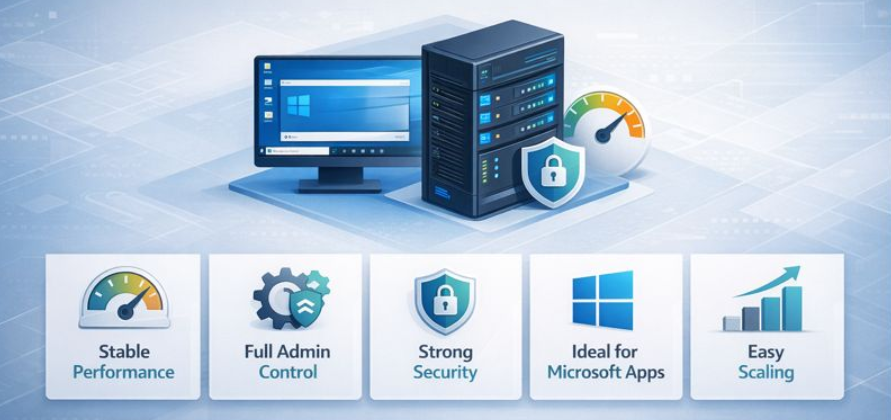
You log in through Remote Desktop (RDP) and manage the server just like your own office system, but with data center grade power and reliability.
This setup is ideal for .NET & ASP.NET applications, IIS websites, Microsoft SQL Server databases, Active Directory, and RDS environments. Windows Server 2019 or 2022 runs smoothly, and tools like Plesk make website and user management easier.
Here’s why many businesses choose it
- Stable performance even during high traffic
- Full admin control for custom setups
- Strong security and isolation
- Perfect compatibility with Microsoft software
- Easy scaling as workload grows
With modern Intel Xeon or AMD EPYC CPUs, NVMe or SSD RAID storage, and flexible networking, a Windows Dedicated Server gives you confidence that your applications will stay fast, secure, and ready for future growth.
10 Best Windows Dedicated Server in 2026, Oct
Choosing the right Windows dedicated server can feel confusing, right? That’s why this section walks you through the top Windows dedicated server providers, one by one, in a clear and simple way.
Here, you’ll see what each provider actually offers, how strong their servers are, what kind of support you get, and who they work best for.
The goal is simple: help you compare real options easily and pick a server that truly fits your workload, budget, and future plans without guesswork.
- YouStable – High-performance Windows servers with expert support
- BlueHost – Easy Windows hosting for small teams
- Namecheap – Budget friendly dedicated Windows server choice
- Hostwinds – Flexible configurations with strong networking option
- Contabo – Best value for heavy resource needs
- E2ENetworks – India focused Windows hosting with local speed
- Liquid Web – Premium SLAs and white glove support
- InterServer – Simple, reliable, cost efficient Windows hosting
- InMotion Hosting – Balanced performance with strong documentation
- AccuWebHosting – Windows centric hosting with deep expertise
1. YouStable – Upto 15% OFF+Free Setup+24/7 Support
Best for: High IOPS .NET/SQL workloads needing NVMe first design and hands on support
Price: From $77.99/month + (Windows license extra) – check current offers

YouStable focuses on practical Windows deployments: IIS driven SaaS, multi tenant Plesk hosting, and transactional SQL Server that demands deterministic latency. Their configurations typically combine modern Intel/AMD CPUs with enterprise NVMe in RAID 1/10, and optional 10 Gbps uplinks. The provider’s support team understands Windows specific pain points RDP hardening, group policy issues, .NET build/runtime quirks, so resolutions are faster than generic L1 scripts.
For growing teams, YouStable’s managed tiers cover Windows patching, proactive monitoring, IPMI/KVM rescue, and backup orchestration with retention aligned to RPO/RTO needs. If you maintain Active Directory or RDS, they can scope CAL and licensing advice under SPLA, reducing surprise costs. With data center options in popular regions and a security stack that includes DDoS mitigation and 2FA guidance, YouStable is a safe default for Windows first shops.
Key Features of YouStable
YouStable gives you a powerful Windows dedicated server built for real performance, with NVMe RAID storage, modern CPUs, and strong network stability. Everything is designed to keep your applications fast, secure, and reliable under heavy workloads.
- Windows Server 2022 ready with SPLA guidance for SQL/RDS licensing: Minimize compliance risk and size licenses correctly for your stack and users. Guided licensing avoids overpaying and keeps audits simple; ideal for enterprises scaling RDS users or SQL cores.
- Enterprise NVMe RAID with hot swap bays and hardware cache: Predictable low latency for OLTP and API workloads that spike I/O. Gen4 NVMe and RAID 1/10 optimize writes and reads; consistent IOPS protect SQL transaction times under load.
- 10 Gbps uplink options with route optimized transit and DDoS: Lower RDP jitter and faster global asset delivery for IIS apps. Traffic engineering reduces packet loss; always on mitigation keeps services reachable during volumetric attacks.
- Managed Windows patching, Plesk, and proactive monitoring: Keep IIS, .NET, and OS updated without outages or regressions. Change windows and rollbacks are planned, reducing downtime risk for mission critical Windows stacks.
- IPMI/KVM rescue access and bare metal rebuild automation: Recover quickly from boot or driver issues after updates. Out of band access means you control the box even if RDP fails; rebuilds are scripted and fast.
- Security hardening for RDP, SMB, and IIS with WAF tooling: Close common attack paths across Windows services. Baselines include 2FA, restricted subnets, and TLS best practices suited to Windows Server 2022.
Pros
- Windows savvy support that understands IIS, .NET CLR versions, and MSSQL tuning.
- Balanced hardware builds favoring NVMe & memory bandwidth for database heavy loads.
- Clear upgrade paths for CPU, RAM, and storage without disruptive migrations.
Cons
- Fewer entry level bare metal promos than commodity hosts.
- Some regions may have wait times for top end AMD EPYC bins.
Ideal Use Cases
- .NET microservices with SQL Server and Redis caching.
- Multi tenant Plesk hosting and Windows RDS for remote teams.
- Active Directory plus file services with strict RPO/RTO backups.
Plans & Pricing
YouStable offers flexible dedicated server plans based on performance needs, starting from around $77.99/month. You can choose configurations based on CPU, RAM, and storage, with easy upgrade options as your workload grows.
| Plan Name | CPU | RAM | Storage | Bandwidth | Monthly Price |
| E3-1230v3-3.30Ghz | 4 | 32 GB DDR4 | 480 GB SSD | 10 TB/1 Gbps | $77.99 |
| E-2136-3.30Ghz | 6 | 32 GB DDR4 | 480 GB SSD | 10 TB/1 Gbps | $116.99 |
| Ryzen 9 3900X (12c/24t) | 12 | 64 GB DDR4 | 960 GB NVMe SSD | 50 TB/1 Gbps | $167.99 |
Why Choose YouStable Windows Dedicated Server?
YouStable is a reliable choice if you want high-performance Windows servers with NVMe speed, strong security, and expert level support. With features like 24/7 assistance, free setup, and up to 15% discount, it gives you both performance and value.
2. BlueHost – Beginner Friendly Windows Hosting
Best for: SMBs moving from shared/VPS to managed Windows dedicated hosting
Price: From $144.19/month (plus Windows license) – verify current plans

BlueHost’s dedicated line suits teams that want a familiar brand and streamlined onboarding into Windows. Expect dependable hardware, straightforward control panels, and strong documentation. While not the most customizable vendor, BlueHost’s managed options cover the Windows care and feeding many SMBs prefer to offload: patch cycles, monitoring, and basic Plesk administration with ticket based escalations.
Performance is ample for single tenant Windows sites, medium size MSSQL databases, and line of business applications that require consistent uptime. If you’re standardizing on Windows Server 2022 with IIS 10 and Plesk, BlueHost keeps the moving parts sane without steep learning curves. Just verify Windows licensing and optional SQL Server licensing in your quote to avoid surprises.
Key Features of BlueHost
- Simplified onboarding and familiar panel experience: Easy for SMB admins stepping up to bare metal. Clear documentation and guided setup reduce configuration time for Windows and Plesk.
- Managed services for Windows patching and monitoring: Offload routine maintenance safely. Scheduled updates with notification windows reduce disruption to production apps.
- Reliable hardware with SSD/NVMe options: Solid baseline for IIS and MSSQL.
Balanced I/O keeps transactional workloads stable during peak traffic. - Ticket based escalations with optional phone support: Get help when it matters most. Decent response SLAs for standard incidents and account requests.
- Brand trust and predictable billing: Fewer unknowns for finance teams.
Transparent renewals help long term budgeting for Windows licenses and add-ons.
Pros
- Low friction path to Windows dedicated for SMBs and agencies.
- Good documentation and onboarding support across panels and IIS.
- Managed tiers reduce admin overhead for small teams.
Cons
- Fewer deep customization options than specialist providers.
- Premium features can add up with licensing and management extras.
Ideal Use Cases
- Agencies consolidating Windows clients on Plesk.
- SMB ERP/CRM systems on IIS and SQL Server Standard.
- Secure RDP environments for distributed teams.
3. Namecheap – Budget Windows Server Hosting
Best for: Cost sensitive projects that still need dedicated Windows resources
Price: From $42.88/month (Windows licensing extra) – check current promos

Namecheap’s dedicated servers remain attractive for budget focused builds that still require isolation and consistent IOPS compared to VPS. While the catalog mixes generations of CPUs, you can find configurations with SSD/NVMe storage and generous bandwidth at compelling price points. Windows support and Plesk availability make it viable for small agencies and dev teams comfortable self managing most of the stack.
Expect to handle tuning and Windows patch hygiene unless you add management. For workloads with predictable traffic patterns line of business apps, RDP sessions for small teams, and low latency websites, Namecheap’s pricing can stretch your runway. Confirm SPLA coverage and IP allocation if you plan multiple SSL sites or SNI sensitive legacy apps.
Key Features of NameCheap
- Budget friendly dedicated options with SSD/NVMe: Cut costs without losing isolation benefits. Ideal for teams leaving VPS limitations and seeking consistent resources.
- Windows Server and Plesk availability: Familiar admin surfaces for SMBs and agencies. Fast to deploy IIS sites, email services, and multi tenant hosting.
- Generous bandwidth and IPv4 allocation: Useful for multi site deployments. Check for additional IPs if you’re migrating legacy SSL stacks.
- Self managed by default with optional add-ons: Control costs with selective services. Pay only for what you need and scale management later.
- Reasonable hardware choices across CPU generations: Balance price against performance. Pick newer CPUs when SQL Server throughput matters.
Pros
- Great entry pricing for bare metal Windows deployments.
- Familiar tooling and control panels lower the learning curve.
- Flexible IP and bandwidth policies for multi site hosting.
Cons
- More hands on administration unless you add managed services.
- Verify hardware generation to avoid older CPU bins for heavy SQL loads.
Ideal Use Cases
- Budget Windows RDP environments for small teams.
- Agency multi tenant Plesk hosting with moderate traffic.
- Legacy app hosting requiring dedicated Windows resources.
Also Read: Top 10 Best Dedicated Server in India
4. Hostwinds – Custom Windows Dedicated Servers
Best for: Customizable builds and strong network options for Windows
Price: From $122/month plus Windows licensing – confirm live rates

Hostwinds stands out for flexible configuration and a network stack that scales. Whether you need additional IPs, private networking, or specific RAID layouts, Hostwinds usually has a SKU to match. For Windows, that flexibility translates to right sizing IOPS, memory, and uplinks for applications ranging from mid sized SaaS to remote work RDS farms.
Management tiers include monitoring, nightly backups, and system administration tasks many teams want covered. Add Plesk for multi tenant hosting or bring your own orchestration for a self managed approach. If you anticipate growth, Hostwinds’ upgrade path minimizes hardware swaps and downtime risks.
Key Features of HostWinds
- Highly configurable bare metal with RAID/NVMe options: Align I/O profiles to SQL and IIS patterns. Tailor read/write performance for OLTP or content heavy workloads.
- Robust network with private VLAN and DDoS options: Safer RDP and inter server traffic. Segment sensitive services and reduce attack surface area.
- Managed tiers with monitoring and backups: Offload routine maintenance reliably. Restore points simplify rollback after Windows updates.
- Plesk ready Windows environments: Fast to deploy multi site hosting. Centralized management for IIS, mail, and DNS services.
- Scalable resource upgrades: Grow without wholesale platform changes. Reduce migration risk as user load increases.
Pros
- Excellent customization for storage and networking.
- Balanced managed options for Windows administration.
- Predictable growth paths and resource scaling.
Cons
- Pricing climbs as you add network and backup extras.
- Advanced setups benefit from experienced admins.
Ideal Use Cases
- RDS farms with private backend networks.
- SaaS on IIS needing mixed read/write performance tuning.
- Hybrid Windows Linux stacks with shared VLANs.
5. Contabo – High Resource Low Cost
Best for: Aggressive pricing for high core servers and big RAM on Windows
Price: From $98.1/month plus Windows license – region dependent

Contabo is known for value hardware, offering high core counts and spacious RAM at sharp prices. For Windows, this translates into cost effective environments for parallel workloads, caching layers, or SQL instances that thrive on memory. NVMe options keep hot datasets close, though you’ll want to confirm RAID layout and controller type for production databases.
Support is ticket centric and best for teams comfortable self managing Windows. If you prioritize raw resources per dollar and can handle patching, backups, and hardening, Contabo stretches budgets further than most. It’s ideal for staging, DR hot standby, and production loads that are CPU/RAM hungry yet predictable.
Key Features of Contabo
- High core counts and large RAM at low price points: Great for parallel Windows workloads. Useful for MSSQL memory optimization and RDS session hosts.
- NVMe storage choices: Improve IOPS and latency for busy databases. Check RAID configuration to meet redundancy goals.
- Global locations with strong peering: Better RDP latency for EU users. Evaluate region for your audience proximity.
- Self managed focus: Keep costs down with DIY administration. Plan security baselines and backup strategies early.
- IPv4 and upgrade options: Room to expand as apps grow. Scale storage and bandwidth with workload demand.
Pros
- Outstanding resource to dollar value for Windows bare metal.
- Solid for DR, staging, and compute rich deployments.
- NVMe availability benefits transactional apps.
Cons
- Self managed posture requires strong Windows admin skills.
- Confirm exact RAID/controller specs for production SQL Server.
Ideal Use Cases
- Memory heavy SQL Server and analytics workloads.
- RDS farms with many concurrent users.
- Cost optimized DR or standby Windows nodes.
6. E2ENetworks – India Focused Low Latency
Best for: India first Windows deployments with low latency domestic access
Price: From $189.2/month plus licensing – verify current pricing

E2ENetworks specializes in the Indian market, offering in country data centers and connectivity that benefits latency sensitive RDP and enterprise traffic. For Windows, this helps organizations with compliance requirements and users clustered in Indian metros. Expect modern CPU options, local peering, and flexibility around storage layouts suited to MSSQL.
Management offerings and DDoS protection vary by plan, so define your security and uptime needs upfront. Teams building ERP, fintech, or e-governance solutions on Windows will appreciate the domestic footprint, consistent peering, and predictable support within Indian business hours.
Key Features of E2ENetworks
- India local data centers and peering: Lower latency for domestic users. Ideal for RDP heavy operations and citizen facing apps.
- Windows ready hardware with NVMe options: Consistent IOPS for MSSQL workloads. Choose RAID to meet redundancy and performance targets.
- Compliance friendly hosting: Easier data residency alignment. Support for sector specific guidelines is a plus.
- Flexible bandwidth upgrades: Match traffic patterns and peak seasons. Good for retail, fintech, and public services surges.
- Managed support options: Tailor admin coverage for Windows stacks. Align patching windows with local time zones.
Pros
- Excellent domestic latency and peering in India.
- Good fit for compliance and data residency needs.
- Appropriate hardware profiles for Windows + SQL Server.
Cons
- International latency varies vs. global hyperscalers.
- Feature sets differ by DC and plan validate before ordering.
Ideal Use Cases
- India focused SaaS on Windows/IIS.
- RDP and AD services for distributed domestic teams.
- SQL Server deployments with data residency needs.
7. Liquid Web – Premium Enterprise Windows Servers
Best for: Mission critical Windows with premium SLAs and white glove support
Price: From $284.75/month plus Windows licensing – premium tier

Liquid Web is a premium provider built for 24/7 critical workloads. Expect newer gen CPUs, fast NVMe, and serious SLAs backed by rapid response support. For Windows, their engineers are comfortable with complex topologies—SQL Always On, multi node RDS, AD federation and they offer managed security layers that reduce attack surface and downtime risk.
Costs run higher, but you get seasoned staff who understand Windows beyond basic panel tasks. If your business equates downtime with lost revenue or compliance incidents, the calculus often favors Liquid Web’s reliability, change management discipline, and detailed runbooks.
Key Features of Liquid Web
- Premium SLAs with fast response and resolution: Reduce MTTR for incidents. Strong escalation paths and 24/7 engineering coverage.
- Enterprise NVMe and modern CPU bins: Excellent single core and IOPS. Ideal for high throughput IIS and SQL Server workloads.
- Advanced Windows architectures supported: Always On, RDS scale out, AD. Design and implementation guidance available.
- Managed security and backups: WAF, DDoS, and snapshots aligned to RPO/RTO. Compliance friendly operations and documentation.
- Change management discipline: Planned updates and tested rollbacks. Lower risk for production patching and upgrades.
Pros
- Best in class support for complex Windows deployments.
- Strong SLAs and predictable performance under load.
- Security first mindset with thorough runbooks.
Cons
- Higher starting prices than value focused competitors.
- Overkill for small, non critical Windows sites.
Ideal Use Cases
- Financial services and healthcare Windows workloads.
- 24/7 SaaS with strict SLAs and audit needs.
- Large RDS/AD environments with compliance controls.
8. InterServer – Simple Reliable Windows Hosting
Best for: Straightforward, cost efficient Windows dedicated builds
Price: From $89/month plus Windows license – watch specials

InterServer keeps things simple: sensible hardware, transparent pricing, and options that cover most Windows use cases without endless upsells. Their dedicated line is ideal for admins who want control, IPMI access, and the ability to tune Windows and Plesk on their terms. Add backups and DDoS protection to round out production readiness.
While management is lighter than premium providers, InterServer is dependable for long running Windows servers hosting web apps, RDP users, or SMB ERPs. It’s a reliable middle ground: good performance per dollar and enough flexibility to grow without vendor lock in.
Key Features of InterServer
- Straightforward hardware with IPMI/KVM: Full control when RDP fails. Essential for recovery after driver or boot issues.
- Windows friendly with Plesk options: Manage IIS and sites easily. Convenient for agencies and SMBs.
- Transparent pricing: Fewer surprises at renewal time. Budget planning is simpler for finance teams.
- Optional backups and DDoS: Add protection as you grow. Keep costs aligned with risk tolerance.
- Decent upgrade flexibility: Add RAM, storage, and bandwidth later. Scale without forklift migrations.
Pros
- Good value with admin friendly controls.
- No nonsense approach to dedicated hosting.
- Solid choice for long lived Windows workloads.
Cons
- Lighter managed services than top tier competitors.
- Best suited to experienced Windows administrators.
Ideal Use Cases
- Self managed IIS and SQL environments.
- Agency Plesk hosting with RDP admin workflows.
- Budget conscious Windows buildouts with control needs.
9. InMotion Hosting – Balanced Business Windows Hosting
Best for: Balanced performance and strong support documentation
Price: From $189.98/month plus Windows licensing – see current deals

InMotion blends modern hardware with a knowledgebase and support that help Windows admins move quickly. Expect NVMe options, RAID redundancy, and dependable bandwidth suitable for mid size apps and databases. InMotion’s change management and clear communication make it comfortable for teams that value predictable maintenance windows and rollback planning.
Windows plus Plesk provisioning is straightforward, and you can add managed services as needed. If you’re migrating from VPS and want a stable, documented jump to dedicated Windows with room to grow, InMotion is a safe pick.
Key Features of InMotion Hosting
- NVMe storage with RAID redundancy: Protect performance and data.
Good for mixed read/write IIS and database loads. - Helpful documentation and planning: Smooth migrations to Windows bare metal.
Reduce misconfigurations and downtime risk. - Managed add-ons: Patch, monitor, and backup with support oversight.
Scale management as complexity grows. - Plesk integration: Quick to manage sites, mail, and DNS on Windows.
Agency friendly workflows. - Predictable maintenance windows: Plan around change with confidence.
Supports clean rollbacks if issues arise.
Pros
- Smooth learning curve for teams new to Windows dedicated.
- Solid hardware and consistent network performance.
- Clear upgrade and management options.
Cons
- Not the cheapest at entry level compared to budget providers.
- Advanced architectures may require custom scoping.
Ideal Use Cases
- Midsize Windows apps with moderate database needs.
- Agencies consolidating clients under Plesk on Windows.
- Predictable, documented maintenance cycles.
10. AccuWebHosting – Windows Focused High Performance
Best for: Windows specialists with granular configuration options
Price: From $103/month plus Windows – verify editions and add-ons

AccuWebHosting has deep Windows roots, offering configurations tailored to IIS, ASP.NET, and SQL Server needs. Choose from SSD/NVMe storage, ample memory, and CPUs that sustain strong single core performance. Their support team is conversant with Windows issues beyond the basics, making AccuWeb a solid fit for developers and admins who want Windows first thinking.
Management and backups are available for production setups, and Plesk support is strong. If you run complex Windows sites, maintain custom .NET apps, or need consistent RDP performance for distributed teams, AccuWeb’s focus yields fewer surprises.
Key Features of AccuWebHosting
- Windows centric expertise: Faster diagnosis for IIS and .NET issues. Reduces time to fix for production incidents.
- Configurable NVMe and RAID: Align storage to SQL and app needs. Better IOPS and resilience for transactional workloads.
- Plesk ready builds: Manage multi site Windows hosting easily. Developer and agency friendly controls.
- Managed services and backups: Production friendly safeguards. Protect data with retention and quick restore options.
- Good RDP performance: Consistent remote admin and user sessions. Supports work from anywhere teams.
Pros
- Windows specialist support and documentation.
- Strong storage and CPU choices for .NET/SQL.
- Flexible management tailored to your needs.
Cons
- Pricing moves with storage and management options.
- Advanced builds benefit from pre sales scoping.
Ideal Use Cases
- .NET and IIS heavy application stacks.
- Agencies hosting many Windows sites.
- SQL Server with tight latency requirements.
How to Choose a Windows Dedicated Server in 2026?
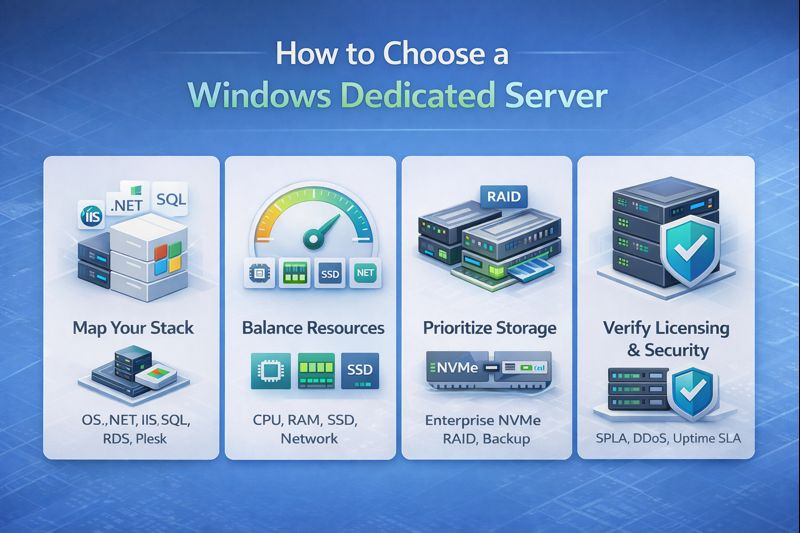
Windows licensing, support scope, and hardware tiers define total value. Balance CPU, RAM, storage IOPS, and network with your IIS/MSSQL workload.
Start by mapping your stack: Windows Server 2022/2019, .NET 6/8, IIS 10+, SQL Server (Standard/Enterprise), and whether you need Plesk, Active Directory, or Remote Desktop Services (and RDS CALs). For compute heavy APIs, prefer modern AMD EPYC (Zen 3/4) or Intel Xeon Scalable (Ice/ Sapphire Rapids) with high single core turbo clocks. For database heavy workloads, memory capacity and NVMe RAID throughput dominate.
Storage is where most Windows servers bottleneck. In 2026, aim for enterprise NVMe (Gen4) in RAID 1/10, hardware controllers with cache, and predictable latency under 200µs for OLTP patterns. If growth is expected, ensure hot swap drive bays, additional NVMe slots, and snapshot capable backups. Networking should include at least 1–10 Gbps uplinks, BGP backed routes, and anycast or CDN options if you serve global RDP users.
Confirm SPLA licensing for Windows, optional SQL Server licensing, and whether the host offers managed patching, kernel updates, Plesk management, and IPMI/KVM access for emergencies. Security must include DDoS mitigation, WAF for IIS, 2FA/RDP hardening, and immutable backups. Finally, validate SLAs (99.9%-99.99%), ticket response times, and in region data centers to meet compliance and latency goals.
Why They Made the List?
The above eight providers cover most needs, but two more round out the top 10: balanced global availability, competitive pricing, and Windows friendly stacks. Each can serve as a primary or secondary provider in a multi region or DR strategy.
Honorable #9: YouStable Alternative Regions
Best for: Teams standardizing configurations across regions with consistent playbooks
Price: Region dependent; contact sales for multi DC Windows footprints
If you’re consolidating providers, mirroring Windows builds across regions simplifies operations, hardening, and monitoring. Maintaining the same image, patch cadence, and backup policy across multiple data centers reduces operational risk during failover or DR tests. Look for providers (including YouStable) that can deliver identical hardware and licensing terms in your target geographies.
For Windows, this consistency means fewer driver mismatches, predictable IOPS, and known good RDP performance. It’s a practical strategy for SaaS on Windows with regional compliance needs or for enterprises phasing out on prem servers.
Key Features to Mirror
- Same CPU family and storage layout across DCs – Predictable performance and failovers.
- Identical Windows build images – Reduce drift and patch inconsistencies.
- Unified monitoring and backups – Single pane of glass for ops teams.
Honorable #10: Mixed Use With InMotion/InterServer
Best for: Multi site Windows hosting and cost optimized DR seats
Price: Starts from low three figures monthly; scale by role and region
Using two providers one for primary production Windows servers and another for DR or regional traffic strikes a strong balance of cost and resilience. For example, you might run production on Liquid Web for SLAs, and maintain warm standby on InterServer or InMotion. This dual vendor approach reduces correlated risks and keeps failover practices honed.
Ensure you align Windows licensing, SQL Server editions, and backup encryption across both providers. Test RDP, IIS, and data layer failovers quarterly, and keep documentation live in your runbooks.
Performance Expectations and Benchmarks in 2026
Modern CPUs and NVMe RAID reduce latency and lift .NET single thread speed. Network quality and DDoS controls keep RDP smooth under regional attacks.
On Windows Server 2022, expect IIS 10 to benefit from higher single core turbo clocks. For SQL Server, memory capacity and NVMe write endurance determine stability under OLTP. A typical profile: AMD EPYC 7313/7443P or Intel Xeon Silver/Gold with 64–256 GB RAM and NVMe RAID 1/10. For networks, 1–10 Gbps uplinks with route optimized transit can reduce RDP jitter below 25 ms in region.
Use synthetic benchmarks to validate: single core tests for .NET performance, fio for storage IOPS and latency, and iperf3 for throughput. More importantly, run production like load tests—e.g., k6/Gatling against IIS endpoints, HammerDB for SQL Server to simulate concurrency and confirm headroom before migration cutovers.
FAQs
Which Windows Server version Should I Choose for a Dedicated Server?
Windows Server 2022 is the default for new builds due to lifecycle, TLS 1.3, and security baselines. Use 2019 only for legacy app compatibility. Verify .NET, IIS modules, and SQL Server edition support before finalizing.
How Many CPU Cores and RAM do I Need for IIS and SQL Server?
For small to mid apps, start with 8–16 cores and 32–64 GB RAM. Database heavy stacks often need 16–32 cores and 64–256 GB RAM. Size using load tests, SQL wait stats, and peak concurrency metrics.
Is NVMe Worth it for Windows Dedicated Servers?
Yes. NVMe RAID 1/10 dramatically reduces latency and boosts IOPS for MSSQL and IIS. It’s the most impactful upgrade after CPU/RAM, especially for write heavy transactional workloads.
Do I Need Plesk on a Windows Dedicated Server?
Plesk simplifies multi site hosting, mail, and DNS on Windows. If you manage many domains or clients, it’s valuable. For single app servers, native Windows tools and automation may suffice.
What Security Steps are Essential for RDP on Windows?
Enforce 2FA, limit RDP to VPN or specific IPs, change default ports, enable account lockouts, and keep Windows updated. Add DDoS protection and monitor failed login patterns.
How Do Windows Licensing Costs Work on Dedicated Servers?
Most hosts offer Windows via SPLA. You pay monthly for the OS license, and optionally for SQL Server and RDS CALs. Costs scale with cores and editions; request a clear itemized quote.
Should I Choose Managed or Self Managed Windows Dedicated Hosting?
Choose managed if your team lacks Windows ops depth or uptime is critical. Self managed fits experienced admins who want control and cost efficiency. Many providers let you mix: self manage with selective add-ons.
Conclusion
Shortlist providers by workload fit, not just price: NVMe for database speed, modern CPUs for .NET throughput, and network quality for smooth RDP. Confirm Windows and SQL licensing, DDoS coverage, and backup policies before signing.
YouStable, Liquid Web, Hostwinds, and AccuWebHosting lead for managed Windows depth, while Contabo and Namecheap win on value. With a clear performance target and SLA needs, you’ll land the right Windows bare metal for 2026.
In Short these Are the Windows Dedicated Server 2026
Choosing the right Windows dedicated server becomes much easier when you compare all top providers side by side. This quick overview highlights real differences in performance, pricing, and use cases so you can confidently select the best option for your workload.
| Provider | Best For | Starting Price | Performance | Key Strength |
| YouStable | High IOPS .NET & SQL workloads | $77.99/mo | Very High | NVMe RAID + Windows expert support |
| BlueHost | Beginner SMB Windows hosting | $144.19/mo | Medium | Easy setup + managed experience |
| Namecheap | Budget dedicated Windows hosting | $42.88/mo | Good | Low cost + flexible resources |
| Hostwinds | Custom configurable Windows servers | $122/mo | High | Custom builds + strong networking |
| Contabo | High resource low cost servers | $98.1/mo | High | More CPU & RAM for price |
| E2ENetworks | India focused low latency hosting | $189.2/mo | High | Local data centers + compliance |
| Liquid Web | Enterprise critical Windows workloads | $284.75/mo | High | Premium SLA + expert support |
| InterServer | Simple reliable Windows hosting | $89/mo | Good | Transparent pricing + control |
| InMotion Hosting | Balanced business Windows hosting | $189.98/mo | High | Documentation + stable performance |
| AccuWebHosting | Windows optimized high performance hosting | $103/mo | High | Windows focused expertise |