To self host an email server in 2026, secure a VPS with a static IPv4, configure DNS (A/AAAA, MX, PTR/rDNS, SPF, DKIM, DMARC), install an MTA and IMAP stack (e.g., Postfix + Dovecot or Mailcow), enforce TLS with MTA-STS/TLS-RPT, harden security (firewall, Fail2ban, anti spam), and validate deliverability.
Thinking about how to self host an email server in 2026? This expert guide walks beginners and pros through stack selection, DNS and security setup, deliverability best practices, and real world gotchas. You’ll learn the exact steps to set up a reliable, secure, and compliant self hosted mail system that inboxes.
What Self Hosting Email Means (and if You Should)
Self hosting email means you control the Mail Transfer Agent (SMTP), IMAP/POP services, DNS, security, and compliance on your own server.
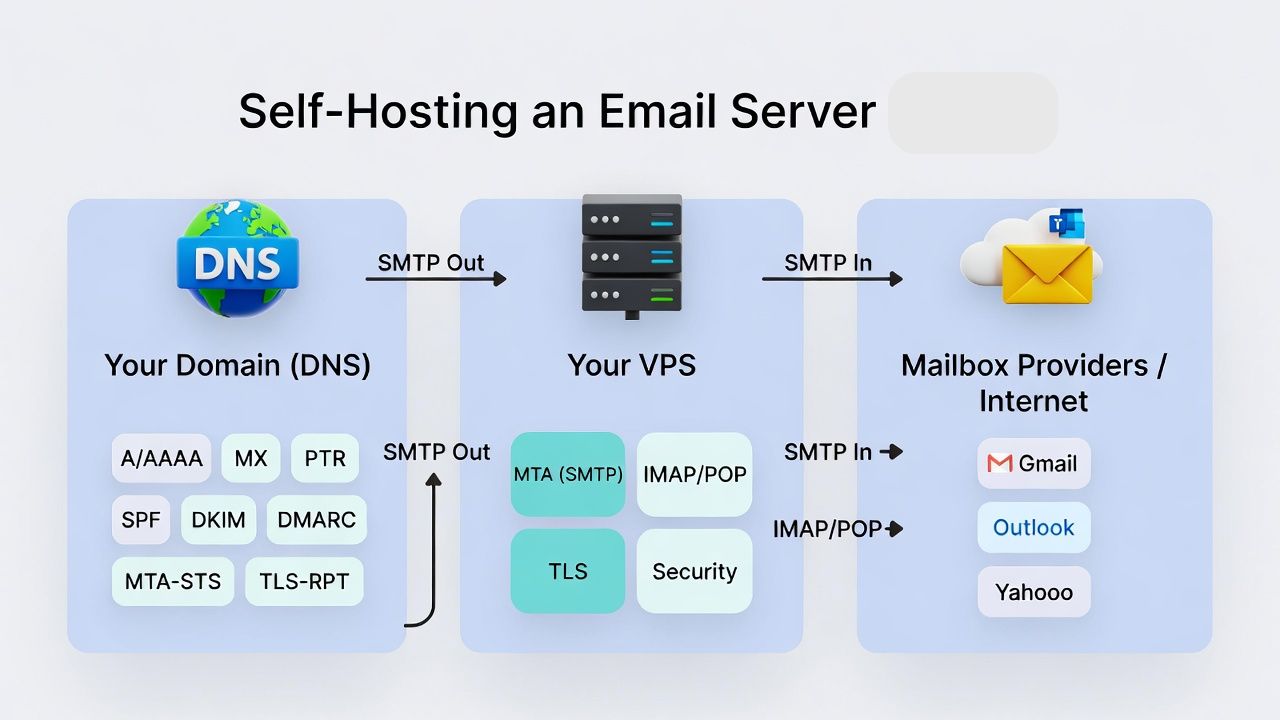
You gain privacy and ownership, but you also assume responsibility for deliverability, uptime, spam defense, and legal compliance. In 2026, mailbox providers are stricter than ever, so execution matters.
Quick Requirements Checklist
- VPS or dedicated server with static IPv4 (and optional IPv6), clean IP reputation, and reverse DNS support
- Open outbound port 25 (many clouds block it), plus inbound 25/465/587 and 143/993
- Domain with DNS control: A/AAAA, MX, PTR (via host), SPF, DKIM, DMARC, MTA-STS, TLS-RPT
- Linux OS (Ubuntu 22.04/24.04 LTS recommended), 2+ vCPU, 4-8 GB RAM for light use
- Delivery stack: Postfix + Dovecot or a suite like Mailcow/Mail in a Box/iRedMail
- TLS certificates (Let’s Encrypt), firewall, Fail2ban, spam/virus filtering
- Backups, monitoring, and access to blocklist and postmaster tools
Stack Options: Pick Your Path
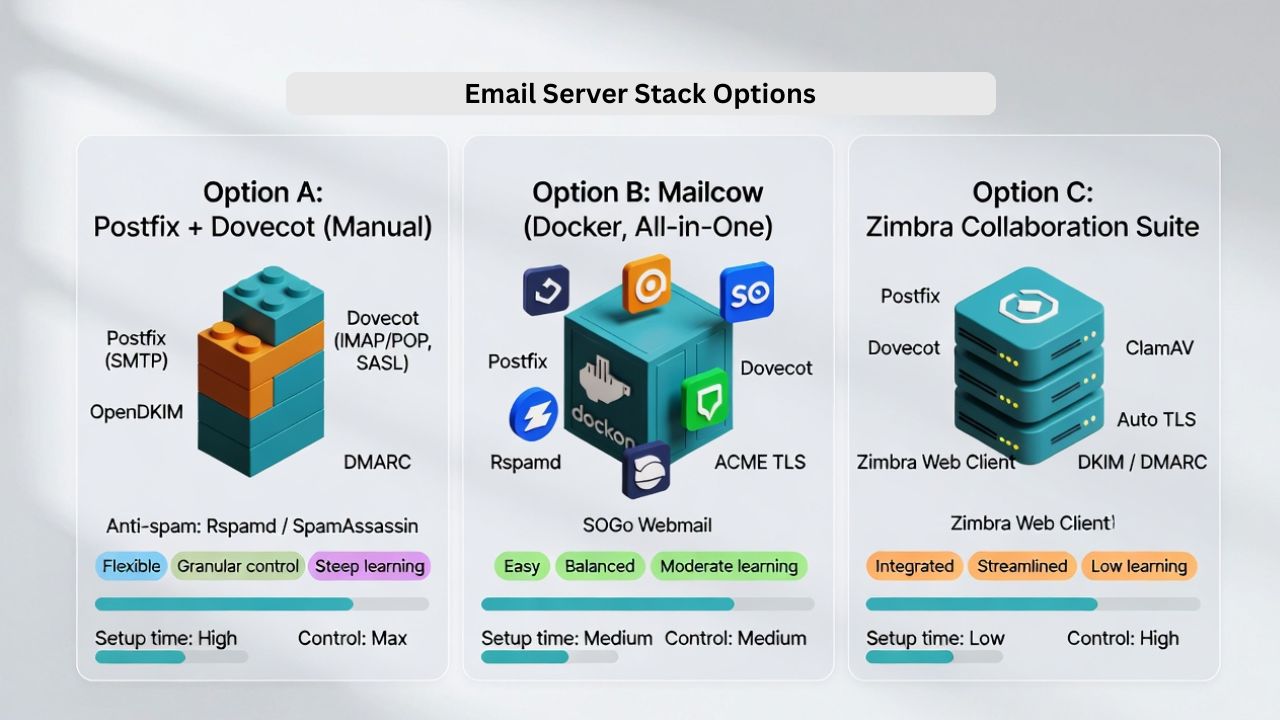
Option A: Postfix + Dovecot (Manual, Flexible)
Best for admins who want granular control. You combine Postfix (SMTP), Dovecot (IMAP/POP and SASL auth), OpenDKIM, and an anti spam tool like Rspamd or SpamAssassin. Highest learning curve, maximum transparency and performance.
Option B: Mailcow (Docker, All in One)
Modern Dockerized suite with Postfix, Dovecot, Rspamd, SOGo webmail, ACME TLS, DKIM, DMARC, and admin UI. Faster to production with sane defaults and a strong community. Great balance for SMBs and pros who want polish without vendor lock in.
Option C: Mail in a Box or iRedMail (Guided Setup)
Scripted installers that configure a working server quickly. Fewer moving parts than Mailcow, ideal for small teams or personal domains with limited time.
Server and Network Prerequisites
- OS: Ubuntu 24.04 LTS recommended
- Resources: 2 vCPU, 4-8 GB RAM, 40-80 GB SSD for small orgs
- Network: Static IPv4, optional IPv6; ensure outbound port 25 is allowed
- rDNS: Your provider must set PTR to mail.yourdomain.com
- Time: NTP enabled; mismatched time harms TLS/DKIM
Tip: Many hyperscalers block port 25 by default. Choose a host that opens it on request and supports rDNS. YouStable VPS plans include dedicated IPv4, rDNS support, and optional managed hardening ideal for mail servers.
DNS Configuration That Delivers in 2026
A/AAAA and MX Records
- A: mail.yourdomain.com → your IPv4
- AAAA: mail.yourdomain.com → your IPv6 (optional but recommended)
- MX: yourdomain.com → mail.yourdomain.com (priority 10)
PTR (Reverse DNS)
Set by your host: your IPv4 PTR must map to mail.yourdomain.com and that name must resolve back to the same IP. Lack of PTR is a delivery killer.
SPF, DKIM, DMARC
- SPF (RFC 7208):
v=spf1 a mx ip4:YOUR.IP all(tighten toallafter validation) - DKIM (RFC 6376): Generate 2048 bit keys; publish the selector TXT; sign outbound mail
- DMARC (RFC 7489): Start with
v=DMARC1; p=none; rua=mailto:dmarc@yourdomain.com; ruf=mailto:dmarc@yourdomain.com; sp=none; adkim=s; aspf=s. Move toquarantineorrejectafter monitoring
MTA STS and TLS RPT (Modern Deliverability)
- MTA STS (RFC 8461): Host a policy at
mta-sts.yourdomain.comand publish_mta-stsTXT. Enforces TLS for SMTP - SMTP TLS Reporting (RFC 8460): Publish
_smtp._tlsTXT with your report mailbox to gain visibility into TLS issues
BIMI (Optional Brand Trust)
For brands, publish BIMI pointing to an SVG logo and, where required, a Verified Mark Certificate (VMC). Not essential for function, but can improve recognition in some inboxes.
Step by Step: Postfix + Dovecot on Ubuntu (2026 Edition)
This minimal setup is production capable for small teams.

Replace placeholders with your values. Consider Mailcow if you prefer a quicker, integrated stack.
# 1) System prep
sudo apt update && sudo apt -y upgrade
sudo timedatectl set-timezone UTC
sudo apt -y install ufw fail2ban certbot

# 2) Open firewall
sudo ufw allow 22/tcp
sudo ufw allow 25/tcp  # SMTP
sudo ufw allow 465/tcp # SMTPS
sudo ufw allow 587/tcp # Submission
sudo ufw allow 993/tcp # IMAPS
sudo ufw --force enable

# 3) TLS cert (replace domain)
sudo apt -y install nginx
sudo certbot certonly --nginx -d mail.yourdomain.com --agree-tos -m admin@yourdomain.com --redirect

# 4) Install core mail services
sudo apt -y install postfix postfix-pcre dovecot-imapd dovecot-lmtpd dovecot-core opendkim opendkim-tools opendmarc rspamd
Configure Postfix main.cf (key directives):
# /etc/postfix/main.cf (excerpt)
myhostname = mail.yourdomain.com
myorigin = /etc/mailname
mydestination = localhost
inet_interfaces = all
mynetworks = 127.0.0.0/8 [::1]/128
relay_domains =
smtputf8_enable = yes

# TLS
smtpd_tls_cert_file = /etc/letsencrypt/live/mail.yourdomain.com/fullchain.pem
smtpd_tls_key_file = /etc/letsencrypt/live/mail.yourdomain.com/privkey.pem
smtpd_use_tls = yes
smtpd_tls_security_level = may
smtp_tls_security_level = may
smtpd_tls_protocols = !SSLv2, !SSLv3
smtpd_tls_ciphers = high

# Auth and submission
smtpd_sasl_type = dovecot
smtpd_sasl_path = private/auth
smtpd_sasl_auth_enable = yes
smtpd_recipient_restrictions = permit_sasl_authenticated, reject_unauth_destination
submission inet n       -       y       -       -       smtpd
  -o syslog_name=postfix/submission
  -o smtpd_tls_security_level=encrypt
  -o smtpd_sasl_auth_enable=yes
smtps     inet n       -       y       -       -       smtpd
  -o syslog_name=postfix/smtps
  -o smtpd_tls_wrappermode=yes
  -o smtpd_sasl_auth_enable=yes
Dovecot authentication and IMAP:
# /etc/dovecot/dovecot.conf (excerpt)
protocols = imap lmtp
disable_plaintext_auth = yes
auth_mechanisms = plain login
ssl = required
ssl_cert = </etc/letsencrypt/live/mail.yourdomain.com/fullchain.pem
ssl_key = </etc/letsencrypt/live/mail.yourdomain.com/privkey.pem

# /etc/dovecot/conf.d/10-master.conf (auth socket for Postfix)
service auth {
  unix_listener /var/spool/postfix/private/auth {
    mode = 0660
    user = postfix
    group = postfix
  }
}
Enable DKIM signing:
# OpenDKIM
sudo mkdir -p /etc/opendkim/keys/yourdomain.com
sudo opendkim-genkey -b 2048 -s mail -d yourdomain.com -D /etc/opendkim/keys/yourdomain.com
sudo chown opendkim:opendkim /etc/opendkim/keys/yourdomain.com/*

# /etc/opendkim.conf (excerpt)
Syslog                  yes
UMask                   002
Mode                    sv
Canonicalization        relaxed/simple
Socket                  inet:12345@localhost
Selector                mail
KeyFile                 /etc/opendkim/keys/yourdomain.com/mail.private
Domain                  yourdomain.com

# Postfix milter hooks in /etc/postfix/main.cf
milter_default_action = accept
milter_protocol = 6
smtpd_milters = inet:localhost:12345
non_smtpd_milters = $smtpd_milters
DMARC and spam filtering:
# OpenDMARC service (listen on localhost:8893), then:
# /etc/postfix/main.cf
smtpd_milters = inet:localhost:12345, inet:localhost:8893
non_smtpd_milters = $smtpd_milters

# Rspamd integrates via milter too; follow distro docs for /etc/rspamd/local.d/
Restart services and test:
sudo systemctl restart postfix dovecot opendkim opendmarc rspamd
echo "test body" | mail -s "Test" you@externaldomain.com
Security Hardening Essentials
- Use encryption: Enforce TLS on submission ports 465/587; prefer TLS 1.2+ and modern ciphers
- Strong auth: Long passwords or passphrases; consider OAuth2 with supported clients
- Brute force defense: Fail2ban for Postfix and Dovecot jails
- Antispam/AV: Rspamd (or SpamAssassin) and ClamAV; enable greylisting cautiously
- Least privilege: Separate Unix users for services; restrict shell access
- Updates: Unattended upgrades for security patches, regular kernel updates
- Backups: Offsite encrypted backups for /etc/, maildirs, and DNS exports
- Logging/monitoring: Journal logs, rspamd UI, and SMTP TLS reports via TLS-RPT
Deliverability: How to Land in the Inbox
- Warm up: Send small volumes first; avoid sudden spikes
- Reputation: Check blocklists (Spamhaus, Barracuda, SORBS) before going live
- Consistency: Align HELO/EHLO with PTR and From domain; use a stable envelope from
- Content: Avoid spammy keywords, use proper text to image ratio, and include a plain text part
- List hygiene: Confirmed opt in, easy unsub, remove hard bounces and chronic soft bounces
- Postmaster tools: Enroll in Gmail Postmaster Tools and Microsoft SNDS for telemetry
- Policy alignment: SPF, DKIM, DMARC alignment strict (aspf=s, adkim=s) for best trust
Compliance, Privacy, and Data Retention
- Legal: Respect CAN SPAM, GDPR/UK GDPR, CASL, and local anti spam laws
- Retention: Define retention and deletion policies; document access controls
- Incident response: Keep abuse@ and postmaster@ mailboxes; respond to reports quickly
- Encryption at rest: Consider filesystem encryption and secure backups
Common Pitfalls (And Fast Fixes)
- Port 25 blocked: Choose a host that opens outbound 25 or apply for unblocking; relays are a last resort
- No PTR: Ask your provider to set PTR to mail.yourdomain.com; ensure forward confirmed reverse DNS
- Residential IP: Avoid; ranges are often tainted or outright blocked
- NAT/CGNAT: Complicates rDNS and reputation; prefer a public static IP
- IPv6 only: Many recipients still prioritize IPv4; run dual stack when possible
Sizing, Costs, and When Not to Self Host
- Typical small org: $8-$25/month VPS, plus your time for setup and maintenance
- Mail volume: For marketing/bulk, consider a dedicated ESP; self hosting is better for transactional/inbox critical business mail with modest volume
- Team skills: If you lack Linux/email expertise, pick a managed option
Need a reliable base? YouStable’s SSD VPS with dedicated IPv4, rDNS, and 24×7 support is well suited for mail servers. We can pre harden the stack and help you stay compliant without vendor lock in.
Self Host vs. Hosted Email: Pros and Cons
Advantages of Self Hosting
- Privacy and control over data, routing, and retention
- No per mailbox fees; scalable for many aliases and domains
- Flexibility to integrate custom filtering, routing, or apps
Disadvantages
- Time and expertise required to maintain security and deliverability
- Risk of blocklisting if misconfigured
- Higher operational responsibility (backups, monitoring, compliance)
Quick Deployment: Mailcow in a Few Commands
Prefer an all in one suite? Mailcow speeds you to production with Docker.
# Prereqs
sudo apt update && sudo apt -y install curl docker.io docker-compose-plugin
sudo systemctl enable --now docker

# Mailcow
git clone https://github.com/mailcow/mailcow-dockerized
cd mailcow-dockerized
./generate_config.sh   # Enter mail.yourdomain.com
echo "ACME_CONTACT=admin@yourdomain.com" | sudo tee -a mailcow.conf
sudo docker compose pull
sudo docker compose up -d
Then configure domains, users, DKIM, and policies in the Mailcow UI, and publish your DNS records.
Pre Launch Checklist
- PTR set to mail.yourdomain.com and resolves forward
- A/AAAA, MX, SPF, DKIM, DMARC, MTA-STS, TLS-RPT valid
- TLS grade A on modern test tools; no weak ciphers
- mail tester.com score ≥ 9/10; zero high risk spam triggers
- Not listed on major RBLs; Gmail/Microsoft postmaster enrolled
- Backups and monitoring in place; abuse@ and postmaster@ active
FAQs
Is self hosting email still viable in 2026?
Yes if you follow best practices. With proper DNS (SPF, DKIM, DMARC), TLS, MTA-STS, clean IPs, and good sending hygiene, self hosted servers can achieve excellent deliverability. Skipping rDNS, authentication, or security hardening will lead to spam folder placement or blocks.
Do I need a static IP and reverse DNS?
Absolutely. A static IPv4 with correct PTR (reverse DNS) that matches your forward A record is foundational. Many providers reject or rate limit mail from dynamic or PTR less IPs. Dual stack with IPv6 is beneficial but not a substitute for IPv4 reputation.
Can I run a mail server on residential internet?
Not recommended. ISPs often block port 25, assign dynamic IPs, and are frequently listed on blocklists. Use a VPS or dedicated server with a clean, static IP and provider supported rDNS.
How do I stop my emails from going to spam?
Align SPF/DKIM/DMARC, configure rDNS, enforce TLS, warm up gradually, keep lists clean, and avoid spammy content. Monitor Gmail Postmaster Tools, Microsoft SNDS, and blocklists. Consider Rspamd with sensible scores and keep your server’s hostname and HELO consistent.
What’s the easiest way to self host for a small team?
Use Mailcow or Mail in a Box for quick, guided deployment with modern defaults. If you prefer a managed foundation, a YouStable VPS with rDNS and optional hardening gets you to a secure, performant starting point faster.
Conclusion
Self hosting an email server in 2026 is absolutely achievable with the right building blocks: a reputable VPS, correct DNS and rDNS, robust TLS, and vigilant deliverability practices.
Choose a stack that fits your skills manual (Postfix + Dovecot) or suite (Mailcow) and follow the checklist. If you want a head start, YouStable can provide the reliable VPS foundation your mail stack deserves.