Remote work has become a normal part of modern business operations. Developers, freelancers, IT professionals, and companies often need to access systems and applications from different locations. Instead of sitting in front of a specific computer, many users now connect to remote machines through the internet.
One of the most widely used technologies for this purpose is RDP access. RDP allows users to control a remote computer or server exactly as if they were sitting in front of it. This technology is especially useful when combined with Windows VPS hosting, which provides a powerful remote environment that can be accessed from anywhere.
Understanding how RDP works and how it connects with Windows VPS hosting can help businesses create flexible remote work environments while maintaining performance and reliability.
What is RDP Access?
RDP stands for Remote Desktop Protocol. It is a technology developed by Microsoft that allows users to connect to another computer over a network connection and control it remotely.
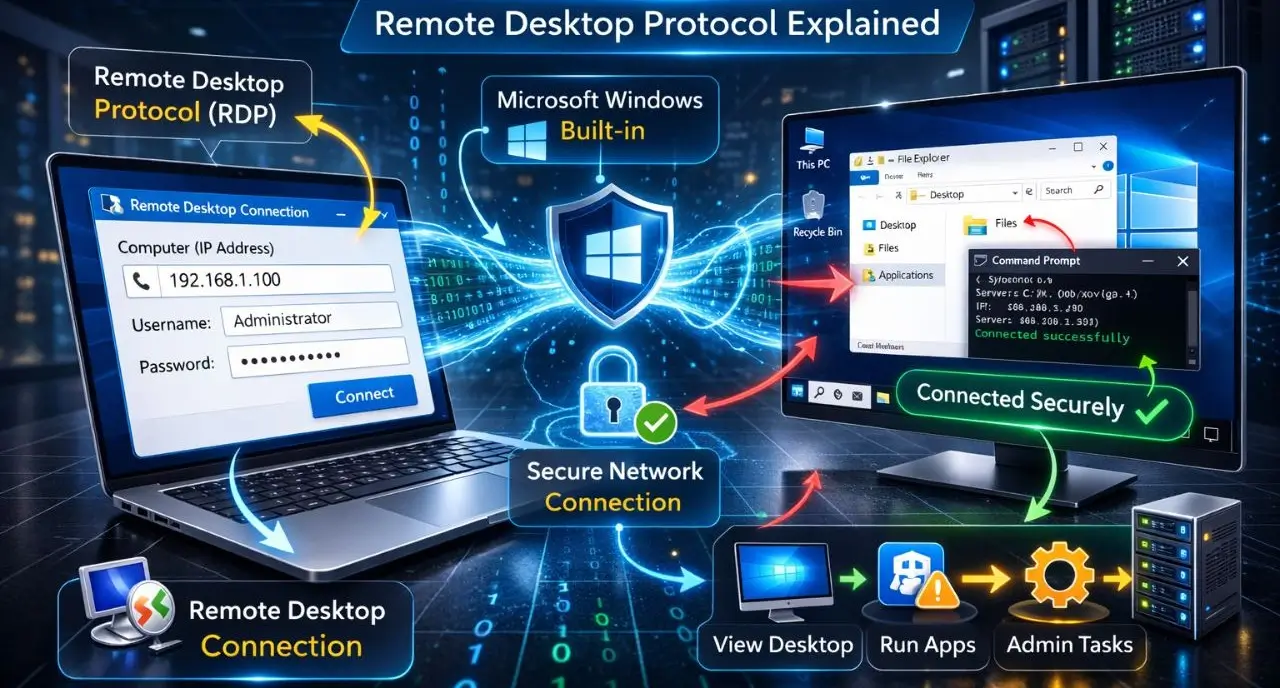
With RDP access, users can view the desktop of a remote computer, open files, run applications, and perform administrative tasks just like they would on their own device.
The main purpose of RDP is to allow remote access to systems without needing physical access to the machine.
RDP is built directly into most Windows operating systems, including Windows Server editions used in VPS environments. Users connect to the remote system using an RDP client, which establishes a secure connection between the local device and the remote computer.
This technology is widely used in IT infrastructure, server management, remote work environments, and cloud hosting platforms.
How RDP Access Works
RDP works by transmitting the graphical interface of a remote computer to the user’s device through a secure network connection.
The process typically follows these steps:
First, a computer or server must have Remote Desktop access enabled. This is usually configured on a Windows system or Windows Server.
Second, the user opens an RDP client application. On Windows devices, this is usually the Remote Desktop Connection tool that comes pre-installed.
Third, the user enters the IP address or hostname of the remote computer.
Finally, after entering login credentials such as username and password, the connection is established and the remote desktop appears on the user’s screen.
From that point, the user can interact with the remote machine exactly like a local computer.
What is Windows VPS Hosting?
A Windows VPS (Virtual Private Server) is a virtual server that runs the Windows Server operating system and provides dedicated resources such as CPU cores, RAM, storage, and bandwidth.
VPS servers are created using virtualization technology, where a powerful physical server is divided into several independent virtual servers. Each VPS operates as a separate machine with its own operating system and resources.
Because Windows VPS servers run Windows Server, they support Remote Desktop Protocol connections by default. This allows users to connect to the VPS remotely and manage it through a graphical desktop interface.
Windows VPS hosting is commonly used for:
- Hosting ASP.NET websites
- Running Microsoft SQL Server databases
- Managing remote desktop environments
- Running Windows based software
- Testing and development environments
Since the server runs in a data center, users can access their VPS from anywhere through RDP.
Why Windows VPS is Popular for Remote Work
Windows VPS hosting has become an effective solution for remote work because it provides a stable and accessible computing environment.
Instead of relying on a personal computer, users can connect to a powerful server located in a professional data center. This server remains online continuously and can be accessed whenever needed.
Key advantages of using Windows VPS for remote work include:
The ability to access your work environment from anywhere
The ability to run software that requires Windows operating systems
Reliable performance with dedicated server resources
A consistent working environment regardless of the device used to connect
Many developers and businesses use Windows VPS hosting from providers like YouStable to create remote work environments that support Windows applications and stable remote desktop access.
Common Uses of RDP Access
RDP technology supports many practical use cases across different industries.
- Remote Workstations: Employees can connect to office computers or remote servers from home or other locations.
- Server Management: System administrators use RDP to manage servers, install updates, and configure software remotely.
- Application Hosting: Businesses can host Windows based applications on remote servers and allow employees to access them through RDP.
- Forex and Trading Platforms: Many traders use VPS servers with RDP access to run automated trading platforms continuously.
- Development and Testing: Software developers often use remote Windows environments for testing applications in different configurations.
Benefits of Using RDP with Windows VPS
Combining RDP with Windows VPS hosting offers several advantages for remote computing.
- Work From Anywhere: Users can connect to their VPS from any location using an internet connection.
- Dedicated Resources: Unlike shared hosting, VPS servers provide dedicated CPU, RAM, and storage resources.
- Consistent Performance: Because the server runs in a professional data center, it offers reliable uptime and stable network connectivity.
- Device Flexibility: Users can connect to their VPS from laptops, desktops, tablets, or mobile devices.
- Remote Software Execution: Applications run on the VPS server instead of the local device, which reduces the load on the user’s computer.
How to Access RDP on a Windows VPS
Connecting to a Windows VPS through RDP is a straightforward process.
First, the user purchases a Windows VPS plan from a hosting provider.
After the server is activated, the provider sends the VPS login details.
These usually include:
- Server IP address
- Administrator username
- Password
Next, the user opens the Remote Desktop Connection application on their computer.
The server’s IP address is entered into the connection field, and the login credentials are provided.
After authentication, the Windows desktop of the VPS appears on the screen, allowing the user to control the server remotely.
Why Choosing a Reliable Windows VPS Provider Matters
The performance of remote desktop access depends heavily on the infrastructure used by the hosting provider.
Important factors to consider include:
- Server hardware performance
- NVMe storage speed
- Network connectivity
- Data center reliability
- Technical support availability
Many businesses prefer hosting providers that offer stable infrastructure and optimized Windows server environments.
For example, YouStable Windows VPS hosting is commonly used by developers and businesses because it offers NVMe based servers, scalable VPS plans, and reliable performance suitable for remote desktop environments.
Security Tips for Using RDP Access
Although RDP is secure when configured correctly, proper security practices should always be followed.
Important recommendations include:
- Use strong and unique passwords
- Enable firewall protection on the server
- Keep Windows Server updated regularly
- Limit login attempts to prevent brute force attacks
- Change default RDP ports when possible
These measures help protect remote servers from unauthorized access.
Windows VPS vs Local Computer for Remote Work
Many people compare working on a local computer with using a remote VPS environment.
| Feature | Local Computer | Windows VPS |
| Hardware Power | Limited to personal device | Data center server resources |
| Accessibility | Only local access | Accessible from anywhere |
| Reliability | Depends on personal system | Professional infrastructure |
| Scalability | Limited hardware upgrades | Easily scalable |
Because VPS servers operate in data centers, they usually offer better reliability and uptime compared to personal machines.
FAQs
What does RDP stand for?
RDP stands for Remote Desktop Protocol, a Microsoft technology that allows users to connect to and control remote computers.
Is RDP access secure?
Yes, RDP can be secure when strong passwords, firewalls, and proper security settings are used.
Do I need a Windows VPS to use RDP?
RDP can connect to any Windows computer, but Windows VPS hosting is commonly used because it provides dedicated remote servers that stay online continuously.
Can I access RDP from a mobile device?
Yes, Remote desktop applications are available for smartphones and tablets, allowing users to connect to remote servers from mobile devices.
Conclusion
RDP access is a powerful technology that allows users to control remote computers and servers through the internet. It plays an important role in modern remote work environments, server management, and cloud computing.
When combined with Windows VPS hosting, RDP provides a flexible and reliable platform for accessing applications, managing servers, and working remotely from any location.
For developers, businesses, and professionals who require stable remote desktop environments, choosing a reliable hosting provider such as YouStable Windows VPS Server can help ensure consistent performance, secure access, and scalable infrastructure for remote work.