Nested virtualization is the capability to run a hypervisor inside a virtual machine, so you can create and manage VMs within a VM. It works by safely exposing hardware virtualization extensions (Intel VT‑x/AMD‑V and EPT/NPT) from the physical host to the guest, enabling the guest OS to function as a hypervisor.
If you’re exploring modern lab setups, cloud native development, or complex QA pipelines, you’ll encounter nested virtualization sooner rather than later. In simple terms, it lets one virtual machine behave like a physical server that can itself host more VMs, ideal for training, testing, and running multi layered environments without extra hardware.
What is Nested Virtualization?
Nested virtualization allows a guest VM to run its own hypervisor. In industry shorthand, the physical host hypervisor is L0, the hypervisor running inside a VM is L1, and the VMs created by that L1 hypervisor are L2.
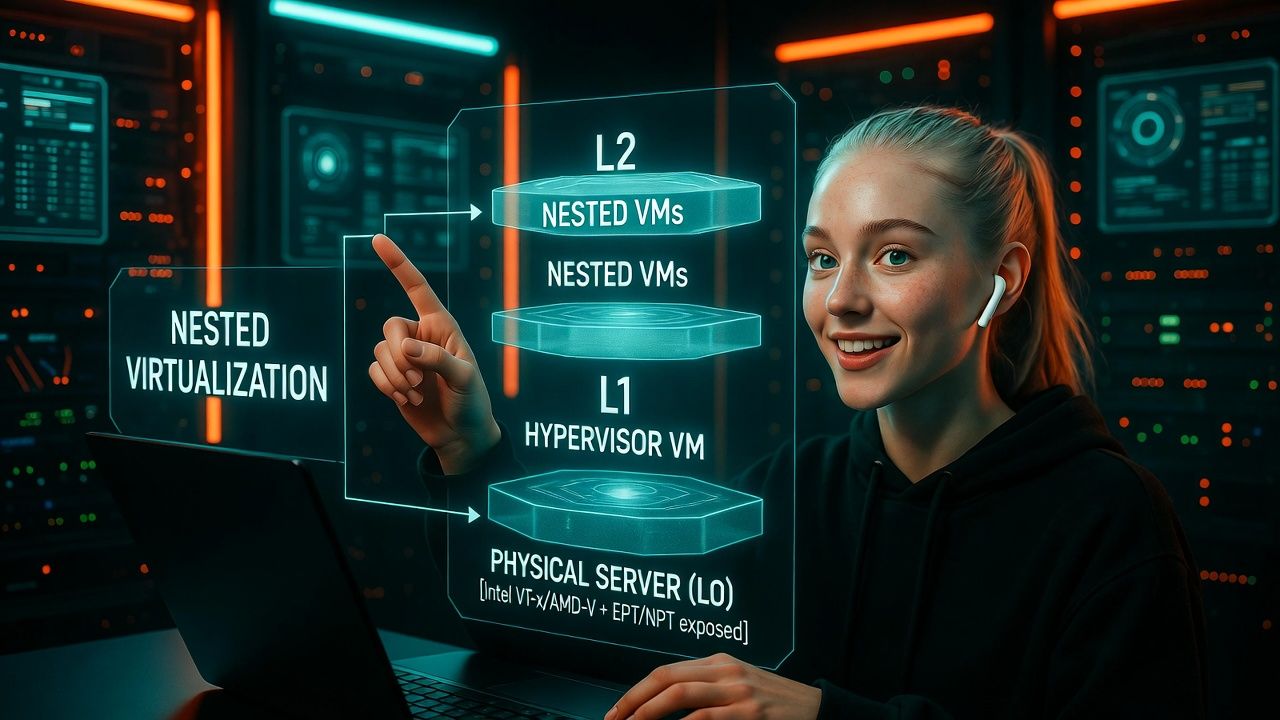
The key enabler is hardware assisted virtualization extensions (Intel VT-x or AMD-V) and second level address translation (EPT/NPT) being exposed through the L0 hypervisor to the L1 guest.
Primary keyword: nested virtualization. Secondary keywords naturally used below include hypervisor, hardware assisted virtualization, KVM, Hyper-V, VMware, cloud computing, and nested VMs.
How Nested Virtualization Works
Virtualization Extensions and Memory Translation
Modern CPUs provide virtualization features such as Intel VT-x/VT-d and AMD-V/AMD-Vi. They also provide second level address translation—EPT (Intel) or NPT (AMD), to translate guest memory efficiently. In nested setups, L0 passes these capabilities to the L1 guest so it can create and run L2 VMs without emulating a whole CPU.
L0, L1, L2: The Roles
L0 is the real hypervisor on the physical host (e.g., KVM, Hyper-V, or ESXi). It manages CPU scheduling, memory, and I/O for everything below. L1 is a hypervisor installed inside a VM—it believes it is running on bare metal because L0 exposes virtualization features to it. L2 are the nested VMs that L1 creates and manages.
Under the hood, advanced techniques minimize overhead: Intel’s VMCS shadowing, AMD’s nested paging, and hypervisor “enlightenments” reduce costly VM exits and keep nested operations efficient. Still, there is extra overhead compared to running directly on L0.
Performance and Overhead
Expect 5–30% overhead depending on workload and depth of nesting. Memory intensive and I/O-heavy tasks can incur more cost due to double translations and additional context switches. Performance improves when:
- EPT/NPT are enabled and stable on the host
- CPU model is passed through to L1 (host passthrough)
- Paravirtualized devices (virtio, vmxnet3) are used
- NUMA topology is respected and CPU pinning is applied for critical L2 VMs
Common Use Cases for Nested Virtualization
- Education and training labs: Spin up full hypervisor labs without dedicated hardware.
- Dev/QA environments: Test hypervisor dependent software, orchestrators, or CI pipelines that require Hyper-V, KVM, or ESXi inside a VM.
- Cloud native demos: Run Kubernetes or OpenStack control planes inside an L1 hypervisor to mimic real production architectures.
- Network function virtualization (NFV): Chain virtual routers, firewalls, and load balancers across multiple layers.
- Migration and P2V testing: Validate upgrade/migration paths without touching production infrastructure.
Requirements and Compatibility
- CPU support: Intel VT-x with EPT or AMD-V with NPT; enable virtualization in BIOS/UEFI.
- Host hypervisor: KVM (Linux), Microsoft Hyper-V, VMware ESXi/Workstation support nested virtualization on modern versions.
- Guest hypervisor: Windows with Hyper-V role; Linux with KVM; VMware ESXi as a guest; selected versions of VirtualBox also support nesting.
- Resources: Ample CPU cores, RAM, and storage IOPS. Nested VMs multiply resource needs.
- Cloud providers: Some clouds allow nested virtualization on specific instance families; check documentation or ask support to enable it.
How to Enable Nested Virtualization (Step by Step)
KVM on Linux (Intel)
# Enable nested virtualization temporarily
sudo modprobe -r kvm_intel
sudo modprobe kvm_intel nested=1

# Verify
cat /sys/module/kvm_intel/parameters/nested
# Should print: Y

# Make it persistent
echo "options kvm-intel nested=1" | sudo tee /etc/modprobe.d/kvm-intel.conf

# Pass through host CPU to the L1 VM (libvirt)
# In the VM's domain XML:
# <cpu mode='host-passthrough'/>
# Then restart libvirtd and the VM
KVM on Linux (AMD)
# Enable nested virtualization temporarily
sudo modprobe -r kvm_amd
sudo modprobe kvm_amd nested=1

# Verify
cat /sys/module/kvm_amd/parameters/nested
# Should print: 1

# Make it persistent
echo "options kvm-amd nested=1" | sudo tee /etc/modprobe.d/kvm-amd.conf

# Ensure host CPU passthrough on the L1 VM
# <cpu mode='host-passthrough'/>
Microsoft Hyper‑V
# Run on the physical host (PowerShell as Admin)
Set-VMProcessor -VMName "L1-Host-VM" -ExposeVirtualizationExtensions $true

# Inside the L1 VM, install Hyper-V and create L2 VMs
# (Server Manager or PowerShell)
Install-WindowsFeature -Name Hyper-V -IncludeManagementTools -Restart
Tip: The L1 VM must be off when toggling ExposeVirtualizationExtensions. Also allocate sufficient static memory to L1 to avoid ballooning under nested load.
VMware ESXi / Workstation
# In vSphere > VM > Edit Settings > CPU
# Check "Expose hardware assisted virtualization to the guest OS"

# Or add to the VM's .vmx file:
vhv.enable = "TRUE"
hardware.virtualization = "TRUE"
For ESXi as a guest, use a recent ESXi version and ensure EPT/NPT is enabled on the host for best performance. In VMware Workstation/Player, enabling vhv may require closing the VM before editing the .vmx file.
Oracle VirtualBox (when supported)
# Enable nested virtualization (host-dependent)
VBoxManage modifyvm "L1-Host-VM" --nested-hw-virt on
Note: VirtualBox nested support varies by CPU and version and is generally less mature than KVM/Hyper-V/VMware for heavy workloads.
Pros and Cons of Nested Virtualization
Advantages
- Consolidation: Build complex labs on one physical server.
- Flexibility: Test multiple hypervisors without extra hardware.
- Faster iteration: Snapshot, clone, and reset entire hypervisor stacks.
- Cost effective: Ideal for training and pre production validation.
Limitations
- Performance overhead: Extra VM exits and translations add latency.
- Hardware dependencies: Requires modern CPUs and firmware settings.
- Operational complexity: Multi layer troubleshooting is harder.
- Not for every workload: Latency sensitive production apps may suffer.
Best Practices and Performance Tips
- Use host passthrough CPU mode for L1 VMs to expose all CPU flags.
- Enable and verify EPT/NPT and large pages; consider HugePages on Linux.
- Right size resources: Reserve CPU/RAM for L1 to prevent contention.
- Prefer paravirtualized devices (virtio scsi, virtio net, vmxnet3).
- Limit nesting depth to L2; L3 and beyond rarely justify the overhead.
- Align NUMA: Keep L1 and heavy L2 VMs within the same NUMA node.
- Monitor with hypervisor native tools (perf, esxtop, Windows PerfMon) and adjust.
Security Considerations
- Larger attack surface: Two hypervisors mean more code paths to harden.
- Side channel risks: Keep microcode, firmware, and hosts patched.
- Isolation policies: Apply strict network segmentation and least privilege across layers.
- Secure boot and vTPM: Use where supported for L1 and sensitive L2 guests.
- Disable nested virtualization when not required to minimize risk exposure.
Nested Virtualization vs. Running Containers Inside VMs
Containers inside VMs are common and efficient. You only need nested virtualization if your workload requires a hypervisor inside the guest (e.g., Android Emulator on Hyper-V, running ESXi-in-VM, or testing live migrations). For microservices, containers in VMs remain simpler and faster.
Real World Scenarios
- Platform engineering: Spin up an L1 KVM cluster inside a powerful L0 host to replicate production for upgrade rehearsals.
- Training academies: Deliver full VMware or Hyper-V hands on labs to students without shipping servers.
- CI pipelines: Build and test drivers or virtualization-dependent software that must detect Hyper-V or KVM features.
When to Use YouStable for Nested Virtualization
At YouStable, we help teams build reliable nested environments on high frequency CPUs and NVMe storage. On supported dedicated servers and select cloud VMs, we can enable nested virtualization, tune host passthrough CPU modes, and advise on NUMA, HugePages, and storage layouts. If you need a guided setup or performance review, our 24/7 experts are a ticket away.
FAQs
Is nested virtualization safe for production?
It can be, but it depends on workload and risk tolerance. Nested layers increase complexity and attack surface. Many teams reserve nesting for labs, CI, and training. For production, validate performance and security controls thoroughly, and keep firmware and hypervisors fully patched.
How much performance do I lose with nested virtualization?
Typical overhead ranges from 5–30% depending on CPU, memory pressure, storage, and workload type. Enabling EPT/NPT, using host passthrough CPU, paravirtual drivers, and giving L1 reserved resources significantly reduces the gap.
How do I enable nested virtualization in Hyper‑V?
On the physical host, power off the L1 VM and run: Set-VMProcessor -VMName “L1-Host-VM” -ExposeVirtualizationExtensions $true. Then boot the L1 VM, install the Hyper-V role inside it, and create your L2 VMs. Ensure adequate CPU/RAM allocation.
Can I run Docker or Kubernetes with nested virtualization?
Yes. You can run containers inside L2 VMs, and many teams do for lab parity with production. However, if you don’t require a guest hypervisor, containers-in-VMs (without nesting) are simpler and often faster.
Which hypervisors support nested virtualization best?
KVM, Hyper-V, and VMware ESXi/Workstation offer mature nested support on modern CPUs. VirtualBox offers partial support that’s generally suited to lighter workloads. Always check version specific documentation and enable EPT/NPT for best results.
Conclusion
Nested virtualization lets you run a hypervisor inside a VM, enabling full featured lab and test environments on a single server. By exposing VT‑x/AMD‑V and EPT/NPT to the guest, you can build multi layered stacks that mirror production. Plan capacity, apply best practices, and, when needed, partner with providers like YouStable to deploy it right.