Are you noticing that your automation cost is slowly increasing every month? In the beginning, everything feels simple. You connect a few apps, create some workflows, and your work starts running automatically without much effort.
But as your usage grows, things start to change. More workflows mean more tasks, and more tasks mean higher costs. What once felt affordable slowly turns into a monthly expense that keeps increasing without clear control.
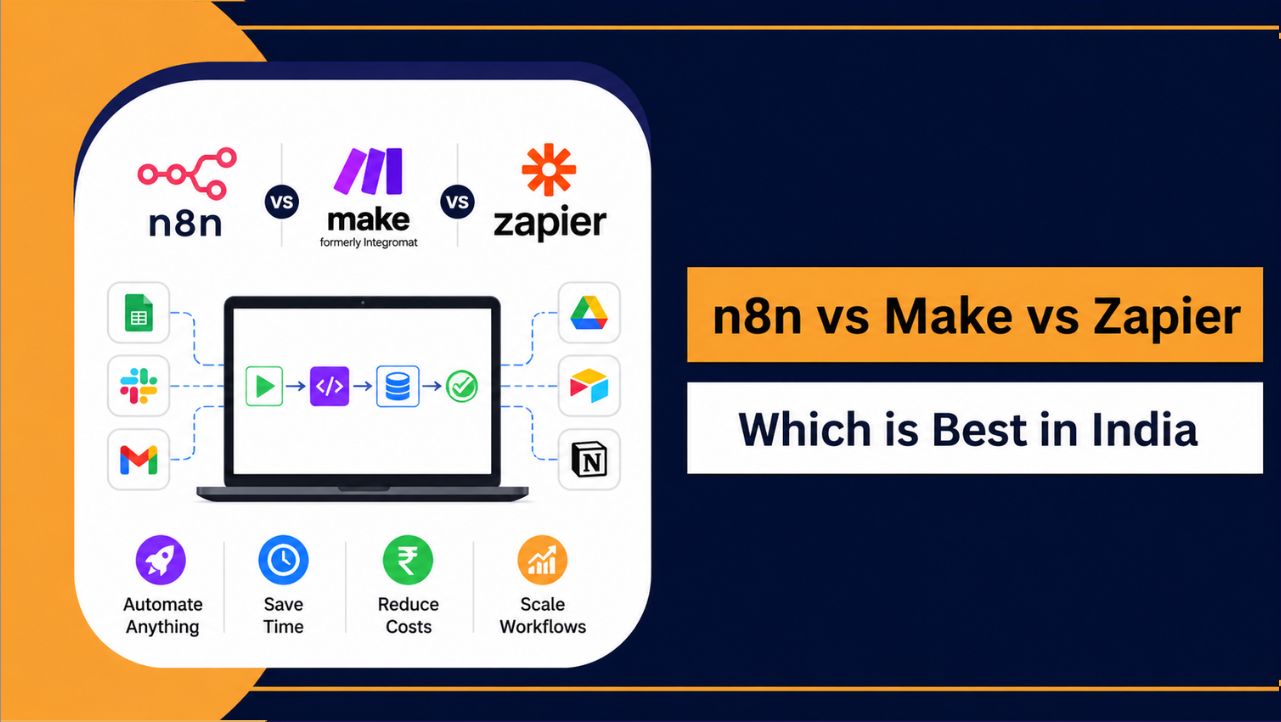
This is where the real difference between n8n and Zapier becomes important. Both tools help automate your work, but they follow very different pricing and scaling models. Understanding this helps you choose a solution that not only works today but also stays efficient and affordable as your automation grows.
What Are n8n and Zapier?
Both n8n and Zapier are automation tools designed to connect different apps and reduce manual work. They help you automate tasks like sending emails, updating data, or syncing information between platforms. However, the way they work and scale is very different.
n8n
n8n is a self hosted workflow automation platform that gives you full control over how your automation runs. You can connect multiple apps, build custom workflows, and run everything on your own server without restrictions.
- Self hosted and flexible: You control where and how your automation runs.
- No per task pricing: You are not charged for every execution.
- Highly customizable workflows: You can build complex automation based on your exact needs.
Zapier
Zapier is a cloud based automation tool focused on simplicity and ease of use. It allows you to connect apps quickly without any technical setup, making it popular among beginners.
- Easy to use: Simple interface with quick setup.
- Cloud based system: No need to manage servers or hosting.
- Task based pricing model: Cost increases as your automation usage grows.
Both tools solve the same problem, but n8n focuses on flexibility and long term scalability, while Zapier focuses on simplicity and quick setup.
How Pricing Works (n8n vs Zapier)
The real difference between n8n and Zapier comes from how they charge you over time. With n8n, you pay for a VPS, and once it’s set up, you can run workflows without worrying about per-task costs.
This keeps your expenses stable even as your automation grows. Zapier works on a task based model, where every action is counted, so more usage directly increases your monthly cost.
| Pricing Factor | n8n | Zapier |
| Pricing Model | Hosting based (VPS) | Task based |
| Cost Structure | Fixed and predictable | Increases with usage |
| Workflow Execution | No per-task limits | Each step counts as a task |
| Long Term Cost | Low and stable | Becomes expensive over time |
| Best Use Case | Growing and scalable automation | Small and basic workflows |
This is why n8n is considered a better long term option, as it gives you more control over costs while allowing your automation to scale without constant upgrades.
Monthly Cost Breakdown Table
To understand the real difference, let’s compare how costs grow based on usage levels.
| Usage Level | n8n Cost | Zapier Cost |
| Low Usage | $4–$8 (VPS) | $19–$29 |
| Medium Usage | $8–$15 (VPS) | $49–$99 |
| High Usage | $15–$30 (VPS) | $150+ |
As you can see, n8n costs increase very slowly because you are only upgrading your server when needed. Zapier, on the other hand, becomes significantly more expensive as your automation grows.
Hidden Costs You Should Know
At first, both n8n and Zapier may seem straightforward in pricing, but there are some hidden factors that can affect your total cost over time. Understanding these helps you avoid unexpected expenses and choose the right tool for long term use.
Zapier Hidden Costs
- Task limits per plan: Each plan comes with a fixed number of tasks, and once you cross that limit, you need to upgrade.
- Multi step workflows consume more tasks: A single workflow can use multiple tasks, which increases usage faster than expected.
- Premium apps require higher plans: Many important integrations are only available in expensive plans.
- Auto scaling costs: As your automation grows, your monthly bill keeps increasing.
n8n Hidden Costs
- VPS hosting cost: You need to pay for a server to run n8n, but this cost remains predictable.
- Initial setup time: It may take some effort to set up and configure your workflows.
- Basic technical learning: A small learning curve is required for advanced workflows.
What This Means in Reality
Zapier’s hidden costs increase as your usage grows, making it expensive over time. n8n, even with setup and hosting, remains more cost efficient and predictable, which makes it a better choice for long term automation.
Also Read: n8n VPS Minimum Requirements
Long Term Cost Comparison
When you compare n8n and Zapier over the long term, the difference becomes very clear. Zapier may look affordable at the beginning, but as your workflows and tasks increase, your monthly cost keeps rising.
\With n8n, you pay for a VPS, so your cost stays mostly stable even as your automation grows, making it a much better option for scaling without constantly increasing expenses.
| Factor | n8n | Zapier |
| Pricing Growth | Stable | Increases with usage |
| Cost Control | High | Low |
| Scaling Impact | Minimal cost increase | Significant cost increase |
| Long Term Value | High | Decreases over time |
| Best Fit | Growing businesses | Small, limited usage |
This is why n8n is more suitable for long term use, as it allows you to scale your automation without worrying about rising costs.
Performance and Value for Money
When your automation starts growing, performance becomes more important than just ease of use. n8n gives you full control because it runs on your own server, so your workflows are not limited by platform restrictions. As your workload increases, you can upgrade your server and your automation continues to run smoothly without slowing down or breaking.
From a value perspective, n8n is more practical in the long run. Your cost stays stable because you are not paying per task, which means more automation does not increase your expenses in the same way. Zapier may feel easier at first, but as usage grows, both cost and limitations increase. This is why n8n offers better value when your goal is reliable and scalable automation.
Which One Is Better for You?
Choosing between n8n and Zapier depends on your goals. If you want a quick and simple setup with minimal effort, Zapier can work for basic automation. But if you are planning to scale your workflows, reduce long term costs, and gain full control over your automation, n8n becomes the better choice because it grows with your needs without increasing expenses in the same way.
| Use Case | Best Choice |
| Beginner with simple tasks | Zapier |
| Growing automation needs | n8n |
| Long term cost control | n8n |
| Advanced workflows | n8n |
| Quick setup without technical work | Zapier |
This makes n8n more suitable for users who are focused on scalability, flexibility, and long term value.
When n8n Is the Better Choice
n8n becomes the right choice when your automation is not just something basic, but something you rely on every day and plan to grow over time. As your workflows increase, the last thing you want is your cost increasing with every action. This is where n8n gives you a clear advantage, it lets your automation grow without constantly affecting your budget.
- Your workflows are increasing regularly: You can add more automation without worrying about per-task charges.
- You are handling multiple tools and processes: n8n makes it easier to connect everything into one smooth system.
- You want stable and predictable costs: Your expenses stay under control even as your usage grows.
- You need flexibility in how automation works: You are not restricted by platform limits or fixed rules.
- You are thinking long term: n8n supports growth without forcing you to upgrade plans again and again.
This is why n8n becomes the better choice when your focus is not just starting automation, but building a system that can grow with your business without creating extra cost pressure.
When Zapier Makes Sense
Zapier makes sense when your automation needs are simple and you want something that works quickly without any setup. If you are just getting started and don’t want to deal with servers or configurations, Zapier gives you a straightforward way to connect apps and run basic workflows.
- You want to start quickly without setup: Everything works out of the box without technical effort.
- Your workflows are simple and limited: Basic automations like sending emails or updating data work well.
- You don’t want to manage a server: Zapier handles everything on its own platform.
- Your usage is low: Costs stay manageable when task execution is limited.
This makes Zapier a good option for beginners or small use cases, but as your automation grows, its limitations and cost can become more noticeable.
Pros and Cons
Before you decide, it helps to see clearly what you gain and what you compromise with each tool. The difference is not just in features, but in how they fit your daily work and long term plans.
| Tool | Pros | Cons |
| n8n | You get full control over how your workflows runYour cost stays stable even as your automation grows You can build advanced workflows without restrictions | You need to set it up firstRequires basic technical understanding at the start |
| Zapier | You can start quickly without any setupEverything is simple and easy to use | Your cost increases as your usage growsYou face limits when workflows become more complex |
If you look at it practically, n8n gives you more freedom and better cost control over time, while Zapier is easier in the beginning but becomes limiting as your automation grows.
Final Comparison Table
When you compare both tools side by side, the difference becomes very clear. n8n focuses on long term control, scalability, and stable costs, while Zapier focuses more on simplicity and quick setup but becomes expensive as usage grows.
| Feature | n8n | Zapier |
| Pricing Model | Hosting based (VPS) | Task based |
| Cost Growth | Stable and predictable | Increases with usage |
| Flexibility | High (full control) | Limited |
| Ease of Use | Medium (requires setup) | High (beginner friendly) |
| Workflow Limits | Based on server capacity | Limited by plan |
| Scalability | Excellent | Restricted |
| Long Term Value | High | Decreases over time |
This makes n8n a better choice for users who want to build scalable automation without worrying about increasing costs over time.
Where to Run n8n for Best Performance
Once you decide to use n8n, the next important step is choosing where to run it. Since n8n works continuously in the background, your server plays a big role in how smoothly your automation runs. If your VPS is slow or unstable, workflows can fail, get delayed, or stop at important moments.
A reliable option for this is YouStable, especially if you want a setup that can handle automation workloads without performance issues.
Plans & Pricing
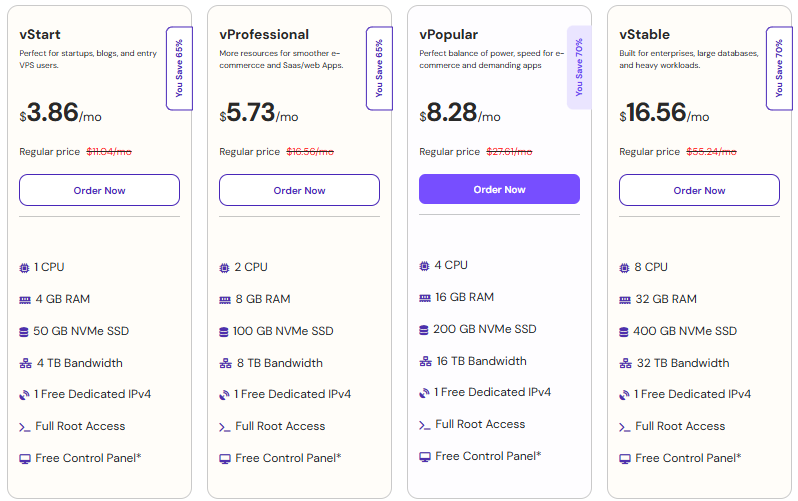
Choosing the right VPS ensures your n8n automation stays fast, stable, and ready to handle growing workloads without problems.
FAQs
Is n8n really cheaper than Zapier in the long run?
Yes, n8n is usually much cheaper over time because it does not charge per task. You only pay for your VPS, so even if your automation increases, your cost stays mostly stable. In contrast, Zapier’s pricing increases as your workflows and tasks grow, which can make it expensive for long term use.
Do I need technical knowledge to use n8n?
You don’t need advanced coding skills, but basic technical understanding is helpful. n8n uses a visual workflow builder, so you can create automation without coding. However, for advanced workflows, knowing APIs or logic can make things easier.
Why does Zapier become expensive over time?
Zapier uses a task based pricing model, which means every action in your workflow counts as a task. As your automation grows, your usage increases, and you need to upgrade to higher plans. This leads to a steady increase in monthly costs.
What can I automate using n8n?
With n8n, you can automate most repetitive tasks across your tools, such as:
• Order processing and updates
• Email notifications and follow ups
• CRM and customer data syncing
• Payment status tracking
• Data transfer between apps
This helps reduce manual work and keeps your workflows running automatically.
Conclusion
By now, you can clearly see that the real difference between n8n and Zapier is not just about features, but about how they handle cost as your automation grows. Zapier works well in the beginning, but as your workflows increase, the task based pricing starts raising your monthly expenses step by step.
n8n takes a different approach. Instead of charging for every action, it gives you full control over your automation and keeps your cost stable. As your usage grows, you are not forced to upgrade again and again, which makes it much more practical for long term use.
If you are planning to use n8n, choosing the right VPS is equally important. A reliable option for this is YouStable, especially if you want smooth performance and stable automation. Starting from a low cost, it provides the speed and reliability needed to run your workflows without interruptions. This helps you build a system that grows with your needs while keeping everything running efficiently.