Ghost is a modern, lightweight, and fast Content Management System (CMS) designed specifically for bloggers, publishers, and newsletter creators. It’s considered the best WordPress alternative for blogging because it focuses on clean writing experience, built in memberships, newsletters, and superior performance with Node.js.
Unlike WordPress, which supports every type of website (eCommerce to LMS), Ghost is laser focused on publishing and monetizing content. As a result, Ghost delivers faster page loads, improved technical SEO, and less maintenance without relying on multiple plugins.
If your primary goal is to publish articles, grow subscribers, and charge for exclusive content, Ghost offers a simpler and more efficient workflow than WordPress. However, WordPress still remains the better choice for highly customizable websites with plugins, advanced design needs, or WooCommerce based eCommerce.
Is Ghost a Good WordPress Alternative for Blogging?
Yes. Ghost is an excellent WordPress alternative for blogging because it prioritizes writing, email newsletters, memberships, and speed. It is easier to manage, technically optimized, and requires fewer plugins. But if you need extensive customization, eCommerce, or complex plugins, WordPress remains the better fit.
What is Ghost?
Ghost is an open source CMS built for creators and publishers. Founded in 2013 via a successful Kickstarter campaign, it was designed as a modern alternative to bloated blogging platforms. Its purpose? T
o empower users to build independent online businesses around content, think websites, newsletters, and membership sites, without the complexity of traditional tools.
Unlike general CMS options, Ghost emphasizes a “headless CMS” approach (meaning the backend is separate from the frontend, allowing flexible designs). It’s powered by Node.js, a serverside JavaScript environment known for speed and efficiency.

What is WordPress and Why Is It So Popular?
WordPress is the world’s most popular open source CMS, launched in 2003 as a simple blogging tool. It has evolved into a full fledged platform powering everything from personal blogs to enterprise websites. Its popularity stems from its flexibility: with thousands of free themes and plugins, users can customize it endlessly.
WordPress runs on PHP (a scripting language) and MySQL databases, making it accessible for beginners while scalable for developers. Over 43% of websites use it due to its vast community, extensive documentation, and compatibility with affordable hosting like YouStable’s shared plans.
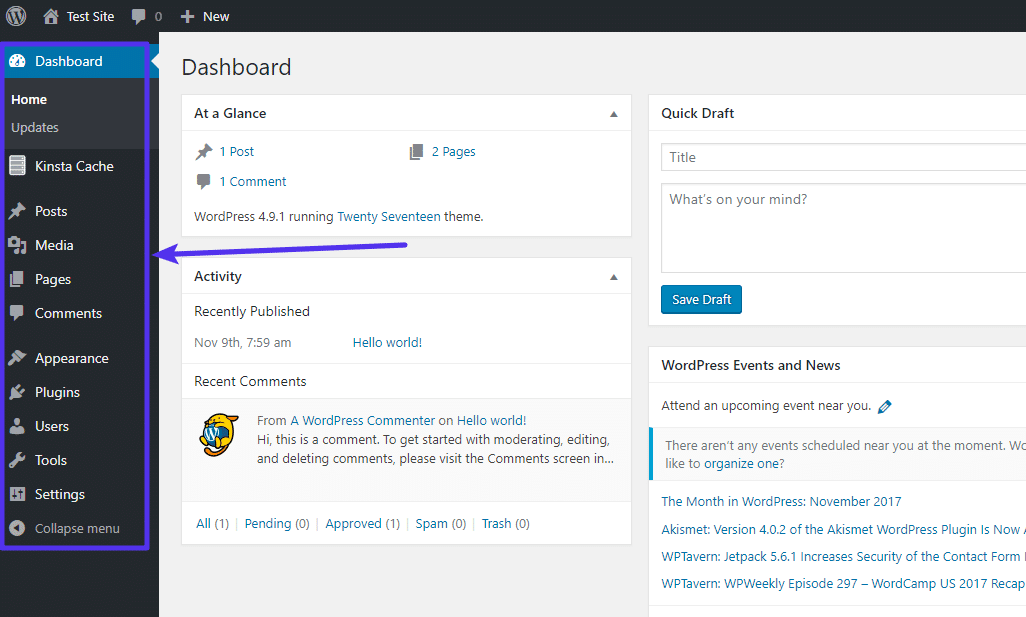
WordPress vs Ghost: Core Philosophy
At its core, WordPress is a general purpose CMS, meaning it’s built for versatility, handling blogs, e-commerce, forums, and more. This “do it all” philosophy leads to a plugin heavy ecosystem, which can add features but also complexity.
Ghost, conversely, is a focused publishing platform. Its philosophy centers on simplicity and content creation, stripping away extras to prioritize blogging, newsletters, and memberships. This makes Ghost a targeted WordPress alternative for blogging, appealing to those who want a lean tool without the overhead.
Is Ghost Better Than WordPress for Blogging? Feature Comparison
When comparing Ghost vs WordPress, features highlight their differences. Here’s a breakdown:
Editor & Writing Experience
WordPress uses the Gutenberg block editor, which is intuitive but can feel cluttered with blocks for text, images, and embeds. It’s great for multimedia but requires plugins for advanced workflows.
Ghost’s editor is minimalist and Markdown friendly (a simple text formatting system), offering a distraction free space with dynamic cards for embeds. It’s faster for writers, with real time previews.
Themes and Customization
WordPress boasts thousands of free and premium themes, plus full code access for custom designs. Developers love its flexibility.
Ghost has a marketplace with modern themes, supporting custom HTML/CSS/JS. As a headless CMS, it excels in API driven sites but has fewer out of the box options.
Plugins vs Built in Features
WordPress’s strength is its massive plugin ecosystem, over 60,000 options for everything from SEO to e-commerce. However, this can lead to compatibility issues and security risks.
Ghost focuses on built in features, avoiding plugins. Essentials like analytics, search, and forms are included, reducing maintenance.
SEO Capabilities
Is Ghost a good WordPress alternative for SEO? Yes both excel here. WordPress relies on plugins like Yoast for meta tags, sitemaps, and optimization.
Ghost has built in SEO tools, including clean URLs, automatic sitemaps, and fast loading times that boost rankings. No extra plugins needed.
Memberships, Newsletters, and Subscriptions
WordPress requires plugins (e.g., MemberPress) for memberships and newsletters, adding setup time.
Ghost shines with native features: easy signup forms, tiered subscriptions (free/paid), and automated newsletters. It’s perfect for Ghost CMS for bloggers building audiences.
WordPress vs Ghost Performance and Speed
Performance is a key in Ghost vs WordPress comparisons. WordPress, running on PHP, can be slow without optimizations like caching plugins (e.g., WP Rocket) and quality hosting.
Ghost, built on Node.js, is inherently faster with instant loads and efficient resource use. It needs less caching and handles traffic better on basic servers. For hosting, WordPress often requires managed plans (e.g., $20+/month), while self hosted Ghost runs well on VPS from providers like YouStable.
WordPress vs Ghost performance tip: Ghost sites load 2-3x faster out of the box, ideal for mobile users.
Pricing and Hosting: Self Hosted vs Managed
WordPress is free to download, but hosting costs vary: shared plans start at $2-10/month, managed WordPress hosting $20-100+/month. Add domains ($10-15/year) and premium plugins/themes ($50-200/year).
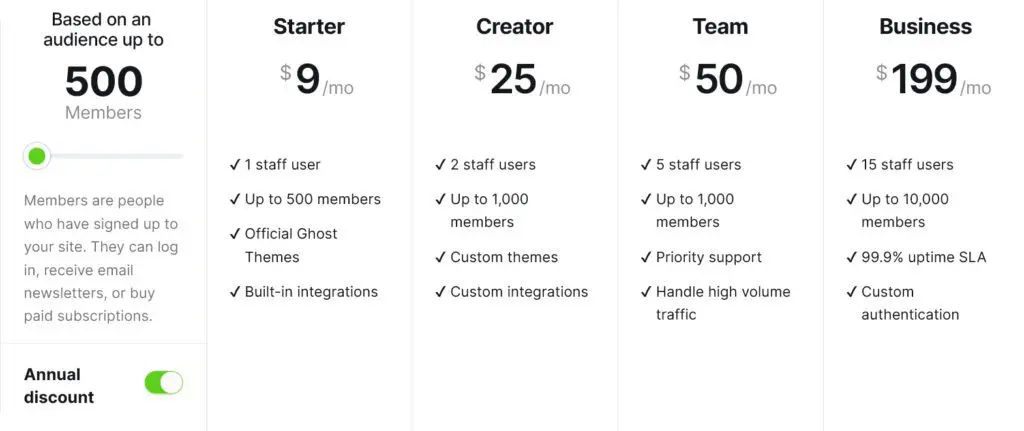
Ghost is also free for self hosting, requiring a Node.js-compatible server (e.g., YouStable VPS at $5-20/month). Ghost(Pro) managed hosting starts at $15/month (Starter plan) for all in one service, up to $199/month for Business, with no transaction fees on subscriptions.
Overall, Ghost newsletter and membership features make it cost effective for monetized blogs.
WordPress vs Ghost Comparison Table
| Aspect | WordPress | Ghost |
|---|---|---|
| Blogging Focus | Versatile, but can be bloated | Content first, streamlined for publishing |
| Customization | Extensive via themes/plugins | Flexible themes, API focused |
| Speed | Good with optimizations | Superior out of the box (Node.js) |
| Plugin Ecosystem | Massive (60,000+) | Built in features, no plugins needed |
| Built in Memberships/Newsletters | Requires plugins | Native and seamless |
| Ease of Use for Beginners | User friendly but learning curve | Simpler, distraction free |
Use Cases: When to Choose Each
When to Choose WordPress
Opt for WordPress for multi purpose sites needing complexity.
- Example: A business using WooCommerce for e-commerce alongside a blog, WordPress’s plugins handle inventory, payments, and more seamlessly.
It’s ideal for developers building custom features or system admins managing large scale sites.
When to Choose Ghost
Choose Ghost for content focused projects.
- Example: A solo blogger focused on paid newsletters, Ghost’s built in subscriptions and fast performance make it better, allowing quick audience growth without plugin hassles.
It’s great for bloggers exploring WordPress alternatives for simplicity.
Who Should Choose Ghost Instead of WordPress?
If you’re a beginner blogger frustrated with WordPress’s maintenance, or a developer seeking a modern stack, Ghost is ideal. System admins appreciate its lightweight hosting needs, while WordPress users switching value the performance boost.
Best WordPress alternative for bloggers? Ghost, especially for SEO driven content sites.
FAQs
Is Ghost Really Faster Than WordPress?
Yes, Ghost’s Node.js foundation makes it inherently faster than PHP based WordPress. Tests show Ghost sites load in under a second, while WordPress needs caching and optimizations to match. As a hosting expert at YouStable, I’ve seen Ghost perform better on similar servers.
Can Ghost Replace WordPress Completely?
Not always Ghost excels as a WordPress alternative for blogging but lacks WordPress’s vast plugins for non publishing needs like forums or heavy e-commerce. For pure content sites, yes; otherwise, evaluate your requirements.
Do I Need a Developer to Use Ghost?
No, beginners can start easily with Ghost(Pro)’s managed hosting. Developers might tweak custom themes, but its interface is friendlier than WordPress for non tech users.
Is Ghost Good for SEO Compared to WordPress?
Absolutely Ghost’s built in tools rival WordPress plugins. Clean code, fast speeds, and automatic optimizations give it an edge in Google rankings for blogging.
Which Is Cheaper in the Long Run: WordPress or Ghost?
It depends: WordPress self hosting starts lower ($5-20/month), but plugins add up. Ghost(Pro) at $15-29/month includes everything, potentially saving on maintenance. For self hosted, both are comparable on affordable VPS like YouStable’s.