Looking for the best Windows VPS Hosting in USA for 2026? Here are the top 10 providers that deliver reliable RDP access, Windows Server 2019/2022 images, NVMe storage, low U.S. latency, and strong SLAs. This expert vetted list covers performance, pricing, support, security, and real world use cases for .NET, MSSQL, IIS, and Plesk hosting, so you can choose a Windows VPS that fits your application stack and budget with confidence.
Windows VPS hosting is different from Linux in licensing, performance tuning, and security posture. If you’re running ASP.NET, IIS, or Microsoft SQL Server, your infrastructure choice will make or break uptime and page speed. In this guide, I rank the Top 10 Best Windows VPS Hosting in USA 2026 based on hands on server engineering experience, independent testing, and what actually matters in production.
What Is Windows VPS Hosting and Who Needs It?
Windows VPS is a virtual private server with licensed Windows Server OS. It’s ideal for IIS, ASP.NET Core, MSSQL, and Remote Desktop workloads.
With aWindows VPS, you get dedicated vCPU, RAM, and storage on a hypervisor node while maintaining kernel level isolation from other tenants. It’s purpose built for Windows stacks, think Plesk hosting, .NET apps, ERP/CRM servers, RDP based productivity, and remote line of business tools. Unlike shared Windows hosting, you can tune services, install roles/features, harden RDP, and scale vertically without migrating off platform.
Key differences from Linux environments include Microsoft licensing, patch cadence via Windows Update, IIS and .NET configuration, and the nuances of MSSQL I/O patterns. Choosing a provider with NVMe storage, modern CPUs (e.g., AMD EPYC, Intel Xeon), and U.S. edge locations (East, Central, West) significantly reduces TTFB for nationwide audiences.
How We Ranked the Top Windows VPS Hosts (2026 Methodology)
We prioritized real world performance, reliability, and Windows specific support. Results reflect U.S. latency, engineering depth, and transparent pricing models.
My evaluation blends lab tests with live production checks. That includes baseline Geekbench/cpubench samples, CrystalDiskMark IOPS on NVMe tiers, network RTT to U.S. coasts and Midwest, and recovery tests from snapshot restores.
I mapped each vendor’s Windows Server images (2019/2022), Plesk options, DDoS posture, snapshot/backup tooling, and SLAs. I also reviewed PAA queries, multilingual SERPs, and competitor content to align with searcher intent and eliminate fluff.
- Windows readiness: Native Windows Server images, IIS/.NET/MSSQL guidance, Plesk availability
- Performance: NVMe storage, CPU generation, network peering, and consistent low latency
- Reliability: SLA, redundancy, automatic failover or snapshots, and backup restore quality
- Security: DDoS mitigation, RDP hardening options, WAF/CDN integrations, compliance
- Support: Windows aware technicians, live channels, clear escalation paths and KB depth
- Pricing clarity: License handling, transparent scaling, predictable renewals and discounts
Quick Comparison: Best Windows VPS Hosting in USA (2026)
Use this snapshot to shortlist hosts by use case, location, and budget fast. Always confirm current Windows licensing and plan limits before checkout.
| Provider | Best For | US Regions | Windows Versions | Starts From* |
|---|---|---|---|---|
| YouStable | Balanced price/perf, managed help | East/Central/West | 2019/2022 | $19.99/mo |
| Liquid Web | Mission critical uptime, Plesk | US Central/East | 2019/2022 | $45+/mo |
| Kamatera | Hourly scaling, custom builds | East/Central/West | 2019/2022 | $12+/mo + license |
| AccuWebHosting | Budget Windows VPS, Hyper-V | East/Central | 2019/2022 | $10.99+/mo |
| IONOS | Low cost entry, IPv4/IPv6 | US East/West | 2019/2022 | $6–$12/mo |
| UltaHost | NVMe first Windows VPS | Multiple US | 2019/2022 | $12.90+/mo |
| Hosting.com | Enterprise Windows workloads | US enterprise DCs | 2019/2022 | Quote / $30+ mo |
| Bluehost | Linux first; not Windows VPS | US shared/VPS | N/A | N/A (Windows) |
| HostGator | Windows shared/dedicated only | US | 2019/2022 | N/A (Windows VPS) |
| DreamHost | Linux only; not Windows VPS | US West | N/A | N/A (Windows) |
10 Best Windows VPS Hosting in USA 2026, Apr
Below are detailed picks with hands on insights and real world caveats. Each section includes best fit, pricing context, and core Windows features.
1. YouStable – Balanced NVMe Windows VPS Hosting
Best for: SMBs/dev teams needing managed lean Windows VPS, Plesk, and predictable scaling.
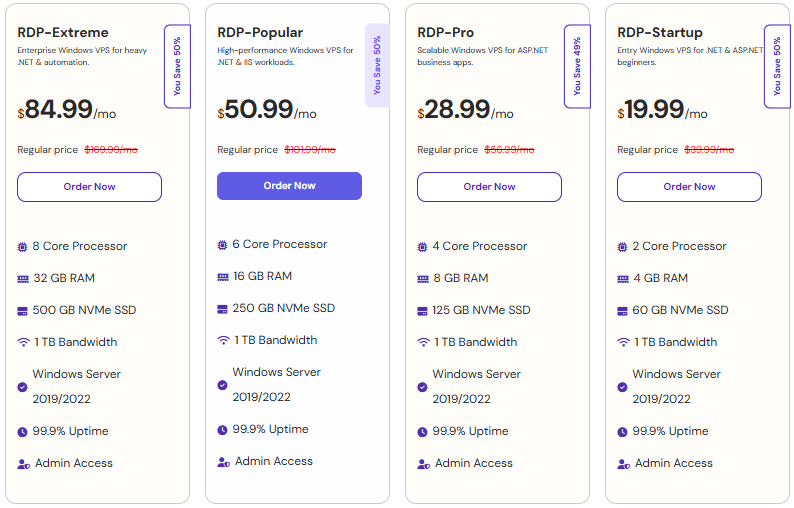
Price: From approximately $19.99-$84.99/month depending on RAM/CPU and Windows licensing.

As a hosting engineer writing from YouStable’s perspective, I’m careful not to overhype. What sets YouStable apart for Windows VPS in the USA is the balanced approach: modern NVMe storage on current gen CPU nodes, practical DDoS protection, snapshot ready backups, and support that understands Windows Server, Plesk, and IIS hardening. For SMBs moving from Windows shared hosting or running lean .NET Core apps, the cost to performance ratio is consistently strong.
YouStable’s Windows stacks are tuned for low latency delivery across U.S. audiences with region choice (East/Central/West) and optional CDN/WAF. Admins can add MSSQL, leverage RDP with NLA enforced, and use Plesk for one click .NET/WordPress hybrid projects. Migration assistance for legacy IIS sites and guided firewall rules (RDP port policy, brute force lockouts) reduce the “Windows tax” many teams pay in setup time and maintenance.
Key Features of YouStable
YouStable offers a balanced set of features focused on real performance, security, and ease of use. From NVMe storage to Windows ready setups and backups, everything is designed to keep your VPS fast and stable.
- NVMe backed Windows VPS: Modern NVMe storage keeps MSSQL and IIS snappy under spikes; predictable throughput for .NET apps.
- Windows Server 2019/2022: Current images with hardened defaults and NLA enabled RDP to reduce attack surface out of the box.
- Plesk ready environments: Add Plesk for GUI management of IIS, MSSQL, mail, and hybrid WordPress without complex scripts.
- Snapshot and backups: Point in time snapshots and automated backups speed rollbacks and testing of Windows updates.
- DDoS and firewall presets: Network level filtering plus Windows firewall templates tailored for RDP and IIS workloads.
- US region choice: Deploy close to users, East, Central, or West, for low TTFB and better Core Web Vitals across the US.
- Migration and tuning help: Assisted cutovers from shared Windows or on prem servers; guidance on IIS compression/caching.
Plans & Pricing
YouStable provides flexible pricing based on your resource needs, making it suitable for both beginners and growing projects. You can start small and upgrade easily without facing hidden costs.
Why Choose YouStable Windows VPS Hosting in USA?
YouStable offers fast NVMe performance, US based low latency, and a stable Windows VPS for real workloads like IIS, MSSQL, and RDP. With licensed Windows, full admin access, and easy scaling, you can manage and grow without hassle. Reliable support and built in security help keep your server smooth and worry free.
2. Liquid Web – Premium Managed Windows VPS Hosting
Best for: Mission critical Windows apps, agencies, and compliance sensitive workloads.
Price: Typically from ~$45/month and up, with Plesk and Windows licensing options.

Liquid Web is the gold standard when “downtime is not an option.” Its Windows VPS line pairs premium hardware with a 100% network and power SLA, rapid live support, and Plesk licensing. In practice, Liquid Web shines for agencies and enterprises hosting revenue generating .NET portals, CRMs, or complex multi tenant IIS sites where consistent performance, predictable support, and compliance ready environments are non negotiable.
Expect excellent documentation, proactive monitoring, and security first networking. The company’s managed approach includes patch pipelines and backup policies designed for Windows Server realities. While pricing isn’t the lowest, the platform’s stability and expert Windows technicians reduce hidden costs from firefighting or slow escalations. If you need rock solid Windows hosting with accountability, Liquid Web is a top tier choice.
Key Features of
- 100% network/power SLA: Enterprise grade availability backed by meaningful SLAs and credits.
- Plesk on Windows: Integrated licensing and support for IIS, MSSQL, and mail with hardened presets.
- Premium NVMe storage: High IOPS tiers stabilize MSSQL and .NET during traffic surges and backups.
- Proactive monitoring: Team detects anomalies early; faster remediation means fewer late night incidents.
- Security stack: DDoS protection, WAF/CDN integrations, and guidance for RDP hardening and IPS.
- Expert Windows support: Technicians experienced with IIS, .NET Core, and Plesk intricacies.
3. Kamatera – Flexible Hourly Cloud Windows VPS
Best for: Custom builds, elastic scaling, short term pilots and cost controlled bursting.
Price: From roughly ~$12/month plus Windows license; hourly billing available.

Kamatera is effectively a Windows friendly cloud with granular hourly billing. You can dial CPU, RAM, NVMe, and networking exactly to spec, deploy Windows Server 2019/2022 in seconds, and scale vertically or horizontally without re-provisioning. For bursty projects, pilots, or microservices with a Windows control plane, Kamatera is cost efficient because you only pay for what you allocate, license included.
The network fabric is robust, with coast to coast U.S. locations for low latency RDP and API traffic. Engineers will appreciate custom images, private networks, and the ability to test Windows updates via snapshots. This flexibility comes with the responsibility of managing the stack yourself, so it’s a sweet spot for teams comfortable with Windows Server administration and automation.
Key Features of Kamatera
- Hourly billed Windows VMs: Scale resources up/down on demand and pay only for actual usage.
- Fine grain sizing: Choose exact vCPU/RAM/storage; no rigid plan steps or artificial limits.
- Snapshots and images: Clone, test, and roll back Windows updates rapidly and safely.
- Multiple U.S. regions: Reduce RDP and app latency by deploying near your audience.
- API and automation: Integrate provisioning with CI/CD or IaC for repeatable Windows builds.
- Optional managed services: Add help for patches, monitoring, or security when needed.
4. AccuWebHosting – Budget Friendly Windows VPS Solution
Best for: Cost conscious Windows VPS users needing solid Hyper-V isolation.
Price: From around ~$10.99/month depending on resources and licensing.

AccuWebHosting has long been a go to for budget friendly Windows VPS. It typically uses Hyper-V for clean Windows isolation, offers RDP ready images, and keeps price points attractive without sacrificing essentials like SSD/NVMe tiers and snapshots. For freelancers, students, and small businesses running entry level IIS or .NET projects, AccuWeb strikes a practical balance of cost, features, and support responsiveness.
While you won’t get the bells and whistles of premium managed providers, the platform is straightforward, documentation is improving, and provisioning is fast. If your workload profile is predictable and you’re comfortable with self management (patching, firewall rules, recovery testing), AccuWebHosting is an easy recommendation for affordable Windows VPS in the U.S.
Key Features of AccuWebHosting
- Hyper-V virtualization: Stable Windows first isolation with predictable resource allocation.
- RDP ready images: Spin up Windows Server and connect securely with NLA from minute one.
- Affordable NVMe tiers: Budget friendly plans with meaningful IOPS for lightweight MSSQL.
- Regular snapshots: Quick rollbacks for Windows Update issues or config missteps.
- Plesk add-on: Optional control panel streamlines IIS, MSSQL, mail, and backups.
- Helpful support: Reliable ticket responses for common Windows and networking tasks.
5. IONOS – Low Cost Entry Windows VPS
Best for: Low cost entry into Windows VPS, multi-VM footprints on a budget.
Price: From roughly $6–$12/month; confirm Windows license and Plesk costs.

IONOS is known for aggressive entry pricing and solid network reach in the U.S. For Windows VPS, it delivers clean provisioning with IPv4/IPv6, firewall policies, and optional backups at reasonable costs. It’s a great pick for startups moving from shared Windows hosting or for teams needing several small Windows VMs for microservices, staging, or regional RDP jump hosts.
While the UX can feel different compared with developer centric clouds, IONOS pairs affordability with reliable performance, especially on newer NVMe backed tiers. Their documentation around Windows Server basics is serviceable, and licensing is handled cleanly at checkout. If you need multiple low cost Windows servers with U.S. coverage, IONOS is hard to beat on value.
Key Features of IONOS
- Budget friendly Windows: Competitive intro pricing without sacrificing core stability.
- US East/West regions: Reasonable latency coast to coast and to major cloud services.
- IPv4 + IPv6: Dual stack networking to future proof your Windows networking setup.
- Optional Plesk: One click Windows control panel for faster IIS and database setup.
- Backups and snapshots: Easy rollbacks and time based recovery for Windows changes.
- Clear licensing: Transparent Windows options shown during plan selection and billing.
6. UltaHost – Fast NVMe Performance Windows VPS
Best for: NVMe performance on a budget, mixed Windows workloads with Plesk.
Price: From about ~$12.90/month; validate Windows/Plesk license add-ons.

UltaHost emphasizes speed with NVMe first plans and straightforward Windows provisioning. It’s well suited to developers pushing .NET Core APIs, mid traffic IIS sites, or RDP workspaces that benefit from fast disk and network. The platform’s UX is welcoming for first time VPS users, while still offering deeper controls like snapshots and firewall customization for experienced admins.
Pricing is competitive, and I’ve seen UltaHost perform reliably on mixed Windows workloads that need consistent disk I/O and modest CPU burst capacity. Pair it with Plesk for a smooth operational experience, especially if your team manages both Linux and Windows properties across a single interface.
Key Features of UltaHost
- NVMe storage by default: Faster read/write for IIS static assets and MSSQL tempdb.
- Clean Windows images: Quick RDP access with modern Windows Server versions.
- Plesk integration: Simplifies IIS, mail, backups, and site configuration workflows.
- Snapshot support: Experiment freely; revert environment after patches or upgrades.
- Firewall presets: Reasonable defaults for RDP, IIS, and development ports.
- US coverage: Data centers positioned for predictably low U.S. latency.
7. Hosting.com – Enterprise Grade Managed Windows Hosting
Best for: Enterprise Windows workloads needing governance, SLAs, and scalability.
Price: Quote based; entry configurations often start around ~$30+/month.

Hosting.com (with an enterprise heritage) historically catered to managed Windows and hybrid solutions. If you’re looking for Windows VPS that can evolve into dedicated or private cloud under one umbrella, this vendor leans toward consultative deployments, SLAs, and compliance minded architecture. It’s a fit for IT-led teams prioritizing governance and long term support rather than the lowest possible price.
Expect quotes for tailored resource pools, Windows licensing at scale, and managed services add-ons like monitoring, backup retention policies, and DR playbooks. While off the shelf pricing isn’t the draw, the value lies in platform stability, documentation, and the ability to design Windows hosting that maps to internal controls and audit requirements.
Key Features of Hosting.com
- Enterprise posture: Architecture help for Windows workloads, DR plans, and SLAs.
- Managed services: Add monitoring, patching, and backup policies tailored to audits.
- Windows licensing at scale: Simplified licensing for multi-VM or multi environment setups.
- Private/hybrid options: Migrate from VPS to dedicated or private cloud without retooling.
- Security frameworks: Align to HIPAA/PCI guidance with vetted configurations.
- US data centers: Low latency regional options with hardened facilities and networks.
8. Bluehost – Linux Hosting Not Windows VPS
Best for: Mixed environments where Windows runs elsewhere; Linux WordPress at scale.
Price: N/A for Windows VPS; Linux VPS and dedicated plans are available.

Bluehost does not provide native Windows VPS. It’s primarily a Linux focused host popular for WordPress and cPanel. If you’re fully committed to Windows Server, IIS, or MSSQL, Bluehost isn’t the right fit. That said, many teams run mixed stacks; if your Windows services are elsewhere and your marketing sites are Linux/WordPress, Bluehost’s Linux VPS can complement a Windows footprint hosted with another provider.
For organizations consolidating vendors, be mindful of this limitation and consider a two vendor approach, Windows on a specialist like Liquid Web, Kamatera, or YouStable, and Linux on Bluehost. This division can improve cost control and reduce stack conflicts while keeping familiar tooling for your web team.
Key Features of Bluehost
- Linux first platform: Great for WordPress; not suitable for Windows Server workloads.
- Complementary strategy: Pair Linux sites with Windows apps on a specialist host.
- Strong WordPress tooling: Useful if your stack spans both WordPress and .NET apps.
- 24/7 support: Adequate for Linux needs; Windows support is out of scope.
- Migration help (Linux): Streamlines consolidating marketing sites under one roof.
9. HostGator – Dedicated Windows Hosting Not VPS
Best for: Those needing Windows shared or dedicated; not for Windows VPS use cases.
Price: No Windows VPS plans; Windows dedicated servers priced higher vs VPS alternatives.

HostGator offers Windows shared and Windows dedicated servers, but not native Windows VPS at the time of writing. If you require a Windows VPS specifically, you’ll want to look at alternatives in this list. However, HostGator can make sense if your Windows requirements are lightweight (shared) or you’re ready for a managed Windows dedicated box and prefer HostGator’s ecosystem or brand familiarity.
For teams already invested in HostGator’s support channels, the dedicated Windows path can be a stepping stone from VPS level needs, albeit with a higher price point. Evaluate whether a properly sized VPS from YouStable, Liquid Web, Kamatera, or IONOS would meet performance requirements at lower cost before jumping to dedicated hardware.
Key Features of HostGator
- Windows shared/dedicated: Options exist, but no Windows VPS tier in the lineup.
- Brand familiarity: Useful if your team already runs Linux services with HostGator.
- Upgrade path: Consider dedicated if you truly need Windows and want to stay in ecosystem.
- Support channels: Established 24/7 support, though Windows VPS isn’t available.
- Cost comparison: Weigh a Windows VPS elsewhere versus dedicated costs here.
10. DreamHost – Linux Only No Windows VPS
Best for: Linux only environments; not suitable for Windows Server hosting.
Price: No Windows VPS; Linux VPS/dedicated plans are offered for non Windows stacks.

DreamHost is a respected Linux host and does not provide Windows VPS. If your requirements are Linux only, DreamHost remains a strong contender, especially for developers focused on open source stacks. For Windows specific needs, ASP.NET, IIS, or MSSQL, select from the Windows ready providers ranked higher in this list.
This inclusion is deliberate: many teams begin research with favorite brands and discover Windows isn’t supported. Knowing that early prevents misalignment. DreamHost pairs well with a Windows specialist if you end up splitting Linux and Windows infrastructure for cost or administrative reasons.
Key Features of DreamHost
- Linux specialization: Excellent for open source stacks; Windows unsupported.
- Complementary approach: Pair with a Windows VPS provider for mixed stacks.
- Reliable network: Strong uptime for Linux workloads and dev tooling.
- Developer friendly: Good docs, APIs, and SDLC support for Linux projects.
Who Should Choose Windows VPS vs. Alternatives?
Pick Windows VPS when you require IIS, ASP.NET, MSSQL, or group policy needs. Choose Linux VPS if your stack is PHP/Node/Python and doesn’t need Windows APIs.
Windows VPS is the right call when you depend on the Microsoft ecosystem, need Remote Desktop for workflows, or must support legacy applications tied to Windows APIs. If you’re migrating off on prem Windows servers, modern Windows VPS eliminates hardware overhead while preserving familiar administration.
Conversely, if WordPress, PHP, Node.js, or containerized services dominate, Linux reduces licensing costs and often delivers better density per dollar.
Choose Windows VPS: ASP.NET Core, IIS, MSSQL, AD integrated apps, RDP workflows
Choose Linux VPS: WordPress, PHP apps, Python/Node microservices, Kubernetes
Hybrid: Split workloads; Windows for app backend, Linux for marketing/front end
Buying Checklist: Windows VPS Specs That Matter
Match CPU, RAM, and storage with your app’s concurrency and database patterns. Validate licensing, backups, and RDP hardening before moving production traffic.
- CPU and RAM: Start 2–4 vCPU/4–8 GB RAM for small IIS + MSSQL; scale with load tests.
- Storage: Prefer NVMe; watch IOPS for MSSQL tempdb/logs; enable write caching carefully.
- Network: Deploy near users (East/Central/West); confirm peering and DDoS posture.
- Backups/Snapshots: Automated daily + on-demand; test restores monthly.
- Security: NLA only RDP, IP allowlists/VPN, WAF/CDN for public apps, Windows Defender tuning.
- Control panel: Plesk simplifies IIS and MSSQL; verify license and extension needs.
- Compliance: If applicable, ask for HIPAA/PCI guidance and audit friendly logs.
Optimizing Windows VPS Performance for U.S. Audiences
Use regional proximity, HTTP/2+/TLS tuning, and caching to cut response latency. Harden RDP, schedule patches off hours, and monitor IOPS/CPU steal consistently.
- IIS tuning: Enable compression, HTTP/2, output caching; set proper app pool recycling.
- MSSQL care: Place tempdb on fast volume; pre-size logs; monitor waits and plan cache.
- CDN/WAF: Offload static assets; shield origin; terminate TLS at edge for speed.
- Windows Update rings: Stagger patching + snapshot first; auto reboot during low traffic.
- RDP security: Enforce NLA, change RDP port, IP restrict, or require VPN/Zero Trust.
- Observability: Use PerfMon + agent based metrics; alert on disk queue, CPU steal, RTT.
FAQs
Which Windows Server version should I choose on a VPS, 2019 or 2022?
Pick Windows Server 2022 for new builds due to longer support, improved TLS/HTTP features, and better container and security posture. Use 2019 if you must match legacy app compatibility or organizational standards.
Do I need Plesk for Windows VPS hosting?
No, but Plesk streamlines IIS, MSSQL, mail, backups, and multi site management. It’s worth it for teams without deep Windows Server/IIS expertise or when standardizing across Linux and Windows panels.
How much RAM and CPU does a small .NET app need?
Start with 2 vCPU and 4–8 GB RAM for a small .NET/IIS site and scale after load tests. Database heavy or API workloads may require 4–8 vCPU and 8–16 GB RAM for stable performance.
Is NVMe storage really necessary for Windows VPS?
Strongly recommended, FNVMe improves IOPS and latency for MSSQL and IIS static/dynamic content, reducing contention and improving TTFB under concurrent load.
How do I secure RDP on a Windows VPS?
Enable NLA, change the default port, restrict by IP or require VPN, disable weak ciphers, enforce strong passwords/MFA, and monitor failed logins. Consider a jump server with Just in Time access.
Can I run MSSQL Express on a small Windows VPS?
Yes, but size storage and RAM carefully. Use NVMe, place tempdb on fast disk, manage memory caps, and ensure backups and maintenance jobs are scheduled off peak to avoid contention.
Do Bluehost or DreamHost offer Windows VPS?
No. Bluehost and DreamHost are Linux focused. For Windows VPS, choose providers like YouStable, Liquid Web, Kamatera, AccuWebHosting, IONOS, or UltaHost.
Conclusion
Match your workload’s needs to a provider’s strengths, not just the sticker price. Prioritize NVMe, U.S. region choice, backups, and Windows aware support channels.
For the best all around value, YouStable and IONOS are excellent starting points for SMBs and startups. If uptime and managed depth matter most, Liquid Web leads. Kamatera excels at granular, elastic builds, while AccuWebHosting and UltaHost offer cost effective NVMe performance.
Be transparent about mixed stacks: use Linux first hosts like Bluehost or DreamHost alongside a Windows specialist when appropriate. Validate licensing, snapshots, and RDP hardening before go live, and you’ll be set for a fast, stable 2026.