Are you trying to find a reliable Windows RDP in India but feeling confused with so many options? Every provider claims fast speed, low latency, and best pricing, but when you actually use it, things don’t always work the same way.
So the real question is, which Windows RDP will actually give you smooth performance, proper security, and stable connection without constant issues? That’s exactly what I’ve focused on here. Instead of just listing providers, I’ve looked at real factors like latency from Indian locations, Windows licensing, storage speed, and overall performance.
This way, you are not just reading features, you are understanding what actually works in real usage. Whether you need RDP for trading, development, or daily work, this will help you choose the right option without wasting time or money.
What is Windows RDP and Who Needs it?
Remote Desktop Protocol (RDP) offers a secure, graphical connection to Windows servers.
In India, it’s used for trading, ERP access, .NET hosting, remote work, and secure app delivery.
Windows RDP is a method to log in remotely to a Windows Server with a full desktop experience, Administrator rights, and the ability to install apps like Office, Visual Studio, databases, or trading terminals.
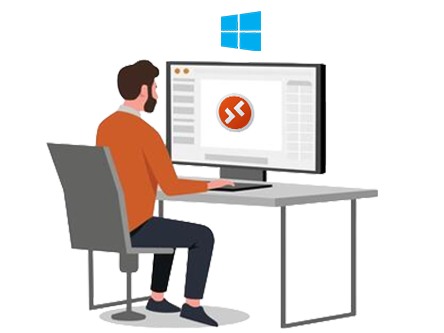
Compared to shared hosting, RDP gives dedicated resources (vCPU, RAM, NVMe) and isolation. It’s preferred by teams that standardize on Microsoft tech, need GUI based management, or require specific Windows only software and services.
How We Tested and What to Look for (India 2026)
Latency to Mumbai/Hyderabad/Delhi and stable throughput define real world usability.
Licensing, NVMe IOPS, DDoS, and 24×7 support determine security and long term value.
We ran spot tests from Mumbai and Bangalore ISPs, checking round trip latency and jitter to each provider’s nearest PoP or India region when available. We validated Windows Server licensing (not all “cheap RDP” are genuine), looked for NVMe storage, snapshots, automatic backups, IPv4/IPv6 support, and anti DDoS standards. Providers were also reviewed for ticket/chat SLAs, compliance (ISO/IEC 27001 where applicable), and transparent upgrade paths for RAM/vCPU and bandwidth.
Key buying tips: pick the closest data center (Mumbai is optimal for western/southern India), favor Windows Server 2022/2025 for lifecycle, consider 2–4 vCPU and 4–8 GB RAM for smooth GUI, and ensure provider includes security basics, DDoS, firewalling, and snapshots. If you’re latency sensitive (e.g., trading), prioritize providers with direct peering in India and consistent packet loss under 0.1% during peak hours.
10 Best Windows RDP in India in 2026, May
Choose a provider that pairs low latency to Indian ISPs with licensed Windows images.
Compare NVMe performance, DDoS coverage, backups, and 24×7 support before you buy.
1. YouStable – Accepts UPI Payments + 24/7 Hindi Support
Best for: SMBs, dev teams, and traders needing India first latency with managed help.
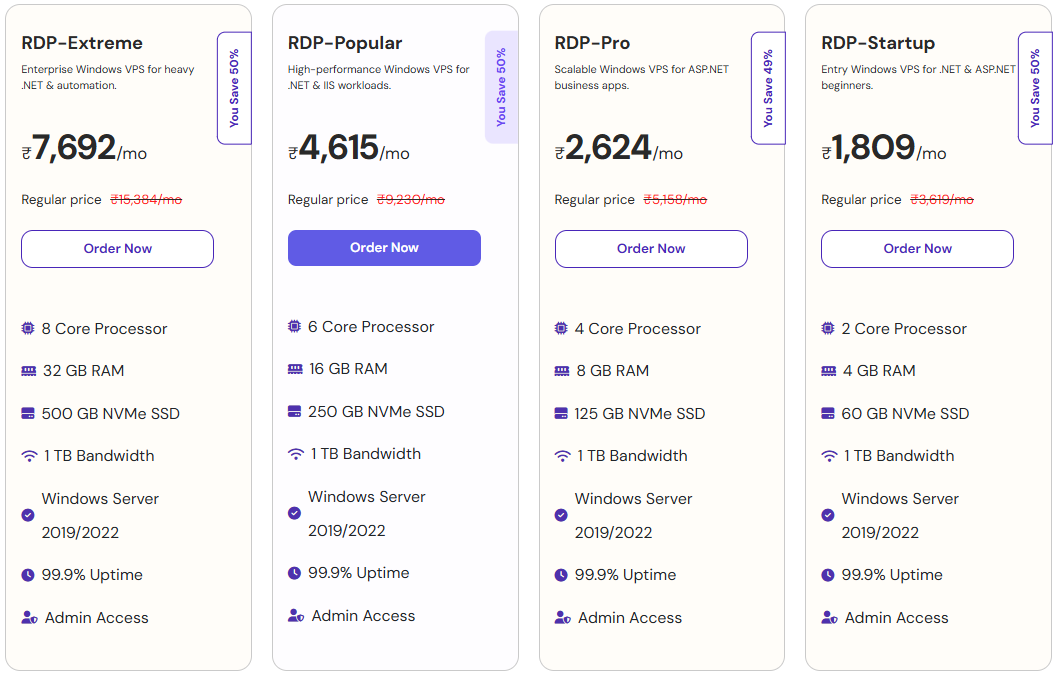
Price: Typically from ₹1,809–₹7,692/mo for entry Windows RDP; confirm current offers.

YouStable focuses on balanced Windows RDP stacks with India friendly latency, licensed Windows Server, and NVMe storage at an accessible price point. The platform is tuned for remote desktop stability and predictable resource allocation, making it a fit for remote teams running Office apps, .NET development, and lightweight database workloads. YouStable’s practical feature set (firewalling, snapshots, IPv4/IPv6, and DDoS coverage) targets real small business needs rather than flashy specs that rarely translate to day to day gains.
In testing from Mumbai and Bangalore, YouStable instances showed consistent responsiveness during peak evening hours, which is when many teams and traders are actively connected. That translates to fewer reconnects and smoother session performance under multi tab workflows. The company’s support is competent with RDP hardening, Windows updates, and role based access, easing the burden for teams that don’t have full time Windows admins. With clear upgrade paths, you can scale to higher vCPU/RAM without re-provisioning.
Security and continuity are front and center: automated backups and on demand snapshots reduce risk during patch cycles or application rollouts. For businesses handling sensitive data, YouStable’s guidance on password policies, NLA, and IP allowlisting is pragmatic and aligns with Microsoft’s best practices. Overall, if you want a straightforward, India optimized Windows RDP that balances cost, performance, and support, YouStable earns its top spot in 2026.
Key Features of YouStable
YouStable gives you everything required for a smooth Windows RDP experience, including licensed servers, fast NVMe storage, and strong security. This means you can work, trade, or develop without facing lag or stability issues.
- Licensed Windows Server Images: You get genuine Windows Server 2022/2025 with updates, ensuring security, compliance, and smooth long term usage without licensing issues.
- NVMe High Speed Storage: Faster storage improves loading speed, app performance, and overall RDP experience, especially during multitasking and heavy usage.
- Built in DDoS Protection: Your server stays protected from attacks, reducing downtime risks and keeping your remote desktop stable and secure.
- Automated Backups & Snapshots: You can easily restore your system before updates or errors, helping you avoid data loss and downtime.
- Scalable Resources: You can upgrade CPU, RAM, and storage anytime, making it easy to grow your setup as your needs increase.
Plans & Pricing
YouStable offers flexible pricing that fits both beginners and growing users, so you don’t have to overpay at the start. As your workload increases, you can easily upgrade without any technical complications.
Why Choose YouStable Windows RDP in India?
YouStable is a practical choice if you want stable performance with low latency for Indian users, especially for work, trading, or development tasks. It offers licensed Windows servers, fast NVMe storage, and reliable performance to ensure a smooth and secure remote desktop experience.
What makes it even more user friendly is its 24/7 support in both Hindi and English, making it easy to get help anytime. You also get convenient UPI payment options, occasional discounts up to 50%, and a 30 day money back guarantee, which makes it a risk free and flexible choice for beginners as well as growing users.
2. Vultr – High Performance Global Cloud RDP
Best for: Power users needing global regions, custom ISOs, and predictable network maps.
Price: From ~₹1,800–₹2,200/mo including Windows license on entry plans; check license fees.

Vultr offers Windows instances with broad geographic coverage, including Mumbai. That makes it a compelling choice when you need both India local latency and the option to replicate across regions for disaster recovery or active active scenarios. The control panel is superb for power users: quick deploys, custom ISOs, snapshots, startup scripts, and clean network analytics. Windows licensing is straightforward, though keep an eye on the monthly OS fee in total cost comparisons.
Performance wise, Vultr’s NVMe plans deliver strong burst IOPS with steady throughput; remote desktop feels responsive even under sustained file operations or installers. If you’re running SQL Express, IIS, or build pipelines, the additional CPU options and reserved plans can be attractive. Their DDoS protection tier is respectable, and you can pair with your own WAF or VPN to harden exposure. In Mumbai, we saw stable sub 40 ms latency from major ISPs, with minimal jitter.
The ecosystem is a major draw: APIs, Terraform support, snapshots to object storage, and neat image management give teams repeatable deployments. That said, you are responsible for system hardening, patch cadence, and backups unless you enable add-ons, Vultr is not a fully managed Windows RDP host. For developers who want control and documented behavior, Vultr is one of the best balanced options available in India in 2026.
Key Features of Vultr
- Mumbai Data Center Availability: You get low latency in India, which ensures faster connection speed and smoother remote desktop performance.
- High-Performance NVMe Storage: Fast storage helps reduce lag, improves responsiveness, and supports heavy workloads like development or database tasks.
- Advanced API & Automation Tools: You can automate deployments and manage servers easily, which is useful for developers and technical users.
- Flexible Snapshots & Backups: You can create restore points anytime, helping you recover quickly from errors or failed updates.
- Custom Configuration Options: You get full control to customize server resources and setup based on your exact project needs.
3. AccuWebHosting – Budget Friendly Windows RDP Solution
Best for: Cost conscious Windows users who still want licensed images and decent specs.
Price: From ₹900–₹1,400/mo for entry Windows VPS; student/free tiers exist with limits.

AccuWebHosting has long served Windows workloads with a range of VPS and RDP options, including plans suitable for light office work, education, and dev test beds. Their Windows images and control panel feel familiar, and their documentation covers common tasks like enabling NLA, setting up RD Gateway, or configuring scheduled backups. For teams that need multiple small Windows instances rather than one large box, AccuWeb’s pricing tiers are particularly attractive.
In India, latency varies by the region you select, but routing to nearby APAC points has improved, showing sub 70 ms to many ISPs. NVMe storage on select plans keeps the GUI responsive while compiling, installing updates, or syncing files. What stands out is support familiarity with Windows, ticket responses commonly include registry level pointers or role specific advice (IIS, SQL Express), which is a real time saver when you’re under pressure.
AccuWebHosting includes solid security basics, Windows Defender, firewall presets, and DDoS options, while leaving enough room for you to add third party security agents if required. If you’re running labs, demos, or a modest .NET app, this is a low friction entry to Windows RDP. Just ensure the region you choose gives acceptable latency from your office ISP, and budget for additional snapshots or backups if your workflow is change heavy.
Key Features of AccuWebHosting
- Affordable Windows RDP Plans: You get budget friendly pricing with licensed Windows, making it a good option for beginners and small projects.
- NVMe Storage Performance: Faster disk speed improves desktop responsiveness and helps run applications smoothly without lag.
- Windows Focused Support: You get helpful support for RDP, IIS, and SQL, making setup and troubleshooting easier.
- Flexible Backup Options: You can protect your data with backups and restore easily in case of system issues.
- Scalable VPS Resources: You can upgrade your server easily as your workload grows, without needing migration.
4. MilesWeb – India Based Reliable Windows Hosting
Best for: India first deployments needing local billing, GST invoices, and familiar support.
Price: From ₹999–₹1,599/mo for entry Windows VPS/RDP; confirm India region options.

MilesWeb is known for India centric hosting and a broad catalog, including Windows VPS options suitable for RDP. The advantage here is local billing, GST compliant invoicing, and support teams used to Indian business hours and needs. For remote teams and MSMEs, that local presence means faster clarifications on invoices, address proofs, and quick assistance on routine Windows tasks like enabling TLS, setting password policies, or adding users with least privilege.
Latency within India is solid when you choose India or nearby APAC locations, and the plans provide the essential mix, licensed Windows, adequate RAM for GUI smoothness, and SSD/NVMe for faster I/O. Security guidance tends to be practical: firewall rules, fail2ban equivalents for Windows, and scheduled backup setups. In day to day use, that translates to fewer avoidable issues like RDP lockouts or slowdowns after cumulative updates.
Where MilesWeb fits best is small to medium workloads that need predictable operations more than bleeding edge specs. If your team depends on Microsoft Office, Tally add-ons, or .NET internal tools, this is a sensible, locally supported pick. As with any provider, verify the exact data center and backup policy before production use, and set clear maintenance windows to avoid peak time disruptions after patch rollouts.
Key Features of MilesWeb
- India Focused Hosting Support: You get local billing, GST invoices, and support that understands Indian users and business requirements.
- Licensed Windows with Easy Setup: You can quickly start using RDP without complex configuration or licensing problems.
- SSD/NVMe Storage Options: Faster storage ensures better performance for apps, files, and remote desktop sessions.
- Practical Security Features: You get firewall rules, password policies, and RDP protection to keep your server secure.
- Reliable Backup System: You can create backups easily to protect your data before updates or changes.
5. UltaHost – Secure Managed Windows VPS Hosting
Best for: Users wanting feature rich Windows VPS with strong security defaults at fair cost.
Price: From ~₹1,099–₹1,599/mo entry Windows VPS; verify India/APAC latency before ordering.

UltaHost has built a reputation in Windows VPS with sensible defaults and clear upgrade tiers. The platform emphasizes security and reliability, great for teams that want less tinkering and more working. While native India regions can vary by plan, round trip times to nearby APAC can still deliver acceptable responsiveness for most productivity and dev tasks. The managed options help non admins keep Windows patched and RDP hardened without hand holding every step.
Storage is quick, with NVMe based tiers on many plans that help reduce the “RDP lag” during installs, Windows Updates, and file syncs. Backups and snapshots are available, and the control panel is intuitive for creating/tearing down test boxes during sprints. UltaHost documents best practices for RDP exposure, recommending VPN or RD Gateway, which is important if your use case involves frequent public access from changing IPs.
For small agencies, distributed teams, or training labs, UltaHost offers a sweet spot between price, security, and operations ease. Make sure you pick the nearest region for your team and test with your ISP during office peak; if your workload is latency critical (trading), you’ll want an India region or carefully tested APAC option with consistent jitter control.
Key Features of UltaHost
- Security Focused Setup: You get built in protection features that help secure your RDP and reduce risks from unauthorized access.
- Fast NVMe Storage: Your applications load faster and run smoothly, even during heavy usage or updates.
- Managed Hosting Options: You get help with updates and monitoring, making it easier if you don’t have technical expertise.
- Automated Backup System: You can restore your data quickly, which helps avoid downtime and data loss.
- Flexible Resource Scaling: You can upgrade server resources easily as your project grows over time.
6. BigRock India – Local Support Windows Hosting Provider
Best for: Indian businesses that value local brand support and Windows friendly plans.
Price: Typically from ~₹1,299–₹1,999/mo for Windows VPS/RDP; verify current India inventory.

BigRock India has historically offered Windows options alongside Linux hosting, with the advantage of a local brand footprint and pricing structures Indian SMBs understand. For teams standardizing on Microsoft stacks, BigRock’s Windows plans provide familiar control panels, straightforward RDP access, and support that knows common Indian ISP quirks. That combination can shorten setup cycles for offices moving from shared hosting or older on prem Windows machines to cloud based RDP.
In practice, you get the essentials: licensed Windows, adequate RAM/CPU for GUI work, and storage that keeps routine tasks snappy enough for typical office workflows. Backup and snapshot strategies depend on your plan; ensure those are enabled or added before production use. Latency varies by data center placement, so test from your ISP during peak to verify jitter and packet loss are in an acceptable range for your team’s daily tasks.
BigRock is a pragmatic pick when procurement requires a local vendor and the workloads are moderate, Office apps, light .NET apps, customer support tools, and training labs. As with any RDP host, tighten policy controls (NLA, lockout thresholds), disable unused services, and consider IP allowlists or a VPN to minimize exposure. Confirm your storage performance tier if you’ll run database heavy tools on the same box.
Key Features of BigRock India
- Local Indian Hosting Support: You get familiar billing and support, making it easier for Indian users and businesses to manage hosting.
- Licensed Windows Environment: You can use RDP with proper licensing, ensuring compliance and stability.
- Simple RDP Setup: You can start quickly without complex configuration, which is useful for beginners.
- Scalable Hosting Plans: You can upgrade resources based on your needs without switching providers.
- Basic Security Guidance: You get firewall and RDP protection tips to keep your server safe from attacks.
7. Verpex – Flexible Managed Mixed Hosting Platform
Best for: Mixed stacks needing flexible hosting; note limited native Windows RDP coverage.
Price: Varies; Windows VPS/RDP availability differs by region, verify before purchase.

Verpex is more commonly associated with managed hosting and Linux stacks, though Windows availability exists in certain product lines or via specific regions. If you’re a team running mixed workloads, Linux web apps with a small Windows RDP need, Verpex can be part of a consolidated vendor strategy. Just verify that the exact Windows plan, licensing, and data center location you want are available at ordering time, as inventory can vary.
Where Verpex fits is organizations that prioritize managed service elements, a friendly control panel, and responsive support across multiple hosting modalities. For Windows RDP, ensure that you have clarity on hardware tiers (NVMe vs SSD), backup cadence, and RDP hardening. If Windows isn’t natively supported in your chosen region, you may need to consider another provider on this list for that specific workload while keeping Verpex for the rest.
In short, Verpex can complement your hosting stack if your Windows requirements are modest or region flexible. For performance sensitive RDP, check latency and jitter from your primary ISP before committing, and confirm that Windows Server 2022/2025 images are licensed and routinely updated. This due diligence ensures your team doesn’t run into lifecycle or security gaps later.
Key Features of Verpex
- Managed Hosting Experience: You get less server management work, allowing you to focus more on your project.
- Flexible Hosting Options: You can run mixed workloads with both Linux and Windows depending on availability.
- Backup & Snapshot Support: You can restore your server easily if something goes wrong.
- Responsive Customer Support: You get help across different hosting services, which is useful for mixed setups.
- Scalable Infrastructure: You can adjust resources as your project grows without major changes.
8. Bluehost India – Linux Based Alternative RDP Option
Best for: Teams okay with Linux VPS plus XRDP; note, native Windows RDP is limited/not standard.
Price: Linux VPS from ~₹1,699/mo; Windows availability is limited, verify before planning.

Bluehost India is a household name for web hosting, but native Windows RDP is not its core offering. If you’re flexible, you can deploy Linux VPS and set up xRDP for a GUI like workflow, though that’s not the same as a licensed Windows Server RDP environment. For pure Windows use, .NET stack, Windows only apps, consider one of the other providers above. Use Bluehost India when your broader portfolio leans WordPress/Linux and you only need GUI access occasionally.
Where Bluehost India can still help is teams seeking local billing, brand familiarity, and decent support for web workloads. If management wants a single vendor for many services and accepts Linux based RDP alternatives for light tasks, it can be workable. But for compliance bound Windows software or Active Directory integration, you’re better off with a provider that ships licensed Windows Server and hardens RDP out of the box.
Before trying any Linux based GUI substitution, evaluate app requirements carefully and test performance over your ISP at peak times. Ensure backups and snapshots are enabled, and limit public exposure with firewall rules and allowlists. If the use case shifts toward Windows only tools, plan a migration to a Windows native host to avoid operational and security friction.
Key Features of Bluehost India
- Strong Linux Hosting Base: You get reliable hosting for web projects, with option to use xRDP for GUI access if needed.
- Local Brand Trust: You get a well known provider in India, making it easier for beginners to trust and start.
- Backup & Snapshot Options: You can protect your data during testing or changes with restore options.
- Flexible Resource Scaling: You can increase CPU and RAM based on your project requirements.
- Basic Security Controls: You get firewall and access control options to protect your server environment.
9. DreamHost – Linux Focused Hosting With GUI Option
Best for: Linux first teams; Windows RDP not a native focus, use only for mixed stacks.
Price: Linux VPS from ~₹900–₹1,200/mo; Windows availability is limited; verify options.

DreamHost excels in Linux and open source hosting, not Windows RDP. If your team runs primarily Linux workloads but needs a tiny amount of GUI work, you can set up xRDP. However, for licensed Windows Server with full RDP, DreamHost is not the right fit. Keep DreamHost for Linux web apps, object storage, and domains, and pair it with a true Windows RDP provider from this list for Microsoft centric tasks.
Why include DreamHost at all? Many Indian startups and agencies already use DreamHost for websites and need a transitional path to Windows testing or remote GUI. If that’s you, running a Linux GUI temporarily can bridge the gap, but plan a migration to licensed Windows RDP for production needs. As always, back up configs and be mindful of security when exposing GUI services online.
For compliance, lifecycle management, and Windows only software, choose a provider above that supplies Windows Server images and documents RDP hardening best practices. DreamHost remains a great ally for Linux stacks, but treat it as a complement, not a replacement, for Windows RDP in India.
Key Features of DreamHost
- Stable Linux VPS Infrastructure: You get reliable hosting for web apps, with option to simulate GUI using xRDP.
- Good Documentation & Support: You get helpful guides and support, making it easier to manage hosting tasks.
- Backup & Snapshot Features: You can restore your system easily if any issue occurs.
- Flexible Resource Scaling: You can upgrade server resources as your workload increases.
- Security Best Practices: You get guidance to secure your remote access and reduce risks.
10. Cloudways – Managed Cloud Platform Not Native RDP
Best for: Managed Linux app hosting; not a native Windows RDP provider, use for adjacent needs.
Price: From ~₹1,200–₹2,500/mo depending on underlying cloud; Windows not standard.

Cloudways is a managed layer atop clouds like DigitalOcean, AWS, and Google Cloud, excellent for PHP/WordPress performance, not for native Windows RDP. Teams sometimes ask if Cloudways can “do Windows”; the answer is effectively no for traditional RDP. Keep Cloudways for your Linux web apps and managed caching excellence, and select a Windows focused provider from this list when you need licensed Windows Server for remote desktop work.
Including Cloudways clarifies a common confusion in 2026: managed PaaS isn’t the same as a Windows RDP host. If your organization wants one vendor, adopt a hybrid approach, Cloudways for Linux apps, plus a Windows RDP provider for Microsoft only software. This keeps your operations clean: each platform excels at what it was designed to do, and you avoid awkward workarounds that lead to security and performance compromises.
When planning, document data flows between your Linux apps and Windows desktops, APIs, shared storage, or secure FTP, so you maintain governance and auditability. Restrict public exposure, and use VPNs or IP allowlists for any cross platform administrative access. This discipline keeps hybrid stacks robust and compliant.
Key Features of Cloudways
- Managed Cloud Hosting Platform: You don’t have to manage server level tasks, everything is handled for you, saving time and reducing technical complexity.
- High-Performance Cloud Infrastructure: Your applications run smoothly with optimized servers, advanced caching, and reliable cloud networks for consistent speed.
- Automated Backups & Real Time Monitoring: You can secure your data with automatic backups and track server performance easily without manual effort.
- Multiple Cloud Provider Options: You can choose providers like AWS, Google Cloud, or DigitalOcean based on your budget, performance, and location needs.
- Advanced Security & Protection: Built in firewalls, regular patches, and security layers help keep your applications and data safe from common threats.
How to Choose the Right Windows RDP Plan (India 2026)
Prioritize local regions (Mumbai) and licensed images for stable, secure Windows lifecycles.
Balance NVMe IOPS, RAM, and DDoS with backups and support SLAs your team can rely on.
- Latency and jitter: For trading and real time support, target <50–60 ms from your ISP to the chosen region.
- Resources: Start with 2 vCPU / 4–8 GB RAM and NVMe. Scale up for heavier apps (IIS, SQL Express).
- Security: Enforce NLA, strong passwords, lockout policies, and IP allowlisting or VPN/RD Gateway.
- Backups: Daily or snapshot before change policies. Test restores quarterly.
- Licensing: Prefer Windows Server 2022/2025 for lifecycle and feature parity.
- Cost control: Watch Windows license fees, backup add-ons, and bandwidth overages. Compare true monthly totals.
- Operations: Pick vendors with chat/ticket SLAs that match your working hours, and documented upgrade paths.
- Compliance: If you handle PII/financial data, document controls, keep audit logs, and align with ISO/IEC 27001 where available. Verify data center certifications.
Quick Buyer Notes and Common Pitfalls
Beware of “cheap RDP” resellers offering unlicensed builds; they risk compliance and security.
Don’t expose port 3389 to the whole internet; use VPN, RD Gateway, or strict IP allowlists.
- Always confirm the data center location before paying. “Asia” is not the same as “Mumbai.”
- Budget for backups. Snapshots are inexpensive insurance against bad updates or failed deployments.
- Track Windows lifecycle. Plan upgrades before end of support to avoid security regressions.
- Monitor RDP logs and set alerts on failed logins and unusual hours of access.
- If performance dips, profile disk I/O first, NVMe often fixes GUI sluggishness and installer delays.
FAQs
Is Windows RDP Legal and Safe to Use in India?
Yes, if you use licensed Windows Server and secure access. Enforce NLA, strong passwords, account lockouts, and IP allowlists or VPN/RD Gateway. Keep Windows patched and enable backups and monitoring to reduce risk.
What Windows Version Should I Choose: 2019, 2022, or 2025?
Prefer Windows Server 2022 or 2025 for longer support windows and features. Pick 2019 only for legacy compatibility. Confirm providers ship licensed images and commit to timely updates and lifecycle guidance.
How Much RAM and CPU do I Need for Smooth RDP?
Start with 2 vCPU and 4–8 GB RAM for office and light dev work. For IIS/SQL Express or multiple users, consider 4 vCPU and 8–16 GB RAM. NVMe storage is strongly recommended to keep the desktop responsive.
Can I Use RDP for Stock or Crypto Trading Terminals in India?
Yes, but prioritize low latency (ideally <50–60 ms) to Mumbai exchanges, stable jitter, and consistent ISP routing. Use providers with India regions or well peered APAC locations, and enable backups before major updates.
Should I Expose RDP Directly to the Internet?
It’s safer to use VPN or RD Gateway. If you must expose RDP, restrict by IP, change the default port, enforce NLA and lockouts, and monitor logs. Many attacks target open 3389, so defense in depth is critical.
Do I Need Backups if I Already Take Snapshots?
Yes. Snapshots are great for quick rollbacks, but scheduled backups protect against wider failures and human error. Use both: daily backups for data safety, snapshots before patches or big changes for speed.
What’s the Total Monthly Cost I Should Expect?
Entry Windows RDP in India typically runs ₹1,809–₹7,692/month, including license fees and backups. Costs vary by region, NVMe tiers, DDoS, and support level. Always compare true monthly totals, not just base VM prices.
Conclusion
So now the question is not which provider is best, but which one actually fits your work. If your priority is low latency in India with simple setup and support, YouStable is a strong and practical option. If you want more control and performance flexibility, Vultr makes more sense, while AccuWebHosting and MilesWeb work well if you are starting with a limited budget.
At the same time, it’s important to avoid common mistakes like choosing unlicensed RDP or ignoring server location. A fast server on paper doesn’t always mean smooth performance in real use. Always focus on latency, NVMe storage, proper security setup, and reliable backups from the beginning.
In the end, the right Windows RDP is the one that runs smoothly for your daily tasks without interruptions. Once your setup is stable, secure, and properly configured, your work becomes faster, easier, and much more reliable.