People search for Proxmox vs OpenStack and expect this comparison to hand them a simple winner. There is not one. Proxmox VE is a virtualization platform that manages virtual machines and containers on your own servers, while OpenStack is a full cloud operating system made of many separate services that together behave like a private version of a public cloud. Comparing them head to head only makes sense once you know which job you actually need done.
This guide goes further than most Proxmox vs OpenStack comparisons online. Beyond the usual “Proxmox is simple, OpenStack is for big clouds” summary, it covers the exact storage backends each one uses, how their licensing and governance actually differ, where clustering limits start to matter, what multi-tenancy really means in practice, and whether you can move from one to the other later without starting over.
| Quick Note: Proxmox VE runs VMs and containers directly on one server or a small cluster, with no extra management layer needed. OpenStack is a set of coordinated services (compute, storage, networking, identity) built to run a multi-tenant private cloud at scale. • Homelab, small business, or a handful of racks: Proxmox. • Multi-tenant cloud, hosting provider, or hundreds of nodes: OpenStack. |
Table of Contents
Quick Comparison Table: Proxmox vs OpenStack
Here is the full picture in one glance before we go deeper into each point.
| Point | Proxmox VE | OpenStack |
|---|---|---|
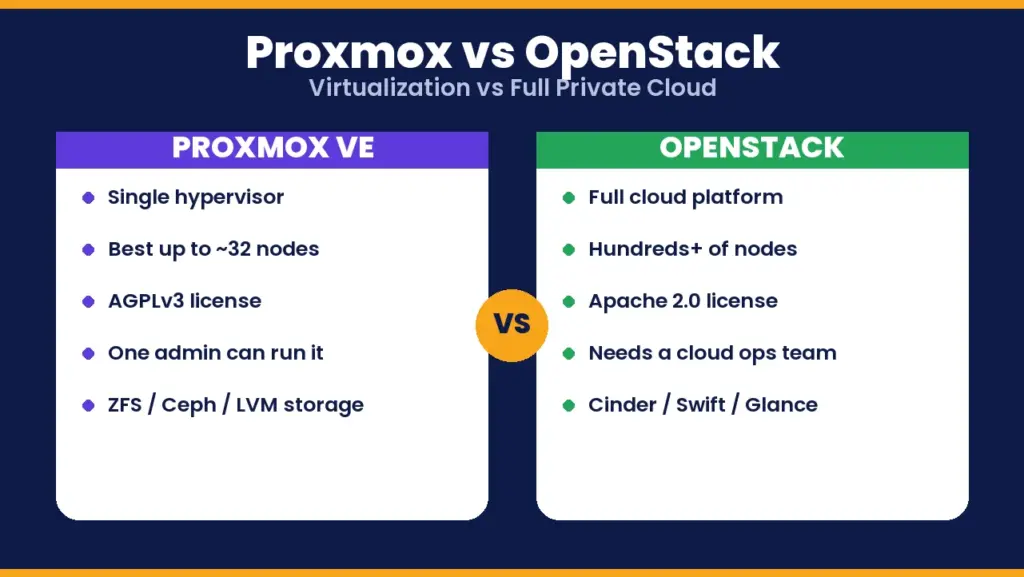
| What it is | Hypervisor and VM/container manager | Full private cloud platform |
| Best for | Homelabs, small to mid-size clusters | Multi-tenant clouds, large providers |
| License | AGPLv3, built by a company | Apache 2.0, run by a foundation |
| Setup time | Under an hour for one node | Days to weeks for a working cloud |
| Cluster size | Comfortable up to around 32 nodes | Hundreds to thousands of nodes |
| Storage model | ZFS, Ceph, LVM, NFS built in | Cinder (block) and Swift (object) services |
| Networking | Linux bridges, VLANs, built-in SDN | Neutron with routers, security groups, LBaaS |
| Multi-tenancy | User and role permissions only | Built for isolated tenants and quotas |
| Team needed | One sysadmin can run it | A dedicated ops or cloud team |
| Cost model | Free core, paid support per socket | Free software, cost is mostly staff and ops |
What Is Proxmox VE?
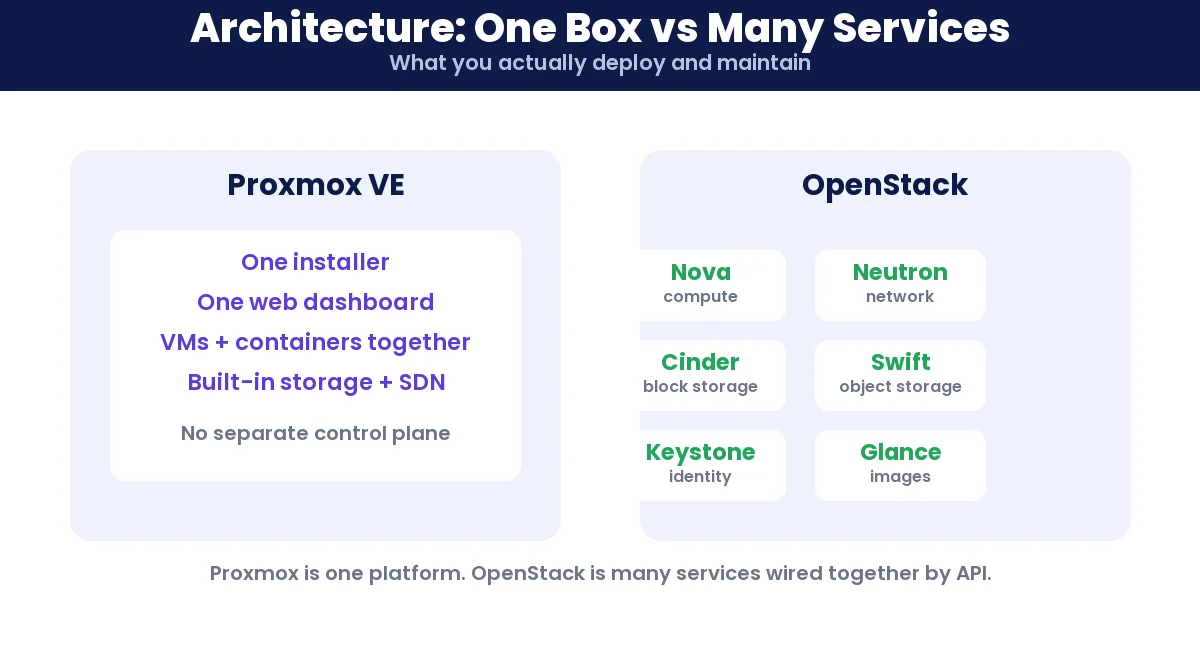
To understand the Proxmox vs OpenStack comparison properly, start with what each one actually is. Proxmox VE (Virtual Environment) is an open-source virtualization platform built on Debian Linux. It combines KVM-based full virtualization for running virtual machines with LXC containers, giving you both on the same host through one web-based control panel. Proxmox VE 9.2, released in May 2026, runs on Debian 13.5 with the Linux 7.0 kernel by default, alongside QEMU 11.0, LXC 7.0, and ZFS 2.4, and it added a dynamic load balancer that can automatically move guests between cluster nodes to even out load.
You install Proxmox VE directly on bare metal, much like you would install any Linux distribution. From there, every VM, container, backup job, and storage pool is managed from a single dashboard, with no separate controller, database cluster, or message queue to stand up first. This is the main reason Proxmox has become the default recommendation for homelabs and small IT teams who need real virtualization without a steep learning curve.
How Proxmox Works
A single Proxmox node works fine on its own, but joining nodes into a cluster unlocks live migration, shared storage, and high availability. Clustering uses Corosync for membership and a quorum-based filesystem to keep configuration in sync across nodes. Proxmox officially supports clusters up to around 32 nodes comfortably, and at least three nodes are recommended once you want HA or Ceph, since both need a working quorum to make safe decisions during a failure.
What Is OpenStack?
OpenStack is not one program. It is a collection of independent services that talk to each other over APIs to form a complete private cloud. Nova handles compute (launching and scheduling VMs), Neutron handles networking, Cinder provides block storage, Swift provides object storage, Glance manages VM images, and Keystone handles identity and authentication across every other service. Horizon gives you an optional web dashboard, but almost everything in OpenStack can also be driven entirely through its REST APIs or command-line clients, which is how most large deployments actually automate it.
OpenStack is governed by the OpenInfra Foundation, a non-profit, rather than by a single vendor. The project ships two coordinated releases a year. The most recent is OpenStack 2026.2 “Hibiscus,” released on 30 September 2026 as the 34th release, following 2026.1 “Gazpacho” earlier in the year. Gazpacho was a SLURP release, meaning operators can skip the in-between release and upgrade once a year instead of every six months. The next SLURP release, 2027.1 “Indri,” is expected around March 2027.
How OpenStack Works
Because OpenStack is a set of coordinated services rather than one installer, deploying it from scratch means standing up a message queue, a shared database, and every service you need, then wiring them together with matching configuration. Most teams do not do this by hand. They use a deployment tool such as Kolla-Ansible, OpenStack-Ansible, or a vendor distribution from Canonical or Red Hat, or they rent a pre-configured OpenStack cloud from a managed provider instead of running the control plane themselves.
Real Difference Between Proxmox and OpenStack
The core Proxmox vs OpenStack difference is scope. Proxmox manages hypervisors. OpenStack manages an entire cloud, including the networking, storage, identity, and billing-adjacent pieces that a hosting provider or large enterprise needs to offer self-service infrastructure to many separate teams or customers. Proxmox can be clustered and does support role-based access for multiple users, but it was never designed to isolate hundreds of untrusted tenants from each other the way OpenStack’s project and quota system was.
Proxmox: Pros and Cons
- Pro: Installs in under an hour and is manageable by one sysadmin.
- Pro: Runs VMs and LXC containers side by side on the same host.
- Pro: The complete feature set is free; paid tiers only change which update repository you use and whether you get vendor ticket support.
- Con: Multi-tenant isolation is limited to user and role permissions, not true per-tenant network and quota isolation.
- Con: Scaling comfortably tops out well before the hundreds-of-nodes range.
OpenStack: Pros and Cons
- Pro: Built from the ground up for multi-tenant isolation with projects, quotas, and per-tenant networking.
- Pro: Scales to hundreds or thousands of nodes across multiple data centers.
- Pro: Everything is API-driven, which makes it a natural fit for automation and self-service infrastructure.
- Con: Deploying and upgrading the control plane itself takes real operational expertise.
- Con: Running it well generally needs a dedicated team, not a single part-time admin.
Licensing and Governance Compared
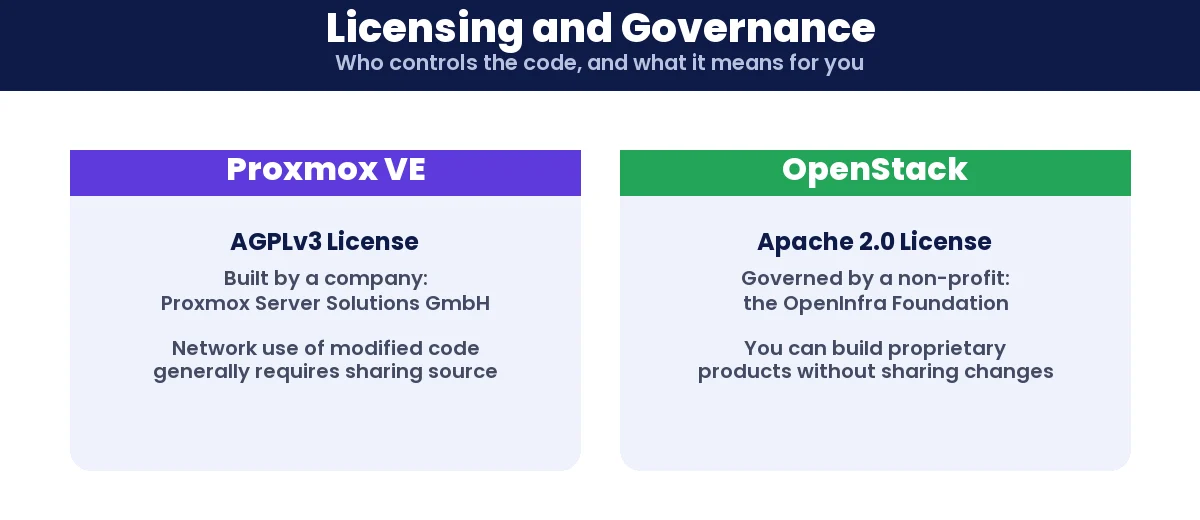
This is a point most Proxmox vs OpenStack comparisons skip, and it genuinely affects how comfortable you can be building a product on top of either one. Proxmox VE is licensed under the GNU Affero General Public License version 3 (AGPLv3) and is developed by Proxmox Server Solutions GmbH, a private company. AGPLv3 has a notable condition: if you modify the software and let others interact with it over a network, you generally need to make those modified sources available too. For most people who just run Proxmox as-is to host their own VMs, this does not come up. It matters more if you plan to fork or heavily modify Proxmox itself as part of a service you sell.
OpenStack is licensed under the Apache License 2.0 and governed by the OpenInfra Foundation, a non-profit rather than a company. Apache 2.0 is more permissive: you can build proprietary products on top of OpenStack code without being required to release your own changes. This is part of why large telecom and cloud providers were comfortable adopting OpenStack as core infrastructure, and why a wide ecosystem of commercial distributions (from Canonical, Red Hat, and others) exists around it.
Cost Comparison
The Proxmox vs OpenStack cost comparison is not about a license fee, since both platforms are free software; it is about what you pay for around them. Proxmox VE’s no-subscription repository is completely free and includes the full feature set; it just receives updates without going through the enterprise testing cycle first. Paid subscriptions buy access to the enterprise repository and, at higher tiers, vendor support: Proxmox’s published 2026 list prices are around €120 per CPU socket per year for Community, €370 for Basic, €550 for Standard, and €1,100 for Premium, with Premium adding round-the-clock ticket support. In a cluster, every node generally needs to run the same subscription tier.
OpenStack itself has no license fee at all, but very few organizations run the raw upstream project by hand. The real cost is staff time (a cloud operations team to deploy, upgrade, and troubleshoot the control plane), a commercial distribution subscription if you choose one from a vendor like Canonical or Red Hat, or a managed OpenStack provider that runs the control plane for you on your own hardware. For a small team, that staffing cost alone usually outweighs anything Proxmox would ever charge in subscriptions.
Storage Options Compared
Storage is one of the more technical parts of the Proxmox vs OpenStack comparison. Proxmox bundles several storage backends directly into the platform: ZFS, Ceph, LVM, and NFS, selectable per storage pool from the same interface you manage VMs in. ZFS is typically node-local, meaning each node keeps its own pool on its directly attached disks, which suits smaller setups where snapshots and data integrity matter more than sharing storage across nodes. Ceph, by contrast, is integrated as hyper-converged shared storage that replicates data across the nodes in your cluster, which is what makes live migration between nodes practical without needing a separate storage array.
OpenStack splits storage into separate services instead of bundling it. Cinder provides block storage through pluggable drivers, so it can sit on top of Ceph RBD, a SAN, or several other backends depending on what you configure. Swift provides object storage, which has no direct equivalent inside Proxmox at all. Glance sits alongside both to manage the VM images that Nova boots from. If your team is already comfortable running Ceph, you can actually point both platforms at the same underlying Ceph cluster; it is the layer above storage (Cinder’s APIs vs Proxmox’s direct pool management) that differs, not necessarily the disks underneath.
Networking Compared
Networking is where the Proxmox vs OpenStack gap becomes obvious. Proxmox networking starts simple: Linux bridges and VLANs cover most homelab and small-business setups. For anything more advanced, Proxmox VE’s built-in SDN (Software Defined Networking) stack lets you define virtual networks and zones across a cluster, and as of version 9.2 it added WireGuard and BGP fabric support along with route redistribution for OSPF fabrics, closing a gap that used to push people toward external SDN tools for anything beyond basic VLANs.
OpenStack’s Neutron service was built as a full networking API from day one. It provides virtual networks, routers, floating IPs, security groups, and optional load-balancing and firewall services, typically backed by Open vSwitch or OVN underneath. This is what lets an OpenStack cloud give each tenant their own private network and security rules without those tenants ever touching the physical switches, which is a harder problem to solve cleanly on Proxmox once you have more than a handful of separate customers.
Scalability and Clustering Limits
Scale is usually the deciding factor in any Proxmox vs OpenStack decision. Proxmox clusters are commonly run comfortably up to around 32 nodes; going well beyond that is possible for some workloads but is not where the platform is optimized. OpenStack was designed for the opposite end of the spectrum, with real-world deployments running into the hundreds or thousands of nodes spread across multiple data centers, since each service (compute, storage, networking) can be scaled out somewhat independently of the others.
In practice, this means the “Proxmox vs OpenStack” choice is rarely close once you know your target scale. A handful of racks for one organization almost never needs what OpenStack is built for, and a service provider planning to onboard hundreds of customers across many servers will hit Proxmox’s practical ceiling long before OpenStack’s.
High Availability and Multi-Tenancy Compared
High availability and multi-tenancy are where the Proxmox vs OpenStack comparison gets practical. Proxmox HA watches cluster nodes and, if one fails, restarts the affected VMs or containers on a surviving node automatically. This only works for guests that already live on shared storage (Ceph or a shared NFS/iSCSI target); a VM pinned to node-local ZFS storage cannot fail over, since there is nowhere else for it to run from. It is also worth being clear that Proxmox Backup Server gives you recovery after data loss, not continuity during an outage; HA and backups solve two different problems and you generally want both.
Multi-tenancy is where the two platforms diverge the most. Proxmox controls access through users, API tokens, and role-based permissions scoped to specific VMs, pools, or nodes, which works well for a company’s own internal teams but was not designed to give hundreds of mutually untrusted customers their own isolated slice of compute, network, and storage. OpenStack’s project (tenant) model does exactly that out of the box, with per-project quotas, isolated virtual networks, and separate security groups, which is the actual reason large hosting and telecom providers reach for it instead of Proxmox.
Which One Should You Pick?
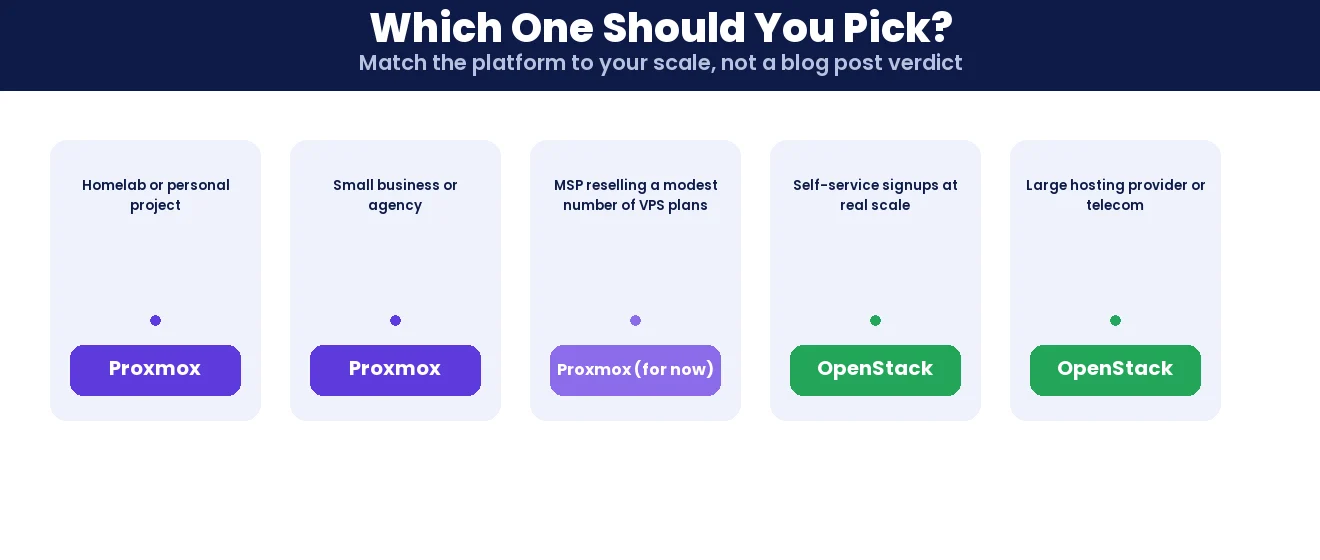
For a Homelab or Personal Project
Proxmox, without much debate. You get a full hypervisor with a clean web interface, running on hardware you already own, set up in an afternoon.
For a Small Business or Agency
Proxmox again. A 3 to 10 node cluster with Ceph covers most internal infrastructure, email, and app hosting needs without requiring a dedicated cloud operations hire.
For an MSP Reselling VPS to Customers
This is the genuine gray area. If you are selling a modest number of VPS plans to a known set of customers, Proxmox with careful role separation can work for years. If you are planning self-service signups, per-customer networks, and real multi-tenant billing at any real scale, start evaluating OpenStack (or a managed OpenStack provider) earlier rather than migrating under pressure later.
For a Large Hosting Provider or Telecom
OpenStack. Multi-tenant isolation, massive scale, and an API-first design are exactly what it was built for, and this is the scale where a dedicated OpenStack operations team pays for itself.
For Learning and Certification
Start with Proxmox to get comfortable with virtualization concepts, then move to a small OpenStack lab deployment (Kolla-Ansible or OpenStack-Ansible on a few VMs) once you want to understand cloud-service architecture rather than just hypervisor management. Many people run this entire lab, both the Proxmox host and the nested OpenStack VMs, on a single VPS with nested virtualization enabled, rather than buying dedicated hardware just to practice.
Can You Migrate From One to the Other?
Migration is the part most Proxmox vs OpenStack guides skip entirely. There is no official, one-click migration path in either direction, and most “we switched” stories online are light on specifics.
In practice, moving from Proxmox to OpenStack (or back) means exporting each VM’s disk image, usually converting it to a compatible format such as qcow2 or raw, and re-importing it as a Glance image or a new Proxmox VM, then rebuilding networking and firewall rules by hand on the destination side, since neither platform’s configuration format maps directly onto the other. Treat any planned move as a project with real testing time, not a weekend task, and keep both environments running in parallel until you have verified every workload on the new side.
Common Mistakes People Make
- Choosing OpenStack for a single small business with no dedicated ops staff, then struggling to keep the control plane patched and healthy.
- Assuming Proxmox HA protects VMs on node-local ZFS storage, then being surprised when a failed node takes those VMs down with it.
- Running a production Proxmox cluster entirely on the no-subscription repository with nobody checking release notes before updating.
- Mixing subscription tiers across nodes in the same Proxmox cluster, which is not a supported configuration.
- Treating the Proxmox vs OpenStack question as having one universal winner, instead of matching the platform to actual node count and tenancy needs.
Ask It Like You Would Ask a Person
Search engines and AI assistants increasingly get asked the Proxmox vs OpenStack comparison in plain, conversational language rather than as a keyword. Here are direct answers to how people actually phrase it.
“Is Proxmox better than OpenStack for a small business?”
In the Proxmox vs OpenStack question, for most small businesses the answer is yes. “Better” here really means “easier to run with the staff you actually have,” and Proxmox wins that comparison for anything under roughly 30 nodes without multi-tenant customer isolation requirements.
“Can I just try OpenStack on one server to see if I like it?”
You can, using a small all-in-one deployment tool, but a single-server OpenStack install is a learning exercise, not a realistic preview of running it in production, since most of the operational complexity only shows up once you are managing multiple compute nodes and real tenants.
“What if I just want a simple home lab hypervisor, not a cloud platform?”
Then OpenStack is the wrong tool entirely, not just the harder one. Proxmox was built for exactly this use case, and reaching for OpenStack here adds operational weight with no matching benefit.
“We’re a hosting company planning to resell VPS to the public. Which one?”
It depends on how many customers and how self-service it needs to be. A modest, hands-on VPS business can run on Proxmox for a long time. A business planning self-service signups, per-customer network isolation, and significant scale should budget for OpenStack (or a managed OpenStack provider) from the start.
“Do I need a whole team to run OpenStack?”
In practice, yes, or you need a vendor/managed provider doing that work for you. Running the upstream OpenStack control plane solo, long-term, without dedicated ops experience is one of the most common reasons OpenStack projects get abandoned.
FAQs
What is the main difference between Proxmox and OpenStack?
Proxmox VE manages virtual machines and containers on your own servers through one web interface. OpenStack is a set of coordinated services that together form a full private cloud platform, built for multi-tenant scale rather than single-organization virtualization.
Is OpenStack free to use?
The OpenStack software itself carries no license fee and is released under the Apache 2.0 license. Most real costs come from staffing a team to deploy and operate it, or paying a vendor for a commercial distribution or a managed deployment.
Can Proxmox handle multiple tenants like a cloud provider?
Proxmox can separate access with users, API tokens, and role-based permissions, which works for internal teams. It was not designed for the isolated, self-service, per-tenant networking and quotas that OpenStack provides by default.
How many nodes can a Proxmox cluster support?
Proxmox clusters are commonly run comfortably up to around 32 nodes. At least three nodes are recommended once you want high availability or Ceph, since both rely on a working quorum during a failure.
Does Proxmox support containers as well as virtual machines?
Yes. Proxmox VE runs KVM-based virtual machines and LXC containers side by side on the same host, managed from the same dashboard and storage pools.
What license is OpenStack released under?
OpenStack is released under the Apache License 2.0 and governed by the OpenInfra Foundation, a non-profit. This is more permissive than Proxmox VE’s AGPLv3 license, which requires sharing modifications in certain networked-service scenarios.
Is Ceph required for Proxmox or OpenStack?
No. Proxmox can run on ZFS, LVM, or NFS instead of Ceph, and OpenStack’s Cinder service supports several storage backends beyond Ceph. Ceph becomes valuable once you need shared, replicated storage across many nodes.
Which one is easier to learn for a beginner?
Proxmox has a noticeably gentler learning curve since it is one installer and one dashboard. OpenStack has more moving parts (compute, networking, storage, and identity services) and generally takes longer to learn well.
Conclusion: Which One Should You Pick?
Proxmox vs OpenStack is not really a rivalry between two competing products aimed at the same job. Proxmox is the practical choice for homelabs, small businesses, and clusters up to a few dozen nodes, with a gentle learning curve and a free core that genuinely stays free. OpenStack is the right tool once you need true multi-tenant isolation, hundreds of nodes, or API-first automation at cloud scale, and it comes with a matching need for dedicated operations expertise. Match the platform to your actual node count and tenancy needs rather than to whichever one a comparison article called the winner, and you will rarely pick wrong.