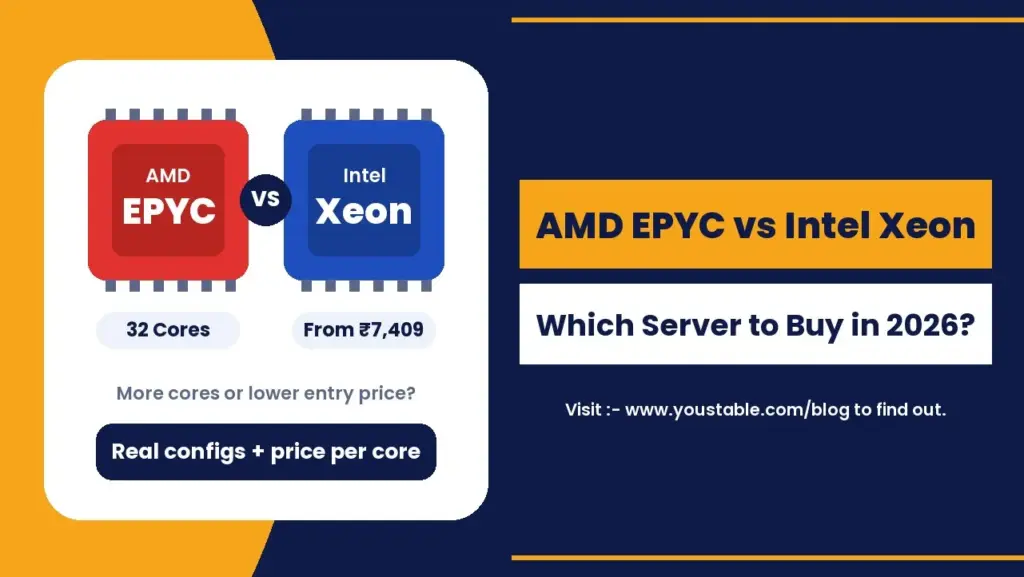
AMD EPYC vs Intel Xeon comes down to one question: do you need more cores or a lower entry price? AMD EPYC servers pack far more cores, memory channels and PCIe lanes into one machine, which makes them the stronger choice for virtualization, SaaS platforms and large databases. Intel Xeon servers start at a much lower monthly price and deliver solid per-core performance, which makes them ideal for single websites, business applications and software licensed per core.
This guide compares AMD EPYC and Intel Xeon dedicated servers using real configurations and prices, explains where each processor wins, and shows exactly which server to buy for your workload.
AMD EPYC vs Intel Xeon: Quick Verdict
| If You Need | Choose | Why |
|---|---|---|
| The lowest entry price | Intel Xeon | Xeon servers start from ₹7,409/mo |
| Maximum cores in one server | AMD EPYC | Up to 32 cores and 64 threads |
| Virtualization and many VMs | AMD EPYC | More cores, memory channels and PCIe lanes |
| Per-core licensed software | Intel Xeon | Fewer, faster cores keep licence costs down |
| Best price per core | AMD EPYC 9334 | About ₹1,428 per core per month |
What Is AMD EPYC?
AMD EPYC is AMD’s server processor family, built for data centers. Its design focuses on putting a large number of cores on a single chip and feeding them with many memory channels and PCIe lanes. That makes EPYC servers very good at running lots of work in parallel, such as dozens of virtual machines, container clusters or busy databases, and it is the core of the EPYC vs Xeon difference.
Two EPYC generations are common in dedicated servers today:
- EPYC 7282 (Zen 2, 7nm): 16 cores and 32 threads, 64 MB L3 cache, 8 DDR4 memory channels and PCIe 4.0. A cost-effective way into high-core EPYC 7282 hosting.
- EPYC 9334 (Zen 4, 5nm): 32 cores and 64 threads, boost up to 3.9 GHz, 128 MB L3 cache, 12 DDR5 memory channels and PCIe 5.0. The latest-generation choice for heavy workloads, available as an EPYC 9334 dedicated server.
What Is Intel Xeon?
Intel Xeon is Intel’s long-running server and workstation processor line. Xeon has decades of history in enterprise data centers, broad software certification and strong per-core performance on high-clock models. In dedicated hosting, Xeon servers are popular because they offer dependable performance at an accessible monthly price, which is their biggest advantage in the AMD EPYC vs Intel Xeon comparison.
Dedicated Xeon servers range from compact 4-core machines for a single website up to 16-core E5 systems with ECC memory for heavier business workloads.
AMD EPYC vs Intel Xeon: Specs Compared
Here is the AMD EPYC vs Intel Xeon comparison in numbers, using a popular Xeon dedicated server and two EPYC options with real configurations:
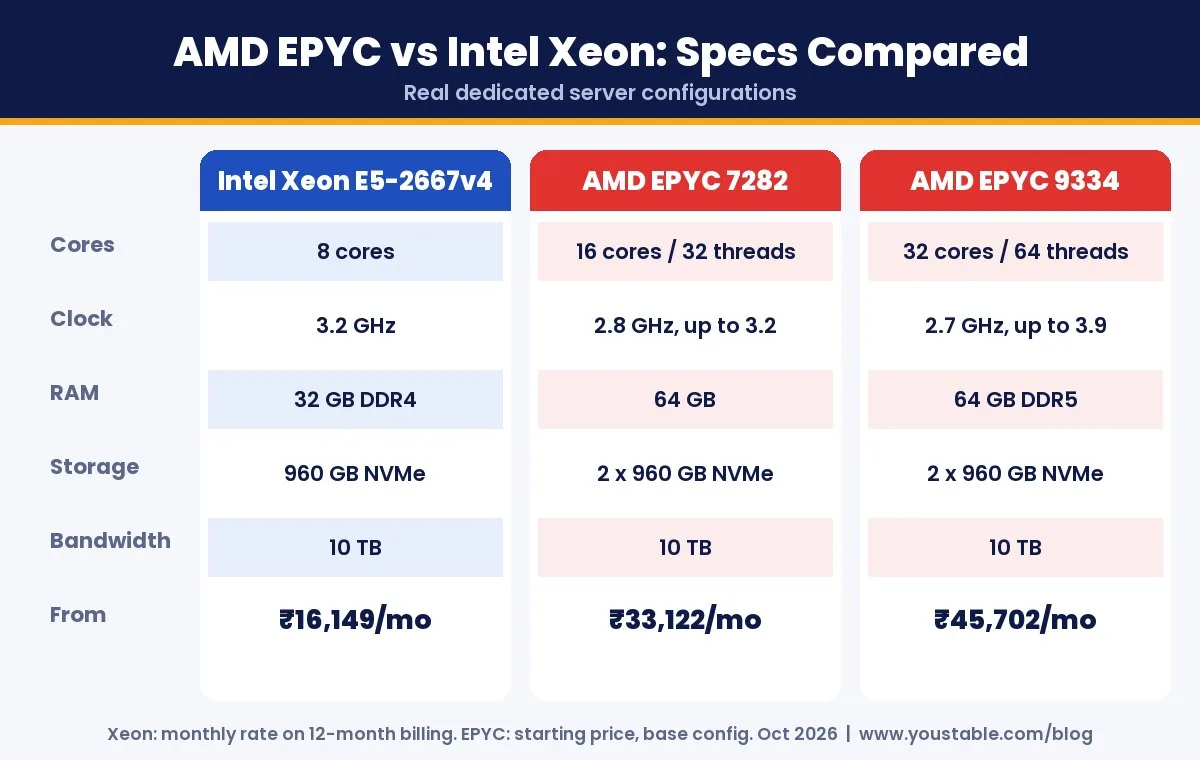
| Spec | Intel Xeon E5-2667v4 | AMD EPYC 7282 | AMD EPYC 9334 |
|---|---|---|---|
| Cores / Threads | 8 cores | 16 cores / 32 threads | 32 cores / 64 threads |
| Clock speed | 3.2 GHz | 2.8 GHz, up to 3.2 GHz | 2.7 GHz, up to 3.9 GHz |
| RAM | 32 GB DDR4 | 64 GB | 64 GB DDR5 |
| Storage | 960 GB NVMe SSD | 2 x 960 GB NVMe SSD | 2 x 960 GB NVMe SSD |
| Bandwidth | 10 TB | 10 TB | 10 TB |
| Starting price | ₹16,149/mo | ₹33,122/mo | ₹45,702/mo |
Xeon prices shown are monthly rates on 12-month billing. EPYC prices are starting rates for the base configuration. Check the live product pages before ordering, since prices can change.
Where AMD EPYC Wins
More Cores in One Server
An EPYC 9334 gives you 32 cores and 64 threads in a single machine. For workloads that split work across many threads, such as web servers handling thousands of requests, build pipelines or analytics jobs, more cores translate directly into more work done per second.
Memory Bandwidth for Big Datasets
The EPYC 9334 supports 12 channels of DDR5 memory, and even the older EPYC 7282 has 8 channels. More channels mean data moves between RAM and the CPU faster, which matters for in-memory caches, large databases and analytics.
PCIe Lanes for Fast Storage and Networking
Both EPYC models offer 128 PCIe lanes, PCIe 4.0 on the 7282 and PCIe 5.0 on the 9334. That gives NVMe drives and network cards plenty of bandwidth without competing with each other.
Better Value per Core
When you divide the monthly price by the number of cores, the EPYC 9334 comes out cheapest at around ₹1,428 per core. If your workload can use the cores, EPYC delivers more compute for every rupee.
Where Intel Xeon Wins
A Much Lower Starting Price
An Intel Xeon E3-1230v3 dedicated server starts at ₹7,409 a month, less than a quarter of the cheapest EPYC configuration. If you are moving one busy website off a VPS, you rarely need 32 cores, and a Xeon server gives you full hardware isolation at a fraction of the cost.
Strong Per-Core Speed
High-clock Xeon models such as the E-2286G run at 4 GHz. Many applications, including older PHP code, some game servers and single-threaded database queries, care more about how fast each core is than how many cores you have.
Lower Licence Costs for Per-Core Software
Some commercial software, including Windows Server and SQL Server, is licensed per core. A server with fewer, faster cores can cost far less to license than a 32-core machine, which often makes a Xeon server the cheaper option overall even if the hardware price looks similar.
Mature, Widely Certified Platform
Xeon has been the default enterprise server platform for a long time. Legacy business software, control panels and older applications are widely tested on Intel, which reduces compatibility surprises.
EPYC vs Xeon: Performance in Real Terms
Benchmarks often show EPYC far ahead or Xeon far ahead, and both can be true. It depends on what is being measured. Server performance has two very different sides:
- Single-thread performance: how quickly one task finishes on one core. This depends mostly on clock speed and core design, and it matters for page generation in older PHP apps, many game servers and individual database queries.
- Multi-thread performance: how much total work the server can do at once. This depends on core and thread count, cache and memory bandwidth, and it matters for virtualization, busy web servers, builds and analytics.
In the EPYC vs Xeon comparison, a 32-core EPYC 9334 will finish a heavily parallel job much faster than an 8-core Xeon. A single request on a lightly loaded server, however, may feel just as quick on a high-clock Xeon. Measure which type of work your application actually does before paying for cores.
Why Cache Size Matters
L3 cache is fast memory built into the processor. The EPYC 9334 carries 128 MB and the EPYC 7282 carries 64 MB. A large cache keeps frequently used data close to the cores, which reduces trips to RAM and speeds up databases and in-memory applications.
Power Efficiency: EPYC vs Xeon Running Costs
The EPYC 7282 is rated at 120W and the EPYC 9334 at 210W. A higher number looks worse until you divide it across the cores: the 9334 delivers 32 cores within that budget, so its work per watt is excellent.
With a rented dedicated server, electricity and cooling are already included in the monthly price. Efficiency does not show up as a separate power bill. Instead, it shows up as more performance for each rupee you pay, which is one reason high-core EPYC servers compare so well on price per core.
AMD vs Intel Dedicated Server: Reliability and Security
Both processor families are built for 24/7 server use, so reliability is less about the brand and more about the configuration:
- ECC memory: server-grade Xeon and EPYC platforms support ECC RAM, which detects and fixes memory errors before they corrupt data. Look for ECC on any server that runs a database.
- Memory encryption: EPYC processors include hardware memory encryption features that help isolate virtual machines from each other, a useful extra layer for multi-tenant hosting.
- Redundant storage: dual NVMe drives, as on the EPYC configurations, allow RAID 1 so one failed drive does not take your site offline.
Whichever processor you pick, hardware isolation is the real security win of dedicated server hosting: no other customer shares your CPU, RAM or disks.
AMD EPYC vs Intel Xeon: Price per Core
In any EPYC vs Xeon comparison, headline prices only tell half the story. Dividing each server’s monthly price by its core count shows how much compute you actually get for your money:
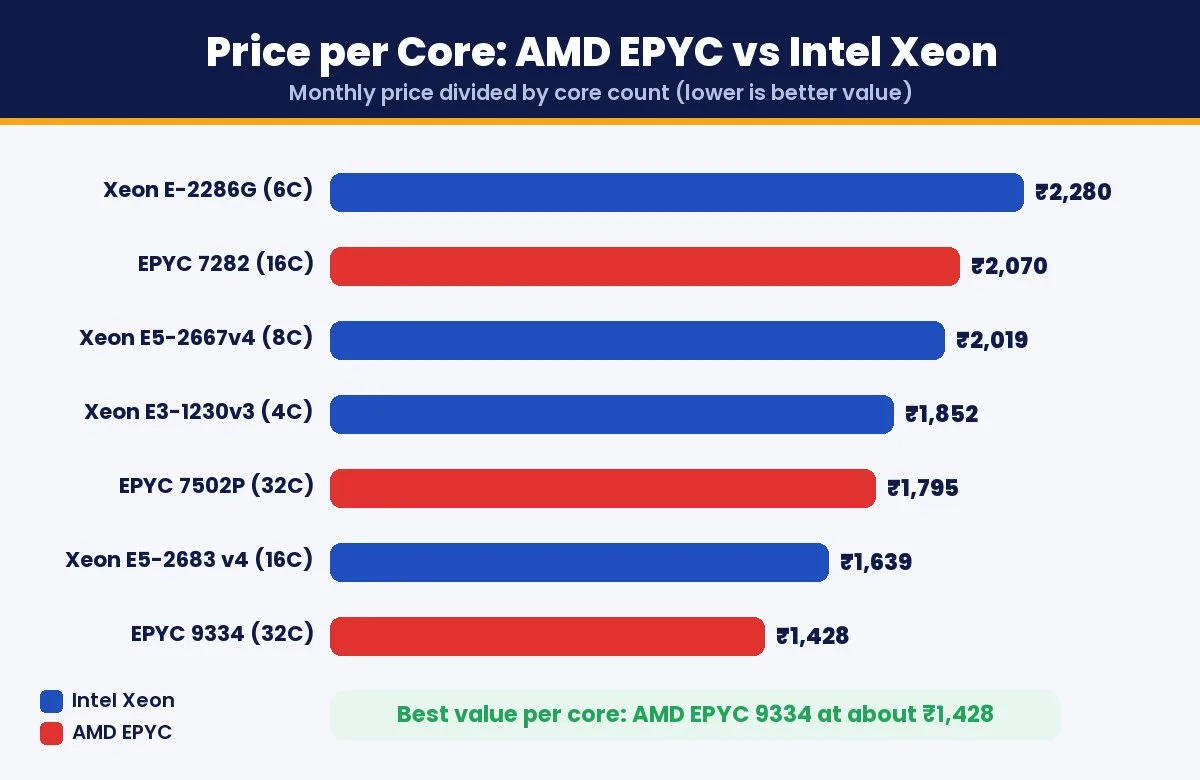
| Server | Cores | Monthly Price | Price per Core |
|---|---|---|---|
| Intel Xeon E3-1230v3 | 4 | ₹7,409 | ₹1,852 |
| Intel Xeon E-2286G | 6 | ₹13,679 | ₹2,280 |
| Intel Xeon E5-2667v4 | 8 | ₹16,149 | ₹2,019 |
| Intel Xeon E5-2683 v4 | 16 | ₹26,219 | ₹1,639 |
| AMD EPYC 7282 | 16 | ₹33,122 | ₹2,070 |
| AMD EPYC 9334 | 32 | ₹45,702 | ₹1,428 |
| AMD EPYC 7502P (256 GB RAM) | 32 | ₹57,442 | ₹1,795 |
Two takeaways stand out. For small workloads, the Xeon E3 is the cheapest way to get a dedicated server at all. For large workloads, the EPYC 9334 gives the most compute per rupee, as long as your software can actually use 32 cores.
Which Dedicated Server Should You Buy?
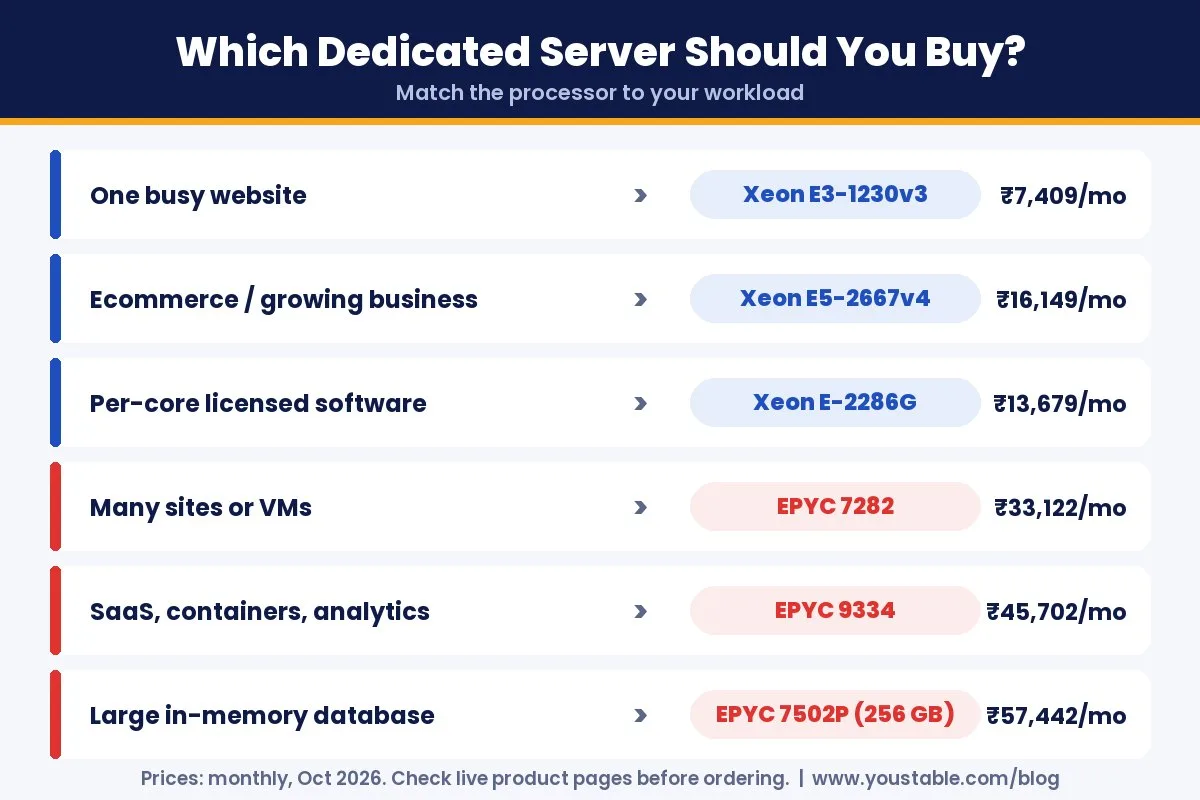
| Your Workload | Recommended Server | Starting Price |
|---|---|---|
| One busy website or small business app | Intel Xeon E3-1230v3 | ₹7,409/mo |
| Ecommerce store or growing business | Intel Xeon E5-2667v4 | ₹16,149/mo |
| Windows or SQL Server licensed per core | Intel Xeon E-2286G | ₹13,679/mo |
| Hosting many sites or running VMs | AMD EPYC 7282 | ₹33,122/mo |
| SaaS, containers, CI/CD and analytics | AMD EPYC 9334 | ₹45,702/mo |
| Large in-memory databases | AMD EPYC 7502P with 256 GB RAM | ₹57,442/mo |
If you are still unsure about AMD vs Intel dedicated server options, start with the core count your application really uses today. A server that is busy at 30% CPU on 8 cores does not need 32 cores yet. You can always move to EPYC when growth demands it.
AMD EPYC vs Intel Xeon for Common Workloads
Web Hosting and WordPress
For one large website, the EPYC vs Xeon choice is easy: a Xeon server is usually enough and much cheaper. If you are a hosting reseller or agency putting hundreds of sites on one machine, EPYC’s core count lets each account get its own share of CPU without slowdowns.
Databases
Small and mid-sized MySQL or MariaDB databases run well on a high-clock Xeon. Large databases with many concurrent connections benefit from EPYC’s extra cores and memory channels, especially with plenty of RAM such as the 256 GB EPYC 7502P configuration.
Virtualization and Private Cloud
This is where EPYC shines in any AMD vs Intel dedicated server comparison. More cores and threads mean more virtual machines or containers per server, which lowers the cost of each VM and simplifies your infrastructure.
Game Servers
Many game servers depend on single-thread speed. A high-clock Xeon such as the E-2286G is a strong, affordable option. If you want even higher clock speeds, the AMD Ryzen 9 5900X dedicated server, with boost up to 4.8 GHz, is worth a look.
AI, Analytics and Build Pipelines
Data processing, CI/CD builds and CPU-based machine learning tasks scale with cores. The EPYC 9334’s 32 cores and DDR5 memory make it the better fit for these jobs.
EPYC vs Xeon: Mistakes to Avoid
- Buying cores you cannot use: a single-threaded application will not run faster on 32 cores.
- Ignoring licence costs: per-core software can make a high-core server far more expensive than its hardware price suggests.
- Skipping ECC memory for databases: ECC RAM detects and corrects memory errors, which protects data integrity on critical systems.
- Comparing only the processor: RAM, NVMe storage, bandwidth and data center location matter just as much for real-world speed.
- Forgetting management: decide early whether you will manage the server yourself or want help with updates and security.
For a deeper look at choosing CPU, RAM and storage together, read our guide on how to pick the right dedicated server. If you are still deciding on the support level, compare managed vs unmanaged dedicated server hosting.
Total Cost: What You Pay Beyond the Processor
The processor is only one line on your bill. When you compare AMD EPYC vs Intel Xeon servers, add up the full monthly cost:
- Billing term: 12-month billing saves around 15% compared with paying month to month.
- Control panel: cPanel, Plesk or DirectAdmin licences are optional add-ons.
- Operating system: Linux is free, while Windows Server is a paid add-on.
- GST: 18% GST applies to hosting services in India, and businesses can usually claim it back as input credit.
For a full breakdown of what drives the bill up or down, see our guide to dedicated server price in India.
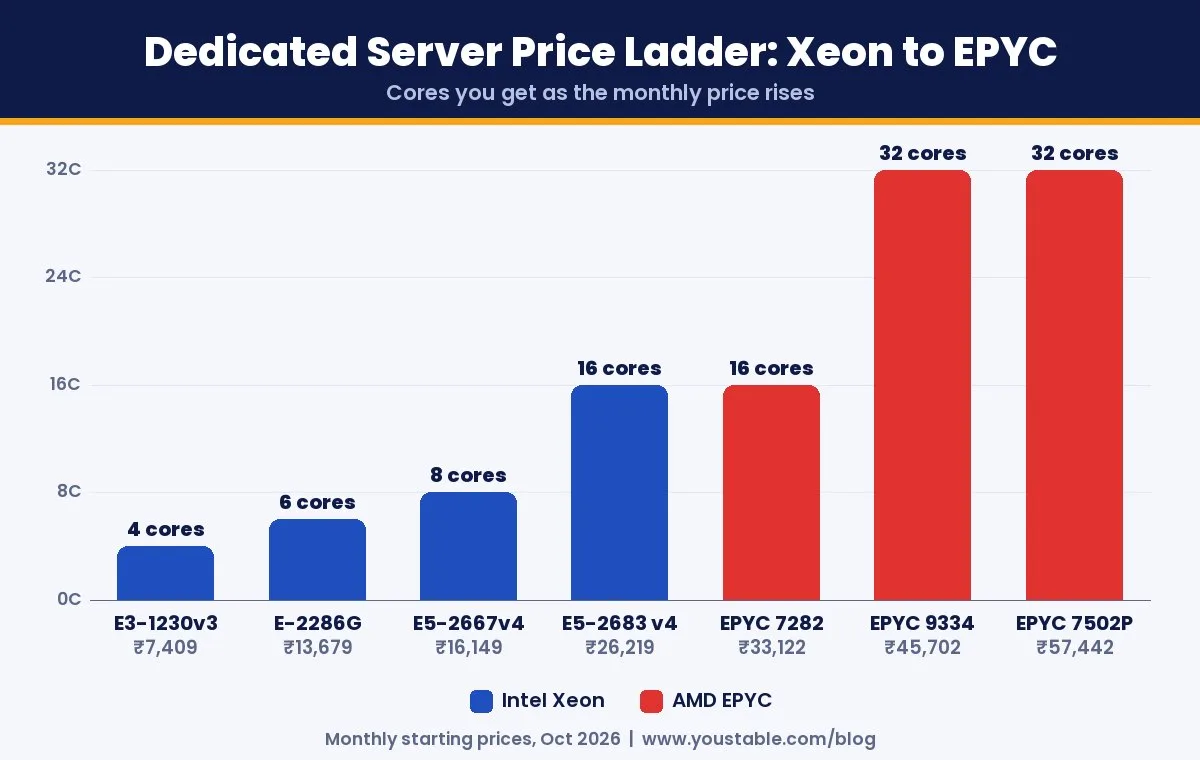
Starting With Xeon and Moving to EPYC Later
You do not have to settle the AMD EPYC vs Intel Xeon question forever on day one. Many businesses start on an affordable Xeon server, then move to EPYC once traffic, VM count or database size outgrows it. Because a dedicated server is a separate physical machine, the move works like any server migration:
- Order the new EPYC server while the Xeon keeps serving traffic.
- Copy files, databases and configuration to the new machine.
- Test everything on the new server using a temporary address.
- Switch DNS, monitor for a few days, then cancel the old server.
Planned this way, the switch causes little or no downtime. Starting smaller and upgrading when the numbers justify it is usually cheaper than buying 32 cores you will not use for a year.
FAQs
Is AMD EPYC better than Intel Xeon?
Neither is better for every job. AMD EPYC is better for workloads that need many cores, such as virtualization, SaaS and large databases. Intel Xeon is better when you want a lower starting price, strong per-core speed or lower licence costs for per-core software.
Which is cheaper, an AMD EPYC or Intel Xeon dedicated server?
Intel Xeon servers have the lower entry price, starting from ₹7,409 per month. AMD EPYC servers cost more per server but offer better value per core, with the EPYC 9334 working out to about ₹1,428 per core per month.
Is AMD EPYC good for web hosting?
Yes, especially if you host many websites on one server. For a single website, an Intel Xeon server is usually enough and costs much less.
Which processor is better for databases?
Small and mid-sized databases run well on a high-clock Intel Xeon. Large databases with many connections or big in-memory datasets benefit from AMD EPYC’s extra cores, memory channels and larger RAM options.
Does the processor affect software licence costs?
Yes. Software such as Windows Server and SQL Server is licensed per core, so a server with fewer, faster cores can be much cheaper to license than a high-core EPYC server.
What is the difference between EPYC 7282 and EPYC 9334?
The EPYC 7282 is a Zen 2 processor with 16 cores, DDR4 memory and PCIe 4.0. The EPYC 9334 is a newer Zen 4 processor with 32 cores, DDR5 memory, PCIe 5.0 and a higher boost clock of up to 3.9 GHz.
Final Verdict
In the AMD EPYC vs Intel Xeon decision, there is no single winner, only the right fit for your workload. Choose Intel Xeon when you want the lowest entry price, fast individual cores or lower per-core licence costs. Choose AMD EPYC when you need many cores, high memory bandwidth and the best value per core for virtualization, SaaS and large databases.
Browse YouStable’s Intel Xeon dedicated servers from ₹7,409 a month, or step up to AMD EPYC dedicated servers for high-core workloads. Every server gives you the whole machine to yourself, with fast SSD or NVMe storage and full root access.