To set up and manage VPS server backups, define RPO/RTO, choose a backup method (snapshots, file level, or image based), automate jobs, store encrypted copies offsite, enforce a retention policy, and test restores regularly.
Use the 3-2-1 rule (3 copies, 2 media, 1 offsite) to minimize data loss and speed recovery. Backing up a virtual private server is not optional it’s your last line of defense against hardware failures, attacks, and human error.
In this step by step guide, you’ll learn how to plan, set up, automate, and test VPS server backups using proven methods that are secure, cost effective, and beginner friendly.
Why VPS Server Backups Matter?
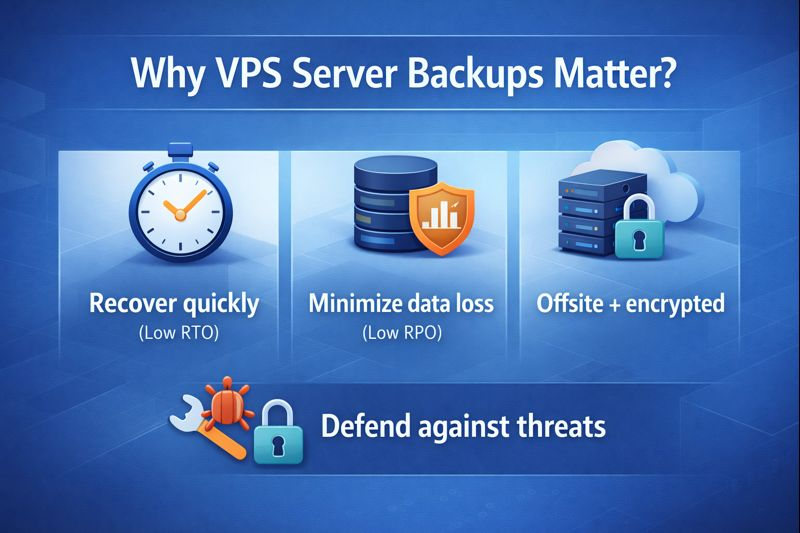
Downtime and data loss are expensive. A solid backup plan protects your websites, applications, and databases from ransomware, accidental deletions, migrations gone wrong, and faulty updates. Your goals are simple:
- Recover quickly (low RTO)
- Lose as little data as possible (low RPO)
- Keep copies offsite and encrypted
Threats evolve, but a disciplined backup strategy remains the most reliable, cost efficient insurance you can buy for your VPS.
Backup Concepts You Must Know
Before you set anything up, get familiar with the basics that shape every VPS backup strategy.
- Snapshot vs. Backup: Snapshots are fast, provider level disk images. Great for instant rollbacks, but they often live in the same infrastructure. Backups are portable, application aware, and stored offsite.
- Full, Incremental, Differential: Full copies everything. Incremental saves changes since the last backup. Differential saves changes since the last full. Incrementals are most storage efficient.
- 3-2-1 Rule: Keep 3 copies, on 2 types of media, with 1 offsite.
- RPO/RTO: Recovery Point Objective (acceptable data loss) and Recovery Time Objective (acceptable downtime) guide your schedule and tooling.
- Application Consistent: Databases need consistent dumps or snapshots to avoid corruption.
- Encryption & Immutability: Encrypt data at rest and in transit. Use object lock/immutability to protect against ransomware.
Plan Your VPS Backup Strategy
Start with clarity. Document what you’ll back up, where it will live, and how you’ll restore it.
- What to back up: web roots (/var/www), application code, configs (/etc), SSL keys, user uploads, and databases (MySQL/MariaDB/PostgreSQL).
- Frequency: Map to RPO. Examples: hourly incrementals + nightly prunes for busy sites; nightly for blogs.
- Retention: Common: daily (7), weekly (4), monthly (12). Adjust to compliance and budget.
- Destination: Offsite S3-compatible storage, another region, or dedicated backup storage.
- Tools: Provider snapshots, cPanel/Plesk backups, rsync/tar, or modern deduplicating tools like restic/borg.
For many teams, a hybrid approach works best: frequent provider snapshots for quick rollbacks, plus encrypted offsite backups for disaster recovery.
Method 1: Use Your Provider’s Snapshots (Fast Rollbacks)
Provider snapshots create point in time images of your VPS disk. They’re ideal before major updates or deployments.
- Pros: One click, rapid restore, no server load when restoring.
- Cons: Usually stays in the same provider; not a replacement for offsite backups.
- Steps:
- Enable automatic daily snapshots if your host offers them.
- Create a manual snapshot before upgrades or migrations.
- Periodically export snapshots or pair them with offsite backups.
Tip: YouStable VPS offers automated snapshots and optional offsite backup add-ons, so you can pair instant rollbacks with disaster proof storage.
Method 2: Automated Offsite Backups with Restic (Recommended)
Restic is a fast, open source, deduplicating backup tool with built in encryption. It supports S3 compatible storage, SFTP, and more perfect for automated, offsite VPS backups.
Prerequisites
- Ubuntu/Debian server (commands similar on other distros).
- S3 compatible bucket (e.g., AWS, Wasabi, Backblaze, or provider object storage).
- Access keys with least privilege to one bucket/path.
1. Install Restic
sudo apt-get update
sudo apt-get install -y restic
2. Configure Secure Environment Variables
Create a file to hold credentials and repo settings.
sudo bash -c 'cat >/root/.restic-env' <<'EOF'
export RESTIC_REPOSITORY="s3:https://s3.YOUR-PROVIDER.com/your-bucket/vps1"
export AWS_ACCESS_KEY_ID="YOUR_ACCESS_KEY"
export AWS_SECRET_ACCESS_KEY="YOUR_SECRET_KEY"
export RESTIC_PASSWORD="Choose-A-Strong-Unique-Password"
EOF
sudo chmod 600 /root/.restic-env
3. Initialize the Repository
source /root/.restic-env
restic init
4. Create Exclusions and a Backup Script
Exclude caches, temp files, and other nonessential paths.
sudo bash -c 'cat >/root/.backup-excludes.txt' <<'EOF'
/proc
/sys
/tmp/*
/var/cache/*
/var/tmp/*
/swapfile
EOF
sudo chmod 600 /root/.backup-excludes.txt
Create the backup script.
sudo bash -c 'cat >/usr/local/sbin/vps-backup.sh' <<'EOF'
#!/usr/bin/env bash
set -euo pipefail
source /root/.restic-env

HOST=$(hostname)
EXCLUDES=/root/.backup-excludes.txt

# Optional: create fresh database dumps before file backup
# MySQL/MariaDB example:
# mysqldump --single-transaction --routines --triggers --events --all-databases | gzip > /var/backups/mysql-$(date +%F).sql.gz
# PostgreSQL example:
# sudo -u postgres pg_dumpall | gzip > /var/backups/postgres-$(date +%F).sql.gz

restic backup
  --host "$HOST"
  --tag "daily"
  --exclude-file "$EXCLUDES"
  /etc /var/www /var/backups

# Retention policy: adjust to your needs
restic forget --keep-daily 7 --keep-weekly 4 --keep-monthly 12 --prune

# Integrity check
restic check --with-cache
EOF
sudo chmod 700 /usr/local/sbin/vps-backup.sh
5. Schedule Nightly Backups (Cron)
(crontab -l 2>/dev/null; echo "0 2 * * * /usr/local/sbin/vps-backup.sh >> /var/log/vps-backup.log 2>&1") | crontab -Optional: send success/failure pings to a monitoring URL (e.g., Healthchecks) inside the script to get alerts.
6. Test a Restore (Do Not Skip)
source /root/.restic-env
mkdir -p /restore-test
restic snapshots
restic restore latest --target /restore-test --include /var/www
ls -lah /restore-test/var/www
Verify files, permissions, and integrity. Regular test restores prove your backups actually work.
Method 3: Application Consistent Database Backups
File backups alone can miss in flight database writes. Add logical or physical dumps to ensure consistency.
MySQL/MariaDB (Logical Dump)
mysqldump --user=root -p
  --single-transaction --routines --triggers --events --all-databases
  | gzip > /var/backups/mysql-$(date +%F).sql.gz
Include /var/backups in your restic job. For very large datasets, consider mariabackup/Percona XtraBackup.
PostgreSQL (Logical Dump)
sudo -u postgres pg_dumpall | gzip > /var/backups/postgres-$(date +%F).sql.gzAlternatively, use pg_dump per database or pg_basebackup for physical streaming backups.
Restore Scenarios You Should Practice
- Single file restore: Recover a config or media upload without touching the whole server.
- App rollback: Restore /var/www with the latest known good snapshot or backup.
- Full server rebuild: Provision a fresh VPS, install restic, and restore /etc, /var/www, and database dumps, then restart services.
# Example: single directory restore
source /root/.restic-env
restic restore latest --target /restore --include /etc/nginx
For provider snapshots, the process is usually a single click revert or a volume replacement, which is fast but should be combined with offsite backups for resilience.
Security and Compliance Best Practices
- Encrypt backups at rest and in transit; never store plaintext credentials in scripts.
- Least privilege: Restrict object storage keys to one bucket and namespace.
- Immutability: Enable Object Lock/WORM and bucket versioning to block ransomware tampering.
- Separate accounts/regions for offsite copies to survive provider level incidents.
- Audit & logs: Keep backup logs, retain access logs, and rotate keys regularly.
Cost Optimization Tips
- Use incremental deduplication (restic/borg) to cut storage by 50–90% for unchanged data.
- Apply exclusions for caches and temp paths.
- Tune retention: fewer monthlies if budgets are tight; keep weeklies longer for safety.
- Move old backups to lower cost storage classes if supported.
- Schedule backups during off peak hours to save on bandwidth and CPU.
Common Mistakes to Avoid
- Relying only on snapshots stored with the same provider.
- Never testing restores (the most expensive mistake).
- Backing up inconsistent databases without dumps or quiescing.
- Keeping secrets in world readable files or repos.
- Ignoring logs and silent failures in cron jobs.
Quick Reference: Rsync Alternative (SFTP/Another Server)
If you prefer a simple file sync to another server, use rsync over SSH. It’s not deduplicated like restic, but it’s straightforward.
rsync -aHAX --delete --numeric-ids
  --exclude-from=/root/.backup-excludes.txt
  /etc /var/www /var/backups
  [email protected]:/backups/$(hostname)/
Pair this with periodic database dumps and ensure the destination has versioning or snapshots for rollbacks.
FAQs
u003cstrongu003eWhat’s the best way to back up a VPS for most websites?u003c/strongu003e
u003cstrongu003eA hybrid approach:u003c/strongu003e nightly encrypted, offsite backups with restic or borg (including database dumps) plus daily provider snapshots for instant rollbacks. This balances fast recovery with true disaster resilience.
How often should I run VPS backups?
Match frequency to your RPO. Dynamic apps and shops: hourly incrementals or at least nightly. Blogs and small sites: nightly. Always keep weeklies and monthlies for long term protection.
u003cstrongu003eAre snapshots alone enough for VPS backups?u003c/strongu003e
No. Snapshots are fast but typically live within the same provider and can be impacted by account issues. Use snapshots for quick rollbacks and offsite backups for true disaster recovery.
How do I test my backups?
Perform a file level restore to a separate path, verify integrity, and practice a full server restore quarterly. Document the steps and keep your runbooks updated.
How much storage do I need for VPS backups?
As a starting point, 2–3× your data size for 30 days of retention with deduplicated tools. Highly dynamic data or databases may need more. Monitor growth and adjust retention policies.u003cbru003eu003cbru003eBy planning for RPO/RTO, automating encrypted offsite backups, and testing restores, you’ll keep your VPS resilient against outages and threats. If you want expert help, YouStable can assist with designing and managing your backup strategy end to end.