


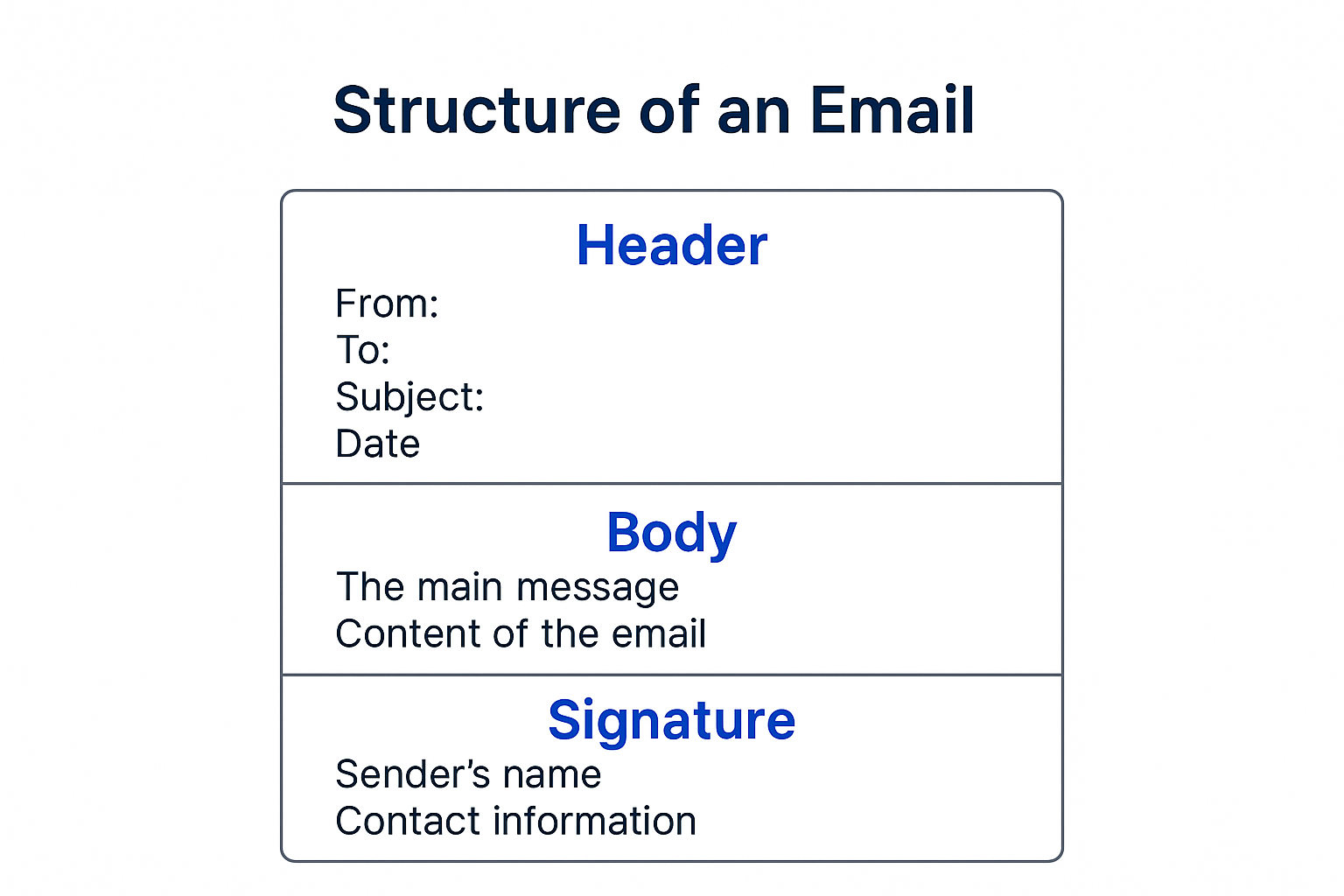
The structure of an email is made up of three primary components: the Header, Body, and Signature. The Header includes sender and recipient details, authentication data, and the subject line.
The Body contains the actual written content, formatted as plain text or HTML. The Signature appears at the end of the email, showing contact information and professional identity.
Email remains one of the most reliable and widely used digital communication formats across personal and business environments. Whether you are sending transactional WordPress emails, marketing campaigns, or internal communications, every email follows a standardized structure defined by internet protocols such as SMTP and MIME.
These rules ensure that an email can be successfully delivered, authenticated, rendered correctly on different devices, and interpreted by hosting servers, spam filters, and mail clients such as Gmail, Outlook, Yahoo, Apple Mail, and Thunderbird. Understanding how an email is structured helps you improve deliverability, security, and clarity while ensuring professional communication.
Email Structure Overview
When an email is created and transmitted, it is formed from three essential parts that work together for successful sending and receiving. The Email Header contains routing information and metadata that mail servers use to identify both the sender and recipient, as well as validate the message.
The Email Body represents the text, images, links, layout, and attachments that the recipient sees when opening the email. Finally, the Email Signature displays branding and contact information, which helps the recipient validate the identity and professionalism of the sender. This entire structure operates according to standardized rules ensuring universal consistency.
1. Email Header (Visible and Technical Metadata)
The email header is the most important structural element for mail servers and security filters because it includes how an email is routed and authenticated. Some fields, such as From, To, Date, and Subject, are visible to users and help provide context and identification.
Other advanced header fields remain hidden by default, including Received paths, Message-ID, Return Path, and authentication results like SPF, DKIM, and DMARC. These entries help track delivery hops, stop email spoofing, and determine whether a message is trustworthy or spam. The header also declares the email’s format using Content Type and MIME Version fields, which guide email clients in rendering the content correctly.
2. Email Body (Message Content and Formatting)
The body is the essential communication layer that the reader interacts with. This section can be in plain text, which is lightweight, secure, and universally compatible; or HTML, which provides design features like branding elements, styled buttons, images, and hyperlinks. Modern emails often use multipart MIME formatting to include both versions in a single message.
This ensures recipients with strict text only settings still view the message properly, while webmail and mobile apps display the richer version. Error free body structure increases readability and reduces spam score, especially for transactional WordPress messages such as OTPs, invoices, and password resets.
3. Email Signature (Identity and Branding)
The signature is placed at the end of the email and contributes to professionalism and credibility. It typically contains the sender’s full name, designation, phone number, website, physical address, support links, company name, and sometimes legal compliance notices like GDPR requirements or unsubscribe instructions in marketing messages.
In HTML messages, signatures may include brand logos, CTA banners, and social media icons. A well formatted signature assures recipients that the email originates from a legitimate organization and encourages quick ways to connect further, thereby enhancing trust and engagement.
Email Structure Comparison Table
| Component | What It Includes | Primary Purpose | Common Examples |
|---|---|---|---|
| Header | To, From, Subject, Date, Message ID, Content Type, Return Path, authentication fields | Delivery, routing, identification, anti spam verification | To: [email protected], SPF authentication |
| Body | Main written content, HTML formatting, links, buttons, images | Communication and engagement with the user | Account information, support instructions |
| Signature | Sender contact details and branding information | Professional identity and recipient trust | Regards, Company logo, Support links |
Full Email Structure Example (Header + Body + Signature)
Below is a realistic example of what an email structure looks like, useful for WordPress admins, email developers, and hosting users who manage deliverability or debugging.
Raw Email Header Example
From: [email protected]
To: [email protected]
Subject: Welcome to YouStable Hosting
Date: Wed, 15 Jan 2025 10:24:50 +0530
Message-ID: <[email protected]>
MIME-Version: 1.0
Content-Type: multipart/alternative; boundary="abc123"
Return-Path: [email protected]
HTML Body + Signature Example
<p>Hi John,</p>
<p>Thank you for choosing YouStable hosting. Your account is now successfully activated, and you can begin exploring all included features, performance tools, and cPanel controls. If you need help with DNS, SSL, or WordPress setup, our support team is available 24/7 to assist you.</p>
<p>Regards,<br>
<strong>YouStable Support Team</strong><br>
[email protected]<br>
https://www.youstable.com</p>
Protocols and Standards Behind Email Structure
Understanding what powers email communication helps diagnose issues and improve server configuration.
SMTP – Simple Mail Transfer Protocol
SMTP manages how messages move between mail servers during the sending process. It usually operates on ports 25, 465, or 587 depending on encryption. Proper SMTP configuration is essential for WordPress sites to prevent “email not sending” errors and to ensure transactional emails reach inboxes rather than spam. Incorrect DNS entries or missing authentication can lead to immediate rejection by receiving servers.
MIME – Multipurpose Internet Mail Extensions
MIME allows modern email features such as attachments, media, CSS styling, and multilingual character support. Without MIME, emails would be restricted to plain text only. MIME also enables multipart messages: both text/plain and text/html together. This structure improves compatibility across mail environments, especially older clients, secure gateways, or text only email apps.
CC and BCC
The header fields CC (Carbon Copy) and BCC (Blind Carbon Copy) allow sending email to additional recipients. People included in CC are visible to others in the thread, supporting collaborative communication. BCC recipients remain hidden completely, which is useful for confidential notices or preventing exposure of contact lists in bulk communication.
Message-ID
Message-ID serves as a unique digital fingerprint for each email. It prevents duplicate delivery, assists threading in inboxes, and helps spam filters validate whether a sender is legitimate or a bot network. Each mail server generates IDs with timestamps and domain identifiers for traceability.
Content Type
This header instructs the mail client on how to interpret the contents. The most common types include:
| Type | Purpose |
|---|---|
| text/plain | Universally supported format for secure and lightweight messages |
| text/html | Designed emails with styling and interactive components |
| multipart/alternative | Contains both formats for maximum compatibility |
What Is a Proper Email Structure?
A technically correct email can still fail to communicate effectively if poorly written. A professional structure improves clarity, engagement, and response time. Start with a relevant and short subject line summarizing the message.
Use a personalized greeting followed by a clear introduction that establishes why you are writing. Keep paragraphs concise and organized using bullet lists or numbered steps whenever necessary. Close politely by summarizing required actions or next steps. Conclude with a full contact signature so the recipient can respond easily without searching for your details.
Example of a well structured request:
Subject: DNS Update Required for Domain example.com

Hello Team,

Please assist in adding the below DNS records to point my domain to the new hosting server. Let me know once completed.

Thanks and Regards,
John Doe
Troubleshooting Email Structure and Deliverability Issues
Some structure related errors can cause messages to be filtered, blocked, or rendered incorrectly.
| Problem | Main Cause | Solution |
|---|---|---|
| Email going to spam | Missing SPF, DKIM, HTML errors, spam like formatting | Configure authentication DNS records and clean code |
| Formatting broken on mobile | CSS not supported by email clients | Use table based responsive layout and inline CSS |
| Attachments blocked | Incorrect MIME boundaries or corrupted encoding | Ensure MIME version and Content Type values are correct |
| Subject truncation | Excessively long subject line | Keep within 50–60 characters |
| Signature missing in replies | Image only signature without text fallback | Add plain text version |
How to View Email Headers for Analysis
When you suspect deliverability issues, checking full headers is the fastest way to identify routing hops, spam filter failures, or authentication errors.
Gmail
Open email > More options (⋮) > Show OriginalOutlook
File > Properties > Internet HeadersCommand line tools
telnet mail.server.com 25Why Email Structure Matters for WordPress and Hosting Users
Improper structure can lead to lost leads, failed order confirmations, and broken signup flows. For hosting clients using WooCommerce, LMS platforms, or membership websites, correctly formatted emails prevent unnecessary support issues and protect domain reputation.
Ensuring reliable SMTP delivery helps maintain a stable transactional pipeline for revenue critical communication. Structure also affects accessibility, allowing screen readers to interpret messages correctly.
FAQs
What is the structure of an email example?
An email includes the header, body, and signature. The header holds routing and authentication details, the body contains the actual content, and the signature includes the sender’s professional identity. A complete example is provided above with technical and visible elements.
What is a proper email writing structure?
A proper business email contains a subject line, greeting, clear message body, call to action or conclusion, and a complete signature. The format must be concise, easy to scan, and highly relevant to improve response rates.
What are email headers used for?
Headers assist email servers in identifying sender reputation, validating security checks, determining delivery routing, and displaying relevant sender and subject information to the user. They are essential for inbox placement and filtering logic.
What is MIME in email?
MIME adds support for attachments, HTML formatting, styled content, and multiple content types within a single email. It ensures compatibility with modern devices and email applications.
Should I send plain text or HTML email?
Plain text improves deliverability and is safer in highly regulated environments. HTML enhances branding, engagement, and conversion rates. The best choice is a multipart format containing both.
Why does Message-ID matter?
It prevents unnecessary duplication and enables accurate threading of replies. Spam filters rely heavily on Message-ID to verify a legitimate sending source.
Conclusion
The structure of an email is the foundation of successful digital communication. Both technical and visual elements must work together to ensure that an email reaches its destination securely, appears properly formatted, and delivers clear value to the reader.
By understanding how headers, body elements, MIME structure, SMTP routing, and signatures interact, hosting users, WordPress administrators, developers, and beginners can improve reliability, reduce spam issues, and maintain professional communication standards. For sustainable inbox performance and trust, always follow best practices and verify that your domain level authentication and formatting rules are correctly configured.










