

A smooth website migration checklist is a step‑by‑step plan to move your site to a new host, domain, CMS, or HTTPS with zero data loss and minimal SEO impact.
It covers pre‑migration auditing, full backups, URL mapping and 301s, staging and QA, launch procedures, and post migration monitoring to protect rankings and revenue.
Migrating a website doesn’t have to be risky. With a smooth website migration checklist, you can shift hosting, change domains, move to HTTPS, or rebuild on a new CMS while preserving SEO, performance, and user experience.
This guide walks you through each step planning, execution, and validation using proven processes I’ve refined across hundreds of migrations.
What is a Website Migration (and When Should You Do it)?
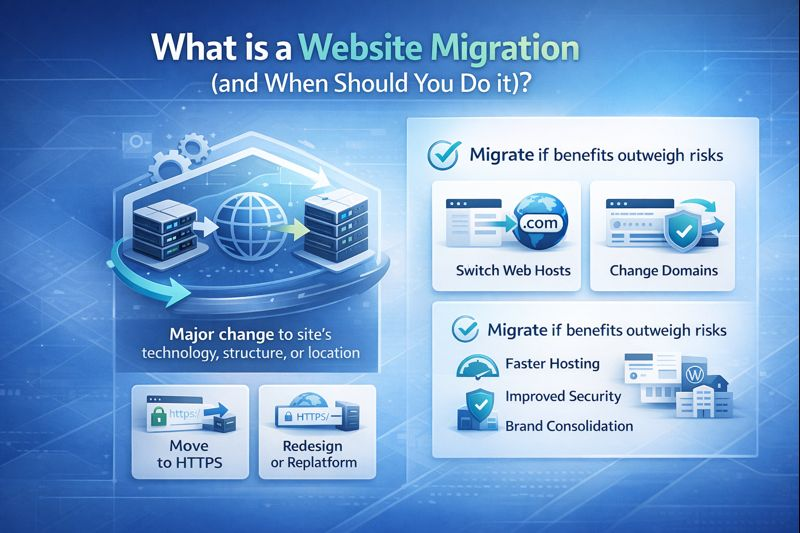
A website migration is a significant change to a site’s technology, structure, content, or location that can affect search visibility and traffic.
Common scenarios include switching web hosts, changing domains, moving to HTTPS, redesigning or replatforming (e.g., to WordPress), and merging sites.
Migrate when benefits outweigh risks faster hosting, better UX, improved security, or brand consolidation.
Types of Website Migrations (Know Your Scope)
- Host migration: moving to a new web hosting provider without changing URLs.
- Domain migration: changing example.com to newdomain.com (requires 301s and GSC Change of Address).
- Protocol migration: HTTP to HTTPS (SSL/TLS, mixed content fixes).
- Platform/CMS migration: e.g., custom CMS to WordPress (template, taxonomy, permalink changes).
- Design/architecture changes: navigation, categories, pagination, internal linking shift.
- Content merges/splits: consolidating multiple sites or subdomains; moving blog to /blog/ or subdomain.
Smooth Website Migration Checklist – (Easy Guide)
1. Pre Migration Strategy and Benchmarks
- Define scope and success metrics: sessions, conversions, revenue, CWV, crawl errors.
- Freeze content and code changes 1–2 weeks pre‑launch.
- Inventory current site: export all URLs, templates, media, and internal links.
- Benchmark performance: GA4 traffic by page, Search Console queries, top landing pages, backlinks.
- Lower DNS TTL to 300 seconds at least 24–48 hours before launch for faster propagation.
- Create rollback plan: backups, old hosting access, DNS reversion steps, communication matrix.
2. Technical SEO Audit (Before You Move)
- Crawl the site (Screaming Frog/YouStable toolkit) to capture URLs, canonicals, directives, status codes.
- Export XML sitemaps and robots.txt rules for reference.
- Note canonical tags, hreflang, pagination rels, AMP/alternate links.
- Record Core Web Vitals, TTFB, caching headers, image sizes, JS/CSS weight, and third‑party scripts.
- Identify thin/duplicate pages to consolidate during migration rather than after.
3. Content and URL Mapping (Your SEO Lifeline)
Map every old URL to a single best new URL with a 301 redirect. Priority pages: top 20% by traffic, revenue, and links. Avoid redirect chains or loops. Keep permalink structures consistent when possible to reduce risk.
- One‑to‑one 301s for all indexed pages.
- Consolidate near-duplicates to the strongest canonical URL.
- Update internal links in the new build to point directly to final destinations (not redirected URLs).
- Prepare media and file redirects (/images/, /pdfs/).
4) Staging Environment, Backups, and Security
- Spin up a staging site on the new host (password protected, noindex).
- Full backup: files + database + media. Verify restore works.
- Install SSL certificates on staging and production; plan auto‑renewal.
- Harden WordPress: strong admin credentials, least‑privilege users, WAF, bot protection, and daily backups.
5. Performance Setup (Hosting, CDN, Caching)
- Choose hosting sized for your traffic and stack: managed WordPress, VPS, or cloud.
- Enable CDN for static assets; configure origin pull and cache TTLs.
- Server optimization: PHP 8.x, HTTP/2 or HTTP/3, OPcache, Brotli, GZIP, object caching (Redis).
- Image optimization: WebP/AVIF, responsive srcset, lazy load.
- Minify and defer non critical JS; preload critical CSS and fonts.
Tip: YouStable offers free expert migrations on eligible plans, staging environments, LiteSpeed/Redis caching, and integrated SSL/CDN to simplify zero‑downtime moves.
6. QA on Staging (Don’t Skip This)
- Validate templates, navigation, search, cart/checkout, forms, and login flows.
- Ensure canonical tags, hreflang, meta robots, and structured data match intent.
- Check pagination, faceted navigation, category filters, and parameter handling.
- Review 404 page usability and server headers.
- Run CWV tests (LCP, INP, CLS) on key templates.
Launch Day Checklist (Production Cutover)
- Put site in maintenance mode if needed and pause auto‑deployments.
- Migrate database and uploads; update environment variables and database connection strings.
- Implement the full 301 redirect map at server level (preferred for speed and reliability).
- Remove noindex from production; keep staging blocked via password and robots.
- Switch DNS to the new host after a final smoke test and confirm SSL is active.
- Resubmit XML sitemaps in Google Search Console and Bing Webmaster Tools.
- Trigger GSC Change of Address (domain migrations only).
- Verify analytics/ads tracking (GA4, conversions, tags, pixels).
Example 301 Redirect Rules
# Apache (.htaccess)
RewriteEngine On
# Force HTTPS
RewriteCond %{HTTPS} !=on
RewriteRule ^(.*)$ https://%{HTTP_HOST}/$1 [R=301,L]

# Redirect old page to new URL
Redirect 301 /old-category/old-page/ https://example.com/new-category/new-page/

# Redirect entire directory
RewriteRule ^old-blog/(.*)$ https://example.com/blog/$1 [R=301,L]
# Nginx (server block)
# Force HTTPS
if ($scheme = http) {
return 301 https://$host$request_uri;
}
# Single redirect
rewrite ^/old-category/old-page/?$ https://example.com/new-category/new-page/ permanent;
# Directory redirect
rewrite ^/old-blog/(.*)$ https://example.com/blog/$1 permanent;Post Migration QA and SEO Validation
- Crawl the new site and compare to your pre‑migration crawl (status codes, canonicals, title/meta parity).
- Spot‑check top pages for design/UX parity and conversion tracking.
- Verify 301s are direct (no chains) and that internal links don’t hit redirected URLs.
- Fix mixed content, non‑secure assets, and incorrect canonical/hreflang references.
- Monitor Search Console: coverage, Page Experience, CWV, and crawl stats.
- Watch server logs for spikes in 404/5xx, and address quickly.
Protecting SEO: What Matters Most
- Redirect fidelity: 1:1, status 301, no chains/loops.
- Content parity: titles, headings, copy, internal links, and structured data preserved.
- Information architecture: navigation and URL structure kept consistent where possible.
- Indexation control: correct robots.txt rules and meta robots; block only what should be blocked.
- Speed and stability: equal or better performance after launch; maintain uptime.
Robots, Sitemaps, and Caching: Common Gotchas
- Staging left indexable: always protect with basic auth and noindex.
- Robots.txt blocking CSS/JS: can harm rendering; allow essential assets.
- Old sitemaps still live: update and resubmit new sitemaps in GSC/Bing.
- Cache conflicts: purge CDN and server caches after go‑live to serve fresh pages.
- Canonical tag drift: ensure canonicals match the live URL scheme and host.
Robots Examples
# Staging robots.txt (in addition to password protection)
User-agent: *
Disallow: /
# Production robots.txt
User-agent: *
Disallow: /wp-admin/
Allow: /wp-admin/admin-ajax.php
Sitemap: https://example.com/sitemap.xmlZero Downtime Tips for WordPress Site Migration
- Lower TTL to 300 seconds ahead of time and schedule cutover during low traffic hours.
- Use a content freeze window; for ecommerce/forums, run a short maintenance window to sync final orders/posts.
- Keep old server online for 48–72 hours; serve a maintenance banner only if necessary.
- Verify new host has sufficient PHP workers and database resources to handle peak load.
Mistakes to Avoid (From 12+ Years of Migrations)
- Changing too many things at once: host + domain + design + IA increases risk exponentially.
- Skipping a complete URL map: orphaned pages and link equity loss.
- Launching without backups and rollback: even experts need a parachute.
- Leaving redirects in the CMS only: server‑level 301s are faster and more reliable.
- Forgetting analytics and conversion tracking: lost data = lost decisions.
Essential Tools for a Smooth Website Migration
- Crawlers: Screaming Frog, Sitebulb, YouStable Site Audit.
- Log analysis: GoAccess, server logs, GSC crawl stats.
- Performance: PageSpeed Insights, Lighthouse, WebPageTest.
- Monitoring: UptimeRobot, Better Stack, server resource monitors.
- Redirect testing: httpstatus.io, curl, Chrome DevTools.
- Security: SSL Labs, WAF, malware scanning.
How YouStable Helps You Migrate Safely
As a hosting provider built for performance, YouStable offers free expert migrations on eligible plans, staging environments, managed SSL, and LiteSpeed/Redis acceleration. Our engineers validate 301 maps, configure CDN and caching, and stay with you through DNS cutover and post‑launch monitoring—so you keep rankings and load faster on day one.
FAQ’s
How do I migrate a website without losing SEO?
Audit the current site, map every URL to a single destination, implement server‑level 301s, keep content and metadata parity, update internal links, and resubmit sitemaps. Monitor Search Console, fix 404s quickly, and maintain performance. A disciplined website migration checklist reduces volatility and preserves rankings.
How long does a website migration take?
Small sites can take 1–2 weeks end‑to‑end; complex ecommerce or replatforming projects run 4–8+ weeks. The critical path is planning (audits, mapping) and QA. DNS propagation is usually minutes to a few hours if you lower TTL in advance, but allow up to 24–48 hours globally.
What’s the difference between domain migration and host migration?
Host migration moves your site to a new server with URLs unchanged—lower SEO risk. Domain migration changes the hostname (example.com to newdomain.com) and requires 301s and a Change of Address in Search Console—higher SEO impact and more monitoring.
Should I pause ads during migration?
Yes, during the cutover window. Pausing paid campaigns prevents wasted spend from broken URLs or tracking. After QA indicates stable 301s and tracking, re‑enable ads and update destination URLs to the final canonical versions.
What if traffic dips after migration?
Temporary fluctuations are common. Compare pre/post benchmarks, check coverage and crawl stats in GSC, fix 404s and redirect chains, verify canonicals and sitemaps, and improve performance. If issues persist beyond 2–4 weeks, reassess URL mapping and internal linking or engage a migration specialist.
Conclusion
A smooth website migration is about discipline: audit, map, stage, test, launch, and monitor. Follow this step‑by‑step website migration checklist to protect SEO and UX, and choose reliable hosting with expert support. If you want white‑glove help, YouStable’s migration team can guide you from planning to post‑launch success.



