A Servlet in Java is a server side component that extends a web server’s capabilities to handle HTTP requests and generate dynamic responses. Running inside a servlet container like Apache Tomcat, a Java Servlet processes request data, executes business logic, and returns HTML, JSON, or other content, forming the backbone of many Java web applications.
If you’re new to web development in Java, understanding what a servlet is and how it works will help you grasp the foundation of Jakarta EE (formerly Java EE) web apps. In this guide, I’ll explain servlets in plain language, show a working example, clarify the servlet lifecycle, and share deployment tips drawn from real hosting experience.
What Is a Servlet in Java?
A Java Servlet is a class that responds to requests from a web client (typically via HTTP) and runs inside a servlet container. The container manages the servlet’s lifecycle, initialization, request handling, and destruction and provides APIs to read request parameters, manage sessions, set response headers, and write output.
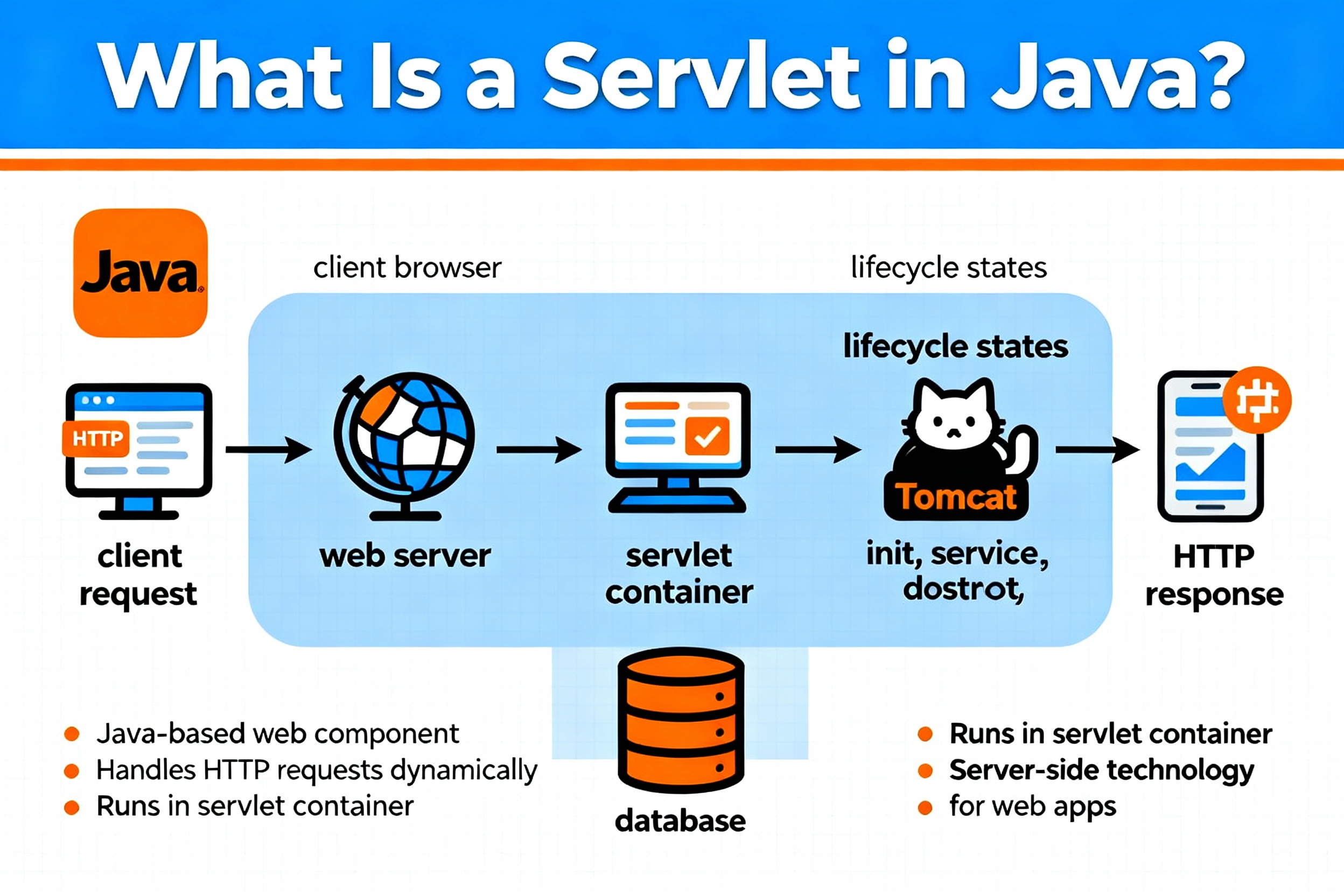
Modern servlets typically extend HttpServlet and override methods like doGet() and doPost(). You can configure servlets via annotations (for example, @WebServlet) or via a deployment descriptor (web.xml), then deploy the application as a WAR to a servlet container such as Tomcat or Jetty.
How Java Servlets Work (Request Response Model)
Servlets implement a simple but powerful pattern:
- The client (browser or API client) sends an HTTP request to the server.
- The servlet container maps the URL to a servlet.
- The servlet reads request data, executes logic, accesses databases or services, and prepares a response.
- The container sends the response (HTML, JSON, files, etc.) with proper headers and status codes.
The Servlet Lifecycle: init, service, destroy
The lifecycle is core to servlet behavior:
- init(): Called once when the servlet is first loaded. Use it to read configuration and initialize resources (e.g., connection pools).
- service(): Invoked for every request. For
HttpServlet, the container delegates todoGet(),doPost(),doPut(), etc. - destroy(): Called once before the servlet is removed. Release resources and close connections here.
Threading and Thread Safety
Servlet containers create one servlet instance and handle multiple requests using threads. That means:
- Do not store request specific data in instance fields; prefer local variables.
- Use thread safe structures for shared state or leverage container managed resources.
- Avoid synchronized blocks on high traffic code paths; consider pools and stateless design.
Key Servlet API Components
HttpServlet, ServletConfig, and ServletContext
HttpServlet is the base class for HTTP based servlets. You override doGet() for reads, doPost() for form submissions, and others for REST like operations.
ServletConfig provides servlet specific initialization parameters. ServletContext is application wide and lets you share data and access resources across servlets.
Request, Response, Headers, and Status Codes
Using HttpServletRequest, you can read parameters, headers, cookies, and the request body. With HttpServletResponse, you set status codes (like 200, 404, 500), headers (like Cache-Control, Content-Type), cookies, and write the response body via getWriter() or getOutputStream().
Filters and Listeners
Servlet Filters wrap requests before and after they hit your servlet. They’re ideal for logging, authentication, compression, and CORS. Listeners react to lifecycle events (session creation, attribute changes) and are handy for metrics and housekeeping.
Writing Your First Servlet (Step by Step)
Project Setup
You can build with Maven or Gradle. Use the Jakarta Servlet API for modern servers (package jakarta.servlet). Older containers use javax.servlet. For Tomcat 10+, use jakarta.servlet.
// Maven dependency (Jakarta Servlet API)
<dependency>
  <groupId>jakarta.servlet</groupId>
  <artifactId>jakarta.servlet-api</artifactId>
  <version>6.0.0</version>
  <scope>provided</scope>
</dependency>
Example: A Simple HttpServlet
package com.example.web;

import java.io.IOException;
import java.io.PrintWriter;
import jakarta.servlet.ServletException;
import jakarta.servlet.annotation.WebServlet;
import jakarta.servlet.http.HttpServlet;
import jakarta.servlet.http.HttpServletRequest;
import jakarta.servlet.http.HttpServletResponse;

@WebServlet(name = "HelloServlet", urlPatterns = {"/hello"})
public class HelloServlet extends HttpServlet {

    @Override
    public void init() throws ServletException {
        // Initialize resources such as caches or service clients
        // Runs once when the servlet is first loaded
    }

    @Override
    protected void doGet(HttpServletRequest request, HttpServletResponse response)
            throws ServletException, IOException {

        response.setContentType("text/html; charset=UTF-8");
        response.setStatus(HttpServletResponse.SC_OK);

        String name = request.getParameter("name");
        if (name == null || name.isBlank()) {
            name = "World";
        }

        try (PrintWriter out = response.getWriter()) {
            out.println("<!DOCTYPE html>");
            out.println("<html><head><title>Hello Servlet</title></head>");
            out.println("<body><h1>Hello, " + name + "!</h1></body></html>");
        }
    }

    @Override
    public void destroy() {
        // Clean up resources before shutdown
    }
}
Access the servlet at http://localhost:8080/your-app/hello?name=Developer. This shows the request–response cycle and how parameters are read and responses are written.
Mapping via web.xml (Optional)
<web-app xmlns="https://jakarta.ee/xml/ns/jakartaee"
         xmlns:xsi="http://www.w3.org/2001/XMLSchema-instance"
         xsi:schemaLocation="https://jakarta.ee/xml/ns/jakartaee
             https://jakarta.ee/xml/ns/jakartaee/web-app_6_0.xsd"
         version="6.0">

    <servlet>
        <servlet-name>HelloServlet</servlet-name>
        <servlet-class>com.example.web.HelloServlet</servlet-class>
    </servlet>

    <servlet-mapping>
        <servlet-name>HelloServlet</servlet-name>
        <url-pattern>/hello</url-pattern>
    </servlet-mapping>

</web-app>
Deploying to Apache Tomcat
Package your app as a WAR (mvn package) and drop it into Tomcat’s webapps/ directory. Start Tomcat and hit the mapped URL. For production, tune memory, enable HTTPS, and configure logging and access controls.
Common Use Cases and Patterns
MVC with Servlets and JSP
A classic approach is using servlets as the Controller, Java classes as the Model, and JSP as the View. The servlet handles requests, updates the model, then forwards to a JSP for rendering:
- Servlet gets data and sets attributes:
request.setAttribute("items", list). - Forward with
RequestDispatcherto a JSP. - JSP renders HTML using JSTL and EL.
Sessions, Cookies, and Authentication
HttpSession stores user specific data across requests. Cookies track session IDs; you can harden them with HttpOnly and Secure. For authentication, use container managed security, filters, or integrate with frameworks like Spring Security or Jakarta Security.
File Uploads and REST Endpoints
Use @MultipartConfig on servlets to handle file uploads. For REST APIs, you can implement doGet(), doPost(), doPut(), doDelete(), and respond with JSON. For complex APIs, consider JAX-RS (Jakarta RESTful Web Services) or Spring MVC.
Servlets vs JSP vs Spring MVC vs Jakarta EE
When to Use Which
Each technology fits different needs:
- Servlets: Low level control, minimal dependencies, great for learning, small services, or performance critical endpoints.
- JSP: View technology that pairs well with servlets for server rendered HTML; better replaced by modern templating engines in many cases.
- Spring MVC: Higher level framework with robust features, DI/IoC, validation, data binding, security integration, ideal for complex apps.
- Jakarta EE: Standardized platform (Servlets, CDI, JPA, JAX-RS) supported by multiple vendors; good for enterprise consistency and portability.
If you’re building from scratch and need rapid development, Spring MVC or Jakarta EE stacks often accelerate delivery. Servlets remain foundational and are excellent for teaching core web concepts and building lightweight endpoints.
Best Practices for Reliable, Fast Servlets
Security Essentials
Security must be built in from day one:
- Validate and sanitize inputs to prevent XSS, SQLi, and header injection.
- Use HTTPS everywhere; set HSTS and secure cookies.
- Protect against CSRF with tokens; limit methods to intended verbs.
- Least privilege on database users and file access; never hardcode secrets.
Performance and Scalability
From hosting to code, optimize end to end:
- Connection pooling with a reliable pool (e.g., HikariCP).
- Caching for expensive queries or rendered fragments; send proper cache headers.
- Compression (GZIP/Brotli) at the server/proxy layer.
- Non blocking I/O or async servlets for long running tasks where supported.
- Stateless design to scale horizontally; limit session size and use sticky sessions only when necessary.
Logging, Monitoring, and Observability
Use structured logging (JSON) and propagate request IDs. Monitor with JMX, Prometheus, or vendor tools. Track latency, error rates, GC pauses, and thread pool saturation. Log at appropriate levels and avoid logging sensitive data.
Hosting and Deployment Considerations
Where you host your servlet application impacts performance, security, and uptime. Consider the following when choosing infrastructure for Tomcat or any servlet container:
- Environment: Shared hosting is budget friendly but limited. A VPS or cloud instance gives you root control, better isolation, and tuning flexibility.
- Resources: Size CPU/RAM for peak load; monitor and autoscale if possible.
- Networking: Put a reverse proxy (Nginx/Apache) in front for TLS, compression, and HTTP/2/3.
- Reliability: Backups, snapshots, and multi AZ architecture reduce downtime risk.
- Security: Managed firewalls, DDoS protection, and regular patching are essential.
At YouStable, we help teams deploy Java Servlet apps on optimized VPS and cloud instances with SSD/NVMe storage, dedicated resources, free SSL, and daily backups. If you need managed Tomcat setups, we can harden your stack, configure monitoring, and assist with continuous delivery without vendor lock‑in.
Troubleshooting Tips
- 404 Not Found: Check URL mappings (
@WebServletorweb.xml) and context path. - 405 Method Not Allowed: Ensure the correct HTTP method is implemented (e.g.,
doPost()for POST). - 500 Internal Server Error: Inspect logs in
catalina.outor your logging framework; handle exceptions and set meaningful status codes. - Encoding issues: Specify
response.setContentType("text/html; charset=UTF-8")and set request encoding if needed. - ClassNotFound: Match API versions (jakarta vs javax) to your container version.
FAQs
What is a Servlet in Java?
A servlet is a Java class that runs inside a servlet container to handle HTTP requests and produce dynamic responses. It’s the foundation of many Java web applications and powers frameworks like Spring MVC and Jakarta EE components.
What is the servlet lifecycle?
The lifecycle has three main phases: init() (initialize once), service() (handle each request, typically via doGet()/doPost()), and destroy() (cleanup once before removal).
What is the difference between Servlet and JSP?
Servlets are Java classes for request handling and control logic. JSP is a server side templating technology primarily for views. In MVC, servlets act as controllers and JSP renders HTML. Many teams now use modern templating or single page apps instead of JSP.
How do I deploy a servlet application?
Package your application as a WAR, place it in your servlet container’s deployment directory (e.g., Tomcat’s webapps/), and start the server. Map URLs via annotations or web.xml. For production, add HTTPS, logging, and resource tuning.
Is servlet still used, or should I learn Spring instead?
Servlets are still relevant they’re the core HTTP engine behind many Java web frameworks. Learning servlets helps you understand the web stack. For large projects, Spring MVC or Jakarta EE offers higher level abstractions and faster development.
What is a servlet container?
A servlet container (e.g., Apache Tomcat, Jetty, Undertow) manages servlet lifecycle, threading, request routing, and the Servlet API implementation. It’s part of, or integrated with, your Java application server.
Are servlets thread safe?
Servlets are multi threaded by default. A single servlet instance serves many requests concurrently. Avoid shared mutable state in instance fields. Use local variables, thread safe collections, or container managed resources to ensure thread safety.
Conclusion
Understanding servlets in Java gives you a strong foundation for building reliable web applications. Whether you stay close to the metal with pure servlets or adopt frameworks like Spring, the servlet model remains the bedrock of Java web development.
When you’re ready to deploy, choose a tuned, secure environment, like a managed VPS from YouStable, to keep your apps fast and resilient.