

To set up a load balancer on a Linux server, choose an L4 or L7 solution (HAProxy, Nginx, or LVS), install it, define backend pools and health checks, enable SSL and logging, open firewall ports, and test failover and scaling. Below is a step-by-step guide for Ubuntu/RHEL using Nginx, HAProxy, and Keepalived.
In this guide, you’ll learn how to setup load balancer on Linux server the right way—covering Nginx (Layer 7), HAProxy (Layer 4/7), and optional high availability with Keepalived. We’ll walk through architecture planning, installation, configuration, SSL termination, health checks, performance tuning, and troubleshooting, using clear, beginner-friendly steps.
What is a Load Balancer and Why it Matters?
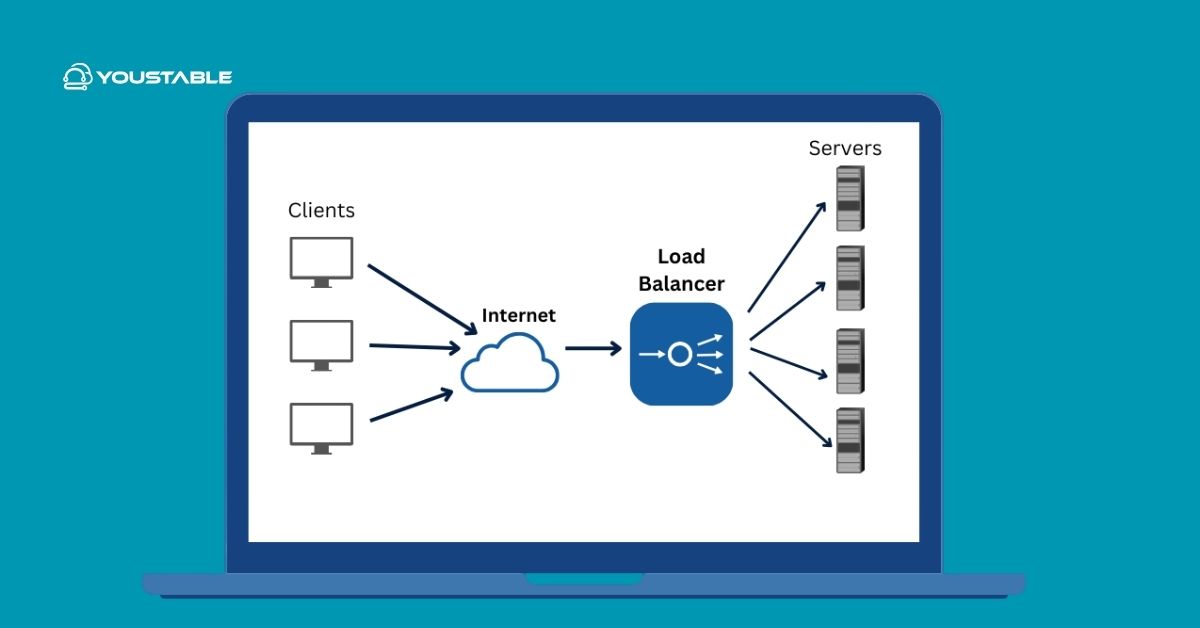
A load balancer distributes incoming traffic across multiple backend servers to improve availability, performance, and scalability. It prevents any single server from becoming a bottleneck, provides graceful failover, and enables rolling updates—essential for modern web apps, APIs, and eCommerce sites.
L4 vs L7 Load Balancing (Quick Comparison)
- Layer 4 (Transport): Routes by IP/port using TCP/UDP. Very fast, low overhead. Great for raw TCP, TLS passthrough, and high throughput.
- Layer 7 (Application): Routes by HTTP headers, URLs, cookies, or hostnames. Supports content-based rules, header rewrites, caching, and SSL termination.
Popular Open-Source Options
- Nginx: Excellent L7 reverse proxy for HTTP/HTTPS, simple config, SSL termination, static file offload.
- HAProxy: High-performance L4/L7 proxy, advanced health checks, stickiness, rich observability.
- LVS/IPVS (with Keepalived): Kernel-level L4 load balancing for massive throughput, commonly paired with Keepalived for VRRP floating IPs.
Prerequisites and Architecture Planning
System and Network Requirements
- Linux server (Ubuntu 22.04+/20.04+ or RHEL/CentOS/Rocky 8/9).
- Public IP or private IP behind a firewall/load balancer as needed.
- Two or more backend app servers (e.g., 10.0.0.11, 10.0.0.12).
- Root/sudo access, package manager (apt, dnf, or yum), and a domain (e.g., example.com).
DNS and SSL Considerations
- Point your domain (A/AAAA) to the load balancer’s IP.
- Use Let’s Encrypt for SSL termination on the load balancer or pass-through to backends if apps handle TLS.
- Plan redirects (HTTP to HTTPS) and HSTS if required.
Security and Firewall
- Open only necessary ports: 80 (HTTP), 443 (HTTPS), 8404/8405 for HAProxy stats if needed.
- Allow internal traffic from LB to backends on app ports (e.g., 80/8080/9000).
- Harden SSH, keep packages updated, and enable logging.
Option 1: Set Up Nginx as a Layer 7 Load Balancer
Install Nginx
# Ubuntu/Debian
sudo apt update && sudo apt install -y nginx

# RHEL/Rocky/CentOS
sudo dnf install -y epel-release
sudo dnf install -y nginx
sudo systemctl enable --now nginx
Create Upstream and Server Blocks
Define a backend pool and a frontend server block. Nginx Open Source supports passive health checks via max_fails and fail_timeout.
sudo nano /etc/nginx/conf.d/lb.conf

# Example HTTP load balancer
upstream app_pool {
    server 10.0.0.11:80 max_fails=3 fail_timeout=10s;
    server 10.0.0.12:80 max_fails=3 fail_timeout=10s;
    # Optional: ip_hash; # for sticky sessions
}

server {
    listen 80;
    server_name example.com www.example.com;

    # Redirect HTTP to HTTPS (if terminating TLS)
    return 301 https://$host$request_uri;
}

# HTTPS frontend (after obtaining certs)
server {
    listen 443 ssl http2;
    server_name example.com www.example.com;

    ssl_certificate     /etc/letsencrypt/live/example.com/fullchain.pem;
    ssl_certificate_key /etc/letsencrypt/live/example.com/privkey.pem;

    location / {
        proxy_pass http://app_pool;
        proxy_set_header Host $host;
        proxy_set_header X-Real-IP $remote_addr;
        proxy_set_header X-Forwarded-For $proxy_add_x_forwarded_for;
        proxy_set_header X-Forwarded-Proto https;
        proxy_read_timeout 60s;
        proxy_connect_timeout 5s;
        proxy_send_timeout 60s;
    }
}
Obtain SSL Certificates (Let’s Encrypt)
# Ubuntu/Debian
sudo apt install -y certbot python3-certbot-nginx
sudo certbot --nginx -d example.com -d www.example.com

# RHEL/Rocky/CentOS
sudo dnf install -y certbot python3-certbot-nginx
sudo certbot --nginx -d example.com -d www.example.com
Reload and test Nginx after configuration updates.
sudo nginx -t
sudo systemctl reload nginx
Nginx Notes and Tips
- For active health checks, Nginx Plus or third-party modules are required.
- Use ip_hash for cookie-less sticky sessions, or set app-level cookies for better control.
- Enable gzip and caching if serving static content alongside proxying.
Option 2: Set Up HAProxy (Layer 4/7) for High Performance
Install HAProxy
# Ubuntu/Debian
sudo apt update && sudo apt install -y haproxy

# RHEL/Rocky/CentOS
sudo dnf install -y haproxy
sudo systemctl enable --now haproxy
Configure Frontends, Backends, Health Checks, and Stickiness
Below is a robust HAProxy configuration for HTTP/HTTPS with health checks, sticky sessions, and a stats dashboard.
sudo nano /etc/haproxy/haproxy.cfg

global
  log /dev/log local0
  log /dev/log local1 notice
  maxconn 50000
  user haproxy
  group haproxy
  daemon
  tune.ssl.default-dh-param 2048

defaults
  log global
  mode http
  option httplog
  option dontlognull
  timeout connect 5s
  timeout client  60s
  timeout server  60s
  timeout http-request 10s
  retries 3

# HTTP frontend (redirect to HTTPS)
frontend fe_http
  bind *:80
  acl host_example hdr(host) -i example.com www.example.com
  http-request redirect scheme https code 301 if host_example
  default_backend be_app

# HTTPS frontend with TLS termination
frontend fe_https
  bind *:443 ssl crt /etc/ssl/private/example-com.pem
  mode http
  default_backend be_app

# Backend with health checks and stickiness
backend be_app
  mode http
  balance roundrobin
  option httpchk GET /health
  http-check expect rstatus 2xx
  cookie SRV insert indirect nocache
  server app1 10.0.0.11:80 check cookie app1
  server app2 10.0.0.12:80 check cookie app2

# Optional: Stats page
listen stats
  bind :8404
  mode http
  stats enable
  stats uri /stats
  stats refresh 5s
  stats auth admin:StrongPassword!
Generate or import your certificate in PEM format for HAProxy (full chain + key). Then reload:
sudo haproxy -c -f /etc/haproxy/haproxy.cfg
sudo systemctl reload haproxy
Enable Logging and Firewall Rules
# UFW (Ubuntu)
sudo ufw allow 80/tcp
sudo ufw allow 443/tcp
sudo ufw allow 8404/tcp   # optional stats
sudo ufw reload

# firewalld (RHEL/Rocky)
sudo firewall-cmd --add-service=http --permanent
sudo firewall-cmd --add-service=https --permanent
sudo firewall-cmd --add-port=8404/tcp --permanent
sudo firewall-cmd --reload
Optional: High Availability with Keepalived (VRRP Floating IP)
To avoid a single point of failure, deploy two load balancer nodes using Keepalived for an automatic failover via VRRP and a shared virtual IP (VIP).
Install and Configure Keepalived on Both Nodes
# Ubuntu/Debian
sudo apt install -y keepalived

# RHEL/Rocky/CentOS
sudo dnf install -y keepalived

sudo nano /etc/keepalived/keepalived.conf

# Node 1 (MASTER)
vrrp_instance VI_1 {
  state MASTER
  interface eth0
  virtual_router_id 51
  priority 200
  advert_int 1
  authentication {
    auth_type PASS
    auth_pass StrongPass123
  }
  virtual_ipaddress {
    10.0.0.100/24 dev eth0
  }
}

# Node 2 (BACKUP) - change state to BACKUP, lower priority
vrrp_instance VI_1 {
  state BACKUP
  interface eth0
  virtual_router_id 51
  priority 100
  advert_int 1
  authentication {
    auth_type PASS
    auth_pass StrongPass123
  }
  virtual_ipaddress {
    10.0.0.100/24 dev eth0
  }
}

sudo systemctl enable --now keepalived
Test VRRP Failover
- Point DNS to the VIP (10.0.0.100).
- Stop HAProxy/Nginx on the MASTER or shut it down; the BACKUP should assume the VIP within seconds.
- Verify minimal downtime and that sessions continue unless app-level state is not shared.
Performance Tuning and Best Practices
Key Settings to Review
- Timeouts: Keep client/server timeouts tight but realistic (e.g., 30–60s for HTTP).
- Connection Limits: Tune maxconn (HAProxy) and worker_processes/worker_connections (Nginx) to match CPU and memory.
- Buffers and Compression: Enable gzip for text assets; avoid compressing already compressed files.
- TLS: Use modern ciphers, HTTP/2, OCSP stapling; offload TLS at the LB when appropriate.
Sticky Sessions vs. Stateless Design
- Stickiness (cookies or ip_hash) helps stateful apps (session in memory), but complicates scaling and failover.
- Prefer stateless apps with external session stores (Redis, database) for resilient scaling.
Observability: Metrics, Logs, and Alerts
- Enable HAProxy stats (/stats) or Prometheus exporters; for Nginx, use stub_status or third-party exporters.
- Ship logs to a central system (Elastic, Loki, or a managed service) and set SLO-based alerts (errors, latency, health check failures).
- Load test with tools like k6, wrk, or JMeter before going live.
Nginx vs HAProxy vs LVS: Which Should You Choose?
- Nginx (L7): Best for web apps, caching, header rewrites, and simple HTTP routing. Easy SSL termination.
- HAProxy (L4/L7): Best for advanced health checks, high concurrency, stickiness, and observability. Excellent general-purpose choice.
- LVS/IPVS (L4): Best for ultra-high throughput and low latency at scale; often combined with Keepalived, but requires deeper network expertise.
Troubleshooting Checklist
Common Issues and Fixes
- 502/504 Errors: Check backend health endpoints, upstream server ports, and timeouts.
- SSL Handshake Failures: Validate cert/key paths, permissions, and full chain presence.
- Sticky Sessions Not Working: Ensure cookie settings align with domain and HTTPS; confirm ip_hash or cookie policies.
- High Latency: Review DNS/TLS, enable keep-alive, scale backends, and tune buffers/timeouts.
- Failover Not Triggering: Validate Keepalived priorities, interface names, and VRRP multicast permissions on the network.
When to Choose Managed Load Balancing
If you prefer to offload configuration, scaling, monitoring, and 24/7 response, consider a managed solution. At YouStable, our engineers can provision optimized VPS or Dedicated Servers with HAProxy/Nginx pre-tuned, set up VRRP for high availability, and monitor your stack so your apps stay fast and resilient.
Step-by-Step Quick Start Summary
- Pick your load balancer: Nginx (L7) or HAProxy (L4/L7).
- Install the package, open firewall ports, and enable the service.
- Define backend servers, health checks, and routing rules.
- Enable SSL termination or passthrough; test with curl and browser.
- Optional: Add Keepalived for a floating VIP and failover.
- Monitor metrics/logs, then load test and tune.
With the steps above, you can confidently deploy a robust, secure load balancer on Linux. If you want a team to handle the design, HA configuration, and ongoing monitoring, YouStable can architect and manage it end to end—so you can focus on your application, not the plumbing.
FAQs: Load Balancer on Linux Server
Is a reverse proxy the same as a load balancer?
A reverse proxy forwards client requests to one or more backend servers. A load balancer is a type of reverse proxy that distributes traffic across multiple servers and includes health checks, failover, and balancing algorithms. Many tools (Nginx, HAProxy) act as both.
Which is better for Linux load balancing: Nginx or HAProxy?
Nginx excels at Layer 7 HTTP features and static content, while HAProxy shines at high-performance L4/L7 proxying, advanced health checks, and observability. For most web apps, HAProxy offers more granular control; Nginx is excellent if you also need web serving and rewrites.
How do I enable sticky sessions for my application?
In Nginx, use ip_hash or cookies managed by the application. In HAProxy, use cookie-based persistence in the backend (cookie insert) or source hashing. For reliability, prefer stateless sessions with a shared store (Redis) and avoid stickiness when possible.
Can I load balance TCP and UDP traffic on Linux?
Yes. HAProxy supports TCP (and limited UDP via the QUIC/HTTP3 stack), and LVS/IPVS provides high-performance L4 balancing for TCP/UDP. Nginx stream module can proxy TCP/UDP as well. Choose based on protocol needs and performance goals.
Do I need two load balancers for high availability?
For production, yes. Use two LBs with Keepalived (VRRP) or a cloud-managed load balancer to avoid single-point failures. A floating virtual IP or anycast/DNS-based methods can provide failover with minimal downtime.


