

To fix TLS on a Linux server, verify your certificate and full chain, confirm the private key matches, enable TLS 1.2/1.3 with modern ciphers, correct Nginx/Apache settings, sync system time, then reload services.
Test with openssl s_client, curl, and SSL Labs. Renew or reinstall via Certbot if the certificate is expired or misconfigured. If you need to fix TLS on a Linux server, you’re likely dealing with HTTPS errors, handshake failures, or browser warnings.
This guide walks you through a fast incident checklist and a deeper, systematic approach to solve TLS issues on Nginx or Apache, using OpenSSL, Certbot, and proven production hardening practices.
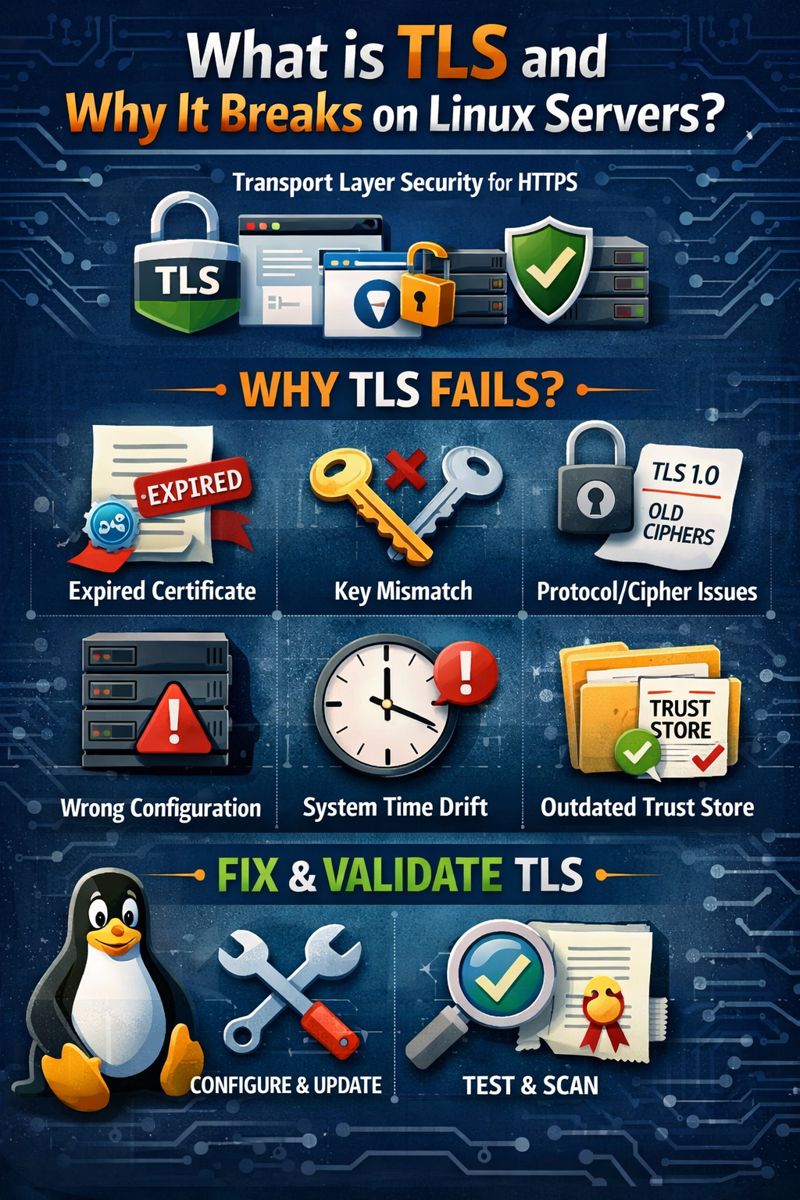
What is TLS and Why it Breaks on Linux Servers?
TLS (Transport Layer Security) is the protocol securing HTTPS.
It can fail due to an expired or broken certificate chain, a key mismatch, unsupported protocols/ciphers, wrong server configuration, time drift, or outdated system trust stores.
Fixing TLS means addressing these layers, then validating with proper tools.
Quick Incident Checklist (Use This First)
- Check expiry: Is the certificate expired or near expiry?
- Verify chain: Does the site present the full chain (server + intermediate CA)?
- Match key: Does the private key match the certificate?
- Protocols: Only TLS 1.2/1.3 enabled; legacy versions disabled.
- Ciphers: Use modern, secure ciphers; avoid weak suites.
- Time: Ensure NTP/chrony is syncing; no clock drift.
- Config test: Validate Nginx/Apache config, then reload.
- Test: Use openssl s_client, curl -v, and SSL Labs.
Common TLS Errors and What They Mean
- ERR_SSL_PROTOCOL_ERROR / “wrong version number”: Protocol mismatch or a non-TLS listener behind port 443.
- Certificate verify failed: Broken chain, expired cert, or missing intermediate.
- Handshake failure / no shared cipher: Client and server have no overlapping protocol/cipher.
- Hostname mismatch: CN/SAN does not match the domain.
- Self signed or untrusted: Certificate not issued by a trusted CA or system trust store is outdated.
Diagnose TLS with OpenSSL and Curl
Start by enumerating the server’s presented certificate and chain, verification status, and supported protocols.
# Show certificate chain and verification
openssl s_client -connect example.com:443 -servername example.com -showcerts

# Force specific TLS versions to test compatibility
openssl s_client -connect example.com:443 -servername example.com -tls1_2
openssl s_client -connect example.com:443 -servername example.com -tls1_3

# Quick HTTP(S) check with verbose output
curl -Iv https://example.com

# List ciphers your OpenSSL supports (server config must overlap)
openssl ciphers -v | sort
Look for “Verify return code: 0 (ok)” and confirm the leaf cert CN/SAN matches your domain. If verification fails, your chain is likely incomplete or wrong.
Verify Certificate, Chain, and Private Key
Confirm your cert is valid, not expired, and the private key matches the certificate.
# Inspect certificate dates and SANs
openssl x509 -in /etc/ssl/certs/example.crt -noout -text | less

# Compare modulus of key and cert (hash should match)
openssl rsa -in /etc/ssl/private/example.key -noout -modulus | openssl md5
openssl x509 -in /etc/ssl/certs/example.crt -noout -modulus | openssl md5

# Combine full chain if your CA provided separate files
# fullchain.pem should contain: [leaf cert] + [intermediate(s)]
cat example.crt intermediate.crt > fullchain.pem
On Debian/Ubuntu, refresh trust store if needed:
sudo update-ca-certificatesOn RHEL/CentOS/Alma/Rocky:
sudo update-ca-trust extractFix TLS on Nginx
Ensure your server block references the correct certificate files and uses modern protocols/ciphers. Test config before reloading.
server {
    listen 443 ssl http2;
    server_name example.com www.example.com;

    ssl_certificate     /etc/letsencrypt/live/example.com/fullchain.pem;
    ssl_certificate_key /etc/letsencrypt/live/example.com/privkey.pem;
    # Trusted chain for OCSP (use your CA bundle)
    ssl_trusted_certificate /etc/letsencrypt/live/example.com/chain.pem;

    ssl_protocols TLSv1.2 TLSv1.3;
    ssl_prefer_server_ciphers off;

    # TLS 1.2 cipher suites (TLS 1.3 suites are implicit)
    ssl_ciphers 'ECDHE-ECDSA-AES256-GCM-SHA384:ECDHE-RSA-AES256-GCM-SHA384:
                 ECDHE-ECDSA-CHACHA20-POLY1305:ECDHE-RSA-CHACHA20-POLY1305:
                 ECDHE-ECDSA-AES128-GCM-SHA256:ECDHE-RSA-AES128-GCM-SHA256';

    # OCSP stapling
    ssl_stapling on;
    ssl_stapling_verify on;
    resolver 1.1.1.1 8.8.8.8 valid=300s; resolver_timeout 5s;

    add_header Strict-Transport-Security "max-age=31536000; includeSubDomains" always;

    root /var/www/html;
    index index.html index.php;

    location / {
        try_files $uri $uri/ =404;
    }
}

# Test and reload
sudo nginx -t && sudo systemctl reload nginx
Common Nginx pitfalls include pointing to the wrong key, using only the leaf certificate instead of fullchain.pem, or enabling deprecated protocols.
Fix TLS on Apache (httpd)
Apache requires the right cert paths and modern SSLProtocol/SSLCipherSuite. Use a vhost for port 443.
<VirtualHost *:443>
    ServerName example.com
    ServerAlias www.example.com
    DocumentRoot /var/www/html

    SSLEngine on
    SSLProtocol TLSv1.2 TLSv1.3
    SSLHonorCipherOrder off
    SSLCompression off

    SSLCertificateFile      /etc/letsencrypt/live/example.com/fullchain.pem
    SSLCertificateKeyFile   /etc/letsencrypt/live/example.com/privkey.pem
    # For OCSP stapling verification (Apache 2.4+)
    SSLCACertificateFile    /etc/letsencrypt/live/example.com/chain.pem

    SSLOpenSSLConfCmd Curves X25519:secp384r1
    SSLCipherSuite ECDHE-ECDSA-AES256-GCM-SHA384:ECDHE-RSA-AES256-GCM-SHA384:
                   ECDHE-ECDSA-CHACHA20-POLY1305:ECDHE-RSA-CHACHA20-POLY1305:
                   ECDHE-ECDSA-AES128-GCM-SHA256:ECDHE-RSA-AES128-GCM-SHA256

    # OCSP stapling
    SSLUseStapling on
    SSLStaplingResponderTimeout 5
    SSLStaplingReturnResponderErrors off
    SSLStaplingCache "shmcb:/var/run/ocsp(128000)"

    Header always set Strict-Transport-Security "max-age=31536000; includeSubDomains"
</VirtualHost>

# Test and reload
sudo apachectl configtest
sudo systemctl reload apache2    # Debian/Ubuntu
# or
sudo systemctl reload httpd      # RHEL/CentOS/Alma/Rocky
On Apache 2.4.8+, SSLCertificateFile commonly includes fullchain; older versions sometimes require a separate chain file. Always validate with a config test.
Renew or Repair Certificates with Let’s Encrypt (Certbot)
If the issue is expiry or a broken renewal, use Certbot to reinstall or renew and reload services.
# Install Certbot (examples)
sudo apt-get update && sudo apt-get install -y certbot python3-certbot-nginx
# or for Apache
sudo apt-get install -y certbot python3-certbot-apache

# Obtain/repair certificate
sudo certbot --nginx -d example.com -d www.example.com
# or
sudo certbot --apache -d example.com -d www.example.com

# Manual/standalone if necessary (bring down conflicting services)
sudo certbot certonly --standalone -d example.com

# Test auto-renew
sudo certbot renew --dry-run

# Check systemd timers
systemctl list-timers | grep certbot
Ensure file permissions allow the web server to read key files (typically 600 for keys, 644 for certs) and paths in your server config match Certbot’s live directory.
Enable TLS 1.2/1.3 and Use Modern Cipher Suites
- Allow only TLSv1.2 and TLSv1.3 for strong security and wide compatibility.
- Prefer ECDHE key exchange, AES-GCM and CHACHA20-POLY1305 ciphers.
- Disable SSLv3, TLSv1.0, and TLSv1.1.
- Avoid weak ciphers (RC4, 3DES, MD5, DSS) and compression.
Balance security with legacy client needs by testing with real user agents. Most modern browsers and APIs fully support TLS 1.2+.
Harden TLS: OCSP Stapling, HSTS, and Session Settings
- OCSP Stapling: Reduces client validation latency; ensure resolver and CA chain are correct.
- HSTS: Enforce HTTPS with Strict-Transport-Security. Only enable when your site is fully HTTPS across subdomains.
- Session resumption: Leave defaults on (tickets/caches) unless you have special compliance needs.
- HTTP/2 or HTTP/3: Gains performance without changing TLS fundamentals.
System-Level Fixes: Time, OpenSSL, and Trust Store
- Time sync: Use chrony or systemd-timesyncd. Certificates fail if clocks drift.
- OpenSSL version: Old libraries may lack TLS 1.3 or modern ciphers; update the OS if needed.
- Trust store: Update CA bundle so clients trust current roots and intermediates.
- Firewall/Proxy: Ensure port 443 is open and no non-TLS traffic is terminating on 443.
# Ensure NTP/chrony is active
timedatectl
sudo systemctl enable --now chrony || sudo systemctl enable --now systemd-timesyncd

# Check OpenSSL version
openssl version -a
Test Your Fix Thoroughly
- Local: openssl s_client -verify, curl -Iv.
- Enumerate ciphers: nmap –script ssl-enum-ciphers -p 443 example.com.
- External scans: SSL Labs (A/A+ target), Mozilla SSL Configuration Guidelines.
- Browsers: Test in Chrome, Firefox, mobile devices, and API clients.
# Nmap cipher enumeration (install nmap first)
nmap --script ssl-enum-ciphers -p 443 example.com
Special Scenarios and Pro Tips
- Behind a CDN/Load Balancer: Termination may happen at the edge. Configure TLS both on the edge and on the origin if using end-to-end encryption.
- Wildcard Certificates: Ensure SAN covers all subdomains you actually serve. Use DNS-01 challenges when needed.
- Key Rotation: If compromised or suspected, reissue certificates and replace keys immediately.
- Mixed Content: Even with valid TLS, browsers warn if HTTP assets load on HTTPS pages. Fix URLs or use Content-Security-Policy.
- Automation: Use systemd timers or cron with Certbot, and reload services after successful renewals.
When to Get Help (Managed Option)
If you’re short on time or running mission-critical workloads, a managed hosting provider can monitor, renew, and harden TLS for you. At YouStable, our engineers configure TLS 1.2/1.3, automate Let’s Encrypt, and continuously audit configurations so your Linux servers stay secure and compliant without downtime.
Step-by-Step Fix Summary
- Confirm certificate validity, hostname, and full chain.
- Validate private key matches the certificate.
- Enable only TLS 1.2/1.3 and modern ciphers in Nginx/Apache.
- Turn on OCSP stapling; consider HSTS after stable HTTPS.
- Sync system time; update OpenSSL and trust stores if outdated.
- Reload services and test with OpenSSL, curl, nmap, and external scanners.
FAQ’s – Fix TLS on Linux Server
1. How do I quickly check why my TLS is failing?
Run openssl s_client -connect yourdomain:443 -servername yourdomain -showcerts and review the verify return code, the served chain, and the certificate details. Use curl -Iv https://yourdomain for HTTP-level errors. These two commands usually pinpoint chain issues, hostname mismatches, or protocol problems.
2. Which TLS versions should I enable on Linux servers?
Enable TLS 1.2 and TLS 1.3 only. Disable SSLv3, TLS 1.0, and TLS 1.1. This gives strong security and compatibility with current browsers, APIs, and operating systems, while reducing risk from legacy protocols.
3. Do I need the full chain or just the leaf certificate?
You must present the full chain (leaf + intermediates) so clients can build trust to a root CA. In Nginx, use fullchain.pem. In Apache, SSLCertificateFile should include the full chain (or configure a separate chain file for older versions).
4. Why does my browser still warn after I fixed TLS?
Common causes include mixed content (HTTP assets on HTTPS pages), stale caches, HSTS preloading issues, or CDN edge not updated with the new certificate. Clear caches, update CDN/edge configuration, and verify all asset URLs load via HTTPS.
5. Is Let’s Encrypt reliable for production?
Yes. Let’s Encrypt is widely used in production. Automate renewals with Certbot, monitor expiry, and reload services on renewal. For advanced needs (wildcards, SANs, strict SLAs), consider a paid CA and managed TLS from providers like YouStable to reduce operational overhead.




