To fix SELinux on a Linux server, identify denials in audit logs, correct file labels with restorecon or semanage fcontext, adjust service booleans with setsebool, and only if necessary, create a minimal local policy using audit2allow.
Validate in permissive mode, then switch back to enforcing for full protection. If you’re wondering how to fix SELinux on Linux server environments without weakening security, this guide is for you.
We’ll walk through fast diagnostics, safe fixes, and real world examples that solve the most common SELinux problems on RHEL, CentOS, AlmaLinux, Rocky Linux, and Fedora systems.
What SELinux is and Why it Breaks Things (Sometimes)
SELinux is a mandatory access control (MAC) system that enforces policies on what processes can access which files, ports, and resources.
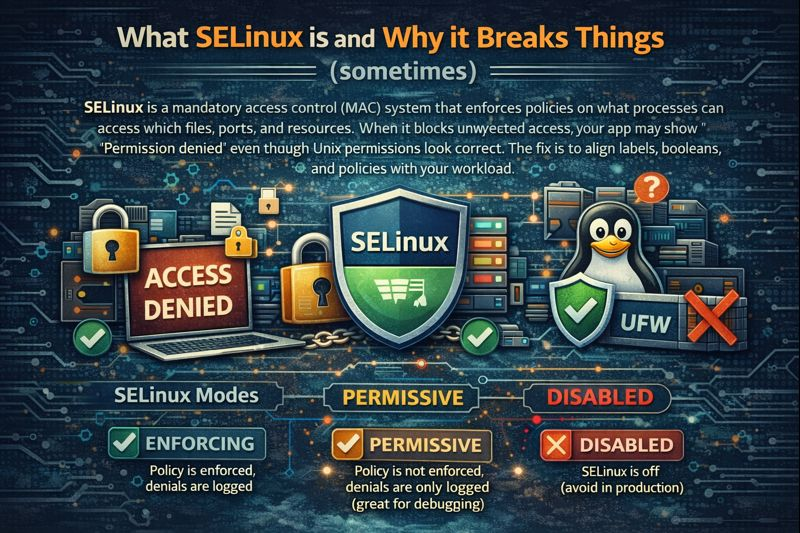
When it blocks unexpected access, your app may show “Permission denied” even though Unix permissions look correct. The fix is to align labels, booleans, and policies with your workload.
SELinux Modes
- Enforcing: Policy is enforced, denials are logged.
- Permissive: Policy is not enforced, denials are only logged (great for debugging).
- Disabled: SELinux is off (avoid in production).
Labels, Types, and Booleans (The Core Concepts)
Every file and process has a security context like user:role:type:level. The type is what matters most in “targeted” policy. Services expect specific types (for example, Apache reads httpd_sys_content_t). Booleans are switches that allow broader actions (for example, letting Apache connect to the network).
Quick Diagnostic Checklist (5 Minutes)
Step 1: Check SELinux Mode
getenforce
sestatus
If you must debug quickly, switch to permissive (temporary), reproduce the error, then switch back.
# temporary (until reboot)
sudo setenforce 0   # permissive
sudo setenforce 1   # enforcing
Step 2: Find the Denials
# show recent AVC denials (last hour)
sudo ausearch -m avc -ts now-1h | aureport -a

# or inspect audit log directly
sudo grep -i "avc" /var/log/audit/audit.log | tail -n 50

# if setroubleshoot is installed
sudo sealert -a /var/log/audit/audit.log
Look for the denied class (file, dir, tcp_socket) and the type labels of the source (process) and target (file/port).
Step 3: Identify the Affected Path/Service
Is it a file label issue, a port that isn’t allowed, or a feature blocked by a boolean? The next sections map each symptom to a safe fix.
How to Fix SELinux on Linux Server – (Step-by-Step)
Fix 1: Mislabeled Files or Directories
Most breakages come from wrong labels. Restore default labels for known paths, or set persistent labels for custom directories.
# restore default labels for a path
sudo restorecon -Rv /var/www/html

# define a persistent label for a custom app dir
sudo semanage fcontext -a -t httpd_sys_content_t "/var/www/myapp(/.*)?"
sudo restorecon -Rv /var/www/myapp
If the entire system’s labels are inconsistent (after a major move or filesystem restore), relabel on reboot.
sudo touch /.autorelabel
sudo reboot
Fix 2: Allow Services to Use Custom Ports
Services can only bind to ports of certain types. Map your custom port to the correct SELinux port type.
# example: allow Apache/Nginx to bind TCP 8080
sudo semanage port -a -t http_port_t -p tcp 8080

# verify
sudo semanage port -l | grep http_port_t
Fix 3: Enable Required SELinux Booleans
Booleans enable broader behaviors like network connections, NFS/SMB access, or user directories. Make changes persistent with -P.
# list all booleans
sudo getsebool -a | less

# common web-related booleans
sudo setsebool -P httpd_can_network_connect on
sudo setsebool -P httpd_enable_homedirs on
sudo setsebool -P httpd_use_nfs on
sudo setsebool -P httpd_use_cifs on
Fix 4: Generate a Minimal Local Policy (Last Resort)
When labels and booleans are correct but a legitimate access is still denied, create a small local policy from audited denials. Review carefully to avoid over-permissive rules.
# inspect and understand the denial
sudo grep -i "avc" /var/log/audit/audit.log | audit2why | less

# generate a local module for a specific service pattern
sudo grep httpd /var/log/audit/audit.log | audit2allow -M myhttpd
sudo semodule -i myhttpd.pp
Re-test immediately. If the module is too broad, remove it and refine.
# list and remove a custom module
sudo semodule -l | grep myhttpd
sudo semodule -r myhttpd
Fix 5: Containers and Mounted Volumes (Docker/Podman)
Containers need correctly labeled volumes. Use :Z for a private relabel, :z for shared.
# Docker/Podman volume with SELinux relabel
docker run -v /srv/app:/var/www/html:Z -p 8080:80 nginx
# or
podman run -v /srv/app:/var/www/html:Z -p 8080:80 nginx
If you must share the same directory among multiple containers, use :z. Avoid disabling labels inside containers unless testing.
Fix 6: NFS/SMB Shares
NFS and CIFS have special contexts and booleans. Ensure mounts use compatible options and your service is allowed to read them.
# allow web server to access NFS/CIFS content
sudo setsebool -P httpd_use_nfs on
sudo setsebool -P httpd_use_cifs on

# label the mount point appropriately
sudo semanage fcontext -a -t httpd_sys_content_t "/mnt/webdata(/.*)?"
sudo restorecon -Rv /mnt/webdata
Safe Workarounds and Pitfalls
Use Permissive Mode for Debugging Only
Permissive mode helps you capture denials without breaking apps. Fix the root cause, then return to enforcing. Leaving a server permissive invites risk.
Avoid Disabling SELinux
Disabling SELinux removes an entire layer of protection. If you must change mode permanently, edit the config and reboot—but aim for enforcing in production.
sudo vi /etc/selinux/config
# SELINUX=enforcing|permissive|disabled
sudo reboot
Relabel After Bulk Moves or Restores
If you’ve restored from backup, changed filesystems, or used rsync without xattrs, contexts may be wrong. A full relabel ensures policy consistency system-wide.
Real World Fix Examples
Apache/Nginx 403 After Deploy
Symptom: HTTP 403 or “Permission denied” in logs after moving a site to /var/www/myapp.
sudo semanage fcontext -a -t httpd_sys_content_t "/var/www/myapp(/.*)?"
sudo restorecon -Rv /var/www/myapp
Web App Needs Outbound API Calls
Symptom: PHP/Python app cannot connect to external APIs.
sudo setsebool -P httpd_can_network_connect onMariaDB on a Custom Data Directory
Symptom: MariaDB fails to start or read data on /data/mysql.
sudo semanage fcontext -a -t mysqld_db_t "/data/mysql(/.*)?"
sudo restorecon -Rv /data/mysql
Nginx Proxy on Port 8080
Symptom: Nginx cannot bind to 8080 even though it’s free.
sudo semanage port -a -t http_port_t -p tcp 8080
sudo systemctl restart nginx
Docker Volume Permission Denied
Symptom: Containerized app gets “Permission denied” with a bind mount.
docker run -v /srv/app:/var/www/html:Z image:tagMonitoring, Logging, and Making Fixes Stick
Use the Right Tools
- auditd and
/var/log/audit/audit.logfor authoritative denials. - setroubleshoot (
setroubleshoot-server) to get human-readable advice withsealert. - policycoreutils for
semanage,restorecon,setsebool,semodule.
Ensure Persistence Across Reboots
- Use
semanage fcontextto persist file labels. - Use
setsebool -Pfor permanent boolean changes. - Document custom policies (
semodule) and keep them under version control.
Best Practices for Teams and Deployments
- Plan labels during app design: choose data directories aligned with default types when possible.
- Automate with Ansible: use
sefcontext,seboolean, andseportmodules to enforce state. - Test in permissive in staging, capture denials, fix, then ship with enforcing in production.
- Prefer booleans and labels over custom policies; keep local modules minimal and specific.
- Verify after upgrades: policy updates can change expected behavior—revalidate key services.
When to Get Help (and How YouStable Can Assist)
If SELinux issues keep recurring, consider a configuration review. At YouStable, our managed Linux hosting and server experts pre-harden images, align SELinux policies with your stack, and monitor audit logs, so your apps stay secure and available—without the trial-and-error. Need 24/7 help? Our team is one ticket away.
FAQ’s
1. How do I check if SELinux is blocking something?
Use ausearch -m avc -ts now-1h or inspect /var/log/audit/audit.log for “AVC” entries. If setroubleshoot is installed, run sealert -a /var/log/audit/audit.log for readable guidance. The denial will show which process type tried to access which file/port type and why it was blocked.
2. Is it safe to disable SELinux in production?
No. SELinux significantly reduces breach impact by confining services. Use permissive mode temporarily for debugging, fix labels/booleans, and return to enforcing. Disabling SELinux should be a last resort and typically indicates configuration debt that should be resolved.
3. How do I permanently change SELinux mode?
Edit /etc/selinux/config and set SELINUX=enforcing or permissive, then reboot. Avoid disabled. Changing with setenforce is temporary and resets at reboot. After switching from disabled to enforcing, run a full relabel (/.autorelabel).
4. How can I let Apache use a custom docroot and reach a remote DB?
Label the docroot and enable outbound network connections. For example: semanage fcontext -a -t httpd_sys_content_t "/var/www/myapp(/.*)?", restorecon -Rv /var/www/myapp, then setsebool -P httpd_can_network_connect on. If using NFS/SMB, also enable httpd_use_nfs or httpd_use_cifs.
5. How do I fix Docker “Permission denied” on mounted volumes with SELinux?
Append :Z or :z to the volume mount so the host path is relabeled for container use: -v /host/path:/container/path:Z. This preserves SELinux confinement while granting the container the right labels to access the files safely.
Mastering these steps will help you fix SELinux on Linux servers quickly and correctly—keeping security intact. If you want this handled by experts, YouStable’s managed server team can implement, monitor, and maintain SELinux policies tailored to your stack.