Choosing a Windows RDP in the USA may look simple at first, but the experience can change completely depending on the provider you pick. Some servers feel fast and stable from the start, while others slow down, disconnect, or create issues when you need them the most.
To avoid that, the options listed here are based on real performance factors like CPU quality, NVMe storage, uptime consistency, and security, not just marketing claims.
Each provider has been selected to help you run your work smoothly, so you can choose a Windows RDP that stays reliable, performs well, and fits your needs without unexpected problems.
What is Windows RDP in USA?
Windows RDP in the USA is a remote desktop service that provides access to a Windows system hosted on servers located in the United States. It works like a virtual computer that you can control from anywhere using your device with full desktop access.
It is widely used for running Windows applications, managing remote work, and accessing US based platforms with better speed and stability. Since the server stays online continuously, it ensures reliable performance, secure access, and a consistent environment for daily tasks and business operations.
How We Ranked the Best Windows RDP in USA for 2026
We ranked the best Windows RDP providers based on real world performance, reliability, and overall usability instead of marketing claims.
Key factors included hardware quality, storage speed, uptime consistency, security features, pricing transparency, and support responsiveness to ensure a stable and practical remote desktop experience for different types of users.
| Factor | What We Checked | Why It Matters | Impact on Ranking |
| Performance | CPU, RAM, NVMe storage | Ensures fast and smooth RDP experience | Higher speed = better ranking |
| Network & Uptime | US locations, latency, uptime | Stable connection and low delay | Reliable providers rank higher |
| Security | DDoS protection, firewall, access rules | Protects RDP from attacks | Safer providers ranked better |
| Pricing & Support | Cost clarity, support quality | Value for money and quick help | Better support = higher trust |
10 Best Windows RDP in USA in 2026, Oct
Start by shortlisting providers that really ship Windows Server with RDP admin access.
Then match latency, budget, management style, and compliance needs to your workload.
1. YouStable – Affordable NVMe Windows RDP Hosting
Best for: Balanced Windows RDP with NVMe, budget friendly scaling, and quick support
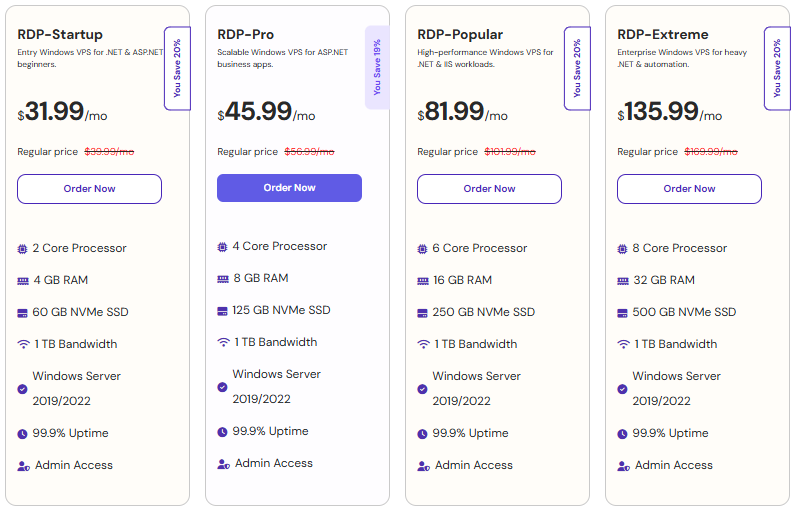
Price: From $31.99-135.99/month (Windows license included on selected plans)

YouStable focuses on practical Windows RDP that’s easy to deploy with US East and US Central latency alternatives. If you need an affordable Windows desktop/server for .NET apps, MSSQL, or PowerShell automation, YouStable’s Windows images and transparent resource tiers make it straightforward to right size. Admin RDP is standard, and you can harden the server quickly with built in firewall presets and versioned snapshots.
Performance wise, NVMe backed storage and modern EPYC/Intel CPUs ensure fast boot times and low I/O wait during patching or restores. Support quality is a standout for small teams: tickets are answered promptly and with Windows specific troubleshooting rather than generic scripts. For agencies and SMBs that value predictable pricing and steady throughput, YouStable strikes a good performance to dollar balance without hidden licensing catches.
Key Features of YouStable
These features are designed to give you a smooth and reliable Windows RDP experience without technical complications. You get fast performance, strong security, and easy management, which makes daily tasks simple and efficient.
- Windows Ready Images with Admin RDP: Pre-configured Windows Server 2022/2025 templates help you launch quickly with secure and fully functional remote desktop access.
- US Based Low Latency Locations: East and Central US regions provide fast connectivity, improving responsiveness for remote work, apps, and file transfers.
- One Click Snapshots & Backups: Easily create restore points before updates, so you can quickly recover your system without downtime or data loss.
- Transparent Windows Licensing: Clear pricing with no hidden OS charges, making it easier to plan your budget and scale confidently.
- DDoS Protection & IP Access Rules: Built in security helps protect your RDP from attacks and limits access using firewall and allowlist controls.
- 24/7 Expert Support: You get real Windows focused help for RDP issues, firewall setup, and activation problems whenever needed.
- API & Automation Tools: Useful for developers and teams to automate deployments and manage multiple RDP instances efficiently.
Plans & Pricing
YouStable offers flexible plans that suit both beginners and growing users, so you can start small without spending too much. As your workload increases, you can upgrade easily without downtime or hidden costs.
Why Choose YouStable Windows RPD in USA?
YouStable is a strong choice if you want reliable Windows RDP performance with low latency across US regions and fast NVMe storage. It offers transparent pricing with licensed Windows, so you don’t face hidden costs or setup confusion. With responsive support and easy scalability, it helps you run your work smoothly without technical stress.
2. QloudRDP – Affordable Windows RDP USA Hosting
Best for: Entry level users, freelancers, and basic Windows remote tasks
Price: From $9.99–25.99/month depending on plan configuration and resources

QloudRDP provides a simple and budget friendly Windows RDP solution designed for users who want quick setup and reliable performance. With NVMe SSD storage, high uptime, and multiple server locations, it supports remote work, browser tasks, and light applications efficiently without complex configuration.
The platform offers full admin access, instant activation, and flexible payment options including card, PayPal, and cryptocurrency. Its scalable plans fit different usage levels, while basic DDoS protection and stable network performance ensure a consistent and smooth remote desktop experience for daily tasks.
Key Features of QloudRDP
These features focus on performance, simplicity, and practical usability for users who need reliable Windows RDP without complex setup.
- High Speed SSD Storage with Stable Performance: QloudRDP uses SSD based storage to ensure fast boot times and smooth performance during daily tasks like remote access, file handling, and application usage.
- Full Administrator Access (Admin RDP): You get complete control over your Windows server environment, allowing you to install software, configure settings, and manage the system without restrictions.
- Instant Setup and Quick Deployment: Servers are usually provisioned quickly after purchase, so you can start using your RDP without long waiting times or manual configuration.
- Affordable Pricing for Entry Level Users: QloudRDP is designed for users who want a cost effective Windows RDP solution, making it suitable for beginners, freelancers, and light workloads.
- Basic DDoS Protection and Network Stability: The platform includes essential security measures to protect against common attacks and maintain a stable connection for uninterrupted remote access.
3. Liquid Web – Fully Managed Enterprise Windows Hosting
Best for: Managed Windows RDP at enterprise standards and tight SLAs
Price: From $54/month for Windows VPS (Windows license extra on some tiers)

Liquid Web is the safe pick for teams who want Windows handled with white glove support. Its Windows VPS and dedicated options deliver 100% network uptime SLAs, proactive monitoring, and hands on help with IIS, MSSQL, and security baselines. If your org needs audit trails, change windows, and scheduled maintenance with communication, Liquid Web’s processes are mature and predictable.
Under the hood you get modern CPUs, generous bandwidth, and snapshot/backup tooling geared for rapid rollback. Security wise, you can combine DDoS protection with managed firewalls and compliance minded logging. While not the cheapest, the delta pays for faster incident resolution and reduced ops overhead, ideal for agencies, SaaS teams, and Windows centric shops that can’t afford surprises.
Key Features of Liquid Web
- Managed Windows VPS and dedicated with true 24/7 expert support: Engineers who understand IIS, .NET, and MSSQL shorten troubleshooting.
- 100% network uptime SLA and proactive monitoring included: Stability and visibility reduce revenue risk for production workloads.
- Snapshot, backup, and DR patterns aligned to enterprise practices: Restore speed and RPO/RTO targets fit compliance driven teams.
- Hardened Windows images and managed firewall options: Close common RDP attack paths faster with vendor best practices.
- Scale from VPS to dedicated without changing platforms: Room to grow while keeping tools, support, and IP space consistent.
4. Hosting.com – Compliance Ready Enterprise Windows Solutions
Best for: Enterprise Windows environments with compliance and custom architecture
Price: Custom quotes $38/month (managed Windows, private cloud, and hybrid)

Hosting.com operates under Ntirety for managed and compliant hosting. If you need Windows RDP in a broader managed stack, think HIPAA, PCI, or SOC 2, Ntirety builds Windows server footprints with rigorous change control, advanced monitoring, and security tooling integrated. Expect deep discovery, design workshops, and documented recovery procedures across multiple US regions.
This isn’t a “spin up in 5 minutes” platform; it’s for IT leaders who prioritize governance and vendor accountability. You’ll get Windows RDP as part of a managed services envelope with firewalling, SIEM options, and well defined SLAs. Procurement is heavier, but midsize and enterprise teams with compliance mandates will appreciate the operational discipline.
Key Features of Hosting.com
- Compliance first Windows hosting aligned to HIPAA, PCI, SOC 2 needs: Security tooling and documentation built into the service model.
- Architected Windows RDP with DR, backups, and network segregation: Reduce blast radius and achieve clear recovery targets.
- Dedicated account management and change control workflows: Predictable maintenance windows and stakeholder visibility.
- Multi region US presence with private connectivity options: Lower latency and stronger east west traffic controls.
- 24/7 monitored operations with ticket SLAs and escalation paths: Enterprise buyers get the controls they expect.
5. UltaHost – Budget Friendly Secure Windows VPS
Best for: Budget Windows RDP/VPS with simple scaling and solid performance
Price: From $13.99/month (Windows plans available in US regions)

UltaHost is popular among freelancers and small teams that want Windows RDP without complex management. Its Windows plans ship with modern hardware, NVMe storage, and straightforward control panels to reboot, snapshot, and upgrade resources quickly. If you’re testing .NET apps, connecting to remote accounting software, or centralizing desktop tasks, the price to performance ratio is attractive.
Security defaults cover the basics, DDoS protection and port/firewall rules to keep brute force attempts down. Backups and snapshots are fast to configure, and upgrades are non disruptive when scheduled. While support is more “guided” than deeply managed, response times are decent, and you can escalate Windows specific issues with reasonable turnaround.
Key Features of UltaHost
- Windows Server images ready for RDP with NVMe backed performance: Launch quickly and enjoy responsive desktop sessions.
- Affordable tiers ideal for continuous RDP access and light workloads: Keep monthly costs predictable while you scale.
- 1 Gbps connectivity and DDoS protections on US endpoints: Stable connections for remote teams and trading terminals.
- Snapshots, backups, and quick resource upgrades: Roll back bad updates and resize without reinstallation.
- Friendly support that can triage Windows issues: Get help with drivers, activation, and RDP policy changes.
6. Verpex – Flexible Mixed Hosting Windows Support
Best for: SMBs seeking vendor flexibility and hybrid stacks
Price: From $9.99/month for VPS; Windows availability varies by region

Verpex focuses on simplicity and support, with VPS options that can include Windows in select locations. If your workloads fluctuate or you prefer a provider that can accommodate both Linux and Windows across projects, Verpex offers sensible control panels and responsive guidance. Its US presence is growing, with a pragmatic approach to licensing and migrations.
While the company is better known for Linux hosting, Windows VPS/RDP arrangements are available on request or via specific plans. If you’re consolidating vendors and need a single pane of glass for mixed stacks, Verpex is a helpful compromise, just confirm Windows stock and license handling in your target US region before committing.
Key Features of Verpex
- Flexible VPS lineup with Windows options in supported US zones: Ask sales to confirm Windows images and licensing details.
- Clean control panel and quick provisioning flows: Easy to reboot, snapshot, and resize as workloads change.
- Reliable support culture focused on clear guidance: Useful for SMBs without deep sysadmin benches.
- Good fit for mixed Linux/Windows estates under one vendor: Simplify invoicing and operations across teams.
- Transparent upgrade paths and predictable costs: Avoid sticker shock as you add CPU, RAM, and storage.
7. HostGator – High Resource Dedicated Windows Servers
Best for: Windows dedicated servers with full RDP and large resources
Price: From $3.99/month for Windows dedicated (varies by config)

HostGator’s Windows footprint in 2026 centers on dedicated servers rather than low cost RDP. If you need predictable CPU, large RAM, and full disk control for SQL Server or high concurrency IIS apps, the dedicated route is clean and simple. You’ll get full administrator RDP access and the isolation that big workloads demand, without neighbor contention.
Expect traditional bare metal management: reboots, OS reloads, and upgrades are straightforward, but you’ll shoulder more admin tasks than on a fully managed platform. For teams graduating from small RDP instances that constantly hit CPU/RAM ceilings, HostGator dedicated Windows is a stable next step with clear cost to resource mapping.
Key Features of HostGator
- Windows dedicated servers with full RDP admin control: Ideal for heavy MSSQL, IIS, and file services at scale.
- Consistent performance and isolation versus shared compute: Eliminate noisy neighbors entirely.
- Flexible configurations for CPU, RAM, and storage: Fit the box to your workload without compromises.
- Simple management model that’s easy to reason about: Great for in house admins and predictable budgeting.
- US data center presence with solid network capacity: Keep latency and packet loss low for remote teams.
8. Cloudways – Managed Cloud Platform Linux Focused
Best for: Linux app hosting; not a Windows RDP provider
Price: N/A for Windows RDP (Linux from $11/month via partner clouds)

Cloudways doesn’t offer Windows servers or RDP. It’s a managed PaaS for Linux based apps on top of AWS, GCP, DigitalOcean, Linode, and Vultr. If Windows RDP is a requirement, look elsewhere. If you can re-platform your app to Linux (e.g., PHP, Node, or headless WordPress), Cloudways provides excellent convenience with vertical and horizontal scaling.
We include Cloudways to address a common search detour; it ranks frequently for “hosting” queries but won’t meet Windows desktop/server needs. For Windows RDP, consider Vultr for self managed Windows images or Liquid Web/YouStable for managed experiences and stronger Windows support.
Key Features of Cloudways
- No Windows RDP or Windows Server images: Suitable only if you can move to Linux stacks.
- Great managed experience for PHP/Node on Linux: Not relevant for .NET or Windows only software.
- Fast scaling and built in backups on partner clouds: A Linux convenience layer, not Windows hosting.
9. DreamHost – Linux Hosting No Windows Support
Best for: Linux VPS and cloud; not a Windows RDP provider
Price: N/A for Windows RDP (Linux VPS from $10/month)

DreamHost remains Linux only. It’s excellent for developers running open source stacks, but if you need Windows Server with RDP, you won’t find it here. Use this note to avoid dead ends: DreamHost’s documentation and pricing are strong for Linux VPS and managed WordPress, yet they can’t support native Windows RDP workflows in 2026.
Where DreamHost shines is reliability and straightforward billing on Linux. For Windows, choose a provider above that publishes Windows images, clarifies licensing, and supports RDP hardening best practices.
Key Features of DreamHost
- No Windows Server or RDP access offered: Keep searching if .NET, MSSQL, or RDP is core to your plan.
- Great Linux uptime and value: Not applicable if Windows is a hard requirement.
- Smooth control panel and helpful docs: Linux friendly, not Windows focused.
10. Vultr – High Performance Self Managed Windows RDP
Best for: Self managed Windows RDP with hourly billing and fast scale
Price: From $26/month including Windows license

Vultr is the go to if you want complete control, hourly pricing, and quick deployments of Windows Server across multiple US locations. Pick a Cloud Compute or High Performance plan, add a Windows image/license, and you’ll have an RDP ready server in minutes. With NVMe storage and modern EPYC/Intel silicon, the desktop experience is responsive and ideal for bursty workloads.
Vultr favors DIY admins: you get snapshots, startup scripts, private networking, and firewall rules, but the support model is self serve. For power users, the flexibility is unmatched, you can spin up temporary RDP nodes for project sprints, testing, or short lived client access and only pay for the hours used.
Key Features of Vultr
- Windows Server images with hourly licensing and fast provisioning: Create and destroy RDP nodes on demand.
- US wide locations with NVMe and modern CPUs: Keep latency low and I/O fast for remote workflows.
- Snapshots, automated scripts, and private networking: Build repeatable templates and secure overlays.
- Firewall and DDoS options for safer RDP exposure: Restrict source IPs and limit attack surface.
- Transparent, usage based billing ideal for experiments: Pay only for the hours your RDP server runs.
How to Choose the Best Windows RDP in USA
Choosing the right Windows RDP in the USA is about matching your workload with the right performance, security, and pricing. A structured approach helps you avoid slow servers, hidden costs, and unreliable providers, ensuring a smooth and stable remote desktop experience.
Step 1: Define Your Workload Clearly
Before selecting any provider, understand what you will use the RDP for. Different use cases require different resources, and choosing the wrong plan can lead to poor performance or unnecessary expenses.
- Basic tasks (browsing, office work) → Low resources
- Development (.NET, apps) → Medium CPU & RAM
- Heavy workloads (MSSQL, automation) → High performance setup
Step 2: Check Hardware Performance
| Component | What to Look For | Why It Matters | Recommendation |
| CPU | Latest Intel / AMD EPYC | Faster processing and multitasking | Modern generation only |
| RAM | Minimum 4GB–8GB | Smooth application performance | Higher for heavy workloads |
| Storage | NVMe SSD | Faster read/write speed | Avoid HDD |
Step 3: Choose the Right US Server Location
Server location directly impacts speed and responsiveness. If your tasks depend on US based services, selecting the right region ensures lower latency and better performance.
- US East → Best for global access
- US Central → Balanced performance
- US West → Ideal for Pacific region users
Step 4: Verify Windows Licensing
Always confirm whether the Windows license is included or charged separately. Genuine Windows Server versions (2022) ensure better security, updates, and long term support without activation issues.
Step 5: Check Security Features
- Network Level Authentication (NLA) for secure login
- Firewall and IP restriction to limit access
- DDoS protection to prevent attacks
- Strong password and access policies
Step 6: Understand Pricing and Hidden Costs
| Factor | What to Check | Why It Matters | Tip |
| Base Price | Starting monthly cost | Initial affordability | Compare multiple providers |
| License Cost | Included or extra | Avoid hidden charges | Confirm before purchase |
| Upgrade Pricing | Cost for scaling resources | Long term flexibility | Check upgrade plans |
| Renewal Price | Same or higher after renewal | Budget planning | Avoid sudden price increase |
Step 7: Evaluate Support Quality
Reliable support is essential, especially if you face technical issues. A provider with fast and knowledgeable support can save time and prevent downtime during critical situations.
Step 8: Check Scalability Options
- Easy upgrade of CPU, RAM, and storage
- No downtime during scaling
- Flexible plans for future growth
Before making a final decision, test latency, review real user feedback, and confirm all technical details. A good Windows RDP should deliver stable performance, strong security, and predictable pricing without unexpected limitations.
Pro Setup, Security Hardening, and Performance Tuning Tips
A clean Windows baseline and sane network rules prevent most RDP incidents.
Optimize I/O and codecs to keep desktop sessions fast on shaky connections.
- Harden RDP early: Enforce strong passwords, enable NLA, restrict source IPs via firewall, and change the default RDP port.
- Patch on a cadence: Use Windows Update rings and snapshot before patching. Roll back fast if a driver or .NET update breaks apps.
- Secure credentials: Disable built in Administrator when possible; create named admin accounts and use just in time access.
- Optimize visuals: Disable unnecessary desktop effects and set RDP to use adaptive graphics codecs for low bandwidth links.
- Monitor and alert: Enable Windows Event Forwarding or agent based monitoring for logons, privilege use, and service failures.
- Backups and test restores: Schedule full and incremental backups offsite; test restores quarterly to validate RTOs.
- Least privilege for apps: Don’t run services as admin; use service accounts with minimal rights.
FAQs
Which Provider is Best Overall for Windows RDP in the USA?
YouStable is the best overall value for most users, balancing price, NVMe performance, Windows ready images, and responsive support. For enterprise SLAs and stricter governance, choose Liquid Web or Hosting.com (Ntirety). DIY users who want hourly billing should pick Vultr.
Do QloudRDP, Cloudways, or DreamHost offer Windows RDP?
No, Those platforms are Linux focused in 2026 and don’t provide Windows Server or RDP. If you need native Windows RDP, consider YouStable, Liquid Web, UltaHost, HostGator (dedicated), or Vultr for self managed images.
How Much Does Windows RDP Cost Per Month in the USA?
Entry level Windows RDP typically starts around $14–$25/month for light use, with mid range tiers $30–$80/month. Managed u003ca href=u0022https://www.youstable.com/blog/what-is-enterprise-dedicated-server-hosting/u0022u003eenterprise plans or dedicated Windows serversu003c/au003e can run 0–0+/month depending on CPU, RAM, storage, and SLAs
What Windows Server Version Should I Choose for RDP?
Choose Windows Server 2022 or 2025 in 2026 for long support windows, better TLS defaults, and modern features. Only use older versions for legacy app compatibility and consider isolating those servers.
How Can I Secure RDP Against Brute Force Attacks?
Enable Network Level Authentication, restrict RDP to known IPs, change the default port, enforce strong passwords/MFA via RD Gateway, and enable account lockout policies. Use DDoS filtering and monitor failed logins.
Is Hourly Billed RDP a Good Idea for Projects?
Yes, Providers like Vultr are ideal for temporary Windows desktops or testing. Spin up an instance, run your workload, snapshot if needed, and destroy it to pay only for use. Just ensure backups are saved off instance before teardown.
Should I Choose Managed or Self Managed Windows RDP?
If uptime is critical and your team lacks Windows admins, choose managed (Liquid Web, Ntirety, or YouStable’s guided support). If you have in house skills and want tighter cost control, self managed (Vultr, some UltaHost plans) can be more efficient.
Conclusion
When you are choosing a Windows RDP in the USA, it really comes down to what kind of experience you want in your daily work. Do you want something that runs smoothly every time, or are you mainly looking to start at a lower cost with simple usage?
If stable performance, better speed, and long term reliability matter more to you, YouStable is a dependable option that handles workloads consistently without unnecessary issues.
If your focus is affordability with a straightforward setup that gets the job done, QloudRDP is a practical choice. Once you pick the one that fits your work style, your RDP should feel smooth, stable, and easy to manage without constant adjustments.
In Short these are the Best Windows RDP in USA
These Windows RDP providers cover different needs, from budget friendly remote desktops to high-performance and enterprise level solutions. The right choice depends on your workload, required resources, and whether you need managed support or full control.
| Provider | Starting Price | Key Strength | Best For |
| YouStable | $31.99-135.99/month | NVMe storage, low latency US locations, reliable support | SMBs, developers & long term users |
| QloudRDP | $9.99–25.99/month | NVMe SSD, high uptime, instant setup, consistent performance | Freelancers, remote work, and cost efficient Windows usage |
| Liquid Web | From $54/month | Fully managed Windows hosting, SLA uptime, expert support | Enterprises & agencies |
| Hosting.com | $38/month | Compliance ready infrastructure, managed security | Enterprise & regulated workloads |
| UltaHost | $13.99/month | NVMe performance, affordable plans, scalable resources | Small teams & budget conscious users |
| Verpex | $9.99/month | Flexible VPS options, mixed OS support | SMBs & hybrid users |
| HostGator | $3.99/month | Dedicated servers, full resource control | High resource workloads |
| Cloudways | $11/month | Managed cloud platform | Not suitable for Windows RDP |
| DreamHost | $10/month | Reliable Linux hosting | Not suitable for Windows RDP |
| Vultr | $26/month | NVMe storage, hourly billing, fast deployment | Developers & advanced users |
For most users, YouStable offers the best balance of performance, pricing, and reliability, making it a practical choice for long term Windows RDP usage without unnecessary complexity or hidden costs.