

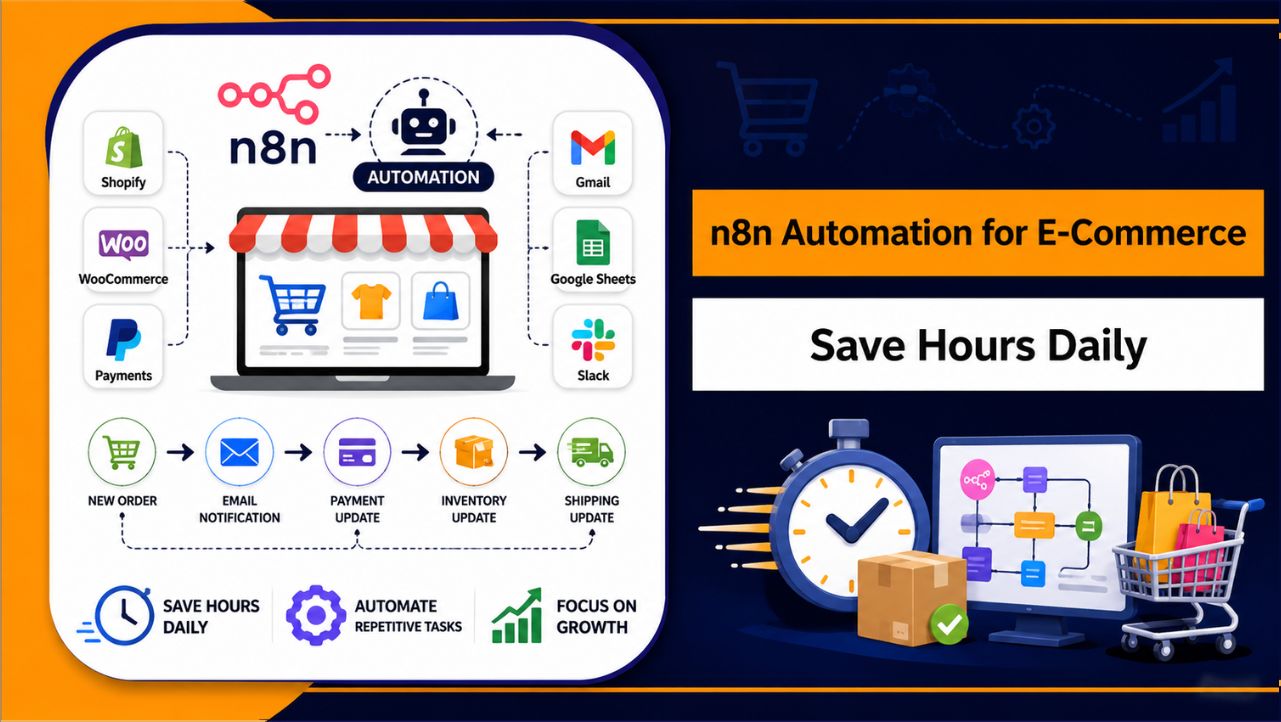
Do you spend hours every day handling orders, replying to customers, updating inventory, and checking payments again and again? And even after doing all this, does it still feel like your work never really ends?
This is exactly what happens in most e-commerce stores as they grow. More orders mean more manual work, more chances of mistakes, and less time to focus on things that actually help your business grow. You might have tried some automation tools already, but either they felt limited or the cost kept increasing as your usage grew.
That’s where n8n changes the way things work. Instead of depending on fixed systems, it lets you build automation the way your business actually needs. You can connect your store, emails, payments, and data into one smooth workflow that runs automatically in the background.
Here, you’ll see how n8n can take over your daily tasks, what you can automate step by step, and how it helps you save hours every day while keeping your store running smoothly without constant effort.
What Is n8n Automation for E-Commerce?
Running an e-commerce store often involves multiple tools working separately, such as orders, emails, payments, and customer data.
Managing all of these manually takes time and can slow down your operations as your store grows. n8n solves this by connecting all your tools into one automated system.
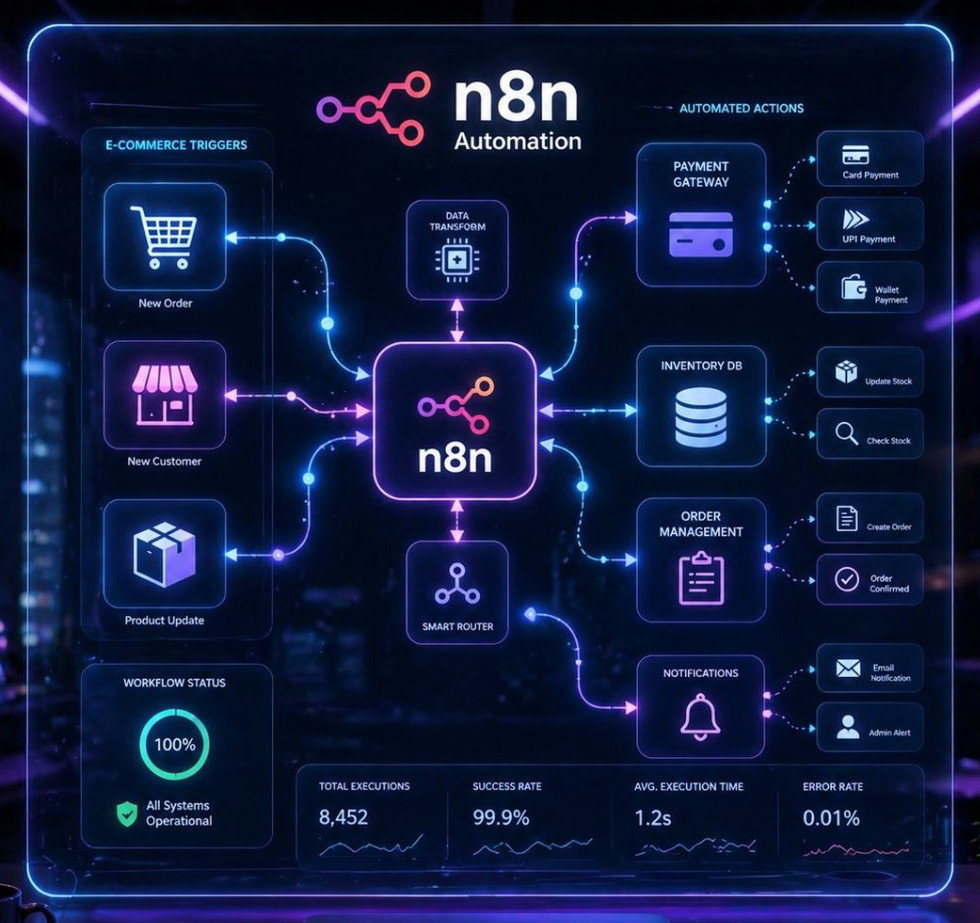
Instead of handling tasks individually, you create workflows where actions are triggered automatically based on events, like a new order or payment.
How It Works
- Automates repetitive tasks: Handles processes like orders, emails, and updates without manual effort.
- Connects multiple platforms: Integrates your store, payment systems, and tools into one workflow.
- Runs workflows in real time: Actions are triggered instantly when an event occurs.
- Gives full control over automation: You can customize workflows based on your exact business needs.
This allows your entire e-commerce process to run smoothly in the background without constant manual work.
Why Automation Is Important for E-Commerce
E-commerce businesses depend on speed, accuracy, and consistency to deliver a smooth customer experience. Manual processes slow down operations and increase the risk of errors, especially as order volume grows.
Automation helps streamline these tasks, ensuring everything runs efficiently in the background while reducing manual effort and improving overall performance.
| Factor | Without Automation | With Automation |
| Speed | Tasks take hours manually | Tasks run instantly |
| Accuracy | Higher chance of errors | Consistent and error free |
| Scalability | Difficult to handle growth | Easily handles more orders |
| Efficiency | Time consuming processes | Smooth and optimized workflows |
| Customer Experience | Delays in updates | Instant notifications and updates |
This clearly shows how automation improves operations and makes it easier to scale an e-commerce business without increasing workload.
Key Benefits of Using n8n for E-Commerce
n8n is a powerful choice for e-commerce automation because it offers full control, flexibility, and long term efficiency without unnecessary limitations.
- Saves daily time: Tasks that normally take hours manually can be completed automatically within seconds.
- Cost efficient setup: You are not charged per task or execution, so your costs remain low and predictable over time.
- Full customization: Workflows can be designed exactly according to your business logic and specific requirements.
- Scalable automation: As your store grows, your workflows can scale easily without hitting platform limits.
- Data control: Since n8n can be self hosted, you maintain full control over your data and automation processes.
Common E-Commerce Tasks You Can Automate with n8n
n8n can automate most of the repetitive tasks involved in running an online store, helping you reduce manual work and keep operations running smoothly.
- Order processing and confirmation: Automatically handles new orders and sends confirmation messages without manual input.
- Customer email notifications: Sends updates such as order status, shipping details, and follow ups instantly.
- Inventory updates across platforms: Keeps stock levels synced across multiple platforms in real time.
- Payment status tracking: Monitors payments and updates order status automatically after successful transactions.
- CRM and customer data syncing: Transfers customer data between your store and CRM without manual entry.
- Shipping and tracking updates: Sends tracking details and delivery updates to customers automatically.
By automating these tasks, you can save time, reduce errors, and improve overall efficiency in your e-commerce operations.
Real Life Use Cases of n8n in E-Commerce
n8n is commonly used to connect multiple tools into a single automated workflow, allowing different parts of your e-commerce system to work together without manual effort.
- Order to fulfillment automation: When a customer places an order, n8n can send a confirmation email, generate an invoice, update your CRM, and notify your team automatically.
- Abandoned cart recovery: Triggers follow up emails or messages to customers who leave items in their cart, helping recover lost sales.
- Multi platform data syncing: Syncs data between platforms like Shopify, Google Sheets, and email tools to keep everything updated in real time.
These real world use cases show how n8n simplifies operations, reduces manual work, and keeps your entire e-commerce workflow connected and efficient.
How n8n Saves Hours Daily (Practical Breakdown)
Managing an e-commerce store manually can take several hours each day, especially when handling repetitive tasks like orders, emails, and updates. n8n automates these processes into workflows that run in the background, saving time and reducing manual effort.
How Automation Reduces Daily Workload
- Handles multiple tasks in one flow: A single trigger, like a new order, can complete several actions automatically.
- Eliminates repetitive manual work: Tasks that you perform again and again are handled without effort.
- Works continuously without interruption: Workflows run 24/7, even when you are not actively managing your store.
- Reduces chances of mistakes: Automated processes follow the same steps every time, ensuring consistency.
- Frees up time for growth: Instead of managing operations, you can focus on marketing, sales, and scaling your business.
How to Set Up n8n for E-Commerce (Step-by-Step)
Setting up n8n for your e-commerce store becomes much easier when you follow a clear, structured process. Once configured correctly, your workflows will run automatically in the background and handle daily operations without manual effort.
Step 1: Set Up a VPS for n8n
To run n8n continuously, you need a VPS (Virtual Private Server). This ensures your automation works 24/7 without interruptions.
- Choose a reliable VPS provider
- Select at least 2 GB RAM and 1–2 vCPU for stable performance
- Access your server using SSH
A stable VPS is important because all your workflows will depend on it.
Step 2: Install n8n on Your Server
After setting up your VPS, install n8n using Node.js or Docker.
Basic method using npm:
npm install n8n -g
n8n start
For production setups, Docker is often preferred because it is more stable and easier to manage.
Once installed, open n8n in your browser using:
http://your-server-ip:5678Step 3: Secure Your n8n Instance
Before creating workflows, secure your setup.
- Add authentication (username & password)
- Use HTTPS (SSL certificate)
- Configure environment variables
This ensures your automation system is protected, especially when handling customer data.
Step 4: Connect Your E-Commerce Platform
Now connect your store and tools to n8n.
You can integrate:
- Shopify or WooCommerce
- Payment gateways
- Email tools (Gmail, SMTP)
- CRM systems
n8n provides built in nodes and API support, making it easy to connect multiple platforms.
Step 5: Create Your First Workflow
Start with a simple automation.
Example workflow:
- Trigger: New order received
- Action 1: Send confirmation email
- Action 2: Update inventory
- Action 3: Save data in CRM
Use n8n’s visual editor to connect these steps.
Step 6: Test the Workflow
Before going live, always test your workflow.
- Run it manually
- Check if each step executes correctly
- Fix any errors
Testing ensures everything works smoothly in real scenarios.
Step 7: Activate and Run Automation
Once testing is complete:
- Activate the workflow
- Let it run in the background
- Monitor execution logs
Your automation will now run automatically whenever the trigger condition is met.
Step 8: Optimize and Scale
As your store grows:
- Add more workflows
- Optimize existing ones
- Upgrade VPS resources if needed
This helps maintain performance and ensures smooth scaling.
Once n8n is properly set up, it becomes a central automation system for your e-commerce store. Instead of managing multiple tasks manually, everything runs through workflows, saving time, reducing errors, and improving efficiency.
Best n8n Workflows for E-Commerce Beginners
If you’re getting started with n8n, it’s best to begin with simple workflows that solve everyday problems in your store. These basic automations are easy to set up and can immediately reduce manual work while helping you understand how n8n works in real scenarios.
Simple Workflows to Start With
- Order Notification Workflow: Automatically sends an email or message to you or your team whenever a new order is placed, so you stay updated without checking the dashboard repeatedly.
- Customer Email Automation: Sends instant order confirmations, shipping updates, or follow up emails to customers, improving communication and customer experience.
- Inventory Update Workflow: Updates stock levels automatically after each order, helping you avoid overselling or manual tracking errors.
- Payment Confirmation Workflow: Tracks successful payments and updates order status or triggers the next step in your process without manual checking.
- Customer Data Sync Workflow: Automatically stores customer details in your CRM or Google Sheets, keeping your data organized and accessible.
Why Start with These Workflows
These beginner friendly workflows focus on common e-commerce tasks that you handle daily. They are simple to build, easy to test, and provide immediate benefits by saving time and reducing manual effort.
As you get comfortable with n8n, you can combine these workflows and create more advanced automation tailored to your business needs.
n8n vs Zapier for E-Commerce Automation
Both n8n and Zapier are popular automation tools, but they work very differently when it comes to e-commerce. The right choice depends on how much control, flexibility, and scalability you need as your store grows.
n8n
n8n is built for users who want full control over their automation and the ability to scale without limitations.
- Self hosted and flexible: You can run it on your own server and customize workflows based on your exact needs.
- No per task pricing: You are not charged for each execution, making it cost efficient for high volume automation.
- Advanced workflow capabilities: Supports complex logic, multiple steps, and custom integrations.
Zapier
Zapier is designed for simplicity and quick setup, especially for beginners.
- Easy to use: You can create automations quickly without technical knowledge.
- Cloud based setup: No need to manage hosting or servers.
- Task based pricing: Costs increase as your automation usage grows.
Which One Is Better for E-Commerce?
For small and simple automation, Zapier works well because of its ease of use. However, as your e-commerce store grows, it can become expensive and limited in terms of customization.
n8n, on the other hand, provides better long term value. It allows you to build scalable workflows, avoid high recurring costs, and maintain full control over your automation system.
For e-commerce businesses planning to grow and automate multiple processes, n8n is a more practical and future ready solution.
Common Mistakes to Avoid
While setting up n8n for e-commerce, small mistakes can lead to performance issues, workflow failures, or unnecessary complexity. Avoiding these common problems helps ensure your automation runs smoothly and reliably.
- Choosing a low performance VPS: A weak server can slow down workflows or cause interruptions, especially as your store grows.
- Building overly complex workflows: Adding too many steps at once makes workflows harder to manage and increases the chances of errors.
- Skipping proper testing: Without testing, workflows may fail during real transactions and affect operations.
- Ignoring monitoring and logs: Not checking execution logs can hide issues that impact performance over time.
- Not optimizing workflows: Unnecessary steps and inefficient logic can slow down execution and reduce overall efficiency.
Avoiding these mistakes ensures your n8n setup remains stable, efficient, and ready to scale with your e-commerce business.
Performance Optimization Tips
Optimizing your n8n setup is important to ensure your workflows run smoothly, especially as your e-commerce store grows. A well optimized system improves speed, reduces errors, and maintains consistent performance.
| Optimization Area | What to Do | Benefit |
| Triggers | Use efficient and relevant triggers only | Prevents unnecessary workflow execution |
| Workflow Design | Keep workflows simple and clean | Improves speed and reduces errors |
| API Usage | Avoid repeated or unnecessary API calls | Faster execution and fewer limits |
| Monitoring | Regularly check logs and execution data | Helps detect and fix issues early |
| Server Resources | Upgrade VPS (RAM/CPU) as workload grows | Maintains smooth and stable performance |
| Error Handling | Add retries and fallback steps | Prevents workflow failures |
This approach ensures your automation stays fast, reliable, and ready to handle increasing e-commerce workload without performance issues.
Where to Host n8n for E-Commerce Automation
Running n8n smoothly depends a lot on your VPS. If your server is slow or unstable, workflows can fail, orders may get delayed, and automation can break at critical moments. For e-commerce, you need a setup that stays fast, stable, and always running in the background.
A reliable option for this is YouStable, especially if you want a VPS that can handle automation workloads without performance issues.
Plans, Pricing and Key Features
YouStable offers n8n ready VPS plans that are designed to run automation tools efficiently while keeping costs under control.
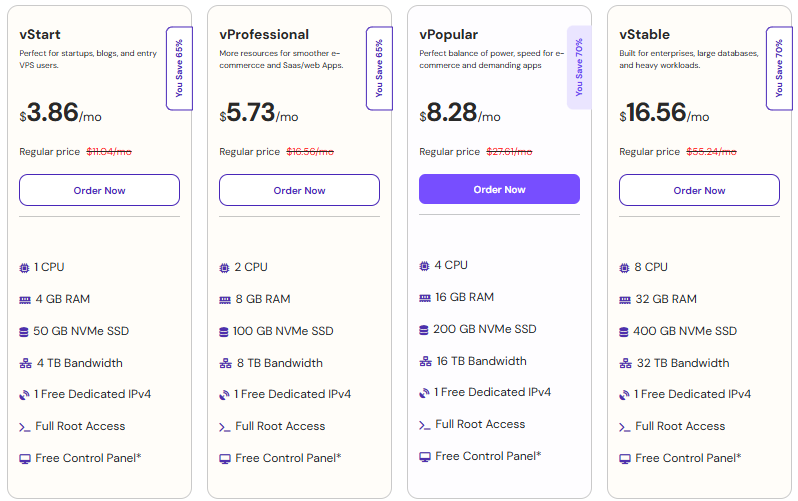
You can explore their plans here: n8n VPS Hosting
Choosing the right VPS from the start ensures your n8n automation runs reliably, performs well under load, and scales smoothly as your e-commerce business grows.
When n8n Is the Right Choice (And When Not)
Choosing the right automation tool depends on your goals, workflow complexity, and how much control you want over your system. n8n is a powerful solution, but it works best in specific scenarios.
When n8n Is the Right Choice
n8n is the best choice when you are serious about scaling your e-commerce business and want full control over your automation. It is especially useful when your workflows become more complex and you need a system that can grow with your store without increasing costs.
- You want full control over automation: You can design workflows exactly according to your business logic without platform limitations.
- You plan to scale your store: n8n can handle increasing orders, data, and workflows without performance issues.
- You want long term cost efficiency: Since there is no per task pricing, your costs remain predictable and lower over time.
- You need advanced workflows: It supports multi step automation, conditions, and custom integrations.
When n8n May Not Be the Best Choice
n8n may not be the ideal option if you are looking for a quick and simple automation tool without any setup or technical involvement. It requires some initial effort, which may not be suitable for everyone.
- You want a no setup solution: Tools like Zapier are easier to use if you don’t want to manage servers or configurations.
- Your automation needs are very basic: For simple tasks, a lightweight tool can be enough.
- You prefer fully managed platforms: If you don’t want to handle hosting, maintenance, or technical setup.
This comparison makes it clear that n8n is best suited for users who want flexibility, scalability, and long term value. If you are willing to invest a little time in setup, it becomes a powerful and reliable automation system for your e-commerce business.
FAQs
Is n8n good for e-commerce automation?
Yes, n8n is highly effective for e-commerce automation because it allows you to fully customize workflows based on your business needs. Unlike many tools, it does not limit how your automation works, making it suitable for handling orders, emails, inventory, and customer data in one system. This flexibility makes it a strong long term solution for growing online stores.
Can n8n handle large e-commerce stores?
Yes, n8n can handle large scale e-commerce operations when used with the right VPS setup. As your store grows, you can increase server resources like RAM and CPU to support more workflows, higher order volume, and complex automation without performance issues.
What can I automate in my online store using n8n?
n8n can automate most repetitive tasks involved in running an e-commerce store, such as:
• Order processing and confirmation
• Customer email notifications
• Inventory updates across platforms
• CRM and customer data syncing
• Payment tracking and status updates
These automations help reduce manual work, improve accuracy, and keep your store running efficiently.
Do I need coding knowledge to use n8n?
Basic technical understanding is helpful, but advanced coding is not required. n8n provides a visual workflow builder that allows you to create automation using drag and drop logic. However, having some knowledge of APIs or logic can help you build more advanced and customized workflows.
Conclusion
At this point, you’ve seen how much time is actually spent on daily e-commerce tasks and how quickly that workload grows as your store scales. Handling everything manually not only slows you down but also makes it harder to focus on what really matters, growing your business.
n8n gives you a different way to handle this. Instead of managing tasks one by one, you create workflows that run automatically in the background. Orders, emails, inventory, and data updates all move together in a structured system, saving time and reducing mistakes.
If you are serious about making your store more efficient and scalable, switching to automation is the logical next step. With the right setup, n8n can take over your daily operations and give you the time and control needed to focus on growth instead of routine work.










