

G Suite vs Google Workspace: G Suite was Google’s legacy productivity suite for business email and collaboration. In 2020 it rebranded to Google Workspace, unifying Gmail, Drive, Meet, Chat, and Docs with tighter integration, pooled storage, revised pricing tiers, and stronger security/admin controls. Existing G Suite customers were transitioned to Workspace plans.
If you’re comparing G Suite vs Google Workspace today, here’s the short answer: G Suite no longer sells new subscriptions; Google Workspace is the modern, feature rich platform with updated plans, security, and collaboration. This guide explains what changed, how pricing and features now map, and how to choose the right plan or migrate smoothly.
What Changed from G Suite to Google Workspace?
Google rebranded G Suite to Google Workspace in late 2020 to reflect a more integrated, cloud first experience.
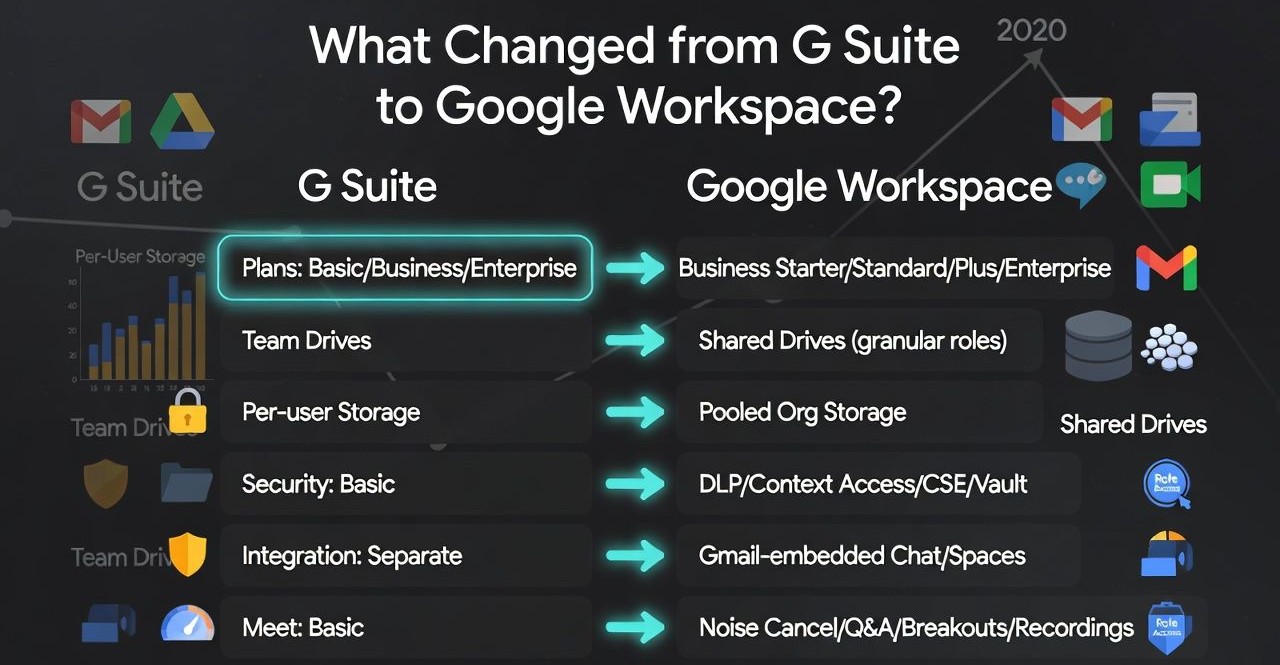
The shift wasn’t just a name change, Workspace introduced tighter app integration (Gmail + Chat + Meet in one place), “smart canvas” features across Docs/Sheets/Slides, pooled storage across users, and clearer plan tiers for SMBs and enterprises.
- G Suite plans (Basic, Business, Enterprise) → Google Workspace (Business Starter, Standard, Plus; Enterprise tiers)
- Team Drives → Shared drives with granular roles and better data governance
- Per user storage in G Suite → Pooled storage in Workspace across the organization
- Security upgrades: DLP, context aware access, client side encryption (CSE), and enhanced Vault/eDiscovery
- Deep integration: Chat and Spaces embedded in Gmail; Meet upgraded with noise cancellation, Q&A, breakout rooms, recordings (plan dependent)
Key Feature Comparison: G Suite vs Google Workspace
Email, Calendar, and Collaboration
- Business email (Gmail with your domain): Both G Suite and Workspace provide professional Gmail with SPF/DKIM/DMARC support and admin policies.
- Calendaring and booking: Workspace enhances resource booking, appointment scheduling, and interoperability with Microsoft 365.
- Docs, Sheets, Slides: Smart chips, assisted analysis, and comment/approval workflows are now native and more cohesive under Workspace.
Storage and File Management
G Suite Business once offered “unlimited” storage for 5+ users; Workspace standardized storage limits and introduced pooled storage.
- Business Starter: Entry level pooled storage (suitable for email first teams)
- Business Standard: More pooled storage plus advanced collaboration tools
- Business Plus: Even higher pooled storage and additional security/compliance
- Enterprise: Configurable storage, Vault, DLP, S/MIME, CSE, and data regions
Shared drives in Workspace provide team owned files with lifecycle control, retention policies, and role based access, critical for continuity when employees leave.
Meetings, Chat, and Spaces
- Google Meet: Upgraded reliability, captions, recordings, noise cancellation, and attendance tracking (depends on plan)
- Google Chat and Spaces: Persistent team messaging, threaded discussions, and app integrations directly in Gmail
- External collaboration: Guest access, shared calendars, and secure link sharing with expiration options
Security, Compliance, and Admin Controls
- Admin console: Refined dashboards, alert center, and proactive recommendations
- Data loss prevention (DLP): Content inspection for Drive, Gmail, and Chat (tiers vary)
- Context aware access: Enforce device posture and user context for zero trust access
- Client side encryption (CSE): Customer managed keys for Gmail, Drive, and Meet to meet stringent compliance
- Vault & eDiscovery: Retention, legal holds, and audit logging (Business Plus and Enterprise)
- Identity: SAML SSO, SCIM provisioning, and endpoint management (web, Android, iOS)
Support and SLAs
Workspace offers 24/7 standard support; Enterprise adds advanced support options and technical account management. Gmail maintains industry leading uptime SLAs and robust disaster recovery architecture.
Pricing and Plans Explained
Business Plans (Starter, Standard, Plus)
- Business Starter: Budget friendly professional email, basic security, smaller pooled storage; great for freelancers and micro businesses
- Business Standard: More storage, Meet features (recordings), enhanced collaboration; ideal for growing teams
- Business Plus: Even more storage, Vault, eDiscovery, and advanced security; suited for compliance focused SMBs
Enterprise and Add-Ons
- Enterprise tiers: Custom pricing, advanced DLP, data regions, S/MIME, CSE, and premium support
- Frontline: Designed for shift and field workers with streamlined features
- Essentials type offerings: Collaboration without Gmail for teams that retain third party email (availability varies)
Typical USD pricing lands around $6–$18 per user/month for Business tiers, with Enterprise via sales. Always verify current pricing in your region.
Legacy G Suite and Special Editions
- Legacy G Suite (free) for personal use: Many accounts were allowed to remain for non-commercial use; business use generally required upgrading
- Google Workspace for Education/Nonprofits: Separate programs with distinct features and pricing
Pros and Cons of Google Workspace vs G Suite
Advantages of Google Workspace
- Unified experience: Gmail, Chat, Meet, Calendar, and Drive work seamlessly
- Better governance: Shared drives, Vault, data regions, and admin insights
- Security depth: DLP, context aware access, CSE, S/MIME, and granular device controls
- Smarter collaboration: Smart chips, assisted analysis, and advanced Meet features
- Pooled storage: Flexible allocation across teams and users
Limitations vs Legacy G Suite
- No blanket “unlimited” storage on SMB plans; storage is now pooled and capped by tier
- Some advanced security/compliance features require Business Plus or Enterprise
- Plan mapping from old G Suite Business may raise costs for heavy storage users
How to Migrate or Upgrade from G Suite to Google Workspace
Zero Downtime Upgrade Steps
- Audit current usage: Storage per user, Vault/retention needs, Meet recording usage
- Choose the matching Workspace plan: Starter, Standard, Plus, or Enterprise based on compliance, storage, and support needs
- Confirm domain and billing: In Admin console, review plan change wizard and terms
- Pilot with a small group: Validate Meet, Chat, shared drives, and DLP rules
- Roll out org wide: Communicate changes; update training resources and security policies
Most G Suite → Workspace upgrades are in place migrations with no email downtime. Data, users, and settings remain intact. For tenant consolidations or cross suite moves, use Google’s data migration service or third party tools and schedule DNS cutovers during low traffic windows.
DNS and MX Records for Gmail (Reference)
If you’re bringing your own domain to Workspace for the first time, set these MX records at your DNS host:
Priority 1   ASPMX.L.GOOGLE.COM
Priority 5   ALT1.ASPMX.L.GOOGLE.COM
Priority 5   ALT2.ASPMX.L.GOOGLE.COM
Priority 10  ALT3.ASPMX.L.GOOGLE.COM
Priority 10  ALT4.ASPMX.L.GOOGLE.COM
Add SPF, DKIM, and DMARC to protect deliverability and brand reputation. Test with mail tester tools and monitor the Admin console for authentication and routing alerts.
Use Cases and Plan Recommendations
Solo Creators and Small Teams
- Best fit: Business Starter (professional email, calendars, and basic storage)
- Upgrade trigger: Frequent Meet recordings, shared drives, or growing storage demands → Business Standard
Growing SMBs (Sales, Agencies, Startups)
- Best fit: Business Standard (more storage, enhanced Meet, shared drives)
- Upgrade trigger: Compliance needs (retention, eDiscovery) or device controls → Business Plus
Enterprises and Regulated Industries
- Best fit: Enterprise tiers with data regions, DLP, S/MIME, client side encryption, and advanced support
- Considerations: Legal holds (Vault), SAML SSO, SCIM, context aware access, and detailed audit trails
Alternatives to Consider
- Microsoft 365: Deep Office app parity, desktop first workflows, strong compliance stack
- Zoho Workplace: Budget friendly suite with integrated CRM/finance ecosystem
- Proton for Business: Privacy focused email with E2E encryption; lighter collaboration features
FAQs
Is G Suite the same as Google Workspace?
Google Workspace is the rebranded and enhanced evolution of G Suite. Core apps are the same, but Workspace adds deeper integration, pooled storage, new security features, and updated plans. New customers buy Workspace; G Suite naming is retired.
What happened to legacy G Suite free accounts?
Google ended legacy G Suite free for most business use. Many personal/non commercial users were allowed to keep service with limitations. Businesses generally needed to upgrade to a paid Workspace plan to remain compliant and retain features and support.
Which Google Workspace plan should I choose?
Match plans to needs: Starter for budget email, Standard for collaboration and recordings, Plus for compliance (Vault, eDiscovery), and Enterprise for advanced security (DLP, CSE, S/MIME) and premium support. Consider storage, Meet features, and regulatory requirements.
Does Google Workspace have unlimited storage?
u003cstrongu003eNou003c/strongu003e. Business plans use pooled storage with defined caps. Enterprise can offer larger or adjustable allocations via Google sales. If you previously relied on G Suite’s “unlimited,” audit usage and plan storage policies or archival strategies before upgrading.
How hard is it to move from G Suite to Google Workspace?
For existing G Suite tenants, upgrading is typically in place with no data loss or downtime. Admins confirm plan changes in the console, and all mail, Drive files, and settings persist. Complex moves (mergers, multi tenant) may require staged migration and DNS cutovers.
Conclusion
G Suite set the foundation for cloud collaboration. Google Workspace is the streamlined, secure, and fully integrated upgrade. If you need professional email, modern team collaboration, governance, and scalable security, choose a Workspace tier aligned to your size and compliance needs and enjoy a smoother, smarter experience across Gmail, Drive, Meet, Chat, and beyond.










