

The best cloud storage options for businesses balance security, compliance, collaboration, performance, and cost.
Top picks include Microsoft OneDrive/SharePoint (Microsoft 365), Google Drive (Workspace), Dropbox Business, Box, and S3 compatible object storage such as AWS S3, Wasabi, and Backblaze B2. Choose based on data sensitivity, ecosystem fit, admin controls, and predictable pricing.
Choosing the best cloud storage for business can feel overwhelming. Between collaboration suites, enterprise content platforms, and developer grade object storage, each category solves different problems.
This guide explains options, trade offs, pricing patterns, and implementation steps, so your team can store, share, and protect data with confidence and clear ROI.
What is Business Cloud Storage?
Business cloud storage is a secure, internet accessible repository where organizations store files, backups, logs, and media.
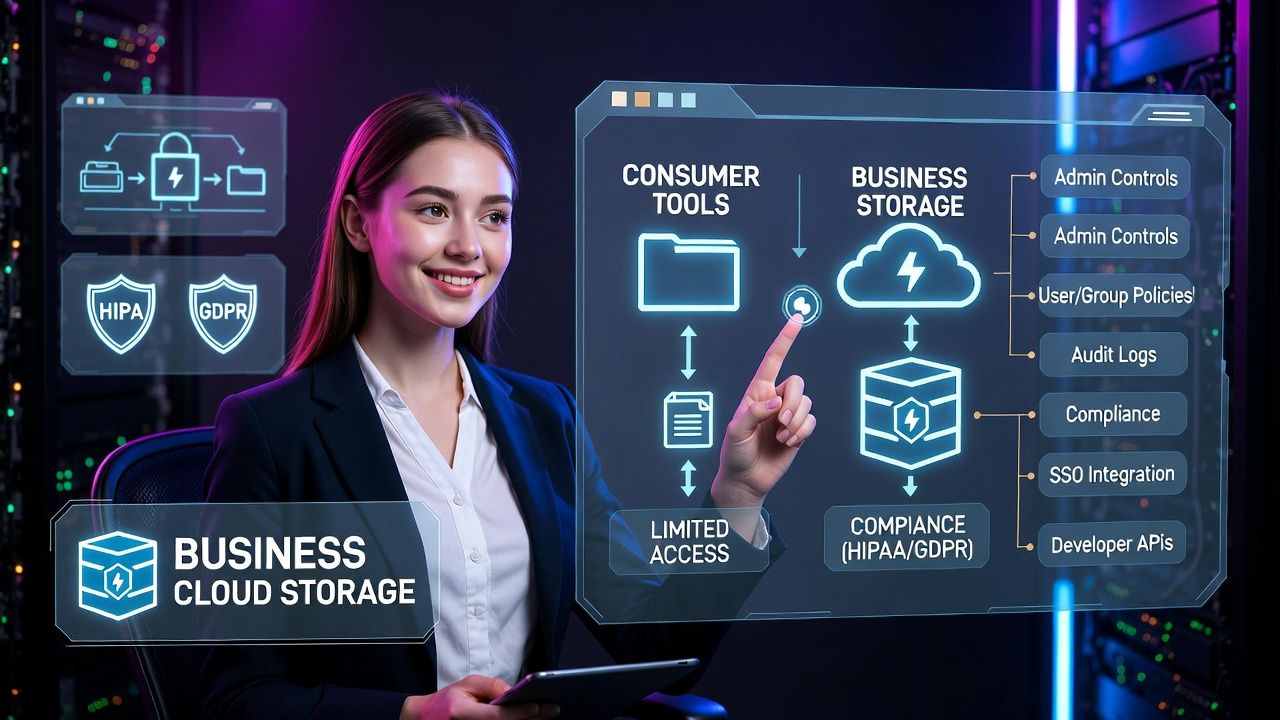
Unlike consumer tools, it adds admin controls, user/group policies, auditing, compliance features (e.g., HIPAA, GDPR), and integrations with identity providers, office suites, and developer tools.
The right choice depends on collaboration needs, security posture, and total cost of ownership.
Types of Cloud Storage (and When to Use Each)
1) Collaboration first suites: Microsoft 365 OneDrive/SharePoint, Google Drive (Workspace)
Best for teams that create, co‑edit, and share documents daily. Storage is integrated with productivity apps, search, and meeting tools. Admins get centralized policies and compliance options.
- Strengths: Native co‑authoring, granular permissions, version history, data loss prevention (with higher tiers), SSO.
- Considerations: Per user billing can become costly at scale; external sharing policies require careful governance; data residency varies by plan.
- Use cases: Sales/marketing content, policy documents, executive reports, cross functional collaboration.
2) Content platforms: Dropbox Business, Box, Egnyte
These specialize in file sync, secure sharing, and workflow automation. They often add advanced external collaboration, granular link controls, and e‑signature integrations.
- Strengths: Fast sync clients, smart content classification, strong external sharing controls, broad app ecosystem.
- Considerations: Per seat pricing; may duplicate capabilities of your office suite; advanced compliance features are in higher tiers.
- Use cases: Agencies, media teams, partner collaboration, RFPs, vendor document exchange.
3) Object storage (developer grade): AWS S3, Wasabi, Backblaze B2, Google Cloud Storage, Azure Blob
Object storage is ideal for large, unstructured data: backups, archives, logs, datasets, media libraries. It offers high durability and API access, with lifecycle tiers for cost control.
- Strengths: Massive scalability, S3‑compatible APIs, low cost per GB, lifecycle policies, cross region replication, strong encryption.
- Considerations: Not a user facing drive; access via apps, SDKs, or gateways; watch for egress and API request charges (Wasabi and B2 have simpler pricing).
- Use cases: Backup and disaster recovery, app assets, data lakes, compliance archives, CDN origins.
4) Backup & archiving: IDrive Business, Acronis, Glacier/Archive tiers
Purpose built for endpoint/server backup and long term retention. Combines agents, scheduling, ransomware protection, and compliance friendly retention policies.
- Strengths: Set and forget backups, immutable storage options (WORM), easy restores, fixed or transparent pricing.
- Considerations: Longer retrieval times on archive tiers; check RTO/RPO requirements before choosing cold storage.
- Use cases: 3‑2‑1 backups, legal hold archives, endpoint fleet protection, offsite server backups.
5) Hybrid and on premises extensions: Synology C2, TrueNAS with S3 gateways
Hybrid approaches keep hot data near users (NAS) while tiering or syncing to cloud for durability and offsite compliance. Best where low latency and local control are priorities.
- Strengths: Local performance, predictable costs, WAN optimized sync, flexible recovery options.
- Considerations: Hardware management, capacity planning, and disaster planning for the local tier.
- Use cases: Branch offices, creative studios, compliance conscious orgs needing local plus cloud redundancy.
The Best Cloud Storage Options for Businesses (Shortlist)
Microsoft OneDrive/SharePoint (Microsoft 365)
- Why it’s great: Deep integration with Teams, Word, Excel, PowerPoint, Azure AD; excellent co‑authoring and governance.
- Best for: Windows centric environments and organizations standardizing on Microsoft 365.
- Watch for: External sharing governance and storage quotas by plan.
Google Drive (Google Workspace)
- Why it’s great: Real‑time collaboration in Docs/Sheets/Slides, powerful search, shared drives for teams.
- Best for: Cloud first SMEs, startups, and education; organizations embracing Google ecosystem.
- Watch for: Migration from Microsoft formats and data residency considerations.
Dropbox Business
- Why it’s great: Best in class sync, Smart Sync, external sharing controls, intuitive UX.
- Best for: Creative teams, agencies, partner collaboration.
- Watch for: Per user pricing and overlap with office suite storage.
Box
- Why it’s great: Strong governance (Box Shield), e‑sign, content lifecycle, enterprise compliance.
- Best for: Regulated industries and enterprises needing fine grained controls.
- Watch for: Cost at scale and feature gating by tier.
AWS S3 (and Glacier), Wasabi, Backblaze B2
Developerfriendly object storage with near infinite scale. AWS S3 leads in ecosystem and features; Wasabi and B2 are simpler, often cheaper for straightforward storage without complex egress or API fees (policy dependent).
- Best for: Backups, archives, media libraries, application assets.
- Watch for: Egress charges and request fees (varies by provider); plan lifecycle and replication to control TCO.
How to Choose the Right Cloud Storage for Your Business
- Security and compliance: Look for encryption at rest and in transit, customer managed keys (CMEK) options, role based access, SSO/MFA, audit logs, retention/legal hold, and data residency regions.
- Collaboration vs. infrastructure: If you need co‑editing and sharing, choose a suite (OneDrive/Drive/Dropbox/Box). For backups and apps, object storage (S3‑compatible) is more cost effective.
- Performance and locality: Place data near users or workloads; consider CDN for distribution; evaluate latency and throughput for large media.
- Admin controls: Granular sharing policies, DLP, content classification, device controls, and automated lifecycle management are essential for scale.
- Pricing model: Understand per user vs per GB, minimum commitments, egress fees, API request costs, and support/SLA tiers. Model 12–36 months TCO.
- RTO/RPO targets: Map recovery time and recovery point objectives to storage tiers (hot, cool, archive) and test restores.
- Integrations: Check native connectors for your CRM, SIEM, MDM/EMM, ticketing, and backup tools.
- SLA and support: Confirm uptime SLAs, response times, and enterprise support availability.
Cost Models at a Glance (What Drives Your Bill)
- Per user licensing: Collaboration platforms typically bundle storage; cost scales with headcount and feature tier.
- Per GB storage: Object storage charges for capacity consumed; archive tiers are cheapest per GB but slower to retrieve.
- Egress and requests: Downloading and API calls may add costs; providers like Wasabi/B2 often simplify or reduce these fees.
- Data protection overhead: Replication, cross region copies, and versioning can multiply storage usage, plan for this in TCO.
- Support and compliance add-ons: Advanced security, legal hold, or enterprise support may be extra.
Real World Selection Scenarios
- Small business (20–50 users): Google Workspace or Microsoft 365 for daily work; pair with Backblaze B2/Wasabi for server backups to keep costs predictable.
- Creative agency: Dropbox Business for lightning fast sync and client sharing; object storage for raw asset archives and delivery via CDN.
- Regulated healthcare/finance: Box or Microsoft 365 E5 with DLP, legal hold, and audit trails; encrypted S3 with immutability (Object Lock) for WORM archives.
- Data heavy SaaS: AWS S3 or GCS for app assets and logs; lifecycle policies to Glacier/Archive; strict IAM, bucket policies, and cost monitoring.
Implementation Checklist (From Pilot to Production)
- Identity and access: Integrate SSO (Azure AD/Google/Okta), enforce MFA, define least privilege roles.
- Structure and ownership: Plan shared drives, team folders, or bucket prefixes; define data owners and lifecycle policies.
- Security baselines: Enable encryption, configure DLP/classification, restrict external sharing by group and domain.
- Backup and immutability: 3‑2‑1 rule three copies, two media, one offsite. Use versioning and Object Lock where supported.
- Monitoring and alerting: Turn on audit logs; integrate with SIEM; set budget alerts and anomaly detection for egress spikes.
- Pilot and training: Start with a department, collect feedback, refine policies, then roll out company wide.
- Test restores: Quarterly recovery drills validate RTO/RPO and ensure documentation is accurate.
Example: S3 Lifecycle Policy to Control Costs
Use lifecycle rules to automatically move older objects to cheaper tiers and expire versions after retention windows.
{
  "Rules": [
    {
      "ID": "Logs-Tier-And-Expire",
      "Filter": { "Prefix": "logs/" },
      "Status": "Enabled",
      "Transitions": [
        { "Days": 30, "StorageClass": "STANDARD_IA" },
        { "Days": 90, "StorageClass": "GLACIER" }
      ],
      "NoncurrentVersionTransitions": [
        { "NoncurrentDays": 30, "StorageClass": "GLACIER" }
      ],
      "Expiration": { "Days": 365 }
    }
  ]
}
Where a Hosting Partner Like YouStable Fits
If you’re consolidating infrastructure, pairing cloud storage with compute and backups simplifies operations.
At YouStable, we help businesses deploy secure cloud servers with offsite backups, S3‑compatible storage integrations, private networking, and 24×7 monitoring, so your workloads, data protection, and budgets stay aligned. Ask our architects to right size storage tiers and forecast egress before you commit.
Pros and Cons Summary
- Microsoft 365/OneDrive/SharePoint
- Pros: Deep Office/Teams integration, strong admin tools.
- Cons: Governance complexity, per user cost scaling.
- Google Drive (Workspace)
- Pros: Excellent real time collaboration, powerful search.
- Cons: Microsoft format migration, region availability.
- Dropbox Business
- Pros: Fast sync, simple external sharing.
- Cons: Seat based cost, overlaps with suites.
- Box
- Pros: Governance, compliance, e‑sign workflows.
- Cons: Higher cost for advanced features.
- AWS S3 / Wasabi / Backblaze B2
- Pros: Low cost per GB, lifecycle control, scalability.
- Cons: Not a user drive; watch egress and API fees.
Final Recommendation
Most businesses succeed with a two tier approach: a collaboration suite (Microsoft 365 or Google Workspace) for day to day files plus S3‑compatible object storage for backups and archives.
Add governance (DLP, legal hold), lifecycle policies, and regular restore tests. If you need help aligning storage with RTO/RPO and budget, YouStable can architect a pragmatic, secure design.
FAQs
What is the most secure cloud storage for business?
Security depends on configuration more than brand. Choose providers with encryption at rest/in transit, optional customer managed keys, granular RBAC, DLP, audit logs, and immutability. Box (with Shield), Microsoft 365 E5, and S3 with Object Lock are excellent when paired with SSO/MFA and least privilege access.
How much cloud storage does a small business need?
For 20–50 users, a common baseline is 1–3 TB for collaboration files plus 2–5× that for backups and archives, depending on media workloads and retention policies. Start with measured usage, then apply lifecycle policies and quarterly reviews to right size capacity.
Which is better for business: OneDrive or Google Drive?
Pick the suite that matches your ecosystem. OneDrive/SharePoint fits Windows/Office heavy environments and offers robust governance via Microsoft Purview. Google Drive excels at browser first collaboration and simplicity. Both support advanced security; costs vary by plan and included apps.
What’s the difference between object storage and traditional file storage?
File storage uses folders and SMB/NFS protocols for user drives. Object storage uses buckets and APIs (S3) to store data with metadata, offering massive scale and lifecycle tiers. It’s ideal for backups, logs, and media, not as a mapped drive without a gateway.
How can we reduce cloud storage costs without risking data?
Enable versioning with sensible retention, apply lifecycle policies (hot to cool to archive), compress and deduplicate data, place data in the right region, and minimize egress by caching via CDN or keeping compute close to storage. Monitor with budgets and alerts to catch anomalies early.










