Hot site vs warm site vs cold site, In disaster recovery, a hot site is a fully equipped, continuously synchronized secondary environment enabling near instant failover; a warm site has pre-provisioned infrastructure with recent data copies for hours level recovery; a cold site is an empty or minimal facility where systems are rebuilt from backups, taking days or longer.
Choosing between a hot site, warm site, and cold site is one of the most crucial disaster recovery decisions. Your pick directly impacts RTO (how fast you recover), RPO (how much data you can lose), cost, and operational complexity. This guide explains the key differences, trade offs, and how to choose for your business.
What Are Hot, Warm, and Cold Sites in 2026?
Disaster recovery (DR) sites are alternate locations physical or cloud based used to restore business operations after outages, cyberattacks, or regional events.
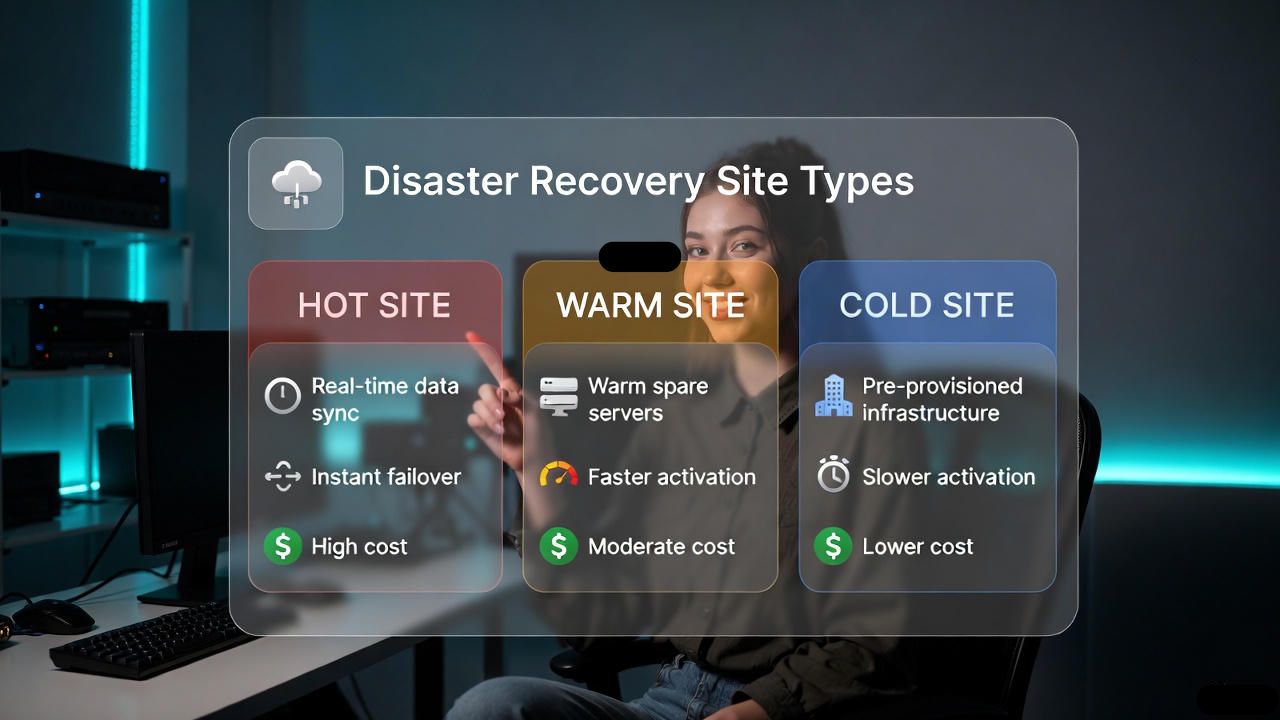
The “temperature” reflects readiness: the hotter the site, the more prebuilt and synchronized it is, and the faster (and costlier) it is to fail over.
Key Differences at a Glance
- Recovery Time Objective (RTO):
- Hot site: seconds to minutes
- Warm site: minutes to hours
- Cold site: days to weeks
- Recovery Point Objective (RPO):
- Hot site: near zero (seconds)
- Warm site: low to medium (minutes to hours)
- Cold site: high (hours to days)
- Data Synchronization:
- Hot: synchronous or high frequency asynchronous replication
- Warm: periodic replication or frequent backups
- Cold: backup only (daily/weekly), offsite/media
- Infrastructure Readiness:
- Hot: fully provisioned, active active or hot standby
- Warm: partially provisioned, needs scale up at failover
- Cold: minimal or none; full build required
- Operational Cost:
- Hot: highest (compute, licenses, continuous sync)
- Warm: moderate
- Cold: lowest
- Testing Frequency:
- Hot: frequent, automated drills
- Warm: scheduled failover tests
- Cold: periodic restore tests
- Best For:
- Hot: mission critical, regulated, zero tolerance apps
- Warm: important but not life/safety critical systems
- Cold: archival or non critical workloads
Deep Dive Into Each DR Site Type
Hot Site
A hot site is a fully functional duplicate of your production environment. Compute, storage, networking, security controls, and data are continuously synchronized, enabling immediate or near immediate cutover when the primary site fails.

- How it works: synchronous replication for databases and critical storage; active active or active passive clusters; automated failover using load balancers, DNS, or BGP.
- RTO/RPO: seconds to minutes, often near zero for tier 1 apps.
- Pros: minimal downtime, minimal data loss, strong compliance posture.
- Cons: expensive (duplicate environments, licensing), complex runbooks and monitoring.
- Best for: financial transactions, healthcare EMR, real time SaaS, payment gateways, high SLA eCommerce checkout.
Warm Site
A warm site has preprovisioned infrastructure (VM templates, reserved instances, network and security baselines) and receives frequent backups or asynchronous replication. You spin up services and apply recent data during failover.
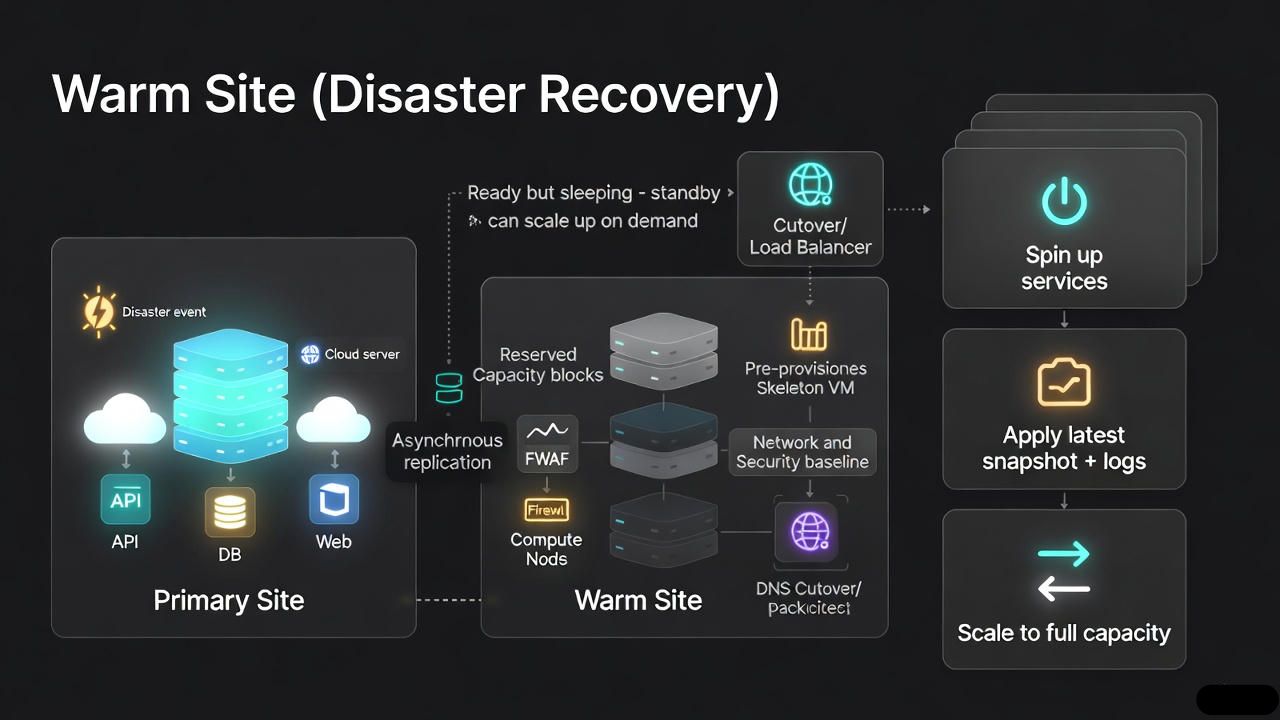
- How it works: scheduled snapshots and log shipping; infrastructure as code (IaC) to deploy capacity on demand; partial automation.
- RTO/RPO: minutes to hours, depending on automation and data freshness.
- Pros: balanced cost and speed; flexible scaling; simpler than a hot site.
- Cons: some downtime and data loss risk; startup orchestration needed.
- Best for: internal business apps, CRM/ERP modules, content platforms, analytics where brief downtime is tolerable.
Cold Site
A cold site provides a location or cloud account with minimal prebuilt resources. You restore systems from backups and rebuild networking, identity, and application stacks after a disaster.
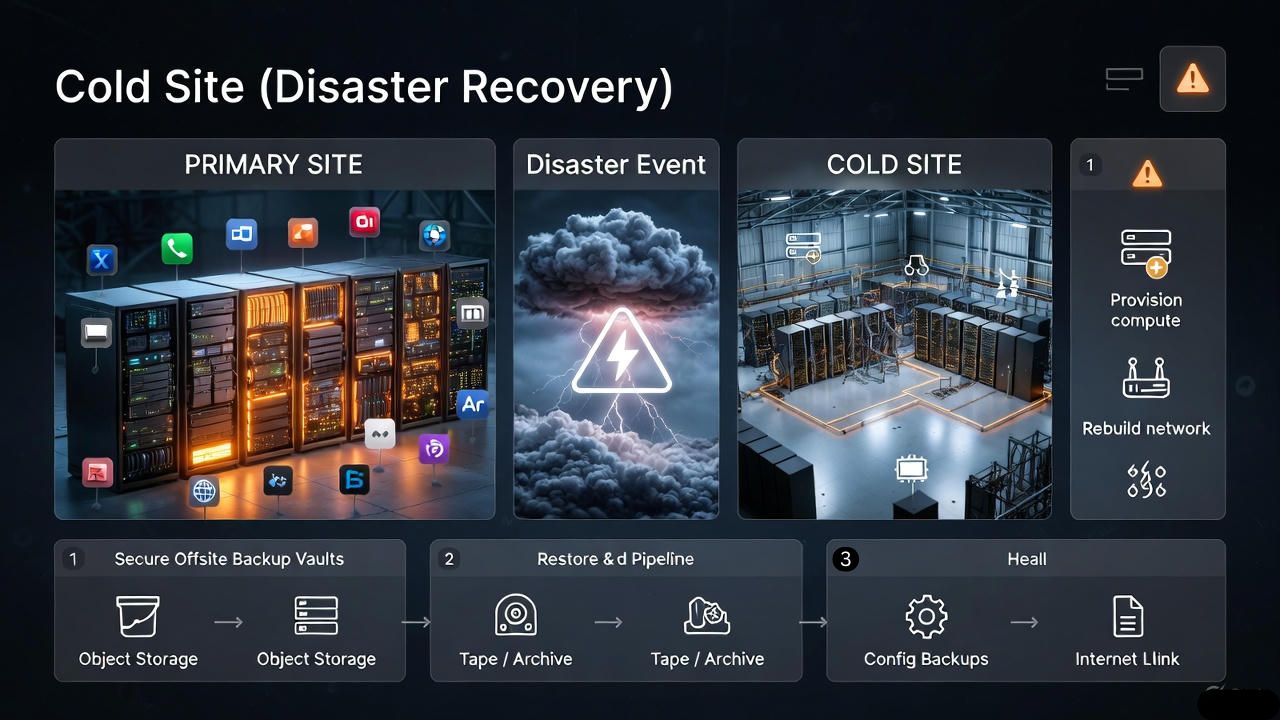
- How it works: offsite backups (object storage, tape), configuration backups, manual provisioning at time of disaster.
- RTO/RPO: days to weeks; data loss equals your backup interval.
- Pros: lowest cost, simple to maintain between tests.
- Cons: longest downtime, potential configuration drift, high human effort during recovery.
- Best for: archives, dev/test, noncritical websites, long tail services.
RTO and RPO: Setting Realistic Targets
Recovery Time Objective (RTO) is how fast you must restore service. Recovery Point Objective (RPO) is how much data you can afford to lose. Define both per application tier, not per company, then map to a DR site type and budget.
- Tier 1 (customer facing, revenue critical): RTO ≤ 15 minutes; RPO ≤ 1 minute → hot site or premium warm with near real time replication.
- Tier 2 (important internal systems): RTO 1–4 hours; RPO ≤ 1 hour → warm site.
- Tier 3 (noncritical/archival): RTO 24–72 hours; RPO 24 hours+ → cold site.
# Example DR mapping (simplified)
applications:
  checkout-api:
    rto: 5m
    rpo: 30s
    dr_site: hot
    replication: synchronous
  crm:
    rto: 2h
    rpo: 30m
    dr_site: warm
    replication: async_snapshots
  data_archive:
    rto: 48h
    rpo: 24h
    dr_site: cold
    replication: backups_only
On Prem, Cloud DR, and DRaaS
Modern disaster recovery often uses cloud regions as alternate sites. Public cloud and DRaaS (Disaster Recovery as a Service) reduce capital expenditure, leverage automation, and provide geographic diversity.
- Cloud Hot: active-active across regions with database replication (e.g., multi-AZ/region), global load balancing, and continuous data sync.
- Cloud Warm: prebuilt images, replicated storage snapshots, autoscaling groups; failover via DNS cutover and scripted bootstraps.
- Cloud Cold: store encrypted backups in object storage; rebuild with IaC when needed.
Watch for gotchas: egress charges during failover, software licensing in secondary regions, configuration drift, and identity dependencies (SSO, directory services). Validate security and compliance (ISO 22301, NIST SP 800-34, HIPAA, PCI DSS) across both primary and DR sites.
Cost Modeling and ROI
Budgeting isn’t just about infrastructure. Include licenses, replication, monitoring, observability, testing, staff training, and incident response. Compare this to the expected cost of downtime to justify the “temperature” you need.
- Downtime cost formula (simplified): lost revenue per hour + productivity loss + SLA penalties + recovery overhead.
- Hot site costs: duplicate compute/storage, always-on networking, premium replication features.
- Warm site costs: reserved capacity or burstable cloud resources, scheduled replication, orchestration tools.
- Cold site costs: storage for backups, periodic test restores, slower recovery effort.
- Use the 3-2-1-1-0 backup rule: 3 copies, 2 media, 1 offsite, 1 immutable, 0 errors after testing.
How to Choose: A Practical Decision Framework
- Run a Business Impact Analysis (BIA): quantify financial and operational impact per application.
- Set RTO/RPO by tier: align with customer and regulatory obligations.
- Map tiers to site types: hot for tier 1, warm for tier 2, cold for tier 3.
- Validate data pipelines: choose synchronous vs asynchronous replication based on RPO.
- Automate with IaC and runbooks: reduce human error and speed up recovery.
- Test quarterly: do planned failovers and document gaps.
- Iterate: adjust DR temperature as your business or threat landscape changes.
# DR Readiness Checklist (abbreviated)
- inventory_apps: complete
- classify_tiers: t1/t2/t3
- define_rto_rpo: approved_by_business
- choose_site_type: hot|warm|cold per app
- data_replication: configured_and_monitored
- infra_as_code: reproducible_builds
- runbooks: step_by_step_with_owners
- access_and_secrets: recoverable_and_secure
- failover_drills: quarterly_with_metrics
- postmortems: action_items_closed
Real World Scenarios
- High traffic eCommerce: hot site for checkout, payment, and inventory microservices; warm site for CMS and search; cold for historical reports.
- SaaS platform: hot for auth and core APIs; warm for analytics; cold for archives and logs beyond retention windows.
- Healthcare provider: hot for EMR and PACS; warm for scheduling; cold for old imaging backups (with strict compliance controls).
- SMB website: warm site using nightly database dumps and image replication; cold for marketing assets.
- Government records: warm for citizen portals; cold with immutable backups for record repositories.
Implementation Best Practices
- Network and DNS: use global load balancers, health checks, and short TTLs for controlled, fast cutover.
- Identity: ensure directory services, MFA, and secrets management replicate or can operate independently at the DR site.
- Data: choose replication that matches your RPO; protect with encryption, immutability, and WORM policies.
- Automation: build with Terraform/CloudFormation and CI/CD; use configuration management for drift control.
- Observability: centralize logs and metrics in both regions; alert on replication lag and failover readiness.
- Security: mirror controls (firewalls, WAF, EDR, SIEM) across sites; test incident response alongside DR.
- Testing: practice full failovers, not just component tests; validate rollback and partial-region failures.
FAQs
What is the main difference between a hot, warm, and cold site?
A hot site is fully synchronized and ready to run immediately, a warm site is partially prepared and needs some activation, and a cold site is a minimal shell where you rebuild from backups. The differences translate to RTO/RPO and cost.
Which site type is most expensive and why?
Hot sites are most expensive because you maintain duplicate infrastructure, continuous replication, and licensing at the secondary site. You’re paying for speed and minimal data loss, which requires always-on resources and sophisticated orchestration.
What typical RTO and RPO can I expect for each site?
Hot site: RTO seconds to minutes; RPO near zero. Warm site: RTO minutes to hours; RPO minutes to hours. Cold site: RTO days to weeks; RPO equals your backup interval (often 24 hours or more).
Can cloud DR replace a traditional hot site?
Yes. Cloud regions can deliver hot, warm, or cold patterns with global load balancing and cross-region replication. Benefits include elasticity and lower capex, but plan for egress costs, licensing, and security parity across regions.
How do I decide which DR site type my business needs?
Run a Business Impact Analysis, set application level RTO/RPO, and map tiers to site types. If losing seconds of data is unacceptable, choose hot; if you can tolerate an hour of downtime and data loss, warm may suffice; for noncritical systems, cold is cost effective.
Conclusion
Hot sites give the fastest recovery at the highest cost, warm sites strike a practical balance, and cold sites minimize spend but lengthen downtime. Start with business requirements, not technology. Then size your DR site temperature to match RTO/RPO, compliance, and budget and test it until failover is boring.