AWS supports nested virtualization only on EC2 Bare Metal instances and certain managed offerings. Standard virtualized EC2 instances do not expose Intel VT-x/AMD-V to guests, so running KVM, Hyper‑V, or ESXi inside them is unsupported. For production nesting, use Nitro based bare metal instances (for your own hypervisor) or VMware Cloud on AWS.
If you’re evaluating AWS nested virtualization for labs, CI emulators, or multi tenant platforms, it’s crucial to understand where it works and where it doesn’t. In this guide, I’ll explain what AWS supports, which EC2 families to choose, how to set up KVM on bare metal, performance considerations, and safer alternatives when nesting isn’t required.
What is Nested Virtualization?
Nested virtualization lets you run a hypervisor inside a virtual machine. In practice, that means starting a VM (Level 1), then running another VM or hypervisor inside it (Level 2).
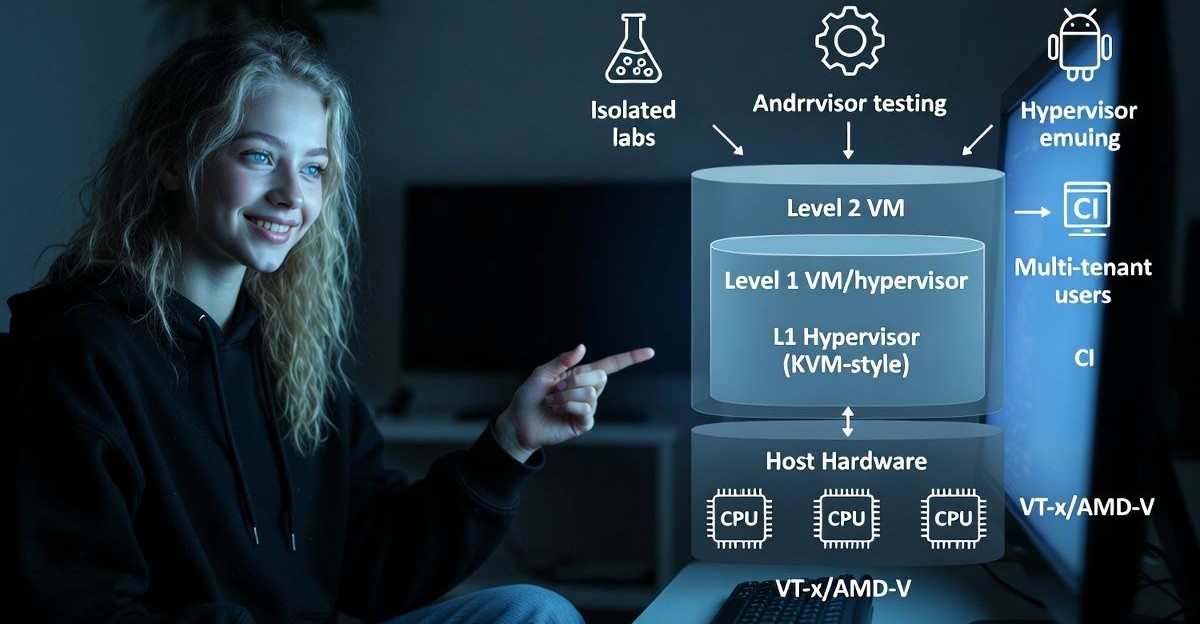
This requires CPU virtualization extensions (Intel VT-x/VMX or AMD-V/SVM) to be available to the guest VM.
Common reasons to use nesting include building isolated lab environments, testing hypervisor features, running Android emulators for CI, or consolidating multi tenant workloads that expect full VM isolation.
Does AWS Support Nested Virtualization?
Yes, on bare metal. AWS EC2 Bare Metal instances provide direct access to the underlying server, so you can install and run your own hypervisor (KVM, Hyper‑V, ESXi) and even enable nesting inside your guest VMs. Traditional EC2 instances (non‑bare‑metal) do not expose VT‑x/AMD‑V and therefore do not support nested virtualization.
Supported Paths on AWS
- EC2 Bare Metal (Nitro based) instances: You control the host OS and can install KVM, Hyper‑V, or ESXi. You may also enable nesting in your guest VMs because you have full hardware access.
- VMware Cloud on AWS: VMware managed SDDC on AWS bare metal. You can run VMs on VMware ESXi clusters and use VMware’s supported methods for advanced scenarios. (Note: feature availability depends on VMware’s platform policies.)
Not Supported on Standard EC2 Instances
- Nitro virtualized EC2 instances (non‑metal) do not pass through VT-x/AMD-V to the guest OS. Attempts to start a nested hypervisor will fail or fall back to slow software emulation (e.g., QEMU TCG).
- Graviton (ARM) instances do not provide an avenue for nested virtualization similar to x86 bare metal for common x86 hypervisors.
Which EC2 Instances Support Nested Virtualization?
Choose Nitro based Bare Metal variants. Availability varies by Region, but common options include:
- Compute optimized: c5.metal, c5n.metal, c6i.metal, c6a.metal, c7i.metal (and similar)
- General purpose: m5.metal, m5n.metal, m6i.metal, m6a.metal, m7i.metal
- Memory optimized: r5.metal, r5n.metal, r6i.metal, r6a.metal
- Storage/NVMe heavy: i3.metal, i4i.metal
- High frequency: z1d.metal
Always check the latest AWS documentation and your Region’s instance catalog, as naming and availability evolve.
Setting Up KVM on EC2 Bare Metal (and Enabling Nesting)
The following example uses an x86_64 bare metal instance (e.g., m6i.metal) running Amazon Linux 2023. Adjust packages/commands if you use Ubuntu, RHEL, or another distro.
# 1) Verify CPU virtualization support
lscpu | egrep 'Virtualization|Vendor ID'
egrep -o 'vmx|svm' /proc/cpuinfo | sort -u

# 2) Update system and install KVM/libvirt tooling
sudo dnf -y update
sudo dnf -y install qemu-kvm libvirt virt-install virt-manager

# 3) Start and enable libvirt
sudo systemctl enable --now libvirtd
sudo usermod -aG libvirt $USER   # re-login after this to pick up group

# 4) Load KVM modules (Intel example; use kvm_amd for AMD)
sudo modprobe kvm
sudo modprobe kvm_intel

# 5) Confirm KVM is available
lsmod | grep kvm
virsh nodeinfo

# 6) OPTIONAL: Enable nested virtualization for your KVM guests
# This lets a VM you create also run its own hypervisor.
echo "options kvm_intel nested=1" | sudo tee /etc/modprobe.d/kvm-intel.conf
sudo modprobe -r kvm_intel
sudo modprobe kvm_intel
cat /sys/module/kvm_intel/parameters/nested  # should return Y

# 7) Create a VM (example)
virt-install
  --name demo-vm
  --memory 4096
  --vcpus 2
  --cpu host-passthrough
  --disk size=30
  --cdrom /var/lib/libvirt/images/ubuntu.iso
  --network network=default
Notes:
- Use
--cpu host passthroughto expose CPU features to VMs. - For AMD hosts, replace
kvm_intelwithkvm_amdand verifysvmappears in/proc/cpuinfo. - Networking: Consider macvtap, bridge, or routed setups depending on security and throughput needs on EC2.
Performance Considerations and Best Practices
- CPU: Nested workloads add overhead. Favor newer generations (e.g., c6i.metal, m6i.metal) and right size vCPU/NUMA topology.
- Memory: Allocate headroom for host OS, L1 hypervisor, and L2 guests. Avoid overcommit if you require predictable latencies.
- Storage: Use EBS gp3/io1/io2 with provisioned IOPS for consistent I/O, or NVMe local storage on i3.metal/i4i.metal for high throughput (with data durability plans).
- Networking: Nitro provides high baseline bandwidth; for east–west VM traffic, consider SR-IOV or bridge setups inside your hypervisor and spread traffic across multiple ENIs if needed.
- Isolation: Each nesting layer increases complexity; harden L1 and L2 hypervisors, patch regularly, and audit inter VM traffic.
Common Errors and How to Fix Them
- qemu: KVM not available: You’re likely on a non‑metal EC2 instance or KVM modules aren’t loaded. Verify bare metal type and check
lsmod | grep kvm. - Guest hypervisor won’t start: Ensure nested is enabled (
/sys/module/kvm_{intel,amd}/parameters/nestedshowsY) and your VM usescpu host passthrough. - Poor performance: Avoid software emulation; confirm
vmx/svmflags appear in the guest and review storage/network bottlenecks.
Alternatives to Nested Virtualization on AWS
- Containers instead of VMs: Use Docker, ECS, or EKS for most CI, microservices, and ephemeral environments. Often faster and cheaper than managing nested hypervisors.
- Managed services: For build/test pipelines, consider AWS CodeBuild, Device Farm (mobile testing), or Amazon WorkSpaces/AppStream for desktop/app streaming.
- VMware Cloud on AWS: If you require VMware semantics, use VMware’s managed SDDC rather than hand rolling nesting.
- Dedicated/Metal servers off‑cloud: When strict performance or licensing requires full control, a tuned bare‑metal server can be cost effective. At YouStable, we provision dedicated servers and custom bare metal environments optimized for virtualization and labs, contact us for architectures that mirror your AWS setup with predictable pricing.
Cost and Licensing Tips
- EC2 Bare Metal pricing: Metal instances are premium. Use Savings Plans or Reserved Instances if you run 24×7. Spot capacity for metal is limited or unavailable in many Regions.
- Storage costs: High IOPS EBS volumes add up. Right size IOPS/throughput and use lifecycle policies for snapshots.
- Licensing: Hyper‑V, Windows Server, and certain commercial hypervisors have specific licensing for nested setups. Validate terms before deploying.
Security and Compliance Notes
- Shared responsibility: On bare metal, you operate the hypervisor. Harden SSH, restrict management networks, and enforce MFA and least privilege in IAM.
- Patching cadence: Keep host kernel/KVM and guest OSes updated. Enable automatic updates where possible and stage changes in a test cluster.
- Data protection: Use encrypted EBS, customer managed KMS keys, and consider host based encryption inside guests for sensitive workloads.
Real World Use Cases
- Training labs: Spin up a KVM or ESXi host on m6i.metal to teach virtualization, then allow students to create L2 VMs safely.
- Network emulation: Run GNS3/EVE NG on i3.metal for high I/O virtual routing/switching labs.
- CI pipelines: Build Android/iOS emulators or kernel CI requiring VM in VM isolation when containers aren’t enough.
FAQs
Does AWS support nested virtualization on standard EC2 instances?
No. Standard EC2 instances do not expose VT-x/AMD-V to guests. You need EC2 Bare Metal or a managed platform like VMware Cloud on AWS.
Which EC2 instances allow me to run KVM, Hyper‑V, or ESXi?
Nitro based Bare Metal families such as c5.metal/c6i.metal, m5.metal/m6i.metal, r5.metal/r6i.metal, i3.metal/i4i.metal, and z1d.metal. Verify availability in your Region.
Can I enable nested virtualization inside my KVM guests on AWS bare metal?
Yes. Load the appropriate KVM module with u003ccodeu003enested=1u003c/codeu003e and use u003ccodeu003ecpu host passthroughu003c/codeu003e for your VMs so they can run their own hypervisors.
Is nested virtualization on AWS good for production?
It depends. For specialized multi tenant platforms or labs, bare metal with nesting can be appropriate. For typical apps, containers or single level VMs are simpler, cheaper, and easier to operate.
What are the best alternatives if I don’t need full nesting?
Use ECS/EKS for containers, AWS CodeBuild/Device Farm for CI and mobile testing, or VMware Cloud on AWS if you need VMware semantics without managing the hypervisor yourself. For fixed, high-performance needs, consider u003cstrongu003eu003ca href=u0022https://www.youstable.com/dedicated-servers/u0022u003eYouStable dedicated serversu003c/au003eu003c/strongu003e..