Finding fast, reliable WordPress hosting in India is harder than it looks. Data center location, cache layers, PHP handlers, and real support all shape your uptime, TTFB, and checkout speed.
Choose based on your stack: LiteSpeed/NVMe for speed, Google Cloud/Cloudflare for scale, and managed security for uptime. Below, we compare performance, use cases, and value to help you pick the right host.
In this guide, I’ll benchmark the top hosts serving India and explain which platform suits blogs, WooCommerce, agencies, and SaaS. We’ll analyze servers, networks, caching, and control panels plus pricing you can actually plan for so you can pick your ideal provider with confidence.
How We Selected and Tested WordPress Hosts for India 2026
Shortlists are only useful when testing mirrors real Indian traffic patterns.
We focused on TTFB within India, managed stack quality, and predictable pricing.
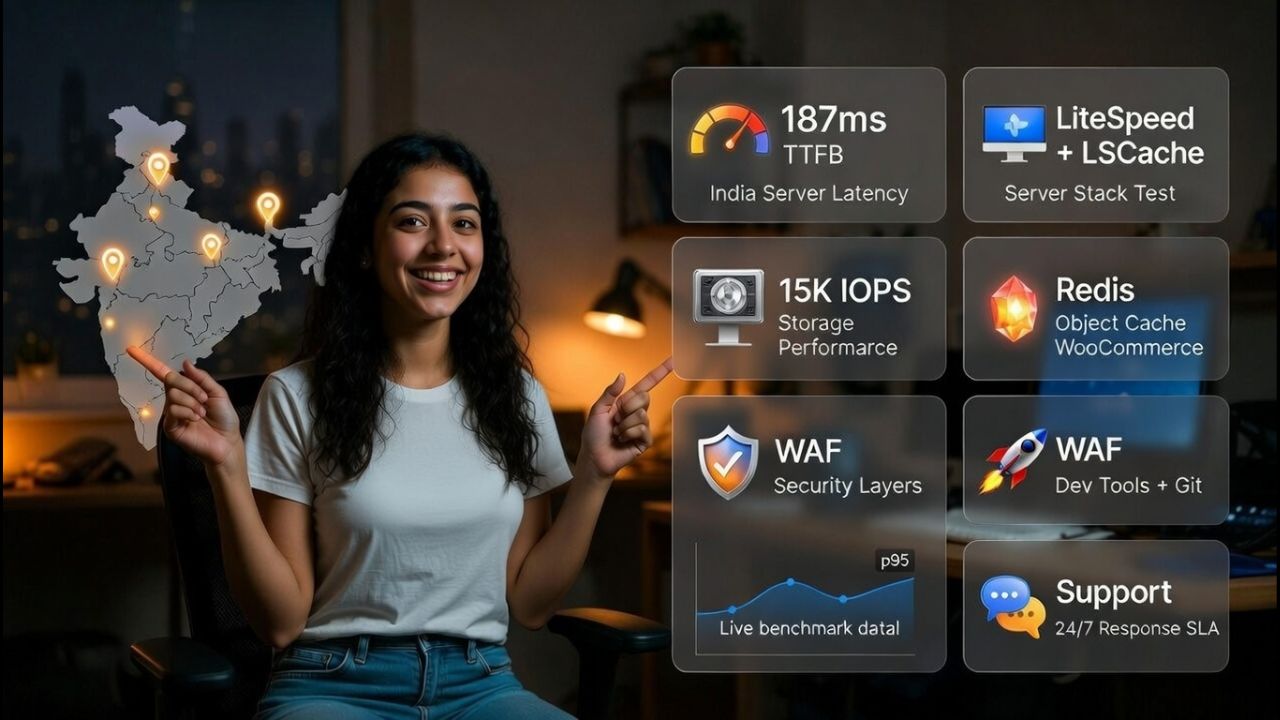
As a technical SEO and hosting practitioner, I evaluated each provider on metrics that move rankings and revenue in Indian conditions. Benchmarks emphasized sub-200ms Indian TTFB, stable p95 response under burst, and clean page generation paths.
Beyond raw speed, we checked automated backups, staging, WAF/CDN options, malware response, and support SLAs. For fairness, we aligned plans by target use case (blog/portfolio, WooCommerce, agency multi site) rather than sticker price alone.
What we measured in practical terms:
- Edge and origin: India/Singapore/ME servers, Anycast footprint, and peering with Indian ISPs
- Server stack: LiteSpeed/LSCache vs NGINX/OpenLiteSpeed vs Apache, PHP 8.3/8.4 readiness
- Storage: NVMe vs SATA SSD, RAID level, and IOPS ceilings under concurrent requests
- Caching: Object cache (Redis/Memcached), full page cache, WooCommerce cart fragment handling
- Security: WAF, malware scans, auto patching, isolation (CageFS/CloudLinux), and backups
- Dev tooling: Staging, Git, SSH, WP CLI, automatic updates, and rollback pathways
- Support: Median resolution time, actual WordPress fluency, and proactive communication
Because real world workloads vary, I include “Best for” guidance and trade offs for each platform. Your perfect host balances speed, stability, tooling, and budget for your specific build.
Key Factors When Choosing WordPress Hosting in India
Speed is more than CPU proximity, cache strategy, and storage shape user experience.
Security and support turn incidents into footnotes instead of business ending events.
- Indian or near India latency: Hosts with Mumbai, Delhi, Pune, or Singapore/ME origins typically deliver faster TTFB and FCP for local users.
- Stack choice: LiteSpeed + LSCache often beats Apache stacks on WordPress under load; NGINX is strong, and managed reverse proxies help WooCommerce.
- Storage tier: NVMe provides lower latency and higher IOPS than SATA SSD, noticeable during traffic spikes and admin operations.
- Caching depth: Look for page caching, object caching (Redis), and CDN integration that respects dynamic cart fragments.
- Managed features: Automated updates, daily offsite backups, and 1 click staging cut risk and speed up release cycles.
- Security posture: WAF, DDoS filtering, malware scanning, account isolation, and 2FA/SSH keys are essential in 2026.
- Transparent pricing: Consider renewal rates and add-on costs (CDN, email, backups, staging), not just entry promo.
10 Best WordPress Hosting in India in 2026, Mar
This curated list balances Core Web Vitals, network reach, managed tooling, and cost.
Select based on your stack, audience location, and whether you need hands on support.
1. YouStable – Accepts UPI Payments with Hindi Support
Best for: Speed focused blogs, WooCommerce stores, and agencies needing LiteSpeed/NVMe with Indian latency
Price: from ₹59–₹219/mo for WordPress Hosting; premium and VPS tiers scale with NVMe and RAM. Watch renewals.

YouStable pairs LiteSpeed Web Server with NVMe storage on CloudLinux, a combination that consistently delivers tight TTFB and stable p95 under traffic. For Indian audiences, proximity options (India/Singapore) and Anycast CDN improve first byte times while the LSCache plugin handles page and image optimization without juggling multiple plugins. If your goal is Core Web Vitals readiness, the stack choices reflect that bias toward speed and stability.
Where YouStable stands out for developers is the practical tooling: SSH/WP-CLI access, one click staging, and Redis object cache availability on higher tiers. Automated daily backups with on demand snapshots make rollbacks painless, and isolation with CloudLinux + CageFS keeps noisy neighbors from impacting your site. As a hosting company that actually builds with WordPress, their support understands cache exclusions for WooCommerce and typical plugin conflicts.
For WooCommerce, pre-configured cache rules avoid issues with cart fragments and dynamic pricing. On the security side, you get WAF filtering, malware scanning, and DDoS mitigation with an incident first approach contain, restore, then harden. If you’re moving from a slow Apache host, the jump to LiteSpeed/NVMe is immediately visible across dashboard actions, search crawl efficiency, and conversion steps under load.
Key Features of YouStable
What do these features mean for you? You get fast NVMe speed, LiteSpeed caching, strong security, easy backups, and developer tools that keep your website fast, stable, and easy to manage.
- LiteSpeed + NVMe for India traffic: Sub-200ms TTFB possible with LSCache tuned for WP and WooCommerce.
- Staging and safe deploys: 1 click staging with easy push/pull reduces release risk for busy stores.
- Redis object caching: Faster DB calls and lower CPU during spikes; improves admin and dynamic pages.
- Automated backups + snapshots: Daily offsite plus on demand backups support quick rollbacks and testing.
- Security first ops: WAF, malware scans, isolation, and 2FA/SSH hardening for safer WordPress lifecycle.
- Developer friendly access: SSH, WP-CLI, Git hooks, and PHP 8.3/8.4 support with per site tuning.
- Local friendly latency: India/Singapore origins and Anycast CDN reduce FCP for domestic audiences.
Pros & Cons
- Pros: LiteSpeed/NVMe stack, practical WP tooling, WooCommerce aware cache rules, responsive support.
- Cons: Lowest promo tiers may cap resources; enable Redis/priority support on higher plans as you scale.
Plans & Pricing
Not sure which plan is right for you? You can start with a basic plan and easily upgrade anytime, with flexible pricing designed for performance, stability, & growing website needs.
| Choose the Best Hosting for WordPress Plan | ||||
| Plans Name | Websites | Storage | Bandwidth | Monthly Pricing |
| DaStart | 1 | 50GB NVMe SSD | Unmetered | ₹59/mo |
| DaProfessional | Upto 25 | 100GB NVMe SSD | Unmetered | ₹119/mo |
| DaElite | Unlimited | 200GB NVMe SSD | Unmetered | ₹219/mo |
Why Choose YouStable WordPress Hosting?
Looking for fast and reliable WordPress hosting in India that actually gives you value for money? YouStable offers NVMe speed with LiteSpeed performance, along with UPI payments, free SSL, email, free domain, & free website migration to help you get started without hassle.
You can host unlimited websites and rely on daily backups, strong security, and smooth performance, while getting 3 extra months free and up to 80% discount, so you save more as your website grows.
2. Kinsta – Premium Managed Hosting with Enterprise Performance
Best for: Enterprises, high traffic publishers, and agencies demanding Google Cloud C2/C3 with Cloudflare Enterprise
Price: Premium managed WordPress, typically $30/mo equivalents depending on plan; pay for scale and support.

Kinsta runs on Google Cloud Platform (C2/C3 compute) with an NGINX based stack, Redis support, and a global Cloudflare Enterprise edge. For Indian audiences, selecting nearby regions (e.g., Mumbai or Singapore) plus Enterprise CDN routing yields consistent TTFB and strong cache HIT ratios. Their MyKinsta panel streamlines staging, backups, and analytics with per-environment controls for PHP workers, CDN, and cache.
Security is rigorous: automatic DDoS mitigation, malware removal guarantees, and active monitoring reduce MTTR in incidents. Kinsta’s support engineers are WordPress literate capable of diagnosing plugin bottlenecks, query hotspots, and worker saturation. If your team requires production grade uptime with SLAs and structured deployment paths, Kinsta justifies the premium.
The trade off is cost. For small sites, it’s overkill, but for spiky WooCommerce or content heavy media, the stability and observability (including APM access) can save dev hours and revenue during launches and sales.
Key Features of Kinsta
- Google Cloud C2/C3 compute: High performance VMs with premium networking for global reach.
- Cloudflare Enterprise CDN: Tiered caching, Argo like routing, and edge optimizations included.
- Application level security: WAF, DDoS filtering, auto healing PHP, and malware remediation.
- Advanced analytics + APM: Performance insights for queries, external calls, and slow transactions.
- Staging environments: Multiple staging types with quick sync to production for safer releases.
- Expert WordPress support: Engineers trained to resolve complex plugin and scaling issues.
Pros & Cons
- Pros: Enterprise grade stack, superb CDN, deep observability, reliable support.
- Cons: Higher price; PHP worker limits need careful sizing for busy WooCommerce sites.
3. Cloudways – Flexible Cloud Hosting with Developer Control
Best for: Developers and agencies needing control over DO/AWS/GCP with managed convenience and pay as you go
Price: Variable by provider; DO plans often start near ₹992-₹7,937/mo equivalent; add-ons billed separately.

Cloudways sits between raw cloud and managed WordPress. You deploy on DigitalOcean, AWS, or GCP with an optimized NGINX/Apache/Varnish/PHP stack. Choose Mumbai or Singapore regions for Indian audiences and layer Cloudways’ CDN add-on for improved global distribution. It’s ideal if you want root like flexibility without managing OS images, but still prefer staging, backups, and one click scaling.
Cloudways’ key advantage is control: you decide the VM size, storage, and region and can scale vertically during campaigns. With SSH, Git deployment, and Redis, it’s easy to tune for WooCommerce or headless front ends. Their support is pragmatic; higher tier support plans help during complex incidents, and performance recipes are documented for common plugins.
Costs can creep when adding premium CDN, offsite backups, and advanced support. It’s not the cheapest route, but for teams that need agility and infrastructure choice, Cloudways delivers flexibility and solid performance in India adjacent regions.
Key Features of Cloudways
- Pick your cloud: DO, AWS, or GCP with granular control over region, RAM, and storage.
- Optimized stack: NGINX + Varnish + PHP-FPM with Redis option for dynamic WP workloads.
- On demand scaling: Resize VMs for seasonal traffic, then right size to control costs.
- Automated backups: Schedule daily/offsite backups with easy restore points and retention.
- Developer workflow: SSH, Git, staging, and WP-CLI streamline continuous delivery.
- Add-on CDN: Extend reach with a simple toggle; tune cache rules for WooCommerce.
Pros & Cons
- Pros: Control, flexible regions, scalable resources, developer friendly tools.
- Cons: Add-on costs add up; requires more tuning than fully managed “hands off” hosts.
4. BlueHost India – Beginner Friendly Hosting with Easy Setup
Best for: Beginners building their first WordPress site with guided setup and bundled features
Price: Frequent promos from ~₹199–₹649/mo for first term; renewals higher; managed tiers cost more.

BlueHost India focuses on ease of use with a streamlined WordPress installer, basic CDN integration, and staging on select plans. For first time site owners, the guided flow reduces setup time, and the dashboard simplifies domain, SSL, and email configuration. While entry tiers share resources, performance is adequate for blogs, portfolios, and early stage business sites targeting Indian visitors.
As you grow, consider moving to plans with better CPU/RAM allocations and caching. BlueHost’s marketplace offers themes and plugins but avoid overloading your site; stick to lightweight options and enable server caching where possible. Support is accessible for basic WordPress questions and helps with SSL and simple migration tasks.
If you need aggressive performance and developer tooling, look at optimized LiteSpeed or cloud based providers. For beginners or budget sensitive projects, BlueHost India’s simplicity and frequent deals make it a practical starting point.
Key Features of BlueHost
- Simplified WP setup: Guided installation with SSL and basic cache/CDN options included.
- Staging support: Test changes safely before pushing updates to your live website.
- Beginner friendly panel: Manage domains, email, and basic performance settings easily.
- 24/7 support: Assistance for installs, SSL, and simple migrations for new users.
- Affordable entry tiers: Low promo pricing to launch quickly and validate your idea.
Pros & Cons
- Pros: Easy onboarding, staging, bundles, and frequent discounts.
- Cons: Entry plans share resources; upgrade for sustained speed and concurrency.
5. HostGator – Affordable Hosting for Small WordPress Websites
Best for: New WordPress users who want straightforward pricing and basic resource headroom
Price: Often ₹199–₹299/mo promos; renewals apply; look for plans with better CPU/memory allocations.

HostGator’s WordPress plans are an accessible entry point for small blogs and brochure sites. The control panel is beginner friendly with automatic WordPress installation, SSL, and basic backups. For Indian audiences, performance is acceptable for low to medium traffic sites; use a CDN with a nearby edge to improve first paint and offload static assets.
As your site grows, consider enabling object caching and database optimization. HostGator support can assist with plugin conflicts and basic DNS changes, though advanced tuning will be on you. It’s a sensible start for first time owners who plan to optimize later or migrate once traffic scales.
To maintain good Core Web Vitals, stay light on plugins, use image compression, and adopt a reputable caching plugin. If WooCommerce is your target, plan for an upgrade sooner to ensure consistent checkout performance under load.
Key Features of HostGator
- Easy WordPress install: Launch a basic site in minutes with SSL and updates.
- Budget friendly: Low first term pricing for simple blogs and starter sites.
- Support for basics: Help with WordPress installs, DNS, and common plugin issues.
- Managed updates: Automates minor patching to reduce vulnerabilities and downtime.
- CDN compatibility: Pair with a CDN to reduce latency for Indian users.
Pros & Cons
- Pros: Simple, cheap entry, decent for small sites and learning WordPress.
- Cons: Not optimized for heavy WooCommerce; upgrade paths needed as traffic grows.
6. MilesWeb – India Based Hosting with Local Support
Best for: India focused bloggers and SMBs wanting local support and data center proximity
Price: Competitive India first pricing; entry WP plans often ₹59–₹499/mo promos; verify renewals.

MilesWeb is an India based provider with local support and regional data center options that reduce latency for domestic visitors. Their WordPress plans include managed updates, SSL, and backups with straightforward resource allocations. For small businesses, the combination of pricing and proximity is appealing, especially when paired with a CDN that has strong Indian POPs.
Performance on entry tiers is best for blogs and corporate sites, while higher plans add more CPU/RAM and caching features. Support is attuned to common Indian ISP and DNS scenarios, which shortens resolution times when routing issues crop up.
For WooCommerce, choose plans offering Redis and more PHP workers, or consider a VPS upgrade for consistent checkout throughput. As with any promo heavy host, watch renewal pricing and resource ceilings.
Key Features of MilesWeb
- Local presence: India data center options and support improve latency and response.
- Budget focused plans: Attractive promos to start; scale later as traffic grows.
- Managed WordPress: Auto updates and backups reduce operational overhead.
- Security basics: SSL, malware scanning, and account isolation on modern kernels.
- Upgrade paths: Move to higher tiers or VPS for WooCommerce performance.
Pros & Cons
- Pros: India first approach, local latency, affordable plans.
- Cons: Entry tiers suit small sites; serious eCommerce may need VPS or managed premium.
7. ScalaHosting – Managed VPS Hosting with Strong Performance
Best for: Agencies and power users who want SPanel VPS, isolation, and Redis with predictable costs
Price: Managed VPS from budget friendly ranges; WordPress cloud tiers cost ₹1,983/mo more than shared but scale better.

ScalaHosting shines with its SPanel managed VPS offering lighter, license free, and resource efficient compared to traditional cPanel stacks. For WordPress users, dedicated resources, NVMe storage (on applicable plans), and Redis unlock consistent performance during concurrency spikes. If your agency manages multiple client sites, SPanel’s isolation and security defaults help contain risks between accounts.
The platform offers staging, daily backups, and malware protection, with optional WAF/CDN integrations. While not India specific, choosing Singapore or logically close regions plus a strong CDN gets you close to domestic performance goals. It’s an excellent middle ground between shared hosting and expensive enterprise platforms.
If you need custom NGINX rules, Git workflows, or multi tenant setups, ScalaHosting is flexible. The trade off is a slightly steeper learning curve than entry level shared hosts, but the performance dividends are real.
Key Features of ScalaHosting
- SPanel VPS: Lightweight control panel reduces overhead and licensing costs.
- Dedicated resources: RAM/CPU isolation keeps noisy neighbors from hurting your sites.
- NVMe storage: Faster I/O and lower latency for dynamic WordPress workloads.
- Redis support: Speeds up queries and cart/dynamic pages under load.
- Security suite: Malware scans, backups, and isolation to contain incidents.
Pros & Cons
- Pros: Strong VPS value, isolation, and developer flexibility.
- Cons: Not India native; combine with CDN and nearby region for best latency.
8. DreamHost – Reliable Hosting for Content Focused Websites
Best for: Content heavy bloggers and creatives who value simplicity and reliable managed WordPress
Price: WordPress Hosting plans offers ₹178–₹803/mo promos are modest; DreamPress managed tiers cost more but include extra performance.

DreamHost’s DreamPress managed WordPress plans add server level caching, on demand backups, and staging with an emphasis on simplicity and reliability. While US based, they pair well with global CDNs; pick a provider with Indian POPs to maintain acceptable FCP. Their commitment to WordPress and transparent policies makes them a safe long term bet for content forward sites.
Performance is consistent for editorial workflows: auto image compression, caching that plays nicely with Gutenberg, and stable PHP 8.3/8.4 support. For developers, SSH/WP-CLI and Git are available, and their knowledge base is unusually clear about best practices.
The trade off is distance to India origins; mitigate with CDN and careful plugin selection. For WooCommerce heavy stores, evaluate concurrency needs and consider higher plans or alternative stacks closer to India.
Key Features of DreamHost
- DreamPress stack: Managed cache, staging, and backups tuned for WordPress.
- Developer access: SSH, WP-CLI, Git support for versioned deployments.
- Transparent policies: Clear limits and fair usage make planning easier.
- Good documentation: Practical guides for performance and security hygiene.
- Reliable uptime: Mature infrastructure and stable operations over the years.
Pros & Cons
- Pros: Simple, solid managed WordPress; strong docs and tooling.
- Cons: Distance from India; use CDN and choose higher tiers for busy sites.
9. Namecheap – Low Cost Hosting for Quick Website Launch
Best for: Budget conscious users who want a managed WordPress feel with very low entry pricing
Price: EasyWP often starts ₹891–₹1884/mo extremely low for the first term; renewals stay budget level compared to peers.

Namecheap’s EasyWP is a managed like WordPress platform with quick setup, staging on certain tiers, and respectable performance for its cost. While infrastructure is not India native, pairing with a CDN that emphasizes Indian POPs keeps sites usable for domestic audiences. It’s a great way to validate a new idea with minimal spend.
EasyWP abstracts much of the complexity: you get backups, SSL, and automated updates. However, deep stack control is limited compared to VPS or developer heavy platforms. For content sites, it’s efficient; for heavy WooCommerce, plan for a future upgrade.
Focus on lightweight themes, optimized images, and minimal plugins to preserve performance. When traffic grows, consider moving to more robust managed stacks with Redis and NVMe backed storage.
Key Features of Namecheap
- Ultra low entry cost: Launch WordPress cheaply, then iterate and learn.
- Simple management: Automated updates, SSL, and backups reduce overhead.
- Fast setup: Get from idea to published site in minutes with minimal steps.
- Staging available: Test changes on supported tiers before going live.
- CDN friendly: Add a CDN to cover India latency gaps effectively.
Pros & Cons
- Pros: Extremely affordable, easy to use, good for validation.
- Cons: Limited deep control; not ideal for large WooCommerce or custom stacks.
10. Hosting.com – Managed Hosting with Enterprise Level Support
Best for: Businesses wanting traditional managed hosting with SLAs and consultative support
Price: WordPress Hosting starts ₹89/mo Mid to premium; expect higher than consumer shared hosting, with managed services included.

Hosting.com (operating within established managed hosting lineages) caters to SMB and mid market buyers who need SLA backed services and consultative help. For WordPress, expect standard managed features, backups, staging, WAF, and guided security hardening with an emphasis on predictable operations over aggressive low pricing.
While not India specific, pairing with a CDN and selecting nearby regions can deliver acceptable performance for Indian audiences. The real value comes from managed processes: incident response playbooks, maintenance windows, and change control that align with internal IT policies.
Choose this path if your organization prioritizes governance, compliance, and steady state uptime with clear accountability. For pure speed to price, developer centric options may fit better.
Key Features of Hosting.com
- SLA backed managed WP: Operational rigor with defined metrics and response times.
- Security hardening: WAF policies, patching cadence, and compliance aware processes.
- Staging and backups: Change management aligned with internal IT standards.
- Consultative support: Guided capacity planning and performance recommendations.
- CDN integrations: Improve global reach, including India, with policy control.
Pros & Cons
- Pros: Mature operations, governance friendly, strong managed feature set.
- Cons: Pricier than consumer hosts; not India native for lowest latency.
Which Host Should You Choose? Quick Recommendations
Match your workload to the provider’s strengths and your team’s skills and budget.
Use nearby origins and strong caching to hit India focused Core Web Vitals targets.
- Fastest stack for India on a budget: YouStable (LiteSpeed + NVMe + LSCache).
- Enterprise or mission critical: Kinsta (GCP + Cloudflare Enterprise + strong SLAs).
- Developer control with managed ease: Cloudways (DO/AWS/GCP, flexible scaling).
- Beginner friendly start: BlueHost India or HostGator (guided setup, low promos).
- India first budget and support: MilesWeb (local presence, easy upgrades).
- Agency grade VPS isolation: ScalaHosting (SPanel VPS, Redis, NVMe).
- Editorial simplicity: DreamHost (DreamPress managed WordPress).
- Ultra cheap validation: Namecheap EasyWP (launch cheap, upgrade later).
- Governance and SLAs: Hosting.com (managed operations and compliance focus).
Buying Advice and Common Pitfalls
Promos are tempting; plan for renewals and growth to avoid surprise costs later.
Don’t overinstall plugins optimize theme, cache, and CDN before adding complexity.
- Verify origin proximity: Choose India/Singapore/ME regions to keep TTFB low for local users.
- Prioritize NVMe and LiteSpeed/NGINX: Faster I/O and event driven servers matter under peak traffic.
- Enable object cache: Redis cuts database overhead for WooCommerce and dynamic pages.
- Audit plugins quarterly: Remove heavy/unmaintained ones; update PHP and core/plugins safely via staging.
- Backups and rollbacks: Daily offsite plus on demand snapshots before major changes.
- Cache rules for WooCommerce: Exclude cart, checkout, and user specific fragments to prevent issues.
- Budget for the real total: CDN, backups, malware cleanup, and support plans can affect TCO.
FAQs
Which is the Fastest WordPress Hosting for India?
For most sites, a LiteSpeed + NVMe stack with an India or Singapore origin wins on TTFB and p95. YouStable is a strong speed value pick; Kinsta performs best at enterprise scale with Cloudflare Enterprise.
Should I Host in India or Singapore for Indian Traffic?
Both work. India origins can deliver the lowest TTFB; Singapore is a close second with excellent connectivity. Pair either with an Anycast CDN and optimized cache rules for consistent FCP across ISPs and regions.
What Matters More: CPU/RAM or Caching?
Caching first, then resources. Page and object caching reduce PHP execution and DB calls, stabilizing performance. After cache is tuned, scale CPU/RAM and PHP workers for dynamic traffic like WooCommerce checkouts.
Is Managed WordPress Hosting Worth it for WooCommerce?
Yes, if it includes Redis, staging, safe updates, and informed support. Managed hosts reduce downtime risks during promotions. For heavy stores, consider LiteSpeed or Kinsta/Cloudways with proper PHP worker sizing.
How Do I Keep Costs Predictable After Promo Pricing?
Check renewal rates, CDN and backup fees, and support tier pricing. Choose annual terms you can sustain, right size your plan, and measure utilization monthly to avoid paying for unused capacity or overages.
What’s the Easiest Way to Improve Core Web Vitals on WordPress?
Use a fast theme, enable server cache (LSCache/NGINX), add object cache (Redis), lazy load images, compress media, and serve static assets via CDN with Indian POPs. Test changes in staging, then deploy.
Conclusion
For Indian websites, performance begins with proximity, caching depth, and storage speed. A LiteSpeed + NVMe stack close to India can dramatically improve TTFB, Core Web Vitals stability, and overall user experience, especially for WooCommerce and content-heavy builds.
If you’re prioritizing performance without stretching your budget, YouStable stands out as a strong value driven option. Users comparing performance focused entry level WordPress hosting options should evaluate real resource allocations, caching layers, and scalability before choosing a plan. Enterprise projects may lean toward Kinsta for advanced observability, while Cloudways offers flexibility for developers who prefer cloud level control.
Whichever host you select, use staging before major changes, maintain reliable backups, and fine tune caching rules regularly. Hosting delivers the best results when it’s optimized with intent, not just chosen for a promotional price.