

To monitor and secure MariaDB on a Linux server, track health metrics (uptime, connections, queries, replication), log and slow queries, and set alerts. Then harden configuration: least-privilege users, TLS, firewall, Fail2ban, SELinux/AppArmor, backups, and auditing. Use tools like mysqld_exporter with Prometheus/Grafana or PMM for visibility and alerts.
Monitoring and securing MariaDB on a Linux server keeps your database fast, recoverable, and safe from attacks. In this guide, you’ll learn practical, step-by-step methods to monitor performance and harden security with industry-recommended settings, commands, and checklists—using simple tools available on most Linux distributions.
As a Senior Technical SEO Content Writer at YouStable, I’ll combine real-world server experience with beginner-friendly explanations so you can confidently deploy, monitor, and secure MariaDB on production Linux servers.
What You’ll Monitor and Secure (Scope & Goals)?
Primary goal: reliably monitor MariaDB health and secure it against unauthorized access and data loss. Secondary goal: ensure traceability (auditing) and compliance-friendly logging.
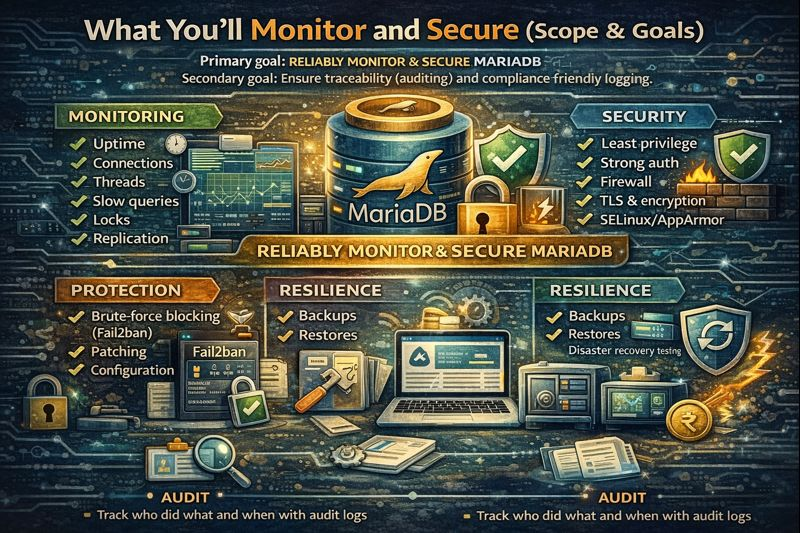
Here’s the scope:
- Monitoring: uptime, connections, threads, slow queries, locks, replication, disk, memory, CPU
- Security: least privilege, strong auth, firewall, TLS (in transit), encryption at rest, SELinux/AppArmor
- Protection: brute-force blocking (Fail2ban), patching, configuration hardening
- Resilience: backups, restores, disaster recovery testing
- Audit: track who did what and when with audit logs
Prerequisites (Linux + MariaDB Basics)
- Linux server with sudo access (Ubuntu/Debian/Rocky/Alma/CentOS)
- MariaDB 10.5+ (or latest LTS)
- Shell access and basic SQL familiarity
- Optional: Prometheus/Grafana, or Percona Monitoring and Management (PMM)
Monitor MariaDB Health & Performance
Quick Health Checks (Built-in Commands)
Start with essential status insights.
Run these as a privileged MariaDB user:
# Server status
mysql -u root -p -e "SHOW GLOBAL STATUS LIKE 'Uptime';"
mysql -u root -p -e "SHOW GLOBAL STATUS LIKE 'Threads_connected';"
mysql -u root -p -e "SHOW GLOBAL STATUS LIKE 'Questions';"

# InnoDB/row activity and locks
mysql -u root -p -e "SHOW ENGINE INNODB STATUSG"

# Slow queries (enable slow query log first)
mysql -u root -p -e "SHOW GLOBAL STATUS LIKE 'Slow_queries';"

# Replication (if used)
mysql -u root -p -e "SHOW SLAVE STATUSG"  # or SHOW REPLICA STATUSG
Monitor Logs (Error & Slow Query Logs)
Enable logging in your MariaDB configuration (usually /etc/mysql/mariadb.conf.d/50-server.cnf or /etc/my.cnf):
[mysqld]
log_error                  = /var/log/mysql/error.log
slow_query_log             = 1
slow_query_log_file        = /var/log/mysql/mariadb-slow.log
long_query_time            = 1
log_queries_not_using_indexes = 0
Check logs regularly:
sudo tail -f /var/log/mysql/error.log
sudo tail -f /var/log/mysql/mariadb-slow.log
Summarize slow queries with Percona Toolkit:
sudo apt-get install percona-toolkit -y  # or yum install percona-toolkit
pt-query-digest /var/log/mysql/mariadb-slow.log | less
Metrics & Alerting with Prometheus + Grafana
Export MariaDB metrics with mysqld_exporter and visualize in Grafana.
Example install (Ubuntu):
# Create monitoring user
mysql -u root -p -e "CREATE USER 'mysqld_exporter'@'localhost' IDENTIFIED BY 'StrongPass!';"
mysql -u root -p -e "GRANT PROCESS, REPLICATION CLIENT, SELECT ON *.* TO 'mysqld_exporter'@'localhost'; FLUSH PRIVILEGES;"

# Download exporter (adjust version)
cd /tmp
curl -LO https://github.com/prometheus/mysqld_exporter/releases/download/v0.15.1/mysqld_exporter-0.15.1.linux-amd64.tar.gz
tar xzf mysqld_exporter-*.tar.gz
sudo mv mysqld_exporter-*/mysqld_exporter /usr/local/bin/

# Systemd service
sudo bash -c 'cat >/etc/systemd/system/mysqld_exporter.service <<EOF
[Unit]
Description=Prometheus MySQL Exporter
After=network.target

[Service]
User=nobody
Environment="DATA_SOURCE_NAME=mysqld_exporter:StrongPass!@(localhost:3306)/"
ExecStart=/usr/local/bin/mysqld_exporter
Restart=always

[Install]
WantedBy=multi-user.target
EOF'
sudo systemctl daemon-reload
sudo systemctl enable --now mysqld_exporter

# Scrape in Prometheus (prometheus.yml)
# - job_name: 'mysql'
#   static_configs:
#   - targets: ['server-ip:9104']
Create Grafana dashboards from the community or PMM dashboards to alert on spikes in Queries, Threads_connected, Handler_read*, and InnoDB rows.
Lightweight Alternatives
- Percona Monitoring and Management (PMM): turnkey, includes exporters and dashboards
- Monit/Netdata: easy Linux-level and service checks
- Cron + mailx: run SHOW STATUS and log anomalies for simple setups
Secure MariaDB Configuration (Hardening)
Run mysql_secure_installation
sudo mysql_secure_installation
# Set/validate root password, remove anonymous users,
# disallow remote root login, remove test DB, reload privileges
Apply Least Privilege Users and Strong Authentication
# Example: app user with only needed privileges
CREATE USER 'appuser'@'10.0.0.%' IDENTIFIED BY 'Ultra$trongP4ss';
GRANT SELECT, INSERT, UPDATE, DELETE ON appdb.* TO 'appuser'@'10.0.0.%';
FLUSH PRIVILEGES;

# Lock down root to localhost only
ALTER USER 'root'@'localhost' IDENTIFIED BY 'EvenStronger!Passw0rd';
DROP USER IF EXISTS 'root'@'%';
Prefer socket or PAM auth on hosts where that fits security policy. Rotate passwords, and disable unused accounts.
Restrict Network Exposure (Bind & Firewall)
# Bind locally or to a private interface
[mysqld]
bind-address = 127.0.0.1   # or private IP only
port = 3306
# UFW (Ubuntu/Debian) - allow only trusted sources
sudo ufw allow from 10.0.0.0/24 to any port 3306 proto tcp
sudo ufw deny 3306/tcp
# firewalld (RHEL/Rocky/Alma)
sudo firewall-cmd --permanent --add-rich-rule='rule family="ipv4" source address="10.0.0.0/24" port protocol="tcp" port="3306" accept'
sudo firewall-cmd --permanent --add-port=3306/tcp --remove # block others
sudo firewall-cmd --reloadEnforce TLS for Client Connections
Issue a server certificate and require SSL for client users. In my.cnf:
[mysqld]
ssl_cert=/etc/mysql/ssl/server.crt
ssl_key=/etc/mysql/ssl/server.key
ssl_ca=/etc/mysql/ssl/ca.crt
# Require SSL for critical users
ALTER USER 'appuser'@'10.0.0.%' REQUIRE SSL;Secure Defaults (SQL Modes, File Access, Error Visibility)
[mysqld]
# Safer SQL behavior
sql_mode = STRICT_TRANS_TABLES,ERROR_FOR_DIVISION_BY_ZERO,NO_AUTO_CREATE_USER,NO_ENGINE_SUBSTITUTION

# Restrict file operations
secure_file_priv = /var/lib/mysql-files

# Reduce noisy info leaks
log_warnings = 2
Enable SELinux/AppArmor and Correct File Permissions
- SELinux: keep enforcing; use semanage fcontext and restorecon for custom paths
- AppArmor: ensure mysqld profile restricts filesystem access
- Permissions: data dir owned by mysql:mysql; 600 on creds and keys
Block Brute Force & Abuse
Fail2ban for MariaDB
Parse error logs and ban IPs with repeated authentication failures.
# /etc/fail2ban/filter.d/mariadb-auth.conf
[Definition]
failregex = ^.*Access denied for user '.*'@<HOST>.*$
ignoreregex =
# /etc/fail2ban/jail.local
[mariadb-auth]
enabled = true
port = 3306
filter = mariadb-auth
logpath = /var/log/mysql/error.log
maxretry = 5
bantime = 1hsudo systemctl restart fail2ban
sudo fail2ban-client status mariadb-authConnection Hygiene
[mysqld]
max_connections = 200
max_connect_errors = 1000
wait_timeout = 300
interactive_timeout = 300
connection_control = FORCE_PLUS_PERMANENT  # MariaDB plugin (if available)
Use host-based access (GRANT to specific subnets only) and avoid wildcard (%) hosts in production.
Backups, Restores, and Disaster Recovery
Logical Backups (mariadb-dump)
# Full logical backup with compression and encryption
mariadb-dump --all-databases --routines --triggers --events --single-transaction
  | gzip | openssl enc -aes-256-cbc -salt -pass pass:"$BACKUP_PASS"
  > /backups/mariadb-$(date +%F).sql.gz.enc
Physical Backups (mariabackup)
# Backup
mariabackup --backup --target-dir=/backups/full-$(date +%F) --user=root --password=...

# Prepare
mariabackup --prepare --target-dir=/backups/full-2025-01-01

# Restore (service stopped)
systemctl stop mariadb
rsync -avrP /backups/full-2025-01-01/ /var/lib/mysql/
chown -R mysql:mysql /var/lib/mysql
systemctl start mariadb
Rotation, Offsite, and Test Restores
- 3-2-1 rule: 3 copies, 2 media types, 1 offsite
- Automate daily incremental + weekly full backups
- Regularly test restores in a staging server
- Encrypt at rest and in transit to object storage (S3, Backblaze)
Auditing and Compliance
MariaDB Audit Plugin
Track logins and queries for accountability. Enable the plugin and define a sane policy:
INSTALL SONAME 'server_audit';
SET GLOBAL server_audit_logging = ON;
SET GLOBAL server_audit_events = 'CONNECT,QUERY_DDL,QUERY_DML';
SET GLOBAL server_audit_file_path = '/var/log/mysql/mariadb-audit.log';
SET GLOBAL server_audit_file_rotate_size = 104857600;  # 100MB
SET GLOBAL server_audit_file_rotations = 10;
Protect logs with strict permissions and rotate with logrotate to avoid disk pressure.
Ongoing Maintenance Checklist
- Apply security updates to OS and MariaDB regularly
- Review slow query reports weekly; index or optimize offenders
- Audit user accounts and privileges monthly
- Verify backups and run test restores quarterly
- Watch disk I/O and space; alert at 75% capacity
- Rotate and archive logs; verify audit trails
- Reassess firewall rules and TLS certificates before expiry
Common Pitfalls to Avoid
- Exposing port 3306 to the public internet
- Using wildcard (%) hosts for admin accounts
- Skipping SSL/TLS because “it’s on a private network”
- Relying on untested backups
- Ignoring slow queries until latency impacts users
- Storing credentials in world-readable scripts
How YouStable Can Help
If you’d rather not juggle exporters, firewalls, TLS, and backups, YouStable’s managed server team can implement a full MariaDB monitoring and security baseline for you. We deploy best-practice configs, 24/7 proactive monitoring, alerts, backup automation, and periodic audits—so your databases stay fast, compliant, and recoverable.
FAQ’s
1. u003cstrongu003eHow do I check if MariaDB is healthy on Linux?u003c/strongu003e
Verify the service, connections, and errors. Use systemctl status mariadb, SHOW GLOBAL STATUS for Threads_connected and Uptime, and tail -f /var/log/mysql/error.log. For deeper visibility, enable the slow query log and deploy mysqld_exporter + Prometheus/Grafana for trends and alerting.
2. u003cstrongu003eWhat is the best way to secure MariaDB from remote attacks?u003c/strongu003e
Bind to localhost or a private interface, restrict port 3306 with a firewall, use least-privilege users, require TLS for client connections, enable Fail2ban to block brute-force attempts, and regularly patch the OS and MariaDB. Avoid remote root and wildcard (%) host entries.
3. u003cstrongu003eShould I use SSL/TLS for internal MariaDB traffic?u003c/strongu003e
Yes. Lateral movement and sniffing can happen inside networks. Enforce TLS with server and client certificates and REQUIRE SSL for privileged users. Combine with private subnets, firewall rules, and host-based authentication for defense in depth.
4. u003cstrongu003eWhat tools can I use to monitor MariaDB for free?u003c/strongu003e
mysqld_exporter with Prometheus and Grafana is a powerful free stack. Netdata offers quick insights. Percona Monitoring and Management (PMM) is another free, turnkey option that includes metrics, query analytics, and dashboards tailored for MariaDB/MySQL.
5. u003cstrongu003eHow often should I run backups and test restores?u003c/strongu003e
Back up daily at minimum, with weekly full and daily incremental or logical dumps depending on RPO/RTO. Test restores quarterly (or after major changes) on a staging host. Encrypt backups and store an offsite copy to meet the 3-2-1 rule.










