


Create YUM on a Linux server by building a local YUM repository (from an ISO or mirrored packages), generating metadata with createrepo_c, serving it over HTTP/HTTPS, and adding a .repo file on clients that points to your baseurl. This enables fast, controlled, and offline-ready package management across RHEL/CentOS/AlmaLinux/Rocky systems.
In this guide, I’ll show you how to create YUM on Linux server step by step—specifically, how to create a local YUM repository that you can host privately or mirror from upstream sources.
Whether you’re running CentOS 7, AlmaLinux/Rocky 8/9, or RHEL, this tutorial covers offline setups, syncing, GPG security, and real-world maintenance.
What is YUM (and DNF) and Why Build Your Own Repo?
YUM (Yellowdog Updater, Modified) is the package manager used by RPM-based distributions. On RHEL 8/9, CentOS Stream, AlmaLinux, and Rocky Linux, the default client is DNF, but the yum command remains as a wrapper for compatibility.
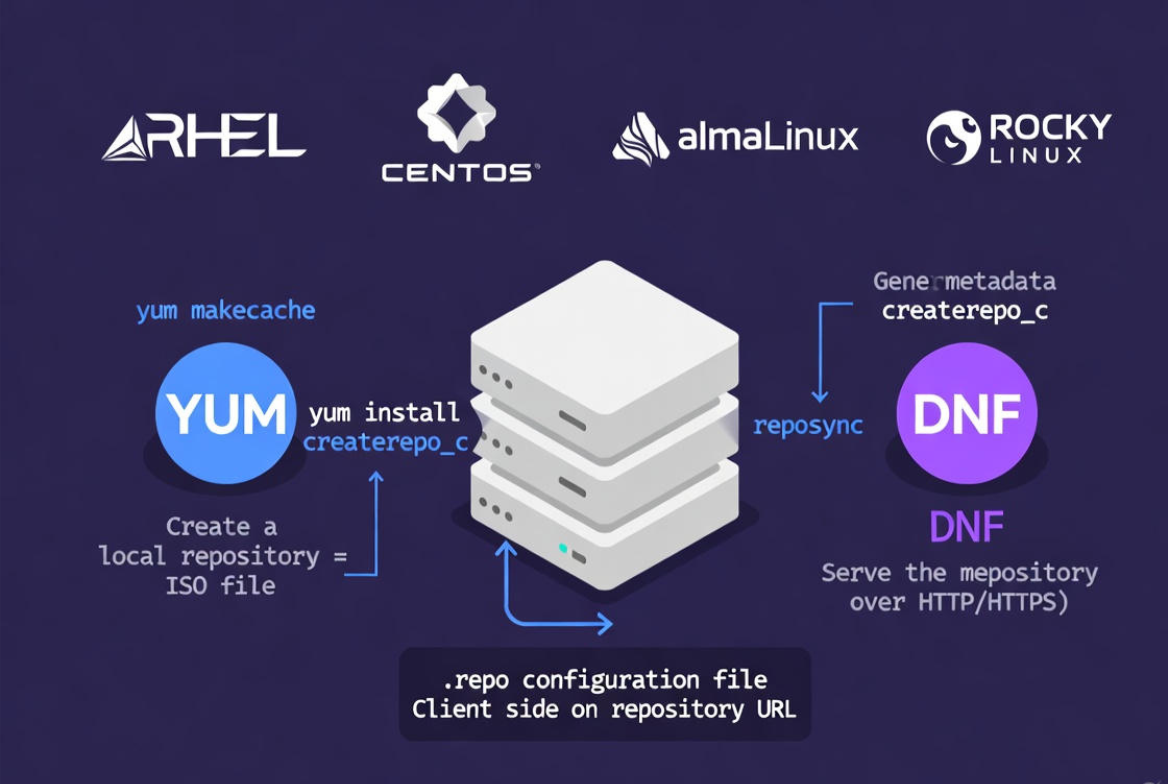
Creating your own YUM repository centralizes packages for speed, control, and compliance—ideal for data centers, air-gapped networks, and consistent DevOps environments.
Prerequisites
- A Linux server (RHEL/CentOS 7 or AlmaLinux/Rocky/RHEL 8/9) with sudo/root access
- Basic networking, firewall, and SELinux familiarity
- For RHEL: active subscription or a valid content source; for community: AlmaLinux/Rocky/CentOS Stream mirrors
- Web server to host the repository (Apache httpd or Nginx)
- Utilities: createrepo_c, and optionally reposync (from yum-utils or dnf-plugins-core)
Quick Decision: Two Ways to Create a YUM Repository
- Offline/local repo from ISO or a directory of RPMs (best for air-gapped or curated package sets)
- Mirrored repo with reposync from upstream sources (best for keeping a local mirror up to date)
Option 1: Create a Local YUM Repository from ISO or RPM Directory
This method builds a repository from packages you already have—like a RHEL/AlmaLinux/Rocky ISO or a custom RPM collection. It’s the fastest way to create YUM on Linux server for offline use.
Step 1: Install Required Tools
# RHEL/CentOS 7
sudo yum install -y createrepo yum-utils httpd

# AlmaLinux/Rocky/RHEL 8/9
sudo dnf install -y createrepo_c dnf-plugins-core httpd
Step 2: Prepare a Repository Directory
sudo mkdir -p /var/www/html/repos/localrepo
sudo chown -R root:root /var/www/html/repos
sudo chmod -R 755 /var/www/html/repos
Step 3: (Optional) Mount an ISO and Copy Packages
If you’re using a distribution ISO (e.g., AlmaLinux-9.x-x86_64-dvd.iso), mount and copy RPMs from the BaseOS/AppStream (or Packages) directories.
sudo mkdir -p /mnt/iso
sudo mount -o loop /path/to/AlmaLinux-9.x-x86_64-dvd.iso /mnt/iso

# Copy BaseOS and AppStream packages (adjust paths per distro)
sudo cp -av /mnt/iso/BaseOS/Packages/*.rpm /var/www/html/repos/localrepo/
sudo cp -av /mnt/iso/AppStream/Packages/*.rpm /var/www/html/repos/localrepo/
Alternatively, copy your curated RPMs into the same directory if you’re building a custom repo.
Step 4: Generate Metadata with createrepo_c
# Initialize repository metadata
sudo createrepo_c /var/www/html/repos/localrepo

# Later, when updating with new RPMs, use --update:
sudo createrepo_c --update /var/www/html/repos/localrepo
Step 5: Serve the Repo over HTTP (Apache)
sudo systemctl enable httpd --now

# If SELinux is enforcing, allow Apache to read the repo directory
sudo chcon -R -t httpd_sys_content_t /var/www/html/repos

# Open firewall if needed
sudo firewall-cmd --add-service=http --permanent
sudo firewall-cmd --reload
Your repository base URL is now:
http://<your-server-ip-or-domain>/repos/localrepoStep 6: Create a .repo File on Client Machines
sudo tee /etc/yum.repos.d/localrepo.repo > /dev/null <<'EOF'
[localrepo]
name=Local YUM Repository
baseurl=http://<your-server-ip-or-domain>/repos/localrepo
enabled=1
gpgcheck=0
EOF

# Refresh cache and test
sudo yum clean all && sudo yum makecache
sudo yum repolist

# Install a package to verify
sudo yum install -y <package-name>
Set gpgcheck=1 after you sign packages or the repository metadata with a GPG key (covered below).
(Optional) Step 7: Enable GPG Signing for Security
Signing adds trust. Generate or import a GPG key, sign RPMs or metadata, and point clients to your public key.
# Create a GPG key (interactive)
gpg --full-generate-key

# Export public key to serve via HTTP
gpg --export -a "Your Name or Repo Key" | sudo tee /var/www/html/repos/RPM-GPG-KEY-localrepo

# On clients, import and enforce gpgcheck
sudo rpm --import http://<server>/repos/RPM-GPG-KEY-localrepo

# Then set in /etc/yum.repos.d/localrepo.repo
gpgcheck=1
gpgkey=http://<server>/repos/RPM-GPG-KEY-localrepo
Option 2: Mirror an Upstream Repository with reposync
Use reposync to mirror official repositories locally. This reduces external bandwidth and speeds up updates across many servers.
Step 1: Install reposync Utilities
# RHEL/CentOS 7
sudo yum install -y yum-utils httpd

# AlmaLinux/Rocky/RHEL 8/9
sudo dnf install -y dnf-plugins-core httpd
Step 2: Choose Which Repos to Mirror
- AlmaLinux/Rocky 8/9: BaseOS, AppStream, Extras
- RHEL 8/9: BaseOS, AppStream (requires subscription access)
- CentOS 7: base, updates, extras (EOL note: plan migration)
Step 3: Run reposync
Create a directory structure and sync. Examples below show AlmaLinux 9; adjust for your distro and architecture.
BASE=/var/www/html/repos/almalinux9
sudo mkdir -p $BASE/{BaseOS,AppStream}
# Sync packages and metadata
sudo reposync -p $BASE/BaseOS --download-metadata --repo=almalinux-baseos
sudo reposync -p $BASE/AppStream --download-metadata --repo=almalinux-appstream

# If your reposync doesn't add repodata, generate it:
sudo createrepo_c $BASE/BaseOS
sudo createrepo_c $BASE/AppStream
On RHEL, ensure your subscription repos are enabled before syncing. On CentOS 7, use the repo IDs from /etc/yum.repos.d/CentOS-Base.repo.
Step 4: Serve and Expose Your Mirror
sudo systemctl enable httpd --now
sudo chcon -R -t httpd_sys_content_t /var/www/html/repos
sudo firewall-cmd --add-service=http --permanent
sudo firewall-cmd --reload
Create client repo files that point to your mirror:
# AlmaLinux 9 example:
sudo tee /etc/yum.repos.d/alma-local.repo > /dev/null <<'EOF'
[almalinux-BaseOS-local]
name=AlmaLinux 9 BaseOS (Local)
baseurl=http://<server>/repos/almalinux9/BaseOS
enabled=1
gpgcheck=1
gpgkey=https://repo.almalinux.org/almalinux/RPM-GPG-KEY-AlmaLinux-9

[almalinux-AppStream-local]
name=AlmaLinux 9 AppStream (Local)
baseurl=http://<server>/repos/almalinux9/AppStream
enabled=1
gpgcheck=1
gpgkey=https://repo.almalinux.org/almalinux/RPM-GPG-KEY-AlmaLinux-9
EOF

sudo dnf clean all && sudo dnf makecache
sudo dnf repolist
Maintenance: Keep Your YUM Repository Healthy
- Automate syncs: run reposync nightly/weekly via cron or systemd timers
- Prune old packages: use reposync –delete to remove upstream-deleted packages
- Regenerate metadata: createrepo_c –update when adding/removing RPMs
- Monitor storage: NVMe-backed VPS or dedicated servers handle repo mirrors better under load
- Secure access: prefer HTTPS, restrict by IP/VPN for internal repos
# Example cron job (as root) to sync nightly at 2:30 AM
cat <<'CRON' >> /etc/crontab
30 2 * * * root reposync -p /var/www/html/repos/almalinux9/BaseOS --download-metadata --repo=almalinux-baseos --delete
35 2 * * * root reposync -p /var/www/html/repos/almalinux9/AppStream --download-metadata --repo=almalinux-appstream --delete
# Refresh metadata if needed
40 2 * * * root createrepo_c --update /var/www/html/repos/almalinux9/BaseOS
45 2 * * * root createrepo_c --update /var/www/html/repos/almalinux9/AppStream
CRON
Security Best Practices for Private YUM Repos
- Enable gpgcheck=1 and distribute your GPG public key
- Serve over HTTPS with a valid certificate (Let’s Encrypt for internet-facing repos)
- Use basic auth or IP allowlists for internal repositories
- Audit changes: version control your repo .repo files and sync scripts
- Harden Apache/Nginx and keep OS patched via your new repo
YUM vs DNF: Commands You’ll Use
- Install: yum install pkg equals dnf install pkg
- Update cache/list repos: yum makecache, yum repolist equals dnf makecache, dnf repolist
- Clean cache: yum clean all equals dnf clean all
- Mirror: yum-utils reposync (EL7) vs dnf-plugins-core reposync (EL8/9)
On modern systems, the yum command is often a symlink to dnf. All steps here work on both, with package names adjusted per version.
Troubleshooting Common YUM Repository Errors
- Cannot find a valid baseurl: Verify baseurl in .repo, DNS, and firewall; ensure Apache is running and accessible
- repodata/repomd.xml not found: Run createrepo_c in the repo directory or ensure –download-metadata with reposync
- GPG check failed: Import the correct GPG key and confirm gpgkey URL; set gpgcheck=0 temporarily for diagnostics
- 404 on packages: Check SELinux context (httpd_sys_content_t) and directory permissions (755)
- Mismatched architecture: Ensure you’re syncing/serving the correct basearch (x86_64, aarch64)
Real-World Tips from the Hosting Floor
- Split repos by environment (prod/stage/dev) to isolate package versions
- Cache popular packages on edge nodes close to your app servers
- For large estates, mirror only what you need with –repo filters and include/exclude lists
- Document your repo IDs and keep .repo files minimal and consistent via configuration management
Hosting your private YUM repo on a fast NVMe VPS or a dedicated server improves throughput during patch windows. YouStable offers optimized VPS and bare-metal options ideal for mirrors, with bandwidth, snapshots, and DDoS protection that keep your repos reliable under load.
FAQs
u003cstrongu003eHow do I create a local YUM repository from an ISO?u003c/strongu003e
Mount the ISO, copy RPMs to a directory, run createrepo_c to generate repodata, and serve the directory via Apache or Nginx. Finally, create a .repo file on clients pointing baseurl to your server’s path and run yum/dnf makecache.
u003cstrongu003eIs YUM replaced by DNF?u003c/strongu003e
On RHEL 8/9 and derivatives, DNF is the default, but the yum command remains for compatibility. The repository layout and configuration (e.g., .repo files, repodata) work the same, so this guide applies to both.
u003cstrongu003eHow do I mirror official repositories locally?u003c/strongu003e
Install yum-utils (EL7) or dnf-plugins-core (EL8/9), then run reposync with the desired repo IDs and u002du002ddownload-metadata. Serve the synced directories over HTTP/HTTPS and point clients to your baseurl. Use u002du002ddelete to prune removed packages.
u003cstrongu003eHow can I secure a private YUM repository?u003c/strongu003e
Enable GPG checks, serve over HTTPS, restrict access by IP or VPN, and store repo content on hardened systems. Sign your packages or metadata and distribute your GPG public key via a trusted channel.
u003cstrongu003eWhat’s the easiest way to point many servers to my repo?u003c/strongu003e
Use configuration management (Ansible, Puppet, or Salt) to deploy the .repo file uniformly. Keep repos versioned and separate by environment to avoid accidental upgrades across fleets.










