


A load balancer on a Linux server is software that distributes incoming traffic across multiple backend servers to improve availability, performance, and reliability.
It monitors server health, routes each request to the best target using algorithms (round-robin, least connections), and can terminate SSL, cache content, enforce security, and scale horizontally at low cost.
In this guide, you’ll understand how a load balancer works on Linux, the difference between Layer 4 and Layer 7 approaches, when to choose HAProxy, Nginx, or IPVS, and how to deploy a production-ready, highly available load balancer with Keepalived.
We’ll use practical examples you can copy, based on real world hosting experience.
What is a Load Balancer on a Linux Server?
A Linux load balancer is typically HAProxy, Nginx, or IPVS (LVS) running on a Linux distribution (Ubuntu, Debian, AlmaLinux, Rocky, etc.).
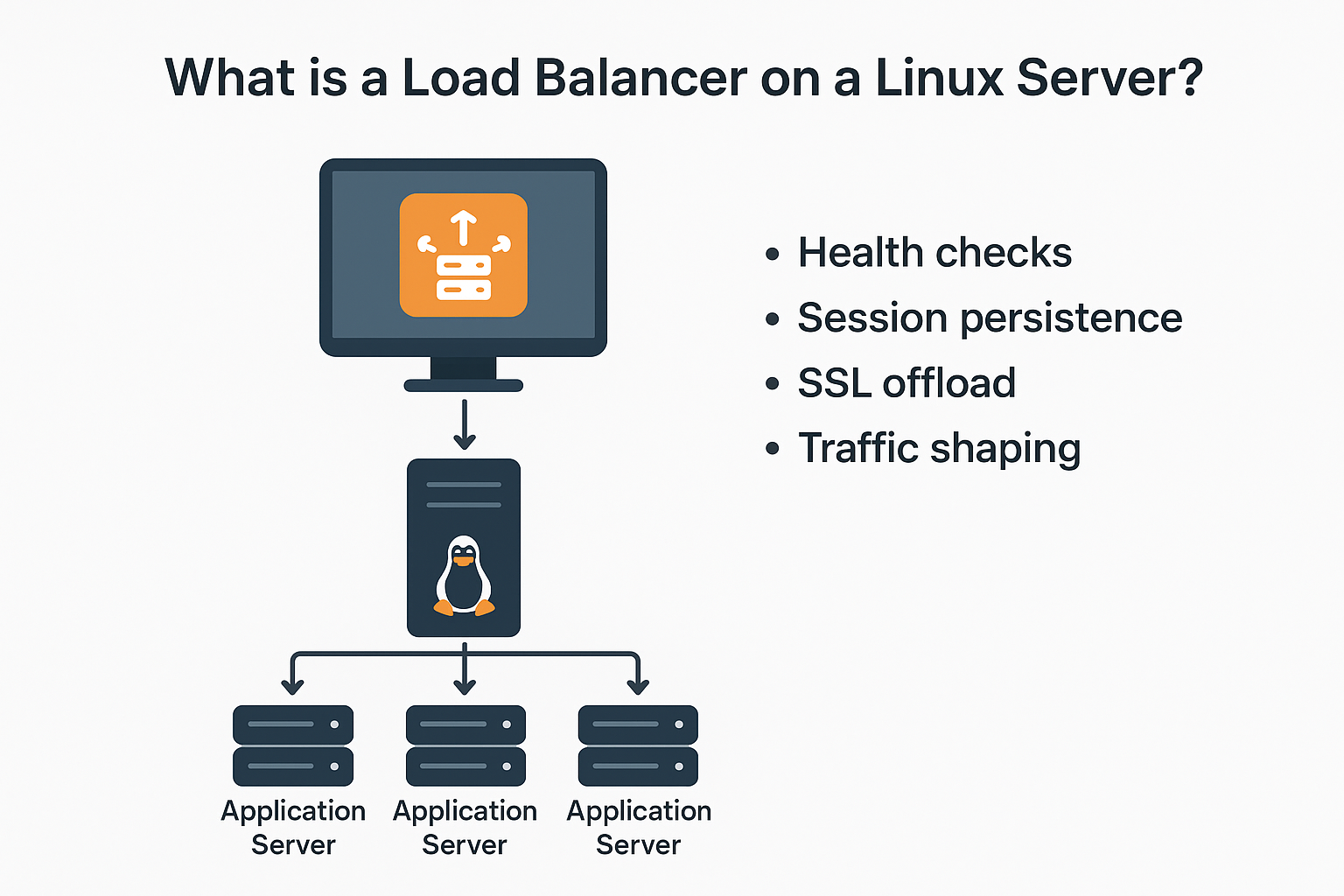
It sits in front of multiple application servers and intelligently routes traffic. Beyond distribution, it also performs health checks, session persistence, SSL offload, and traffic shaping.
Layer 4 vs. Layer 7 (What You’re Actually Balancing)
Understanding layers clarifies capabilities and cost:-
- Layer 4 (Transport): Works with TCP/UDP only. Fast and efficient. Doesn’t inspect HTTP content. Tools: IPVS (LVS), HAProxy in TCP mode.
- Layer 7 (Application): Understands HTTP/HTTPS headers, paths, cookies, and methods. Enables advanced routing, WAF, caching, compression, and sticky sessions. Tools: HAProxy HTTP mode, Nginx, Envoy, Traefik.
Popular Linux Load Balancing Stacks
- HAProxy (L4/L7): High performance, rich health checks, TLS, stickiness, observability. Excellent default for web apps and APIs.
- Nginx (L7): Reverse proxy with mature HTTP features, HTTP/2, caching, static offload. Great for web workloads and content-heavy sites.
- LVS/IPVS (L4): Kernel-level load balancing for very high throughput and ultra-low overhead.
- Keepalived: Adds high availability (VRRP virtual IP) and health-based failover to HAProxy/Nginx/IPVS.
Why Use a Linux Load Balancer? Benefits and Use Cases
- High availability: Remove failing servers automatically; use a floating VIP for failover.
- Horizontal scaling: Add or remove backend nodes without downtime.
- Security: Centralize TLS, rate limiting, bot filtering, and basic WAF rules.
- Performance: Connection pooling, HTTP/2, caching, compression, and TCP optimizations.
- Cost control: Open-source and commodity Linux hardware beat many managed per-GB pricing models at scale.
Common Architectures
Single Reverse Proxy (Small to Medium)
One HAProxy or Nginx node fronts 2–5 app servers. Simple to manage, but a single point of failure unless paired with snapshots and fast restore. Best for development, staging, or smaller sites.
Active–Standby with Keepalived (Production)
Two load balancers share a virtual IP (VIP) via VRRP. If the primary fails, the secondary takes over automatically. This is the most common production pattern for web and eCommerce.
IPVS at L4 for Extreme Throughput
Kernel-level load balancing with IPVS offers millions of concurrent connections with minimal CPU usage. Use for ultra-high traffic APIs, gaming, or streaming, often combined with Keepalived for VIP failover.
How to Choose: HAProxy vs. Nginx vs. IPVS
- Choose HAProxy when you need advanced health checks, TCP and HTTP support, detailed metrics, stickiness, ACLs, and enterprise-grade reliability for APIs and apps.
- Choose Nginx when you want a powerful HTTP reverse proxy with caching, static offload, and easy integration into web stacks.
- Choose IPVS when you want pure Layer 4 speed with the lowest overhead and you don’t need content-aware routing.
Step-by-Step: Set Up a Production-Ready Linux Load Balancer
Prerequisites and Network Plan
- Two Linux VMs for load balancers (LB1, LB2) and 2+ backend app servers (APP1, APP2).
- Private network (e.g., 10.0.0.0/24). VIP: 10.0.0.100.
- DNS record for your domain pointing to the VIP (A/AAAA).
- Firewall allows 80/443 to VIP and 80/443 from LB to backends.
Option A: HAProxy (L7) — Install and Configure
On Ubuntu/Debian:-
sudo apt update && sudo apt install -y haproxy
sudo systemctl enable --now haproxy
Minimal HTTPS offload + health checks + sticky sessions:-
# /etc/haproxy/haproxy.cfg
global
  log /dev/log local0
  maxconn 10000
  tune.ssl.default-dh-param 2048

defaults
  log global
  mode http
  option httplog
  option dontlognull
  timeout connect 5s
  timeout client  30s
  timeout server  30s

frontend web_in
  bind *:80
  bind *:443 ssl crt /etc/ssl/private/example.pem alpn h2,http/1.1
  http-request redirect scheme https unless { ssl_fc }
  default_backend app_pool

backend app_pool
  balance roundrobin
  option httpchk GET /health
  http-check expect status 200
  cookie SRV insert indirect nocache
  server app1 10.0.0.11:80 check cookie A
  server app2 10.0.0.12:80 check cookie B

# reload
# sudo haproxy -c -f /etc/haproxy/haproxy.cfg && sudo systemctl reload haproxy
APIs, consider balance leastconn, add option http-buffer-request and tune timeouts based on request/response size.
Option B: Nginx (L7) — Reverse Proxy Load Balancing
sudo apt update && sudo apt install -y nginx
sudo systemctl enable --now nginx
Basic upstream with HTTPS and HTTP/2:-
# /etc/nginx/conf.d/loadbalancer.conf
upstream app_upstream {
  least_conn;
  server 10.0.0.11:80 max_fails=3 fail_timeout=10s;
  server 10.0.0.12:80 max_fails=3 fail_timeout=10s;
  keepalive 64;
}

server {
  listen 80;
  server_name example.com;
  return 301 https://$host$request_uri;
}

server {
  listen 443 ssl http2;
  server_name example.com;

  ssl_certificate     /etc/ssl/certs/fullchain.pem;
  ssl_certificate_key /etc/ssl/private/privkey.pem;

  location / {
    proxy_pass http://app_upstream;
    proxy_http_version 1.1;
    proxy_set_header Connection "";
    proxy_set_header Host $host;
    proxy_set_header X-Forwarded-For $proxy_add_x_forwarded_for;
    proxy_set_header X-Forwarded-Proto $scheme;
  }

  location /health {
    return 200 'ok';
  }
}

# test and reload
# sudo nginx -t && sudo systemctl reload nginx
Option C: IPVS (L4) — Ultra-Fast Kernel Load Balancing
Install tools and create a virtual service using NAT mode:-
sudo apt install -y ipvsadm keepalived

# Create VIP 10.0.0.100:80 with round robin
sudo ipvsadm -A -t 10.0.0.100:80 -s rr
sudo ipvsadm -a -t 10.0.0.100:80 -r 10.0.0.11:80 -m
sudo ipvsadm -a -t 10.0.0.100:80 -r 10.0.0.12:80 -m

# View stats
ipvsadm -Ln --stats
IPVS supports direct routing (DR) and full NAT. DR offers higher performance but requires ARP/realserver tuning; NAT is simpler to start with.
Add High Availability with Keepalived (VRRP)
Keepalived provides a floating VIP that fails over between LB1 and LB2 automatically.
# /etc/keepalived/keepalived.conf (LB1)
vrrp_script chk_haproxy {
  script "/usr/bin/pgrep haproxy"
  interval 2
  fall 2
  rise 2
}

vrrp_instance VI_1 {
  state MASTER
  interface eth0
  virtual_router_id 51
  priority 150
  advert_int 1
  authentication {
    auth_type PASS
    auth_pass 42secret
  }
  virtual_ipaddress {
    10.0.0.100/24 dev eth0
  }
  track_script {
    chk_haproxy
  }
}

# LB2: set state BACKUP and priority 100
# sudo systemctl enable --now keepalived
Swap the health script to check Nginx or IPVS as needed (e.g., pgrep nginx or an HTTP check script).
Performance Tuning Essentials
Kernel and File Descriptor Tuning
# /etc/sysctl.d/99-lb.conf
net.core.somaxconn=65535
net.ipv4.ip_local_port_range=1024 65000
net.ipv4.tcp_tw_reuse=1
net.ipv4.tcp_fin_timeout=15
net.core.netdev_max_backlog=250000
net.ipv4.tcp_max_syn_backlog=262144
fs.file-max=1000000

# Apply
# sudo sysctl --system

# Increase nofile for HAProxy/Nginx
# /etc/security/limits.d/99-nofile.conf
haproxy soft nofile 500000
haproxy hard nofile 500000
nginx   soft nofile 500000
nginx   hard nofile 500000
TLS and HTTP Optimizations
- Enable HTTP/2 and modern ciphers; use OCSP stapling.
- Use keep-alive to backends and tune reuse settings.
- Prefer least connections for uneven request times; use round robin for homogeneous workloads.
- Enable gzip/brotli (Nginx) and consider caching for static assets.
Security Hardening Checklist
- Terminate TLS on the load balancer; enforce HSTS and strong ciphers.
- Rate limit abusive IPs and add basic bot protections.
- Implement a WAF (Nginx ModSecurity or HAProxy ACLs) for common attack patterns.
- Restrict admin/status pages by IP or authentication.
- Keep OS and packages patched; automate with unattended upgrades and configuration management.
Troubleshooting: Quick Commands
- Verify listeners:
ss -lntp | egrep '80|443' - Check service logs:
journalctl -u haproxy -forjournalctl -u nginx -f - Health check endpoints:
curl -I http://APP:80/health - VIP reachability:
curl -I -k https://VIP - IPVS stats:
ipvsadm -Ln --stats - Packet capture:
sudo tcpdump -ni eth0 host VIP and port 443
Cost and Scalability: Self Hosted vs. Cloud
- Self-hosted (Linux + HAProxy/Nginx/IPVS): Low software cost, full control, excellent performance. You manage HA, scaling, patching.
- Cloud LBs (ELB, Cloud Load Balancing): Managed and elastic with per-hour and data-processing costs. Less control, easy multi-AZ/region.
- Hybrid: Use cloud LB at the edge and Linux LBs inside clusters for cost and flexibility.
If you prefer managed infrastructure without losing performance, YouStable’s managed servers and load balancer setups can deploy HAProxy/Nginx with Keepalived, monitoring, and hardened TLS for you—ideal if you want outcomes, not plumbing.
Real World Tips from Production
- Start simple: L7 HAProxy with two backends solves 80% of cases.
- Health checks matter: Use application-level checks (e.g., /health) that verify dependencies like DB and cache.
- Plan stickiness: For session-bound apps, use HAProxy cookies or Nginx IP hash. Prefer stateless sessions with a shared store when possible.
- Observe everything: Export HAProxy/Nginx metrics to Prometheus and visualize with Grafana. Baselines prevent surprises.
- Test failover: Practice pulling the plug on LB1 to confirm VRRP failover and client session behavior.
FAQ’s – Load Balancer on Linux Server
u003cstrongu003eIs Nginx a load balancer or just a web server?u003c/strongu003e
Nginx is both. As a reverse proxy, it load balances HTTP/HTTPS traffic using algorithms like round robin and least connections, supports HTTP/2, caching, compression, and basic WAF capabilities. It’s widely used as an L7 load balancer in front of application servers.
u003cstrongu003eWhich is better for Linux load balancing: HAProxy or Nginx?u003c/strongu003e
For pure load balancing with deep health checks, connection handling, and advanced ACLs, HAProxy generally leads. If you also need static file serving and caching alongside proxying, Nginx is compelling. Many stacks use HAProxy at the edge and Nginx on app nodes.
u003cstrongu003eWhat’s the difference between a reverse proxy and a load balancer?u003c/strongu003e
A reverse proxy sits in front of servers and forwards requests; a load balancer is a reverse proxy that distributes traffic across multiple backends and performs health checks and failover. All load balancers are reverse proxies, but not all reverse proxies perform load balancing.
u003cstrongu003eDo I need sticky sessions for my app?u003c/strongu003e
Use sticky sessions if your app stores user state in memory and cannot share it externally. Otherwise, prefer stateless sessions with Redis or database-backed stores. Stateless designs scale better and reduce uneven load distribution.
u003cstrongu003eHow do I make my Linux load balancer highly available?u003c/strongu003e
Deploy two load balancer nodes and use Keepalived (VRRP) to share a virtual IP. Add health checks to demote a failing primary, keep configurations in sync, and test failover regularly. Optionally run them across different availability zones.
Conclusion – Load Balancer on Linux Server
Building a load balancer on a Linux server is straightforward and powerful. Start with HAProxy or Nginx, add Keepalived for HA, and tune kernel, TLS, and observability. If you’d rather not manage the nuances, YouStable can design, deploy, and operate a secure, high-performance load balancing layer tailored to your workload.










