

NFS, or Network File System, in Linux lets you access and share files across a network just like they’re on your local drive. It’s a client server protocol originally created by Sun Microsystems in the 1980s.
The server shares out directories, and clients connect to them remotely using RPC for communication and XDR for data formatting. You’ll see versions like NFSv3 (simple, works over UDP or TCP) and NFSv4 (more secure, TCP only with built in locking).
Think of it as a shared network folder for your Linux setup, perfect for web hosting environments, WordPress clusters, or VPS servers. Whether you’re a beginner dipping into server management or a developer handling backups and code shares, NFS makes file access seamless without constant copying.
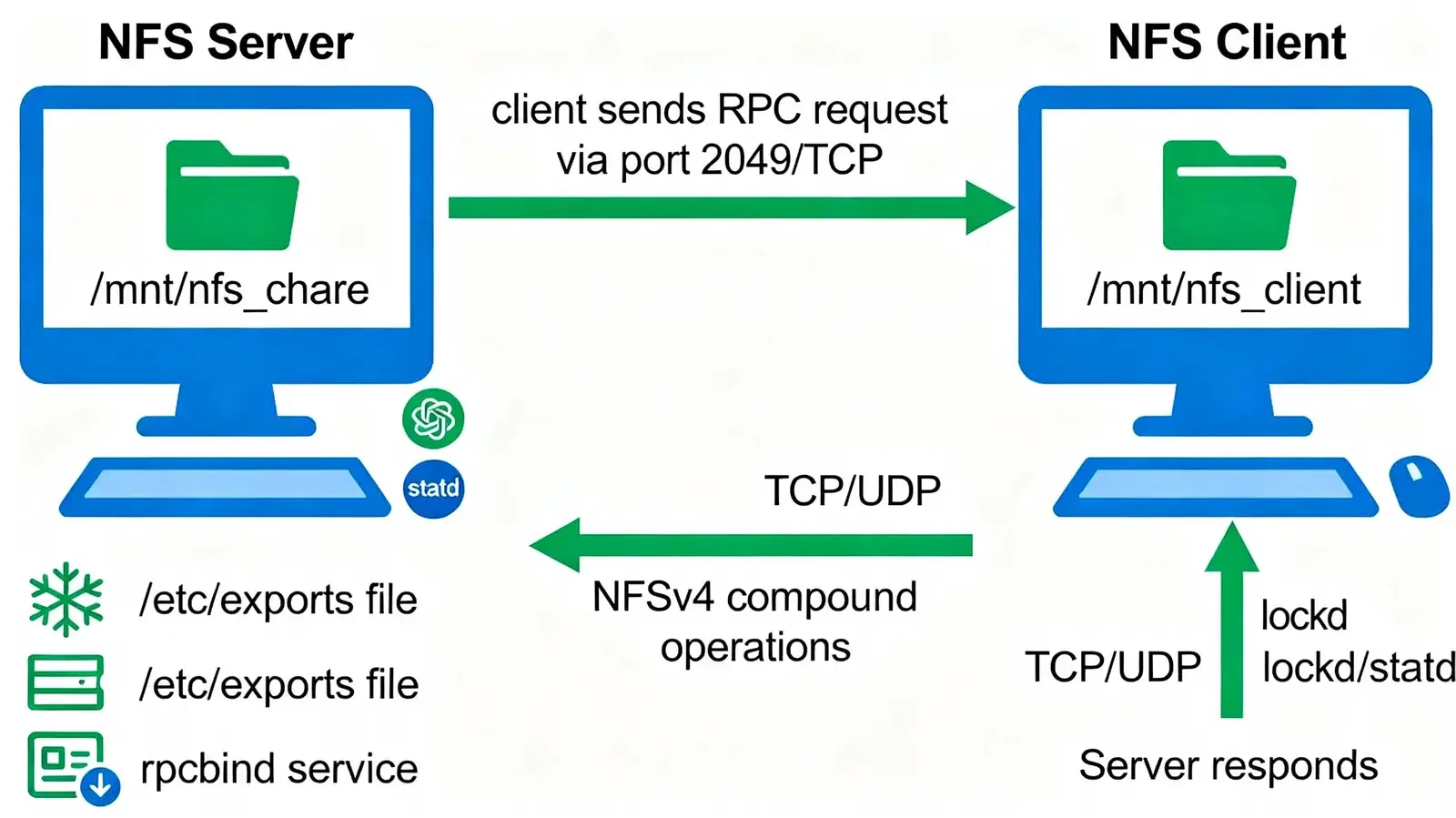
How Does NFS Actually Work?
At its core, NFS breaks down into a few key pieces that handle the magic:
- NFS Server: The machine holding the files you want to share, configured through a simple exports file.
- NFS Client: Your machine that connects and mounts those remote folders.
- RPC and rpcbind: The communication layer that matches requests to the right services.
- Locking services: Prevent multiple users from editing the same file at once.
Data zips over TCP or UDP, with NFSv4 bundling multiple requests into one for speed, great for crossing firewalls without headaches.
NFS Versions: Which One Fits Your Needs?
| Feature | NFSv3 | NFSv4 |
|---|---|---|
| State Tracking | None (stateless) | Tracks opens and locks |
| Network Protocol | UDP or TCP | TCP only |
| Security Options | Basic user auth | Kerberos, access control lists |
| Locking | Separate service | Built right in |
| Speed Across Nets | Decent on LAN | Better with compound operations |
| Firewall Ease | Needs multiple ports | Single port (2049) |
NFS shines for quick LAN sharing but watch for security on wider networks, stick to private setups or VPNs.
Setting Up an NFS Server on Ubuntu (Step by Step)
Let’s get hands on. These steps work great on Ubuntu or Debian based systems.
- Install the server package:
sudo apt update
sudo apt install nfs-kernel-server -y
2. Set up your share folder:
sudo mkdir -p /mnt/nfs_share
sudo chown nobody:nogroup /mnt/nfs_share
sudo chmod 777 /mnt/nfs_share
3. Edit the exports file (sudonano /etc/exports):
/mnt/nfs_share 192.168.1.0/24(rw,sync,no_subtree_check)Save, then apply: sudo exportfs -ra.
4. Fire up the services:
sudo systemctl enable --now nfs-kernel-server rpcbind
sudo systemctl status nfs-kernel-server
5. Check it’s working: showmount -e localhost
Mounting NFS Shares on a Client Machine
Now connect from another Linux box.
- Grab the client tools:
sudo apt update
sudo apt install nfs-common -y
2. Make a mount point:
sudo mkdir -p /mnt/nfs_client
3. Mount it up (replace server_ip with your server’s address):
sudo mount -t nfs4 -o proto=tcp,port=2049 server_ip:/mnt/nfs_share /mnt/nfs_clientCheck: df -h | grep nfs.
4. Make it permanent (add to /etc/fstab):
server_ip:/mnt/nfs_share /mnt/nfs_client nfs defaults 0 0
Reload: sudo mount -a.
For WordPress folks, try mounting /wp-content/uploads this way to share media across sites effortlessly.
Fixing Common NFS Hiccups
NFS can throw curveballs, here’s how to knock them out fast.
| Issue | Quick Fix |
|---|---|
| “Stale File Handle” | umount -f /mnt/nfs_client then remount |
| “RPC: Timed out” | Ping server, check firewall: ufw allow 2049/tcp |
| “Permission Denied” | Refresh exports: exportfs -arv, match UIDs |
| Mount won’t stick (v4) | Force v3: mount -o vers=3 ... |
Test your setup: touch /mnt/nfs_client/test.txt on client, verify on server. Run nfsstat -c for performance clues if it’s sluggish.
When Makes Sense to Use NFS?
Grab NFS for team code repos, centralized backups, or multi server WordPress deploys. Skip it over public internet opt for SFTP or secure alternatives. Pair with load balancers for rock solid availability.
FAQs
Is Ghost really faster than WordPress?
Yes. Ghost’s Node.js architecture and built in caching make it faster than most WordPress setups.
u003cstrongu003eWhat ports should I open for NFS?u003c/strongu003e
Core ones: 2049 (TCP/UDP) and 111 for rpcbind. Use u003ccodeu003eufwu003c/codeu003e to allow them safely.
Can Ghost replace WordPress completely?
Not for all use cases. It can replace WordPress for blogging and memberships but not eCommerce or complex websites.
Is Ghost good for SEO compared to WordPress?
Yes. Ghost is strong out of the box for SEO, while WordPress needs plugins like RankMath.
Conclusion
NFS in Linux remains a practical and efficient solution for sharing files across systems without the hassle of manual transfers. By allowing directories to be accessed over a network as if they were local, it simplifies workflows for developers, system administrators, and hosting environments. From basic LAN file sharing to powering multi server setups like WordPress clusters, NFS offers flexibility with versions like NFSv3 and the more secure, modern NFSv4.
That said, proper configuration and security practices are essential, especially when extending beyond private networks. Using controlled access, firewalls, and secure authentication methods can help maintain stability and data protection. When set up correctly, NFS delivers a reliable, high-performance way to manage shared storage in Linux-based systems.










