

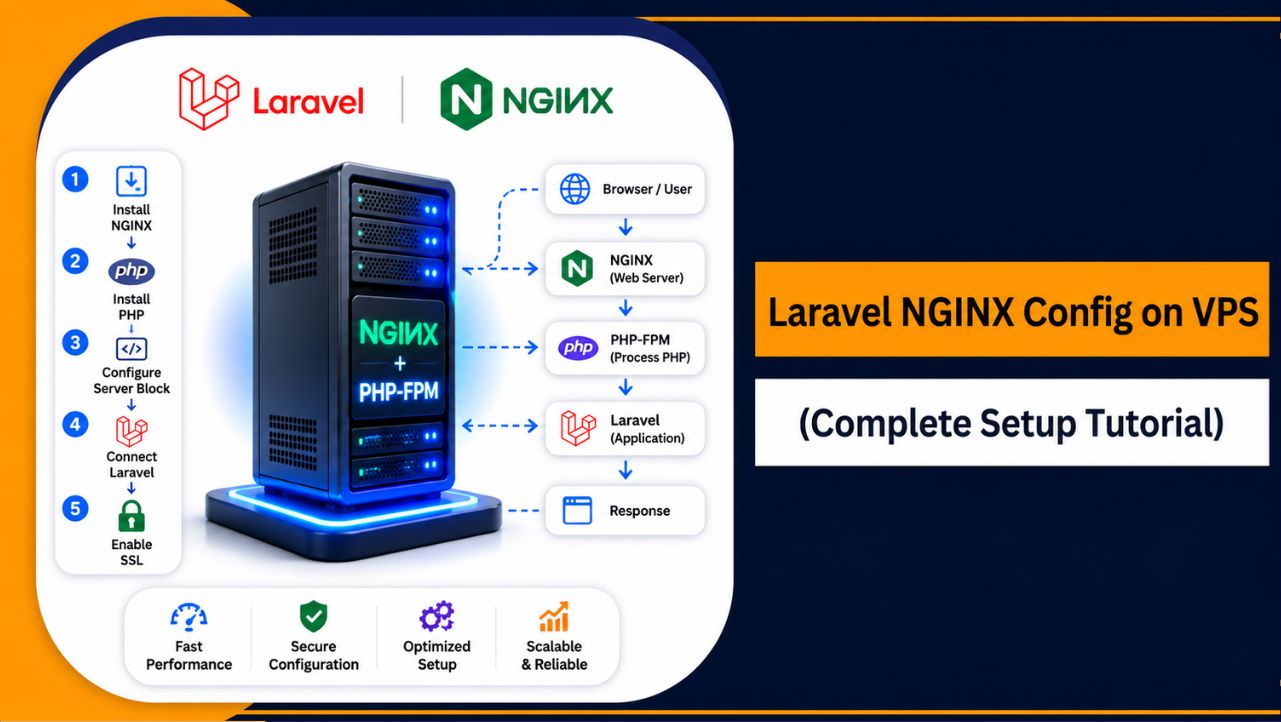
Configuring Laravel with NGINX on a VPS is a popular way to deploy modern PHP applications because it improves speed, scalability, and server performance. A properly optimized Laravel NGINX setup also helps applications handle traffic more efficiently and securely.
This tutorial explains how to configure Laravel with NGINX on a VPS using practical and beginner friendly steps. You’ll learn how to install required components, configure NGINX properly, secure your VPS environment, optimize Laravel performance, and troubleshoot common deployment related issues.
What Is Laravel NGINX Configuration?
Laravel NGINX configuration means setting up NGINX properly so it can serve Laravel applications efficiently on a VPS or server environment.
Since Laravel uses PHP, NGINX works together with PHP-FPM to process requests, load application files, and deliver responses quickly to users.
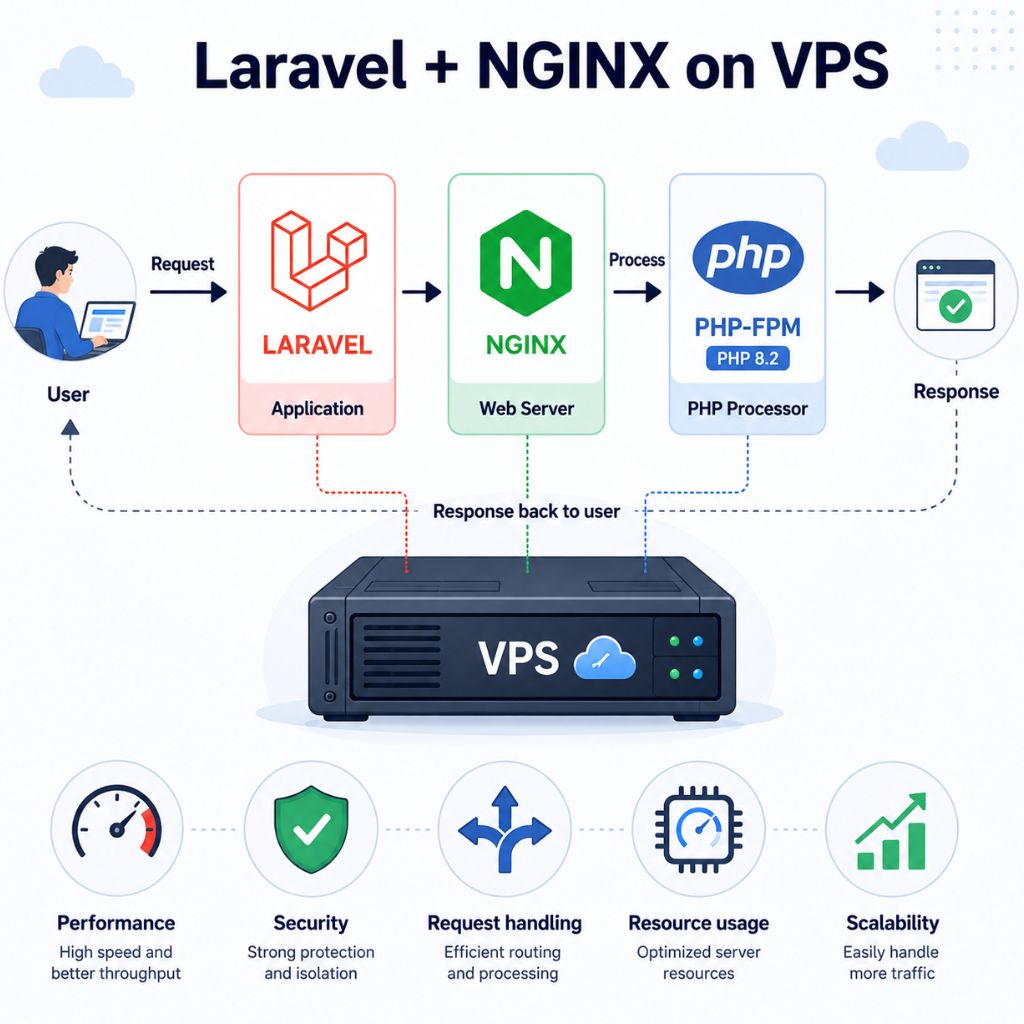
Unlike traditional shared hosting environments, configuring Laravel manually on NGINX gives you more control over:
- Performance optimization
- Security settings
- Request handling
- Resource management
- Scalability
This setup is widely used for modern Laravel deployments because it provides better speed and stability compared to many default hosting environments.
Why Laravel Works Better with NGINX
Laravel performs very well with NGINX because NGINX is designed to handle multiple connections efficiently while consuming fewer server resources.
Benefits of Using NGINX with Laravel
- Faster request processing: NGINX handles traffic efficiently during high workloads
- Lower resource usage: Uses less memory compared to heavier web servers
- Better scalability: Supports growing Laravel applications more smoothly
- Improved PHP-FPM integration: Works efficiently with modern PHP versions
- High concurrency handling: Manages multiple simultaneous users effectively
Because of these advantages, many developers prefer using NGINX for Laravel applications hosted on VPS servers.
Why Use NGINX for Laravel on VPS?
Using NGINX with Laravel on a VPS gives you more control, better optimization, and improved performance compared to many standard hosting setups. Instead of relying on preconfigured shared hosting environments, a VPS allows you to configure Laravel exactly the way your project requires.
Key Benefits of Running Laravel on NGINX VPS
| Benefit | Why It Matters |
| Better Performance | Faster response handling for Laravel applications |
| Improved Stability | Handles traffic spikes more efficiently |
| Resource Efficiency | Uses server resources more effectively |
| Custom Configuration | Full control over Laravel and NGINX setup |
| Scalability | Easier to upgrade server resources as traffic grows |
| Security | Better control over firewall and server protection |
For long term stability and smoother Laravel deployments, using reliable VPS infrastructure from YouStable can help maintain strong uptime and consistent server performance.
Requirements Before Configuring Laravel with NGINX
Before starting the setup process, your VPS should meet a few important requirements to ensure Laravel and NGINX run properly without compatibility or performance problems.
| Requirement | Recommended Setup | Why It Matters |
| Operating System | Ubuntu 24.04 LTS | Stable Laravel and NGINX compatibility |
| RAM | 2 GB or more | Helps Laravel run smoothly |
| CPU | 2+ vCPU | Improves PHP and NGINX performance |
| Storage | NVMe SSD | Faster application loading speed |
| PHP Version | PHP 8.2 or higher | Required for latest Laravel versions |
| Database | MySQL or MariaDB | Application database management |
| Access | Root or sudo access | Needed for server configuration |
Having these requirements ready before deployment helps avoid installation and configuration issues later.
How to Choose the Right VPS for Laravel Projects
Choosing the right VPS is important because Laravel performance depends heavily on server quality, storage speed, RAM, and CPU performance. A poorly optimized VPS can cause slow loading times, unstable performance, and deployment problems during higher traffic usage.
Important Factors to Consider
| Factor | Recommended | Why It Matters |
| CPU Performance | 2+ latest generation vCPU | Better Laravel processing speed |
| RAM | 2–4 GB or more | Prevents PHP memory issues |
| Storage | NVMe SSD | Faster file and database access |
| Uptime | 99.9% or higher | Keeps applications online consistently |
| Root Access | Full root access | Required for manual Laravel configuration |
| Scalability | Easy upgrade support | Helps future project growth |
If you want smoother Laravel deployment and better compatibility, choosing optimized VPS hosting for Laravel can significantly improve application stability and performance.
Step-by-Step Laravel NGINX Config on VPS
Now that your VPS environment is ready, the next step is configuring Laravel with NGINX properly so your application can run securely and efficiently. A correct Laravel NGINX setup improves performance, handles requests faster, and helps avoid common deployment problems later. Follow these steps carefully to complete the configuration smoothly on your VPS.
Step 1 – Connect to Your VPS Using SSH
First, securely access your VPS using SSH. This gives you full control over your server so you can install and configure Laravel, NGINX, PHP, and other required services properly.
ssh root@your_server_ipReplace:
- root with your VPS username if different
- your_server_ip with your actual VPS IP address
Security Recommendations
- Use SSH keys instead of passwords for better protection
- Disable direct root login whenever possible
- Change the default SSH port to reduce automated attacks
Once connected successfully, you’ll have terminal access to your VPS server.
Step 2 – Update Your VPS Server
Before installing Laravel or NGINX, update your VPS packages and repositories. Keeping the system updated improves security, compatibility, and overall server stability.
sudo apt update && sudo apt upgrade -yThis update process helps:
- Install latest security patches
- Refresh package repositories
- Improve compatibility with PHP and NGINX
- Reduce installation related issues
Step 3 – Install NGINX on VPS
NGINX will act as the main web server for your Laravel application. It is lightweight, fast, and optimized for handling modern web traffic efficiently.
Install NGINX:
sudo apt install nginx -yEnable and start the NGINX service:
sudo systemctl enable nginx
sudo systemctl start nginx
Verify installation:
nginx -vIf NGINX shows a version number, the installation was successful.
Step 4 – Install PHP and Required Extensions
Laravel requires PHP along with several PHP extensions to function properly. Installing the correct PHP version is important for performance, security, and Laravel compatibility.
Install PHP-FPM and required extensions:
sudo apt install php8.2-fpm php8.2-mysql php8.2-cli php8.2-curl php8.2-xml php8.2-mbstring php8.2-zip unzip -yCheck PHP version:
php -vPHP 8.2 or higher is recommended for modern Laravel applications because it provides better speed and improved framework compatibility.
Step 5 – Install Composer
Composer is the dependency manager used by Laravel to install packages and manage project dependencies.
Install Composer:
sudo apt install composer -yVerify Composer installation:
composer --versionIf Composer returns a version number, it’s ready to use.
Step 6 – Install Laravel Project
Now create your Laravel application directly on the VPS.
Create Laravel project:
composer create-project laravel/laravel myprojectMove into the Laravel directory:
cd myprojectSet correct permissions:
sudo chown -R www-data:www-data storage bootstrap/cacheThese permissions help Laravel write cache, sessions, and logs properly without permission related errors.
Step 7 – Configure NGINX Server Block for Laravel
Now configure NGINX so it can serve your Laravel application correctly. Laravel uses the /public directory as the web root, so the NGINX configuration must point there properly.
Create NGINX configuration file:
sudo nano /etc/nginx/sites-available/laravelAdd this Laravel NGINX configuration:
server {
   listen 80;
   server_name your_domain_or_ip;
   root /var/www/laravel/public;
   index index.php index.html;
   location / {
       try_files $uri $uri/ /index.php?$query_string;
   }
   location ~ \.php$ {
       include snippets/fastcgi-php.conf;
       fastcgi_pass unix:/run/php/php8.2-fpm.sock;
   }
   location ~ /\.ht {
       deny all;
   }
}
Enable the configuration:
sudo ln -s /etc/nginx/sites-available/laravel /etc/nginx/sites-enabled/This step connects your Laravel configuration with the active NGINX server setup.
Step 8 – Test and Restart NGINX
Before restarting NGINX, always test the configuration syntax to avoid server errors caused by incorrect configuration.
Test NGINX configuration:
sudo nginx -tRestart NGINX:
sudo systemctl restart nginxIf no errors appear, open your VPS IP or domain in a browser to verify that Laravel is loading correctly.
Step 9 – Configure Firewall
Configuring a firewall helps secure your VPS by allowing only required traffic.
Allow HTTP and HTTPS traffic:
sudo ufw allow 80
sudo ufw allow 443
sudo ufw enable
This protects your Laravel VPS setup while still allowing website visitors to access your application normally.
Step 10 – Enable SSL with Let’s Encrypt
Adding SSL encryption secures your Laravel application and enables HTTPS access. Modern websites should always use SSL for security and SEO benefits.
Install Certbot:
sudo apt install certbot python3-certbot-nginx -yGenerate SSL certificate:
sudo certbot --nginxOnce completed, your Laravel application will run securely over HTTPS with automatic SSL configuration handled by Certbot.
Common Laravel NGINX Errors and Fixes
While configuring Laravel with NGINX on a VPS, even a small configuration mistake can cause your application to stop working properly. Issues related to file permissions, PHP-FPM, cache, or incorrect NGINX configuration are very common during Laravel deployment. Understanding these errors and knowing how to fix them quickly helps keep your Laravel application stable and accessible.
403 Forbidden Error
A 403 Forbidden error usually appears when NGINX cannot access Laravel files properly or the root directory is configured incorrectly.
Common Causes
- Incorrect Laravel file permissions
- Wrong NGINX root directory
- Missing access permissions for storage or public folders
Fix
Set proper Laravel permissions:
sudo chown -R www-data:www-data /var/www/laravelYou can also verify that your NGINX root path points to:
/var/www/laravel/publicAfter updating permissions, restart NGINX:
sudo systemctl restart nginx502 Bad Gateway Error
A 502 Bad Gateway error commonly happens when NGINX cannot communicate properly with PHP-FPM.
Common Causes
- PHP-FPM service is stopped
- Wrong PHP socket path in NGINX configuration
- PHP version mismatch
Fix
Restart PHP-FPM service:
sudo systemctl restart php8.2-fpmThen verify your NGINX configuration contains the correct PHP socket path:
fastcgi_pass unix:/run/php/php8.2-fpm.sock;Finally, restart NGINX again:
sudo systemctl restart nginx500 Internal Server Error
A 500 Internal Server Error usually indicates Laravel configuration problems, cache issues, permission errors, or a broken .env file.
Common Causes
- Corrupted Laravel cache
- Incorrect folder permissions
- Invalid .env configuration
- Missing application key
Fix
Clear Laravel configuration and cache:
php artisan config:clear
php artisan cache:clear
You can also regenerate Laravel cache:
php artisan config:cacheIf the issue continues, check Laravel logs inside:
storage/logs/Laravel logs usually help identify the exact configuration problem quickly.
NGINX Configuration Test Failed
Sometimes NGINX may fail to restart because of syntax mistakes inside the configuration file.
Common Causes
- Missing semicolon (;)
- Incorrect server block syntax
- Invalid PHP-FPM path
Fix
Test NGINX configuration before restarting:
sudo nginx -tIf any syntax error appears, correct it inside your NGINX configuration file and test again before restarting the server.
Laravel Page Not Loading After Deployment
Sometimes Laravel installs successfully, but the application still does not load correctly in the browser.
Common Causes
- Firewall blocking traffic
- DNS not configured properly
- Laravel storage permissions missing
Fix
Allow HTTP and HTTPS traffic:
sudo ufw allow 80
sudo ufw allow 443
Then restart services:
sudo systemctl restart nginx
sudo systemctl restart php8.2-fpm
Most Laravel deployment issues can be resolved quickly by checking permissions, restarting PHP-FPM, validating NGINX configuration, and reviewing Laravel logs carefully.
Security Best Practices for Laravel on VPS
Securing your Laravel application on a VPS is extremely important because even a small security mistake can expose your website, database, or server to attacks. A properly secured Laravel VPS environment helps protect sensitive data, improves server stability, and reduces the risk of unauthorized access or malware related issues.
If you plan to host Laravel projects for long term usage, choosing reliable and secure Laravel VPS hosting from YouStable can also help maintain better uptime, server protection, and consistent application performance.
Important Security Practices to Follow
- Keep Laravel, PHP, and NGINX updated: Regular updates help fix security vulnerabilities and improve server stability
- Use SSL certificates: HTTPS encryption protects login data, sessions, and sensitive user information
- Secure the .env file: Never allow public access to your Laravel environment configuration file
- Enable firewall protection: Allow only required ports like 80, 443, and SSH access
- Use strong SSH authentication: SSH keys are safer than password based logins
- Disable unnecessary services: Remove or disable unused packages and services on the VPS
- Set proper file permissions: Incorrect Laravel permissions can expose important application files
- Use fail2ban or brute-force protection: Helps block repeated unauthorized login attempts
- Take regular backups: Backups help recover your Laravel application quickly if something goes wrong
- Monitor server logs regularly: Checking NGINX and Laravel logs helps detect suspicious activity early
A properly secured Laravel VPS environment not only improves protection but also helps your application remain stable, reliable, and safer for long term production usage.
Performance Optimization Tips
Optimizing your Laravel and NGINX setup is important because application performance directly affects loading speed, server stability, and overall user experience. A properly optimized Laravel VPS environment can process requests faster, reduce resource usage, and handle traffic more efficiently without performance related issues.
If you want faster application response times and smoother Laravel deployment, using high performance NVMe VPS hosting for Laravel from YouStable can also improve server responsiveness and long term stability significantly.
| Optimization Method | What It Does | Why It Matters |
| Enable PHP OPcache | Stores compiled PHP code in memory | Reduces PHP processing time |
| Use Laravel Caching | Caches routes, config, and views | Improves Laravel loading speed |
| Optimize Composer Autoload | Optimizes class loading | Makes application execution faster |
| Use Redis or Memcached | Improves cache and session handling | Reduces database load |
| Enable Gzip Compression | Compresses website files | Improves page loading speed |
| Use Queue Workers | Processes background jobs separately | Prevents request delays |
| Optimize Database Queries | Reduces slow database operations | Improves overall application performance |
| Use CDN for Static Files | Delivers files from global servers | Improves loading speed worldwide |
| Monitor Server Resources | Tracks CPU and RAM usage | Prevents server overload |
| Use NVMe SSD Storage | Improves file and database access speed | Enhances Laravel responsiveness |
A properly optimized Laravel NGINX environment helps applications stay fast, stable, and scalable while delivering better performance during higher traffic workloads.
Common Mistakes to Avoid
While configuring Laravel with NGINX on a VPS, many beginners make small mistakes that later create performance, security, or deployment problems. Avoiding these common issues from the beginning helps keep your Laravel application stable, secure, and easier to manage in a production environment.
| Common Mistake | Why It Causes Problems | Recommended Solution |
| Using Wrong NGINX Root Path | Laravel may return 403 or 404 errors | Always point NGINX to the /public directory |
| Incorrect File Permissions | Laravel cannot write logs or cache files properly | Set correct ownership and permissions |
| Ignoring System Updates | Outdated packages increase security risks | Regularly update PHP, NGINX, and Laravel |
| Using Old PHP Versions | Compatibility and performance issues may occur | Use PHP 8.2 or higher |
| Forgetting to Restart Services | Configuration changes may not apply correctly | Restart NGINX and PHP-FPM after changes |
| Skipping SSL Configuration | Website traffic remains unsecured | Enable HTTPS using SSL certificates |
| Ignoring Firewall Rules | Exposes the VPS to unnecessary access | Allow only required ports |
| Not Monitoring Server Resources | High CPU or RAM usage can slow applications | Monitor server performance regularly |
| Improper Database Optimization | Slow queries reduce Laravel performance | Optimize queries and database indexes |
| Using Low Quality VPS Infrastructure | Unstable performance may affect applications | Choose reliable VPS infrastructure |
Avoiding these mistakes helps your Laravel NGINX environment remain faster, safer, and more reliable for long term application deployment.
FAQs
Do You Need Root Access for Laravel NGINX Config on VPS?
Yes, root or sudo access is usually required for proper Laravel NGINX configuration on a VPS. It allows you to install NGINX, PHP-FPM, Composer, SSL certificates, configure firewall settings, and manage Laravel server files without permission related restrictions.
Why Is Laravel Not Loading Properly on NGINX?
Laravel may fail to load correctly on NGINX because of incorrect file permissions, wrong root directory configuration, PHP-FPM issues, or problems inside the .env file. Checking Laravel logs and validating your NGINX configuration usually helps identify the issue quickly.
What Is Required for Laravel NGINX Setup on VPS?
A complete Laravel NGINX setup requires several important server components for proper deployment and stable application performance.
Main Requirements
• NGINX web server
• PHP-FPM
• Composer
• MySQL or MariaDB
• Laravel framework
• SSL certificate for HTTPS security
These components help Laravel applications run securely, efficiently, and smoothly on VPS infrastructure.
Can Laravel NGINX Config Handle High Traffic Websites?
Yes, Laravel with NGINX can handle high traffic efficiently using proper caching, database optimization, and scalable VPS infrastructure.
Conclusion
Configuring Laravel with NGINX on a VPS helps improve application speed, scalability, security, and overall server performance. With the right configuration, Laravel applications can handle traffic more efficiently while maintaining stable response times and smoother deployment management.
A properly optimized VPS environment, updated PHP version, secure NGINX configuration, and regular performance monitoring all play an important role in long term Laravel stability. Using reliable VPS infrastructure from YouStable can also help maintain better uptime, faster performance, and smoother Laravel application deployment.











The systemd worker setup is the part most guides skip or bury at the end — but it’s actually what decides whether your queued jobs survive a server reboot. I run UnfoldCMS on Hetzner with a nearly identical Nginx config, and the one thing I’d add is setting restart=on-failure with a short delay in the service file. Saved me twice when a memory spike killed the process silently.