

Automation tools are evolving fast. But here’s something you might have noticed, most tools still feel limited when tasks become complex or conditions change.
That’s where OpenClaw makes a difference. It is designed to handle complex workflows by combining AI with automation, allowing systems to adapt, manage multi step tasks, and work efficiently without constant manual effort.
In real automation workflows, it performs more efficiently than traditional rule based tools, especially when dealing with dynamic inputs and changing conditions.
This helps you use it more effectively and get better results in real automation workflows.
What Is OpenClaw?
OpenClaw is an AI powered automation system that helps you execute tasks, manage workflows, and connect multiple tools without constant manual effort.
Its core purpose is to:
- Automate workflows intelligently
- Execute multi step tasks
- Orchestrate APIs, tools, and systems together
What makes it different?
Traditional automation tools follow fixed rules.
OpenClaw goes beyond that, it can analyze, decide, and adapt based on the situation.
That’s what makes it powerful.
OpenClaw can also connect with messaging platforms like WhatsApp and Telegram for automated communication workflows and real time notifications.
Why OpenClaw Is Getting Popular?
If you look at how automation is being used today, one thing becomes very clear, people no longer want basic tools that just follow instructions. They want systems that can understand, adapt, and handle real situations without constant supervision.
As workflows become more complex, the limitations of traditional automation tools become more noticeable.
Think about it:
- What happens when a condition changes unexpectedly? Most tools simply stop working
- What if your workflow needs an update? You have to manually adjust everything
- What if the process becomes more complex? The system struggles to keep up
This is where OpenClaw makes a real difference.
Instead of relying only on fixed rules, OpenClaw uses AI to interpret tasks and respond intelligently. It can handle changing inputs, adjust workflows on the fly, and continue working even when situations are not perfectly defined.
So rather than constantly fixing your automation, you’re actually building something that can manage itself more effectively.
That’s the reason more developers, businesses, and automation focused users are moving toward OpenClaw, it doesn’t just automate tasks, it makes automation smarter and more reliable in real conditions.
Features of OpenClaw
When you start using OpenClaw, you quickly notice one thing, it’s designed to make your work easier without adding unnecessary complexity. Each feature works in a way that feels practical and useful, not forced. Let’s understand them clearly.
- AI Driven Workflow Automation: OpenClaw doesn’t just follow commands, it understands what you want to achieve. Because of this, it can handle tasks more accurately and reduces the need for constant manual corrections.
- Multi Step Task Execution: Complex tasks often require multiple steps, and managing them manually can become messy. OpenClaw simplifies this by handling complete workflows from start to finish, so you don’t have to break everything into smaller parts.
- Integration With APIs and Tools: Most workflows involve multiple tools and services. OpenClaw connects smoothly with APIs, databases, and external platforms, allowing everything to work together without interruptions.
- Real Time Decision Making: Situations can change at any moment, and OpenClaw is built to handle that. It can adjust its actions instantly based on new inputs, keeping your workflow running without failure.
- Customizable Workflows: No two users have the same requirements. OpenClaw allows you to design workflows according to your needs, whether you want something simple or more advanced.
- Scalability and Performance: As your workload increases, OpenClaw continues to perform efficiently. It handles growing tasks without slowing down, making it suitable for both small and large setups.
How Does OpenClaw Work?
Now let’s understand how OpenClaw actually works, without making it complicated.
At its core, OpenClaw follows a structured process, but what makes it different is how smoothly everything connects and adapts during execution.
Here’s what happens step by step:
- First, you define a workflow based on what you want to achieve
- Then, the system receives input (this could be data, a trigger, or a user action)
- It analyzes the task and figures out the best way to handle it
- Based on that, it triggers actions across tools, APIs, or systems
- Finally, the result is generated and delivered
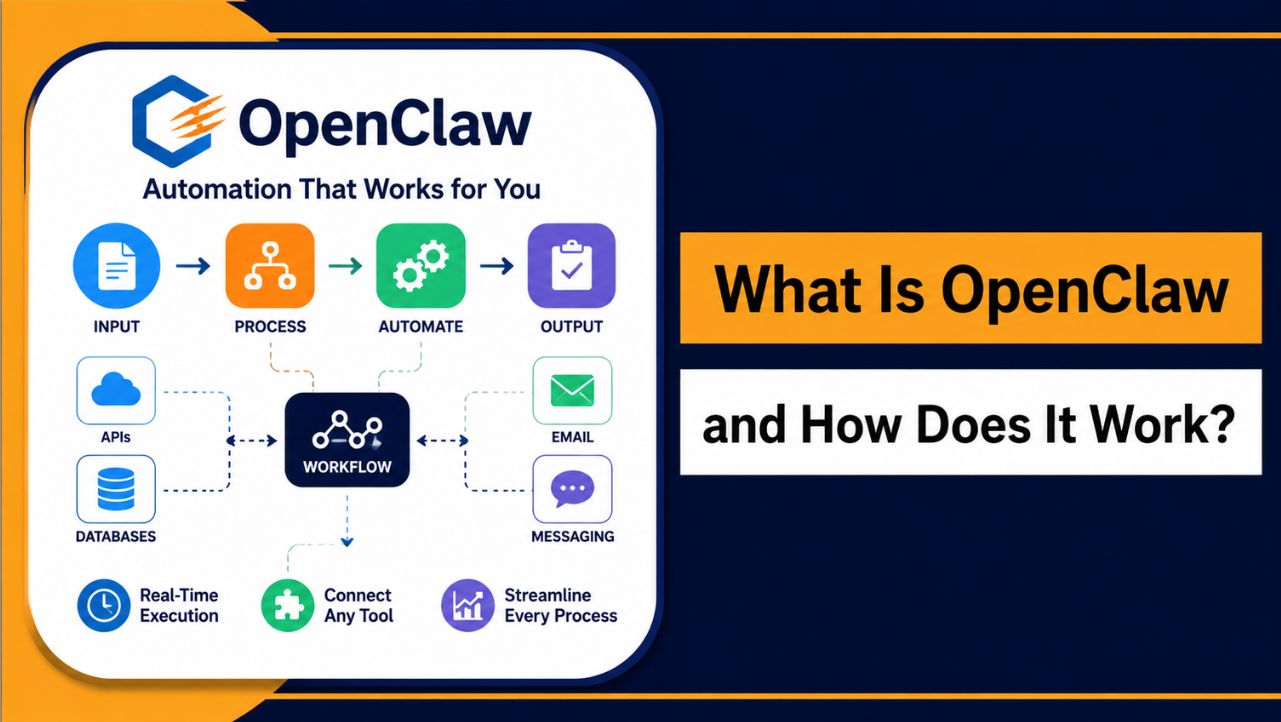
If you look at it simply, the flow is:
Input → Processing → Action → Output
But the real strength of OpenClaw lies in the processing stage. Instead of just following fixed instructions, it evaluates the situation and chooses the most suitable path to complete the task.
That’s why it feels less like a basic automation tool and more like a system that can handle tasks in a smarter, more flexible way.
OpenClaw Architecture Explained
OpenClaw works through a structured system where each component plays a clear role. The core engine manages execution, workflows define how tasks should run, and integrations connect external tools, APIs, and databases. This setup ensures everything works smoothly together without unnecessary complexity.
When it comes to deployment, OpenClaw can run on different environments depending on your needs. While cloud and local setups are useful for basic usage or testing, a VPS environment is often preferred for better performance, control, and long term stability.
| Component / Setup | Role |
| Core Engine | Handles execution and processes tasks |
| Workflows | Define logic, steps, and automation flow |
| Integrations | Connect APIs, tools, and external systems |
| Cloud Platform | Easy to use, minimal setup required |
| Local System | Suitable for testing and small workloads |
| VPS Environment | Better performance, control, and reliability |
Step-by-Step: How OpenClaw Executes a Task
When you run a task in OpenClaw, the entire process feels smooth and connected, you don’t have to control every step manually. Once you define what you want to achieve, the system takes over and handles the execution in a clear, step-by-step flow, making the whole experience simple and reliable.
- You start by defining a workflow based on your goal
- The system picks up input through a trigger, data, or user action
- It understands the task and decides how to proceed
- Then it performs the required actions using tools, APIs, or databases
- Finally, the result is generated and delivered to you
Because each step is properly connected, the process runs efficiently, reduces errors, and helps you complete tasks without constant monitoring or adjustments.
OpenClaw vs Traditional Automation Tools
When you compare OpenClaw with traditional automation tools, the difference becomes very clear. Traditional tools are designed to follow fixed instructions, while OpenClaw works in a more flexible and adaptive way. This becomes especially important when workflows grow complex or conditions change unexpectedly.
| Feature | OpenClaw | Traditional Tools |
| Intelligence | Context aware and adaptive | Rule based and fixed |
| Flexibility | High, adjusts to changes | Limited, needs manual updates |
| Automation Level | Handles complex workflows | Suitable for simple tasks |
| Setup Complexity | Moderate, requires understanding | Easy, quick to set up |
The difference is simple: OpenClaw adapts and handles situations dynamically, while traditional tools strictly follow predefined rules.
Real Life Example
Let’s take a simple situation so you can clearly understand the difference. Imagine you want to automate customer support to handle common queries without replying manually every time.
With a traditional system, the process is quite basic:
- It sends fixed replies based on keywords
- It struggles if the question is slightly different
- It cannot go beyond predefined responses
Now with OpenClaw, the approach becomes much smarter:
- It understands what the user is actually asking
- It generates a more accurate and relevant response
- It can even take action, like checking data or updating records if needed
Because of this, the entire system feels faster, more responsive, and far more efficient, especially when handling different types of user queries.
Use Cases of OpenClaw
OpenClaw works best in situations where tasks are repetitive, multi step, or constantly changing. Instead of handling everything manually, you can rely on it to manage workflows more efficiently and reduce ongoing effort.
- Customer Support Automation: Handling customer queries becomes easier as OpenClaw understands user intent and provides accurate responses. It can also perform actions like checking data or updating records, making the entire process faster and more reliable.
- Business Process Automation: Routine tasks such as data entry, report generation, and internal workflows can be automated. This helps reduce manual work and keeps operations running smoothly without constant supervision.
- API Integration and Workflow Management: When multiple tools are involved, OpenClaw connects them and manages the workflow between systems. It can fetch data, process it, and trigger actions without requiring manual coordination.
- Data Processing and Analysis: Managing large datasets becomes simpler as OpenClaw organizes and processes information efficiently. This allows better focus on insights and decision making instead of handling raw data.
- AI Chatbots and Assistants: OpenClaw can power chatbots that not only respond but also take actions like retrieving information or updating systems based on user input. This improves both accuracy and functionality.
- Complex Workflow Execution: For tasks involving multiple steps, OpenClaw handles the complete process from start to finish. This reduces errors and removes the need to manage each step manually.
Running OpenClaw on a stable VPS improves performance and reliability for continuous workflows. Choosing the right Openclaw VPS Hosting ensures faster execution and smooth operation. Platforms like YouStable offer NVMe storage, stable performance, and an easy setup, making them suitable for both beginners and growing projects.
Benefits of Using OpenClaw
OpenClaw makes automation smarter and easier by handling complex workflows, adapting to changes, and reducing manual work. Using a reliable Openclaw VPS Hosting setup improves speed, stability, and overall performance, especially for continuous automation tasks.
Benefit
| Benefit | What It Does | Why It Matters | Example |
| Smart Automation | Adapts workflows using AI logic | Reduces dependency on rule-based tools | Handles dynamic automation workflows |
| Time Saving | Automates repetitive processes | Improves productivity | Daily business task automation |
| Handles Complex Workflows | Executes multi-step tasks | Reduces errors | End to end workflow execution |
| Tool Integration | Connects APIs and systems | Improves efficiency | API based automation |
| Real Time Adaptability | Responds to live changes | Keeps workflows stable | Real time workflow updates |
| Scalability | Supports growing workloads | Ensures long term performance | Scaling automation systems |
Also Read: OpenClaw VPS Requirements
Limitations of OpenClaw
OpenClaw is powerful, but it also has some limitations that you should understand before using it in real workflows. Knowing these helps you use it more effectively and avoid unnecessary issues.
- Learning Curve at the Start: OpenClaw is more advanced than basic automation tools, so it takes time to understand workflows, integrations, and setup. Beginners may need some practice before using it efficiently.
- Requires Proper Configuration: To get accurate results, workflows need to be set up correctly. If the logic or integrations are not defined properly, the output may not match your expectations.
- Performance Depends on Environment: OpenClaw’s performance depends on where it runs. Using a reliable
- Openclaw VPS Hosting setup improves speed and stability, while weaker systems can slow down execution.
- Not Ideal for Simple Tasks: For basic automation with fixed rules, simpler tools can sometimes be faster and easier. OpenClaw works best when tasks are complex or require flexibility.
- Integration Setup Takes Time: Connecting multiple APIs and tools may take some initial effort, especially when working with custom configurations or advanced workflows.
Is OpenClaw Safe and Reliable?
OpenClaw is generally safe and reliable when it is configured properly and used with secure integrations. Since it works with APIs, tools, and data, using proper access controls and trusted connections helps maintain security and prevent issues.
In terms of reliability, it can handle complex workflows smoothly and adapt to changing conditions without breaking. Its performance remains stable as long as it runs in a properly configured and reliable environment.
How to Get Started With OpenClaw
Getting started with OpenClaw is simple if you follow the right approach. You don’t need to set up everything at once, just begin with a basic workflow and expand as you get comfortable with the system.
- Set Your Goal First: Start by deciding what you want to automate. It could be customer support, data processing, or any repetitive task. Having a clear goal makes it easier to design your workflow.
- Install and Set Up OpenClaw: Choose your environment, local system for testing or a VPS for better performance. Install OpenClaw, configure basic settings, and make sure everything is running properly before moving forward.
- Create Your First Workflow: Define a simple workflow with clear steps. Add inputs, actions, and expected outputs so the system knows exactly what to do. Start small to avoid confusion.
- Connect APIs and Tools: If your workflow involves external platforms, integrate APIs, databases, or tools. This allows OpenClaw to fetch data and perform actions automatically.
- Test and Improve: Run your workflow and check the results. Make adjustments where needed to improve accuracy and performance. This step helps you build a more reliable system over time.
- Scale Gradually: Once everything works smoothly, expand your workflows and handle more complex tasks. OpenClaw is built to scale, so you can grow your automation step by step without issues.
Also Read: Setup OpenClaw On VPS
FAQs
1. What is OpenClaw in simple terms?
u003cstrongu003eOpenClaw isu003c/strongu003e an AI powered automation system that can understand tasks, execute workflows, and adapt to changing conditions without manual intervention. It goes beyond traditional tools by handling complex and dynamic processes more efficiently.
2. Do you need a VPS to run OpenClaw?
u003cstrongu003eNou003c/strongu003e, you can run OpenClaw on a local system for testing or small tasks. However, for better performance and reliability, using a VPS is recommended, especially for continuous or large scale automation.u003cbru003eu003cbru003eu003cstrongu003eKey reasons to use a VPS:u003c/strongu003eu003cbru003eu003cbru003eu003cstrongu003e• Better Performance:u003c/strongu003e Handles workflows faster without lagu003cbru003eu003cstrongu003e• Stable Execution:u003c/strongu003e Runs tasks continuously without interruptionu003cbru003eu003cstrongu003e• Scalability:u003c/strongu003e Easily upgrade resources as your workload growsu003cbru003eu003cstrongu003e• Remote Access:u003c/strongu003e Manage your automation from anywhere
3. Is OpenClaw better than traditional automation tools?
u003cstrongu003eYesu003c/strongu003e, OpenClaw is more flexible because it adapts to changes instead of following fixed rules. It can handle complex workflows, make real time decisions, and continue working even when conditions change.
4. Is OpenClaw suitable for beginners?
u003cstrongu003eYesu003c/strongu003e, beginners can use OpenClaw, but it may take some time to understand workflows and integrations. Starting with simple automation tasks and gradually increasing complexity helps in learning it more effectively.
Conclusion
OpenClaw is changing how automation works by making workflows smarter, more flexible, and easier to manage. Instead of depending on fixed rules, it can understand tasks, adapt to changes, and handle complex processes more efficiently, which makes it useful for both individuals and businesses.
At the same time, using it effectively depends on proper setup, clear workflows, and the right environment. Once everything is configured well, OpenClaw can save time, reduce manual effort, and improve overall productivity, making it a practical choice for modern automation needs.










